Macpaw’s CleanMyMac review 2026
Backed by leading cybersecurity experts and investigative journalists, we deliver independent, real-world antivirus testing and analysis, guaranteeing objective evaluations without undue influence or bias from outside parties.
Our transparent and consistent methodologies ensure objective, up-to-date reviews, empowering readers to make well-informed decisions.
Learn more

Macpaw’s CleanMyMac is one of the most popular choices for Apple users looking to keep their computers secure and well-maintained. But is it really worth it? To determine that, I conducted several tests with the Cybernews research team to see how CleanMyMac performs in terms of malware protection, system maintenance, and overall performance.
The tests show that while CleanMyMac is an excellent system maintenance tool, it unfortunately falls short of dedicated antivirus software in terms of malware and ransomware prevention. I can safely recommend Macpaw’s CleanMyMac to anyone looking to clean up their computer. But if you’re looking for security features, I’d recommend looking elsewhere.

However, if you still want to learn more about CleanMyMac and see how it stands out on the market, read on this CleanMyMac review, where I analyze it mostly as an antivirus utility for Macs.
| ⭐ Rating: | |
| 🥇 Overall rank: | #29 out of #30 |
| 💵 Price: | From $47.40/year |
| ✂️ Free version: | ✅ 7-day free trial |
| 🖥️ Platforms: | macOS |
Pros and cons of Macpaw’s CleanMyMac




Our team of researchers thoroughly tests antivirus software following a well-established testing process. In unison, our experts combine in-house and independent testing lab findings with first-hand experience to help you make informed decisions about each product. Learn how we test antivirus software.
How much does CleanMyMac cost?
MacPaw’s CleanMyMac pricing starts at $3.59/month on a yearly plan for 1 Mac. A monthly plan costs you $9.95/month, while a lifetime subscription costs $119.95. You can also pay extra for protection of up to 4 additional devices with the annual plans starting at $5.95/month for 2 devices and $12.95/month for 5 devices.
| 1 device | 2 devices | 5 devices | |
| Monthly | $9.95/month | $15.95/month | $32.95/month |
| Yearly | $3.95/month | $5.95/month | $12.95/month |
| Lifetime (one-time payment) | $119.95 | $191.95 | $383.95 |
This makes CleanMyMac pretty expensive compared to TotalAV, which starts at $19.00/year, and Norton 360 Deluxe, which starts at $29.99/year.
Getting started with CleanMyMac
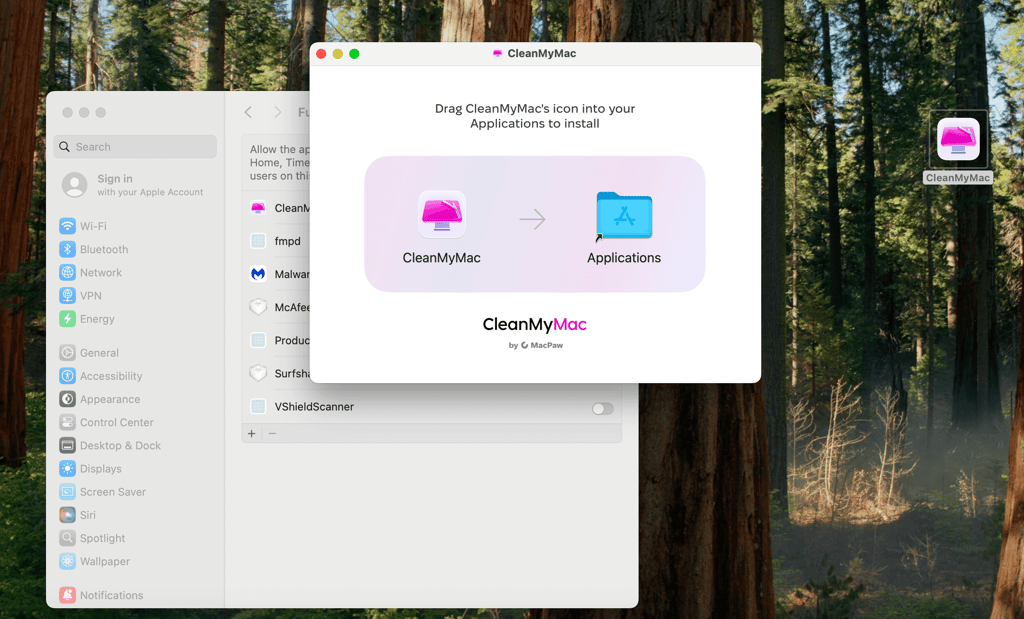
I found CleanMyMac’s ease-of-use is its greatest strength. The installation process on my Mac with macOS 15.5 Sequoia was simple. All I had to do was drag the CleanMyMac app to my Applications folder, and the software was ready to use.
After installation, I was met with a very simple and user-friendly interface. Divided into sections, it let me find all the features I needed very quickly. I particularly enjoyed the Space Lens feature that allowed me to see which folders use the most storage on my computer, allowing me to clean them quickly.
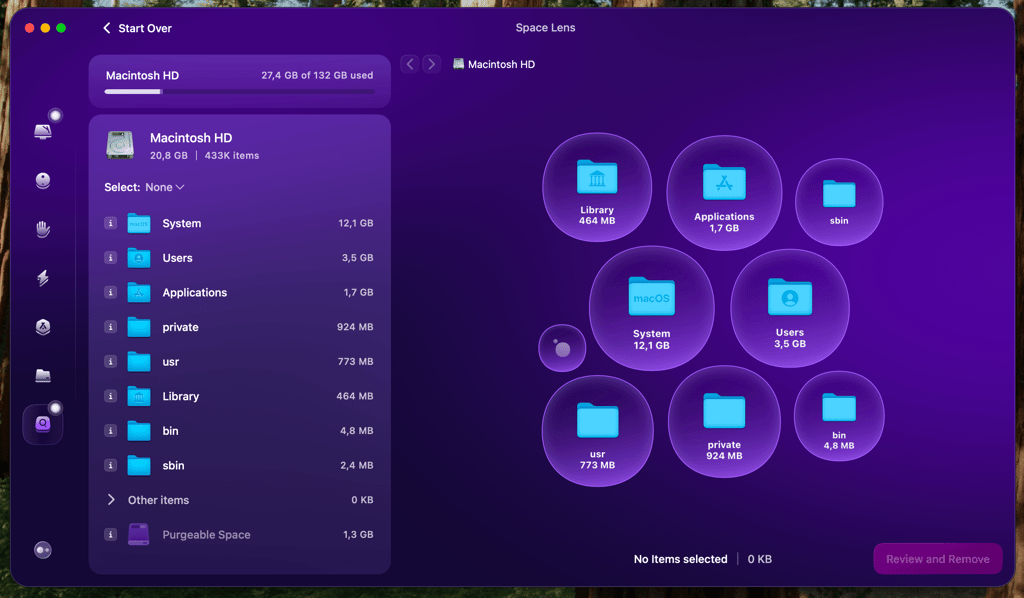
However, that isn’t the only cool feature CleanMyMac has. It offers 7 different cleaning modes and malware protection, which is more than enough to keep my computer clean.
Unfortunately, the malware protection option, while simple to use, isn’t that good. Our in-house testing showed that it had trouble detecting zero-day and non-Mac-specific malware, making it potentially vulnerable to various threat actors. Another thing I didn’t like is how it requires user input to neutralise malware, which can lead to your data being exposed for far longer than it should.
CleanMyMac isn’t lab-tested as an antivirus
Unfortunately, Macpaw’s CleanMyMac has not been tested by either AV-TEST or AV-Comparatives. This means that CleanMyMac’s antivirus efficiency claims haven’t been independently verified by lab tests, making its performance in high-volume scenarios a mystery. To give you a clearer understanding, we’ve also performed in-house testing to check how CleanMyMac performs.
Hands-on with CleanMyMac
Unfortunately, our CleanMyMac tests show that it’s sub-par in terms of malware detection, spotting only 3/10 samples during our test.
To perform the tests, along with our research team, I set up a MacBook Air M2 running macOS 15.5 Sequoia through a 4GB RAM virtual machine. We planted 10 recent antivirus samples to check whether they would be detected. We then ran real-time protection and a Smart Care scan to test CleanMyMac’s performance.

Unfortunately, out of the 10 samples, it only detected 3 Mach-O samples and ignored the remaining 7, which included various types of malware. This is likely due to CleanMyMac’s policy of only updating its database every week. Most of the samples we used were zero-day exploits, meaning brand-new virus samples that likely hadn’t been added to the database yet. The Mach-O samples, on the other hand, were a few days old, showing that CleanMyMac does work if its database is updated.
On the flip side, the Mach-O files were the only ones that clearly target macOS, perhaps further explaining the issue. For fairness’s sake, I must note that many other products we tested did catch those files as well.
Finally, during our testing, real-time protection didn’t quite work like it should, requiring user intervention to stop the malware from working. Most other software quarantines the malware until the user makes a decision as to what to do with it.
If you want to get really technical, here are the malware samples we used to test CleanMyMac’s malware protection:
| SHA-256 | File type | Tags |
| 08dfbede5fc3a34bffb88d7058fce2816cf06af871eb4e90228aa82fb3bdd0e0 | macho | 45-94-47-157 machO |
| a84b8fa2bfc31ae3a7d6cb3dbe116ee5d565968e9305718426d9fcbc485279fb | exe | exe RedLineStealer |
| 7d635fe69c16690f57cb31821f10463974b8020ab1c0092040b760ee55079838 | macho | AmosStealer infostealer machO macOS |
| 7a1dec3e4f08d54d03df3fa12228f107471d76489432318ebff149a2b11b5d80 | exe | exe MassLogger |
| 316deb4eb07bba80612b1b2943a35995657fb15efcc69709e7251a2b082a6ccb | elf | elf mirai |
| 384f16af925aab3688079cb09d289d35d68f4576d6bea5eaefc0f896ad6e69cf | doc | CVE-2017-11882 doc |
| c812b07b6d6d511d6d20972c3607a7c473df4a0181fdeb8d09f4fc054dc6a262 | xlsx | xlsx |
| e418cbad6006696595a396905ac73ca85eb369ca4ea3afe04619ee88468aeb50 | js | DBatLoader DHL js |
| 11ca3819a2bb745a6c990bc8f31990aa38a7f760d5cf0bee967381a9f7371b14 | sh | CoinMiner sh |
| a4c3c55d1ca3e406fa8db67d6b8ec395ebb2d8ba76f835bae987733d71ee8fb1 | macho | AmosStealer HUN machO |
To compare, I looked at our 5 best antivirus for Mac picks. All of them outperformed CleanMyMac to a degree that makes this comparison really rough for Macpaw. Here’s a quick overview:
| Malware detection rate | Price | |
| CleanMyMac | 30.00% | $47.40/year |
| TotalAV | 92.70% | $19.00/year |
| Norton 360 Deluxe | 95.30% | $49.99/year |
| Intego ONE | 70.00% | $48.72/year |
| Bitdefender Total Security for Mac | 95.30% | $19.99/year |
| Trend Micro Antivirus for Mac | 80.00% | $29.95/year |
Unfortunately, these results mean that I can’t recommend using MacPaw’s CleanMyMac for malware protection. The software leaves you vulnerable to zero-day exploits and has trouble finding legitimate malware samples. If you’re looking to protect your Mac, I suggest using a different product, such as TotalAV. It has high detection rates and removes malware efficiently.
Beware of fake installers for CleanMyMac – threat actors often spoof the software to easily gain access to your computer. Always download the software from its official website.
Key features of Macpaw’s CleanMyMac
Macpaw’s CleanMyMac features many handy functionalities for keeping your computer clean and running as smoothly as possible. I’ve decided to dive deeper into a few of them to help you check whether they are what you need.
Smart Care
Smart Care is essentially an all-in-one optimizer feature found at the top of the functions bar in your CleanMyMac app.
After clicking on it, it scanned my device for 5 main categories – junk, threats, running tasks, app updates, and duplicates. It also found and displayed all the junk files on my device, letting me review and remove them. Unfortunately, our testing showed that its anti-malware functionalities are sorely lacking.
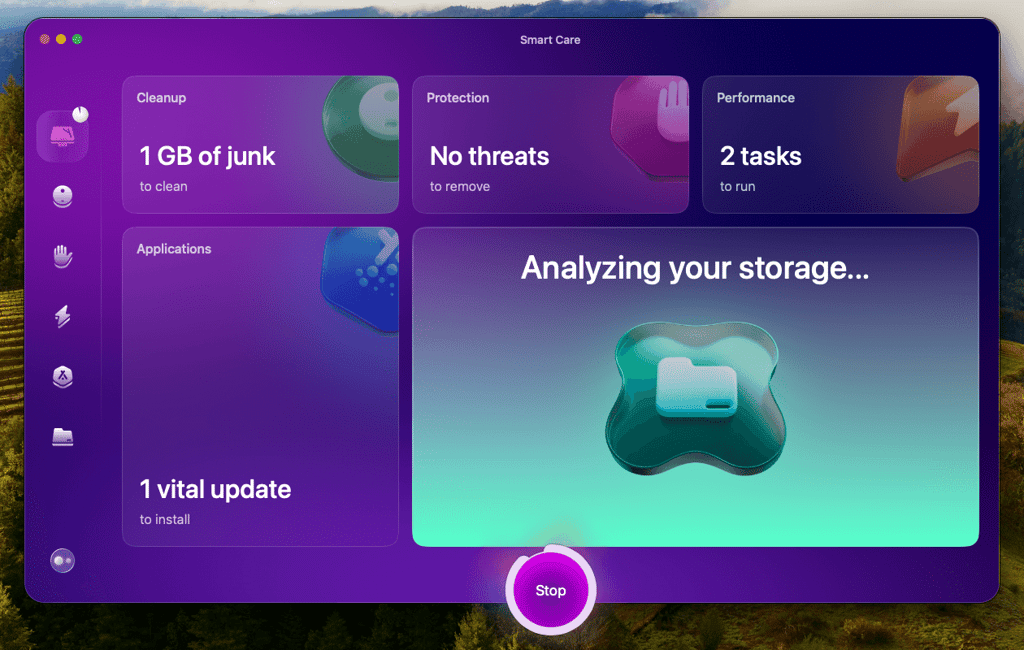
Beyond that, the feature helps you check which tasks are running in the background of your system, slowing it down as you work or play. You can review them and use the task manager to close such operations. Finally, you can manage apps by automatically updating them and removing duplicates to free up some room.
Privacy Protection
Along with browser trackers, this tool also allows you to find and remove other types of online logs. If there’s anything that tracks your online activity, whether it’s cookies, history, or item lists, CleanMyMac offers a quick solution as a part of its protection scan.
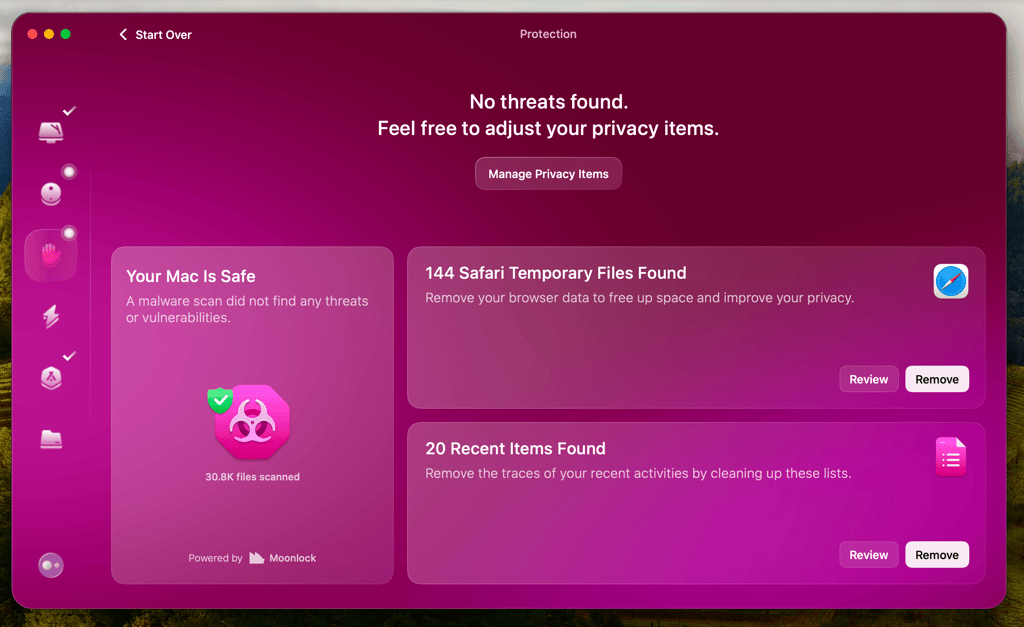
You can remove them and keep browsing regularly with increased convenience. The privacy aspect is part of the Protection feature, so you just need to click on it to run a privacy scan.
Verdict: I wouldn’t use CleanMyMac as an antivirus
CleanMyMac offers a lot of handy performance and decluttering tools. Unfortunately, our in-house testing shows that CleanMyMac fails to deliver reliable antivirus protection due to infrequent database updates. With no independent lab testing available, either, it’s really hard to say CleanMyMac backs up its claims. While it should keep you protected from older viruses, it won’t detect anything that happens to be created between database updates. Therefore, I’d recommend using TotalAV to protect your Mac instead.
That said, if you have a different piece of antivirus software installed and want to use CleanMyMac for purely decluttering and speeding up your Mac, it might be worth a shot.
FAQ
Can I trust CleanMyMac?
Yes, CleanMyMac is trustworthy. However, I wouldn’t use it as an antivirus due to poor in-house testing results and no lab testing verifying its claims.
Is CleanMyMac better than Norton?
No, CleanMyMac isn’t better than Norton. While it’s a much more handy tool for computer cleanup, it’s not a good pick for antivirus software.
Is CleanMyMac worth the money?
That depends. If you’re looking for good Mac cleanup software, CleanMyMac is worth the money. However, I wouldn’t recommend it as antivirus software.
How does CleanMyMac affect PC performance?
Since the scans from CleanMyMac are pretty fast and efficient, the effects on the Mac I used for testing were negligible.