McAfee vs Webroot: which antivirus is better?
Backed by leading cybersecurity experts and investigative journalists, we deliver independent, real-world antivirus testing and analysis, guaranteeing objective evaluations without undue influence or bias from outside parties.
Our transparent and consistent methodologies ensure objective, up-to-date reviews, empowering readers to make well-informed decisions.
Learn more

The right antivirus can increase your device’s security exponentially. This is why you need to pick the right tool carefully. While there are numerous security apps to consider, you may end up choosing between McAfee and Webroot – two popular antivirus options in 2026.
For this in-depth McAfee vs Webroot comparison, I joined Cybernews experts to test both antiviruses and assess their features, performance, pricing, and more. We concluded that McAfee is better than Webroot, and the following analysis shows exactly why.
McAfee vs Webroot
| McAfee Antivirus | Webroot Antivirus | |
| ⭐ Rating: | ||
| 🥇 Overall rank: | #10 out of #30 | #18 out of #30 |
| 🔥 Coupons: | McAfee Antivirus coupon 67% OFF | Webroot coupon 50% OFF |
| 💵 Price: | From $49.99/year | From $29.99/year |
| ✂️ Free version: | Yes (Android, iOS) | No |
| 🖥️ Platforms: | Windows, Mac, Android, iOS | Windows, macOS, iOS, and Android |





Our team of researchers thoroughly tests antivirus software following a well-established testing process. In unison, our experts combine in-house and independent testing lab findings with first-hand experience to help you make informed decisions about each product. Learn how we test antivirus software.
McAfee vs Webroot: which offers better protection?
| McAfee | Webroot | |
| AV-Test | Top product (2025) | Certified (2019) |
| AV-Comparatives | Advanced+ (2025) | Advanced+ (2012) |
| SE Labs | AAA (2025) | AA (2025) |
In search of an antivirus program with great protection, I performed in-house tests and analyzed reviews from the independent testing labs. Their results compare McAfee vs Webroot and determine their effectiveness against malware.
McAfee is among the best antivirus tools in 2026. According to AV-Comparatives July-October 2025 tests, McAfee boasts a 99.5% protection rate and has rightfully earned the Advanced+ rating. Webroot, on the other hand, hasn’t been involved in recent tests by the company, with the latest results recorded in October 2012. Even though Webroot was scored positively, we simply cannot consider these results.
In terms of AV-Test results, McAfee has earned the perfect 6.0/6.0 score in all three major categories: Protection, Performance, and Usability. November-December 2025 results indicate that McAfee can successfully protect against malware infections. Webroot hasn’t been included in recent tests yet again. In fact, the most recent test from May-June 2019 indicated that Webroot couldn’t be trusted to protect against malware effectively.
According to SE labs, both McAfee and Webroot were scored highly after Security Evaluation tests. McAfee test in December 2025 led to an AAA score (100% protection) and Webroot test in June 2025 led to an AA score (93% protection).
As for in-house testing, Webroot found 70% of planted threats on our test devices. McAfee performed better as a safer option with 80% threat detection.
Malware protection
McAfee and Webroot include tools for real-time security and scanning in their basic protection packages. Let’s see which provider does a better job at stopping malware, viruses, and other threats from entering your device.
Webroot has an always-on protection and a web shield. It also includes identity theft protection with its premium plans, ransomware defense, and a firewall to guard against network attacks. Additionally, Webroot offers system optimization tools that help improve device performance and a password manager for added convenience. Altogether, these features aim to provide a comprehensive layer of security and privacy for everyday users.
McAfee offers comprehensive anti-scam protection and antivirus tools that automatically shield you from fake messages, deep fake scams, and different types of malware, including ransomware. These features work together to guard your device from harmful intrusions while also preventing any damage to your files and personal data. By monitoring all processes in real time, McAfee ensures that threats are detected and blocked before they can cause harm, providing strong, all-around security.
Although both providers offer a robust threat protection package, results show that McAfee is better at preventing malware.
Scanning
To compare McAfee and Webroot scanning results, our in-house testers planted 10 malicious files on an 8GB RAM device with a 4-core, 3.99GHz processor.
McAfee Total Protection has two types of scans: full and quick scans, as well as settings for automation. A quick scan took a bit more than 6 minutes, but it did not find the injected threats. A full scan by McAfee found 8 out of 10 malware files in 22 minutes.

McAfee also adds a niche Vulnerability Scanner for finding and upgrading outdated software.
Webroot follows the same pattern with quick and full scanning options. The deep scan can be altered to reach well-hidden problems.

After going through both options, I see that McAfee is better at scanning than Webroot. For full inspections, McAfee uncovered 80% of malware, while Webroot was a bit behind with 70%.
Firewall protection
McAfee impressed me with a robust firewall and its extra features. It allows you to safeguard your devices by blocking dangerous outbound destinations.
On top of that, there are advanced options: port opening, stealth mode, and lockdown. McAfee has a very strong firewall, which is better than free options like Windows Defender.

For Webroot – firewall is a clear weakness. Also known as Web Shield, it failed to stop all incoming threats during in-house tests.
Features overview
Both Webroot and McAfee have comprehensive antivirus programs with robust features. Here, I compare basic protection packages plus additional tools offered by providers in their subscription packages.
| McAfee | Webroot | |
| Firewall | ✅ Yes | ✅ Yes |
| Real-time protection | ✅ Yes | ✅ Yes |
| Virus scan | ✅ Yes | ✅ Yes |
| Password manager | ✅ Yes | ✅ Yes |
| VPN | ✅ Yes (entry plan) | ✅ Yes (most expensive plan) |
| Parental controls | ✅ Yes (entry plan) | ✅ Yes (most expensive plan) |
| File shredder | ✅ Yes | ✅ Yes |
| Webcam protection | ❌ No | ❌ No |
| Performance optimization tool | ✅ Yes | ✅ Yes |
| Dark web, data breach monitoring | ✅ Yes | ✅ Yes |
Although, at first glance, it may appear as if both McAfee and Webroot offer the same tools, it’s important to note that McAfee often offers them to entry plan users. On the other hand, Webroot unlocks extra features with higher-tier plans.
McAfee features
McAfee has a lot of highly functional features. Its entry-level package (Essential) offers robust identity, privacy, and security features. First, there are powerful scans, real-time protection, and a firewall that can be customized. Even beginners can enjoy top-notch network security right out of the gate.
Then, there is McAfee's WebAdvisor. This powerful browser extension shields your browsing from malware and cryptojacking. It offers stats on scanned pages and blocked online threats. While running, WebAdvisor keeps your browsing sessions clean and fast.

McAfee also has a powerful VPN. With a solid network of servers and auto-connect options, it also includes a kill switch – an essential feature for safe VPN use.

With a heavy focus on online safety, McAfee has a comprehensive password manager. With AES-256 encryption and multi-factor authentication, it protects logins, notes, wallets, and other reusable data.

But the list does not stop here, as McAfee also includes a system cleaner, file shredder, web and app boosts, plus identity theft coverage in its subscriptions.
To learn more, check out our comprehensive McAfee review.
Webroot features
The base Webroot Antivirus Protection package comes with phishing and identity protection, a firewall, and text scam detection. This offer is less punishing on your PC performance. Still, the list of functional features is smaller than McAfee’s, especially since Webroot’s firewall didn’t detect planted threats during in-house testing.
The higher-tier subscription includes new features: a VPN, a system analyzer that detects data leaks, plus dark web monitoring to protect your data and identity online.
Webroot maxes out with additional features for device cleaning, tracker removal, dark web monitoring, and identity protection. It also includes options to prevent future threats and compensation for damages.
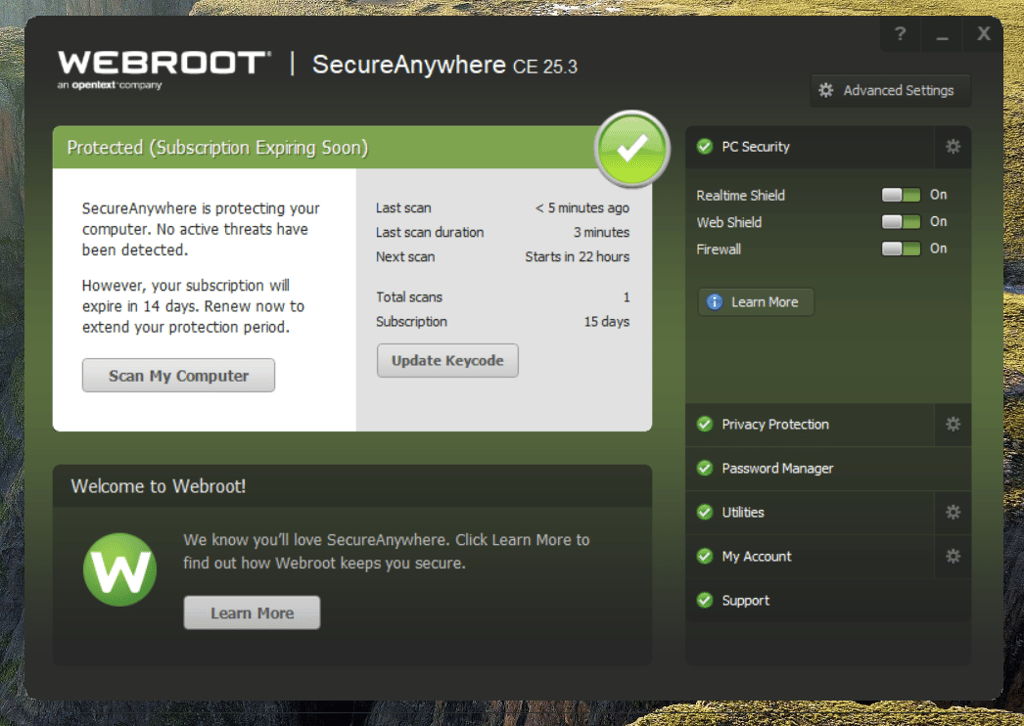
Webroot stays in its lane with a simple security package. Its fleet of features is smaller than McAfee’s, but its antivirus offering can be a great choice for protecting multiple older devices.
To learn more, check out our full Webroot review.
PC performance
McAfee’s full scans are intensive processes that occupy between 90% and 100% of your CPU power. That said, our in-house tests were conducted on devices with 8GB RAM and 3.99GHz 4-core CPUs. For older PCs and devices, McAfee can take over the device for an extended period to perform a full scan.
Webroot is a more forgiving choice that is less heavy on your CPU. On average, its full scans used only 52% of the resources, and the load never exceeded 77%. For a new device, such performance means you can run more apps without difficulties, while older PCs aren’t paralyzed.
After testing these competitors, Webroot proved to be a better antivirus program for preserving PC performance. McAfee scans are more thorough and find more threats, but the load on the device is too great.

Pricing
Choosing the right provider with better pricing is a tough task because Webroot and McAfee have many unique deals with different features and complex pricing structures.
| Plan | McAfee | Webroot |
| Free | ❌ No free version on Windows and macOS | ❌ No free version |
| Essential (5 devices)/Essentials (1 device) | 49.99/year | $29.99/year |
| Essentials (3 devices) | – | $34.99/year |
| Advanced Individual (all devices)/Premium (5 devices) | $89.99/year | $64.99/year |
| Advanced Family (all devices)/Total Protection (5 devices) | $119.99/year | $89.99/year |
| Check McAfee pricing | Check Webroot pricing |
While the fight is close, I give the win to McAfee because it offers a better price-to-quality ratio.
McAfee pricing
McAfee has no free option for Windows and macOS users, but the entry package, McAfee Essential, comes with a highly robust feature set offered by the provider. For $49.99/year, you get the standard security suite, a VPN, a firewall, scam protection, and identity monitoring options for 5 devices.
The mid-tier deal, McAfee Advanced Individual, unlocks the Social Privacy Manager, personal data and online account cleanup, identity monitoring and alerts, and lifts the restriction on available devices, all for $89.99/year.
McAfee Advanced Family is the top-tier subscription option for total protection, with a heavy focus on threat prevention and damage control. It includes effective parental controls and covers an unlimited number of devices for 6 unique users for $119.99/year.
Webroot pricing
Webroot Antivirus entry plan comes with a basic suite of security tools, including identity protection that monitors online threats, a firewall that failed to stop attacks during our in-house tests, and text scam detection. For $29.99/year, you get a lightweight antivirus for older devices. Webroot Essentials offers the same service, but it covers 3 devices for $34.99/year.
Webroot Premium covers 5 devices and offers additional privacy and identity protection features, like the cleanup of online activity traces, dark web monitoring, and fraud expense reimbursement of up to $1M. Webroot Premium costs $64.99/year.
Finally, we have Webroot Total Protection. With this plan, you get a VPN for 5 devices, parental controls, backup, and unlimited cloud storage. This plan covers 5 devices and costs $89.99/year.
Apps and interface: which is more user-friendly?
McAfee and Webroot offer desktop and mobile apps that are easy to use. With simple interfaces, even new users can get around these antiviruses successfully.
However, McAfee has more intuitive and better-performing apps than Webroot. The differences are even more obvious in mobile apps, where McAfee offers new features for mobile users, while Webroot’s options offer less advanced versions for Android and iOS devices.
Desktop apps
At first glance, McAfee shows a clear overview of active tools that’s pleasing to the eye and doesn’t overload the user with information. Additionally, you have safety suggestions that evolve over time and do not clutter your screen. In the Home section, you can find suggestions for your next steps and a sidebar with information on active devices and their current status.

McAfee offers clear navigation. Overall, the app offers comfortable navigation with simple icons and simple phrases that are easy to understand for beginner users. The macOS app is nearly identical to the Windows option. However, it is not included in McAfee’s free trial.
When I tested Webroot's app, I concluded that it is not up to modern standards. It still looks the same as it looked years ago: outdated and lacking an intuitive design that would make navigating it quicker and snappier. Additionally, I encountered moments where the app itself did not perform well, as random stutters and lagging hindered the user experience.
Mobile apps
McAfee’s mobile app prioritizes ease of use and introduces new features for enhanced mobile protection. The available file shredder improves the performance of laggy smartphones, while advanced firewall and web protection keep the device secure, even if it gets into the wrong hands.

Both Android and iOS apps are easy to install and use. The interface is simple to navigate and minimalistic.
On the other hand, mobile apps are a clear weakness for Webroot. For Android, its scans are ineffective, and the package is missing important parts of the standard security suite. However, it covers the basics – it detects and removes malicious apps, blocks dangerous websites when using Chrome, and provides a detailed safety score and activity reports to keep you informed.

Webroot’s antivirus for iPhone offers a simple layer of mobile security without slowing down your browsing experience. It includes features like real-time scanning, protection for risky sites, and secure web browsing through Safari. With its Webroot for Safari integration, it warns you about malicious or suspicious sites before you even click on them. Additionally, it comes with a built-in password manager and a VPN.
Customer support
Both McAfee and Webroot have options for customer support via live chat, phone, and email. Since antivirus programs have clients worldwide, I prioritize providers that offer 24/7 support to users.
| McAfee | Webroot | |
| ✅ Yes | ✅ Yes | |
| Live chat | ✅ Yes | ✅ Yes |
| Phone | ✅ Yes | ✅ Yes |
| Knowledge base | ✅ Yes | ✅ Yes |
Webroot and McAfee answer your questions via email, and you can also call both providers for a closer inspection of problems and to receive concrete solutions. They also present FAQs in informative blog articles and run community forums where clients can report new issues and discuss recurring problems.
Final verdict
| Category | McAfee | Webroot |
| Features | ✅ | ❌ |
| Protection | ✅ | ❌ |
| PC performance | ❌ | ✅ |
| Pricing | ✅ | ❌ |
| User interface | ✅ | ❌ |
| Support | ✅ | ✅ |
Summarizing our research and discoveries, I conclude that McAfee is better than Webroot. Independent reviews from SE Labs and AV-Comparatives give McAfee a higher protection rating as well. Our in-house testing follows the same pattern, showing that Webroot demonstrates slower performance, and its firewall fails to identify incoming threats.
Still, Webroot's higher-tier plans offer cheaper antivirus protection with a lower impact on the system resources. Of course, if you want to protect more than 1 device, Webroot quickly loses its appeal. Plus, even the base subscription of McAfee comes with reliable privacy features and an overall better price-to-value offer.
While the topic of pricing is up for debate, I found McAfee more lucrative than Webroot because its value fulfills the price. That said, Webroot is still a decent option to consider if you are looking for a cheaper, lightweight solution for older devices.
FAQ
What is the difference between McAfee and Webroot?
McAfee is a better antivirus option with more high-end features. Webroot is a cheaper alternative that is not as heavy on your computer. Still, McAfee offers better protection, as seen in our in-house tests and independent reviews.
Does McAfee work with Webroot?
Yes, technically McAfee and Webroot can work at the same time. However, running two antivirus programs simultaneously isn’t a good idea because their ongoing processes will interfere with each other. If you stick to one provider, their tools will work properly without hindering PC performance.
Is Webroot a good antivirus?
Yes, Webroot offers fast, mid-level antivirus programs. However, McAfee is a better choice, as it provides better security and far more privacy options in its base package. Webroot will save you money, but its subscriptions leave a lot to be desired.