Webroot antivirus review
Backed by leading cybersecurity experts and investigative journalists, we deliver independent, real-world antivirus testing and analysis, guaranteeing objective evaluations without undue influence or bias from outside parties.
Our transparent and consistent methodologies ensure objective, up-to-date reviews, empowering readers to make well-informed decisions.
Learn moreWebroot antivirus is a lesser-known service with an established user base. But mixed user reviews and outdated AV lab tests made me wonder how it actually performs and what features it can offer. Our findings revealed mixed effectiveness – while Webroot performed well against ransomware, its malware detection lagged behind industry leaders like Norton and TotalAV. This review uncovers Webroot’s strengths, weaknesses, and whether it’s worth your investment.
| Price: | From $29.99/year |
| Free version: | No |
| OS compatibility: | Windows, macOS, iOS, and Android |
| Coupons: | Webroot coupon 50% OFF |
-
No-hassle installation – quick setup with minimal system resource usage
-
Firewall and network protection – helps secure your internet connection from external threats
-
Identity theft protection – includes anti-phishing tools to prevent credential theft
-
Flexible pricing plans – offers affordable options for individuals and businesses
-
Average in-house security test results
-
Lacks advanced functionality like parental controls


Webroot is an American cybersecurity software provider that specializes in antivirus, identity, and privacy protection. To examine its full capabilities and features, our research team and I ran several security tests and researched what it has to offer to present you with a detailed and unbiased review.
In this Webroot antivirus review, we not only conducted anti-malware performance tests but also compared its pricing, features, functionality, and usability with market competitors. The tests, unfortunately, revealed mixed effectiveness against different types of malware. A notable downside compared to leading antivirus providers, like Norton and TotalAV.




Our team of researchers thoroughly tests antivirus software following a well-established testing process. In unison, our experts combine in-house and independent testing lab findings with first-hand experience to help you make informed decisions about each product. Learn how we test antivirus software.
How much does Webroot antivirus cost?
Webroot antivirus offers 4 subscription plans – two antivirus-only plans and two antivirus plans with ID protection. Their price ranges from $29.99 to $124.99, with device coverage of 1 to 10 devices. Since my last check, Webroot has added two more plans, Total Protection and Total Protection Family, which come with a VPN and data backup in addition to all that the lower-tier plans offer.
It’s also worth noting that no matter the plan, iOS device apps cannot be scanned to block malware. Here’s a quick summary of each plan, its price, and main features:
| Essentials 1 device | Essentials 3 device | Premium | Premium Family | |
| Price (year) | $29.99 | $34.99 | $64.99 | $124.99 |
| Current discount | 25% | 25% | 40% | 40% |
| Device coverage | 1 | 3 | 5 | 10 |
| Threat protection | ✅ Yes | ✅ Yes | ✅ Yes | ✅ Yes |
| Firewall | ✅ Yes | ✅ Yes | ✅ Yes | ✅ Yes |
| Phone and tablet coverage | ✅ Yes | ✅ Yes | ✅ Yes | ✅ Yes |
| Login and password protection | ✅ Yes | ✅ Yes | ✅ Yes | ✅ Yes |
| Identity protection | ❌ No | ❌ No | ✅ Yes | ✅ Yes |
It’s worth noting that this is the price for the first year of subscription. The renewal price is likely to be higher, as there may not be any discounts applied. Impressively, Webroot offers the longest guarantee period out of all the antivirus providers I have tested, including Norton and TotalAV, with a 70-day money-back guarantee.
However, comparing Webroot's yearly price to other providers shows that it’s one of the pricier options in the market. For example, Norton 360 plans start from $29.99, while another leading antivirus provider – TotalAV – is even cheaper, costing $19.00. Overall, Webroot antivirus is closer in price to Surfshark AV, McAfee, and Avast, which all cost between $33.61 and $31.20 a year.
If you want to try out Webroot, you can test the Essentials 1 Device plan by applying for a 14-day free trial. To get this trial, you’d need to go to the official website and fill in your details, like name, surname, and email. Unlike a proper subscription, where your only chance to back out is by claiming a 70-day money-back guarantee, you won’t have to enter your payment details. But that also means that your ability to use Webroot will end in 14 days.
Also, if you’re sure that you want to get Webroot but don’t know which plan is best for you, below you’ll find a quick summary of each option.
After comparing all the plans, I would say that the Webroot Premium plan has the best value for money. It offers 5-device coverage and significantly more features than the Essentials plans but does not cost as much as the Total Protection plans.
Webroot Essentials 1 Device
The Essentials 1 Device plan covers just one device, making it the cheapest but also the least extensive of the four subscriptions. With limited antivirus features and no identity protection, it truly offers just the most basic protection. Compared to Norton, which costs $29.99/year but offers far more features, this Webroot plan fails to impress.
Webroot Essentials 1 Device offers standard threat protection for PCs and Macs, regular malware scans, an anti-ransomware feature, real-time phishing block, firewall monitoring, and Web Threat Shield to protect you from entering dangerous websites.
Webroot Essentials 3 Device
The Essentials 3 Device plan is pricier than the Essentials 1 Device one. For $34.99/year, it offers coverage for 3 devices and all of the same features as Essentials 1 Device.
Both Essentials plans include the LastPass password manager with the subscription, though you’d need to download a separate app. Either way, Webroot's Essentials plans do protect your logins and passwords, though I would personally advise caution when trusting LastPass.
Webroot Premium and Premium Family
The priciest Webroot plans, Premium and Premium Family, also offer the most security features, include extensive identity protection, and cover 5 and 10 devices, respectively. Essentially, both of these plans have the same features; the only difference is that Premium Family covers twice as many devices.
In addition to the Essentials plans' features, Premium plans offer device cleanup and online activity elimination. ID protection features are Dark web and financial monitoring, identity health status updates, 1 bureau credit monitoring, 24/7 US-based restoration, and up to $1 million in identity theft reimbursement through the American Bankers Insurance Company of Florida.
Mixed Webroot antivirus independent test results
Other than our own security research team, I also trust independent antivirus testers. One of them is AV-TEST, an IT security institute. The other is AV-Comparatives, which is a great platform for checking security information on multiple antivirus software providers. Both of these have run tests on Webroot antivirus. However, I would take it with a grain of salt, as the most recent tests were performed in 2019.

This could be because back then Webroot did not perform well. In the May-June 2019 AV-TEST investigation, Webroot antivirus scored 2/6 for protection, 5.5/6 for performance, and 4/6 for usability. It performed better in the 2019 AV-Comparatives test, offering 97.9% malware protection on Mac devices but only 33% malware protection on Windows devices.
While the score is low, 2019 in the cybersecurity world was light years away. That is why our research team and I conducted in-house tests to see how Webroot antivirus performs nowadays and if it has improved since its last testing.
In-house Webroot antivirus test results
Our research team and I conducted ransomware, malware, and phishing detection tests on a 32GB RAM Windows Server 2022 device with an Intel Xeon 8259CL processor. Ten different malware samples were planted, real-time protection was disabled, and a full-scan feature was launched. The Webroot plan our team chose to test the features was Essentials – optimal for features and price. The purpose of the test was to see how many of the planted malware samples Webroot antivirus could detect and what actions it would take once samples were detected.
Malware detection test
During malware, ransomware, and phishing tests, Webroot antivirus' malware testing results were the worst. Webroot detected only 4 out of 10 planted malware samples, so it's fair to say that it has a 40% success rate. On the plus side, the antivirus did suggest removing all infected files and did so successfully.

The full scan itself took 1 hour and 31 minutes – significantly more than the average modern antivirus scan. For example, other security tests our research team has performed on top antivirus programs took 10-15 minutes on average. Furthermore, antivirus providers like Norton could find 10/10 of planted malware. Even Avira antivirus, which definitely isn’t the best, had a success rate of 70%.
Ransomware detection test
Webroot antivirus successfully dealt with ransomware files, providing the best results out of all tests. Even though the scan took a long time, Webroot detected 9 out of 10 ransomware samples, showing a 90% success rate. During the test, CPU usage reached 30%, which is still within the low range.

RAM usage was also in the idle category, with 15% – a very good result, considering that Webroot antivirus had to scan 451,000 files. Overall, I’d say that Webroot antivirus performed very well in detecting ransomware. Of course, antivirus giants like Norton still outperformed it, detecting and removing 10/10 ransomware samples in under 10 minutes. Still, this result was a pleasant surprise given how poorly Webroot antivirus performed with malware samples.
Phishing detection test
Webroot antivirus had moderate success in detecting phishing. To test its abilities, I disabled security features on the Firefox browser and accessed links of confirmed phishing sites, like Phistank.org and urlhaus.abuse.ch. Out of 10 phishing websites, Webroot antivirus blocked 5, which is a 50% success rate.

While I would dare to claim that Webroot antivirus has improved since the 2019 independent tests, it still has a way to go. The conducted tests show that Webroot can only effectively protect your device from ransomware, with average performance in malware and phishing tests. Of course, the tests were also stacked against Webroot antivirus, with real-time protection being disabled and malware samples deliberately planted. However, other antivirus providers, like Norton or TotalAV, that our team has tested also had the same conditions yet performed significantly better.
Webroot antivirus security features
Testing in a controlled environment is not the same as the full performance of a security suite. If you’re interested in what Webroot antivirus has to offer, below you’ll find a summary of its main security features:
- Real-time protection
- Web shield
- Access control
- Firewall
- Proxy
- Identity protection
- File shredder
- Password manager
Just like any other antivirus, Webroot also offers scans, including manual ones that I used in testing.
Real-time protection
Webroot antivirus offers real-time protection – a detection feature that blocks and quarantines malware as soon as it appears on your device. In the Webroot antivirus app, it’s called Realtime Shield and is available on Windows and macOS devices. Just like in my tests, this feature can be manually disabled.

Unfortunately, when I tested this feature, it functioned quite poorly. None of the extracted malware samples were blocked with real-time protection enabled, so ironically, Webroot antivirus performed much better in dealing with malware without it.
Web shield
Just last year, the Webroot antivirus web shield used to be part of the firewall. Now, the web shield is its own feature, and I got to use it during the phishing detection test. Web shield offers moderate protection, as during the test, it showed a 50% success rate in detecting phishing. Overall, I’d say it works quite similarly to a firewall, but when it comes to web protection, even Windows Defender is a better option.

Access control
Perhaps aware of its own downsides, Webroot antivirus offers access control – an optional feature that allows users to set up password or captcha requirements before any significant changes to the antivirus can be made. When I tested this feature I found that it works as intended all the time. Essentially, access control helps safeguard the antivirus and its settings against malicious agents. So, if they manage to access your device, this feature could prevent some of the damage they could do.
Firewall
Webroot antivirus firewall is available on all Windows devices. It alerts users when an unknown process is trying to access the internet. The previous test showed that this feature is somewhat faulty, as it wasn’t able to detect or block malware. However, I cannot make any claims about its operation now, as I wasn’t able to safely test it. But the AV-TEST report notes web protection and access blocking – signs that the Webroot antivirus firewall is functional.

Proxy
Webroot antivirus offers a fairly rare proxy feature. It allows users to access the internet through their own HTTP proxy exits. My testing showed that this feature works perfectly well, especially since I find it quite similar to a VPN. For example, Webroot HTTP proxy requests resources on your behalf and can change your IP address, adding to the overall user privacy.

The main difference between a Webroot proxy and an actual VPN is traffic encryption. So, if you want greater security when using public Wi-Fi, the proxy won’t protect your traffic and identity the way a VPN would. To get that additional layer of security, you would need to look into antivirus providers that have included VPNs, like Bitdefender or Norton.
Identity protection
Webroot’s identity protection feature is designed to safeguard your accounts, usernames, and other private information against keyloggers, spyware, and other malicious programs that target personal data.
It’s available on Windows devices and consists of Identity Shield and Phishing Shield. The former one protects your sensitive information while the latter blocks potentially dangerous websites that can trick you into revealing your private details.
File shredder
Webroot antivirus has a Secure Erase feature that serves as a file shredder. It’s available on both macOS and Windows devices. The file shredder works by overwriting content with random data. This way, the digital information is permanently deleted and cannot be exploited by anyone.
You get three levels of security erasing: low, medium, and high. The lower the security level, the higher the chance to recover the deleted file and the shorter the cleanup time. With high security, it’s the opposite – it’s almost impossible to recover deleted files, and the process takes longer.
Password manager
While it does not have its own service, Webroot antivirus offers a LastPass account to its users. So, even if it’s a third-party service, you essentially get a password manager with your Webroot antivirus subscription. You can get started by creating an account via the Webroot app.
However, just like Webroot antivirus itself, LastPass raises some security concerns. For example, it had two quite major data breaches over the past few years, so it’s definitely not the most secure password manager there is. If you’d like to have this feature, I would recommend getting a more reliable password manager.
Webroot antivirus – ease of use and setup
Webroot antivirus is compatible with Windows, macOS, iOS, and Android operating systems, as well as Chrome and Firefox browsers. Windows and macOS apps have more features, like real-time protection and a file shredder, that are not available on mobile apps. To properly test compatibility options, I had an Essentials plan subscription. Below, you will find more information about the apps and extensions, but to summarize, I’m not a fan of the Webroot interface on either platform.
Desktop apps
While I found both Windows and macOS apps to be very similar and easy to navigate, the interface is a bit outdated. Visually, Webroot antivirus seems to be adapted to much older operating systems and graphic settings. However, beginner users might find it much easier to navigate than Norton or TotalAV, as all settings and options are clearly laid out on the same page.

Setting up the app is fairly simple. You just need to purchase the plan of your choice and create an account. Once you have an account, the installation process takes just a few fairly straightforward steps. The most complicated part is entering the activation keycode, but with a subscription, it’s given in the My Account dashboard. Once the setup is complete, all features get automatically activated. The web extension is installed by following pretty much the same steps.

Browser extensions
Webroot antivirus browser extensions are available only for Chrome and Firefox. The extension is called Web Threat Shield by Webroot.com. It can be downloaded on the Chrome Web Store or the Firefox add-on store. The browser extension’s settings can be managed via the Webroot application.

Mobile apps
The Webroot antivirus mobile application for Android or iOS devices can be downloaded from the Google Play Store or Apple App Store. Upon installing the app, you must add file access permissions to scan the device. After setting up the application, it automatically runs a device scan and enables device protection. Both iOS and Android apps are virtually the same in appearance and functionality. However, personally, I found the mobile apps to be more visually appealing than the desktop ones.

Webroot antivirus customer support
Webroot offers multiple customer support options. You can get help from a professional agent by submitting a ticket on the support page or calling via phone. Unfortunately, it might take time to receive a response since there’s no live chat support option.
| Live chat support | ❌ |
| Phone support | ✅ |
| Email support | ✅ |
| Knowledge database | ✅ |
| Community support | ✅ |
When I attempted to contact customer support, I found the ticket system, while less convenient than live chat, to still be quite efficient. Response time has also improved since the last time our team tested Webroot antivirus. Previously, it took 64 hours to get a response. Now, the response time is down by half – I got a reply in 36 hours. While it was quite slow, the customer service was helpful and was able to resolve my issue.
User reviews
How our research team and I evaluated Webroot antivirus can be completely different from how it is perceived by its daily users. That’s why I decided to look up frequent user responses and reviews about this antivirus. Here is an overview of what they think:
| Trustpilot rating | Google rating | App store rating | |
| Webroot antivirus | 3.8/5 | 3.6/5 | 2.9/5 |
Overall, Webroot antivirus has a fairly good rating among users, with a lower score being awarded to its iOS app. Most people praised it for how easy it is to set up and use. Others, on the contrary, found the setup and subscription renewal process to be unnecessarily complex or even buggy.
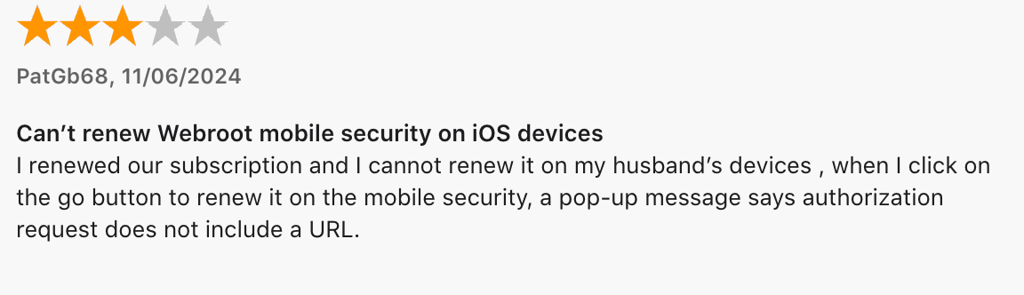

However, there are many praises for the simplicity of use. And I found very few comments that would describe the security of Webroot antivirus negatively.

So, despite its flaws, Webroot seems to be a generally well-received antivirus with a stable repeated user base.
Is Webroot antivirus worth it?
While it definitely has its fans and perks, I personally would choose another antivirus over Webroot. The customer support options are slow, the interface, while simple, is a bit outdated, and the features are not that impressive when you consider that some hardly work well. For example, the web shield only has a 50% success rate in dealing with phishing.
To answer the question of whether it’s safe, I also have to say that it’s not really secure. Sure, Webroot antivirus has a 90% success rate with ransomware, but against malware – the main thing that an antivirus should be effective against – its performance was quite weak. Long-term users seem to be satisfied with Webroot’s security guarantees, but when I got to test antivirus providers like Norton, TotalAV, Bitdefender, and others, Webroot seemed quite lackluster.
There are many options that are better than Webroot antivirus, most of which you can find in our best antivirus software reviews. Those are the services that can find 9 or even 10 malware samples out of 10. They also have VPNs and other great additional features. For a password manager, there are free third-party options, too. So, while on its own, Webroot antivirus might seem like a fairly good option, comparing it to others just highlights all the things it’s still lacking.
FAQ
Is Webroot antivirus a good antivirus program?
No, in both independent tests, like AV-TEST and AV-Comparatives, and our in-house tests, Webroot antivirus failed to go over a 50% malware detection rate. While performing significantly better with ransomware, Webroot antivirus detected 4/10 malware samples and 50% of phishing samples, making it a mediocre option for an antivirus.
What antivirus is better than Webroot?
It depends on your expectations. If you want a cheaper option, Bitdefender is both more affordable and more secure. If you want the ultimate device protection, Norton 360 antivirus is better than Webroot. Other great alternatives are TotalAV, Surfshark AV, ESET, and more.
Is Webroot getting discontinued?
No, only the Webroot business plans are no longer available. Personal antivirus still exists and can be purchased. Business plans stopped getting sold or renewed in 2019 and were no longer serviced from 2020.
Should I disable Windows Defender if I have Webroot antivirus?
No, you should never disable the firewall for any program. Considering that Webroot firewall can be a bit glitchy, Windows Defender is a good alternative to step in where Webroot fails to deliver.
How much does Webroot antivirus cost?
You can get Webroot antivirus from $29.99/year. The most affordable plan covers one device and offers basic threat protection. For more advanced security and greater device coverage, it’s best to subscribe to pricier plans.