Total Defense review 2025
Backed by leading cybersecurity experts and investigative journalists, we deliver independent, real-world antivirus testing and analysis, guaranteeing objective evaluations without undue influence or bias from outside parties.
Our transparent and consistent methodologies ensure objective, up-to-date reviews, empowering readers to make well-informed decisions.
Learn more

Total Defense is a solid antivirus solution with strong protection capabilities, confirmed by both lab tests and our hands-on testing. The software offers extensive customization options, allowing you to schedule scans at convenient times. Its month-long free trial lets you thoroughly test all features, while the robust password-protected parental controls make it a good solution for families.
However, our Total Defense review revealed several bugs and interface quirks that affect usability. It also lacks additional features that have become standard in the industry – there's no built-in VPN or password manager.

| ⭐ Rating: | |
| 🥇 Overall rank: | #28 out of #30 |
| 💵 Price: | From $39.99/year |
| ✂️ Free version: | No |
| 🖥️ Platforms: | Windows, macOS, Android |
| 🔥 Coupons: | - |
If you’re curious to find out more about this antivirus, its pricing, performance, and standout features, keep reading.
Total Defense pros and cons
How much does Total Defense cost?
Total Defense offers three subscription lengths: 1-year, 2-year, or 3-year plans. The longer subscriptions offer better value over time. All plans include a 60-day money-back guarantee, which is an excellent perk for new customers.
Each plan covers a specific number of devices. It's important to note that the Essential Anti-Virus plan only works on the Windows operating system. Some of the higher-tier plans also include online backup storage as an added benefit.
| Plan name | Essential Anti-Virus | Premium Internet Security | Ultimate Internet Security |
| Price | $39.99/year | $69.99/year | $109.99/year |
| Devices | 3 | 5 | 10 |
| Online backup | Not included | 10GB | 25GB |
| Operating systems | Windows | Windows, macOS, Android | Windows, macOS, Android |
When it comes to cost, Total Defense falls somewhere in the middle of the antivirus market. It's not the most expensive option available, but it does cost more than popular alternatives like Norton 360, TotalAV, and Bitdefender.
However, the comparison isn't entirely straightforward. While Norton starts at $29.99/year for just one device, and Bitdefender begins at $12.99/year for a single device, Total Defense's entry-level plan covers up to 3 devices. TotalAV offers the most direct comparison at $19.00/year for 3 devices. This multi-device coverage makes Total Defense a reasonable value, even though its base price is higher than some competitors.
Getting started with Total Defense
Getting started with Total Defense was refreshingly straightforward. You get a 30-day free trial with no need to enter payment info. When signing up for the free trial, I chose the Ultimate Internet Security plan, since it seemed to offer the best all-around protection. After signing up, an email landed in my inbox with the download link and straightforward instructions, so there’s not much room for confusion at this stage.

Installation took longer than I'm used to. The program first connects to the servers to download packages, then requires you to actively monitor the process and agree to the terms. You can't just start it and walk away – the installer needs your attention at various steps, which, honestly, felt tedious.

When I first launched the app, it immediately started an optimization scan without asking. I wish it had offered initial setup preferences or at least asked permission first. Some users might appreciate this automatic approach, but I prefer having a choice.

The overall interface is actually well-designed and intuitive. However, the home section felt a little pointless – it's just buttons duplicating the left sidebar navigation. This seems like a failed attempt at streamlining. I'd much rather see system status or recent events here instead.

What impressed me most was the extensive automation options. Nearly everything can be scheduled, which is fantastic for set-and-forget protection. The settings organization is also thoughtful – rather than having one overwhelming preferences menu, each feature has its own settings section. My only real complaint is not knowing how long full scans will take. I think a progress bar would help a lot. Overall, daily use is smooth, and the overall design is clean and accessible.
Lab test results
Independent lab tests provide the most reliable way to compare antivirus products. These labs use standardized testing methods and controlled environments, allowing for fair comparisons between different security apps.
When it comes to independent testing, the antivirus has limited coverage. Total Defense isn’t listed on AV-TEST, which is one of the biggest and most respected antivirus testing labs, and there’s also no rating for Total Defense on SE Labs, another trusted source.
However, Total Defense does have a solid track record with AV-Comparatives. In the real-world protection test conducted between February and May 2025, Total Defense achieved a 99.3% protection rate. This score earned it the AV-Comparatives Real-World Protection Advanced+ award – the highest award. This result puts it just behind leading products like Bitdefender, Malwarebytes, and Norton 360, which speaks to its strong protection.
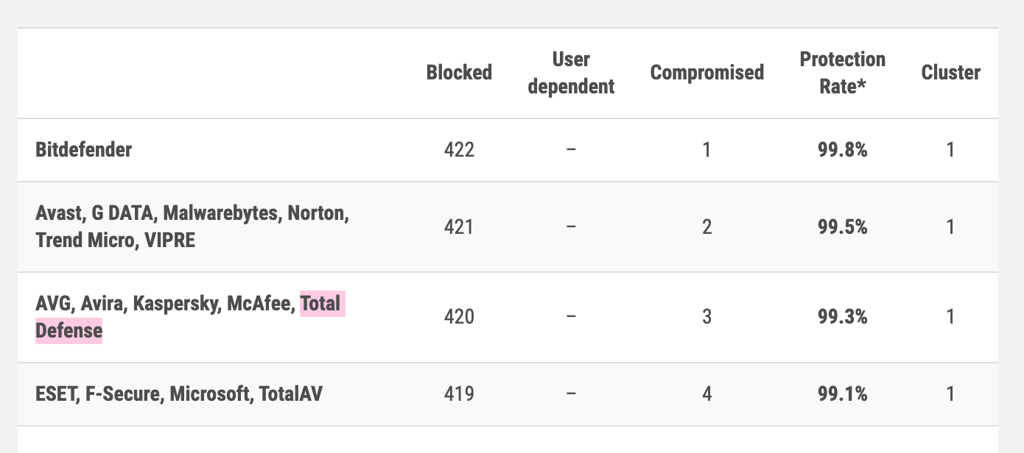
In the malware protection test from March 2025, Total Defense had a protection rate of 99.97%. It once again received the Advanced+ award, along with other top antivirus programs like Bitdefender, Norton 360, and Avast.
While these results are impressive, the lack of testing from other major labs is concerning. Total Defense clearly performs well when tested, scoring close to market-leading antivirus products. However, without results from multiple testing sources like AV-TEST, it's harder to get a complete picture of its capabilities. I always prefer seeing results from several different labs before making a final judgment about any antivirus software's effectiveness.
Our in-house testing results with Total Defense
To see how well Total Defense works against malware and phishing scams, I teamed up with the Cybernews research team to complete in-house testing. We ran tests on a ThinkPad T14s running Windows 11 with an AMD Ryzen 5 PRO 7540U processor with Radeon 740M graphics card and 16GB of installed RAM. Actual testing was done on an Oracle VirtualBox running Windows 10 (64-bit) with 10GB memory, 50GB storage, and 6 vCPUs allocated.
Malware and ransomware detection test
My malware protection test began by gathering 50 malware and ransomware samples from bazaar.abuse.ch and downloading them as a compressed file. I extracted the package into the Downloads folder for easier testing, since some antivirus apps don't scan inside ZIP files.
The full scan took 44 minutes and 28 seconds to complete. For comparison, during our Norton 360 tests, it finished the full scan in about 10 minutes, while Bitdefender took nearly 2 hours. Total Defense detected 48 out of 50 malware samples, achieving a 96% detection rate. This performance backs up the lab test results I mentioned earlier.
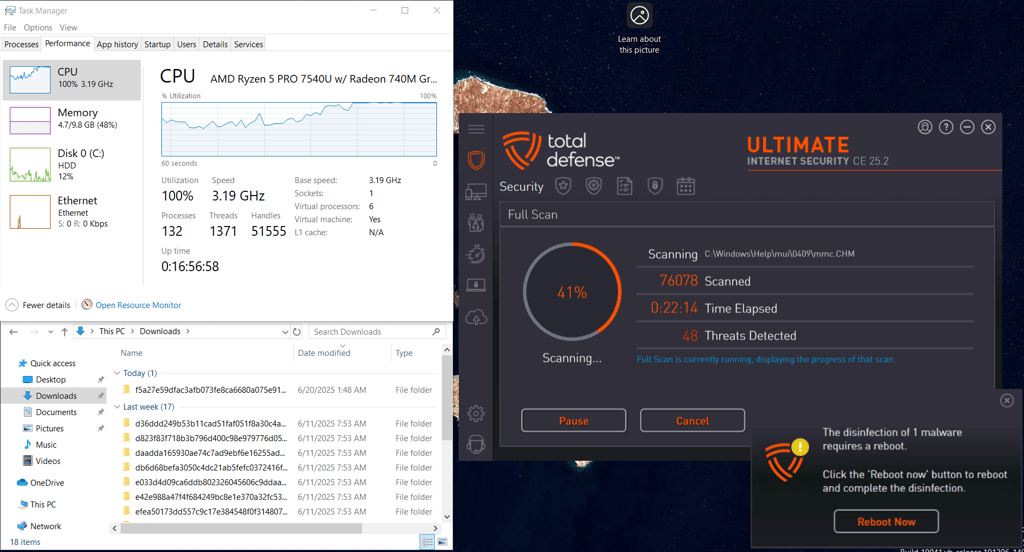
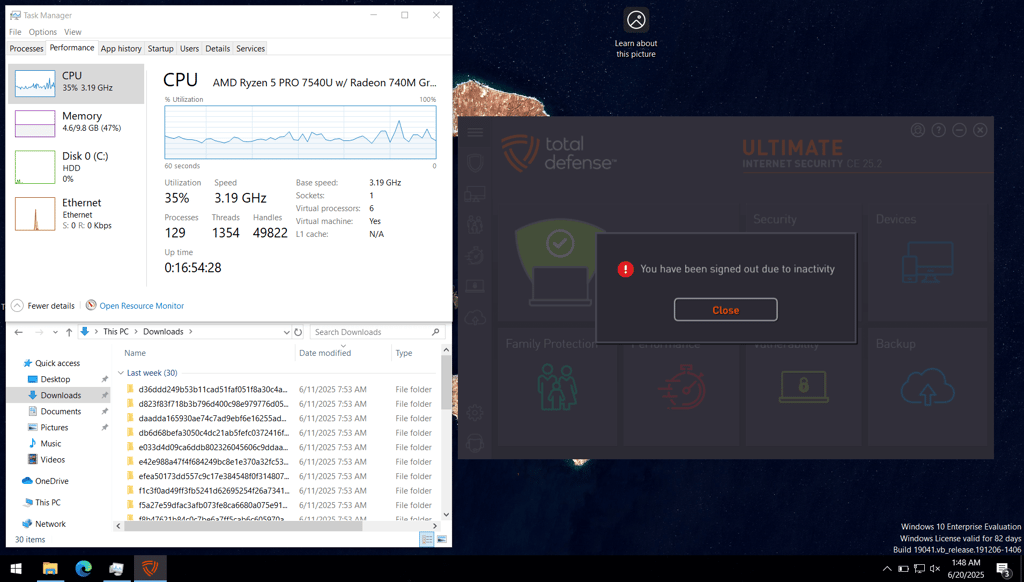
That said, a concerning bug emerged during testing. While the scan was running, the software signed me out "due to inactivity" and paused the scan. I later found that this is related to the parental controls feature, but it's a critical flaw. You literally cannot leave the computer unattended during a scan – yet another case showing that this software requires constant supervision.
Total Defense automatically quarantined all detected threats without asking for any input. While I later found these files in the Quarantine section with options to restore, exclude, delete, or manage exclusions, I would prefer being prompted immediately after the scan. This automatic approach can be problematic if false positives occur, as legitimate files might be quarantined without warning. Total Defense didn't clearly indicate where it placed the quarantined files in the system either, adding to the confusion.
When running other types of scans, neither the quick scan (which took 3 minutes) nor the system scan (15 minutes) picked up any threats at all, which deemed them useless.

In summary, Total Defense showed a very solid detection rate during the full scan, placing it on par with major competitors like Norton and Bitdefender. That said, the lack of flexibility during the scan process and some user interface quirks leave some room for improvement.
Phishing test
I also tested Total Defense's real-time blocking effectiveness. For this test, I tried manually accessing 15 known malicious URLs sourced from URLhaus Abuse. The testing was performed using the Edge browser extension to see how well the antivirus prevents access to dangerous websites.
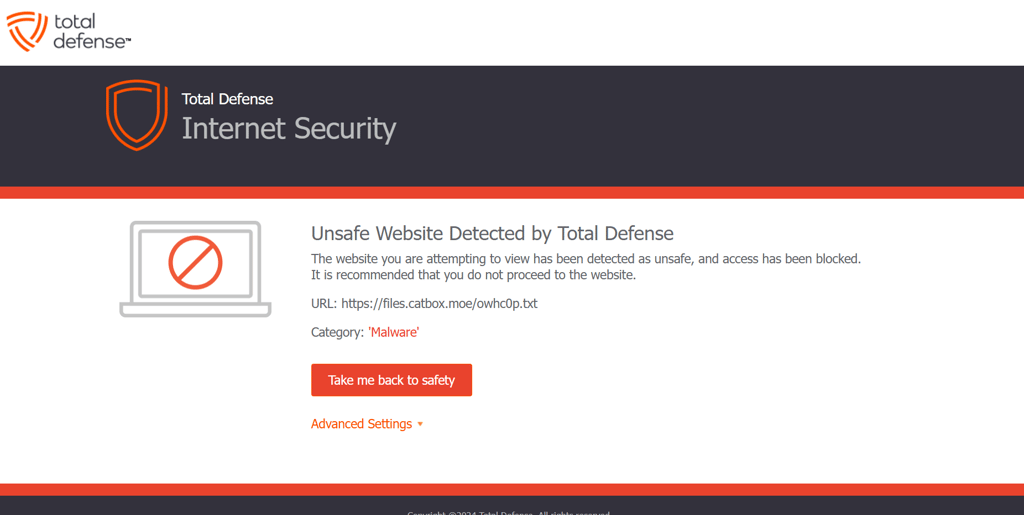
Total Defense immediately blocked only 2 out of 15 malicious URLs with its web protection. These two sites triggered a security pop-up that prevented me from accessing the dangerous content entirely. For the remaining 13 URLs, the extension failed to block access within the browser.
However, when malicious files from these 13 unblocked sites attempted to download, Total Defense prevented downloads by denying file permissions. While this secondary protection technically prevented the malware from executing, it's far from ideal. The files still initiated downloads and left residual traces on my system, which were shown as "totaldefense-malware-residue." These can still be potential security risks, as partial downloads could still contain harmful code.

The results show a concerning 13% web-blocking rate (2 out of 15), though the Total Defense ultimately prevented infection through its download protection layer. For comparison, providers like Norton Antivirus or Bitdefender block more than 90% malicious links before any downloads occur.
Total Defense's Parental Controls
Total Defence comes with excellent parental control options. It allows you to manage and restrict internet access for family members. Setting up individual child profiles was very simple. I liked that you can easily replicate an existing profile’s settings, which makes it easy to quickly create accounts for multiple children. All controls are password-protected, ensuring that only the administrator can adjust access or site restrictions.
The feature lets you block specific website categories, including adult content, hate, dating, illegal activities, and even shopping. I appreciated that you can set different rules for each member. It also provides a summary page of blocked sites, along with customizable time limits. You can also set up email alerts and reports to notify you of attempts to access restricted sites, which adds another layer of transparency for parents.

While top competitors like Norton 360 and Bitdefender go further by offering insights into time spent online, Total Defense stood out for its ease of setup and the number of site categories it covers. It’s an easy and effective solution for families who want tailored web safety without a steep learning curve.
PC Tune-Up
Total Defense's PC Tune-Up feature automatically scans and optimizes your system to improve startup times, browsing speed, and overall performance. It updates outdated software, repairs problematic drivers, and adjusts internet settings to keep your PC running smoothly.
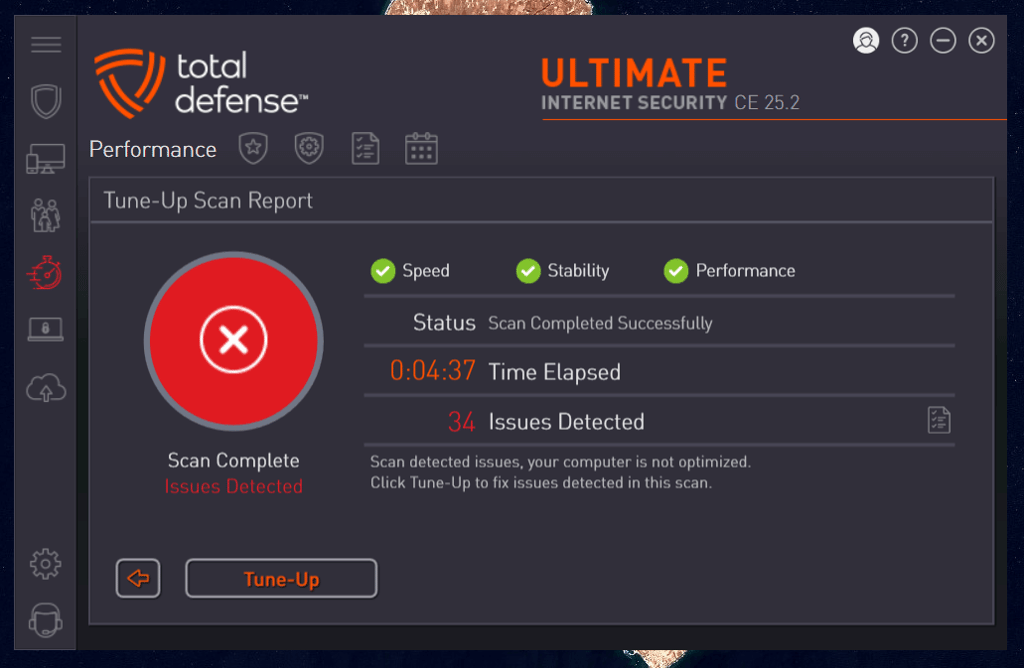
The feature examines which programs launch at startup and disables unnecessary ones, significantly reducing boot time. It also includes disk cleaning functions that remove junk files to free up storage space. The interface makes optimization straightforward – just run a scan and let it identify any performance bottlenecks.
I tested this by running a performance scan on my system, which analyzed various slowdown causes. After running the tune-up process, I was genuinely surprised to notice real performance improvements. My PC started faster and programs launched more quickly. It was nice to see this feature actually work, because, from my experience, many antiviruses claim to offer PC optimization, but few deliver measurable results.
Security reports
Total Defense provides detailed reports for every security feature, which I found especially useful. Beyond just parental controls, there are dedicated report sections for online backup, performance, security scans, and vulnerabilities. Each allows you to quickly review recent activity and see if any issues need attention.

For users who want to stay informed about their system's security status, these comprehensive reports provide valuable insights without requiring technical expertise to understand.
Impact on PC performance
During the full scan, Total Defense used up significant system resources with CPU usage hitting 95%, RAM at 48%, and disk usage at 39%. This made my computer practically unusable for the time the scan was running. For context, when testing competitors on the same system, TotalAV's CPU usage ranged between 50-65% during full scans, while Norton 360 maintained a much lighter footprint at just 18-42%.
The quick scan showed better resource management with average CPU usage at 48%, RAM at 42%, and disk usage at 13%. While these numbers are more reasonable, the quick scan failed to detect any of my planted malware samples, making its lighter system impact meaningless from a security perspective. Similarly, the system scan averaged 68% CPU usage, 32% RAM, and 22% disk usage, but it didn’t detect any threats.
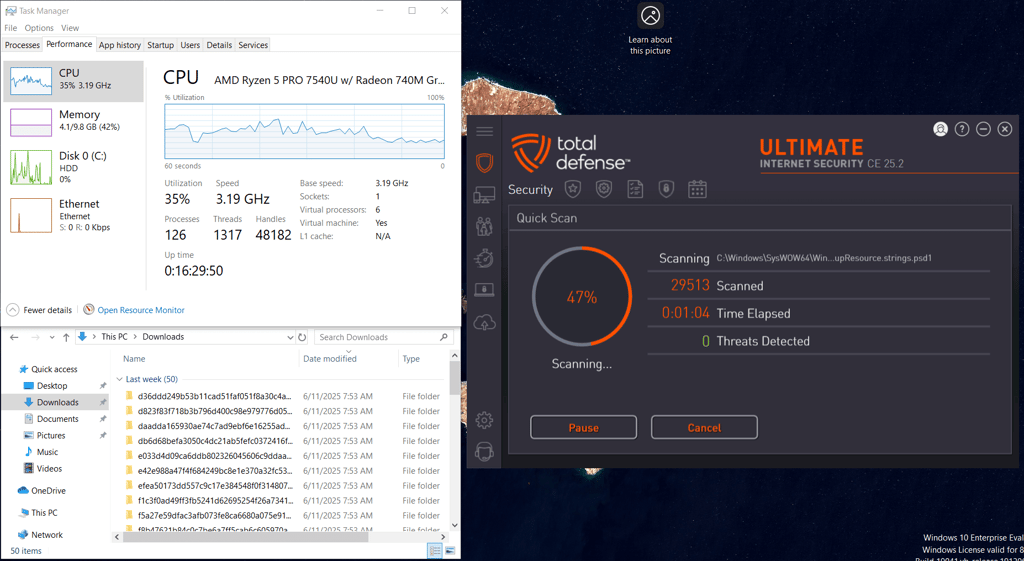
Overall, Total Defense’s scanning process is much heavier on the system than some of its competitors. During scans, the computer felt sluggish and unresponsive, forcing me to wait for scans to complete before resuming normal work.
Verdict: dependable family antivirus with limited features
Total Defense is a reliable antivirus that delivers strong, though not perfect, protection. Its web protection proved effective, eventually blocking malicious downloads. One of its biggest strengths is its robust parental controls, making it a solid choice for families.
That said, it falls short compared to more feature-rich competitors. It lacks extras like a VPN or password manager, which many suites such as Norton 360 or TotalAV now include. Its results in independent lab tests are also somewhat limited. Still, if your priority is straightforward protection for your devices, Total Defense is a good option.
FAQ
Can I trust Total Defense?
Yes, Total Defense can be trusted. It’s a legitimate American cybersecurity company with over 20 years of experience. Total Defense provides reliable virus protection, proven by independent lab test results.
Is Total Defense better than Norton?
No, Total Defense isn’t better than Norton 360. Norton is more affordable, delivers stronger protection scores in both lab and in-house tests, and includes more advanced features.
Is Total Defense worth the money?
No, Total Defense isn’t worth the money. It’s relatively expensive and lacks the protection quality and extra features you can get from better-priced competitors like Norton 360, Bitdefender, or TotalAV.