NordPass vs RoboForm comparison in 2026


According to NordPass research, in 2026, the average internet user has nearly 200 passwords they need to protect. Needless to say, not many of us could ever remember that many unique combinations, which is why some users choose to reuse the same passwords, while others employ the help of password management solutions. For this NordPass vs RoboForm comparison, I tested two of the most popular password managers in 2026.
RoboForm was released back in 1999, and NordPass’ beginnings date back to 2019. While there’s a 20-year gap between the two password managers, this certainly isn’t an indicator that one is better than the other. I’ve had the chance to test both of these providers extensively, and while legacy is important, to determine my top choice between the two, I focused on security, features, plans and pricing, user experience, and customer support. Let’s jump right in.
NordPass vs RoboForm – at a glance
| Category | NordPass | RoboForm |
| Features | ✅ NordPass pulls slightly ahead thanks to more flexible password recovery and a stronger password generator. In addition to core features like password generation and autofill, NordPass also stands out with useful extras such as email masking and other privacy-focused tools. | ✅ Without many extras, RoboForm has all the basic features you would expect a password manager to have, including generation, autofill, sharing, and importing. |
| Pricing and plans | ✅ NordPass offers excellent value with various plans and features; however, it’s a bit pricier than RoboForm | ✅ RoboForm is a slightly more budget-friendly option for basic password manager features |
| Security | ✅ NordPass takes the lead with more advanced encryption, flexible authentication options, generous data storage, and transparent security practices | ❌ RoboForm offers strong core security features like unlimited password storage and multi-factor authentication; however, it's a bit outdated compared to NordPass |
| User-friendliness | ✅ NordPass stands out by offering a smoother and more polished overall user experience across its apps and extensions | ❌ RoboForm’s desktop and mobile apps are minimalistic but outdated, so some users may find them harder to use |
| Customer support | ✅ NordPass stands out with quicker access to live help and easier access to agent support | ❌ RoboForm offers 24/7 ticketing system, but live chat and phone support work only during business hours |
| Compatibility | ✅ NordPass stands out by offering superior mobile apps and supporting most operating systems, including Linux | ❌ While RoboForm supports most major platforms, it doesn’t have an app for Linux |

NordPass vs RoboForm: which one is more secure?

| Security features | NordPass | RoboForm |
| Encryption | ✅ xChaCha20 | ✅ AES-256 |
| Two-factor authentication | ✅ Yes (authenticator applications,security keys, backup codes) | ✅ Yes (authentication app, email, SMS, passkeys, trusted devices, security keys) |
| Biometric authentication | ✅ Yes (fingerprint, facial) | ✅ Yes (fingerprint, facial, iris recognition) |
| Zero-knowledge architecture | ✅ Yes | ✅ Yes |
| Security audits | SOC 2 Type 1, SOC 2 Type 2, Cure53 security audits | 2 audits by Secfault Security |
Encryption
In terms of encryption, both NordPass and RoboForm absolutely meet the standard expected of the top-rated password managers in 2026. However, NordPass earns the top spot because of its more advanced encryption.
Rather than going with the industry-standard 256-bit AES encryption to guard your vault, NordPass raises the bar with the more modern XChaCha20. A stream cipher that encrypts data bit by bit instead of by block, the cutting-edge XChaCha20 is simpler, faster, and doesn’t require hardware acceleration.
As for RoboForm, it uses the more traditional but still super-secure 256-bit AES encryption alongside PBKDF2 SHA256 to protect against dictionary and brute-force attacks, and uses over 8.3 million iterations.
Another thing to note about NordPass and RoboForm is that they’re zero-knowledge solutions. Hence, all encryption/decryption takes place locally, and only encrypted data is sent to their servers, meaning both password managers have no way to access your data.
Multifactor security
Both RoboForm and NordPass offer multi-factor authentication (MFA) – a must-have layer of protection against potential breaches. To access your vault, the security measure requires further identity verification using other methods in addition to your username and password.
As detailed in our full NordPass review, the password manager offers three main options for MFA, which pretty much covers all the ground:
- Authenticator applications like Google Authenticator, Microsoft Authenticator, and Authy
- Security keys such as YubiKey and MultiPass FIDO
- Backup codes
RoboForm supports two-factor authentication (2FA) on its paid and free plans. Even though hardware keys like YubiKey aren’t supported, all major apps like Google Authenticator, Microsoft Authenticator, and Authy are allowed. SMS and email verifications are supported, too, but it’s best to forego this as it’s one of the least secure 2FA methods.
In brief, both NordPass and RoboForm offer various authentication methods to minimize the risk of compromised passwords. However, NordPass has the upper hand, as it supports hardware keys, unlike RoboForm.
Data storage
NordPass is more generous and flexible with its storage than RoboForm.
With NordPass, you get unlimited password storage space even if you’re on the free plan. You can also store passkeys, credit cards, contact information, and secure notes. The Premium plan even comes with a 3GB storage for your files. If you need to expand your encrypted file storage, I recommend employing NordLocker – it offers 3GB of storage for free and up to 2TB of storage with its top-tier plan.
RoboForm doesn’t offer encrypted file storage. Instead, it offers Safenotes for text and vault items, such as Wi-Fi passwords, door codes, or license keys. For file storage, the creator of RoboForm offers its other product – GoodSync. It offers 10GB of free storage and up to 8TB with paid plans.
Privacy policy
Despite their zero-knowledge architecture, you can expect NordPass and RoboForm to collect some user information. However, to be fair, the password managers are quite reasonable with their data collection and handling.
Adhering to the industry standard, NordPass collects:
- Personal data like email addresses
- Device information such as IP addresses, browser types, and operating systems
- Statistical information about your account’s activities
In its privacy policy, NordPass also makes clear that workarounds to mask your identity are available. Plus, it also spells out the rights related to your personal data. For instance, erasure, rectification, and withdrawal of consent.
Similarly, RoboForm collects the following:
- Basic user data, like email addresses and names
- Device information, like operating system and IP address
- Relevant information for marketing purposes (but you can opt out of it)
Additionally, RoboForm also gives you some semblance of control in that you can manage how some of your data is handled and shared.
Third-party security audits
Both NordPass and RoboForm have been rigorously audited by various independent cybersecurity firms. This helps ensure that the companies are compliant with the highest security standards as well as builds trust.
To start, NordPass has passed the SOC 2 Type 1 and SOC 2 Type 2 audits.This means that they have and use the necessary measures to protect customers' sensitive information. Additionally, NordPass has completed a full security audit by Cure53. The firm found nine vulnerabilities, but NordPass took care of the issues before the auditors had even completed the full audit.
In comparison, as discussed in our RoboForm review, this password manager has undergone 2 independent third-party security audits by Secfault Security: first one in 2023 and the second one in 2025.
NordPass vs RoboForm: features overview
| Security features | NordPass | RoboForm |
| Password importing | ✅ Yes | ✅ Yes |
| Account and password recovery | ✅ Yes | ✅ Yes |
| Password sharing | ✅ Yes | ✅ Yes |
| Autofill | ✅ Yes | ✅ Yes |
| Weak password monitoring | ✅ Yes | ✅ Yes (Security Center) |
| Email masking | ✅ Yes | ❌ No |
| Dark web monitoring | ✅ Yes | ✅ Yes |
If you're wondering how NordPass compares to another market heavyweight, check out our NordPass vs 1Password comparison to see how they compare for individuals and businesses.
Password importing
To facilitate the transition from other services, most password managers offer convenient password-importing methods. NordPass and RoboForm both support bulk password importing from a long list of applications.
In NordPass’ case, it automatically recognizes the browsers that store your credentials and allows password transfers with just a few clicks. Besides that, it also supports imports from other password managers like RoboForm, 1Password, and KeePass. Of course, the standard CSV file is supported as well.
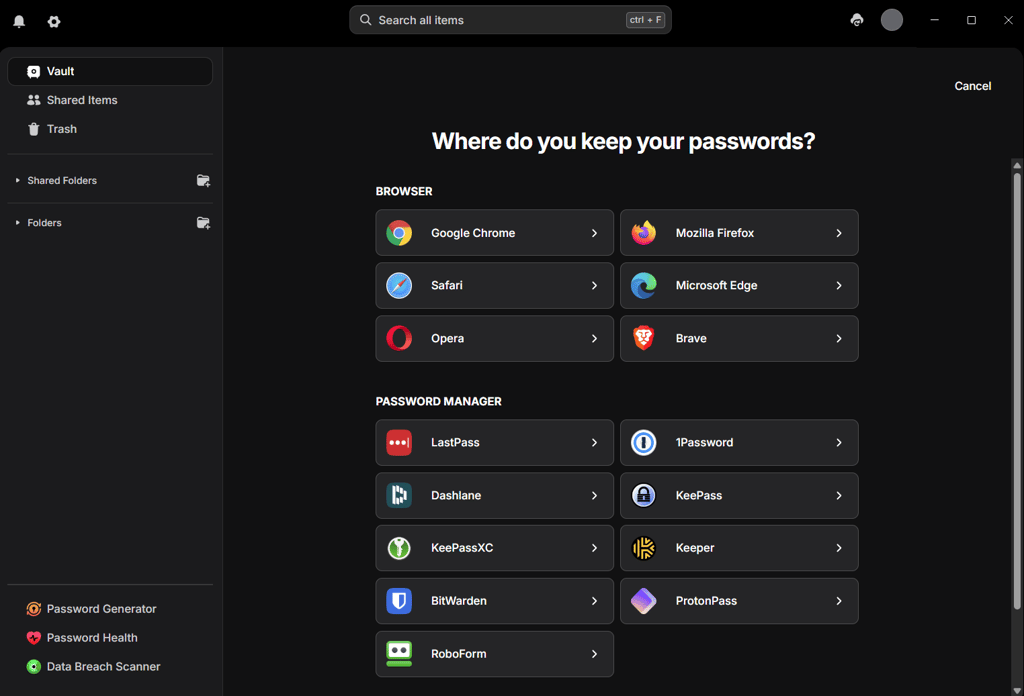
Likewise, RoboForm also allows bulk password importing from various files, apps, and platforms. That includes browsers like Chrome, Firefox, Safari, Opera, and Edge, other password managers such as NordPass, 1Password, and Keeper, and CSV files.

To sum it all up, both NordPass and RoboForm certainly make it very easy for users to import passwords when switching providers.
Account and password recovery
NordPass and RoboForm are relatively lenient and accommodating when it comes to account and password recovery. However, note that RoboForm’s main password recovery method is behind a paywall and only available to premium users.
With NordPass, you can generate a unique 24-symbol Recovery Code. It will be your lifeline if you ever lose your master password. You should also enable biometrics, as it lets you reset the 24-symbol Recovery Code in case you lose it.
Things are less dire for NordPass Premium users thanks to its Emergency Access feature. With it, your designated contacts get read-only access to the items in your vault.
As for RoboForm, Emergency Access is its main recovery method – it enables you to select designated emergency contacts. However, the feature is only available to paid users and the contact must have a RoboForm account. Alternatively, you can use biometrics on your mobile devices to restore your passwords, too.
Password generator
A password generator is essential to quickly and easily create unique passwords that can withstand brute-force attacks. Both NordPass and RoboForm have very simple to use password generators and are able to create truly secure and unique passwords.
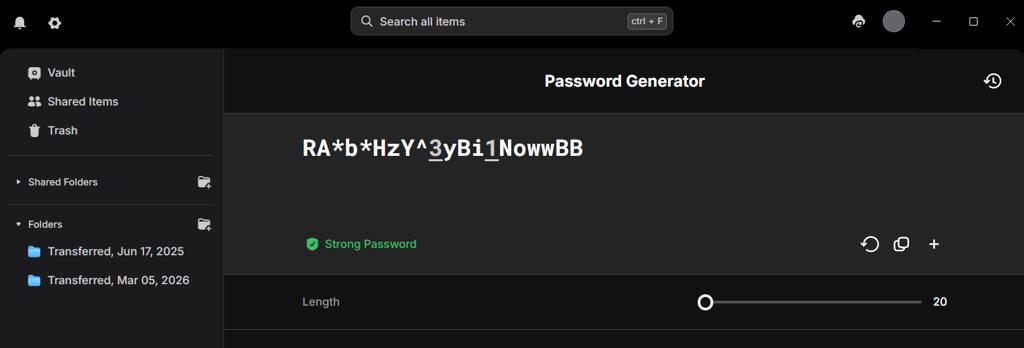
Recently, NordPass disabled the ability to pick the symbols that make up your password. Right now, you cannot choose whether or not your passwords include upper/lower-case letters, numbers, or special characters. NordPass generates strong passwords between 20–64 characters, and they all include all types of symbols by default. This lifts the responsibility off your shoulders and ensures you generate the strongest passwords possible.
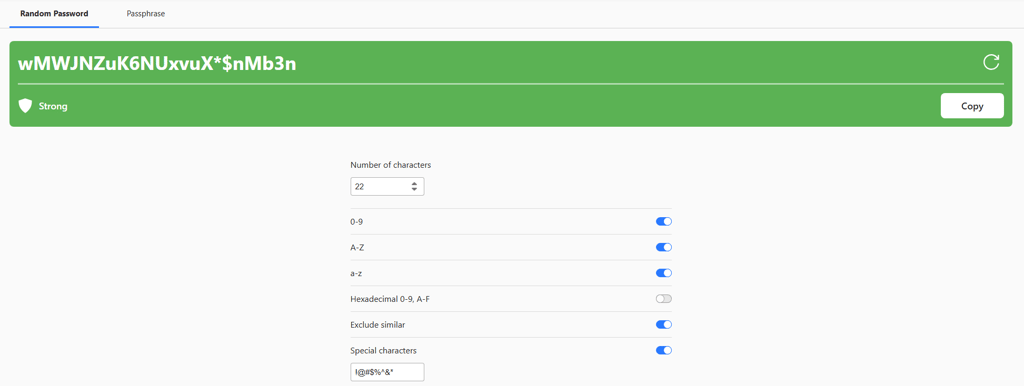
RoboForm’s password generator is more customizable, as you can choose what symbols make up your password, including upper/lower-case letters, numbers, and symbols.
While the customization makes RoboForm seem more flexible; unfortunately, it enables users to create weak passwords. Especially since it allows you to create passwords between 1–512 characters. Needless to say, if you choose a larger number of characters, your passwords can be virtually impossible to crack, but if you choose a small number, you may create problems for yourself.
Password sharing
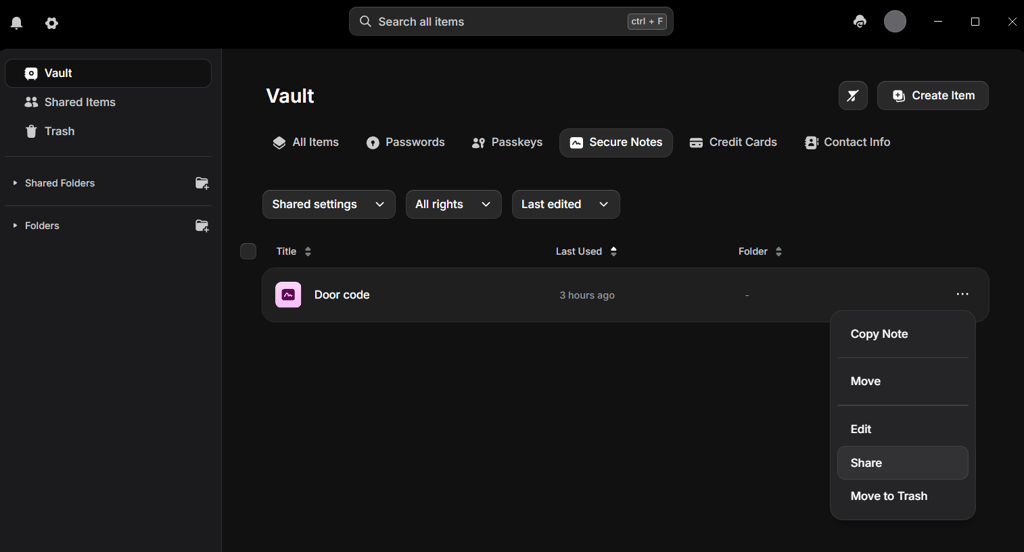
NordPass makes it extremely easy to quickly and safely share all your saved credentials like passwords, payment details, and secure notes. Simply select the item you want to share, tweak the access levels, insert the recipient’s email address, and you’re done.
Similarly, RoboForm also lets you securely share credentials and folders using just a link. You can also do that by going to the Sharing Center via the extension or RoboForm Sharing on computers and phones and adding the recipients' email addresses. And, just like NordPass, you have full control over the access levels and can revoke access at any time.
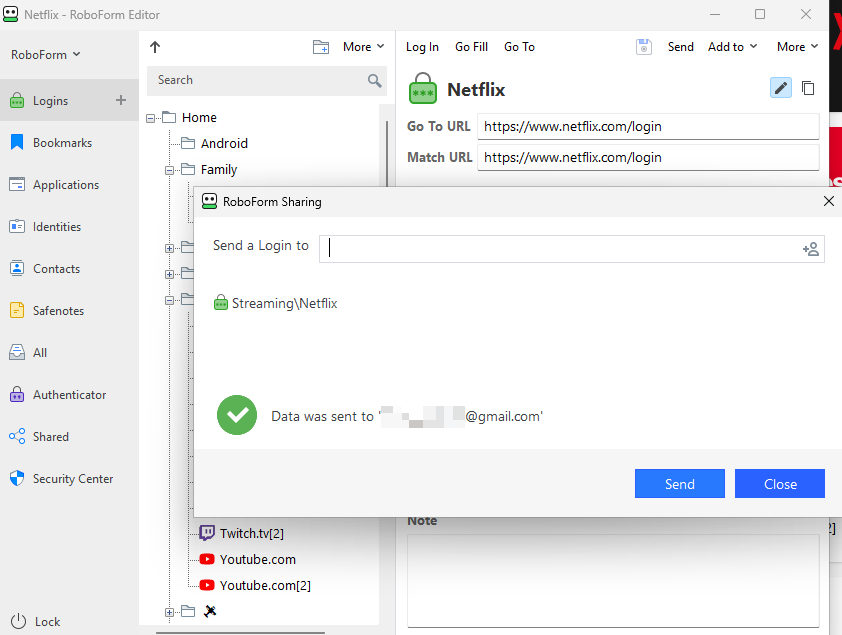
Just make sure that your recipient has a RoboForm account since that’s a prerequisite. While this is slightly troublesome, it shouldn’t be too much of an issue since it has a free version.
Overall, it’s a tie for this round of the NordPass vs RoboForm faceoff. Both password managers prioritize user-friendliness and security for their password-sharing features.
Autofill
Like every password manager that’s worth its salt, both NordPass and RoboForm offer autofill to simplify and speed up login, payment, and other form-filling processes.
Convenient and quick, NordPass’ autofill feature fills in all the necessary credentials in online forms on your behalf. This goes for login, payment, and all other form-filling processes. The new Instant login feature allows users to log in with one click. The feature can be disabled for specific websites.
In a similar fashion, RoboForm’s autofill works the same way. Click on the green RoboForm icon, and it’ll automatically fill in all the necessary fields – whether it’s username, password, address, or credit card details. It’ll even submit the form for you.
In brief, both password managers’ autofill features are equally handy. When enabled, they eliminate the hassles and inconveniences associated with form filling, allowing you to breeze right through.
Weak password monitoring
Password health monitoring is crucial for any password manager because it must detect weak passwords and prompt you to change them immediately.
NordPass’ Password Health feature detects weak passwords and identifies reused and old passwords, too. RoboForm’s Security Center also detects weak passwords and notifies you about any security risks. Moreover, RoboForm provides a Security Score to give you a better understanding on password health.
Email masking
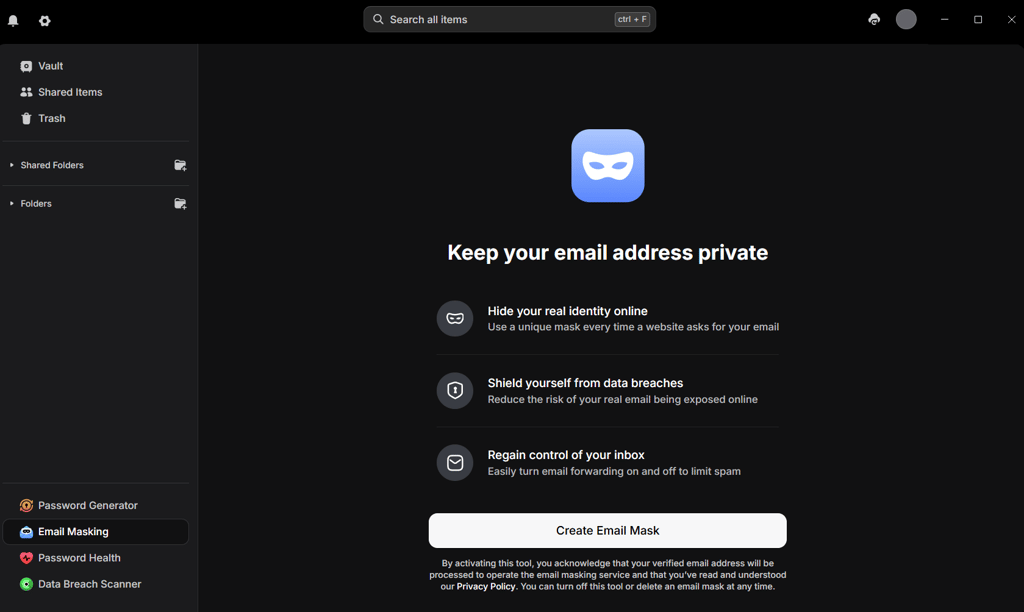
NordPass allows you to create an alternative email you can use to hide your real email address. Alternative email forwards emails to your primary email inbox, so you still get all of the information in one place. It's a great way to increase privacy. RoboForm doesn't have this feature at the moment.
Dark web monitoring
Dark web monitoring refers to continuous scans of the dark web for leaked credentials. NordPass does this with its Exposed Passwords feature. If you log in with a compromised or weak password, this feature will alert you to the risks, prompting you to change it. Additionally, it has recently introduced the Data Breach Scanner – a tool for monitoring email addresses and credit cards. It allows you to check if your email addresses or credit card information have ever been exposed and alerts you if they are.
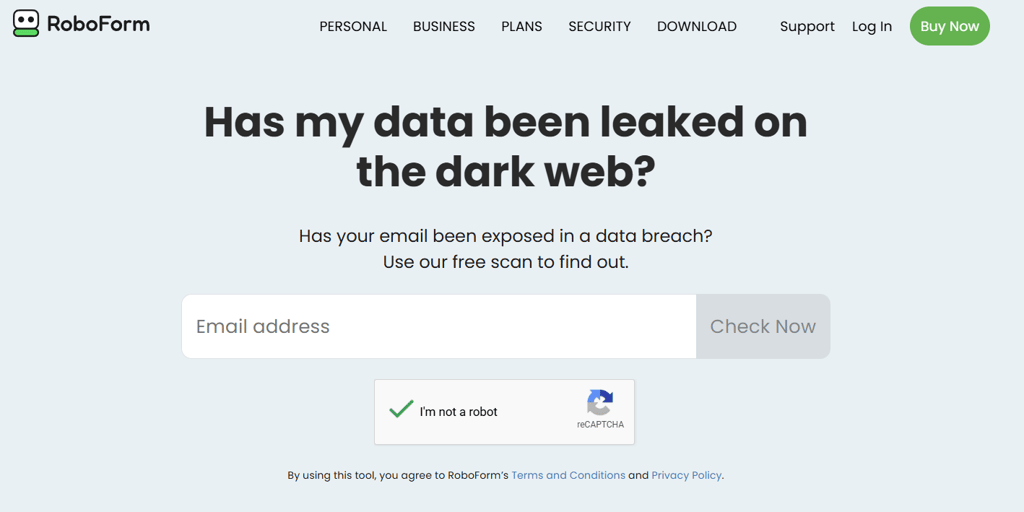
Similarly, RoboForm looks for compromised passwords on the dark web by using the Have I been Pwned database; however, it doesn't scan for leaked email addresses, payment details, or other sensitive information, like NordPass does.
Plans and pricing

RoboForm is slightly cheaper than NordPass, however, both password managers are very affordable and put up a good fight. For starters, they have various plans to cater to all needs and preferences. Additionally, NordPass and RoboForm are also generous with their features.
| Plan | NordPass | RoboForm |
| Free | ✅ Yes | ✅ Yes |
| Premium | $1.29/month (1 user) | $0.99/month |
| Family | $2.32/month (6 users) | $2.66/month (5 users) |
| Business | From $1.79/month/user | From $2.50/month/user |
| Try NordPass | Try RoboForm |
If RoboForm isn't your cup of tea but you're still interested in a premium password manager, check out our 1Password vs RoboForm comparison to see how RoboForm stacks up against another top-tier alternative.
NordPass pricing
For various users, NordPass has these plans:
- Free
- Premium – $1.29/month for 1 user
- Family – $2.32/month for 6 users
- Business – from $1.79/month per user
Interestingly, NordPass’ free version is very generous with features. It comes with unlimited passwords, autosave and autofill, automatic sync, and MFA. If you want to try our Premium without commitment, there’s a 30-day money-back guarantee as well.
Overall, you can only really harness NordPass’ potential by upgrading to Premium. With Premium, you can enjoy all the features in the Free plan as well as access on multiple devices, Password Health, Data Breach Scanner, NordPass Authenticator, and File Attachments.
To fit in more users, you’ll need to spring for the Family plan. It comes with the same features as Premium but allows up to six users.
When it comes to NordPass business plans, you can choose from Teams, Business, and Enterprise subscriptions. The Teams offer covers offline credential access, MFA protection, and SSO login with Google Workspace. Business expands the solution with group-based credential sharing, password strength monitoring, and compliance integration. Enterprise proposes centralized control and tracking of shared logins, SSO logins with Entra ID, MS ADFS, and Okta, user access management, and integrations with Microsoft Sentinel and Splunk.
RoboForm pricing
RoboForm, too, has four plans for different users:
- Free
- Premium – $0.99/month for 1 user
- Family – $2.66/month for 5 users
- Business – from $2.50/month per user
RoboForm Free comes with only the absolute basics and a 2FA. While it serves as a useful way to explore the service, its functionality is otherwise quite limited. To access additional essential features, consider upgrading to the Premium plan. It comes with unlimited logins, password audit, emergency access, sync across devices, cloud backup, and an option to securely share items and folders.
However, if you’re sharing with family and friends, you’ll need the Family plan. You get the same features as Premium, but it can accommodate up to five users. The provided pricing applies to the yearly, 1-year and annual plans.
RoboForm also has two Business plans: Business and Enterprise. The first plan is tailored for teams and covers centralized management, custom security policies, dark web monitoring, and other crucial features. The Enterprise subscription also adds a dedicated account manager, SLA, and self-hosting for large organizations.
Compatibility and user experience
| NordPass | RoboForm | |
| Supported OS | Windows, macOS, Linux, Android, iOS | Windows, macOS, Android, iOS |
| Browser extensions | Chrome, Edge, Firefox, Opera, Safari, Brave, Vivaldi | Chrome, Firefox, Opera, Edge, Brave, and Safari |
| Number of seats (family plans) | Up to 6 | Up to 5 |
Desktop apps
NordPass and RoboForm desktop apps work on all Windows and macOS devices. Installation and setup take just minutes and involve nothing more complicated than clicking when prompted. There will be onscreen instructions to guide you every step of the way.
In NordPass’ case, its desktop apps for all the different operating systems are very much like each other. Streamlined, modern, and interactive, the apps are functional yet not at all overwhelming. Even newbies should find navigation a piece of cake since there’s a menu at the top with all the important categories like passwords, secure notes, and shared items.
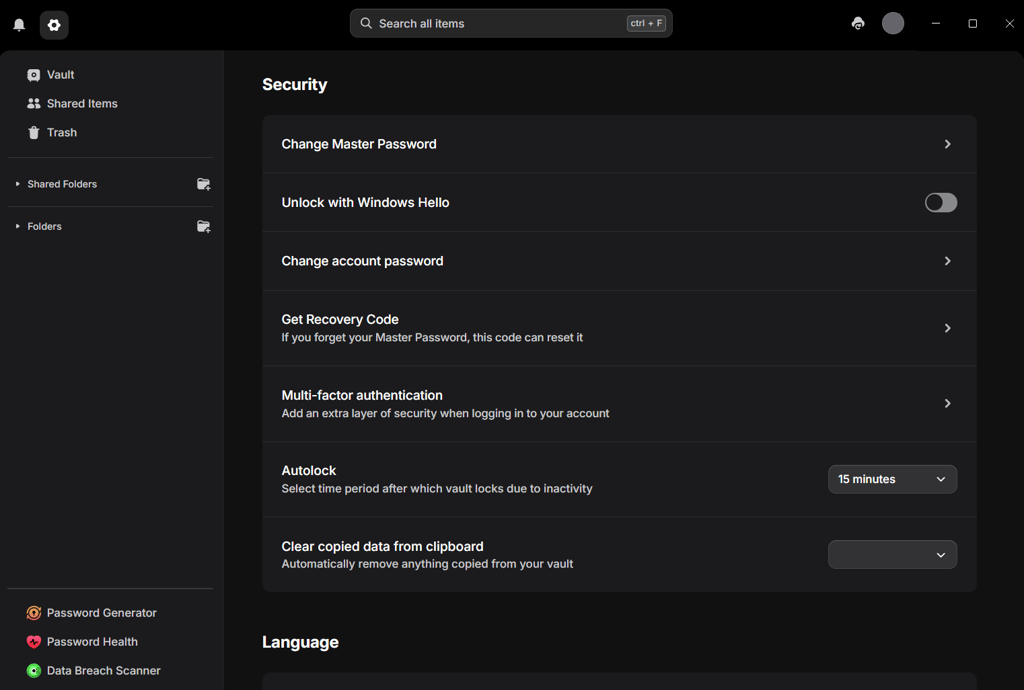
Likewise, RoboForm’s desktop apps for the various operating systems also bear the same looks as each other. Very minimalistic and no-frills, the apps are straightforward and beginner-friendly.

Browser extensions
NordPass and RoboForm have browser extensions for all the commonly-used browsers like Chrome, Safari, and Firefox. Either way, whether it’s NordPass or RoboForm, all it takes is just a few clicks here and there to add the extension to your browser.
Once added, the extensions are ready for use. However, like most browser add-ons on the market, NordPass and RoboForm’s functionalities are heavily tied to their respective web apps. On the extensions, you get the standard basics like autosave, autofill, and password generator. However, everything else is only available on the dedicated web apps.
Mobile apps
To get NordPass or RoboForm’s mobile app on your phone, you just need to download the app from either the Apple App Store or the Google Play store.
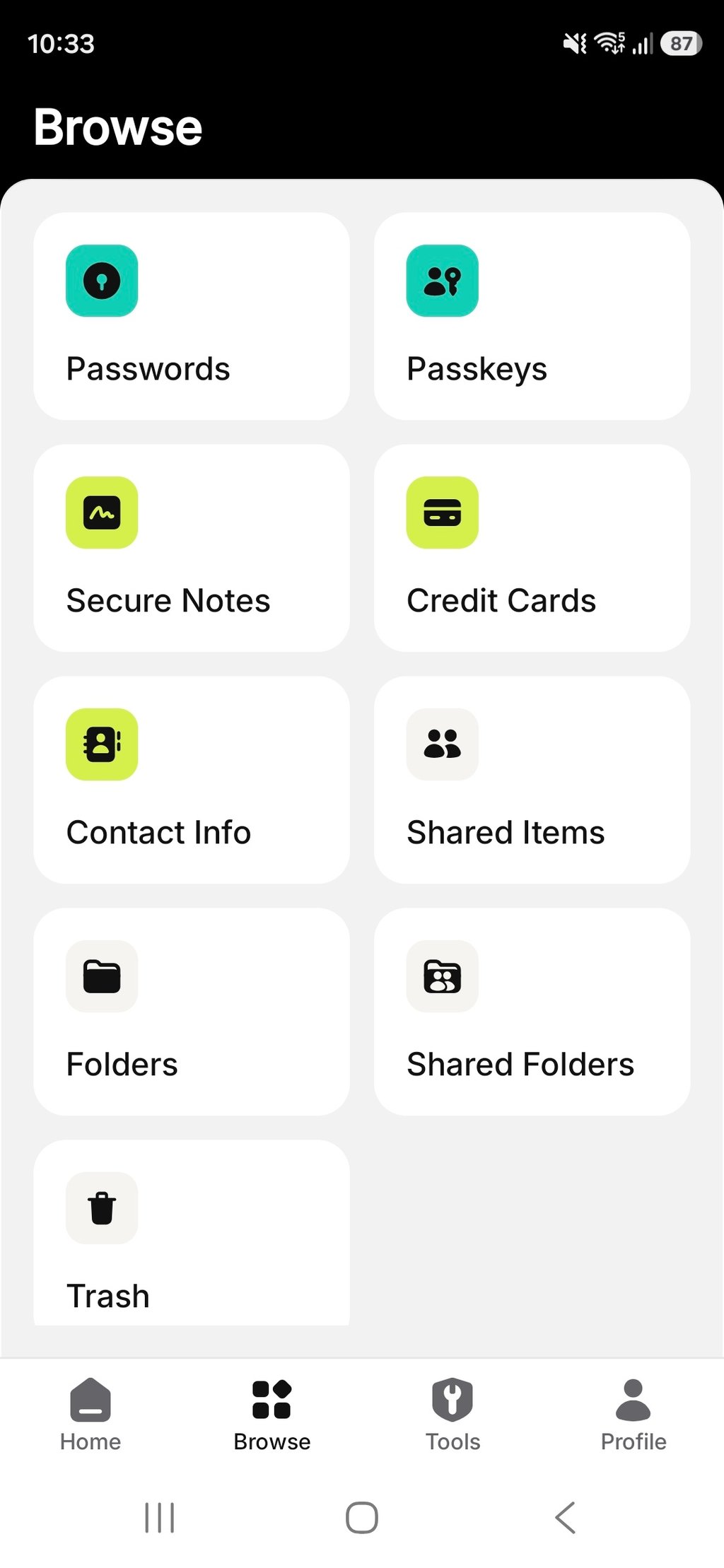
With NordPass, its mobile apps for Android and iOS devices look almost identical. Clutter-free, responsive, and carefully structured, you’ll have no trouble finding your way. However, looks aside, NordPass’ mobile apps are also extremely functional. You’ll find the same lineup of features as those offered by its web and desktop apps.
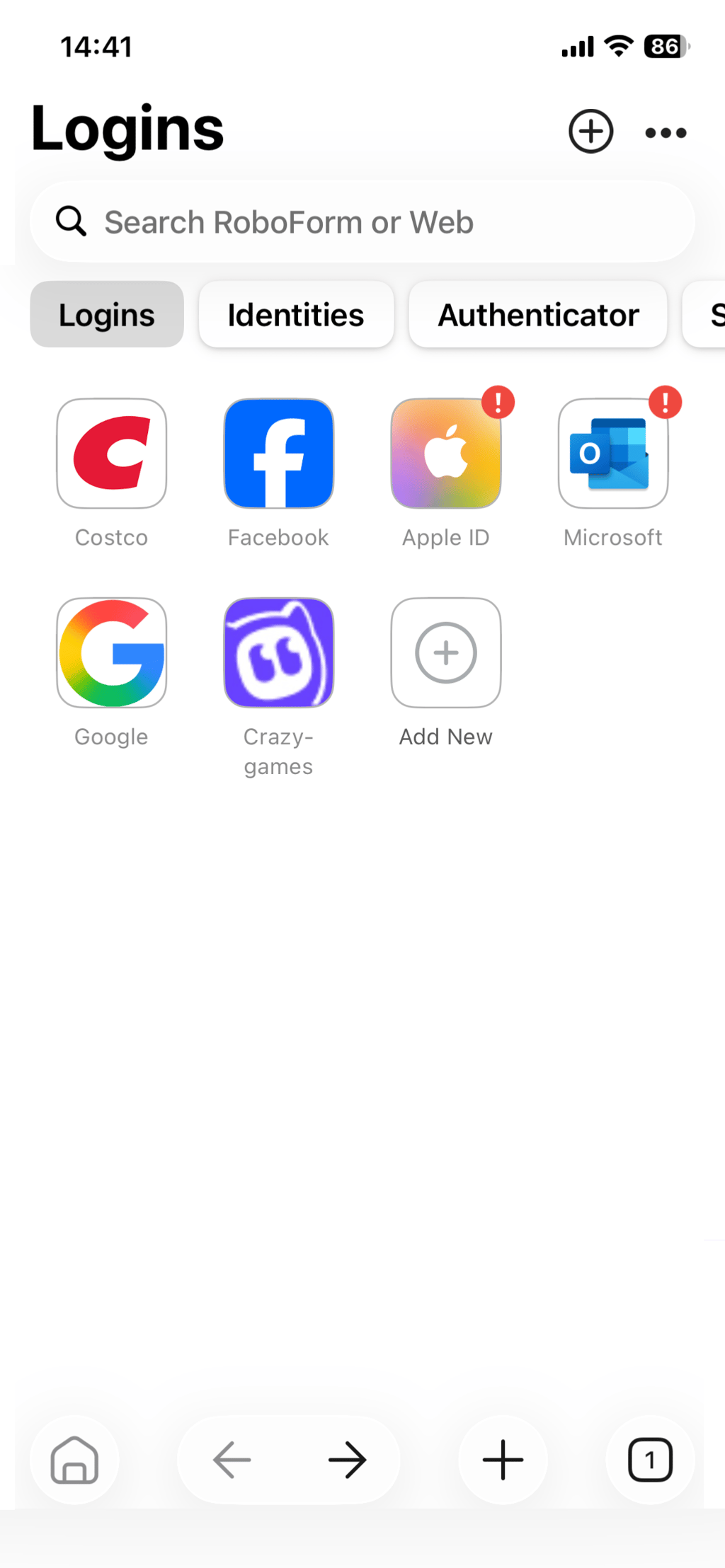
In contrast, RoboForm’s mobile apps are nowhere near as generous with features. Instead, they only come with core password management features like autofill, password generator, and password audit. However, on the bright side, the apps for both Android and iOS devices are very clean and simple.
Customer support
| NordPass | RoboForm | |
| Email support | ✅ Yes | ✅ Yes |
| 24/7 live chat | ✅ Yes | ✅ Yes (6AM–8PM Monday–Friday, and 6AM–6PM Saturday–Sunday) |
| Phone support | ❌ No | ✅ Yes (9AM–6PM Monday–Friday) |
| Written guides | ✅ Yes | ✅ Yes |
| Social media support | ✅ Yes | ✅ Yes |
NordPass’ team is available to help 24/7 via live chat and email. And, unlike most password managers, those two support options are available to everyone – including free users and even non-users. Generally, the agents are efficient, well-trained, and keen to help. For a more DIY approach, NordPass’ online help center is very detailed and accessible. Here, you’ll find tons of knowledge base articles and how-to guides on all-things password management.
As for RoboForm, your best bet is its 24/7 ticket support. Immediate replies are out of the question, but the response time is usually acceptable, especially if you're a paid customer since your requests are prioritized. Paid users also receive priority support via phone, email, and live chat; however, these services are only available during business hours, which may be inconvenient for some users. Otherwise, your other options are the Help Center, User Manual, and Tutorials.
Video review
You can also check out our video comparison of NordPass vs RoboForm. It helps you make the right choice just as well, covering features, usability, value, and more.
NordPass vs RoboForm – which one to choose?
After thoroughly comparing NordPass and RoboForm, I found that they cater to different types of users. So, depending on your needs, you can choose which provider is better for you.
NordPass is an excellent choice for those who want a premium password manager. It races to the top with its advanced and well-rounded security, robust features, intuitive interfaces, and excellent customer support.
On the other hand, RoboForm is better suited for budget-conscious users. It's secure, feature-rich, and works on many devices – a strong alternative for a cheaper price.
FAQ
Is NordPass better than RoboForm?
Yes, NordPass is better than RoboForm. Although RoboForm is a very solid password manager, NordPass offers more advanced and comprehensive security, better features, easier-to-use as well as more intuitive interfaces, and more functional mobile apps. Additionally, NordPass also has more accessible customer support with its 24/7 live chat.
Which is better for mobile: NordPass or RoboForm?
NordPass offers a more complete experience than RoboForm. While both password managers’ mobile apps are modern and responsive, NordPass’ mobile apps offer the full range of features that you’d find on its web and desktop apps. Meanwhile, RoboForm’s mobile apps only provide very basic features like autofill and password generator.
Can NordPass import passwords from RoboForm?
Yes, NordPass can import passwords from RoboForm. First, you need to export your data from RoboForm as a CSV file. Then, head to the settings in NordPass’ desktop or web app and click “Import items.” Select RoboForm from the list, upload the CSV file, and follow the instructions.
What is better than RoboForm?
NordPass and 1Password are better than RoboForm. NordPass, for example, offers better general and security features. Meanwhile 1Password is more affordable. But while these password managers are better, RoboForm is still one of the best providers in the market.