Keeper vs LastPass: comparison 2026

As of August 2026, this Keeper vs LastPass comparison shows that both password managers cover the essentials well, from secure password storage to autofill and account recovery. LastPass remains a recognizable option with a free plan and simple apps, while Keeper stands out with a cleaner security track record, broader security tools, and a more polished experience.
To decide which one is better, the Cybernews research team and I tested both providers across security, features, pricing, usability, customer support, and real-world performance. We also checked how well each password manager worked on desktop and mobile devices.
In this Keeper vs LastPass comparison, I’ll go over their main differences, strengths, weaknesses, and overall value to help you decide which one fits your needs best.
Keeper vs LastPass – an overview
Keeper and LastPass are both feature-rich password managers that are compatible with a wide range of devices. However, they have some differences. On the security side, LastPass has dealt with multiple security incidents, while Keeper has no known breaches.
This particular security aspect is essential, as Keeper has a cleaner security track record and, thus, a better reputation. Additionally, both use zero-knowledge encryption, but Keeper’s stronger security reputation and wider feature set give it an edge among the best password managers.
| Keeper | LastPass | |
| ⭐ Rating: | ||
| 🥇 Overall rank: | #4 out of #20 | #14 out of #20 |
| 🔥 Coupons: | Limited-Time offer! Keeper coupon 50% OFF | LastPass coupon for $3.00/month |
| 💵 Price: | From $1.79/month | From $3.00/month |
| ✂️ Free version: | Yes | Yes, plus 30-day free trial |
| 🔒 Encryption: | AES-256 | AES-256 |
| 🖥️ Platforms: | Windows, macOS, Linux, Android, iOS | Windows, macOS, Linux, Android, iOS |
| 🌐 Browser extensions: | Chrome, Firefox, Safari, Opera, Edge, Brave | Chrome, Firefox, Opera, Safari, Edge |

Recent Updates
Key differences between Keeper and LastPass
Keeper and LastPass mainly differ in their approach to security, pricing, and user experience. Keeper focuses on advanced security controls, a cleaner security track record, and broader feature availability, while LastPass emphasizes a beginner-friendly experience and simple password management.
Choose Keeper if:
- You prioritize strong security and a clean track record. Keeper has no known history of data breaches, offers a transparent privacy policy, and includes advanced protections like its Security Audit tool, self-destruct option, and extensive MFA support.
- You want more advanced features. Keeper includes tools like One-Time Share, developer APIs, unlimited password sharing, and broader business-focused functionality across its plans.
- You prefer a more polished and intuitive experience. Its apps and browser extensions are modern, easy to navigate, and available across major platforms, including Linux desktop and Brave.
Choose LastPass if:
- You want a generous free plan. LastPass offers unlimited password storage on its free tier, along with MFA, basic password sharing, and dark web monitoring.
- You prefer a beginner-friendly setup. Its interface is simple to get started with and works well for users looking for straightforward password management.
- You mainly need core password manager features. LastPass covers essentials like password generation, autofill, password sharing, and emergency access without overwhelming casual users.
Keeper vs LastPass: plans and pricing
LastPass and Keeper offer a similar number of personal and business plans. From the get-go, I was more impressed with Keeper’s varied plans, which you can use for different business needs and company sizes. It’s a nice feature if you ask me.
Keeper offers three plans for personal use: Free, Personal, and Family. There are also three business plans: Business Starter, Business, and Enterprise. You can try Keeper Unlimited for free for 30 days.
LastPass also has three personal use plans: Free, Premium, and Families. As well as three business plans: Teams, Business, and Business Max. All of them come with a 30-day free trial (even the Free plan gets a trial of the Premium plan).
While both providers are affordable, Keeper is notably cheaper, with plans starting from $1.79/month, which is similar to the average market price.
| Plan | Keeper | LastPass |
| Free | ✅ Yes | ✅ Yes |
| Keeper Personal/LastPass Premium | $1.79/month | $3.00/month |
| Keeper Family/LastPass Families | $3.83/month | $4.00/month |
| Business plans | From $7.00/month | From $4.25/month |
| Try Keeper | Try LastPass |
Although the free versions of both Keeper and LastPass are limited, LastPass Free allows storing unlimited passwords on one device type, while Keeper Free is limited to one mobile device and 10 records. Moreover, LastPass Free includes several useful features, such as basic password sharing, dark web monitoring, and multi-factor authentication (MFA).
The Personal and Family/Families plans are more comparable. Keeper’s Personal plan includes unlimited password storage, unlimited device sync, unlimited password sharing, MFA, Emergency Access, and 24/7 support, including live chat and phone support for paid plans. The Family plan additionally offers 5 private vaults, 10GB of storage, and folder/record sharing.
LastPass Personal plan also offers unlimited device access, MFA, Emergency Access, personal customer support, and 1GB of encrypted file storage. With the Families plan, you get 6 individual vaults, a family manager dashboard, and folder sharing.
Keeper has 3 business plans: Business Starter, Business, and Enterprise. With the entry plan, users get encrypted vaults, access from unlimited devices, activity reports, and 2FA. Enterprise users can also make use of SSO, Azure integration, SCIM provisioning, and other advanced features.
LastPass also has three business plans: Teams, Business, and Business Max. Like Keeper’s entry plan, LastPass Teams offers private vaults, shared folders, and multi-factor authentication. Business Max plan users additionally get unlimited SSO apps, customizable user management, and advanced add-ons for an extra cost.
Keeper vs LastPass: which one offers better security?
Keeper is the more secure choice due to its cleaner security track record and LastPass’ past security incidents. Upon testing both password managers, I found that Keeper and LastPass both offer strong AES-256 encryption, zero-knowledge architecture, and multi-factor authentication.
Still, Keeper’s clean breach history, extensive MFA options, transparent security documentation, and regular third-party audits make it a more reliable choice overall. Keeper also performs quarterly third-party penetration testing and maintains SOC 2 and ISO 27001 certifications.
On the flip side, my LastPass review showed that LastPass has faced serious security incidents in the past, including the 2022 incident where customer metadata and encrypted vault backup data were copied. While LastPass has since emphasized additional audits, stronger access controls, and security certifications, its past incidents still make Keeper the stronger option for security-focused users.
| Security feature | Keeper | LastPass |
| Encryption protocol | AES-256 | AES-256 |
| Zero-knowledge architecture | ✅ Yes | ✅ Yes |
| Multi-factor security | ✅ Yes | ✅ Yes |
| Biometric authentication | ✅ Yes (facial and fingerprint recognition) | ✅ Yes (facial and fingerprint recognition) |
| Security audits | ✅ Yes | ✅ Yes |
| Security track record | ✅ No known breaches | ❌ Multiple past security incidents |
Encryption
When it comes to encryption, both Keeper and LastPass use 256-bit AES encryption, which is widely recognized as the industry standard for advanced security. Additionally, they both utilize PBKDF2-SHA-256 key derivation, a technique that makes it difficult for attackers to guess your password by trying many combinations.
I also didn’t notice any big differences in their encryption approach. Keeper employs a zero-knowledge policy, ensuring that all encryption and decryption occur locally on your device. This means that only encrypted vault data is stored on Keeper's servers, and the company cannot access your data. Similarly, LastPass also carries out encryption and decryption processes at the device level, ensuring your master password remains secure.
Overall, both Keeper and LastPass offer robust encryption techniques and adhere to a zero-knowledge policy, helping protect your passwords and sensitive data.
Multi-factor security
Keeper and LastPass offer various MFA options to enhance account security; however, Keeper takes the edge by supporting multiple methods for 2FA, including TOTP apps like Google Authenticator and Microsoft Authenticator, hardware tokens, FIDO2-based keys like YubiKey, smart wearables such as Apple Watch or Android Wear, text messages, RSA SecurID, and Duo Security.
It's worth noting that while SMS verification is available, it's considered less secure and susceptible to hijacking, so I most certainly recommend opting for more secure methods.
On the other hand, LastPass also provides an extensive range of 2FA and MFA options. Its options include LastPass Authenticator, popular TOTP apps like Google Authenticator and Microsoft Authenticator, wearable authentication through watchOS or Wear OS, and hardware options such as YubiKey and RSA SecurID.
Furthermore, LastPass offers additional MFA tools for business users, including workstation MFA and business-focused authentication options.
Data storage
When comparing Keeper vs LastPass for data storage, Keeper seems better, especially if you want unlimited password storage and more flexible encrypted file storage options.
In Keeper’s case, it offers unlimited password storage. This is a great asset, especially if you’re using completely unique passwords for different accounts.
To get included secure file storage, you’ll need Keeper’s Family plan, which comes with 10GB of storage. Keeper also offers a Secure File Storage add-on, with options up to 100GB of encrypted storage for personal users.
On the other hand, LastPass offers unlimited password storage, but its approach to data storage for other files differs.
Its free version provides 50MB of secure notes file storage. Meanwhile, paying users on its Premium and Families plans get up to 1GB of encrypted file storage. But, either way, individual file size is capped at a very restrictive 10MB. That’s enough for small documents, but not really for much else.
Privacy policy
Keeper emerges as the winner in the Keeper vs LastPass privacy policies face-off. Although both services follow zero-knowledge principles, Keeper’s data collection appears more limited and straightforward. Keeper collects limited personal information for account verification and authentication, such as username or email address, and phone number. Additionally, it logs aggregate user statistics and website traffic, such as browser type and visit frequency, to help manage and improve its services.
Meanwhile, LastPass collects a broader range of personal and technical data. Its Privacy Notice states that LastPass may collect information such as authentication details, IP addresses, location, language settings, operating system, unique device identifiers, and analytics or troubleshooting data.
While both Keeper and LastPass maintain zero-knowledge principles, Keeper’s overall approach to account data collection appears more minimal and easier to understand. LastPass has also made privacy improvements, including ISO 27701 and TRUSTe privacy certifications, but its broader data collection still makes Keeper the better choice for privacy-conscious users.
Third-party security audits
When it comes to LastPass vs Keeper audits, Keeper emerges as the winner due to its broader and more transparent public security documentation. Keeper Security is highly certified in the industry and undergoes frequent security testing.
Keeper has undergone audits by independent third parties and complies with the Service Organization Control (SOC 2) framework, which helps ensure proper management of customer data. Additionally, it meets ISO 27001, ISO 27017, and ISO 27018 standards. ISO 27001 certification shows that Keeper follows a formal information security management system, covering areas like access control, documentation, internal audits, continual improvement, and preventive actions. Keeper also works with third-party experts such as NCC Group and CyberTest for quarterly penetration testing.
LastPass has also undergone independent audits and maintains several security and privacy certifications, including SOC2 Type II, ISO 27001, SOC3, BSI C5, and TRUSTe. However, Keeper provides more detailed public information about its audit and penetration testing practices, which gives it an edge in this category.
In summary, both providers have third-party audits and certifications, but Keeper’s more detailed public audit information, regular penetration testing, and clean security track record make it the stronger choice here.
-
Both Keeper and LastPass use AES-256 encryption, support multi-factor authentication, and follow zero-knowledge architecture.
-
Keeper undergoes frequent third-party audits and has no known history of data breach, unlike LastPass, which has faced serious security incidents in the past.
-
Keeper is the more secure option, offering more detailed public security documentation, regular penetration testing, and a cleaner track record for safeguarding user information.
Keeper vs LastPass: features overview
Both Keeper and LastPass provide great password importing options, multiple password recovery methods, flexible password generators, and convenient autofill features.
However, Keeper has the advantage because its password-sharing tools are more flexible on paid plans, especially with secure record sharing and One-Time Share. Meanwhile, LastPass offers basic password sharing on its free plan, but broader one-to-many sharing is reserved for Premium and Families users. Additionally, compared to LastPass, Keeper has more advanced features available with its Business plans, such as developer APIs.
See the table below for an overview of the features available with both password managers.
| Features | Keeper | LastPass |
| Password generator | ✅ Yes | ✅ Yes |
| Password sharing | ✅ Yes | ✅ Yes |
| Password importing | ✅ Yes | ✅ Yes |
| Data breach monitoring | ✅ Yes | ✅ Yes |
| Autofill | ✅ Yes | ✅ Yes |
| Developer APIs | ✅ Yes | ✅ Yes |
| Emergency access | ✅ Yes | ✅ Yes |
| Account and password recovery | ✅ Yes | ✅ Yes |
Password importing
When it comes to password importing, both Keeper and LastPass offer convenient options to save you from the hassle of copy-pasting. However, Keeper emerges as the winner in this category due to its extensive importing capabilities.
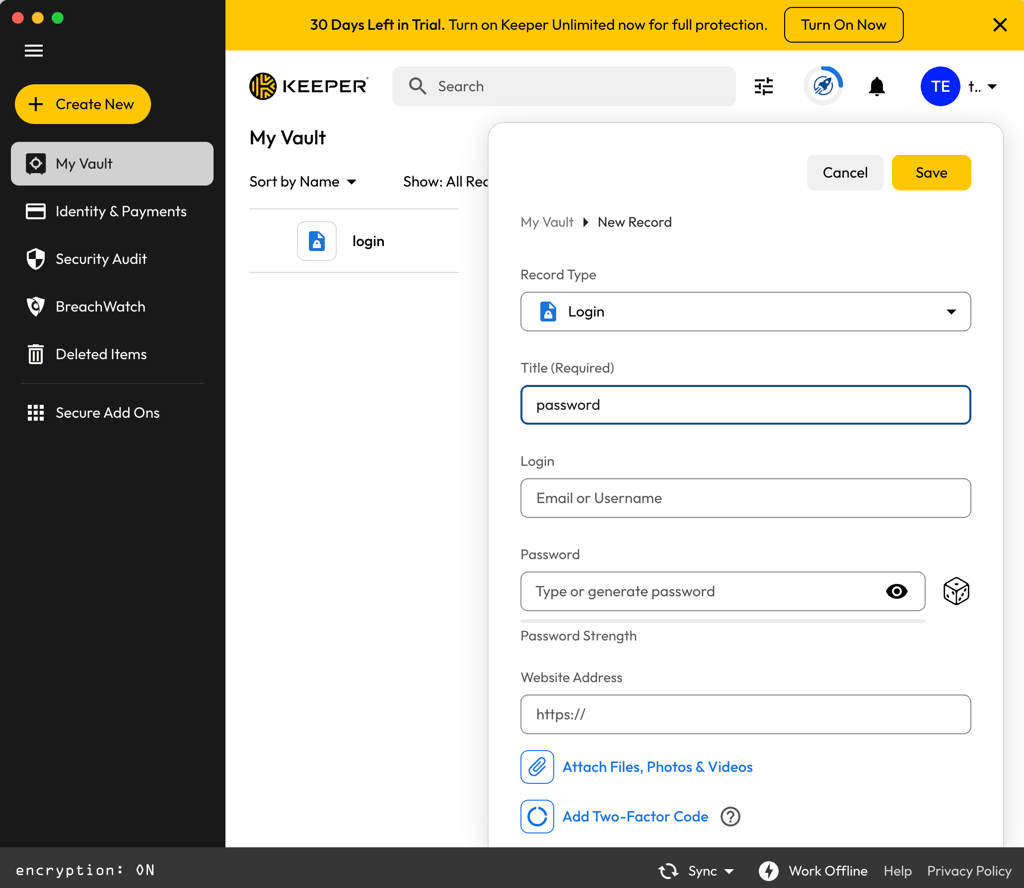
During my testing, I found that Keeper Importer automatically imports unprotected passwords from web browsers like Chrome, Firefox, Edge, and Safari. Beyond that, the password manager supports imports from other password managers, too. Among those on its vast list are LastPass, 1Password, Dashlane, EnPass, Roboform, and ZOHO. Plus, it also allows import from CSV, Excel/XLS, TSV, JSON, and Keeper Commander CLI.
On the other hand, LastPass also provides generous importing options, though Keeper’s process feels broader and more flexible overall. LastPass allows imports from browsers like Chrome, Edge, Firefox, and Safari, as well as other password managers like Keeper, Dashlane, KeePass, 1Password, Bitwarden, and RoboForm.
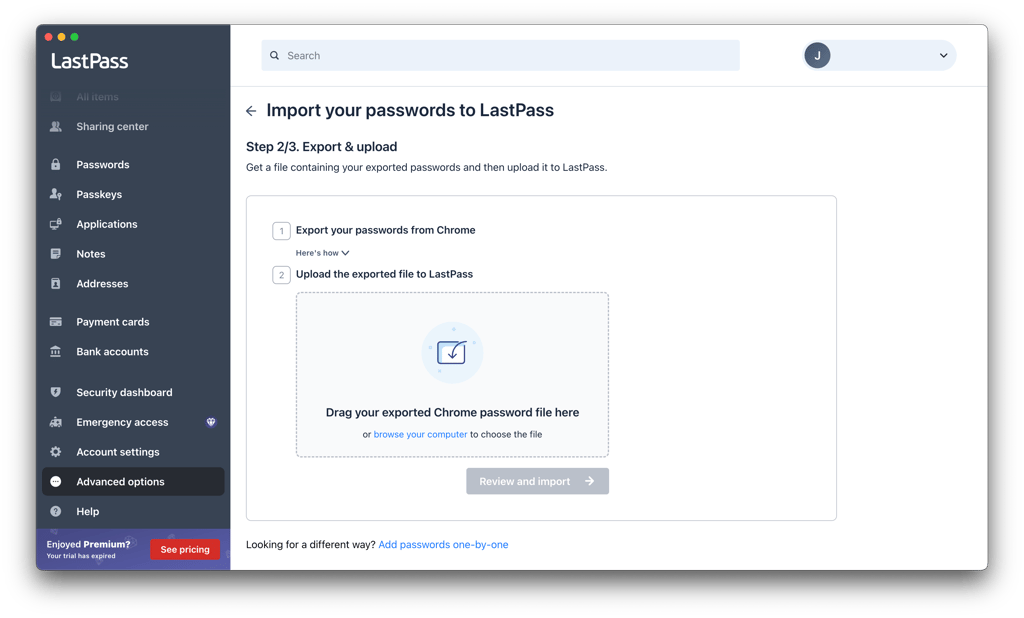
LastPass also supports CSV imports, which is useful if your previous password manager doesn’t have a direct import option.
Account and password recovery
When comparing account and password recovery options, Keeper and LastPass both offer convenient recovery methods, but Keeper stands out for me due to its flexible emergency access and secure recovery phrase system.
In Keeper’s case, you can choose up to 5 contacts who can access your password vault in the event of an emergency. This is useful for digital legacy or emergency situations.
Beyond that, Keeper uses a 24-word recovery phrase for account recovery. If you forget your master password, you’ll need your recovery phrase, email verification, and 2FA if it’s enabled to reset it.
As for LastPass, you can choose among mobile account recovery with Face ID, Touch ID, or fingerprint authentication, a password hint, a one-time password, SMS recovery, or reverting to your previous master password. However, these methods usually need to be set up beforehand, and LastPass still cannot simply reset your master password for you.
If none of the recovery methods work, you may need to reset your LastPass account and start fresh, which lets you create a new master password but deletes the data saved in your vault.
Password generator
When it comes to password generators, both Keeper and LastPass offer flexible options.
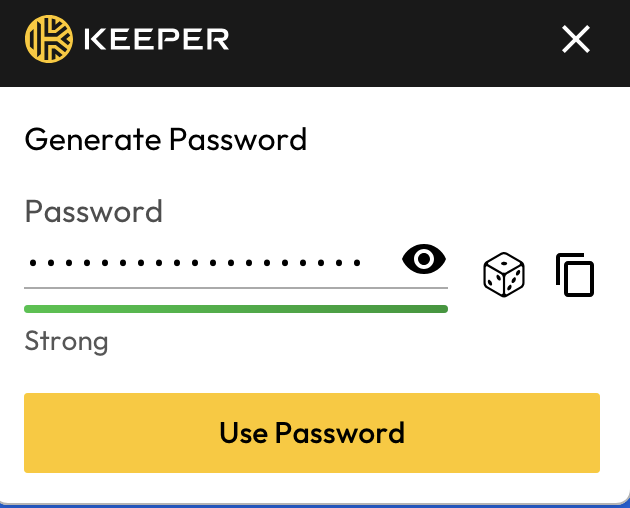
With Keeper’s password generator, you can set the length of the password as well as the types of characters – such as capital letters, numbers, and symbols. The maximum character length is limited to 99, which is more than what you’d need to create a strong password.
Likewise, LastPass’ password generator also allows the customization of password length, types of characters, and more.
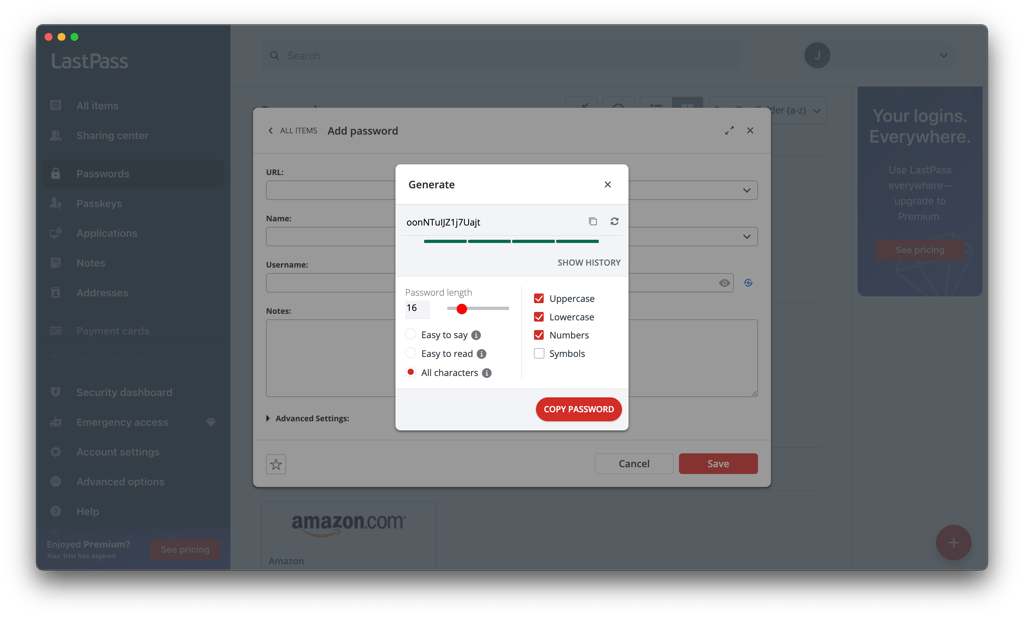
Additionally, you can also set the passwords to be easy to say or read as well. The default password length is 16 characters, but you can increase it up to 99 characters.
Password sharing
When comparing Keeper and LastPass in terms of password sharing, Keeper emerges as the better option due to its more user-friendly and secure features.
Keeper makes password sharing very easy. Its One-Time Share feature lets you share time-limited records – including passwords, other login credentials, and encrypted files – with anyone.
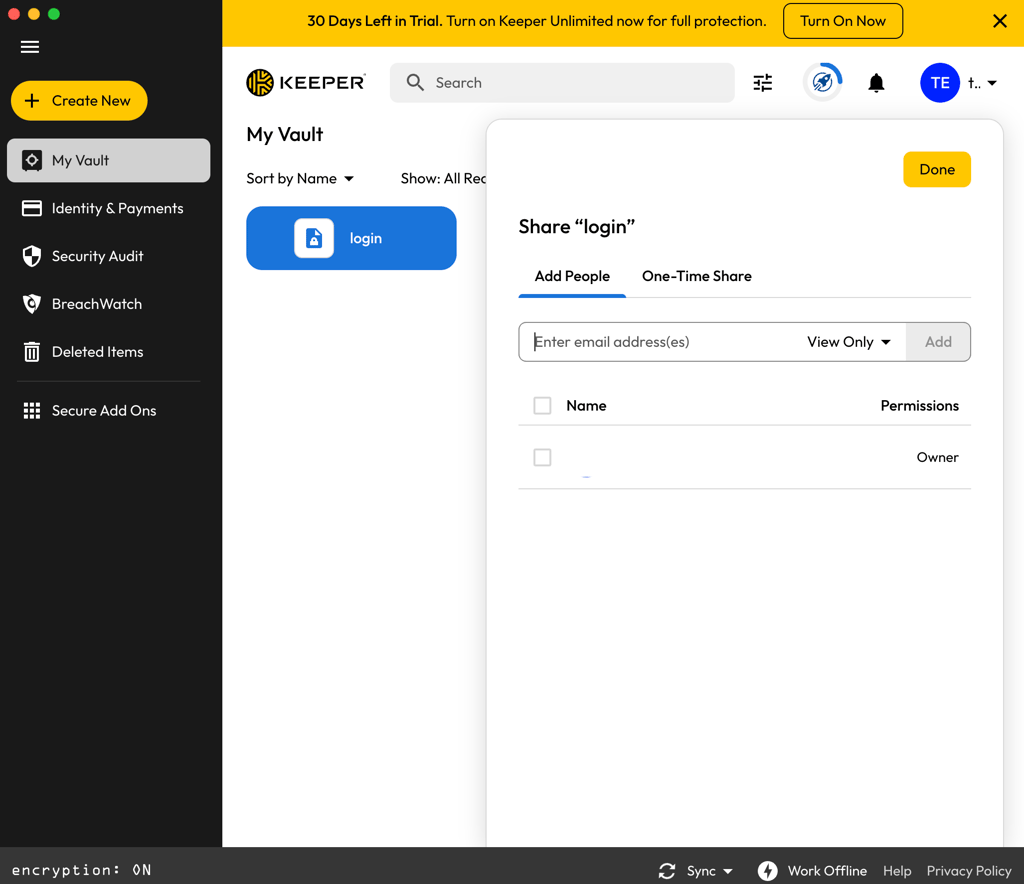
All the recipient needs for access is a link, which you can send through various channels like direct QR code scan, AirDrop, email, and SMS.
For added security, One-Time Share is also device-locked, so the link is only accessible on the original recipient’s device. All requests to the server are signed with elliptic-curve cryptography (ECDSA) – a digital signature algorithm.
LastPass also has a password-sharing feature. But whether you can utilize it (and to what extent) depends on your plan.
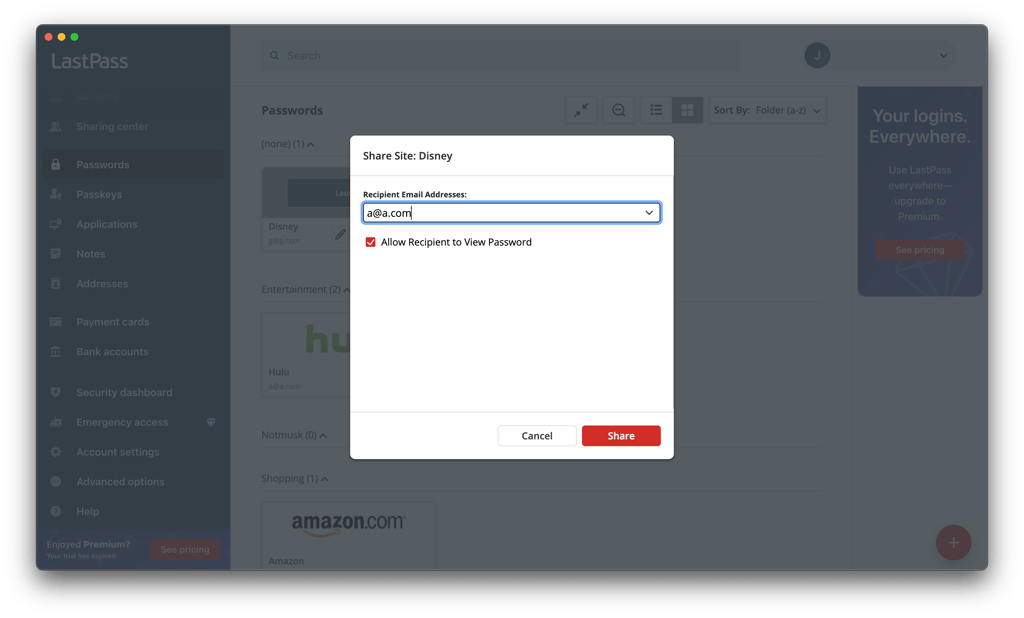
Those on its Family plan can share passwords among 6 users. Meanwhile, Teams and Business plans support shared folders for organizations, with Teams capped at 50 users.
Autofill
When comparing Keeper and LastPass in terms of autofill functionality, the result is a draw due to both providers offering robust autofill features with similar capabilities.
You’ll find that most browsers already offer the autofill feature. But a password manager’s one is usually more secure and not restricted to just passwords.
For instance, KeeperFill can enter usernames, passwords, passkeys, payment cards, addresses, and 2FA codes.
KeeperFill, can be used along with the app. Alternatively, you can download it separately, either as a browser extension or as a system tray item. For quick and easy access, you can also set up hotkeys to immediately launch KeeperFill.
Similarly, LastPass’ autofill also helps to quickly enter login credentials, payment details, and more. Additionally, you can disable the feature for certain sites, such as those that pose a risk to security.
-
Both Keeper and LastPass offer essential features like password generators, recovery options, and autofill functionality.
-
Keeper includes more advanced tools such as One-Time Share and broader business-focused functionality, giving it an edge for users who need more flexible sharing and business-focused features.
-
Overall, Keeper stands out with its flexible sharing, wider import options, and extra tools that make managing passwords easier.
Platforms, interface, and ease of use
Keeper and LastPass are compatible with all major operating systems, including Windows, macOS, Linux, Android, and iOS. In terms of browser extensions, both support major browsers like Chrome, Safari, Firefox, Opera, and Edge. However, Keeper also directly supports Brave, giving it a slight edge in browser compatibility. Moreover, up to 5 users can use Keeper’s Family plan, while LastPass Families accommodates up to 6.
| Keeper | LastPass | |
| Supported OS | Windows, macOS, Linux, Android, iOS | Windows, macOS, Linux, Android, iOS |
| Browser extension | Chrome, Safari, Firefox, Opera, Edge, Brave | Chrome, Safari, Firefox, Opera, Edge |
| Number of users | Up to 5 | Up to 6 |
In any case, Keeper still maintains its high ground with better ease of use. Its apps and extensions put user-friendliness first with intuitive design and easy navigation, making it a great password manager for families and less experienced users.
Desktop apps
When comparing Keeper vs LastPass, Keeper emerges as the winner in terms of desktop app functionality and accessibility.
Keeper’s desktop apps are available on Windows, macOS, and Linux devices. One thing you’ll notice very quickly is that its app puts user-friendliness high up on the priority list. From setup to password management, every single task and process is guided, easy, and quick.
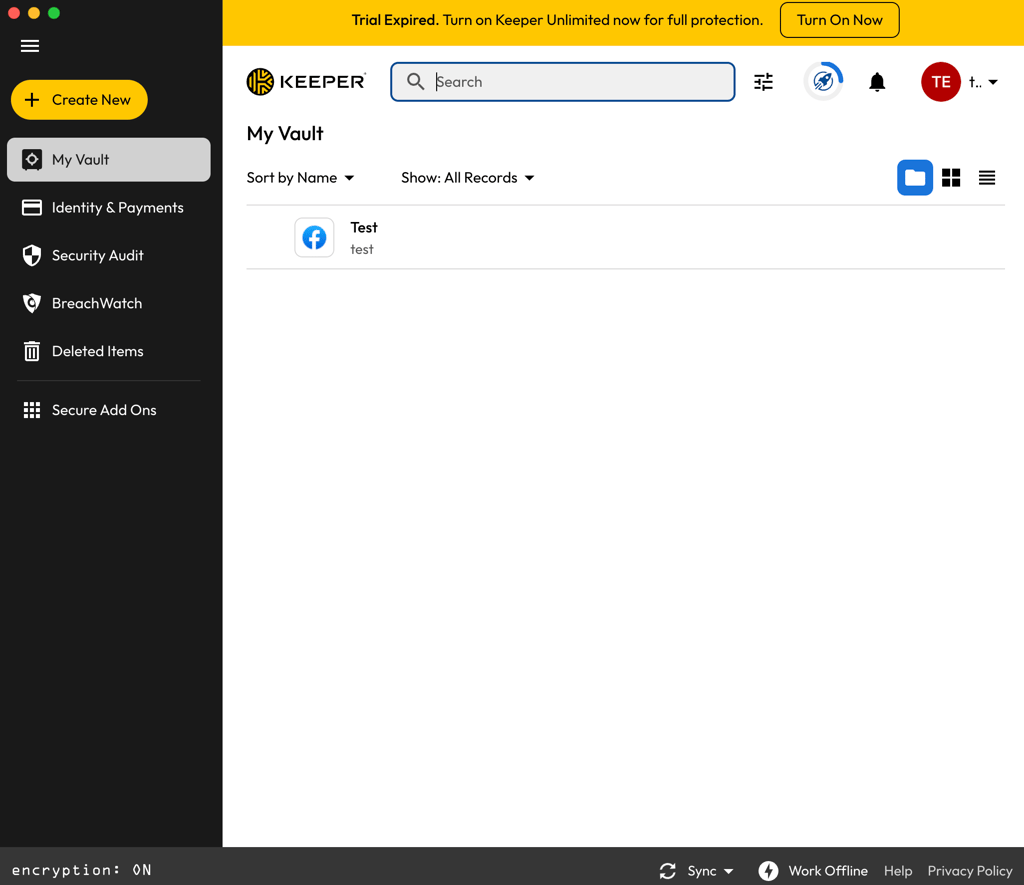
Additionally, the app’s interface is contemporary, well-organized, and a breeze to navigate. All features are neatly categorized, and you get quick access to the most important elements: vault, identity and payment details, security audit, and deleted items.
LastPass also offers a desktop app for Windows, available through the Microsoft Store or the LastPass Universal Windows Installer. However, compared to Keeper’s dedicated desktop apps for Windows, macOS, and Linux, LastPass still feels more browser-focused overall.
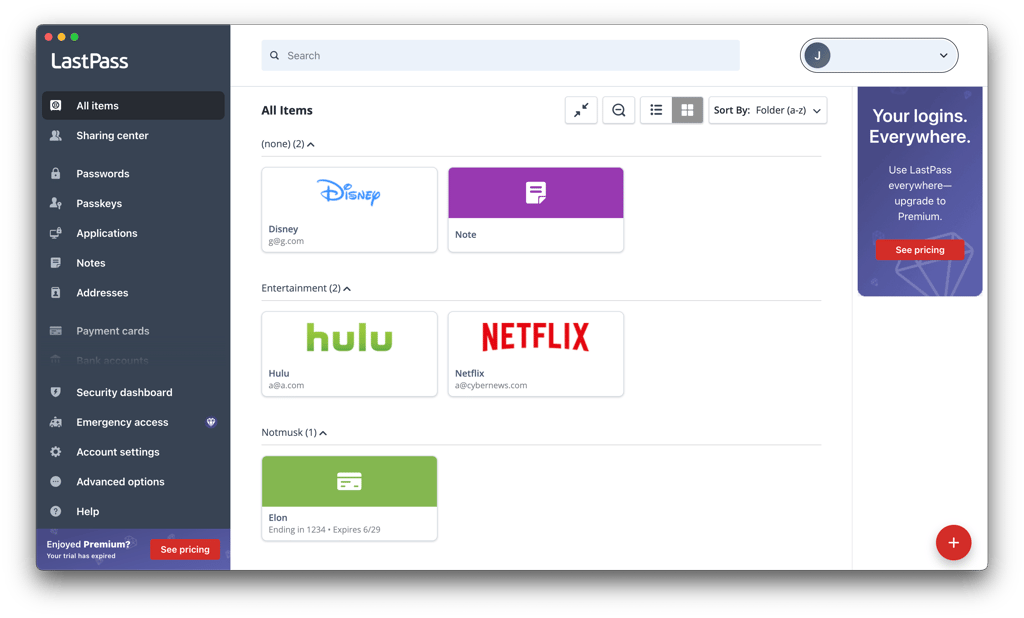
LastPass setup is easy enough and requires just a click. However, Keeper’s broader desktop app availability and more polished desktop experience make it the stronger option in this category.
Browser extensions
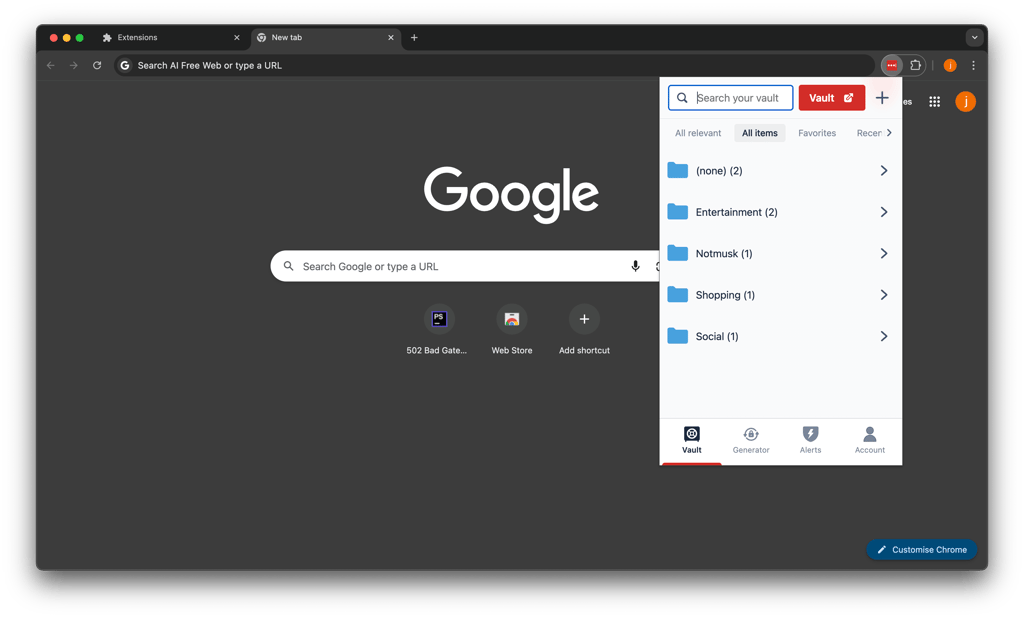
When comparing Keeper vs LastPass regarding browser extensions, both offer extensions for popular browsers like Chrome, Safari, Firefox, Opera, and Edge. However, Keeper takes the win in the compatibility section since it also offers an extension for the Brave browser.
As is standard with browser extensions, Keeper’s version works closely with the web vault. That said, the extension is still great for autofill, autosave, password generation, and quick vault access. Plus, Keeper’s extension also supports features like account switching.
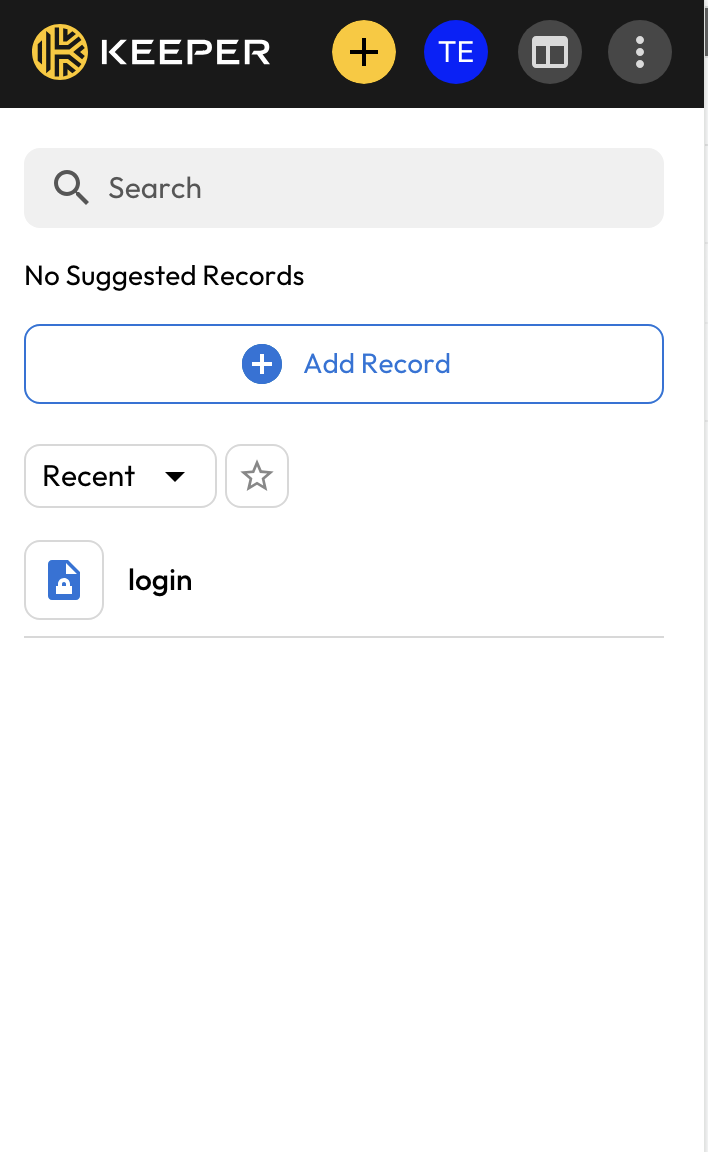
Meanwhile, LastPass offers extensions for Chrome, Safari, Firefox, Opera, and Edge. The installation process (if you can call it that) requires only one click.
Functionality-wise, it’s in the same boat as Keeper. You get autofill, autosave, password generation, and vault access, though more advanced account management is still easier through the web vault.
Mobile apps
Whether Keeper or LastPass, your mobile app setup is as easy as downloading the chosen app from either the Apple App Store or the Google Play Store.
With Keeper, its mobile apps for Android and iOS look rather different from each other, but both versions are very intuitive, visually appealing, and functional.
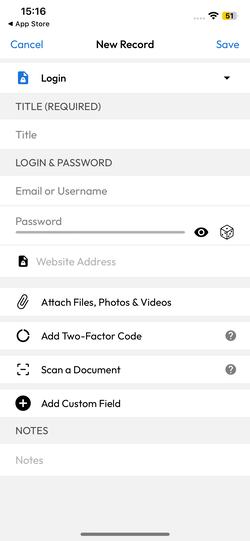
In fact, most of the same core features found in its browser and desktop apps are available here, too. The main exception is that importing passwords is still handled through the Web Vault or Desktop App.
LastPass’ mobile apps also get an A+. They offer a strong mobile experience with core features like vault access, autofill, password saving, password generation, and account settings.
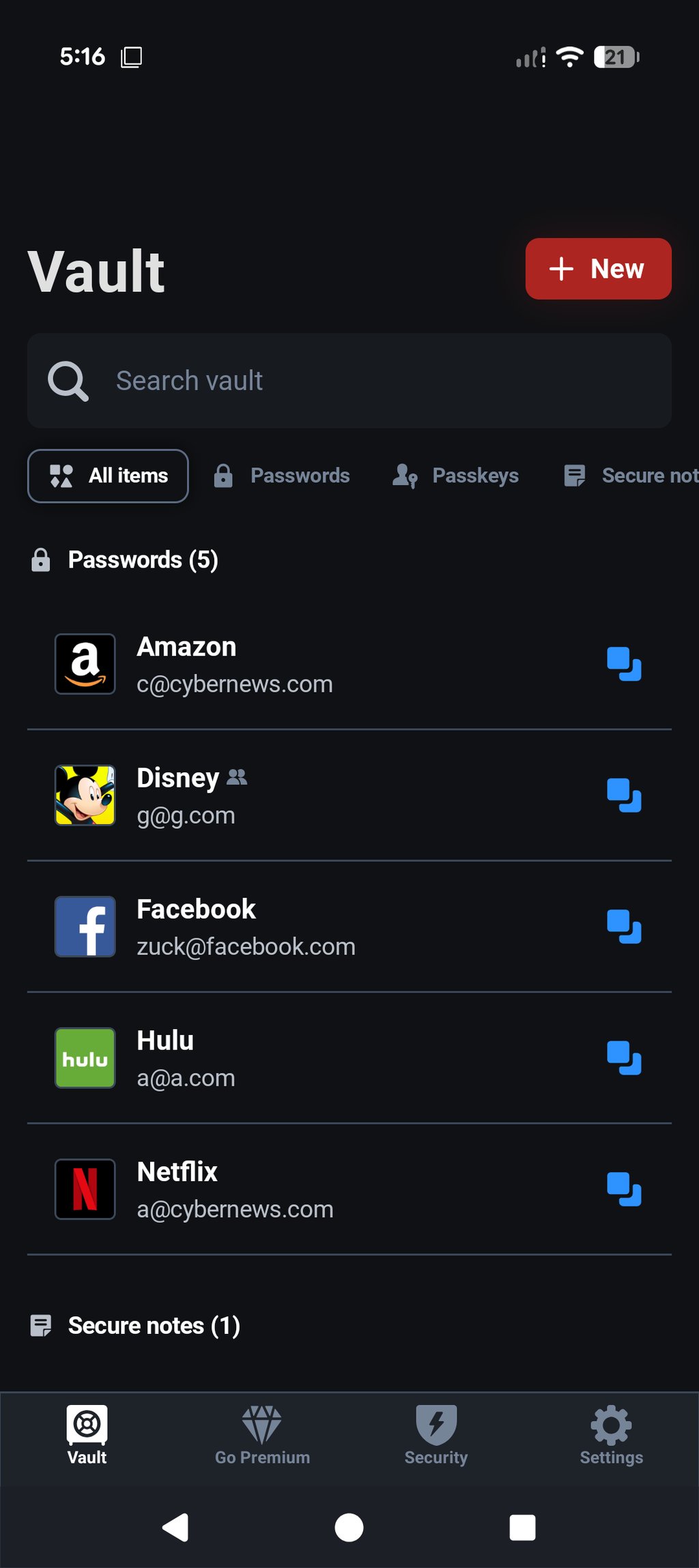
You also get mobile-friendly additions like autofill in apps, with LastPass recently improving its mobile autofill experience on iOS and Android.
-
Keeper and LastPass both support major platforms, including Windows, macOS, Linux, Android, and iOS, but Keeper adds Brave browser compatibility.
-
Keeper’s desktop and mobile apps are more intuitive, offering smoother navigation and cleaner design.
-
Overall, Keeper delivers a more seamless and user-friendly experience across platforms, giving it the upper hand.
LastPass vs Keeper: customer support
At first glance, it would appear that Keeper and LastPass both offer solid customer support options, but Keeper takes the lead thanks to its 24/7 support, paid-plan live chat, and phone support. As a result, paid Keeper users can expect more direct access to assistance, including help with more advanced technical queries. See the table for a full rundown of what to expect from each provider.
| Keeper | LastPass | |
| Email support | ✅ Yes | ✅ Yes |
| 24/7 live chat | ✅ Yes, paid plans | ❌ No |
| Phone support | ✅ Yes, paid plans | ✅ Paid users/callback support |
| Support community (forum) | ❌ No | ✅ Yes |
| Knowledge base | ✅ Yes | ✅ Yes |
| Social media support | ❌ No | ❌ No |
In my experience, Keeper’s customer support was responsive and helpful, making it easy to resolve issues quickly.
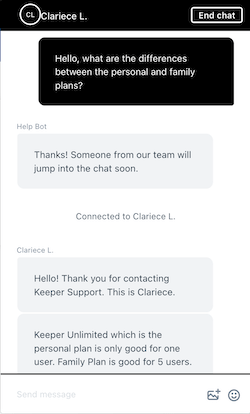
In contrast, LastPass offers more limited direct support for free users. Free users get access to self-help resources and the LastPass Community, while Premium users get personal support managed by the customer care team. LastPass also provides a chatbot, but its effectiveness can be limited if it fails to solve the issue directly.
In my experience, the LastPass chatbot redirected me to submit a ticket, and I received a reply only a day later.
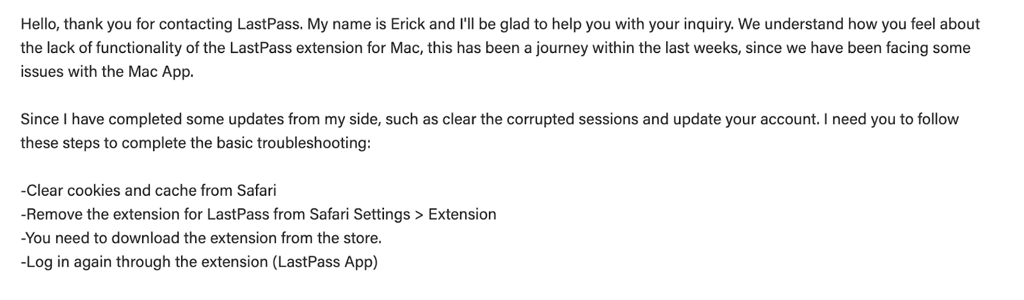
Overall, Keeper’s hands-on support approach is superior, making it a better option for users who prioritize quick and effective customer service.
Both password managers feature knowledge bases, but Keeper’s is notably more comprehensive. Its guides are categorized by personal and enterprise use, with detailed instructions and video content to aid users. LastPass also offers a knowledge base with a helpful search function, but it falls short of Keeper’s in-depth usability.
Keeper vs LastPass: user reviews
Users favor Keeper over LastPass. On G2.com, Keeper has a solid 4.6/5 rating based on 1235 reviews, with many praising it as the go-to enterprise solution. However, some negative reviews mention that certain features cost extra. Meanwhile, LastPass holds a slightly lower rating of 4.5/5 based on 2083 reviews, with mixed feedback about the mobile app and browser extension usability. Complaints also revolve around pop-ups and compatibility issues with certain websites.
On TrustPilot, Keeper’s reception is less favorable, with a 3.2/5 rating from 3163 reviews. Common criticisms include unhelpful customer support and the service being too advanced for some users. In contrast, LastPass has a significantly lower score of 1.4/5 based on 927 reviews, with many expressing frustration over subscription cancellations and ambiguous renewal practices.
While both password managers have substantial user bases, Keeper is generally considered the more reliable option, especially for enterprise users. At the same time, LastPass struggles with more severe user dissatisfaction, particularly on TrustPilot.
Keeper vs LastPass – which one to choose?
In my comparison, Keeper comes out on top in LastPass vs Keeper battle. It offers a cleaner security track record, a more straightforward privacy policy, and plenty of useful features. Keeper also works smoothly across different operating systems and browsers, making it a great choice for both beginners and more experienced users. If you want a secure and easy-to-use password manager, Keeper is worth your attention.
More password manager comparisons from Cybernews:
FAQ
Which is better for mobile: Keeper or LastPass?
Keeper is the better choice for a good mobile password manager. While both password managers offer useful mobile features and work smoothly on Android and iOS, Keeper has a cleaner security track record and a more polished mobile experience overall.
Can Keeper import passwords from LastPass?
Yes, Keeper can import passwords from LastPass. It supports password importing from various password managers, including LastPass. Plus, it also allows importing via a CSV file.