NordPass vs LastPass comparison in 2026

Both NordPass and LastPass are still popular password managers in 2026, but they don’t inspire the same level of confidence. LastPass remains a familiar choice with plenty of features, yet its reputation is still shaped by the 2022 security incident. Meanwhile, NordPass has built a cleaner track record with modern encryption, useful privacy tools, and competitive pricing. For users who want a password manager they can rely on long term, NordPass is the stronger option.
For this NordPass vs LastPass comparison, I looked at the areas that matter most in everyday use: security, encryption, pricing, apps, browser extensions, customer support, sharing, recovery options, and extra tools. I also worked with the Cybernews research team to review each provider’s transparency, public security record, and overall value.
Both services can store, protect, and autofill your passwords, but they suit different users. NordPass focuses more on simplicity, modern security, and affordability, while LastPass leans on its long-standing presence and broader feature set. Keep reading to see how NordPass and LastPass compare side by side and which password manager is the better fit for your needs.
LastPass vs NordPass – an overview
Both providers offer cross-platform support, free versions, and broad browser extension compatibility. However, NordPass outshines LastPass with a higher rating and overall rank, more affordable pricing, and advanced XChaCha20 encryption.
| NordPass | LastPass | |
| ⭐ Rating: | ||
| 🥇 Overall rank: | #1 out of #20 | #14 out of #20 |
| 🔥 Coupons: | NordPass coupon 61% OFF | LastPass coupon for $3.00/month |
| 💵 Price: | From $1.29/month | From $3.00/month |
| ✂️ Free version: | Yes | Yes, plus 30-day free trial |
| 🔒 Encryption: | XChaCha20 | AES-256 |
| 🖥️ Platforms: | Windows, macOS, Linux, Android, iOS | Windows, macOS, Linux, Android, iOS |
| 🌐 Browser extensions: | Chrome, Edge, Firefox, Opera, Safari, Brave, Vivaldi | Chrome, Firefox, Opera, Safari, Edge |

Recent Updates
Key differences between NordPass and LastPass
NordPass and LastPass are both well-known password managers that help store, organize, and autofill your credentials across devices. Both support password sharing, passkeys, multi-device sync, and security monitoring tools. However, in this NordPass vs LastPass comparison, the biggest differences come down to security history, pricing, and extra privacy features.
Choose NordPass if:
- You want a password manager with a cleaner public security record. NordPass has not experienced any known major data breaches, while LastPass suffered several security incidents, including a major breach in 2022 that involved a backup of customer vault data. If long-term trust and security transparency matter to you, NordPass feels like the safer password manager choice.
- You want more modern encryption. NordPass uses xChaCha20 encryption, while LastPass uses AES-256 encryption. While both are secure, NordPass positions itself with a more modern security architecture.
- You want extra privacy tools beyond password management. NordPass includes features like Email Masking and built-in password health monitoring. The Email Masking tool is especially useful for hiding your real email address when signing up for services or online stores.
- You want a more affordable premium password manager. In most cases, NordPass plans cost less than LastPass while still including core premium features like password sharing, passkeys, autofill, breach monitoring, and multi-device access.
- You prefer a simpler and more modern interface. During testing, NordPass felt cleaner and easier to navigate, especially for beginners. The apps are minimalistic, fast, and less cluttered compared to LastPass.
For a more detailed breakdown, read our NordPass review, where we tested its security, features, pricing, and real-world usability.
Choose LastPass if:
- You want a more mature password-sharing system. LastPass still offers flexible sharing and recovery options for families and teams, including emergency access tools that many long-time users appreciate.
- You want more advanced autofill customization. LastPass gives users deeper control over autofill behavior, saved form data, and password organization. Power users who like tweaking settings may prefer its flexibility.
- You want broader legacy compatibility. Because LastPass has been around for a long time, it integrates well with older workflows, browsers, and business environments that some users still rely on.
- You want a free plan for one device type. LastPass still offers a free version with unlimited password storage, autofill, dark web monitoring, and basic sharing, making it an option for users who don’t want to pay immediately.
Take a look at the LastPass review to see how it performed in our security, usability, and feature tests.
NordPass vs LastPass: plans and pricing
Both services cover the core password management basics, but that does not mean they bring the same value. Since both NordPass and LastPass have free and paid versions, you can compare them based on how much functionality each plan offers for the price.
| Version | NordPass | LastPass |
| Free | ✅ Yes | ✅ Yes |
| Premium | $1.29/month | $3.00/month |
| Family | $2.32/month | $4.00/month |
| Business | $3.23/month | $4.25/month |
| Check pricing | Check pricing |
However, there are still some variations between their paid products. Subscription length is an important factor that could reduce or increase the price. So, to figure out which password manager offers a better deal, you need to consider your preferences. But if you want my opinion, NordPass brings a much better value.
NordPass vs LastPass: free version comparison
| Features | NordPass | LastPass |
| Maximum number of allowed passwords | Unlimited passwords | Unlimited passwords |
| Devices count | 1 active session on 1 device | Unlimited devices of 1 device type |
| Sharing options | Not available | Basic sharing |
Both LastPass and NordPass offer free password manager versions. The free versions of NordPass and LastPass look similar at first, as neither restricts the total number of passwords that you can store. However, their device limits work differently: NordPass allows one active session on one device, while LastPass locks free users to one device type, either mobile or desktop.
LastPass allows one-to-one password sharing. Meanwhile, NordPass doesn't include sharing options for free users at all. However, it does allow some cross-platform use if you sign out of other devices. So, both versions come with particular drawbacks.
NordPass vs LastPass: paid version comparison
The paid plan is where NordPass really comes into its own. You can stay logged in on unlimited devices and share your passwords with other NordPass users. Premium also includes features like Password Health and Data Breach Scanner. In summary, NordPass helps you identify weak, reused, old, and compromised passwords.
LastPass Premium also removes the limit of connected devices. You can share items in your vault with an unlimited number of users, and it adds 1GB of encrypted file storage. Like NordPass, LastPass also adds Dark Web Monitoring, alerting you if your credentials are detected in dark web marketplaces. You're also getting emergency access options that can be invaluable when you accidentally get locked out of your account. With the paid option, you also get customer support and advanced MFA options.
In addition to standard personal plans, both providers have paid plans for businesses: NordPass Business, Teams, and Enterprise plans, and LastPass with Teams, Business, and Business Max. Both providers offer premium password management features, along with team-focused tools.
NordPass' starting price is applicable for a 10-user pack only, and if you want to add more users, you'll need to contact NordPass. Meanwhile, its Business and Enterprise plans have a 5-user minimum. The LastPass Teams plan is suitable for small businesses of up to 50 users, while Business and Business Max support unlimited users and add more advanced admin, SSO, MFA, and SaaS security features. However, both providers also offer excellent and easy-to-use management dashboards.
NordPass vs LastPass: security overview
Security is one of the most important factors when choosing a password manager, so I compared how NordPass and LastPass handle encryption, multifactor authentication, data storage, privacy, and independent security audits. While both offer strong protection for user data, they take different approaches to security and transparency, with NordPass focusing on modern encryption and LastPass continuing to rebuild trust after its 2022 security incident.
Encryption
LastPass uses AES-256 encryption with PBKDF2-SHA-256 hashing and salting. This helps protect your master password and deter potential brute-force attacks, as guessing all potential variables for the encryption key would take too long. The vault secures your credentials better than some services protect their databases.
Our NordPass review revealed that the password manager takes a different route, but it's just as secure. Instead of the more popular AES-256 encryption, it uses the XChaCha20 encryption algorithm, which is considered a modern and highly secure alternative. It’s also reported to be significantly faster on devices without AES hardware acceleration.
The credentials you save in NordPass are encrypted locally and only then uploaded to its servers so that you can access them. This part of the operation is a mirror image of what LastPass offers, with the upside that NordPass uses more modern encryption.
Multifactor security
Previously, NordPass supported only email confirmations and authentication app codes, but the company has since expanded MFA support with security keys. Currently, you can use authenticator apps or physical security keys, such as FIDO2 devices like YubiKey, to add an additional layer of protection to your NordPass account.
LastPass supports two-factor and multifactor authentication. Depending on the plan, you can use authenticator apps, LastPass Authenticator, biometric options, and hardware keys like YubiKey. However, LastPass does not treat email as a primary two‑factor authentication method in the same way NordPass does.
Moreover, LastPass lets users manage trusted devices and use stronger MFA options, with more advanced authentication controls available for business users. So, both NordPass and LastPass seem like equals in this regard.
Data storage
NordPass lets you store unlimited passwords and attach files directly to items within the app. Unlike many competitors that cap free file storage at 1GB, NordPass includes 3GB of file storage for Premium users without requiring separate tools.
During my LastPass review, I found that it takes a more conventional approach by including everything in one app. Free users get 50MB of encrypted storage, which increases to 1GB if you're a paying user. However, there’s also a downside, as each individual file cannot exceed 10MB.
So, if you're more interested in the sheer amount of data storage, NordPass would be a better option. Meanwhile, if you're all about convenience and keeping important files in the same vault, LastPass can be a good alternative.
Privacy policy
When creating a NordPass account, you will be asked for several pieces of information. For example, it requires your email and also logs the payment method you used to pay for your subscription. However, since you can buy a subscription with cryptocurrency, you can leave even fewer traces behind.
Some access logs are also collected when using the service. NordPass will know what IP addresses were used when accessing vaults. This can also be solved by a VPN or Tor Web Browser. So, while NordPass collects some data, it isn't excessive, and you can even find workarounds to hide your identity markers.
LastPass now has its own Privacy Notice, which makes it easier to see what data applies specifically to LastPass users. It specifies that it collects certain data necessary to provide its service, such as name, email address, and payment details, much like NordPass. It also mentions having measures and policies in place to ensure that only the necessary information is collected. However, some deeper security and compliance details are covered separately in the LastPass Trust & Privacy Center, so the Privacy Notice itself doesn’t include every technical detail. That’s something I’m not a fan of – the policy could definitely be more transparent.
Third-party security audits
In 2020, NordPass underwent an independent audit conducted by the Cure53 cybersecurity firm. The audit covered its cryptographic premise, source code, apps, and browser extensions, looking for weak software points that could be potentially exploited. Later, NordPass Business underwent another Cure53 audit in 2021, which covered its apps, browser extensions, Admin Panel, and Nord Account. Additionally, NordPass earned its SOC 2 Type 2 certification in 2023, proving its ongoing commitment to maintaining rigorous security standards for handling sensitive data.
LastPass also holds several security certifications, including ISO 27001, ISO 27701, SOC 2 Type II, SOC 3 Type II, BSI C5, TRUSTe, and FIDO2 Server Certification. In 2024, LastPass gained ISO 27701 certification, and in 2025, it completed an IRAP assessment. It also says it conducts third-party penetration tests and security audits, with more detailed compliance documents available through its Trust Center. However, NordPass provides more publicly accessible details about its Cure53 audit findings, while LastPass mainly presents its security assurance through certifications and Trust Center documents.
NordPass vs LastPass: feature comparison
Beyond security, both NordPass and LastPass include practical password management features designed to make everyday use easier. To see how they compare in real life, I tested password importing, account recovery, password generation, sharing, and autofill functionality to evaluate which provider offers the smoother overall experience.
Password importing
Importing a password into NordPass is as easy as it gets. Plus, it's also integrated into your initial setup process, as one of the first things you will be asked to do when starting the program is to add all your passwords. If you currently have them saved in your web browser, you can import them to your secure vault.
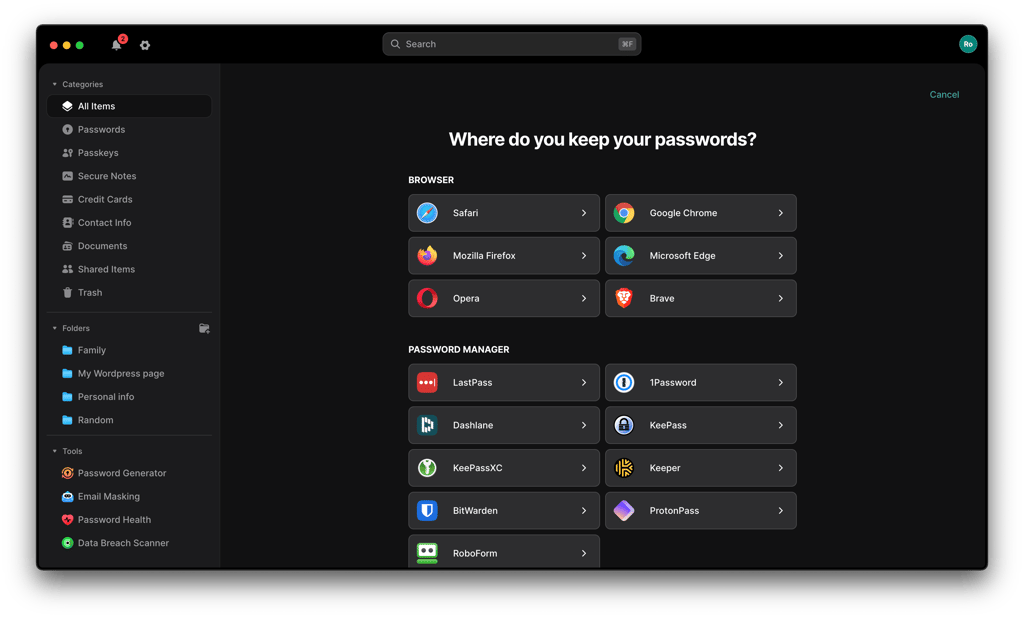
Even if you come from a different password manager, NordPass can import your passwords from LastPass, 1Password, Dashlane, and Bitwarden. This way, you can be up and running within minutes, as the whole operation isn't too complicated.
LastPass allows imports from various sources, including browsers and other password managers. You can even import from an Excel CSV file if it matches the template. Even if you use a password manager that isn't supported, you can import your data with a generic CSV file or save new logins manually as you browse.
Account and password recovery
When registering your NordPass account, you will be given a unique recovery code that you should save somewhere securely. Additionally, you can generate the recovery code directly within your NordPass app. This code serves as your backup if you forget your master password. If you lose your recovery code, customer support agents won't be able to do anything to recover your account (they don't have any access to your vault), even if your subscription has already been paid for an additional year. So, keep this in mind, and make sure that you save the recovery code somewhere safe and accessible in case of emergency.
Similarly to NordPass, LastPass offers several recovery options if you forget your master password. You can use an SMS recovery, a password hint, or a one-time recovery passcode, depending on what you set up beforehand. Like with NordPass, if you don't have a recovery option set up, you can also become locked out of your account, and customer service won't be able to reset your vault.
Password generator
You don't have to come up with a secure password on the spot and on your own. However, a lot of people reuse the same passwords over and over again, which can backfire when credentials from one data leak are reused elsewhere. To steer you clear of potential trouble, both NordPass and LastPass include password generators in their apps.
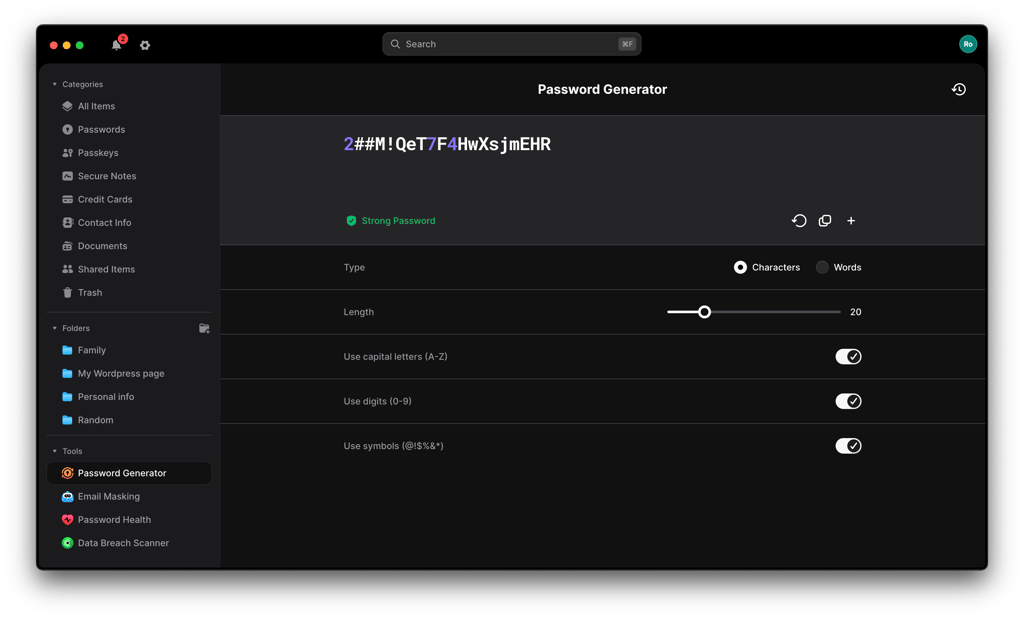
While you can customize the length and include digits and symbols, NordPass has an even better proposition. Instead of a random mess of symbols and words you could never memorize yourself, you can generate a strong passphrase instead. These tend to be much easier to remember so that you won’t be tied to your password manager.
Meanwhile, LastPass doesn't offer a dedicated passphrase generator, but it lets you customize the complexity of your passwords while still keeping them somewhat memorable. While it's not as flexible as generating full phrases, it gives users some control over password strength and composition.
Password sharing
If you're sharing a subscription service with someone else, NordPass offers a secure sharing function. You can select a particular password, type in the recipient's email address, and send the encrypted version. Once your friend accepts the shared item in NordPass, it will be visible in their shared items folder. Then, it will autofill the data when you visit the website, so you won't need to type or copy it manually. Alongside, there's an Items Transfer feature. Business and Enterprise plan users can create folders and share them with others, as well as easily reassign passwords or other sensitive information to a new item owner.
You can also share passwords with other LastPass users. You can go to your vault, select the password you want to share, type in your recipient's email address, and hit send. The password entry is then shared across two accounts, just like with NordPass.
Autofill and instant login
NordPass combines autosave, autofill, and Instant Login into a single system. Saved credentials autofill on Chrome, Firefox, Edge, and Brave, as well as iOS and Android apps. The Log in with NordPass prompt enables one-click sign-ins, streamlining access. Users can disable Instant Login for specific websites in the settings menu.
Similarly, LastPass also offers autosave and autofill, works across major browsers and mobile devices, and can automatically populate saved login credentials.
Platforms, interface, and ease of use
Here’s how NordPass and LastPass stack up in terms of compatibility and user options:
| Compatibility options | NordPass | LastPass |
| Supported operating systems | Windows, macOS, Linux, Android, iOS | Windows, macOS, Linux, Android, iOS |
| Browser extensions | Chrome, Firefox, Edge, Safari, Opera, Brave | Chrome, Firefox, Edge, Safari, Opera |
| Number of users per account | Free plan: 1 user Family plan: up to 6 users | Free plan: 1 user Families plan: up to 6 users |
Desktop apps
The whole LastPass setup takes around 3 minutes. Whether you're on Windows or macOS, there won't be a huge difference, since LastPass offers universal installers for both. Linux users can still use LastPass through browser extensions and the web vault. All you have to do is head to the LastPass website, download the installer or browser extension, and follow the setup instructions.
I've found no significant differences between its web client and its app. You can skip the app installation altogether and just use a browser add-on with a web client with no major loss in functionality. That said, I liked that the decision rests on the user. If you need the app, you can use it. If not, you can skip it.
NordPass applications for Windows, macOS, and Linux aren't that different. However, they provide many more options than its web client. With an app, importing passwords from your browser will be much easier. The main caveat is that if you're on the free version, some extra security features will be locked out – namely, Password Health and Data Breach Scanner.
Browser extensions
LastPass has had browser extension vulnerabilities in the past, including a 2019 issue that could expose the last used password through the Chrome or Opera extension. However, according to LastPass, the bug was resolved, and its browser extensions update automatically
Setting them up won't be too challenging, no matter what browser you're using. The provider’s website includes all the necessary installation guides for the most popular web browsers. As for extensions themselves, they take a bit of a different spin on the same formula that I saw on their apps. All the functions you would expect are there – but with a more minimalistic UI design.
Similarly, NordPass isn't aiming to completely change things, either. It includes support for Chrome, Safari, Edge, Firefox, Brave, and Opera and delivers the same autosave, autofill, and instant login features for a seamless user experience.
Mobile apps
Both NordPass and LastPass are password managers that work with iPhone and Android.
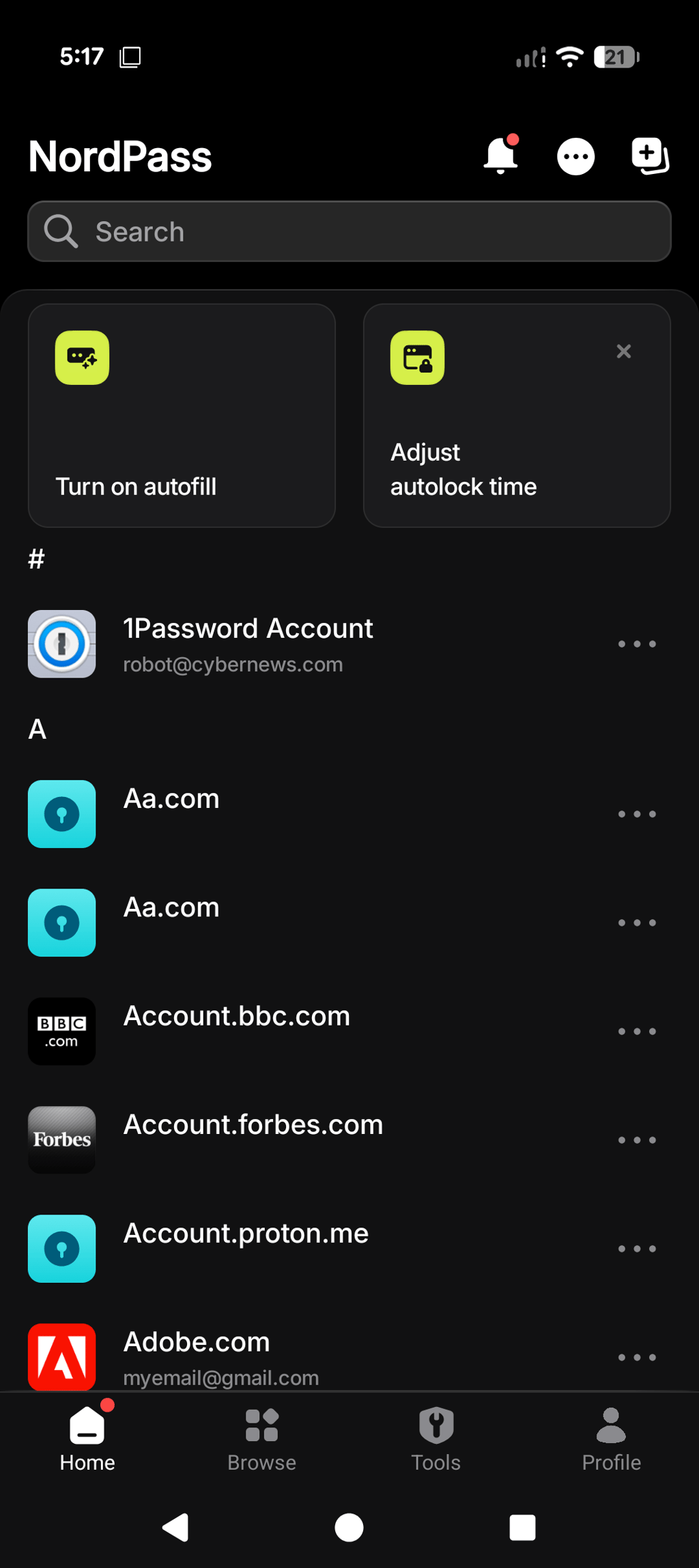
NordPass adds some changes design-wise, but the app won't be hard to navigate. You get a solid product that can replace your phone's built-in password manager, with autofill support for websites and mobile apps.
LastPass adds the same features but also some extras. For example, LastPass Authenticator can let Apple Watch users view codes and respond to authentication requests from their wrist. Plus, LastPass supports autofill for websites and apps on mobile devices.
Customer support
Here’s how NordPass and LastPass compare when it comes to helping users:
| Email support | ✅ Yes | ✅ For paid users only |
| 24/7 live chat | ✅ Yes | ❌ No |
| Phone support | ❌ No | ❌ No |
| How-to guides/knowledge base | ✅ Yes | ✅ Yes |
| Social media support | ✅ Yes | ✅ Yes |
Although password managers aren’t hard to use, you may still have questions or encounter technical issues. LastPass doesn’t offer live chat support, and email support is limited to paid users only. However, it does provide a thorough FAQ section and community support for self-help.
NordPass also has FAQs and how-to guides, just like LastPass. You can also email customer support agents or send them a message via live chat. Most importantly, neither of these options is locked behind a paywall, so even free users can ask questions and get help.
NordPass vs LastPass: final verdict
Both NordPass and LastPass deliver strong password management features and reliable protection, but each stands out in different areas.
NordPass comes out ahead with its modern XChaCha20 encryption, lower pricing, and live chat support available to all users. Meanwhile, LastPass still offers useful extras like dark web monitoring, flexible recovery options, and detailed password health insights.
Overall, NordPass is the stronger choice in 2026. Its cleaner security track record, modern encryption approach, better value for money, and more accessible customer support make it the better all-around password manager for most users.
Try NordPass if you want a secure and user-friendly password manager with strong security features and affordable premium plans.
FAQ
Is NordPass more secure than LastPass?
Yes, NordPass is generally more secure than LastPass. It uses modern XChaCha20 encryption, follows a zero-knowledge architecture, and is independently audited, offering strong protection even in its free version.
Which password manager is better than LastPass?
For many users, NordPass stands out as a better alternative to LastPass due to its modern XChaCha20 encryption, zero-knowledge architecture, independent audits, cleaner security record, and budget-friendly pricing. This is especially important after LastPass faced major security incidents in 2022.
Has NordPass ever been breached?
As of August 2026, NordPass has had no known data breaches. It uses zero-knowledge architecture, XChaCha20 encryption, and undergoes third-party audits like Cure53 to support strong security standards.
Can I transfer passwords from LastPass to NordPass?
Yes, you can transfer passwords from LastPass to NordPass by exporting your data as a CSV file. Then, simply import the file into NordPass using the import tool found under the settings menu.