Best free VPN for Mac: top free macOS VPNs tested
Our in-house cybersecurity experts and journalists, renowned for major reports like The Mother of All Breaches, conduct transparent, unbiased VPN testing and in-depth analysis.
With 750+ articles crafted based on real-world research, we empower readers to make informed purchasing decisions through first-hand expertise.
Learn more
-
NordVPN is the best free VPN for Mac because it delivers excellent speeds with NordLynx, robust security backed by an audited no-logs policy, and superb performance for real-life activities like streaming, gaming, and torrenting. The only catch is that its access is limited to a 33-day free trial period.
-
Proton VPN is the best truly free VPN for macOS because it offers unlimited data, access to 10 server locations, and top-notch security. Its Swiss jurisdiction, open-source apps, and strong encryption make it an excellent choice for Mac users who want a VPN they can use for free with no data limits.
Based on my testing, NordVPN is the best free VPN for Mac in 2026. It delivered high speeds, top-tier security with robust encryption, and a seamless experience on macOS. However, its free access is only available through a free trial and money-back guarantee rather than a permanent zero-cost plan.
If you’re looking for a truly free Mac VPN, there are several factors I think are worth considering. First, the VPN should offer strong security, including a strict no-logs policy, robust encryption, and a good overall reputation. It should also be easy to install and use on your Mac and other Apple devices, such as an iPhone or iPad. At the same time, it's important to consider common limitations, including data caps, a limited selection of servers, slower speeds, fewer features, or short free-trial periods.
Despite these limitations, free VPNs can still be useful for securing your connection on public Wi-Fi, improving online privacy, and navigating regional constraints. The key is finding a provider that offers a good balance of security, performance, and usability while keeping its limitations in mind.
Proton VPN came out as the best, permanently free VPN for Mac. Its free plan offers excellent security, Swiss jurisdiction, open-source apps, access to 10 server locations, unlimited data, and solid overall performance on macOS.
Best VPN free trials for Mac
Premium VPN free trials are a great way to use a VPN on a Mac without the restrictions of free VPN services. You get temporary access to the full features of some of the best VPNs on the market, without data caps or server limitations.
- NordVPN – best overall free VPN for Mac with a 3-day free trial and 30-day money-back guarantee
- Surfshark – best free-trial Mac VPN for unlimited devices with a 7-day free trial and 30-day money-back guarantee
- Proton VPN – reliable free VPN for Mac with a free version and 30-day money-back guarantee
Top 5 best free VPNs for Mac in 2026
After testing, I narrowed the list down to the 5 best free VPNs for Mac. I reviewed each provider in detail to determine where it stands compared to other VPNs on this list. Read on to see the full reviews and learn more about each free Mac VPN.
| Free Mac VPN | Rating | Servers | Compatibility | Streaming services | Description |
| Proton VPN | Servers in 10 countries | macOS 10.12 or later | Netflix, BBC iPlayer, YouTube, HBO Max, Disney+ | The overall best free VPN for Mac | |
| PrivadoVPN | - | Servers in 10 countries | macOS 10.14 or later | Netflix, BBC iPlayer, YouTube, HBO Max, Disney+ | The best free Mac VPN for streaming |
| Windscribe | Servers in 10 countries | macOS 13 or later | Netflix, BBC iPlayer, YouTube | The best free macOS VPN with useful features | |
| Hotspot Shield | Servers in 3 countries | macOS 10.15 or later | Netflix, BBC iPlayer, YouTube, Amazon, Hulu, and more | The best free Mac VPN for casual browsing | |
| TunnelBear | Fastest server option | macOS 11 or later | Netflix, BBC iPlayer, YouTube | The best easy-to-use free VPN for Mac |
1. Proton VPN – best free VPN for Mac in 2026

-
Security and privacy
-
Bandwidth speed and servers
-
User reviews
-
Personal experience
Proton VPN is the best truly free VPN for Mac in 2026, because it offers unlimited bandwidth without the short-term limits of typical VPN trials. With a verified no-logs policy, no history of data breaches, and an ad-free experience, it offers a reliable, privacy-focused option for everyday Mac users.
Why Proton VPN is the best free Mac VPN
Proton VPN is the best free VPN for Mac mainly because of its security. While many free VPNs compromise security in one way or another, Proton VPN doesn’t. Even with the free version, you get an audited no-logs policy, and can enjoy the privacy benefits of Swiss jurisdiction and open-source apps.
The provider uses industry-standard AES-256 and ChaCha20 encryption to protect your browsing and keep your activity private. In my tests using DNSLeakTest.com and ipleak.net, I didn’t detect any IP or DNS leaks, which means it successfully protected my real IP address.
Another thing I liked is that, unlike many free VPNs, Proton VPN doesn’t show ads. That’s a big advantage. It also comes with unlimited data, which is surprisingly rare among free VPNs. On top of that, the Mac app is intuitive and easy to use, something many free Mac VPNs struggle to get right. I also appreciate the built-in kill switch, which helps protect your connection if the VPN drops unexpectedly, and the Stealth VPN protocol, which obfuscates the VPN connection.
Proton VPN free plan limits
Like any free VPN, Proton VPN comes with some limitations. Probably the biggest one is its server selection. The free plan gives you access to servers in only 10 countries: Canada, Singapore, the Netherlands, Mexico, Norway, Switzerland, Romania, the US, Japan, and Poland. Moreover, you can’t manually choose which one you connect to. You can keep reconnecting until you land in the country you want, but you have to wait one minute between attempts, and you may still end up in the same location.
You also miss out on some premium features. For example, the NetShield ad blocker, Secure Core servers, and port forwarding. Paid users also get access to faster servers, which tend to be less congested.
Is Proton VPN good for streaming on Mac?
Proton VPN isn’t the best option for streaming on Mac. Since the free servers are available to everyone, they’re often overcrowded and already flagged by streaming platforms. In my tests, I tried accessing Netflix Japan, but it didn’t work. I received a VPN detection error. When I tried to reconnect to get a different IP address, I was assigned another location altogether and had to wait a minute before I could switch locations.

Based on my experience, I wouldn’t recommend Proton VPN's free plan for streaming, particularly because of its tricky server selection process. If streaming is your priority, I'd choose a free VPN that lets you manually select its free server locations, such as PrivadoVPN.
Proton VPN free version speeds
I tested all providers between 6 AM and 8 AM UTC, using a baseline speed of 350Mbps for both download and upload.
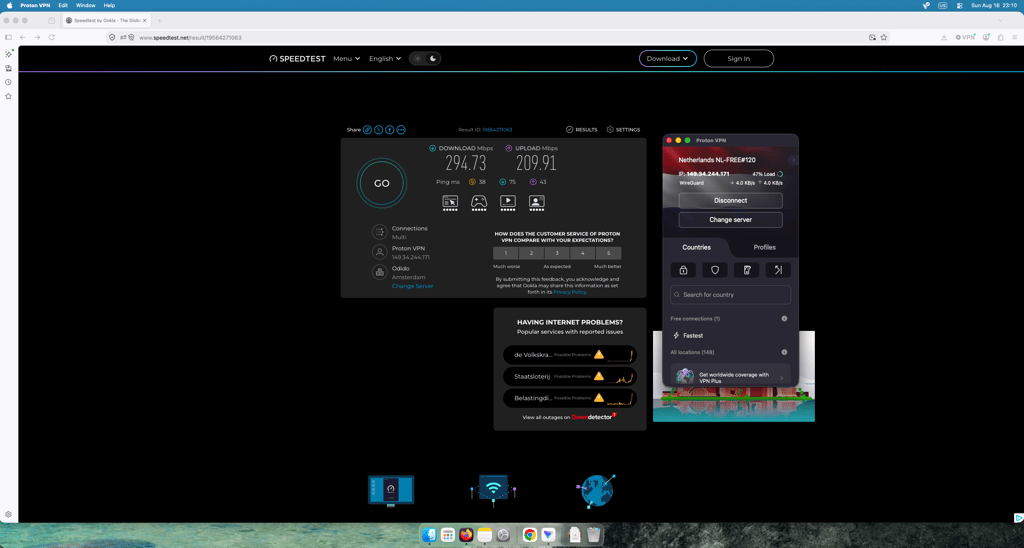
Proton VPN gave me somewhat mixed results. When connected to its Netherlands server, I got 295Mbps download and 210Mbps upload, meaning it reached around 84% of my baseline download speed and 60% of my baseline upload speed. The upload speed was still the highest out of all free VPNs I tested with a Netherlands location.
Proton VPN also had the lowest ping at 38ms, compared with Privado’s 133ms. This makes Proton VPN a good option for uploading files and video calls, while the relatively slower download speed can cause delays during everyday activities such as browsing, streaming, or downloading files.
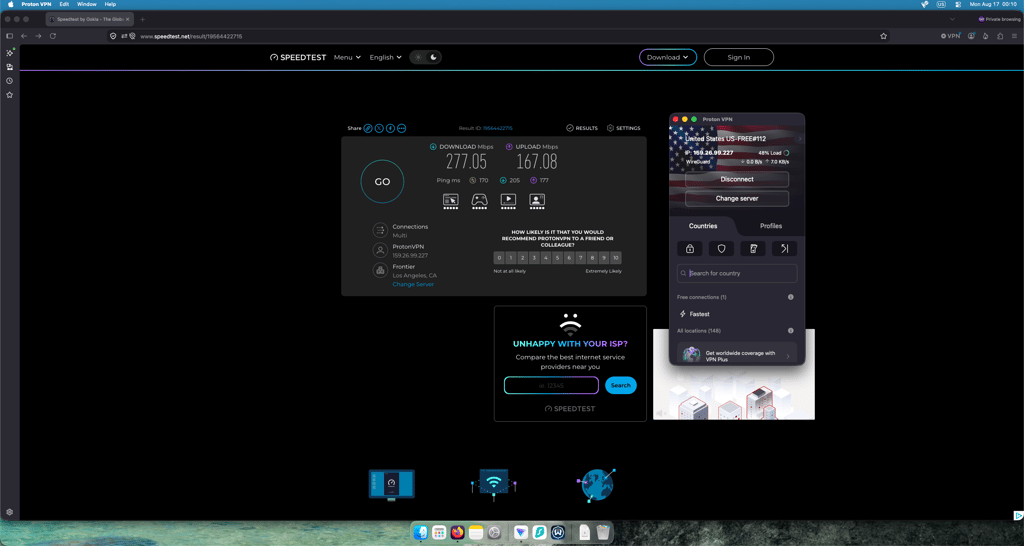
The results were more impressive when I connected to Proton VPN’s US server in Los Angeles. It gave me the fastest US download speed at 277Mbps (79% retention), despite Los Angeles being the furthest US server location tested. The upload speed was also strong in the US at 167Mbps, second only to Windscribe. The main downside was the 170ms ping, although this is understandable given the server’s distance.
Overall, I would consider Proton VPN a good choice for browsing and other everyday activities when connected to a US server, especially given how well it performed in terms of download speeds.
Who should choose Proton VPN?
Despite its limitations, Proton VPN is an excellent free VPN for Mac. I recommend it to anyone looking to protect their daily browsing on macOS without paying for a subscription. It's especially well-suited for privacy-conscious users who want strong security, unlimited data, and a trustworthy provider. If your main goal is secure web browsing, online banking, or using public Wi-Fi safely, Proton VPN is the best free option available.
2. PrivadoVPN – best free VPN for Mac streaming

-
Security and privacy
-
Bandwidth speed and servers
-
User reviews
-
Personal experience
PrivadoVPN is the best free streaming VPN for Mac, offering 10 free server locations, solid speeds, and strong security. It’s a great choice for Mac users who want a free VPN for everyday browsing and streaming, because it reliably bypassed geo-blocks on popular platforms during my tests, including Netflix, BBC iPlayer, and Hulu.
Why PrivadoVPN is the best fast free VPN for streaming on Mac
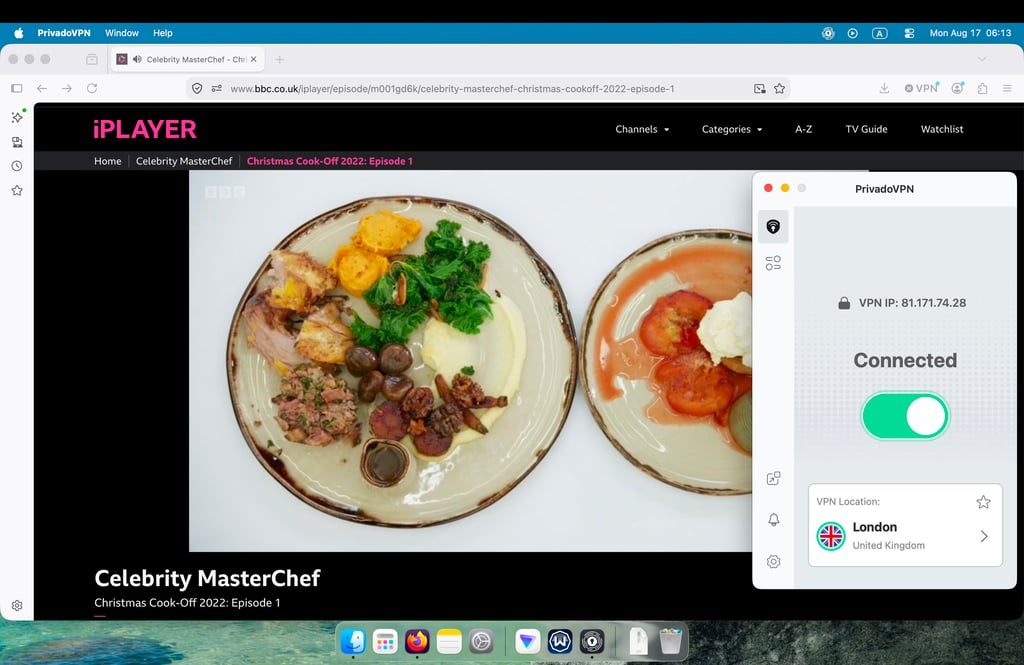
I chose PrivadoVPN as the best free Mac VPN for streaming because it offers 10 locations and, unlike Proton VPN, lets you choose which one to connect to. This means you can access streaming libraries from India, the Netherlands, Germany, France, Brazil, the UK, Argentina, the US, Canada, and Mexico, which I think is a really solid selection. You can stream BBC iPlayer, Amazon Prime Video, and libraries from Netflix, Disney+, and HBO Max.
During my testing, it was also the only VPN that reliably unblocked streaming services. I tried my luck with Netflix, BBC iPlayer, and Hulu, and PrivadoVPN worked with at least 70% reliability across the services I tested. It also didn’t have any IP or DNS leaks, and the kill switch allowed me to stream without worrying about my connection being exposed if the VPN dropped. Plus, the VPN itself doesn’t have any ads, which is nice.
The main limitation is its 10GB-per-month data cap. If you use this VPN only for streaming, you could watch around 10–14 hours of Netflix per month in standard definition. Of course, that won’t be enough if you like to binge-watch a lot of shows, but in that case, I’d honestly recommend getting a paid streaming VPN.
If you just want to watch a season of a show each month, though, PrivadoVPN can be a nice option. It also helps to set Netflix to Data Saver mode, which can make the 10GB allowance stretch further.
PrivadoVPN free plan limits
One of the biggest limitations of PrivadoVPN is its 10GB monthly data cap. Especially on Mac, this won't last long if you stream or download frequently. Another limitation is that it offers access to 10 countries.
The free plan is also missing some features. You don't get access to the ad blocker or Phantom Mode, which blocks trackers and ads, detects risks, and enhances security. To use these features, you'll need to upgrade.
PrivadoVPN free version speeds
I tested PrivadoVPN in the same environment as the other providers, using a baseline speed of 350Mbps for both download and upload. The results were somewhat mixed.
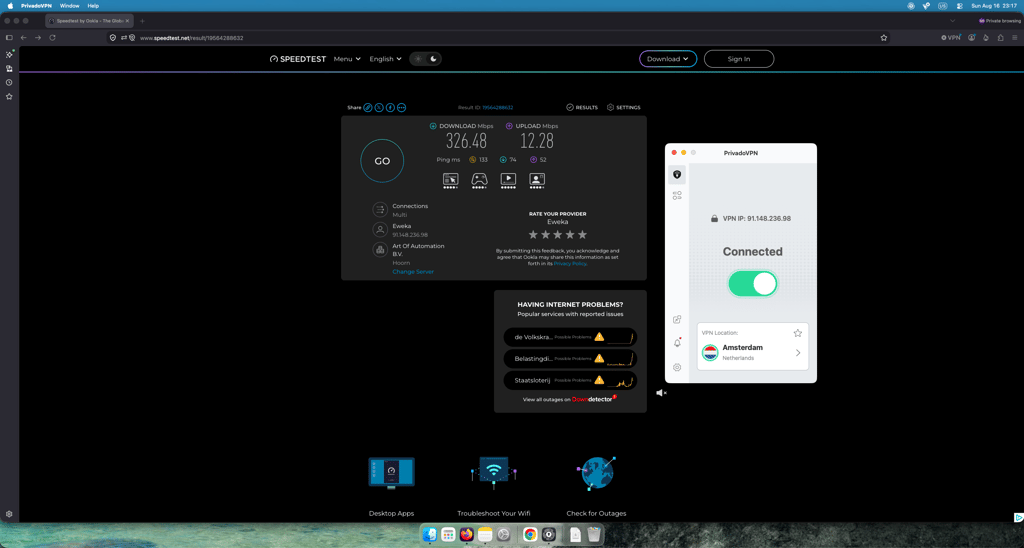
I started with its Netherlands server, where I got 326Mbps download speed, or about 93% retention. This was one of the better results among providers with a free Netherlands location. However, the 12Mbps upload speed (3% retention) was by far the lowest, while the 133ms ping was also the highest. This makes the Netherlands server less appealing for activities that rely on fast uploads or a responsive connection, although the download speed was still quite good.
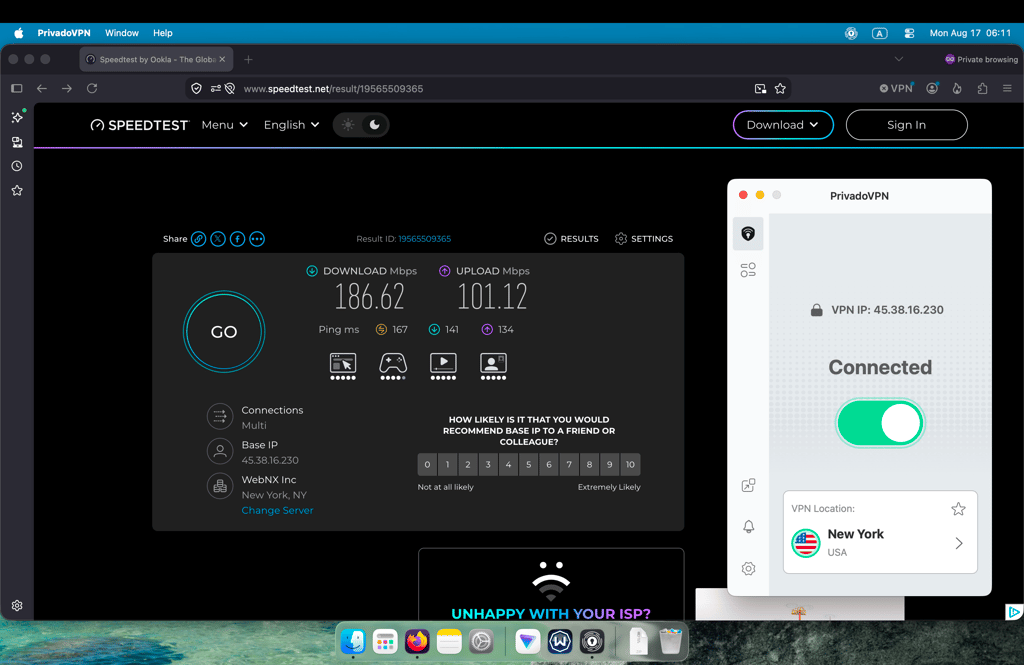
The US results were average. When connected to the New York server, I got 186Mbps download speed (53% retention), the slowest US download result in my tests, though it was not far behind Hotspot Shield. The 101Mbps upload speed was somewhere in the middle, while the 167ms ping was also fairly average and slightly lower than Proton VPN’s 170ms.
Overall, I wouldn’t consider PrivadoVPN the fastest option I tested, but its speeds were still perfectly usable for browsing and streaming.
Who should choose PrivadoVPN?
I recommend PrivadoVPN to anyone who wants to stream securely on a Mac without paying for a premium VPN. In my tests, it unblocked major streaming services like Netflix and BBC iPlayer, while maintaining solid speeds. It also offers strong security, a no-logs policy, and strong encryption, and is based in Switzerland.
3. Windscribe – best free VPN for Mac features

-
Security and privacy
-
Bandwidth speed and servers
-
User reviews
-
Personal experience
Windscribe is a generous free VPN for Mac users who want useful features without paying. Its free plan includes 10GB of monthly data, multiple server locations, built-in ad and tracker blocking, and strong encryption, making it a solid choice for everyday browsing, casual streaming, and protecting your connection on a Mac.
Why Windscribe is the best feature-rich free VPN for Mac
Windscribe really impressed me with its features during testing. While many free or freemium Mac VPNs lock advanced tools behind a paywall, Windscribe seems committed to offering most of its features for free.
During testing, I found options such as Always On VPN and Allow LAN Traffic particularly useful. Always On VPN can keep the VPN connection active when you're using your Mac on an unfamiliar network, while Allow LAN Traffic lets your Mac continue communicating with devices on the local network when the VPN is active. For example, that can be helpful if you're connected to a VPN at home but still need to access a local printer or another device on your network.
I also came across several features designed to bypass censorship if you’re living or traveling in countries like China, Russia, and Iran. For example, the Circumvent Censorship setting includes custom configurations for restrictive networks, while Server Routing lets you choose different routing options to improve connection reliability.
Another standout feature is R.O.B.E.R.T., which is available even on the free plan. It lets you block malware, ads, trackers, and specific types of content, including gambling, adult content, and crypto-related websites.
Windscribe free plan limits
The biggest limitation of Windscribe's free plan is the 10GB monthly data cap. It's enough for light daily browsing but not ideal for streaming, gaming, or other data-heavy activities. Like PrivadoVPN, Windscribe offers 10 server locations on its free plan.
Windscribe free version speeds
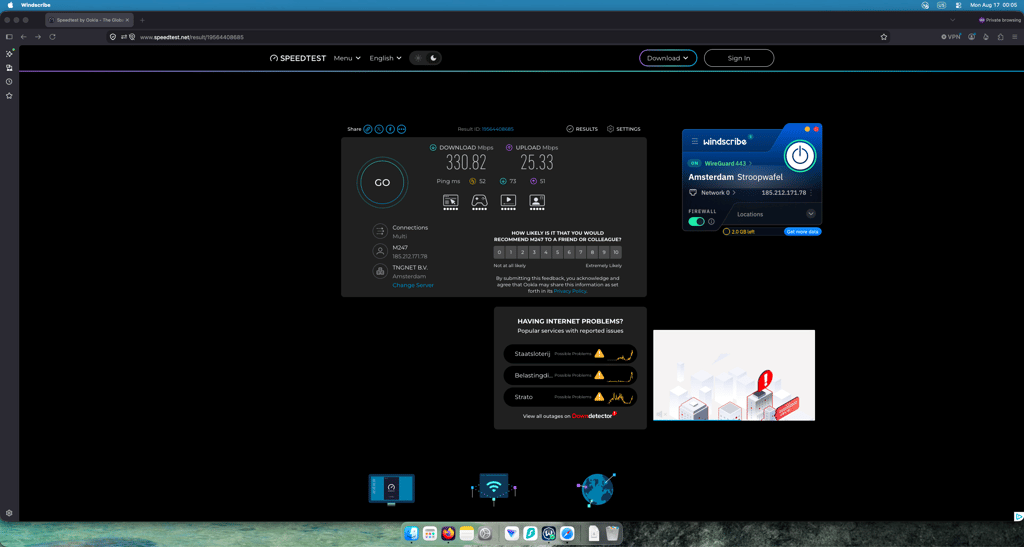
Windscribe performed particularly well on its Netherlands server. I recorded 331Mbps download speed (95% retention rate), which was the fastest result I got in the Netherlands. Upload reached 25Mbps, while ping was 52ms. Both were somewhere between the Proton VPN and PrivadoVPN results – not the strongest, but not the weakest either. Overall, the Netherlands server delivered strong download speeds and a reasonable balance of speed and latency.
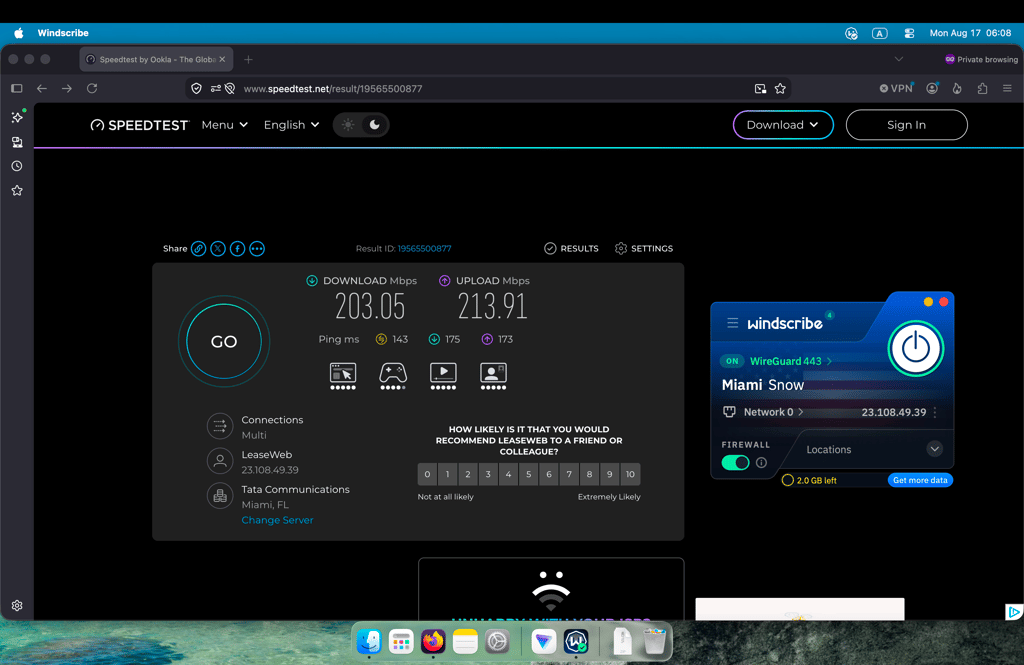
For the US, I connected to Windscribe's Miami server. The download speed was 203Mbps (58% retention), which was still solid, while the upload speed reached 214Mbps (61% retention), the highest one among all the US server tests. With a 143ms ping, latency was noticeably higher, but the combination of download and, especially, decent upload speed makes Windscribe a solid option for US torrenting.
Is Windscribe good for streaming on Mac?
Windscribe isn't the best choice for streaming on Mac. While I was able to unblock Netflix UK, streaming services such as BBC iPlayer and Hulu didn't work reliably, with constant VPN detection errors. During testing, I also experienced noticeable buffering, occasional lag, and drops in video quality.
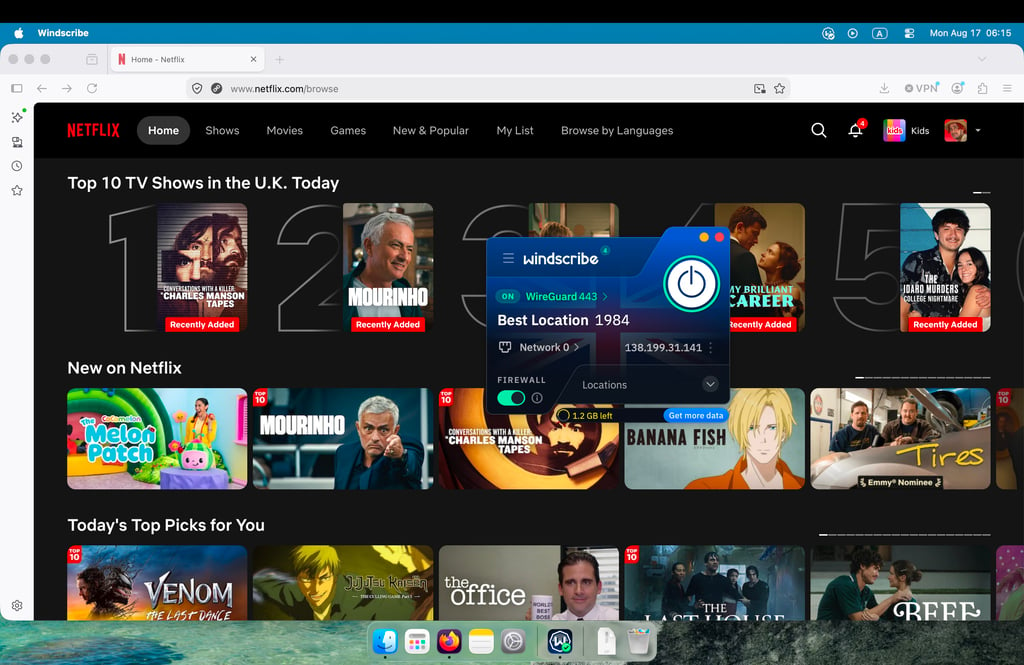
Windscribe also limits users to 10GB of data per month. While that's enough to watch a regular season of a show, the combination of unreliable unblocking and inconsistent streaming performance means I wouldn't pick Windscribe primarily for streaming.
Who should choose Windscribe?
I think Windscribe is best for users who want plenty of features for basic browsing. It's especially useful for people in countries with internet restrictions, thanks to its tools for bypassing censorship. It's also a great option if you want to improve your browsing experience, since the built-in ad blocker, tracker blocker, and content filtering features add extra value.
4. Hotspot Shield – best free VPN for casual Mac browsing

-
Security and privacy
-
Bandwidth speed and servers
-
User reviews
-
Personal experience
Hotspot Shield is a free VPN for Mac for everyday browsing that’s easy to set up and use. Its free plan offers a simple way to protect your connection while browsing on a Mac, with limited speeds and access to a smaller selection of servers. It’s a good option for casual browsing if you want to protect yourself while on public Wi-Fi.
Why Hotspot Shield is a good free VPN for quick Mac protection
Hotspot Shield is a good free VPN for quick Mac protection because it's very easy to use. You can connect in just a few seconds by clicking the big connect button. It's also secure, with AES-256 encryption and a strict no-logs policy.
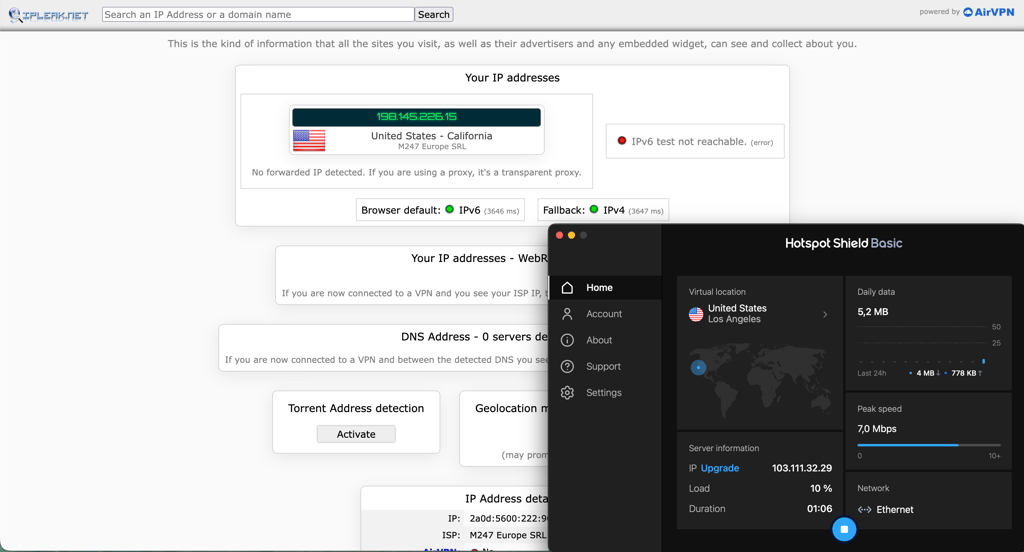
I also performed an IP leak test and detected no IP leaks, confirming that my real IP address remained protected while connected to the VPN. The free version comes with no data limits, so you can browse as much as you want, and it includes auto-connect, helping you stay protected on your Mac at all times.
Hotspot Shield free plan limits
HotSpot Shield is quite limited. While it doesn't have data caps like many other free VPNs, the free plan only lets you choose from 3 countries (the UK, the US, and Singapore), and speeds are restricted, though it isn’t specified to what extent. What I found surprising, and what really made Hotspot Shield rank lower in my lineup, is that the free version doesn't include a kill switch, something I consider the bare minimum for any VPN. Also, the paid version doesn't offer servers optimized for streaming or gaming.
Hotspot Shield free version speeds
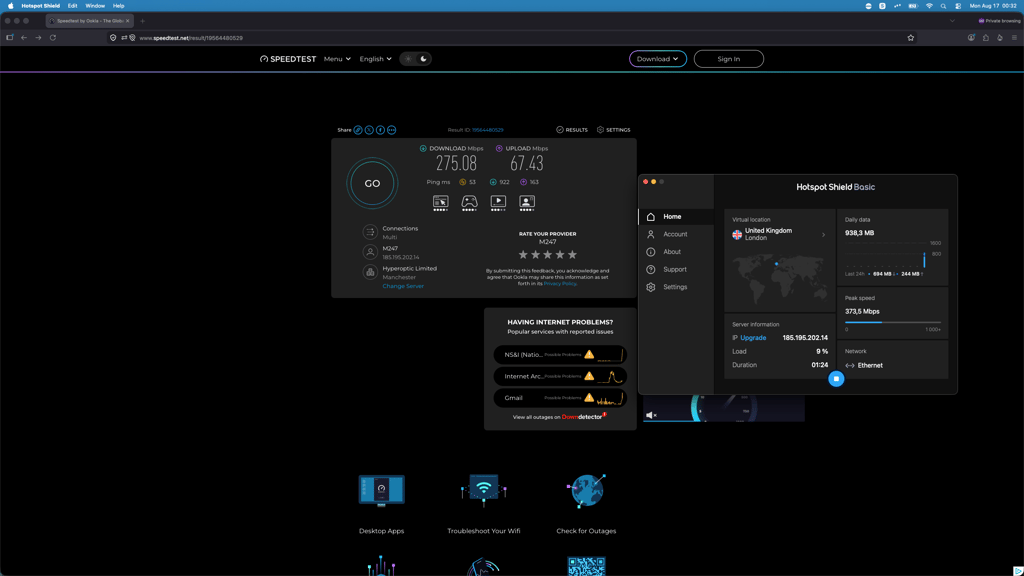
Testing Hotspot Shield was a little tricky, since it doesn’t offer a free server in the Netherlands. I tested its UK server instead, which is geographically a little farther from me than the Netherlands. Hotspot Shield delivered 275Mbps download speed, 67Mbps upload speed, and 53ms ping. Compared with my 350Mbps baseline, I would consider this an average result, with download speed holding up reasonably well but upload speed dropping significantly.
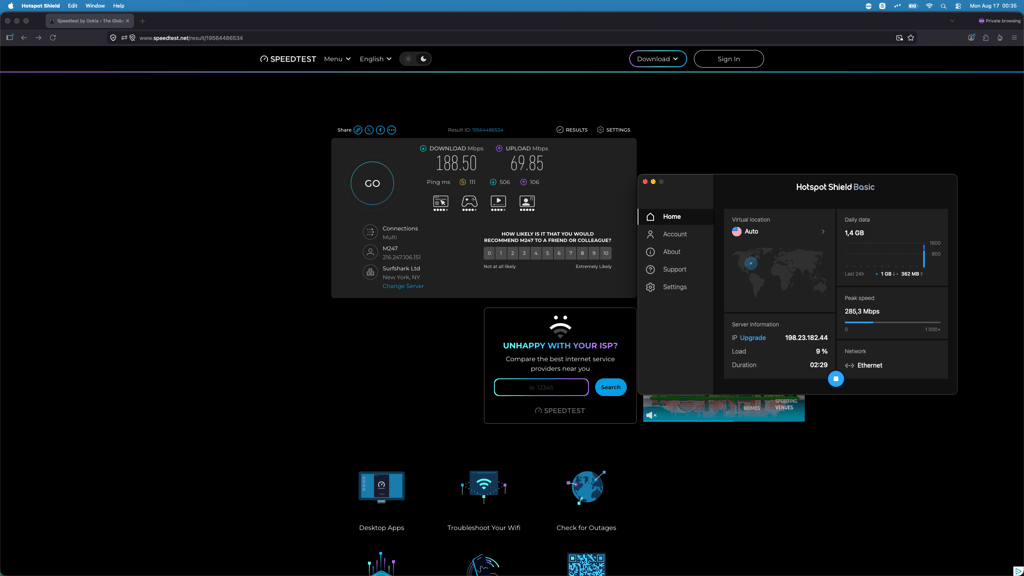
I also tested Hotspot Shield using a US server in New York. The download speed fell to 188.5Mbps, while the upload reached 70Mbps, the lowest upload speed among the US results I recorded. However, the ping was the lowest of the US results at 111ms. Overall, Hotspot Shield provided usable speeds, but it was noticeably slower than my baseline, particularly for upload.
Is Hotspot Shield good for streaming on Mac?
No, Hotspot Shield isn't a good choice for streaming on Mac. The free version only lets you connect to three countries: the US, the UK, and Singapore. While this could potentially give you access to services such as Hulu, BBC iPlayer, or meWATCH, streaming-optimized servers are only available to paid users, so you might experience worse performance.
The free version also comes with limited speeds, which can make reliable streaming difficult. In my tests, I also found that Hotspot Shield's free VPN servers were more easily detected and blocked by streaming services.
Who should choose Hotspot Shield?
I think Hotspot Shield is a good option for people who just want simple online protection. Its no-logs policy and strong encryption help keep your browsing private, and the lack of data limits means you can leave it running all the time. The tradeoff is speed, which can sometimes feel frustrating, especially if you're used to a faster VPN.
5. TunnelBear – best free VPN for Mac beginners

-
Security and privacy
-
Bandwidth speed and servers
-
User reviews
-
Personal experience
TunnelBear is a user-friendly free VPN for Mac that makes it easy to secure your connection with minimal setup. Its free plan includes the core VPN features, supports multiple devices, and automatically connects you to a fast server location. However, the 2GB monthly data limit means it’s best suited to light browsing and occasional use on your Mac.
Why TunnelBear is the easiest-to-use free VPN for Mac
TunnelBear is one of the simplest VPNs I’ve tried. The app is super simple to use. You can connect from the main screen with a single click, and you don’t have to make many adjustments for the VPN to work. I really enjoyed testing TunnelBear’s interface, not only because of its unique and fun design but also because it makes connecting incredibly straightforward.
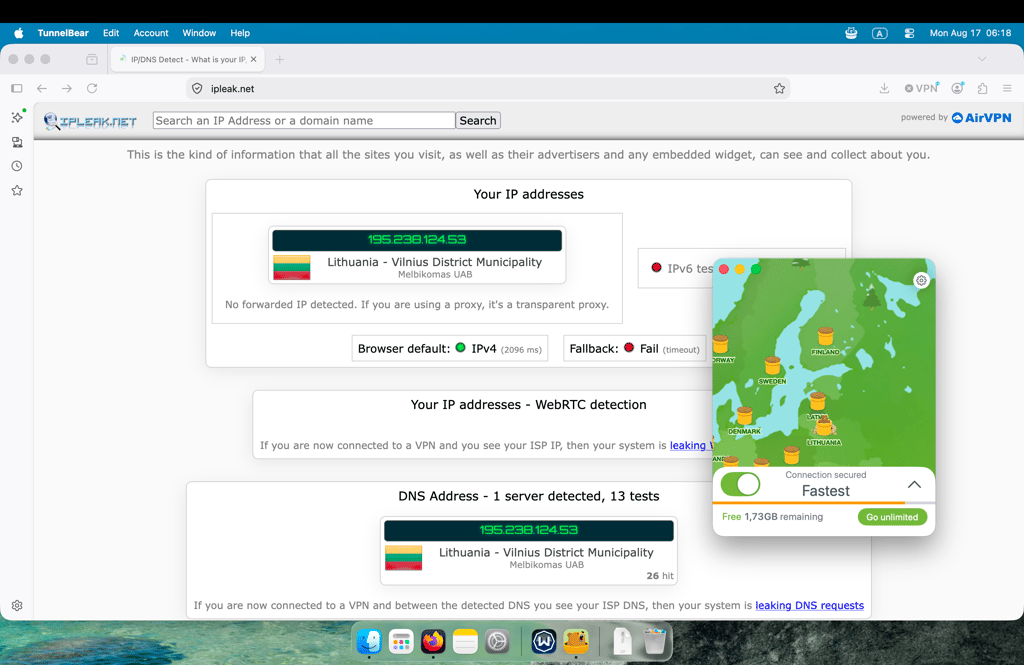
TunnelBear isn’t just easy to use – it also does a good job of keeping your connection secure. As part of my testing, I ran an IP leak test while connected to the VPN and didn’t detect any IP leaks. This is a simple but important check, and TunnelBear passed it without any issues.
TunnelBear free plan limits
I found TunnelBear to be one of the most limiting free VPNs for Mac. You only get 2GB of data per month, which is very low. Also, while you could previously choose a server location, the free plan now only connects you to the fastest available location, which is usually the one closest to you. To access any of TunnelBear’s 47 countries, you’ll need to upgrade to a paid plan.
That said, some features help make up for these limitations. For example, TunnelBear doesn’t impose speed limits on free users. This means you get the same VPN speeds on the free plan as you do on the paid version.
TunnelBear free version speeds
Testing TunnelBear’s speed was a bit tricky because it automatically connected me to the closest available server, which, in my case, was Lithuania. You’d expect that proximity to give it a pretty strong advantage, especially when it comes to latency, but the results were still underwhelming.
The download speed was the slowest of all the providers I tested, at just 213Mbps. Upload speed was average at 101Mbps. The 6ms ping was excellent, which makes sense given how close the server was.
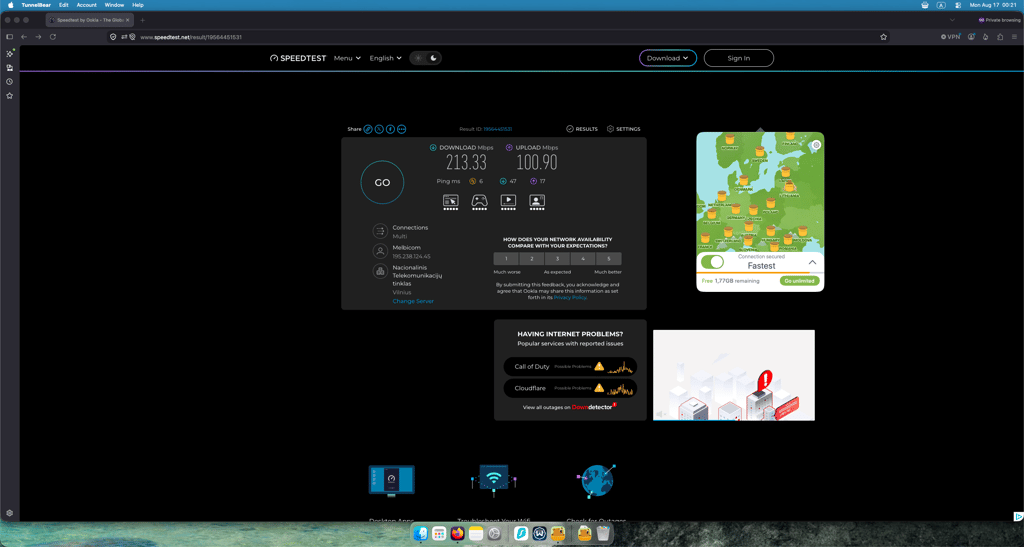
Overall, I’d say TunnelBear’s speed performance is fairly limited. Even with the advantage of connecting to a nearby server, it still couldn’t match the other providers’ download speeds. And since I wasn’t able to test US speeds, it’s hard to say whether performance would improve significantly with more distant locations. For me, that makes TunnelBear’s speed one of its weaker points.
Is TunnelBear good for streaming on Mac?
TunnelBear isn’t a good choice for free streaming on Mac. While the paid version may work fine, the free plan doesn’t let you choose server locations, so you can’t access streaming libraries from other countries.
It also comes with a 2GB monthly data limit, which is far too restrictive for regular streaming. That’s enough for a longer movie in standard quality or roughly one HD episode, but not much more.
Who should choose TunnelBear?
I recommend TunnelBear for anyone who wants a very simple VPN to stay protected on public Wi-Fi networks. It’s secure, has an independently audited no-logs policy, and the free version doesn’t limit speeds, which is a nice bonus.
Free VPN vs paid VPN for Mac
A free VPN for Mac may sound like a great idea, but it comes with both advantages and disadvantages. Depending on your needs, some limitations may be acceptable, while others could be deal-breakers. To help you decide, take a look at the key pros and cons of free vs paid VPNs below.
| Free VPN advantages | Free VPN disadvantages | Paid VPN advantages |
| No upfront cost | Low data caps | Faster speeds |
| Good for basic browsing | Fewer server locations | More countries and servers |
| Protects on public Wi-Fi | Slower speeds | Better streaming support |
| Easy way to test a provider | Limited streaming | More simultaneous connections |
| Increased privacy compared to no VPN | Limited torrenting | Better customer support |
| Fewer security features | Advanced features like threat blocking, split tunneling, double VPN, or dedicated IP | |
| Upselling and upgrade prompts | Better security and privacy | |
| No or limited customer support | Bypasses geo-blocks more reliably | |
| Risk of malware or data leaks | Ease of use and device support | |
| Limited device support (often lacks TV apps) |
Is a free VPN for Mac safe?
Free VPNs for Mac can be perfectly safe if they have the right security features. Some features that you should keep an eye out for are DNS leak protection, a functional kill switch, a no-logs policy, and strong encryption to hide your traffic. Many free VPNs don’t have the proper security infrastructure to offer all of those features. However, some can provide exceptional safety.
Usually, free VPN services that have a paid version tend to be more secure, as they have the resources to invest in a quality product that can effectively prevent IP leaks, encrypt your connection, and provide regular security updates. If you’re unsure if the free VPN of your choice has the necessary features, checking forums like Reddit or even official websites can help.
Is iCloud Private Relay the same as a VPN?
No, iCloud Private Relay isn’t the same as a VPN. Private Relay is a feature available on Apple devices with an iCloud+ subscription. It encrypts Safari and Mail traffic, hides your IP address, and routes your connection through two separate servers. While it does add an extra layer of privacy, it only works within Safari and certain Apple services, so it doesn’t protect all of your device’s internet traffic.
A VPN, on the other hand, encrypts all of your device’s online traffic. It also lets you choose a specific server or country to route your connection through, something you can’t do with Private Relay. This allows you to bypass geo-blocks, avoid certain network restrictions, and stream from different country libraries. Plus, a VPN works across all apps and browsers, whether you’re using Safari, Chrome, or the Instagram app on your phone.
Why some free Mac VPNs are risky
Using a free Mac VPN is tempting, I get it. But as many say, if something’s free, you might be the product. When you use a VPN, the provider can see and manage your internet traffic, so choosing one means trusting its privacy practices and business model. Some free VPNs rely on advertising, data collection, or other monetization methods, which can undermine the privacy benefits you expect from a VPN.
This is especially relevant because privacy is one of the main reasons people use VPNs. According to NordVPN’s 2025 VPN Usage Survey, privacy and protection of online activity are major motivations for VPN users, but many still use free VPN services. The report highlights concerns, including data monetization, weaker security features, and risks such as IP, DNS, or WebRTC leaks.
Apple Community discussions also show that Mac users have concerns about trusting free VPN providers and the potential risks of downloading free VPN apps.
And this isn’t just a theoretical concern. In 2015, it was revealed that Hola VPN was using the idle bandwidth of its free users and selling access to it through its Luminati service. Users’ internet connections were effectively being turned into part of a commercial proxy network without many realizing it. Luminati was later used in an attack against 8chan, which Hola’s founder confirmed had gone through its network.
It’s an extreme example, but it illustrates the underlying problem: when you’re not paying for a VPN, you should ask what the provider is getting from you instead.
Free VPNs for Mac to avoid
When considering VPN options for your Mac, avoid free providers that come with potential risks and limitations. While there are many reliable options, here are some to be cautious of:
- Hola VPN. This provider has been questioned for logging practices and possible security vulnerabilities.
- Betternet. This free VPN service has been criticized for its involvement in third-party advertising and its lack of transparency in data handling.
- Opera Free VPN. This browser VPN is actually not truly a VPN but a web proxy, and it keeps logs of user activity that it may sell to third parties.
- All app-store-only free VPNs. If you can’t investigate the features or the provider and can’t find any information about independent audits or the general safety of the app, don't download it. It might be malware disguised as a VPN.
Final thoughts
Apple computers don’t have built-in VPNs, meaning users may browse the internet without an additional layer of protection. While a secure free VPN is certainly better than having no VPN at all, these services often come with limitations such as fewer servers and features. Still, our research found that they can be suitable for basic browsing and everyday use.
That said, not all free VPNs are trustworthy. Some may contain malware or collect and sell users’ data. For a more secure alternative, consider a premium VPN that offers a free plan, such as Proton VPN, which has an audited no-logs policy and a dependable server network.
If you need faster speeds and access to more servers for activities like streaming or gaming, a fully premium option such as NordVPN is the better choice. Its free trial and money-back guarantee also give you the opportunity to try the service with minimal risk.
FAQ
Is there a 100% free VPN for Mac?
Yes, there are multiple completely free Mac VPNs. The most reliable option is Proton VPN because it doesn’t log user activity, doesn’t contain ads, and offers unlimited bandwidth.
How to get a VPN on a MacBook for free?
First, pick a free VPN, such as Proton VPN or Hotspot Shield. Then, create an account and download the app through the browser or the App Store. Finally, pick your server location and start using your free MacBook VPN.
Is it safe to use a free VPN on a Mac?
Yes, using a free VPN on a Mac is generally safe if you choose a reputable provider. Free VPNs such as Proton VPN and PrivadoVPN use strong encryption and have no-logs policies, helping protect your online activity and personal data. However, not all free VPNs are trustworthy, so it’s important to choose a provider with a strong security and privacy record.
Is there a free VPN extension for Safari?
No, Safari doesn’t have a built-in or free VPN extension. Very few free third-party VPNs have a browser extension. However, you can download any free VPN app on your device, and it’ll automatically work with anything that you might browse on Safari.
Does Mac have a built-in VPN?
No, Mac devices don’t have built-in VPNs. However, it doesn’t prevent the use of third-party VPN apps, so you can download a free app, like Proton VPN, or get a paid subscription.
Is there a free Mac VPN to change location?
Yes, Proton VPN is a free VPN for Mac with servers in 10 locations. It allows you to change your IP virtual location and access geo-restricted content, such as foreign streaming service libraries.