Proton VPN vs ExpressVPN comparison in 2026
Our in-house cybersecurity experts and journalists, renowned for major reports like The Mother of All Breaches, conduct transparent, unbiased VPN testing and in-depth analysis.
With 750+ articles crafted based on real-world research, we empower readers to make informed purchasing decisions through first-hand expertise.
Learn more

In this Proton VPN vs ExpressVPN comparison, I compare two of the most popular premium VPN services available today. Both providers have strong reputations, but they cater to slightly different priorities – Proton VPN emphasizes privacy and transparency, while ExpressVPN is known for its performance and ease of use.
To keep things fair, our research team and I tested both VPNs under real-world conditions, focusing on factors like connection speeds, streaming access, security features, and overall usability. I also evaluated their server networks, privacy policies, and pricing to get a complete picture of how they stack up.
If you're trying to decide which VPN is right for you, this breakdown will walk you through everything you need to know – along with my final verdict based on hands-on testing.
ExpressVPN vs Proton VPN: overview
Both Proton VPN and ExpressVPN are among the best VPNs, delivering strong speeds for most online activities and robust privacy features. They are also highly versatile, so you can use them for browsing, torrenting, gaming, and streaming.
However, there are clear differences between the two. Proton VPN puts a stronger emphasis on privacy, backed by its privacy-first infrastructure and security-focused features. ExpressVPN, in contrast, prioritizes speed, ease of use, and a smooth day-to-day experience.
| Proton VPN | ExpressVPN | |
| ⭐ Rating: | ||
| 🥇 Overall rank: | #3 out of #41 | #4 out of #41 |
| 🖥️ Servers: | 20,700+ servers in 149 countries | 3,000+ servers in 113 countries |
| 📖 No logs policy: | No logs | No logs |
| 💵 Price: | From $2.99/month | From $2.99/month |
| 🔥 Coupons: | Proton VPN coupon 70% OFF | ExpressVPN coupon 80% OFF |
| 🔒 VPN protocols: | OpenVPN, WireGuard, IKEv2, Stealth | OpenVPN, WireGuard, Lightway |
| 🍿 Streaming services: | Netflix, BBC iPlayer, YouTube, HBO Max, Disney+ | Netflix, Hulu, BBC iPlayer, Disney+, and more |
| 🖥️ Platforms: | Windows, macOS, Linux, Android, iOS | Windows, macOS, Linux, Android, iOS |
| 📥 Simultaneous connections: | 10 | 14 |
| 💁🏻 Support: | Knowledge base, email, 24/7 live chat (paid users only) | Knowledge base, email, 24/7 live chat |

Recent Updates
Proton VPN vs ExpressVPN: key differences
While both providers deliver strong performance, the Proton VPN vs ExpressVPN comparison ultimately comes down to priorities. Proton VPN stands out for its privacy-first approach, larger infrastructure, and better pricing, while ExpressVPN focuses on ease of use, streaming convenience, and a smoother overall experience. Here’s a quick way to decide which one fits your needs best.
Choose Proton VPN if:
- You want maximum privacy and transparency. Proton VPN is built around a privacy-first philosophy, with open-source apps, independent audits, and Secure Core servers that route your traffic through multiple privacy-friendly locations. It’s a strong choice for users who prioritize anonymity and security.
- You’re looking for better value (or a free plan). Proton VPN offers one of the best free plans on the market, plus significantly cheaper long-term pricing compared to ExpressVPN. You get more features included at a lower cost, making it ideal for budget-conscious users.
- You need faster speeds and a larger server network. In our testing, Proton VPN delivered more consistent speeds across global locations and operates a massive network of 20,700+ servers in 149 countries, improving both performance and access to global content.
Choose ExpressVPN if:
- You prioritize streaming and device compatibility. ExpressVPN offers excellent streaming performance and includes MediaStreamer (Smart DNS), allowing you to access geo-restricted content on devices that don’t support VPN apps, like some smart TVs and consoles.
- You want the simplest, most user-friendly experience. Its apps are polished, consistent across devices, and extremely easy to use, making ExpressVPN a great option for beginners or anyone who wants a hassle-free VPN.
- You value responsive, 24/7 customer support. ExpressVPN provides round-the-clock live chat support, which is a major advantage if you need quick help. Proton VPN, in contrast, relies on email-based support.
Proton VPN vs ExpressVPN: speed comparison
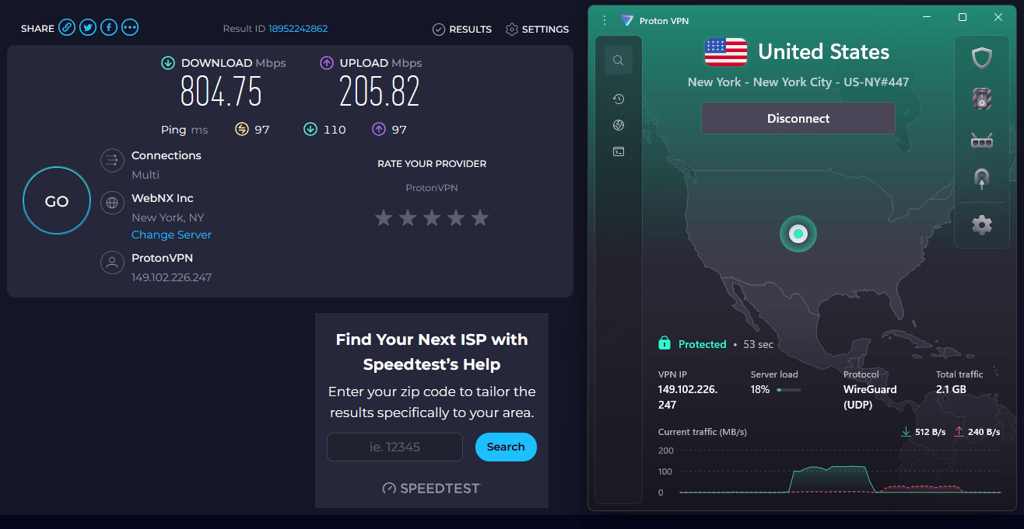
For the Proton VPN vs ExpressVPN speed comparison, I used Speedtest by Ookla with a baseline connection of 930Mbps download and 600Mbps upload. I tested the fastest protocols for both VPNs – WireGuard for Proton VPN and Lightway for ExpressVPN. The tests were conducted across multiple global locations, including local, London, New York, Perth, and Tokyo. Below are the results, showing speed retention, download speeds, and ping.
Proton VPN speed test results
| Server location | Speed retention | Download speed | Ping |
| Local | 94% | 878Mbps | 33ms |
| London, the UK | 90% | 840Mbps | 35ms |
| New York, the US | 86% | 804Mbps | 97ms |
| Perth, Australia | 62% | 581Mbps | 290ms |
| Tokyo, Japan | 62% | 580Mbps | 277ms |
Proton VPN provides three main protocols: WireGuard, OpenVPN, and IKEv2/IPsec. WireGuard, its fastest option, delivered excellent results across all regions and consistently outperformed ExpressVPN.
ExpressVPN speed test results
| Server location | Speed retention | Download speed | Ping |
| Local | 77% | 724Mbps | 17ms |
| London, the UK | 61% | 575Mbps | 40ms |
| New York, the US | 50% | 468Mbps | 97ms |
| Perth, Australia | 41% | 382Mbps | 220ms |
| Tokyo, Japan | 32% | 301Mbps | 255ms |
ExpressVPN offers three protocol options: Lightway, OpenVPN, and IKEv2. Its proprietary Lightway protocol is designed for speed and efficiency. While it performed well, it consistently fell behind Proton VPN in most test locations.
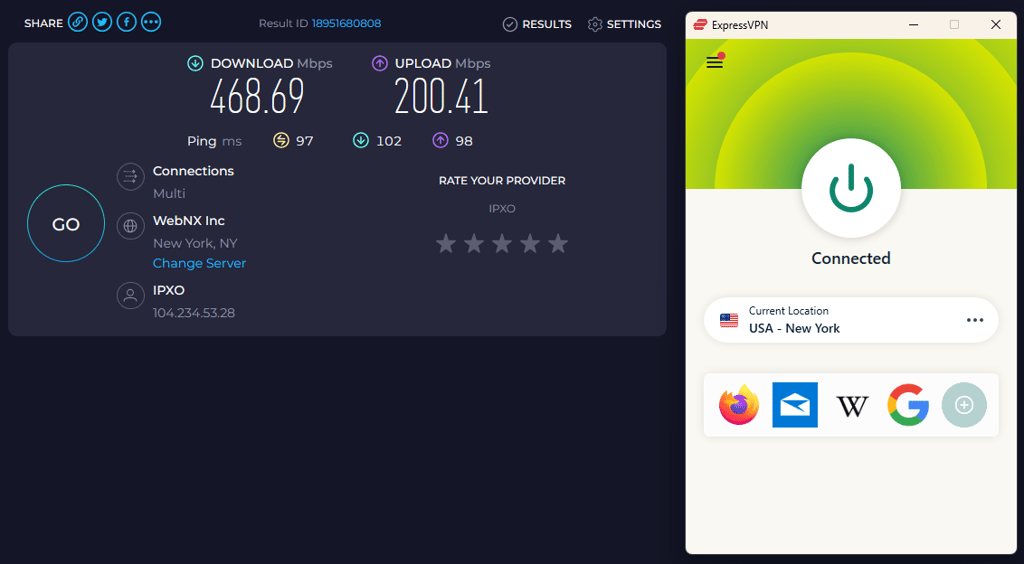
We ran speed tests across 5 locations worldwide to compare the ExpressVPN vs Proton VPN performance. Using their fastest protocols, we tested speeds in multiple regions to see how each provider performs in real-world conditions. Overall, both VPNs delivered solid results, with smooth and stable connections across most locations.
Proton VPN vs ExpressVPN: streaming performance
Both Proton VPN and ExpressVPN are great for streaming. They have no trouble unblocking Netflix’s powerful geo-restrictions, including the difficult-to-bypass Netflix Japan. The same could also be said for other major streaming sites like HBO Max, Hulu, BBC iPlayer, and YouTube.
| Proton VPN | ExpressVPN | |
| Netflix | ✅ Yes | ✅ Yes |
| BBC iPlayer | ✅ Yes | ✅ Yes |
| Amazon Prime Video | ✅ Yes | ✅ Yes |
| Hulu | ✅ Yes | ✅ Yes |
| HBO Max | ✅ Yes | ✅ Yes |
| Disney+ | ✅ Yes | ✅ Yes |
| YouTube | ✅ Yes | ✅ Yes |
While bypassing geo-restrictions plays a major role in streaming performance, it’s not the only factor that matters when comparing Proton VPN and ExpressVPN. You also need to consider device compatibility, ease of access, and how reliably each service delivers content across different platforms.
That said, ExpressVPN delivers a better overall streaming experience thanks to its MediaStreamer feature – a proprietary Smart DNS tool. If your device doesn’t support a VPN app, MediaStreamer still lets you access region-locked content. Both providers are great VPNs for streaming, but Proton VPN doesn’t offer Smart DNS support.

Torrenting tests comparison
Both Proton VPN and ExpressVPN support torrenting and protect your privacy while downloading or sharing files. However, Proton VPN has a slight advantage in this category because it offers dedicated P2P servers, which ExpressVPN doesn’t.
Proton VPN also includes port forwarding, a feature that is extremely useful for torrenting. It helps improve download speeds and connection stability, and allows you to connect with more peers. Since port forwarding can be tricky to implement without weakening security, very few VPNs offer it. Proton VPN solves this by routing connections through its own firewall, so users get the benefits of port forwarding without compromising on safety.
We tested both VPNs by downloading a 5.7GB Ubuntu ISO file using automatic protocol selection and the closest server location:
- Proton VPN completed the download in 4 minutes and 26 seconds, with peak speeds of 23.3Mbps.
- ExpressVPN finished the download in 4 minutes and 26 seconds, reaching a peak speed of 23.2Mbps.
Keep in mind that torrenting speeds can vary depending on your internet connection, the number of peers, your location, and the torrent client you use. In this test, both providers delivered nearly identical performance.
Proton VPN vs ExpressVPN: pricing and plans
Proton VPN and ExpressVPN use similar pricing models, each offering three main subscription plans. Both services include a 30-day money-back guarantee. However, Proton VPN stands out by offering a free plan with access to five server locations and unlimited data.
| Plan | Proton VPN | ExpressVPN |
| 1 month | $9.99/month | From $14.99/month |
| 1 year | $3.99/month | From $4.99/month |
| 2 year | $2.99/month | From $2.99/month |
Proton VPN pricing
Proton VPN’s biggest perk is its free plan, something many competitors don’t include. While it comes with some limits, it still allows unlimited data, access to five server locations, no speed throttling, and no ads. You only get one device connection and miss out on advanced tools like Secure Core, NetShield, and split tunneling, but it remains a solid choice for basic, everyday use.
If you want full VPN functionality without extra Proton services, the Proton VPN Plus plan is the best fit. It costs $9.99/month with a monthly subscription, $3.99/month on a yearly plan, or $2.99/month on the 2-year plan, and unlocks all core VPN features.
The most advanced bundle, Proton Unlimited, combines the VPN with premium Proton Mail, Drive, Pass, Calendar, and Wallet. This plan starts at $7.99/month.
ExpressVPN pricing
ExpressVPN offers three subscription tiers: Basic, Advanced, and Pro. Each plan is available with monthly, annual, or 2-year billing. The most affordable option is the Basic plan, which includes all core ExpressVPN features. You get the VPN service itself, support for up to 10 simultaneous connections, and an ad blocker. With the 2-year plan, the price drops to $2.99/month, although this is still higher than Proton VPN’s long-term pricing.
The Advanced plan serves as a middle-ground option. It adds a tracker blocker, password manager, 3 days of eSIM data, Identity Defender Lite, and increases the device limit to 12. With the 2-year plan, pricing starts at $4.49/month.
The Pro plan is the most feature-rich. It includes 14 simultaneous connections, five days of eSIM data, Identity Defender Pro, and a dedicated IP address. This plan starts at $7.49/month with the 2-year billing.
Not everyone wants to commit to a long-term subscription. Some only need a VPN for a month or two. As with most cybersecurity tools, monthly pricing rises sharply with both providers. ExpressVPN’s monthly plan starts at $14.99, while Proton VPN is more affordable at $9.99/month. Notably, Proton VPN is one of the cheapest monthly VPNs, making it a strong choice for short-term needs.
Both providers offer flexible payment methods, including credit and debit cards, PayPal, bank transfers, and even Bitcoin. However, Proton VPN goes a step further by accepting cash payments, which is rare among VPN providers.
In short, Proton VPN and ExpressVPN deliver similar features across their plans, but Proton VPN does so at a much lower price point. That is before even considering its free plan. Be sure to check our Proton VPN coupon page for the latest deals.
Proton VPN vs ExpressVPN: server network
Both providers offer solid global server coverage, including convenient virtual locations. However, Proton VPN has a larger overall server network. While ExpressVPN no longer discloses its exact server count, Proton VPN operates an impressive fleet of over 20,700 servers.
| Proton VPN | ExpressVPN | |
| Servers | 20,700+ | Undisclosed |
| Countries | 149 | 113 |
| Virtual locations | ✅ Yes | ✅ Yes |
In terms of country coverage, Proton VPN has servers in 149 countries, compared with ExpressVPN’s 113. Greater worldwide coverage improves the chances of finding a nearby server, which can boost speeds, and also gives access to more content from different regions.
Proton VPN vs ExpressVPN: features
When it comes to Proton VPN vs ExpressVPN feature comparison, the fight is fierce and ultimately ends in a tie. Both providers have quite a few unique features up their sleeves.
Split tunneling
Split tunneling is a handy feature that allows you to choose specific apps that will use VPN and the ones that can connect directly. Both Proton VPN and ExpressVPN support this feature, but they offer it on different platforms.
Both providers include split tunneling on Windows, macOS, Linux, and Android. However, Proton VPN also supports split tunneling on Android TV and through its browser extension. ExpressVPN, on the other hand, offers split tunneling at the router level.
Each approach has its own advantages. With a browser extension, you can easily include or exclude specific websites, which adds flexibility that other setups don’t provide. Router-based split tunneling, meanwhile, lets you manage entire devices or groups of devices under different VPN rules. Ultimately, both providers offer split tunneling in different ways, so it all depends on how you prefer to manage your connections.

Stealth servers
Both providers also offer stealth servers, also known as traffic obfuscation, which help to avoid detection and let you bypass censorship and VPN blocks. They essentially hide the fact that you’re using a VPN and are especially useful if you’re using restrictive networks (like school or work) or live in a censorship-heavy country like China.
Proton VPN’s version is called Stealth, and it’s available on all plans. It’s currently supported on Windows, macOS, Android, and iOS apps, but not on Linux.

ExpressVPN, on the other hand, doesn’t offer obfuscation as a standalone feature. Instead, it states that all of its servers include built-in obfuscation, automatically disguising VPN traffic so it appears as regular internet traffic.
Tracker blocker
ExpressVPN includes a Threat Manager as a part of its feature offering. It's a preventive tool that restricts apps and websites from communicating with third parties known to track your online activity or engage in malicious behavior. The level of protection you get also depends on the plan you choose: Basic plan users get lite protection, which blocks ads and malicious sites, while Advanced and Pro plans unlock stronger protection that also blocks trackers and harmful adult content.

Proton VPN offers similar protection through its NetShield feature. NetShield actively scans the websites you visit and blocks access to known malware, spyware, and other malicious domains. A key advantage is that you get full NetShield protection with any paid Proton VPN plan.
Proton VPN’s features
Apart from the features above, here are the features you can get with Proton VPN:
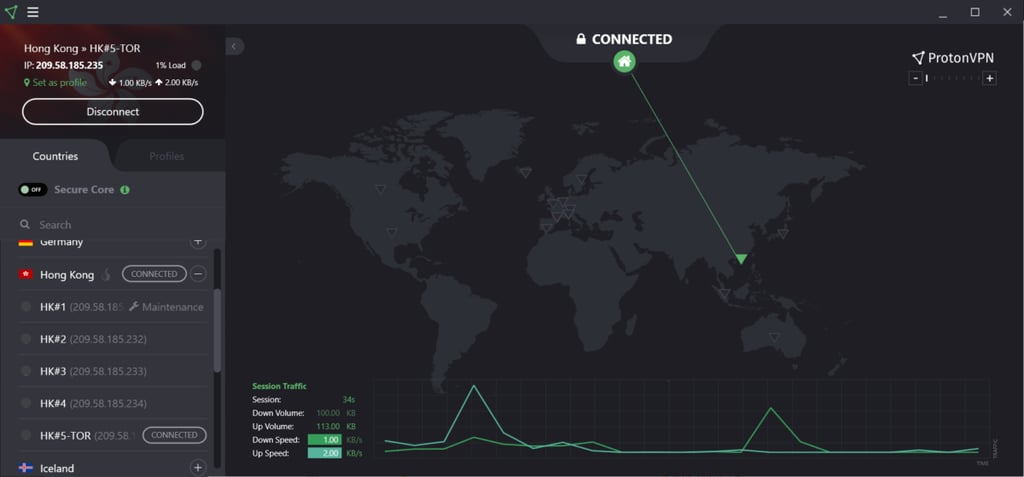
- Tor over VPN. Tor support is built in and easily accessible with a click. With the feature, you can reroute your internet traffic through the Tor network for anonymity and privacy, as well as access hidden services and onion sites.
- Port forwarding. Proton VPN is one of the few providers offering this feature. It allows downloading and sharing files using P2P connections and improves gaming performance.
- Secure Core. Proton VPN’s multi-hop connection funnels your traffic through two different servers to protect against network-based attacks. These servers are in heavily guarded facilities in countries with strong privacy laws.
- NetShield. This feature ensures you avoid infecting the device with malware by checking apps and websites for malicious software.
ExpressVPN’s features
In comparison, ExpressVPN includes some features that the opponent lacks:
- MediaStreamer. A Smart DNS feature that simplifies the streaming experience by unblocking geo-restricted content on devices that don’t support VPN natively.
- Threat Manager. Blocks all tracking and other malicious activities when you’re browsing the web or using apps. It's currently only supported on Windows, macOS, Android, iOS, and Linux.
- Obfuscated servers. They conceal the fact that you're using a VPN. This feature allows you to bypass VPN blocks coming from restrictive networks and governments.
- Shortcuts. You can set up shortcuts for apps or sites that you launch frequently after connecting to a VPN.
Overall, this fierce fight ends up in a draw. Both providers have feature-rich offerings, therefore, you'll be able to find robust features to enhance your online security.
Proton VPN vs ExpressVPN: which is more secure?
| ExpressVPN | Proton VPN | |
| Encryption | AES-256-GCM and ChaCha20/Poly1305 | AES-256 and ChaCha20 |
| Hash | SHA-512 | SHA-384 |
| RAM servers | ✅ Yes | ❌ No |
| A member of the Five Eyes alliance | ❌ No | ❌ No |
| No-logs policy | Audited | Audited |
| Kill switch | ✅ Yes | ✅ Yes |
| Ad blocker | ✅ Yes | ✅ Yes |
| DNS leak protection | ✅ Yes | ✅ Yes |
Both Proton VPN and ExpressVPN offer advanced encryption with AES-256 and ChaCha20. However, ExpressVPN uses stronger hash encryption, so it gains a point over Proton VPN.
Neither VPN is based in a Five Eyes country. Proton VPN is located in Switzerland, while ExpressVPN operates from the British Virgin Islands. Additionally, both providers’ no-logs policies have been audited, and they offer some handy security features like a kill switch and DNS leak protection.
Moving on, ExpressVPN gains an advantage over Proton VPN because it runs on RAM-only servers. It means that data is cleared with every reboot, so your data is completely safe with this provider. However, Proton VPN has publicly challenged the idea that RAM-only servers alone add meaningful protection, especially when a provider already follows a fully audited no-logs policy.
That is largely where ExpressVPN’s security edge ends. Proton VPN stands out with its fully open-source apps, which allow anyone to inspect the code for vulnerabilities. This level of transparency reinforces trust and shows strong confidence in its security practices.
Proton VPN also gains a major advantage with its Secure Core servers. These servers route traffic through Proton-owned servers located in privacy-friendly countries such as Switzerland, Iceland, and Sweden. This setup is ideal for users in high-risk or restrictive environments. On top of that, the Forward Secrecy feature generates new encryption keys for every session, adding another layer of protection.
Infrastructure
Proton VPN has openly questioned the added value of RAM-only server infrastructure, stating that such servers can still be accessed while the system is running, just like hard-drive servers. The provider argues that when strong encryption and a fully audited no-logs policy are already in place, RAM-only servers don’t significantly improve security on their own. Instead, Proton VPN emphasizes its Secure Core servers for users who need higher levels of privacy. These route traffic through Proton-owned infrastructure in privacy-friendly countries such as Switzerland, Iceland, and Sweden, adding an extra layer of protection through both secure ownership and favorable legal jurisdictions.
In contrast, ExpressVPN was one of the first VPN providers to switch over to RAM-only technology. It completed its move to TrustedServer – its RAM-only feature – back in 2019. This move helps to boost security and privacy since RAM-only servers mean that there’s no hard drive to store your data on, and the servers are wiped clean with each reboot.
Privacy
Both Proton VPN and ExpressVPN are based in privacy-friendly countries – Switzerland for Proton VPN and the British Virgin Islands for ExpressVPN – that aren’t in the Five Eyes alliance. Additionally, the pair employs advanced algorithms of AES-256 and ChaCha20 to encrypt your data.
When it comes to tunneling protocols, both offer fast and steady ones. With Proton VPN, you can choose between WireGuard, OpenVPN, and IKEv2/IPsec. Meanwhile, ExpressVPN offers OpenVPN and IKEv2 in addition to Lightway, which is its proprietary protocol. All three are popular and praised for their great speed and privacy.
Logging
Both providers ensure that none of your data is logged. Fortunately, both VPNs also validate it by running independent audits.
Proton VPN has gone through a few rounds of audits by third parties like SEC Consult, Mozilla, and Securitum. In its latest security audit, Securitum confirmed Proton VPN’s no-logs claim. You can also check out its open-source code for yourself if you’re still wary.
Likewise, ExpressVPN has been audited rigorously. Its no-logs policy was independently audited quite recently, in 2025, by KPMG. The firm verified ExpressVPN’s no-logs policy.
Platforms, interface, and ease of use
When it comes to compatibility, ExpressVPN and Proton VPN support major operating systems and work great with other software and devices.
| ExpressVPN | Proton VPN | |
| Supported OS | Windows, macOS, Linux, Android, iOS | Windows, macOS, Linux, Android, iOS |
| Other software and devices | Android TV, Fire TV stick, Kindle Fire, Chromebook | Android TV, Fire TV stick, Chromebook |
| Browser extensions | Chrome, Firefox, Brave, Edge, Vivaldi | Chrome, Firefox |
| Simultaneous connections | Up to 14 | 10 |
Proton VPN supports all major operating systems and offers browser extensions, but its compatibility options largely stop there. ExpressVPN, on the other hand, supports a wider range of browser extensions and also includes the MediaStreamer feature for streaming on devices that don’t support VPN apps. In addition, it offers a dedicated Aircove router app, making it easy to protect all devices on your home network at once. ExpressVPN also allows up to 14 simultaneous connections, depending on the plan, which is more than Proton VPN.
Desktop apps
Proton VPN has desktop apps for Windows, macOS, and Linux users. All three are streamlined, modern, and beginner-friendly. Everything is clearly labeled for easy navigation.
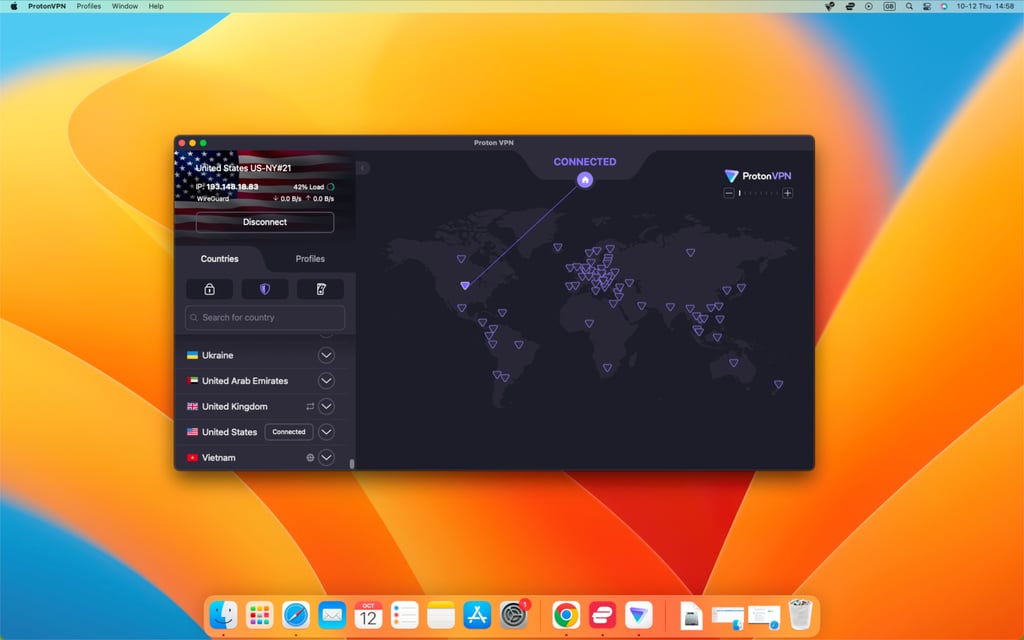
The Windows app is the most functional and comes with all the features. However, the macOS app is as good. All the key features, minus the few Windows-only tools, are there. Additionally, you also get the Mac-exclusive Notify, which notifies whenever you connect to an unprotected network. Linux users, meanwhile, get an intuitive and versatile graphical user interface (GUI).
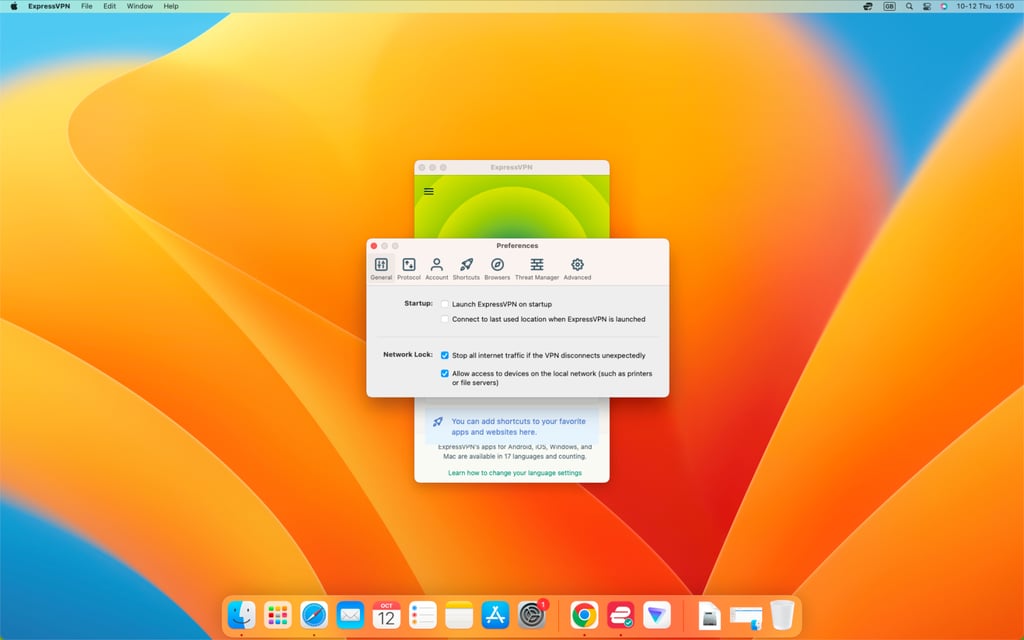
As for ExpressVPN, its Windows and macOS apps are nearly identical and have the same features. In terms of looks, they are sleek and easy to get around. Notably, ExpressVPN has also launched its Linux GUI app, making the navigation much easier for users.
Mobile apps
Both providers’ mobile apps are intuitive, responsive, and straightforward. It’s easy to search for a specific feature, and the modern designs are easy on the eyes.

However, as with most mobile apps, their Android apps offer more features than their iOS versions. For instance, Proton VPN’s iOS app is missing split tunneling and alternate routing.
Customer support
| Proton VPN | ExpressVPN | |
| 24/7 live chat | ❌ No | ✅ Yes |
| ✅ Yes | ✅ Yes | |
| Phone line | ❌ No | ❌ No |
| Guides and articles | ✅ Yes | ✅ Yes |
| FAQ | ✅ Yes | ✅ Yes |
Proton VPN takes the back seat when it comes to customer support. The provider lacks 24/7 live chat, which is typically the fastest and easiest way for assistance. Fortunately, its email support is responsive, and you can expect an answer in a few hours. Alternatively, its knowledge center is also jam-packed with articles and guides on all things VPN.
Meanwhile, ExpressVPN offers 24/7 live chat. You could also reach out using email tickets. Otherwise, for some self-help reading, you could hit up its help center.
ExpressVPN vs Proton VPN – which one wins?
Both Proton VPN and ExpressVPN are excellent premium VPNs with strong performance, privacy protections, and versatile features. However, after a thorough analysis across speed, security, servers, streaming, and pricing, Proton VPN comes out on top as the overall winner.
Proton VPN excels in privacy, security, server network, speed, and affordability, making it a great choice for users who prioritize online safety and value. ExpressVPN shines in streaming performance, ease of use, device compatibility, and 24/7 customer support, making it ideal for users who want convenience and reliable access to geo-restricted content.
| Category | ExpressVPN | Proton VPN | Verdict |
| Pricing | Proton VPN offers a free plan, lower long-term pricing, and better value overall | ||
| Speed | Proton VPN delivered faster and more consistent speeds across global servers | ||
| Privacy | Swiss jurisdiction, Secure Core servers, open-source apps, and audited no-logs policy give Proton VPN the edge | ||
| Features | Proton VPN includes advanced features like Secure Core, NetShield, Tor over VPN, and port forwarding at lower tiers | ||
| Streaming | ExpressVPN wins for streaming, thanks to MediaStreamer (Smart DNS) and broader device compatibility | ||
| Torrenting | Proton VPN’s dedicated P2P servers and port forwarding make it slightly better for torrenting | ||
| Servers | Proton VPN’s 20,700+ servers across 149 countries provide broader coverage than ExpressVPN | ||
| Ease of use | ExpressVPN is easier to use, with sleek apps, browser extensions, and router support | ||
| Customer support | ExpressVPN offers 24/7 live chat, while Proton VPN relies on email support |
FAQ
Is ExpressVPN faster than Proton VPN?
No, ExpressVPN is not faster than Proton VPN. Overall, Proton VPN is faster, especially if you’re using the WireGuard protocol. Meanwhile, ExpressVPN has good speeds but has difficulty maintaining fast upload speeds and connection consistency.
Is ExpressVPN or Proton VPN better for gaming?
Proton VPN is better for gaming. It offers a larger server network across more locations, making it easier to find a nearby, uncrowded server for the lowest possible ping and smoother gameplay.
Which is better for torrenting: ExpressVPN or Proton VPN?
Proton VPN is better for torrenting. While both providers support P2P traffic, Proton VPN offers a port forwarding feature and has more servers worldwide, ensuring better speeds.