NordVPN vs OpenVPN: which VPN is better?
Our in-house cybersecurity experts and journalists, renowned for major reports like The Mother of All Breaches, conduct transparent, unbiased VPN testing and in-depth analysis.
With 750+ articles crafted based on real-world research, we empower readers to make informed purchasing decisions through first-hand expertise.
Learn more

NordVPN and OpenVPN are often mentioned alongside each other, but are vastly different. NordVPN is a complete, top-tier VPN service known for its strong security, fast speeds, and versatile features. OpenVPN, on the other hand, is more of a tool or protocol rather than a full VPN service, making direct comparisons challenging.
To evaluate NordVPN vs OpenVPN fairly, I looked at key factors such as security, performance, ease of use, and pricing. Each was tested in real-world scenarios to see how it performs for streaming, privacy, and device compatibility.
Read on to see how these two options stack up and which one is better suited for your needs, whether you want a full VPN service or a flexible open-source solution.
NordVPN vs OpenVPN: overview
NordVPN offers a full VPN experience with stronger security, features, streaming support, and server options. OpenVPN, as a protocol or client, lacks these extras but has an advantage in being free. For most users seeking the best VPN, NordVPN provides a more complete, user-friendly solution.
| NordVPN | OpenVPN | |
| ⭐ Rating: |
4.9★★★★★
|
3.1★★★★★
|
| 🥇 Overall rank: | #1 out of #41 | #38 out of #41 |
| 🖥️ Servers: |
Thousands of servers in 225 locations
| - |
| 📖 No logs policy: | No logs | No logs |
| 💵 Price: |
From $3.49/month
| Free |
| 🔥 Coupons: |
NordVPN coupon 75% OFF
| Cybernews VPN coupons |
| 🔒 VPN protocols: | OpenVPN, WireGuard (NordLynx), NordWhisper | OpenVPN |
| 🍿 Streaming services: | Netflix, Hulu, BBC iPlayer, Disney+, and more | Server-dependant |
| 🖥️ Platforms: | Windows, macOS, Linux, Android, iOS | Windows, macOS, Linux, Android, iOS |
| 📥 Simultaneous connections: | 10 | 2 |
| 💁🏻 Support: | Knowledge base, FAQs, email, 24/7 live chat | Knowledge base, tickets |

Recent Updates




We spare no effort to test the products & their features. All information is gathered by our in-house research team & fact-checked by our team of experts. Discover the ins and outs of our testing procedures.
Key differences between NordVPN and OpenVPN
NordVPN and OpenVPN are often mentioned together, but they serve very different purposes. NordVPN is a full-featured, premium VPN service, while OpenVPN is a protocol or tool that requires third-party servers and configurations. Here’s how to decide which is right for you.
Choose NordVPN if:
- You want a complete VPN service. With over 8,000 servers in 149 countries, specialty servers, and easy setup, NordVPN gives you a ready-to-go solution.
- Streaming and torrenting matter. NordVPN can unblock Netflix, Hulu, Disney+, and more, plus it has dedicated P2P servers and a SOCKS5 proxy for faster downloads.
- Security and privacy are top priorities. Advanced encryption options (AES-256, ChaCha20), RAM-only servers, an audited no-logs policy, and Panama jurisdiction protect your data.
- You need simplicity and support. NordVPN offers intuitive apps, browser extensions, multiple simultaneous connections, and 24/7 live chat support.
Choose OpenVPN if:
- You prefer a free, open-source option. OpenVPN is completely free to use and allows customization for advanced users.
- You want flexibility with your servers. You can connect to your own server, a third-party VPN server, or community-run servers, giving you control over your network.
- You’re technically experienced. OpenVPN requires setup knowledge of networking concepts but offers strong encryption, a no-logs policy, and reliability if configured correctly.
- You don’t need extra features. OpenVPN focuses on core security functions like a kill switch and web filter but lacks extras like split tunneling, SmartDNS, or specialty servers.
Speed, performance, and streaming
For this NordVPN vs OpenVPN comparison, we also tested the speed of the two providers. NordVPN has a clear lead with significantly faster download and upload speeds, while OpenVPN struggles to compete.
With NordVPN, you get three different tunneling protocol options: NordLynx, OpenVPN UDP/TCP, NordWhisper, and IKEv2/IPSec. You’ll see the best results with NordLynx, which is NordVPN’s proprietary protocol built around WireGuard. It’s considered one of the fastest protocols out there.
In stark contrast, OpenVPN only offers OpenVPN UDP/TCP protocols. Between them, you should see better speeds with OpenVPN (UDP).
Additionally, note that things like server location and server load greatly influence speed. So, if you’re using a community-based free server with OpenVPN, you’re far more likely to see disappointing results. This is because these free servers become overcrowded quickly and have limited bandwidth.
In brief, there’s no question that NordVPN is the faster provider with remarkable upload and download speeds. Meanwhile, unsurprisingly, the stability-first OpenVPN is considerably slower in both departments.
Unblocking Netflix and other geo-restricted sites
NordVPN has an easy victory when we compare NordVPN vs OpenVPN for streaming. During our tests, we threw multiple geo-restricted streaming sites at NordVPN, and it seamlessly bypasses every one of those sites’ geo-blocks. This includes various Netflix libraries, Hulu, Disney+, and more.
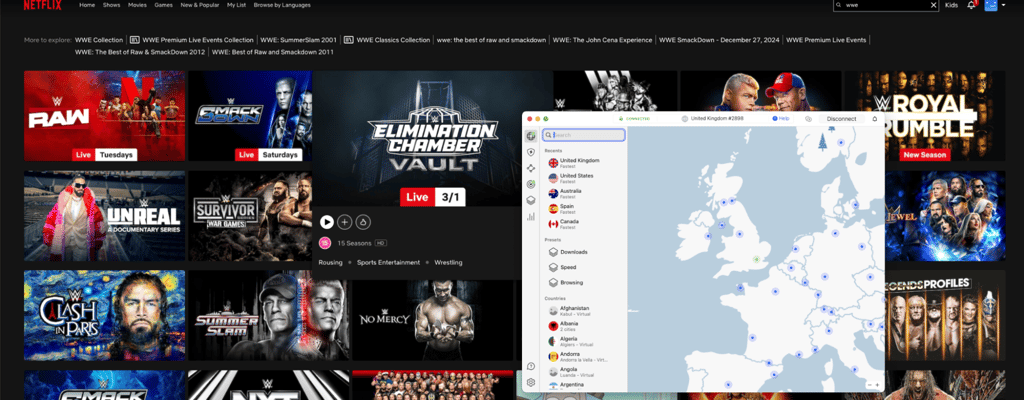
Additionally, NordVPN also offers a SmartDNS feature in the form of SmartPlay. A very handy feature, SmartPlay lets you unblock restricted content on devices like smart TVs and game consoles, even when they don’t support VPN apps.
Meanwhile, things aren’t as clear-cut with OpenVPN because it doesn’t have its own servers. So, whether you can unblock the streaming sites hinges on the strength of the server that you use – be it your own server, another VPN’s server, or one run by the OpenVPN community.
For instance, we used NordVPN’s configuration files for this OpenVPN vs NordVPN comparison and had no issue accessing various geo-restricted sites, including Netflix libraries, BBC iPlayer, and Hulu. However, NordVPN’s strong server network plays a pivotal role here. So, you might not see similar success with other servers.
To sum up, NordVPN takes first place with its remarkable streaming capabilities that can unblock even the toughest restrictions. In contrast, OpenVPN’s streaming capabilities are far more arbitrary since it depends on your server’s strength.
Torrenting
All of NordVPN’s servers support torrenting. Additionally, it also has dedicated P2P servers optimized for torrenting, which translates to faster downloads and more efficient bandwidth utilization. Plus, its SOCKS5 proxy helps boost your download speeds during torrenting, too.
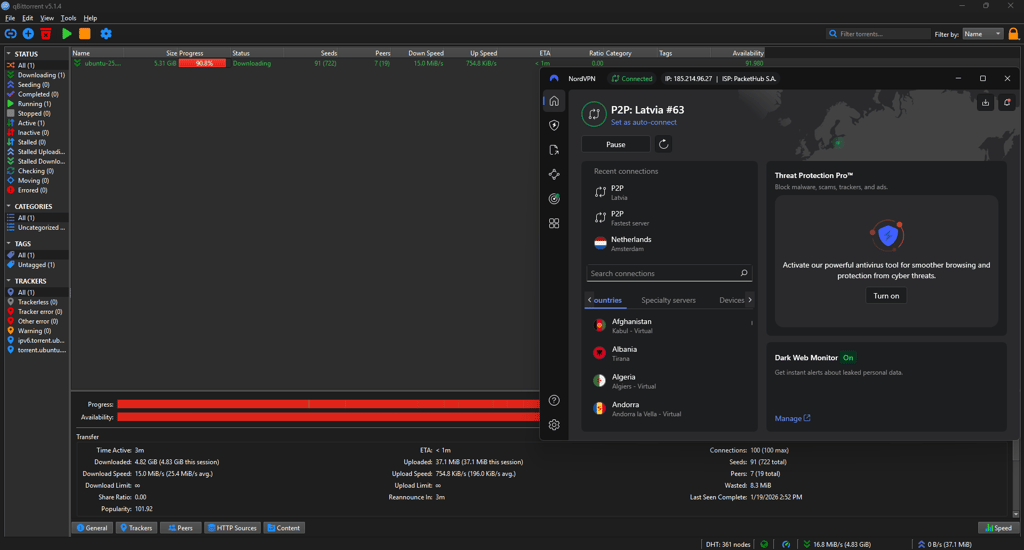
In contrast, OpenVPN doesn’t have any torrenting-focused features in its arsenal. That said, it also doesn’t place any limitations and restrictions on it either. So, your torrenting experience hangs on the quality of your server provider.
Plans and pricing
While NordVPN offers different plan options and a 30-day money-back guarantee, OpenVPN is completely free to use.
| NordVPN | OpenVPN | |
| Monthly | From $14.99 | Free |
| 1-year plan | From $5.49/month | ❌ |
| 2-year plan | From $3.49/month | ❌ |
| Check NordVPN Discounts | Check our VPN Discounts |
In NordVPN’s case, you can subscribe to its monthly, 1-year, or 2-year plan. Each subscription allows up to 10 simultaneous connections. If you’re ready for a longer commitment, the 2-year plan will return the best value. It offers the same things as the other two options but at a cheaper monthly fee.
Meanwhile, OpenVPN is open-source and completely free. However, you only get two free connections. For more connections, you’ll need to opt for one of its two paid versions that are mainly aimed at businesses: OpenVPN Access Server and OpenVPN Cloud. Prices cost around $7.00/month for each connection.
Additionally, the free price tag also doesn’t yet take into account the cost of configuration files and servers – both of which you’ll need to utilize the solution.
More so, you can purchase a NordVPN subscription with credit cards, AmazonPay, Sofort, PayPal, ACH Transfer, cryptocurrencies, Google Pay, iTunes, and even prepaid cards
Server locations
There’s no question that NordVPN is the victor in the OpenVPN vs NordVPN faceoff regarding server locations. NordVPN has an impressive 8,000+ server fleet in 149 countries. That’s also 8,000+ more servers than OpenVPN since OpenVPN doesn’t have its own servers.
Additionally, NordVPN also offers a variety of specialty servers for different purposes. For instance, it has Double VPN servers to boost security, Onion over VPN servers for enhanced privacy, and P2P servers for a better torrenting experience.
Features overview
| NordVPN | OpenVPN | |
| Kill Switch | ✅ | ✅ |
| Web filters | ✅ | ✅ |
| Split Tunneling | ✅ | ❌ |
| Specialized servers | ✅ | ❌ |
| SmartDNS | ✅ | ❌ |
It’s a slam dunk win for NordVPN in the OpenVPN vs NordVPN feature comparison. A generous and comprehensive provider, NordVPN has well-covered core features while throwing in some very attractive advanced features. Contrastingly and unsurprisingly, OpenVPN only offers two noteworthy yet still very basic features: a kill switch and a web filter.
Kill switch
Both providers come with a kill switch that works as a fail-safe mechanism to protect your privacy. If your VPN connection drops, the kill switch automatically disconnects your device from the internet. What this does is that it shields your IP address and location as well as online activities.
NordVPN offers two different versions of the feature. It has a system-wide kill switch that disables all Internet access. Additionally, it also has an app kill switch that disables only specific apps. However, unfortunately, the more specific app kill switch is only available for Windows and macOS.
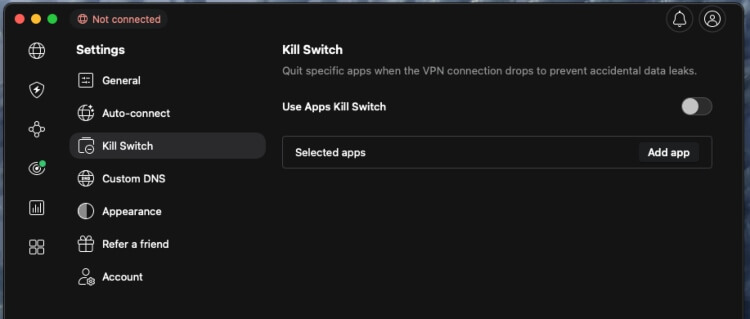
Similarly for OpenVPN, it has a built-in kill switch for added protection as well. The feature automatically cuts off internet access when the connection drops.
Web filters
They also include web filters in their services. With NordVPN, you get Threat Protection, which blocks access to malicious websites. The multifunctional feature also has a few other roles in protecting against ads, trackers, and malware. For instance, it also blocks ads and trackers and scans files for malware before downloads.
OpenVPN has a similar DNS-based content-filtering feature called Cyber Shield to block inappropriate or malicious content. With the feature, you can:
- Monitor or block specific DNS using 43 content categories
- Create Accept and Block lists to customize the domain-filtering process
- Prevent intrusion based on severity or category of threat
NordVPN’s features
Besides those covered above, NordVPN has a long list of other features. Some of the highlights include:
-
Split tunneling. It lets you specify the apps that require VPN protection and those that can connect directly. Available on Windows and Android.
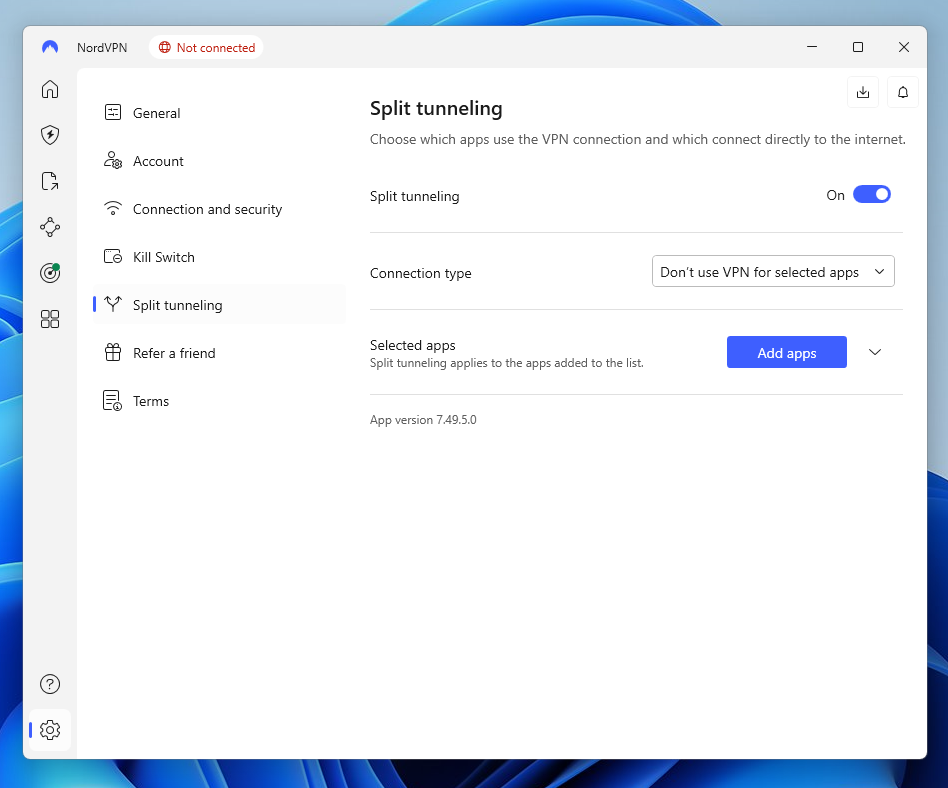
NordVPN split tunneling - SmartPlay. Helps to unblock geo-restricted content on platforms that don’t support VPN apps natively, such as certain smart TVs and game consoles.
-
Specialty servers. NordVPN has a variety of specialty servers. For instance, it has multi-hop/double VPN servers where two servers are combined for enhanced privacy and security. It also has obfuscated servers to get around extreme censorship and Deep Packet Inspection (DPI). Meanwhile, onion over VPN combines your connection with The Onion Router (Tor) network to protect against surveillance and tracking. NordVPN also offers Dedicated IP, which gives you a consistent address when you need one, and it is now available in the browser extension.
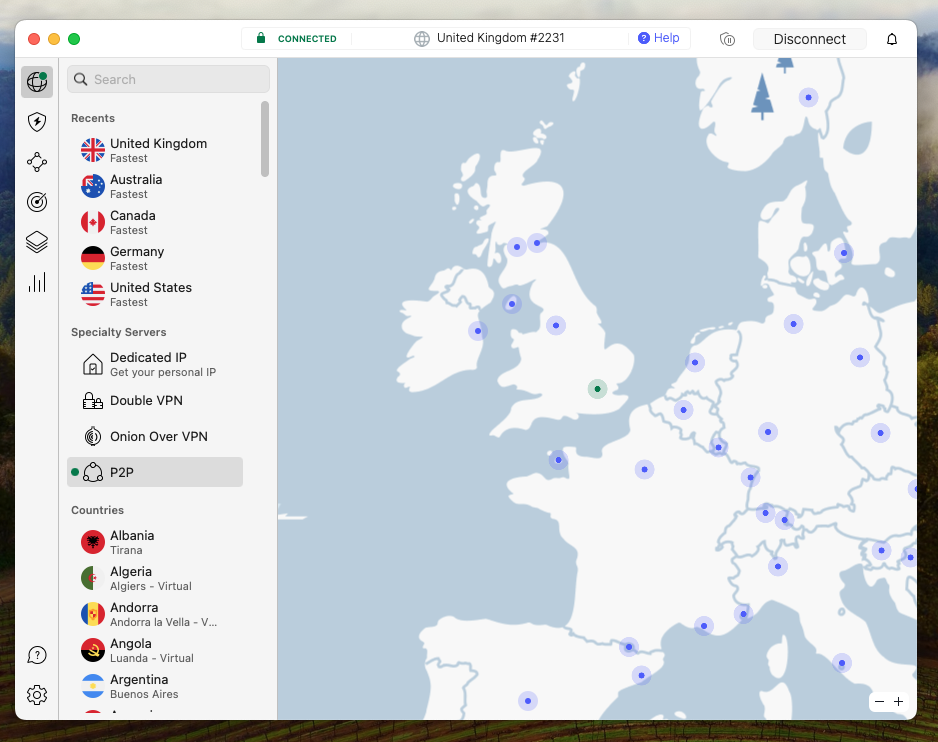
NordVPN specialty servers - Dark web monitor. It scans the dark web for exposed data linked to your email address and alerts you if a breach is detected. NordVPN has expanded this with Dark Web Monitor Pro, which also tracks credit cards, national IDs, Social Security numbers, and phone numbers, and provides improved alerts. You can even check for leaks using a web widget without opening the app.
- Call Protection (Android). Now available in certain countries, this feature helps block scam and spam calls, adding an extra layer of protection on mobile devices
-
Presets. An added feature for convenience. It lets you create custom VPN settings that you can quickly access directly from the app’s main screen. Currently only available on macOS.
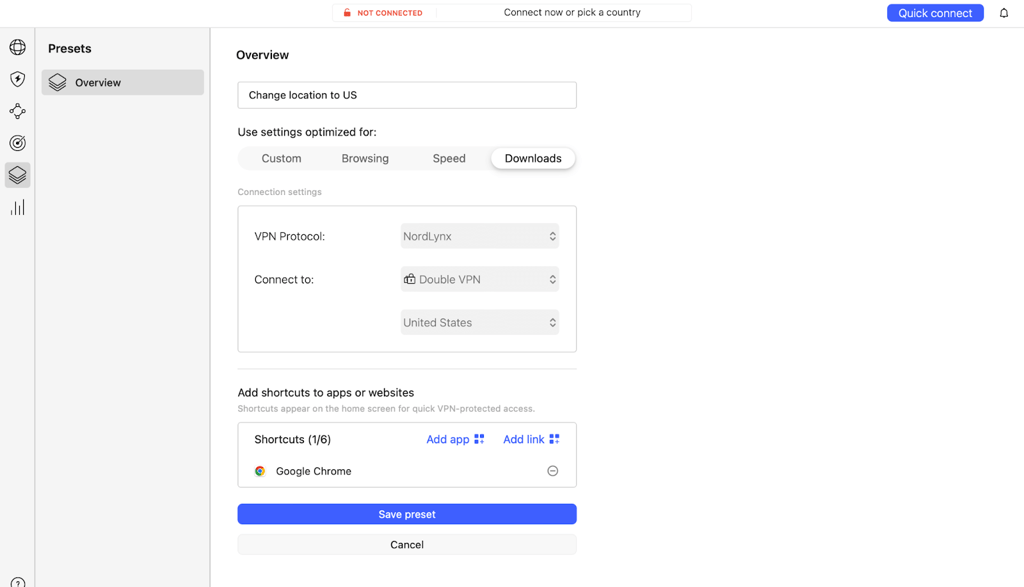
NordVPN presets
NordVPN vs OpenVPN: which is more secure?
| NordVPN | OpenVPN | |
| Encryption | AES-256-GCM and ChaCha20 | 256-bit OpenSSL |
| Hash | SHA-512 | SHA-256 |
| RAM servers | Yes | No |
| A member of the 5-Eyes, 9-Eyes Alliance | No | Yes |
| No-logs policy | Audited | Not audited |
| Kill switch | Yes | Yes |
| Ad blocker | Yes | No |
| DNS leak protection | Yes | Yes |
Between them, NordVPN stands out as the more secure option. Having said that, both NordVPN and OpenVPN put security at the forefront, which is great, as security and privacy form the foundation of any reliable VPN.
For starters, both NordVPN and OpenVPN use advanced encryption and have a no-logs policy. Moreover, the pair also offers a number of key security features, such as a kill switch and DNS leak protection.
However, NordVPN clearly has the upper hand in this OpenVPN vs NordVPN security matchup. Unlike OpenVPN, NordVPN offers the more advanced ChaCha20 cipher in addition to its AES-256. Plus, it minimizes the risk of surveillance and intelligence-sharing by operating under the jurisdiction of Panama. Its no-logs policy has been independently audited six times, too.
Infrastructure
After a breach caused by vulnerabilities in a third-party data center back in 2019, NordVPN upgraded all of its 8,000+ servers to RAM-only servers. Here, your data is stored using volatile memory instead of hard disks. So, whenever a server is reset, all stored data will be wiped to prevent unauthorized tampering and access.
As for OpenVPN, it doesn’t offer any servers. Instead, you’ll need to use your own server, another VPN server, or a server run by the OpenVPN community. Hence, you’ll see a huge difference in quality depending on the server that you end up with.
Privacy
NordVPN uses AES-256 and ChaCha20 for encryption. Both ciphers are the gold standards as they’re considered to be unbreakable even in the face of the most serious assaults like brute force attacks. Additionally, NordVPN is headquartered in privacy-friendly Panama, which isn’t in the Five Eyes alliance.
In contrast, OpenVPN uses 256-bit OpenSSL encryption for its VPN connection. This open-source software is widely considered to be very reliable and even better for bypassing firewalls.
But, where OpenVPN fumbled is that its headquarter is in the US – one of the most prominent members of the Five Eyes alliance. This means that your user data might be under surveillance and monitoring by agencies. Plus, OpenVPN likely has to share your user data with intelligence agencies if requested.
Logging
Both NordVPN and OpenVPN are adamant that your data will not be logged. However, NordVPN is the only one to substantiate that claim with vigorous independent audits. NordVPN has completed six public audits by PricewaterhouseCoopers (PWC) and Deloitte to verify its no-logs claim. The two Big Four firms both confirmed NordVPN’s no-logs policy.
Meanwhile, OpenVPN has yet to put its no-logs policy to the test. Unfortunately, this means that you either need to blindly trust its claim or move on from the provider.
Platforms, interface, and ease of use
| NordVPN | OpenVPN | |
| Supported platforms | Windows, macOS, Linux, Android, iOS | Windows, macOS, Linux, Android, iOS |
| Other software and devices | Kodi, Android TVs, Fire devices | ❌ |
| Browser extensions | Chrome, Firefox | ❌ |
| Simultaneous connections | 10 | 2 |
NordVPN comes out far ahead if we compare OpenVPN vs NordVPN for compatibility. While both providers support all the major operating systems (Windows, macOS, Linux, Android, and iOS), NordVPN takes it a step further.
NordVPN is compatible with all the common software and devices like Android TV and Fire devices, too. Moreover, it also has extensions for Chrome and Firefox browsers. In contrast, as a protocol, OpenVPN doesn’t offer any other dedicated apps or extensions.
There’s no surprise upset in terms of ease of use, either. NordVPN is significantly more intuitive than Open VPN, from installation to setup to management.
Desktop apps
Unlike Linux users that don’t get a visual interface, NordVPN provides desktop apps for its Windows and macOS users. Installation and setup are a breeze, and both apps are modern and responsive. However, its Windows app has a full spectrum of features.
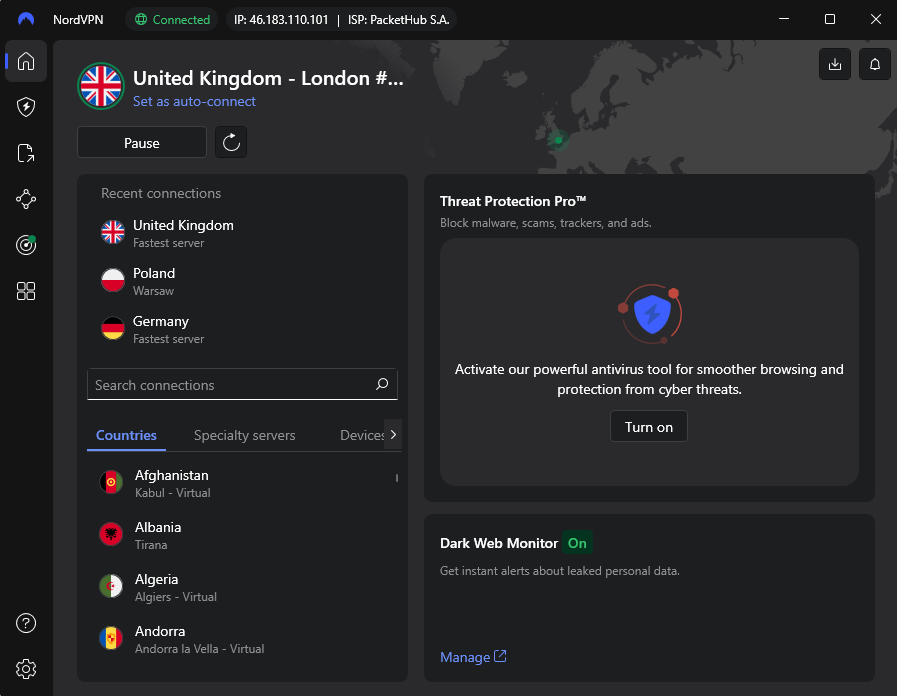
As for macOS, NordVPN has two apps: one from the App Store and another from its official website. The App Store version supports all tunneling protocols, while the website version is widely considered to be the OpenVPN-exclusive sideload version. The latter also has more recent updates.
In comparison, OpenVPN is far harder to set up and too technical for most first-time users. OpenVPN’s how-to guide states that the intended audience should “possess a prior understanding of basic networking concepts such as IP addresses, DNS names, netmasks, subnets, IP routing…”.

However, if you can get over the troublesome setup, you’ll find that its apps are clean, minimalistic, and not too complex.
Mobile apps
NordVPN and OpenVPN’s mobile apps are responsive and visually appealing. Navigation is also fairly straightforward with both.
With NordVPN, its apps for iOS and Android are very similar visually. However, functionality-wise, its Android app offers more features. Meanwhile, the iOS version allows more protocols available to choose from.
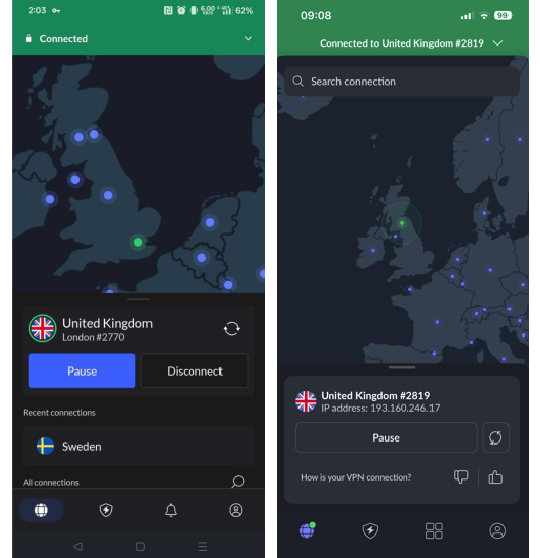
OpenVPN’s apps, meanwhile, are slightly dated compared to NordVPN’s versions. Looks aside, they’re also less functional since you only get limited features with OpenVPN.
Customer support
| NordVPN | OpenVPN | |
| 24/7 live chat | ✅ | ❌ |
| Email/ticket | ✅ | ✅ |
| Phone line | ❌ | ❌ |
| Guides or articles | ✅ | ✅ |
| FAQs | ✅ | ✅ |
NordVPN wraps up this OpenVPN vs NordVPN comparison by scoring another win with its readily-available 24/7 assistance via live chat. It also has email support and plenty of self-help resources like guides, articles, and FAQs.
In contrast, OpenVPN only offers agent assistance via ticketing. Otherwise, you can search for answers in its guides, articles, and FAQs.
NordVPN vs OpenVPN – which one wins?
Based on my testing, NordVPN takes the lead in most areas, offering faster speeds, stronger security, richer features, and superior streaming and torrenting capabilities. OpenVPN stands out as a free, open-source option that gives advanced users flexibility and basic privacy protections.
Overall, NordVPN is the clear winner for most users seeking a full-featured, secure, and user-friendly VPN service. OpenVPN is best suited for technically skilled users willing to manage their own servers.
| Feature | NordVPN | OpenVPN | Verdict |
| Pricing | OpenVPN is free, but NordVPN offers excellent value with full features at a competitive price. | ||
| Speed | NordVPN is significantly faster with multiple protocols and optimized servers, while OpenVPN depends on server quality. | ||
| Privacy | NordVPN provides audited no-logs, RAM-only servers, and Panama jurisdiction; OpenVPN is secure but US-based with no audits. | ||
| Features | NordVPN offers SmartDNS, split tunneling, specialty servers, and advanced tools; OpenVPN only includes core security functions. | ||
| Streaming | NordVPN unblocks all major services reliably; OpenVPN depends on server choice and may be inconsistent. | ||
| Torrenting | NordVPN has dedicated P2P servers and SOCKS5 proxy; OpenVPN allows torrenting but lacks optimization. | ||
| Support | NordVPN provides 24/7 live chat and extensive resources; OpenVPN only offers ticket-based support. |
FAQ
Which is better: NordVPN or OpenVPN?
NordVPN is better. NordVPN offers better streaming capabilities, more robust security, faster speeds, richer features, easier-to-use interfaces, and more accessible customer support. Contrastingly, OpenVPN isn’t a full-service VPN, which explains its weaker security, speeds, features, and more. Plus, you’ll need to find your own server with OpenVPN.
Is OpenVPN trustworthy?
Yes, OpenVPN is relatively trustworthy since it’s fully open source and also has strong encryption, a no-logs policy, and some core security features. However, it’s based in a Five Eyes country. Additionally, its lack of servers means that you’ll need to rely on third-party servers, which could compromise your security.
Is OpenVPN free to use?
Yes, OpenVPN itself is free to use. However, you’ll still need to bear the cost of a configuration file and server. And, while it’s possible to find free servers run by the OpenVPN community, they’re feasible only if you’re willing to put up with potentially adverse effects like limited bandwidth and slow speeds.