Surfshark vs Private Internet Access: which VPN is better?
Our in-house cybersecurity experts and journalists, renowned for major reports like The Mother of All Breaches, conduct transparent, unbiased VPN testing and in-depth analysis.
With 750+ articles crafted based on real-world research, we empower readers to make informed purchasing decisions through first-hand expertise.
Learn more

Surfshark and Private Internet Access (PIA) are two popular VPNs that offer high-quality, reliable performance at affordable prices. One of their main differences is that PIA has a bigger overall server network, while Surfshark covers more locations worldwide.
In this comparison, I break down how each VPN performs across the things that matter most: speed, streaming, torrenting, security, features, and overall usability. All my insights come from hands-on testing, and the results are regularly updated to provide you with accurate and up-to-date information. Keep reading to learn how to choose between Surfshark and PIA.
Surfshark vs PIA: overview
Surfshark is a budget-friendly VPN with unlimited connections and extra features. Meanwhile, PIA offers strong privacy protection and solid security options. I've included all the details about both providers in the table below so you can check the differences yourself. Based on a deeper look at these services, Surfshark still provides better performance and value.
| Surfshark VPN | Private Internet Access VPN | |
| ⭐ Rating: | ||
| 🥇 Overall rank: | #2 out of #41 | #14 out of #41 |
| 🖥️ Servers: | 4,500+ servers in 100 countries | 35,000+ servers in 90 countries |
| 📖 No logs policy: | No logs | No logs |
| 💵 Price: | From $2.49/month | From $2.19/month |
| 🔥 Coupons: | Surfshark coupon 88% OFF | PIA coupon 82% OFF |
| 🔒 VPN protocols: | OpenVPN, WireGuard, IKEv2, Dausos | Wireguard, OpenVPN, IKEv2/IPsec |
| 🍿 Streaming services: | Netflix, Disney+, Amazon Prime Video, Hulu, and more | Netflix, YouTube TV, Hulu, BBC iPlayer |
| 🖥️ Platforms: | Windows, macOS, Linux, Android, iOS | Windows, MacOS, Linux, Android, iOS |
| 📥 Simultaneous connections: | Unlimited | Unlimited |
| 💁🏻 Support: | Knowledge base, email, 24/7 live chat | Knowledge base, FAQs, tickets/email, 24/7 live chat |

Recent Updates




We spare no effort to test the products & their features. All information is gathered by our in-house research team & fact-checked by our team of experts. Discover the ins and outs of our testing procedures.
Key differences between Surfshark and PIA
I’ve put together the most important differences between Surfshark and PIA after my rigorous research. They can help you quickly understand which provider to choose in your case:
- PIA has more servers. According to our PIA review, it has over 35,000+ servers in 90 countries, while Surfshark has 4,500+ servers in 100 countries. So, PIA can give you better chances of finding a fast, reliable server when the demand is high.
- Surfshark costs less. Surfshark offers greater long-term value, a wider selection of pricing plans, and frequent discounts. PIA’s monthly price is a little cheaper ($16.45/month vs $11.99/month), but the Surfshark’s flexible pricing and bundled features make it a better choice.
- Surfshark works faster. My tests and our comprehensive Surfshark review show that Surfshark’s speed test results are excellent. That makes it a strong option for streaming, gaming, and other activities that need a stable, high-speed connection. PIA performs well too, but its speeds can be less consistent depending on the server.
- Surfshark protects privacy better. Surfshark completed six independent audits of its infrastructure and no-logs policy, while PIA passed three. Moreover, Surfshark’s data-sharing is clear and easy-to-understand, while PIA’s policies are less transparent.

Speed, performance, streaming
I tested Surfshark vs PIA across speed, performance, and streaming. Below are my findings.
Speed performance of Surfshark and PIA
Let’s go over the speed results of the Surfshark vs PIA comparison with different protocols. The data that is being compared are the average download and upload speeds for each provider.
- Baseline: 940Mbps download/940Mbps upload
The first tested tunneling protocol is WireGuard – the industry’s fastest and most secure protocol. And from the results, it is clear that Surfshark takes the lead with download speed over PIA’s results. However, the upload speed of PIA was better.
| WireGuard | Surfshark | PIA |
| Download average | 763.8Mbps | 596.67Mbps |
| Upload average | 194.3Mbps | 251.00Mbps |
The next protocol tested was the OpenVPN UDP. Here, the competition is closer with download speeds; PIA even takes the slight lead. But Surfshark surges forward with the upload speed results with a larger margin. Therefore, the win goes to Surfshark.
| OpenVPN UDP | Surfshark | PIA |
| Download average | 120.2Mbps | 126.8Mbps |
| Upload average | 140.3Mbps | 131.4Mbps |
Finally, with the OpenVPN TCP protocol, PIA is the clear winner. This protocol is slower than others and is only recommended when others aren’t available. But if you prefer to use this protocol, then PIA is a better provider with quicker download and upload speeds.
| OpenVPN TCP | Surfshark | PIA |
| Download average | 25.8Mbps | 32.8Mbps |
| Upload average | 28Mbps | 37.6Mbps |
Streaming performance of Surfshark and PIA
Most people use a VPN to access foreign content libraries of their favorite streaming platforms. That is why I examined which one, Surfshark or PIA, is better at unblocking streaming service geo-restrictions, and here are the results:
| Platform | Surfshark | Private Internet Access |
| Netflix | ✅ Yes | ✅ Yes |
| Amazon Prime Video | ✅ Yes | ❌ No |
| Hulu | ✅ Yes | ✅ Yes |
| HBO Max | ✅ Yes | ❌ No |
| Disney+ | ✅ Yes | ❌ No |
| BBC iPlayer | ✅ Yes | ✅ Yes |
| YouTube | ✅ Yes | ✅ Yes |
When I tested the stream quality with Surfshark, the videos were of high quality, and I experienced no lag or buffering. Additionally, the large server fleet and variety of locations will help you access a variety of global content libraries and never run out of entertainment.
Surfshark has discontinued its SmartDNS feature, which helped unblock streaming sites on devices that don’t support VPN apps, like your smart TVs. Even though PIA comes with SmartDNS, I couldn’t make it work. So this feature is rather unreliable.
Overall, PIA works with a few streaming sites, like Netflix, Hulu, BBC iPlayer, and YouTube. Yet, there are issues. While Netflix US works well, the connection is slow, I experienced some lag, and the video quality wasn’t great. There were issues with different Netflix locations as well. However, PIA successfully works with Hulu on any of its US servers.
Torrenting performance of Surfshark and PIA
It’s difficult to pick a clear winner between Surfshark and PIA when it comes to torrenting. Both of these providers are good and secure options for torrenting because both are P2P-compatible and optimized for faster downloading speeds. Additionally, both support torrenting on all of their servers.
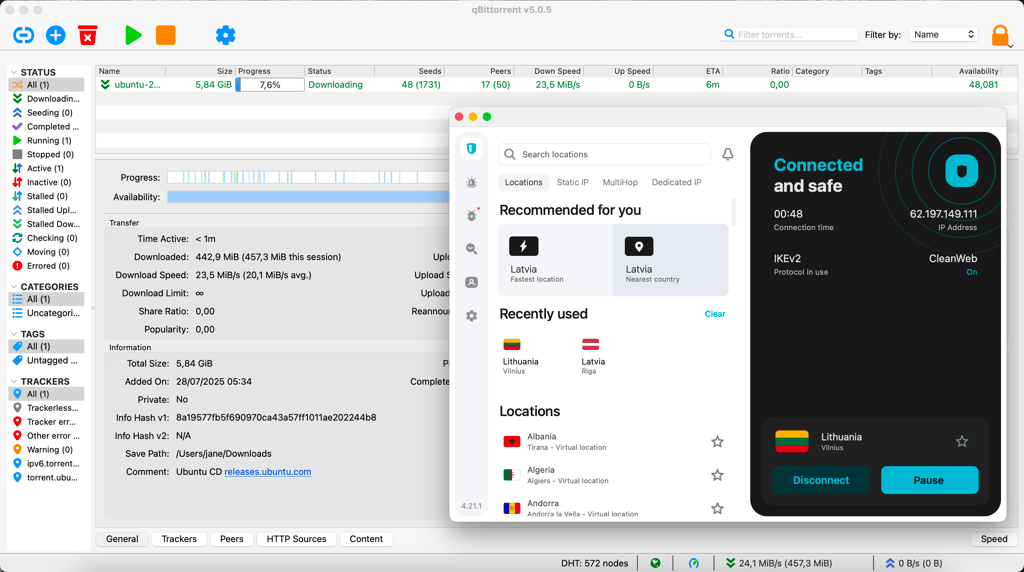
During my tests, I noted that both Surfshark and PIA have great download speeds, and I had no issues downloading even bigger files. So if you’re looking for a VPN for torrenting, either option is good based on their speeds and torrenting-friendly servers.
Surfshark vs PIA price comparison 2026
PIA's monthly subscription is slightly cheaper than Surfshark's. Also, it lets you pick a 6-month or 2-year plan. However, other Surfshark plans are much more cost-efficient. For example, Surfshark’s 2-year plan is cheaper, while its 1-year subscription offers a much better monthly price than PIA’s 6-month plan.
| Plan | Surfshark | Private Internet Access |
| Monthly | $16.45/month | $11.99/month |
| 6 months | N/A | $7.50/month |
| One year | $3.39/month | N/A |
| Two years | $2.49/month | $2.03/month |
| Money-back guarantee | 30-day | 30-day |
| Free trial | 7-day (for Android, iOS, and macOS) | 7-day (for iOS and Android) |
| Now up to 88% OFF Surfshark + 3 months FREE | Halloween Offer now with 82% OFF + 3 Months FREE |
With Surfshark, you can pick between Starter, One, and One+ plans. One and One+ cost $2.49/month and $3.99/month, respectively. Meanwhile, the Starter plan costs $3.39/month. Each offers different subscription lengths, so there’s more options for you to choose from.
Both providers offer a risk-free 30-day money-back guarantee and a 7-day trial for Android and iOS, but Surfshark also applies this trial to macOS devices.
As for the payment, both Surfshark and PIA accept credit cards, PayPal, and cryptocurrencies. Additionally, Surfshark adds Google Pay to the list as well.
Surfshark vs PIA: servers and locations
While some could argue that having more countries covered is more important than a larger server fleet, it’s undeniable that PIA’s 35,000+ servers outshine Surfshark’s 4,500+, winning in this category. Especially if you were to look at the region comparison below:
| Surfshark | Private Internet Access | |
| Servers | 4,500+ | 35,000+ |
| Countries (total) | 100 | 90 |
| Americas | 18 | 12 |
| Europe | 46 | 42 |
| Asia Pacific | 27 | 19 |
| Middle East and Africa | 9 | 12 |
Both providers offer a range of servers and locations to choose from, but there’s no competition with PIA’s massive server fleet.
With Surfshark you get 4,500+ servers in 100 locations, which is more than enough options to pick a server. Yet, PIA still wins the comparison since it has 35,000+ servers in 90 locations.
However, it’s important to know that some of those PIA servers are virtual. These servers behave like physical servers, but may be located in a different country than the IP address suggests. This usually doesn’t affect performance or security, and it doesn’t make your VPN connection easier to detect.

Surfshark vs PIA: feature overview
Surfshark and PIA come with some great VPN features included. The security features that cover the bases, like strong data encryption and reliable speeds, and the extras, like split tunneling, a kill switch, or even a VPN-adjacent antivirus, are excellent. However, Surfshark still takes the winning spot, so let’s look deeper into why that is.
Kill switch
A reliable kill switch is a necessary security feature that all top VPN providers need to have. Both Surfshark and PIA include a strong kill switch in their security features. But when comparing Surfshark vs PIA, what variations can each VPN provider offer that the other couldn’t match?
For starters, Surfshark has a strong and reliable kill switch, which, when enabled, will block all of your internet traffic, unless you’re connecting via a VPN. This is a rather strict feature, since most other VPN providers only kill your connection when the connection with a VPN is interrupted.
However, Surfshark allows customizing this feature – you can pick a soft kill switch, which works like any other VPN provider’s, or for maximum security, pick the strict one.
Now, PIA also has a really reliable kill switch. It works like other kill switches in that once your connection to a VPN gets interrupted, PIA will drop your internet connection to protect your real IP address. And once the connection drops, PIA requires you to reconnect to your VPN again or turn your Wi-Fi on manually, so you don’t accidentally leak your real IP address.
Split tunneling
Another shared security feature is split tunneling. This tool allows you to select which apps or websites are required to go through a VPN tunnel and which can bypass this requirement, even if you’re connected to a VPN.
Surfshark’s split tunneling feature is available only on Windows and Android platforms. When testing this feature, I had no issues assigning apps that required a VPN connection and excluding the others. So Surfshark’s split tunneling works without any issues.

When comparing Surfshark vs Private Internet Access, I have to mention that I ran into some issues with PIA's split tunneling feature. While it did have the advantage of providing this feature on Windows, Android, and macOS devices, it didn't work as smoothly as Surfshark's. For example, when I tried adding one browser to the PIA's exception list, my entire network became unprotected. Meanwhile, the app said that I was still connected to the VPN.
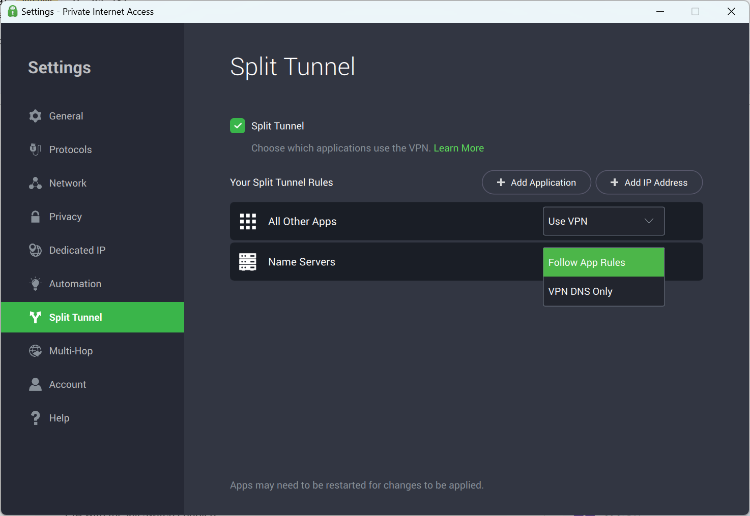
Additionally, even though PIA offers this tool on more OSs, it brings more issues. For example, on Android, split tunneling only works with apps and not websites.
Antivirus
Both of these providers offer their own antivirus protection. They aren’t included with the VPN package but can be purchased together for very low prices.
Surshark One antivirus is a fairly new security tool and comes with an all-around security bundle that covers Windows, macOS, and Android devices. This is a safe antivirus option that offers high-level protection from cyberthreats. However, it doesn’t have an integrated firewall.
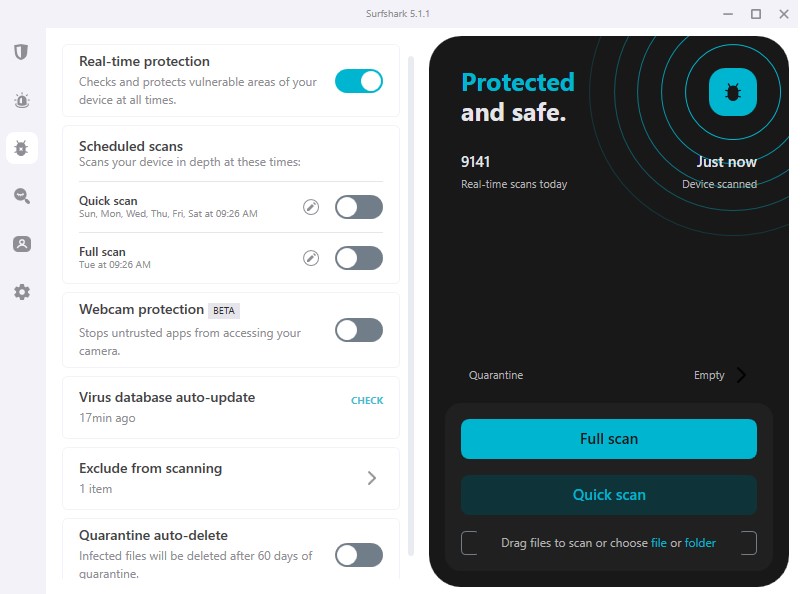
While this isn’t the most feature-rich antivirus software, it does provide solid security. The features include various scanning options (quick, full, scheduled, and drag-and-drop item scans), real-time protection from cyberthreats, a secure search engine that blocks malicious sites and ads, and an alert feature that will let you know if your data has been leaked.
PIA also has a reliable but minimalistic antivirus suite. Unlike the VPN interface, PIA’s antivirus app is very clear and easy to use. However, this antivirus only supports Windows OS.
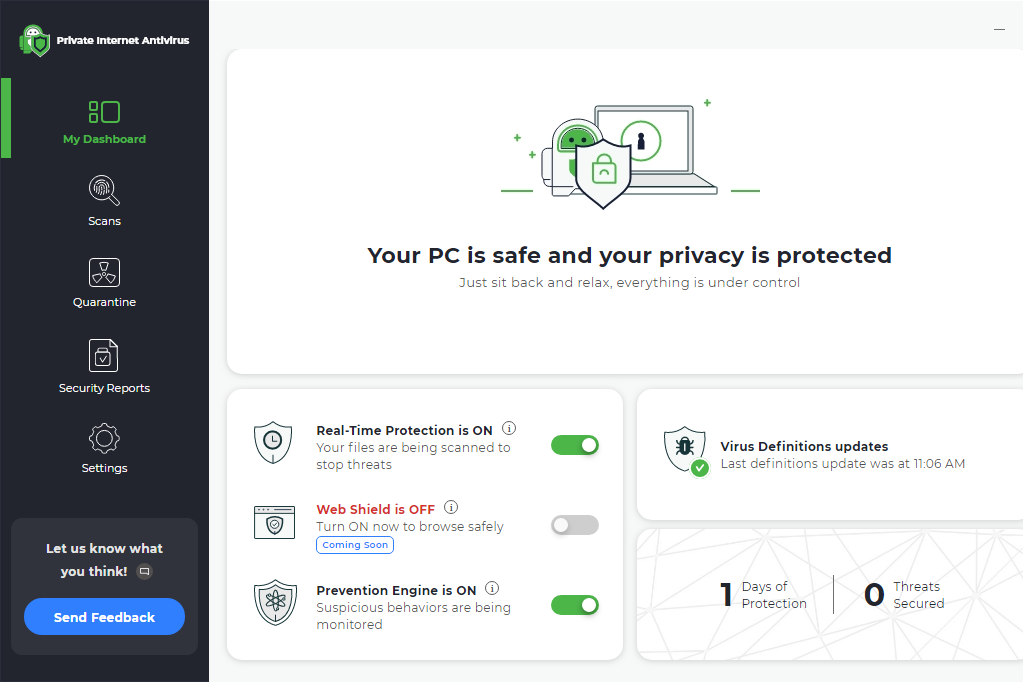
Some of the features you get with this antivirus include real-time protection, a web shield to block malicious ads, and a prevention engine, which fixes the device’s built-in defenses. There are also different scan types and detailed status reports.
Other notable features
Surfshark comes with a reliable obfuscation feature that hides that you’re even connected to a VPN. Additionally, there’s a GPS spoofer to hide your physical GPS location.
Another is the Safe Search feature, which adds additional security from malicious websites and ads. An IP rotator will continuously change your IP address, and an alert function will notify you whenever your data has been leaked.
For an additional price, you can also get a dedicated IP, which is useful when connecting to work networks or accessing sites that tend to block VPNs.
Surfshark vs PIA: which is more secure?
When comparing Surfshark vs Private Internet Access security features, Surfshark proves to be more secure. It has been audited six times and offers the strongest type of data encryption and a clear security policy. Here’s a more direct comparison:
| Surfshark | Private Internet Access | |
| Encryption | AES-256-GCM and Chacha20Poly1305, a 2048-bit version of the RSA | AES-128-CBC (default), AES-256-CBC (more secure) |
| Hash | SHA-256 | SHA-1 and SHA-256 |
| RAM servers | ✅ Yes | ✅ Yes |
| Based in | The Netherlands | The US |
| No-logs policy | Audited | Audited |
Both Surfshark and PIA use AES-256 encryption, making them less vulnerable to data breaches. This encryption type is so reliable that it is used by PayPal and Bank of America, among other financial institutions.
Additionally, hash features contribute to data security. Surfshark and PIA both use SHA-256, which speeds up connection times and reduces the risk of buffering when streaming, for example.
PIA and Surfshark both use RAM-only servers, so they don’t store your data. Also, neither keeps logs of user activity, so they’re less prone to data leaks. But that’s where similarities end.
Surfshark has undergone six audits in total to ensure data protection, while PIA recently passed its third audit in 2026. As for the security policy of Private Internet Access vs Surfshark, PIA’s policy is really confusing and vague about what data it shares. Surfshark, on the contrary, is very clear and open.
Surfshark vs PIA: audits
Both Surfshark and PIA have been independently audited to evaluate their security, privacy and data policies, company operations, and more. Every reputable and trustworthy VPN service has to be independently audited at least once to prove its claims.
PIA had its third audit in 2026, conducted by Deloitte – one of the Big Four auditing companies. It confirmed PIA’s claims that the provider does not log any personal user information or activity.
Overall, Surfshark had completed six security audits conducted by different independent companies. The very first audit by Cure53 in 2018 found no flaws in the company’s security protocols, deeming Surfshark up to the best global standards.
Some additional recommendations were issued, which proved to be addressed by the second 2021 audit. Surfshark’s entire VPN infrastructure was examined during this evaluation, and no faults were detected.
Deloitte’s audits from 2022 to 2025 determined that Surfshark truly keeps no activity logs of its users, once again proving its reliability. The last independent audit was done in February 2026 by SecuRing – it proved once again that Surfshark’s infrastructure is secure from unauthorized access and cyberthreats.
Platforms, interface, and ease of use
If you look at the table below, it’s tough to see much of a difference between PIA and Surfshark. Both have the same number of connections and very similar platform compatibility. Essentially, you can’t lose with either.
| Surfshark | Private Internet Access | |
| Supported OS | Windows, macOS, Linux, Android, iOS | Windows, macOS, Linux, Android, iOS |
| Other software and devices | Android TVs, Fire devices | Android TVs, Fire devices |
| Browser extensions | Chrome, Edge, Firefox | Chrome, Firefox |
| Simultaneous connections | Unlimited | Unlimited |
Surfshark and PIA cover a variety of platforms, OSs, and devices. The coverage these providers offer is pretty much the same. There are no differences when it comes to the supported OSs or other software.
Moving to browser extensions, both cover Chrome and Firefox, but Surfshark gains a slight edge with an extension for Edge. Both PIA and Surfshark offer unlimited simultaneous connections, which essentially makes them pretty much equal when it comes to ease of use.
Desktop apps
Surfshark offers a dedicated app for Linux OS that is both pleasing to use and feature-rich. Its Windows desktop app is the most developed out of all versions. It’s really pleasing and intuitive to use. The main screen displays the grouped categories of features for easier navigation. There’s no map interface for picking the servers, but instead, they are listed with the country’s flag displayed next to them.
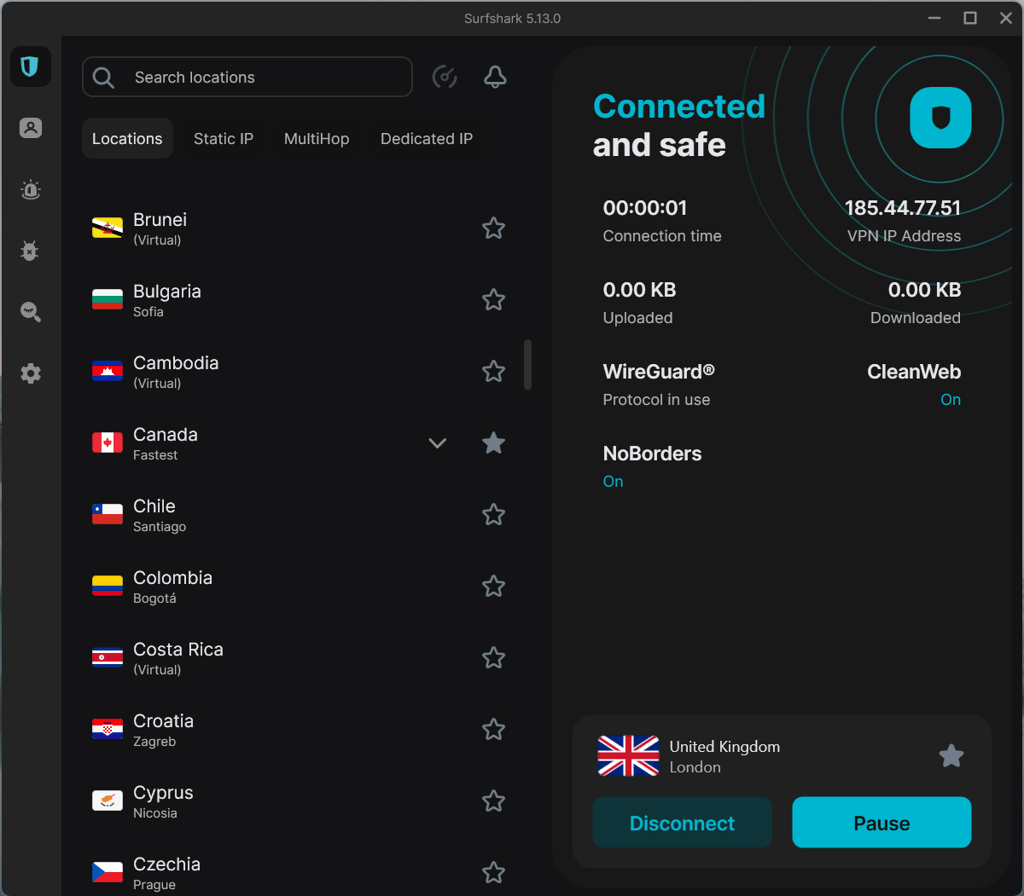
The macOS version of the Surfshark app is slightly less developed than the Windows one. There are two versions of it: one you can download from Surfshark’s page and the other from Apple’s App Store.
The main difference between them is that the app store version provides WireGuard, IKEv2, and OpenVPN protocols, while the webpage one doesn’t offer the OpenVPN option. Additionally, just like the Windows version, the macOS app doesn’t have a map interface either.
Now, PIA’s desktop apps for Windows and macOS are pretty similar. Both versions display a lot of information about your connection, like the protocol, encryption, connection status, and more. Additionally, there’s also no map interface to select your connection.
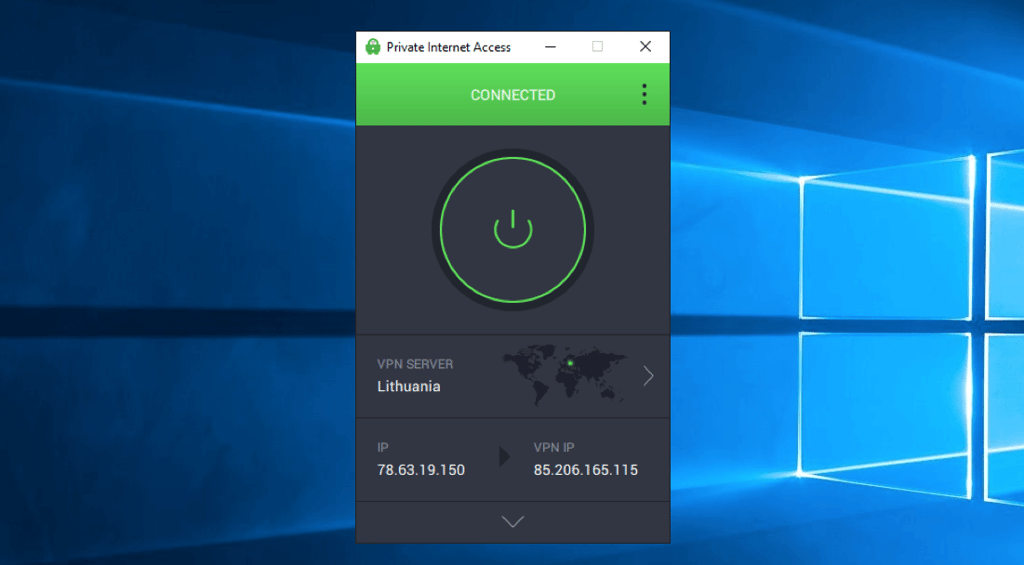
The main issue encountered was with the Windows app, since it kept crashing randomly, or the system would lag while connecting to a server. There were no such issues with the macOS version.
Additionally, PIA’s Linux app was pretty similar to the other two versions and was rather easy to download and install. Some features may be more difficult to use and understand, but with some practice, it’s not a big challenge.
Mobile apps
Surfshark offers a great Android app and a slightly less developed iOS version. But that is the most common occurrence with VPN providers.
The Android version had all the same features as the Windows one, with the addition of a GPS spoofer. It’s very user-friendly and has a very pleasing interface. The iOS version is practically identical but has no GPS spoofer or Whitelister feature.
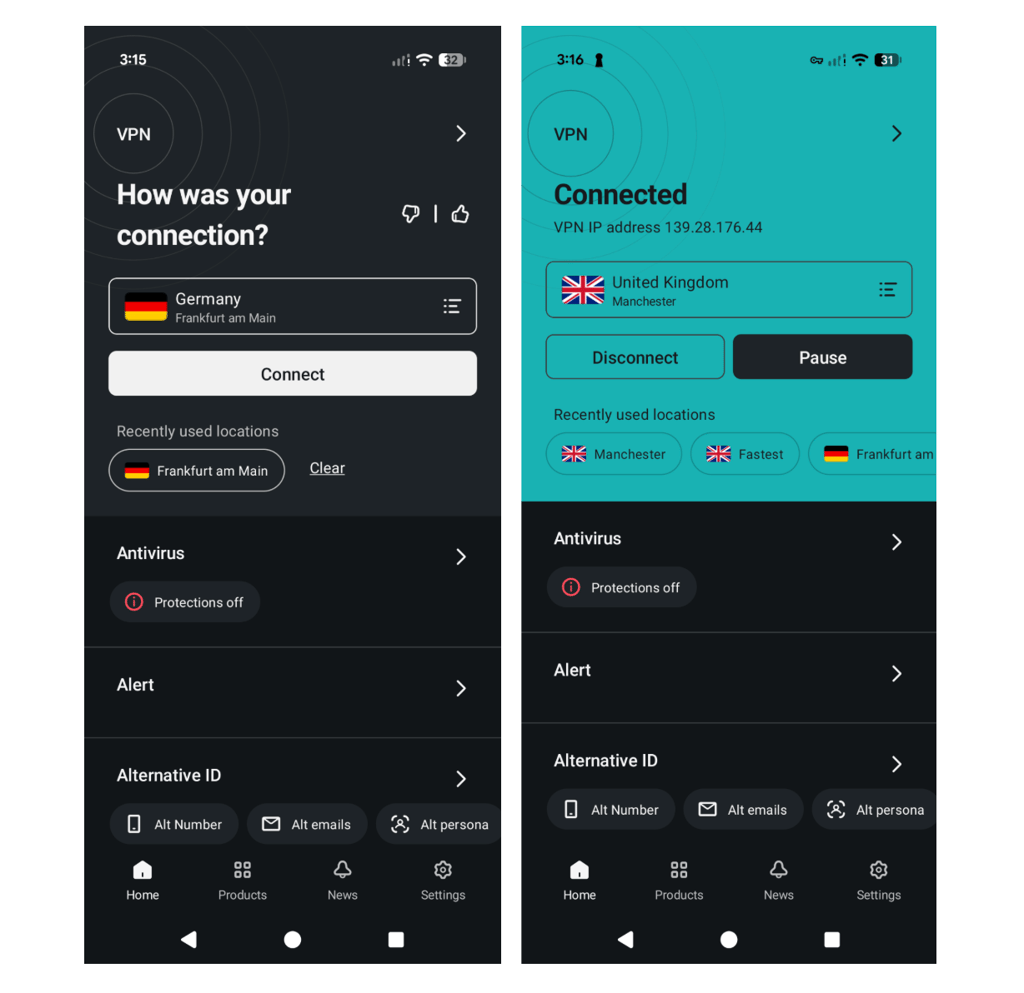
Now, PIA’s mobile apps are pretty much identical to the desktop version. While the design is meant to be minimalistic, the abundance of information presented can be slightly overwhelming. Also, mobile apps can be difficult to navigate and understand, since they have random icons without explanations of what they do.

No matter Android or iOS, the apps look practically identical. However, the features are simplified on the mobile version. For example, the Android app allows you to use split tunneling only for specific apps and not websites.
Customer support
| Surfshark | Private Internet Access | |
| 24/7 live chat | ✅ Yes | ✅ Yes |
| ✅ Yes | ✅ Yes | |
| Guides or articles | ✅ Yes | ✅ Yes |
| FAQ/community forum | ✅ Yes | ✅ Yes |
For two premium VPN providers, you expect them to also have great customer support. Luckily, these two do live up to the expectations. In need of quick solutions, you can contact the 24/7 live chat support. Surfshark additionally offers email support, while PIA has a ticketing system.
Another shared customer support option is their extensive libraries of guides and articles if you wish to work out solutions yourself. To add to that, Surfshark has a useful FAQ page, while PIA has a user forum for discussions and solutions.
However, Surfshark comes out as a winner in this category for a very simple reason – its customer support agents are much quicker and more reliable when it comes to solving issues.
I’ve tested both providers’ customer support response times and success in solving my troubles, and in the end, Surfshark agents managed to quickly provide the needed information.
On the other hand, there was a long back and forth with PIA agents, mostly because they struggled to provide accurate information on how to solve the issues encountered and required more and more additional information from my side. Also, there were inconsistencies with the response times.
Surfshark vs Private Internet Access: final verdict
Surfshark is a clear winner in my Surfshark vs PIA comparison. Its speed, protection, app features, access to streaming platforms, and customer support turned out to be much stronger.
| Category | Surfshark | Private Internet Access |
| Speed | ✅ | ❌ |
| Features | ✅ | ❌ |
| Protection | ✅ | ❌ |
| Streaming | ✅ | ❌ |
| Torrenting | ✅ | ✅ |
| Server locations | ❌ | ✅ |
| Price | ✅ | ✅ |
| Ease of use | ✅ | ✅ |
| Customer support | ✅ | ❌ |
PIA’s advantage is a larger server network across more locations – it has an impressive number of 35,000+ servers in 90 locations. This can help you avoid overcrowded servers and choose the fastest ones.
However, while both VPNs offer competitive pricing and excellent torrenting support, Surfshark is cheaper in the long term, and its bundles with advanced security features give you more for your money.
FAQ
Is PIA better than Surfshark?
No, Surfshark is better than PIA. With Surfshark, you get better security features and stronger data encryption. Also, you can be certain that your data won’t be shared, thanks to the independent audit of their no-logs policy. While PIA offers fewer features, its policy is very vague about data sharing. That being said, its no-logs policy has been audited, too.
Which is cheaper, Surfshark or PIA?
Surfshark offers cheaper long-term subscriptions – its 2-year plan costs $2.49/month and includes unlimited device connections. PIA also offers unlimited device connections, but its cheapest 2-year plan costs $2.03/month.
Can PIA be trusted?
PIA isn’t the most trustworthy VPN provider, but it does have a track record of not providing user data upon third-party requests. It states that it doesn’t log your information, but its user policy is rather vague when it comes to the data it does collect and its ability to share it amongst its companies. So it’s safer to choose a truly reliable VPN provider like Surfshark.