Best VPNs for Fortnite in 2026
Our in-house cybersecurity experts and journalists, renowned for major reports like The Mother of All Breaches, conduct transparent, unbiased VPN testing and in-depth analysis.
With 750+ articles crafted based on real-world research, we empower readers to make informed purchasing decisions through first-hand expertise.
Learn more

A reliable Fortnite VPN can improve your gaming experience in several ways. It helps prevent IP bans, reduce ISP throttling, protect against DDoS attacks, and keep your ping as low as possible. Beyond gaming, a VPN also strengthens your overall online privacy and security.
I tested and reviewed multiple VPNs based on speed, security features, server networks, and real in-game performance with Fortnite. Only the top performers made the list. Check out the full guide to find the best VPN for Fortnite and enjoy smoother, safer, and uninterrupted gameplay.
Top 5 best VPNs for Fortnite –shortlist
- NordVPN – best overall Fortnite VPN
- Surfshark – best Fortnite VPN for multiple devices
- IPVanish – versatile VPN for Fortnite players
- ExpressVPN – highly secure VPN for Fortnite gaming
- CyberGhost – Fortnite VPN with optimized gaming servers




We spare no effort to test the products & their features. All information is gathered by our in-house research team & fact-checked by our team of experts. Discover the ins and outs of our testing procedures.
Why use a VPN for Fortnite?
There are a few reasons why you should get a tested and rated best VPN for playing Fortnite.
If you don’t play a completely fair game, your IP address gets banned and you can’t play Fortnite anymore. A VPN can help you change your IP address and you can continue enjoying the game.
Another reason might be because your ISP is slowing down your network connection whenever a quick online operation is detected. With the fastest VPN, you’ll be able to avoid ISP throttling and enjoy playing Fortnite lag-free.
A VPN that offers a respectable number of server locations can help you access a Fortnite server that is not overcrowded and this way even reduce ping.
What’s more, places such as school or work, and countries like Iraq or China have put restrictions or even bans on Fortnite. By using a reliable VPN, such as NordVPN, you’ll be able to unblock the game from anywhere in the world.
Finally, a VPN can prevent DDoS attacks. Whether it’s an envious player or a random cybercriminal trying to attack you with DDoS and encroach on your system, the most secure VPN will block the attempts of such an attack.
Best VPNs for Fortnite in 2026 – detailed list
With dozens of VPN providers to choose from, finding the right one can be challenging. However, to get the most out of your Fortnite experience, only the best gaming VPN will do. Together with our research team, I tested 41 VPNs that offer a large and geographically diverse fleet of servers, fast speeds, security, and more.
Based on these findings, I’ve compiled a list of the 5 best Fortnite VPNs in 2026.
1. NordVPN – favorite VPN for Fortnite

| Unbans Fortnite: | ✅Yes |
| Servers/countries: | 8,000 servers in 149 countries |
| Based in: | Panama |
| Current deal: | Get 75% OFF NordVPN + 3 months free |
NordVPN is the best VPN for Fortnite and any other gaming, for that matter. Luckily, it’s not a blindly chosen first-place holder. In fact, it has a bunch of benefits to offer.
First and foremost, with NordVPN, you get to choose from an incredible amount of servers and locations – over 8,000 servers in 149 countries, to be exact. This means you can enjoy a lag-free Fortnite game from any corner of the world.
To boost your connection speed even more, this VPN provider has chosen to implement an upgraded version of the WireGuard tunneling protocol called NordLynx. This protocol allows you to enjoy breakneck speeds and reliable protection.
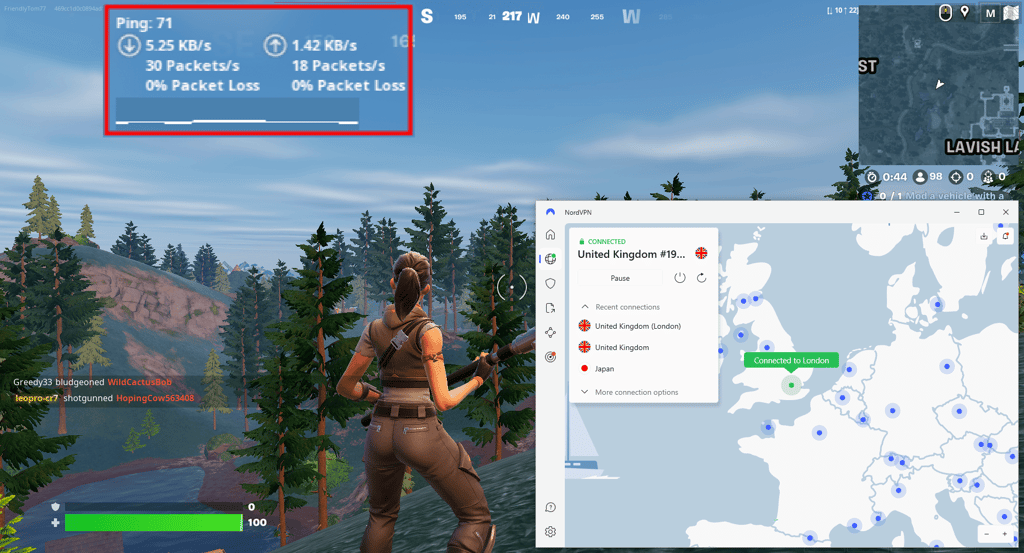
I tested NordVPN with Fortnite connected to a medium-range server (UK). Overall, I found gaming a smooth experience. With a ping of around 70 ms, my gameplay remained quite responsive, with only very minor lag on rare occasions. Most actions, like building and shooting, are executed with minimal delay, but in high-stress situations, you might notice a slight lag that could impact quick movement. The connection was generally stable, allowing for a decent gaming session without major interruptions.
Speaking of protection, NordVPN has done its best to build the safest and strongest security suite. It includes AES-256 encryption, a kill switch feature that will watch your back whenever the VPN connection drops, split tunneling, obfuscation, and more. What I really like is that you can get all of this for as low as $3.49/month.
2. Surfshark – Fortnite VPN with unlimited simultaneous connections

| Unbans Fortnite: | ✅Yes |
| Servers/countries: | 4,500 servers in 100 countries |
| Based in: | Netherlands |
| Current deal: | Now up to 85% OFF Surfshark + 3 months FREE |
Surfshark is a Fortnite VPN that offers unlimited simultaneous connections along with the best quality to price ratio. With the Surfshark discount code "OFFCN", you can slash the price even further. And most importantly, the quality of this VPN serves perfectly for gaming.
Let me point out the pricing first. So, to have a reliable next-gen Surfshark VPN service, you can pay as low as $2.49/month. For such a price, you get more than enough servers and locations that will work great for Fortnite, streaming, and unblocking other globally restricted content. With it, you get over 4,500 servers in 100 countries.
Besides, it uses AES-256-GCM encryption and a respectable list of tunneling protocols, including WireGuard. And finally, you get a full security bundle that covers antivirus, a safe search engine, and more.
While connected to a medium-range Surfshark server (UK), my gaming was smooth with no considerable lag. The ping was around 70 ms, so my experience did not differ at all when compared to NordVPN with Fortnite. There were no noticeable lags or disruptions, and my gameplay remained fluid and responsive. Surfshark strikes a good balance between security and performance, making it a viable option for those who prioritize both while gaming.

Additionally, Surfshark also offers essentials, such as a kill switch feature, split tunneling, obfuscation, ad blocker, and even more exclusive ones, like a static or dedicated IP.
3. IPVanish – all-around VPN for Fortnite

| Unbans Fortnite: | ✅Yes |
| Servers/countries: | 3,400 servers in 112 countries |
| Based in: | United States |
| Current deal: | Now up to 84% OFF IPVanish |
IPVanish is a Fortnite VPN that covers every possible need you could have regarding a great gaming experience. Its constantly improving suite of features won’t let you stay behind with slow speeds or banned IP addresses.
An implementation of strong AES-256 encryption will make your network traffic pretty untouchable and to ensure that even more, you get to use the WireGuard tunneling protocol. The latter not only grants you protection but also dashing connection speeds. Moreover, you’ll definitely find a server that’s close to you to keep your ping as low as possible, as this VPN covers 3,400 servers in 112 countries.
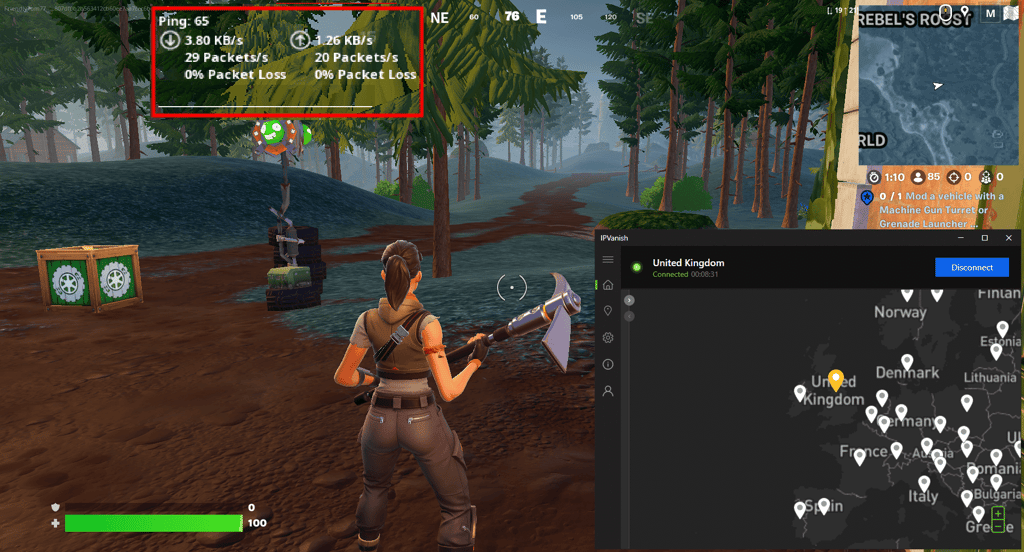
My IPVanish testing while connected to a medium-range server (UK) resulted in a decent gaming experience. The ping was around 65 ms, which is quite manageable for most gameplay situations. While not as low as a local server might provide, it was stable enough to ensure smooth movement and quick response times, minimizing lag. I had an enjoyable and competitive experience without major interruptions, making IPVanish a viable option for those who need to use a VPN while gaming.
It should be noted that IPVanish’s obfuscation feature uses the XOR cipher to make it even harder to detect your VPN connection. Consequently, you can enjoy Fortnite stress-free in heavily restricted countries or public locations.
IPVanish has even more to offer aside from top-notch obfuscation and essentials like the kill switch. I really like that you also get encrypted storage for your sensitive information, and all comes to a price starting from $2.39/month – as affordable as Surfshark.
4. ExpressVPN – secure VPN for Fortnite gaming

| Unbans Fortnite: | ✅Yes |
| Servers/countries: | Undisclosed number of servers in 113 countries |
| Based in: | British Virgin Islands |
| Current deal: | Now up to 80% OFF ExpressVPN + 4 months FREE |
Another great VPN for Fortnite gaming is ExpressVPN. Not only is this a very secure provider to protect your data, but also provides great speeds for a lag-free gaming experience.
ExpressVPN has a vast list of servers in 113 countries, so you can pick from a variety of locations to connect from to get the lowest ping. More so, your data will be encrypted with AES-256 encryption, so it’s virtually unhackable. And, in case of a connection loss, a reliable kill switch will shut down your internet connection.
To strengthen the security even more, there’s a Threat Manager feature that blocks all tracking and other potentially malicious activity. This feature enhances your privacy and anonymity while online.
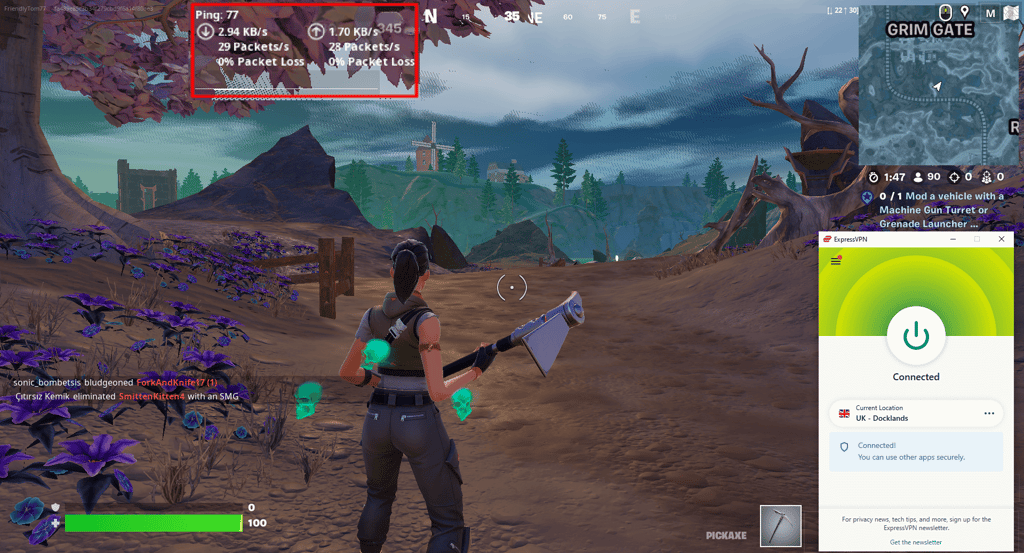
While playing Fortnite with ExpressVPN on a medium-range server in the UK, I got a ping of around 77 ms which led to a smooth gaming experience. The connection was stable enough to avoid major lag or disruptions, though you might notice a slight delay compared to playing on a closer server. Overall, the gameplay was relatively responsive and I enjoyed matches without significant issues.
In addition, this ExpressVPN has a proprietary Lightway protocol, which ensures reliable speeds. While this isn’t the fastest tunneling protocol, it's more than enough for a quality gaming experience without buffering or lags. Even though ExpressVPN isn’t the most budget-friendly VPN, starting at $2.99/month, I find the experience and security features you get are worth the money.
5. CyberGhost – Fortnite VPN with gaming-optimized servers

| Unbans Fortnite: | ✅Yes |
| Locations: | Undisclosed number of servers in 100 countries |
| Based in: | Romania |
| Current deal: | Watch Live Sports Securely, now with 83% OFF CyberGhost + 2 months FREE |
CyberGhost is another great option for Fortnite VPN. The main perk of this provider is that it offers specialized servers for gaming, so you don’t have to sit through lags or buffering that can cost you a win in your game.
This VPN provider has a massive server fleet in 100 countries, so you’re certain to find the best server with the lowest ping for your needs. In addition, you can select gaming-optimized servers for a stable connection.
There’s no need to worry about your data security while using CyberGhost. Your data will be encrypted with AES-256 encryption, there’s a reliable kill switch to prevent real IP leaks, and an ad blocker to prevent malicious online threats, among other features.
When I tested CyberGhost with Fortnite on a medium-range server (UK), ping was around 78 ms, offering a fairly decent gaming experience. While not ideal, the connection was stable enough for casual play. You might notice some delay in actions and reactions, particularly in fast-paced situations. However, the gameplay remained smooth overall, with minimal lag or interruptions. I find it a workable solution if you're prioritizing privacy and security while gaming.
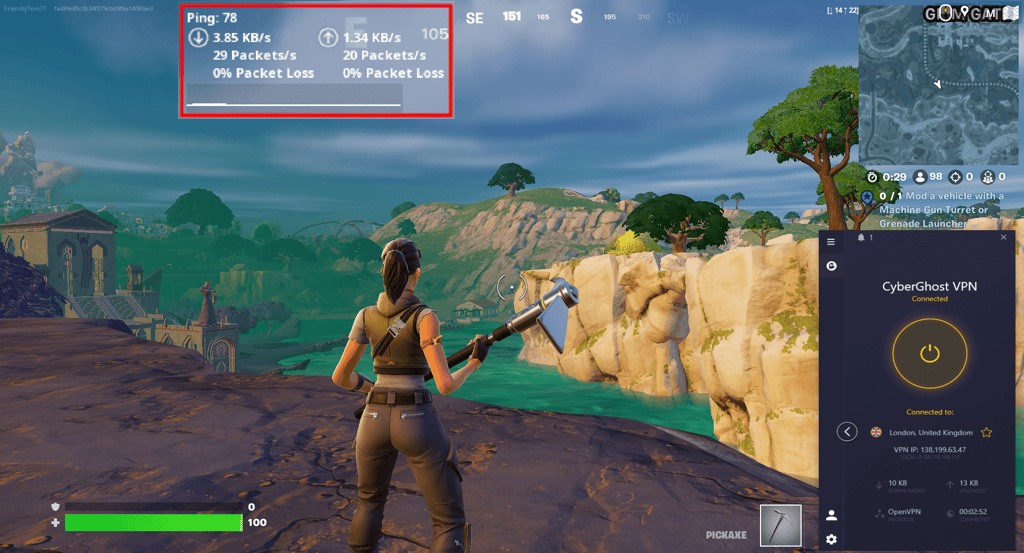
CyberGhost does offer the market-standard WireGuard tunneling protocol. It will provide you with reliable speed results, so you won’t have to deal with lagging or buffering. Not to mention, the closest server to your original location you’ll pick, the better the speeds will be. You can get it for basically the same price as Surfshark or IPVanish – CyberGhost’s pricing starts at $2.19/month, an excellent deal for the features you get.
Best Fortnite VPNs compared
| VPN | Rating | Unbans Fortnite | Servers | Fortnite ping, ms | Compatibility | Price |
| NordVPN | ✅Yes | 8,000 servers in 149 countries | 71 | Windows, macOS, Linux, Android, iOS | From $3.49/month | |
| Surfshark | ✅Yes | 4,500 servers in 100 countries | 71 | Windows, macOS, Linux, Android, iOS | From $2.49/month | |
| IPVanish | ✅Yes | 3,400 servers in 112countries | 65 | Windows, macOS, Linux, Android, iOS | From $2.39/month | |
| ExpressVPN | ✅Yes | Undisclosed number of servers in 113 countries | 77 | Windows, macOS, Linux, Android, iOS | From $2.99/month | |
| CyberGhost | ✅Yes | Undisclosed number of servers in 100 countries | 78 | Windows, macOS, Linux, Android, iOS | From $2.19/month |
How we selected and tested Fortnite VPNs
When testing and selecting the best Fortnite VPNs, I made sure they followed key criteria, including strong security features, fast speeds, wide server selections, etc. Together with our research team, we evaluated 41 VPNs to select only the best ones for Fortnite.
All the Fortnite VPN testing was performed on a Virtualbox VM (with 10 GB RAM, 120 GB dynamic HDD, and 2 CPU cores allocated with Windows 11) installed on a Lenovo ThinkPad T14s Gen2 device (AMD Ryzen 5 PRO 5650U processor, 16 GB RAM, 256 GB SSD). Here’s how the testing process went:
- Research and selection. First, I chose only those VPNs that claim to provide fast speeds and multiple worldwide server locations.
- Feature evaluation. I then checked what security features, including encryption, each VPN offers to make sure your gaming experience is as secure from DDoS attacks as possible.
- Speed and performance tests. We checked what were the fastest tunneling protocols each VPN service provided and did the speed testing on each. We also checked ping when playing Fortnite connected to a VPN server.
- Ranking. Based on the gathered data, I then rated and ranked each VPN to create a list of the best Fortnite VPNs.
Will Fortnite ban you for using a VPN?
Technically, no, you can’t get banned for using a VPN for Fortnite. In other words, it’s not stated in the Terms of Service that using a VPN is forbidden.
However, you can get banned if you decide to break the rules or cheat during the game while using a VPN. Breaking the rules in Fortnite might look like bullying, teaming, scamming, promoting illegal activities, and so on.
If it happens that you’ve indulged in unfair Fortnite gaming and got banned, a VPN can still help you to remove the IP ban on Fortnite. Nevertheless, the game is always better if it’s played fairly!
How to play Fortnite with a VPN
- Pick a reliable gaming VPN. I found NordVPN the best
- Download and install the VPN application to your device
- Launch the VPN application and look for a server that is close to your game server location
- Hit Connect or simply click on a selected server location on the map
- Start Fortnite and enjoy protected lag-free gaming
Fortnite keeps kicking you out? Here's how to fix it:
If you keep coming across the same notification of Fortnite kicking you out due to internet lag, VPN usage, cheating, or other reasons, here are the possible causes behind this:

- VPN use. It’s possible that your VPN software needs an update and the out-of-date configuration is messing up the game experience. Also, it can simply be that your selected VPN isn’t compatible with Fortnite. Update your current VPN application to the latest version. If the issue persists, take a look at our suggested Fortnite VPNs and pick a new one. I recommend NordVPN.
- Dubious network connection. Fortnite requires that your internet connection should reach at least 3 Mbps. Otherwise, you’ll not be able to play the game. Try connecting to a different server in your VPN application and relaunch the game.
- Fortnite protocol of conduct ignorance. Fortnite is a tolerance-oriented video game, meaning they don’t tolerate any kind of players' abuse against each other. Consequently, they make sure the bullies are out of the game. If it so happens that you’ve been banned, change your IP address by connecting to another server and make sure not to ignore Fortnite’s protocol.
- IP ban. If you have shared your personal information, bullied, cheated, or done anything else that is forbidden, then chances are that your IP address has been banned. Again, it’s important to follow Fortine’s rules. If you’ve learnt your lesson, change your IP address with a different server and you should be able to get back to gaming.
Where are Fortnite's servers located?
You can choose from the following Fortnite server locations:
- USA (Ohio, Oregon, Virginia, California)
- Canada
- Sao Paulo, Brazil
- London, UK
- Ireland
- Frankfurt, Germany
- Paris, France
- Mumbai, India
- Singapore
- Tokyo, Japan
- South Korea
- Australia
How to choose the best Fortnite server location?
The best Fortnite server location is equal to the lowest ping. To get such ping, you should be as close as possible to Fortnite server locations or use a wired connection. Both solutions seem quite bothersome to accomplish.
Luckily, there’s an effortless way to enjoy the best Fortnite server location. All you need to do is get the best VPN that offers a large fleet of servers and locations (for example, NordVPN), open the VPN application, select the fastest tunneling protocol (WireGuard if available), and choose a server location that is close to or even in the exact location as the Fortnite server.

Once you’re connected to the selected server, launch the Fortnite game on your computer, mobile device, or gaming console, and you should be able to enjoy Fortnite with no lag!
Tip: Connecting to the USA-based server will provide you with the best connection speeds. Most providers have the largest amount of servers in the USA and it’s less likely to come across an overcrowded server.
Do I recommend using a free VPN for Fortnite?
No, I don’t recommend using a free VPN to play Fortnite. You can, in theory, but it most likely won’t work or you’ll have a sky-high ping.
First and foremost, it’s not a safe option to go for as free VPNs tend to sell their customers’ data to third parties. Also, free VPNs use a bunch of trackers in their applications. At last, you receive insanely limited features, very low speeds, and a meager selection of servers.
Yet, if you’re looking for a way to save a penny and still use a VPN for Fortnite, then there is one option I can suggest going for. You can choose one of the premium VPNs, like NordVPN, and benefit from their free trials or money-back guarantees. After all, only premium VPNs can offer you the best Fortnite experience.
- NordVPN offers a 3-day free trial (get it on Android and then use on any other device) and a 30-day money-back guarantee, so you can test the service risk-free for over a month
- Surfshark also has a 7-day free trial and implements a 30-day refund policy, so you can try out the VPN before committing long-term
Final thoughts
Using a VPN for Fortnite can offer several advantages. It helps protect you from DDoS attacks, prevents ISP throttling, and keeps your connection secure while you play. A reliable VPN can also help bypass IP bans, maintain lower ping by connecting you to optimal servers, and even access the game from restricted networks. The key is choosing a trusted Fortnite VPN with a large server network, fast speeds, and strong security features.
My top recommendation for Fortnite is NordVPN, as it can enhance both your gaming performance and overall online experience. With plenty of server options, it helps keep latency low while protecting you from DDoS attacks, blocking malicious websites and ads, preventing ISP slowdowns, and even unlocking popular streaming platforms.
FAQ
Can you use a VPN on Fortnite?
Yes, you can use a VPN on Fortnite, as there are no rules stating the opposite. However, it’s important to know the Fortnite ToS to be sure you’re not breaking any rules, with or without a VPN.
Which VPN server is best for Fortnite?
The best VPN server for Fortnite is the one that is the closest to the game server location. However, remember that choosing a VPN and the game server locations that are far from your real location will not improve your connection speed.
Is NordVPN good for Fortnite?
Yes, NordVPN is good for Fortnite. Actually, it’s the best VPN you can choose for Fortnite. With it, you receive a wide range of servers and locations, the best network speed, and a top-notch suite of security.
How to play Fortnite on a school computer without a VPN?
To play Fortnite on a school computer without a VPN you can try using a mobile hotspot instead of the school Wi-Fi network. You can also try using proxy servers or smart DNS services.