Best Linux VPNs in 2026 for safe and anonymous online activities
Our in-house cybersecurity experts and journalists, renowned for major reports like The Mother of All Breaches, conduct transparent, unbiased VPN testing and in-depth analysis.
With 750+ articles crafted based on real-world research, we empower readers to make informed purchasing decisions through first-hand expertise.
Learn more
Top 5 best VPNs for Linux
Software companies often overlook Linux users – and VPNs are no exception. Many Linux VPN apps lack updates, break easily, or don’t exist at all, forcing users to rely on manual setup. As a result, the community has learned to find its own workarounds.
But things are starting to change. Some VPN providers now offer proper support for Linux. These services come with simple and reliable apps with a clean interface or easy-to-use command-line tools. They make it much easier to stay safe online without having to mess with complex settings. Many VPN providers even include extra features like kill switches or fast protocols like WireGuard. In this guide, you’ll find the best VPNs for Linux in 2026 – tested and trusted for security, speed, and ease of use.
-
 View deal1. Best VPN for Linux overall in 2026 – NordVPNExpert review
 -
 View deal2. Top-tier Linux VPN for beginners – SurfsharkExpert review
 -
 View deal3. Budget-friendly Linux VPN for daily use – IPVanishExpert review
 -
 Learn more4. Security-focused VPN for Linux – ExpressVPN
 -
 Learn more5. Feature-rich Linux VPN with a GUI app – PureVPN
Why do you need a VPN for Linux?
Using a Linux VPN is an excellent way to improve your daily browsing and unlock some unique benefits you usually wouldn’t have. The overall results will vary based on your chosen provider, but in general, a VPN can provide the following perks:
- Hidden IP address and location. Enabling a VPN will mask your current IP address and location, thus immensely improving your online anonymity. No one will know your actual whereabouts, meaning you won’t have to worry about anyone tracking you physically or virtually.
- Encrypted activities. A VPN’s encryption will render all your online activities unreadable to outsiders like your ISP and Wi-Fi network administrators. This means they won’t know what sites you’re visiting, and you’ll be able to bypass many throttling or other restrictions they impose.
- Secure VPN tunnel. A VPN protects your connection from outside interference, protecting it from malicious interruptions like DDoS attacks and data siphoning.
- Access to geo-restricted content. Changing your location with a VPN allows you to unlock content that’s normally unavailable in your area. This applies to movies, TV shows, video games, articles, websites, and more. Simply connect to a VPN server where your desired content is available, and you’ll be able to access it without trouble.
The best Linux VPNs for 2026
The research team and I evaluated 41 VPN services before deciding which are the best for Linux in 2025. We prioritized Linux features and performance while testing the providers, but we also paid attention to security and privacy practices since those aspects are crucial to Linux users. Ultimately, we picked the 5 following providers, each with unique strengths.
1. NordVPN – overall best VPN for Linux on the market right now

-
Linux distro support
-
Speed and performance
-
Security and privacy
-
Value for money
From my experience, NordVPN is the best Linux VPN available right now. It offers fast speeds, strong security with AES-256 encryption, and reliable support for WireGuard (NordLynx) for smooth performance. Its open-source CLI and open-source GUI for Linux apps work with Debian-based and RHEL-based distributions, including Ubuntu, Debian, Fedora, CentOS, Qubes OS, Mint, and more. NordVPN also provides detailed tutorials and guides, making it easy to set up and use – even if you're new to Linux VPNs.
My experience using NordVPN
I successfully and easily installed NordVPN's CLI app using the provider's detailed guide on its help page. The guide includes various installation alternatives in case some methods don’t work. For example, you can download a Snap package or use a curl or wget command.

During NordVPN setup, I encountered a minor login issue, which was quickly resolved by updating dependencies and re-authenticating through the terminal. Once logged in, the experience was smooth and responsive. You can use intuitive command-line instructions to handle most tasks efficiently — getting used to the core commands doesn't take long.
NordVPN also includes a tray menu for quick connect and disconnect options, but its functionality is limited compared to full graphical applications. Advanced settings and specific server selections are best managed through the CLI.

The service performed pretty well in most of our NordVPN performance tests. Connecting to the most optimal server took only a few seconds, and the average speed retention rate was an impressive 95%, which is the best result among the evaluated Linux VPNs. As expected, there were no IP or DNS leaks while testing the service with sites like dnsleaktest.net and ipleak.net. Moreover, activities like web browsing, streaming foreign content in 4K, and torrenting were utterly free from lagging and buffering.
Regarding features, the NordVPN Linux app includes a kill switch, next-gen antivirus (formerly Threat Protection), Meshnet, and a wide array of specialty server categories. That’s more than enough for top-tier online security, although I am disappointed that not all antivirus features are available on this OS. On the other hand, it’s pretty standard for Linux VPNs to have fewer features than their Windows and Mac counterparts.
NordVPN offers the best value for money of all the providers on this list, starting at $3.49/month. You get one of the fastest VPNs on the market, reliable security tools, and an open-source CLI app for Linux. It supports most major distros and includes useful features like split tunneling, auto-connect, and a kill switch. While the Linux app doesn’t have all the features of its Windows counterpart, the transparency and functionality still make it a strong choice for Linux users.
2. Surfshark – best Linux VPN with a GUI app

-
Linux distro support
-
Speed and performance
-
Security and privacy
-
Value for money
Surfshark is the best Linux VPN for beginners due to its affordability, effectiveness, and user-friendly GUI app. Alternatively, Linux purists can use the CLI version if they prefer. In any case, the app works with Arch, CentOS, Debian, Fedora, Kubuntu, Manjaro, Ubuntu, Raspberry Pi, and other Linux distributions.
My experience using Surfshark
Installing Surfshark on Linux was simple with the help of its online guides. You can use terminal commands or get the app from Snapcraft or Flathub, which makes it accessible for all skill levels.
The GUI app worked smoothly and made daily use easy. If you prefer the CLI version, you’ll need to install it manually – but note that it lacks some features, like CleanWeb and access to specific server types.

Surfshark’s 93% speed retention rate on Linux shows excellent performance, making it a reliable streaming, downloading, and even online gaming option. Connecting to a nearby server was nearly instant. Of course, your speed may vary depending on factors like server distance and your network conditions. We also ran several DNS and IP leak tests and found no issues.
In real-world use, Surfshark handled 4K streaming, web browsing, and file downloads with qBittorrent effortlessly — no buffering, lag, or disruptions.

As for features, the Linux version includes CleanWeb for blocking ads, a kill switch to prevent leaks, and Surfshark’s specialty server categories (Static, MultiHop). These features also worked as intended during our evaluations, thus proving that Surfshark’s Linux app isn’t inferior to its Windows and Mac versions. But, it doesn’t include features like Alternative ID, Search, and Antivirus, which is disappointing.
Surfshark offers excellent value for Linux users, especially at just $2.49/month for the Starter plan. It’s one of the few VPNs with a full GUI on Linux, making it far easier to use than CLI-only options. You also get unlimited simultaneous connections, perfect for multi-device setups. While it lacks some advanced Linux-specific features, Surfshark still delivers strong encryption, a kill switch, and reliable speeds at a budget-friendly price.
3. IPVanish – well-balanced and affordable Linux VPN

-
Linux distro support
-
Speed and performance
-
Security and privacy
-
Value for money
IPVanish is a solid Linux VPN that grants access to over 3,400 servers across 112 countries. It’s quite fast and affordable, making it a good choice for daily use. The service works with Ubuntu, Fedora, Kali, Mint, Lubuntu, and Pop! OS Linux distributions.
My experience using IPVanish
IPVanish doesn’t offer a native Linux app, so you’ll need to connect using OpenVPN configuration files or the new WireGuard Configuration Generator. The generator simplifies setup and lets you enjoy faster, more secure connections than OpenVPN, though it’s still more hands-on than a native GUI app.
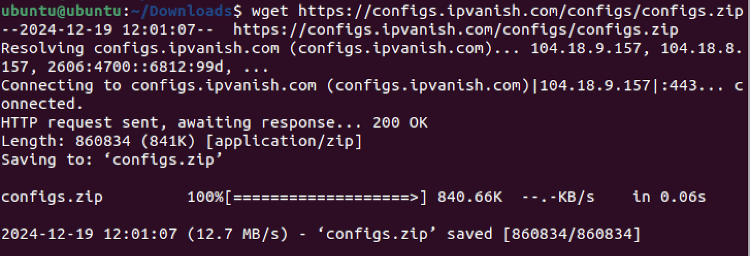
We ran into some compatibility issues, as IPVanish’s OpenVPN config files included parameters not supported by newer versions of the OpenVPN manager. Thankfully, the files were editable, and we were able to make it work with a bit of manual tweaking. While IPVanish offers setup guides, users tackling more complex problems may benefit from checking additional community resources. We also contacted customer support – while the wait was a bit longer than usual, we eventually got the help we needed.
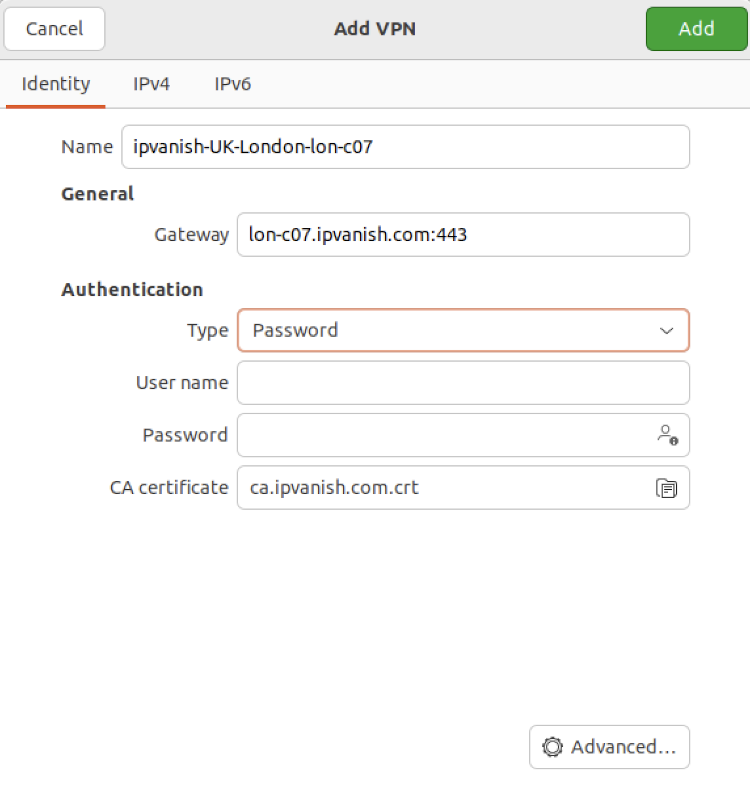
Connections were easy to establish using the OpenVPN manager, though setup required a bit of manual work. Speeds with OpenVPN were around 80%, which was sufficient for smooth browsing, 4K streaming, and torrenting.
IPVanish is a solid choice for Linux users who don’t mind a bit of manual setup. While it still doesn’t offer a native Linux app, you can connect using OpenVPN configuration files or the new WireGuard Configuration Generator for faster, more secure connections. Advanced features like a GUI interface aren’t available, but at just $2.39/month with unlimited device connections, it’s a practical option for anyone who wants straightforward VPN protection.
4. ExpressVPN – excellent Linux VPN for security

-
Linux distro support
-
Speed and performance
-
Security and privacy
-
Value for money
ExpressVPN is a good choice for those who prioritize security without worrying about affordability. This Linux VPN offers a CLI app and a native GUI app. Moreover, the service works with Ubuntu, Debian, Fedora, Raspberry Pi, Linux Mint, and Arch distributions.
My experience using ExpressVPN
Installing ExpressVPN’s CLI app on Linux was straightforward using the provider’s guides. It wasn’t as easy as with Surfshark, but all the commands worked without any additional troubleshooting. Moreover, customer support responded quickly to my queries. This means you won’t have to wait long if something goes wrong.

During our ExpressVPN tests, the VPN connected to the nearest server in just a few seconds, which was impressive. One test showed a 50% speed retention rate, which was lower than expected. However, this appeared to be a one-time result – in other usage tests, like 4K streaming, browsing, and P2P file downloads, ExpressVPN performed smoothly without any noticeable slowdowns. It’s worth noting that VPN speeds can fluctuate based on factors like server load, location, and network conditions.

In terms of features, ExpressVPN’s Linux app includes 2 tunneling protocol options (Lightway and OpenVPN), an ad blocker, and a kill switch. IP and DNS leak prevention tools are also included. It’s an excellent package for sure, but it lacks specialty server options, which are available with NordVPN and Surfshark.
One thing that sets ExpressVPN apart is that you can control its app through a browser extension, making it more convenient to use. While the extension doesn’t add significant extra features, it acts as a remote control for the VPN and improves overall usability.
ExpressVPN is suited for Linux users who value reliability and premium security tools. Its command-line app is stable and works well across popular distros. However, advanced protocol switching isn’t available in the Linux version, even though they are on Windows and macOS.
5. PureVPN – robust Linux VPN with a GUI app

-
Linux distro support
-
Speed and performance
-
Security and privacy
-
Value for money
PureVPN is an affordable Linux VPN with GUI and CLI apps, making it a worthwhile alternative to Surfshark. The provider also has great standard features on the base plan, but you can expand the service’s arsenal from an impressive selection of optional extras. The provider’s Linux app is compatible with Arch, Alma, Manjaro, Fedora, Kali, Ubuntu, Kubuntu, MX, Slackware, and Xubuntu.
My experience using PureVPN
Installing the PureVPN GUI Linux app was straightforward since there was no need to use the terminal. Alternatively, you can choose the CLI app if you prefer the terminal, but keep in mind that this version is currently in the beta phase. In any case, the provider’s support page is full of guides covering the app’s various nuances. In my opinion, the PureVPN Linux GUI app is intuitive and easy to use, making it an excellent option for beginners if you don’t want Surfshark.

As with ExpressVPN, we experienced a few connectivity issues while testing PureVPN. We couldn’t utilize the WireGuard protocol, so we opted for OpenVPN instead. With it, the speed retention rate was a measly 29%, the lowest among our tested Linux VPNs. As you can imagine, this led to buffering issues while streaming and slower download speeds while torrenting. Thankfully, at least online browsing wasn’t impacted significantly. Once again, these issues usually aren’t present when testing PureVPN on other OSs.
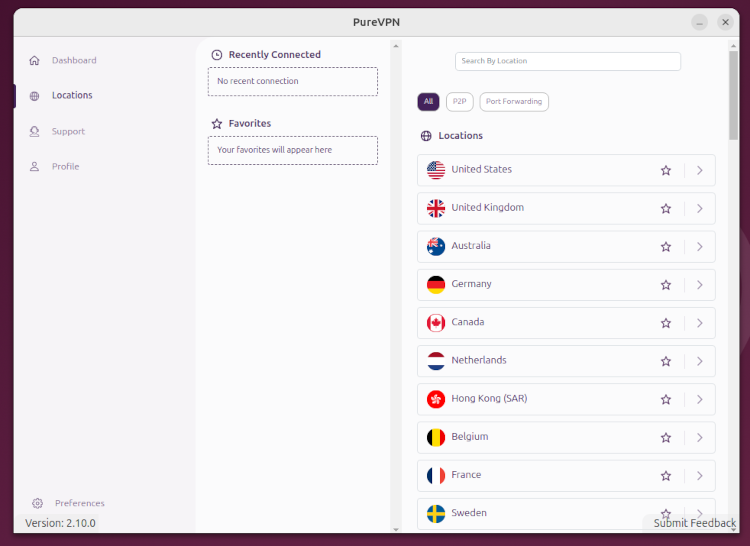
Unfortunately, the Linux app doesn’t include many extras that would improve your overall experience. There’s the kill switch and DNS leak protection, both of which didn’t have issues during our tests. However, the lack of an ad blocker and specialty servers is disappointing. Customer support was responsive, but the quality of assistance varied — which could be a drawback for Linux users who may occasionally need more technical guidance.
PureVPN is a good pick for Linux users, especially beginners, because of its easy-to-navigate GUI app. It also has a CLI version, but since it’s still in beta, some features may be limited or unstable. Plans start at $1.99/month for the Standard tier, which includes basic VPN coverage. The Plus and Max plans unlock extras like a password manager or cloud storage, and you can also buy add-ons like port forwarding or a dedicated IP. It’s a flexible option, but the total cost can add up depending on your setup.
Best VPNs for Linux compared
Here's how the top Linux VPNs stack up against each other when it comes to compatibility, features, and other key criteria.
Below is a table summarizing the essential details of the 5 best Linux VPNs I cover in this article. Each service is an excellent choice for securing your online activities on Linux and other operating systems.
| Best Linux VPN | Rating | Linux apps | Compatibility | Protocols | Servers | Simultaneous connections | Starting price | Money-back guarantee |
| NordVPN | CLI, GUI | Windows, macOS, Linux, Android, iOS | OpenVPN, NordLynx, NordWhisper | 8,000+ servers in 149 countries | 10 | $3.49/month | 30 days | |
| Surfshark | CLI, GUI | Windows, macOS, Linux, Android, iOS | OpenVPN, WireGuard, IKEv2, Dausos | 4,500+ servers in 100 countries | Unlimited | $2.49/month | 30 days | |
| IPVanish | CLI | Windows, macOS, Linux, Android, iOS | OpenVPN, WireGuard, IKEv2, IPSec | 3,400+ servers in 112 countries | Unlimited | $2.39/month | 30 days | |
| ExpressVPN | CLI, GUI | Windows, macOS, Linux, Android, iOS | OpenVPN, WireGuard, Lightway | Undisclosed number of servers in 113 countries | 14 | $2.99/month | 30 days | |
| PureVPN | CLI, GUI | Windows, macOS, Linux, Android, iOS | OpenVPN, WireGuard, IKEv2 | 6,000+ servers in 65 countries | 10 | $1.99/month | 31 days |

How we tested the best VPNs for Linux
Together with the research team, I conducted a thorough evaluation of each VPN based on five criteria, each weighted for its impact on the overall ranking. Here’s a breakdown of the testing process and recommendations from the research team:
- Security and privacy measures (30%). I evaluated each VPN’s most crucial security and privacy features, such as encryption protocols, kill switches, and ad blockers. It was crucial to pick VPNs with robust no-logs policies and additional security features like next-gen antivirus and split tunneling. The research also focused on verifying encryption strength and checking for any DNS or IP leaks.
- Speed testing (20%). The research team meticulously measured upload/download speeds, latency, and overall performance across various server locations. Whether streaming, torrenting, or browsing, I benchmarked VPN performance rigorously to ensure consistent results.
- Linux distribution compatibility (20%). I assessed each VPN's compatibility with various Linux distributions by installing it on distros such as Ubuntu and Arch. The goal was to determine whether there were any notable installation and feature differences between distributions. For providers like Surfshark and PureVPN, the research team and I tested both GUI and CLI app versions.
- UX and UI (15%). The user experience and interface must be intuitive, although I think Linux users don’t mind the terminal’s overall minimalism. I assessed both GUI and CLI applications, evaluating ease of installation, configuration simplicity, and day-to-day usability. Feedback from users of all levels helped me effectively gauge the overall user experience.
- Server network (10%). The backbone of any VPN service lies in its server network. I examined each provider's server infrastructure's size, distribution, and reliability, testing connection stability across different regions and under varying network conditions.
- Value for money (5%). I compared each VPN’s pricing to the features offered, looking at subscription tiers, essential tools, and overall affordability. Services that offer strong functionality at a fair price received higher scores.
By methodically weighing these aspects and applying a hands-on approach to testing, I aimed to offer a comprehensive evaluation that’s informative and reflective of real-world usage on Linux. This ensures my recommendations are based on features, practical usability, and reliability.

Does Linux OS distribution matter when choosing a VPN?
Yes, the Linux distribution you use can matter when choosing a VPN, but not by much. In most cases, it only affects how easy it is to install and use the VPN, not whether it works.
Debian-based systems like Ubuntu or Debian usually get the smoothest experience with .deb packages and better-optimized apps. Fedora and other RPM-based distros are also well supported, while Arch Linux often involves more manual setup or community packages. However, all top Linux VPNs today are built to handle these differences without major issues.
Which VPN is best for Ubuntu?
For Ubuntu, I’d go with NordVPN. It has one of the most polished Linux CLI apps, excellent WireGuard (NordLynx) support, and works seamlessly with Debian-based systems.
Which VPN is best for Fedora?
On Fedora, ExpressVPN is a strong pick. It supports RPM-based systems well, has a stable CLI app, and offers consistent performance. It’s a good choice and works without much tweaking.
Which VPN is best for Debian?
For Debian, I’d again recommend NordVPN. Since Debian is widely supported, NordVPN’s open-source CLI app and detailed setup guides make it one of the easiest VPNs to run here.
Which VPN is best for Arch Linux?
For Arch, I’d choose Surfshark. It supports Arch-based systems and even offers a GUI app, which is rare on Linux. That makes it a more user-friendly option compared to CLI-only setups, especially if you don’t want to configure everything manually.
Final thoughts on the best VPNs for Linux
Although Linux is the least-used desktop operating system globally, its users must still take precautions to protect themselves from various online cyberthreats. One of the key tools in this area is a VPN, which improves online anonymity and protects your connection.
Unfortunately, finding a high-quality VPN for Linux can be challenging since developers prioritize the more popular OSs like Windows and Mac. As such, Linux VPNs typically have fewer features and only work via the terminal.
Our research has shown that NordVPN is the best Linux VPN in terms of performance and features. However, consider Surfshark or PureVPN if you want something more straightforward to use. Or, you can also look at our other favorite, ExpressVPN.
Linux VPN FAQ
Which is the best VPN for Linux right now?
NordVPN is currently the best VPN for Linux. According to our internal tests, it offers an excellent selection of servers and features and the fastest speeds on the market.
Does Linux have a built-in VPN?
No, Linux doesn’t come with a built-in VPN service. However, it supports manual VPN setup using protocols like OpenVPN and WireGuard. You’ll still need to subscribe to a VPN provider to access secure servers and ensure privacy while browsing or using online services.
Which VPN is easiest to use on Linux?
The easiest VPN to use on Linux is Surfshark. From my experience, it stands out because it offers a full GUI app, which is still rare on Linux. That means you can just install it via Snap or Flathub and manage everything through a simple interface. It’s especially beginner-friendly, but you still have the option to use a CLI if you prefer.
Which VPN has a GUI for Linux?
NordVPN, Surfshark, PureVPN, and ExpressVPN have native GUI apps for Linux, which are easy to use and have all the features you need, such as a kill switch and DNS leak protection.
What is the fastest VPN server for Linux?
In general, the fastest VPN server will be the one closest to your actual location, regardless of which OS you’re using. That’s because your internet traffic will only make a short detour to the VPN server, which leads to minimal speed loss. However, other factors will also influence the overall speed retention, such as the tunneling protocol you’re using and the server’s current load.
What is the best VPN for Linux with CLI?
NordVPN is the best overall VPN for Linux and comes with a CLI and GUI apps. Linux CLI app works like any other CLI app, where you install and configure it using commands on the terminal. This shouldn’t be an issue for experienced Linux users, but it can be challenging for newcomers.
Which VPN works best with WireGuard on Linux?
NordVPN works best with WireGuard on Linux. NordVPN uses its own WireGuard‑based protocol, NordLynx, delivering the fastest speeds and most reliable connections among the Linux VPNs I evaluated. It’s also fully supported in its Linux CLI app, making installation and usage straightforward on most distros.
Which VPN has the best kill switch on Linux?
NordVPN has the most reliable kill switch on Linux. Its Linux app makes sure your traffic stays protected if the VPN connection ever drops. This strong security feature is one of the reasons NordVPN tops this list – its Linux tools are among the most robust I’ve tested.