Best VPNs for GeForce Now in 2026
Our in-house cybersecurity experts and journalists, renowned for major reports like The Mother of All Breaches, conduct transparent, unbiased VPN testing and in-depth analysis.
With 750+ articles crafted based on real-world research, we empower readers to make informed purchasing decisions through first-hand expertise.
Learn more

GeForce Now, Nvidia's cloud-based gaming service, streams a vast library of games to devices worldwide via its Ultimate tier with RTX 5080-class performance rolled out globally by late 2025. Yet, availability varies by region through alliance partners, leaving users in unsupported areas like parts of India or Northeast Asia with limited or no access.
A VPN can help you bypass these geo-blocks, connect to optimal servers for lower ping, and secure your traffic during play. From hands-on testing of top providers like Surfshark and NordVPN across servers, I explore the best VPNs for GeForce Now, key features for gaming (speed, stability), and troubleshooting fixes.
Top 5 best GeForce Now VPNs
- Surfshark – best VPN for GeForce Now
- NordVPN – fast GeForce Now VPN
- IPVanish – easy-to-use VPN for gaming on GeForce Now
- Proton VPN – privacy-focused GeForce Now VPN for speedy gaming
- VyprVPN – strong GeForce Now VPN to bypass geo-restrictions
What makes a great VPN for GeForce Now
There are plenty of different VPNs for different uses. Therefore, their features might not be necessary for gaming. To make sure you get the best VPN for GeForce Now, make sure you take into consideration these points:
- Fast tunneling protocols. Fast VPNs can improve your gaming experience, as they speed up your internet connection, reduce ping, and boost performance overall. To achieve this, ensure your chosen VPNs support multiple tunneling protocols, including the industry-leading WireGuard.
- Large server fleet. Having a variety of servers to choose from is always better than having to select one from just a few. It will not only make your performance better, as servers will not be overcrowded, but also make sure you can select any location where GeForce Now is available.
- App compatibility. It's important that you can play games on any app that you want, whether it is mobile or desktop. Therefore, a VPN should offer dedicated iOS, macOS, Android, and Windows apps.
- Unlimited data. Streaming games requires quite a lot of bandwidth, so your chosen VPN shouldn't have any data limits.
Best VPNs for Nvidia GeForce Now – detailed list
Solid VPN for gaming on GeForce Now doesn’t depend only on latency and speed. The overall performance and combination of security, servers, and other aspects can be crucial. Together with our research team, I did thorough research and filtered out the best VPNs that can provide a smooth gaming experience.
1. Surfshark – best all-around VPN for GeForce Now

| Based in: | Netherlands |
| Servers/countries: | 4,500+ servers in 100 countries |
| Simultaneous connections: | Unlimited |
| Current deal: | Now up to 87% OFF Surfshark + 3 months FREE |
Surfshark is at the top of my list of VPNs for GeForce Now. This provider offers the best value for money, lightning-fast connection speeds, powerful security features, and boosts the overall performance when it comes to streaming games. Now you can get an even better deal with Surfshark discount code: OFFCN.
First off, Surfshark offers a variety of tunneling protocols, including WireGuard, OpenVPN, and IKEv2. They contribute to increasing your connection speed. This provider also delivers ample bandwidth with no data caps and maintains your download speed close to the original, which is ideal for cloud-based gaming and streaming content.
As for security, Surfshark uses the top-tier AES-256 encryption and makes sure that no data escapes the traffic. There’s also a kill switch that prevents any accidental data and IP leaks. A strict no-logs policy will have your privacy covered.
Additionally, Surfshark has more than 4,500 servers in 100 countries, which ensures you find the best location for a smooth GeForce Now gaming experience.
Surfshark provides apps for platforms like iOS, Android, Linux, macOS, Android TV, and Windows, making it compatible with basically any major device you are using.
When it comes to Surfshark pricing, this provider is known for offering one of the most affordable, high-quality VPNs available. Its subscriptions allow for unlimited simultaneous connections and start at $2.49/month. There’s also a 7-day free trial for Android and iOS users, and a 30-day money-back guarantee to try the service risk-free.
To find out more, take a look at our Surfshark VPN review or read a Surfshark vs NordVPN comparison.
2. NordVPN – lightning-fast VPN for GeForce Now

| Based in: | Panama |
| Servers/countries: | 8,000+ servers in 149 countries |
| Simultaneous connections: | 10 |
| Current deal: | Get 75% OFF NordVPN + 3 months free |
NordVPN is another top-notch VPN for GeForce Now online gaming. It’s one of the fastest VPNs on the market with an array of security features to ensure a totally safe gaming or browsing experience.
NordVPN’s NordLynx tunneling protocol is the fastest in the selection. Other protocols, such as OpenVPN and IKEv2, also work pretty well. You can count on NordVPN to reduce lag on GeForce Now and enjoy your gaming.
As discussed in our NordVPN review, this provider has next-gen security – a reliable kill switch, AES-256 encryption, and DNS leak protection. Because NordVPN hides your real IP address, bad actors won’t be able to execute DDoS attacks and disturb your gaming, making the whole experience as secure as possible.
With more than 8,000 servers in 149 countries, NordVPN assures your server won’t be overcrowded. You can access nearly every part of the world and bypass geo-restrictions to play either GeForce Now, stream content, or simply browse.
NordVPN cost is pretty decent, starting just at $3.49/month. If you’d like to try out the service first, you can get a 3-day free trial for Android or use a 30-day money-back guarantee.
3. IPVanish – user-friendly GeForce Now VPN to boost your gaming performance

| Based in: | United States |
| Servers/countries: | 3,400+ servers in 112 countries |
| Simultaneous connections: | Unlimited |
| Current deal: | Now up to 85% OFF IPVanish |
IPVanish is also a reliable VPN choice for GeForce Now. It’s one of the most comprehensive VPNs with a large server fleet – 3,400+ servers in 112 countries, all-around security features, and high compatibility.
It’s a great pick for GeForce Now, as it provides stable speeds for uninterrupted gaming sessions. IPVanish supports WireGuard tunneling protocol, so the speed can drop by a maximum of 25%.
As discussed in our IPVanish review, the provider doesn’t disappoint in security either. Your traffic is encrypted using the AES-256 cipher, which is undeniably unbreakable. This provider has been independently audited and implements a no-logs policy to secure high-level privacy for users.
Moreover, IPVanish also supports P2P connections, and you also get a split tunneling feature with which you can use an encrypted VPN connection on certain apps only. Not to mention other features like obfuscation that can help you hide the fact that you’re using a VPN.
With IPVanish you get unlimited simultaneous connections to use it on as many devices as you want. Overall, it’s a great combo for gaming and security.
Speaking of pricing, IPVanish premium plans start at $2.19/month. However, you can test out the service with a 30-day money-back guarantee, which you can use as a free trial.
4. Proton VPN – powerful and privacy-focused VPN for GeForce Now gaming

| Based in: | Switzerland |
| Locations: | 20,700+ servers in 149 countries |
| Simultaneous connections: | 10 |
| Current deal: | Get up to 70% OFF Proton VPN |
Proton VPN is another great VPN for gamers. Besides a quite big server fleet – 20,700+ servers in 149 countries, Proton VPN has excellent gaming features, such as VPN accelerator and advanced split tunneling implementation.
This provider bypasses any geo-restrictions needed to access the GeForce Now service and lets you play games with one of the key elements – fast speed. Proton VPN uses the powerful WireGuard protocol and also offers alternative options, including IKEv2 and OpenVPN, which provide decent speeds as well.
What’s more, any gamer will appreciate the features like split tunneling that allows you to not only include or exclude specific gaming apps but also IP addresses from using a VPN tunnel. There are other features to boost gaming experience: VPN accelerator and Quick Connect to connect to the fastest server automatically.
As discussed in our Proton VPN review, all the provider’s traffic is secured through AES-256 encryption, making your data impossible to crack. In terms of privacy, you can rest assured your data will be free from third parties and other intruders, thanks to the no-logs policy.
Proton VPN's cost is on the pricier side, starting from $2.99/month. However, you get a 30-day money-back guarantee, and there's also a free version available.
5. VyprVPN – robust GeForce VPN to bypass censorship and geo-blocks

| Based in: | Switzerland |
| Servers/countries: | 700+ servers in 70 countries |
| Simultaneous connections: | 10 |
| Current deal: | Now 50% OFF the 1-year plan! |
VyprVPN is also one of the best VPNs to bypass censorship and geo-restrictions for GeForce Now. It’s known to be efficient in unblocking geographically restricted services, whether for streaming or gaming, and it provides decent connection stability.
Even though VyprVPN doesn’t have the fastest speeds, it doesn’t lack tunneling protocols to choose from – it supports WireGuard, OpenVPN, IKEv2, Chameleon protocols, and will serve you just fine when it comes to connecting and gaming on GeForce Now.
As pointed out in our VyprVPN review, the provider excels at keeping you safe online with its AES-256-CBC encryption, which is one of the most secure ciphers. A kill switch is also a security feature that acts as a precaution when your connection to the VPN server gets interrupted. A strict no-logs policy also ensures privacy.
You can stream games via GeForce Now on any platform you need: Windows, macOS, Linux, iOS, as VyprVPN supports them all. However, it allows only 10 simultaneous connections per account, which is enough but still less than what other providers on my list offer.
VyprVPN is quite pricey – premium plans start at $3.00/month. Luckily, you can also opt for a 30-day money-back guarantee or a 3-day free trial for Android and iOS users.
How we selected and tested these VPNs
When it comes to choosing a reliable VPN for a smooth gaming experience, there are a lot of variables: flawless speed, no lag, and smooth overall performance. For this, we have a VPN testing methodology that we carefully follow. While reviewing 41 VPNs for GeForce Now, these were the key factors I looked at:
- Fast protocols and stable speeds (30%). These components are a must for the GeForce Now platform, as it requires faster internet speeds than most streaming platforms. So, I selected only the VPNs that have lightweight protocols and tested their performance.
- Kill switch and split tunneling features (25%). These features can be helpful, as a kill switch prevents your IP address from being exposed if your VPN connection drops unexpectedly. Split tunneling enhances your online gaming experience, as it’ll have your connection split between your local network and the VPN.
- Broad server fleet (25%). Having a big server list means that selected servers won’t be overcrowded and, consequently, your connection speed won’t be reduced, and you won’t have to experience lag. I made sure selected VPNs have broad server fleets with locations around the world.
- Compatibility and simultaneous connections (20%). A reliable gaming VPN should have quality apps for both desktop and mobile devices. Also, if you’re gaming on a device that doesn’t support VPN connections, make sure to look for a VPN that offers a SmartDNS feature. Additionally, my tested VPNs allow simultaneous connections, meaning you can connect to a VPN on multiple devices.
Why do I need a VPN for GeForce Now?
There are numerous reasons why you need a VPN for GeForce Now. It will not only unblock the service if it’s not available in your area, but it will also help you bypass licensing regulations and boost the connection. Let’s look at some ways in which VPN can help you in more detail:
- Access blocked games. A VPN will bypass geo-restrictions and unblock geo-locked games, if GeForce service is not available in your country or region.
- Prevent DDoS attacks. By masking users' IP addresses, VPN can prevent DDoS attacks on the player. GeForce servers now have DDoS protection in place and can mask your IP address in multiplayer games. As a result, a VPN can be an extra layer of protection in this case.
- Avoid bandwidth throttling. GeForce can use a lot of bandwidth. In that case, some ISPs can throttle the connection. A VPN will hide your activities from ISPs and make sure your internet connection is safe from throttling when streaming games.
What is GeForce Now?
GeForce Now is Nvidia’s cloud-based online gaming and streaming platform. It offers a vast library of games that can be played on quite a lot of devices. Its beta version was introduced in 2015 and publicly unveiled in 2020. Users can play their own purchased games or free-to-play games on any desired device.
It’s now available on Windows, Mac, Chrome, Android, iOS, even Android TV and Smart TVs. You can play GeForce Now in the US, selected European and African countries, and Asian markets. Although it’s not accessible everywhere, the Ultimate tier has already been rolled out globally. Still, direct access varies by region, either via Nvidia or alliance partners (e.g., there is no India launch yet, and access is limited in Northeast Asia). Also, the service might be blocked in certain educational institutions, workplaces, or public places.
Luckily, you can easily bypass all of these restrictions and access GeForce Now from anywhere with a VPN.
How to play games on GeForce Now with a VPN
It’s easy to set up and start gaming via GeForce Now with a VPN. Follow these steps to get started:
- Choose a VPN provider and register with it – I recommend Surfshark VPN
- Download the VPN app for the desired device
-
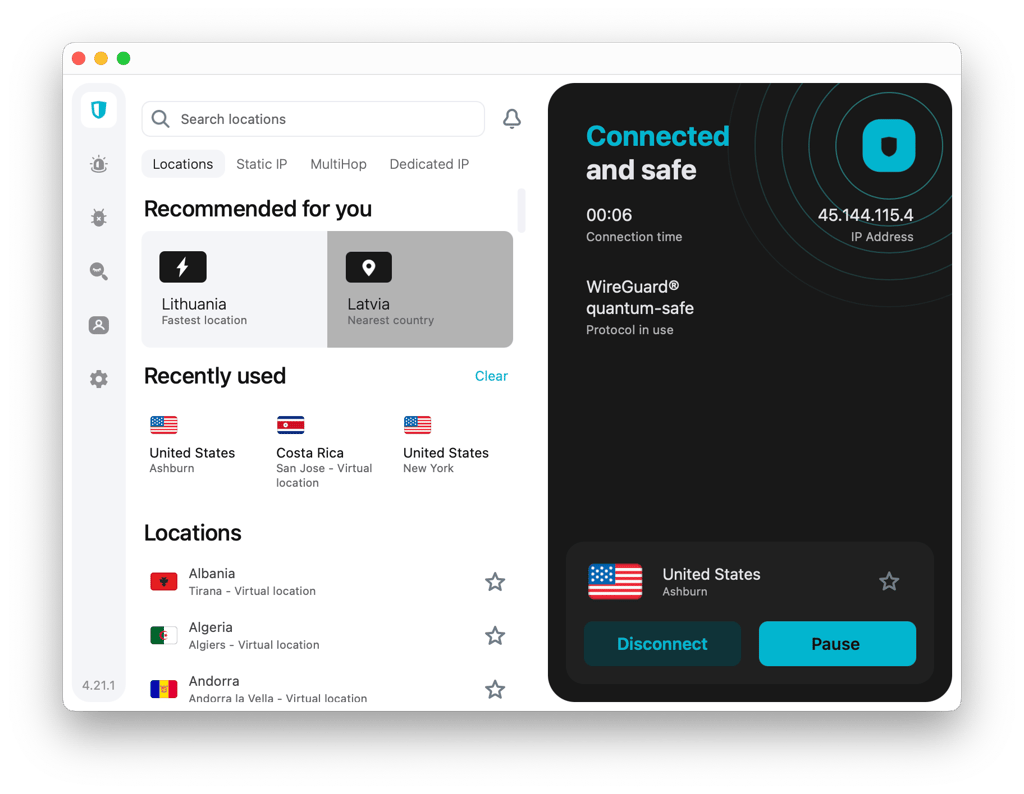
Connect to a server that’s closest to you or where GeForce Now is available
-
Enable the kill switch in VPN settings for security

- Make sure the fastest available protocol is enabled
-
Launch the GeForce Now app and start playing

How can I improve my GeForce Now VPN connection?
When it comes to gaming and streaming, you expect flawless connection speeds and as minimal interruption as possible. However, since GeForce Now games are running from the cloud, the connection might encounter interruptions and lag. Here’s how to improve it:
- Ensure a speedy internet connection. As VPNs will drop the internet speed a little bit, users need to have good service from their ISP and speedy internet connection. Consider choosing a reputable broadband service.
- Choose a reputable VPN. Make sure you get a VPN that has stable connections and fast protocols – this will boost the overall performance and improve GeForce Now connection. I recommend getting Surfshark VPN.
- Try different types of VPN encryption. If your chosen VPN provider has this option, try to degrade encryption from 256-bit to 128-bit. The higher the encryption level, the more reliable the protection of your data. However, in some cases, the higher encryption can produce latency and lower Internet speeds.
- Try different VPN protocols. By default, your VPN should be connected to the fastest protocol. Nonetheless, you can try connecting to different ones. For example, WireGuard protocol prioritizes speed and could potentially improve overall connection.
- Choose the closest VPN servers available. You can lower latency and overall lag by shortening connection routes between yourself and gaming servers. Connecting to a VPN server closest to the game’s server will usually provide the smoothest experience.
Can I use a free VPN to play on GeForce Now?
Yes, you can use a free VPN to play on GeForce Now. However, I don’t recommend it, as it will limit your experience.
Many free VPNs benefit from their intrusive ads that can also potentially be infected with malware, not to mention that some of the free VPNs might collect and sell user data to third parties. Also, they tend to have fewer features than premium providers, and the connection speeds might be slow, as servers usually tend to be overcrowded. That’s definitely not ideal for gaming.
Alternatively, I encourage you to try freemium VPNs – money-back guarantees, free trials, or free versions of premium providers. For the best gaming experience, I recommend trying out Surfshark – it will ensure blazing-fast speeds, powerful security, and lots of servers to choose from, all of it risk-free.
FAQ
Which VPN is best for GeForce Now?
According to my list, the best VPN for GeForce Now is Surfshark or NordVPN. Both have lightning-fast speeds and huge server fleets with numerous locations where GeForce Now is available to play. Surfshark also offers the best price and value for money and has a 7-day free trial.
Can you use a VPN with GeForce Now?
Yes, you can use a VPN with GeForce Now. Its Terms of Use don’t suggest that GeForce restricts using a VPN with its service. As long as VPN is not used to gain an advantage over other players or exploit the game’s mechanics, you are free to use it.
Is Proton VPN good for GeForce Now?
Yes, Proton VPN is one of the best VPNs for GeForce Now. It has a solid free version, overall performance is very good, and thanks to the Accelerator feature, it can compete with the speediest VPN providers. It’s also compatible with most operating systems and is easy to navigate.