Windscribe VPN review
Our in-house cybersecurity experts and journalists, renowned for major reports like The Mother of All Breaches, conduct transparent, unbiased VPN testing and in-depth analysis.
With 750+ articles crafted based on real-world research, we empower readers to make informed purchasing decisions through first-hand expertise.
Learn more

Windscribe is a well-known and widely liked VPN service. It offers unlimited simultaneous connections, has a good free version, works with various streaming services, such as Netflix, and has apps for all popular OS.
While this VPN has greatly improved its connection speeds with the market-standard WireGuard tunneling protocol and has various unique and useful features, it’s still up for debate if this is the next great VPN to choose.
Windscribe could still use some improvements in terms of security since the provider still hasn’t gone through an independent security audit.
So security-conscious cons

In this Windscribe VPN review, we will look into all of the important features. That includes security, speeds, streaming capabilities, apps, features, and price. We did the testing to help you decide if this is the best VPN option for you.
| NordVPN | Windscribe VPN | |
| ⭐ Rating: | ||
| 🥇 Overall rank: | #1 out of #41 | #18 out of #41 |
| 🖥️ Servers: | 9,500+ servers in 149 countries | 480+ servers in 69 countries |
| 📖 No logs policy: | No logs | No logs |
| 💵 Price: | From $3.49/month | From $5.75/month |
| 🔥 Coupons: | NordVPN coupon 75% OFF | Cybernews VPN Coupons |
| 🔒 VPN protocols: | OpenVPN, NordLynx, NordWhisper | WireGuard, OpenVPN, IKEv2/IPsec, WStunnel and StealthVPN |
| 🍿 Streaming services: | Netflix, Hulu, BBC iPlayer, Disney+, and more | Netflix, BBC iPlayer, YouTube |
| 🖥️ Platforms: | Windows, macOS, Linux, Android, iOS | Windows, macOS, Linux, Android, iOS |
| 📥 Simultaneous connections: | 10 | Unlimited |
| 💁🏻 Support: | Knowledge base, email, 24/7 live chat | Self-help, bot chat, tickets |


Windscribe pros & cons


We spare no effort to test the products & their features. All information is gathered by our in-house research team & fact-checked by our team of experts. Discover the ins and outs of our testing procedures.
Speed performance: Is Windscribe VPN fast?
For this Windscribe VPN review, we tested the WireGuard tunneling protocol performance to determine if this VPN provides reliable connection speeds for browsing, streaming, and torrenting.
- Baseline: 1 ms ping/ 500 Mbps download speed / 500 Mbps upload speed
| Location | Download Speed (Mbps) | Upload Speed (Mbps) |
| Canada | 413 Mbps | 82 Mbps |
| The UK | 430 Mbps | 169 Mbps |
| The US | 365 Mbps | 202 Mbps |
Overall, Windscribe VPN’s download speeds were rather impressive. They were pretty close to the baseline we started originally. The slowest speed we got was with the US server location. However, keep in mind that your results may differ depending on your internet connection and the server location you pick.
On the other hand, the upload speeds left a lot to be desired. Only the server in the US, ironically compared to the download speeds, provided somewhat reliable speed results.
| Provider | Average download speed |
| Windscribe | 80% |
| NordVPN | 83% 🏆 |
| PIA | 54% |

Streaming: Does Windscribe work with Netflix?
Windscribe VPN is a pretty solid option for a streaming VPN. While it won’t be making its way to our top streaming VPNs list, it can still unblock various streaming platforms and libraries worldwide.
| Platform | Status |
| Netflix | ✅ (the US, the UK, Argentina, Australia, Brazil, Canada, Colombia, Czech Republic, India, Malaysia, Mexico, Singapore, Sweden, Turkey) |
| BBC iPlayer | ✅ |
| HBO Max | ✅ |
| Hulu | ✅ |
| Youtube TV | ❌ |
First of all, Windscribe offers servers that are optimized for streaming. These are called Windflix servers, and they are available in the US, Canada, the UK, and Japan. We successfully managed to access geo-blocked content on Netflix, HBO Max, and Hulu by using Windflix US. We also tried out Windflix UK to unblock BBC iPlayer, and it worked.
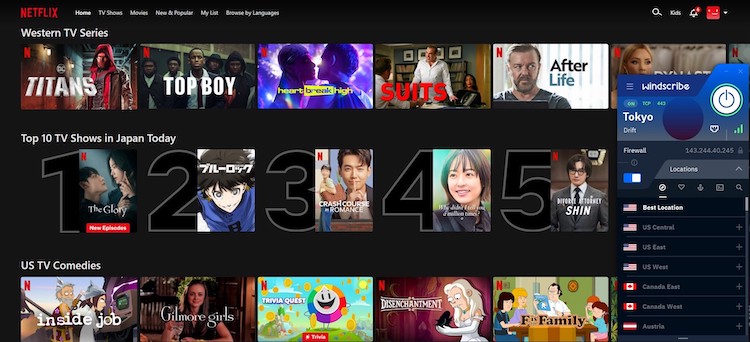
You may have luck even with non-Windflix servers, especially if you try the more obscure ones, not yet recognized by Netflix and other platforms. This service will also be a great addition to your Amazon Fire TV or other devices.
Is Windscribe good for torrenting?
Windscribe VPN lets you torrent on most of its servers, with only a few locations marked by a crossed-out P2P icon where torrenting isn’t allowed.
They also provide a free SOCKS5 proxy to boost torrent speeds, but keep in mind this comes with reduced security. So, you’ll need to decide whether faster downloads or stronger privacy matters more for your P2P activities.
In our test downloading a 4GB Ubuntu file, speeds were inconsistent — starting around 1.5 MB/s but quickly dropping to about 64 KB/s, meaning the download could take up to 14 hours. Switching to IKEv2 didn’t make much difference either.
If you want a VPN that delivers more reliable torrenting speeds, we recommend checking out our guide to the best VPN for torrenting.
Windscribe VPN features
Windscribe has a seriously huge pool of extra features. In fact, it has more features than the vast majority of the VPNs we've reviewed. The tool offers not only the bare essentials like split tunneling, but also some advanced features like double VPN and timezone spoofing.
Firewall
Windscribe doesn’t offer a kill switch feature on their desktop apps. Instead of it, there’s a Firewall feature that, according to the VPN provider, is a much stronger and more reliable option when compared to a classic kill switch.

The Firewall blocks all connections outside of the VPN tunnel, so it prevents any DNS, IPv6, WebRTC, and other leaks.
This feature is quite customizable, you can pick from three available modes:
- Automatic – enables the firewall whenever you connect to Windscribe VPN. Works just like a kill switch, where it drops your internet connection in case your connection to the VPN server is interrupted.
- Manual – allows you to customize when to have the firewall turned on or off. If you turn on the firewall yourself, you’ll only have an internet connection when connected to the VPN.
- Always on – you will only have an internet connection when connected to the VPN.
Split tunneling
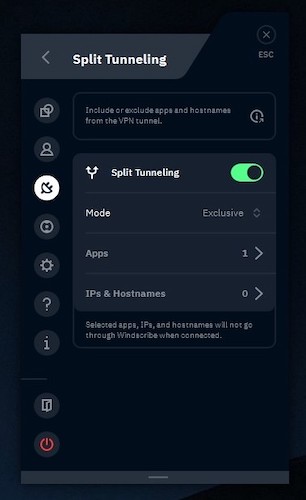
The split tunneling feature on Windscribe is available on Windows, macOS, and Android apps. It’s a reliable tool to customize which apps are excluded from the VPN connection. This can be helpful when you need to conserve bandwidth or visit a website that requires your real location.
However, it’s a bit confusing to select the programs that should bypass the VPN connection. That’s because the list you get contains different themes, gestures, and low-level services, and it’s difficult to find the app you want.
Double Hop
The Double Hop feature lets you connect to any two servers of your choice. In other words, instead of connecting to one location, you will be connected through two different locations to hide your real IP address better. The websites you visit will see the second location, which adds an extra layer of anonymity.
To use this feature, you will have to install a desktop application as well as a browser extension for Chrome, Firefox, or Opera. That’s because the second location is added through the extension.
Secure Hotspot
The Secure Hotspot feature lets you create a secure wifi hotspot on your computer so that other people could connect to it and use the safe connection of Windscribe VPN without the need to install the app themselves.
However, this feature works only on Windows devices, and you can make use of it only if you have a compatible wireless adapter.
Auto Pilot
This is a feature available only on the browser extensions of Windscribe. It’s really simple – Auto Pilot will pick the best location for you in terms of speed, so you won’t have to worry about your internet lagging anymore.
In addition, if you visit a site that’s geo-blocked in your country, Auto Pilot will automatically connect you to the server needed for unblocking it. In other words, this feature just makes your browsing much easier.
Time Warp
Yet another feature available on the browser extensions for Chrome, Firefox, and Opera, Time Warp will fake your timezone to match the one of the server you’re connected to. In this way, websites will be less likely to detect that you’re using a VPN.
R.O.B.E.R.T.

When you have Windscribe VPN installed on your device, you don’t need additional ad blocker software anymore. That’s because R.O.B.E.R.T. does its job pretty well. It’s a highly customizable domain and IP-blocking tool that will protect your device from various online threats.
Its free version blocks ads and trackers, while those who have a paid subscription to Windscribe will also get protected from malicious pages that can infect the computer with malware. Paid users can also choose to block or whitelist various sites related to gambling, explicit content, and clickbait.
Is Windscribe VPN safe?
Windscribe is a relatively safe VPN service. However, there have been some concerns that you should know about.
In June 2021, Ukrainian authorities seized 2 Windscribe servers. In the aftermath, the company revealed that these servers were taken, yet, nothing was recovered. More specifically, both servers ran a legacy stack with the OpenVPN server certificate and the private key on them. These legacy servers, which served as older industry-standard methods prior to the new standard, have long since been discontinued.
Windscribe claims this is an anomaly and also that their no-logs policy means there's nothing on the servers to find. Moreover, in terms of the features offered, Windscribe is still a safe VPN service provider. Here's a rundown of what they offer.
Encryption
All of the applications of Windscribe VPN use the strongest security options available.
For starters, your data is encrypted using the AES-256 cipher, which is a symmetric encryption algorithm that has never been broken. Unlike Surfshark or TorGuard VPN, Windscribe VPN doesn’t let you change the encryption cipher (for example, to choose AES-128 or Blowfish). If implemented in the future, this could be useful on weaker devices.
It’s also worth mentioning that Windscribe VPN uses the strong SHA-512 algorithm for authentication, as well as the 4096-bit RSA key as a handshake method.
Tunneling protocols
Windscribe VPN offers a lot of different tunneling protocols to choose from. You can select WireGuard, OpenVPN, or IKEv2. The best performance you’ll get will be from the market-standard WireGuard tunneling protocol, which in turn, is also the safest one.

- WireGuard – This is one of the fastest (and safest) VPN protocols available today, and it's supported on Windscribe's Windows, macOS, Linux, Android, and iOS apps.
- OpenVPN (TCP and UDP) – Windscribe VPN lets you choose between its two variations, TCP and UDP. Use TCP when security is your top priority, and pick UDP when you want better speed. Both are available on all Windscribe applications.
- WStunnel and StealthVPN – These two bad boys are the protocols that might help you unblock websites if you reside in China or other countries where VPN use is restricted. Both of them hide VPN traffic, making it seem like you’re not using a VPN at all. However, your speed might suffer drastically, so use either of them only if absolutely necessary.
- IKEv2/IPsec – Set as the default protocol on all Windsribe’s apps, IKEv2/IPsec will often give you stable speeds and great security. On the other hand, the IKEv2 VPN connection can be easily blocked.
Logging
Windscribe VPN is very honest about what kind of data they collect. Their privacy policy is short and easy to understand. So, this is what they do log:
- The transaction ID of your payment (for 30 days)
- The amount of bytes transferred each month
- Timestamp of your last activity using the VPN
Windscribe VPN also logs some information during your VPN session, which is immediately deleted after you close the program. This includes the protocols you use, the time of connection, and the amount of data transferred.
On the other hand, Windscribe VPN doesn’t log (or monitor) your browsing activity or source IP, making your browsing completely anonymous. In fact, they even issue a transparency report with the legal requests and Digital Millennium Copyright Act (DMCA) complaints they have received. They write that none of the requests were complied with due to the lack of data.
However, an independent audit of the no-logs policy would certainly strengthen Windscribe’s image and users’ trust in this provider. Especially since Windscribe VPN is based in Canada, which is a Five Eyes country.
Server locations
Even though Windscribe VPN has fewer servers than many other VPNs we have reviewed so far (like ExpressVPN, NordVPN, or Surfshark), the selection of countries is quite diverse: you can choose from 480+ servers in 69+ countries.
| Regions | Number of countries |
| Americas | ~9 countries |
| Europe | ~35 countries |
| Asia Pacific | ~16 countries |
| Middle East and Africa | ~4 countries |
The vast majority of server locations are in Europe, but there is also quite a lot of coverage in Asia and North America. Meanwhile, the selection of servers in Africa and South America could be better.
On the other hand, Windscribe VPN claims to own only physical servers, which means that it might be difficult to cover certain countries due to legal restrictions. However, we find it hard to believe they actually have servers in Antarctica, especially when the name of the server is “Fake Antarctica – Troll Station”.
When connecting to a Windscribe server, keep in mind that you’ll have better speed when you access servers near your location. You can also check the status of the servers (current usage and availability) on the official page of Windscribe VPN.
Does Windscribe VPN work in China?
Windscribe has a great track record of bypassing the Great Firewall of China. However, keep in mind that this only applies to their paid version. If you're thinking about bypassing geo-blocks with a free version, it won't be possible.
That said, sometimes outages will be unavoidable. The government does enforce the blocks around protest dates.
Plans & pricing
Windscribe VPN isn’t the most expensive VPN service you’ll see. You can get it for as low as $5.75 a month when buying the yearly subscription.
You can also try out the Windscribe Pro version for a month, but that makes it more than twice as expensive at $9 a month.
| Version | Price |
| Free | $0.00 |
| 1-month plan | $9.00/month |
| 1-year plan | $5.75/month |
| Build a plan | $1.00/month/location |
Apart from the paid plan, Windscribe also offers a limited free version. It’s not enough to enjoy the full capabilities of this VPN provider but it can be a great free-trial option, and just like the paid plan, it offers unlimited simultaneous connections.
In addition, there’s also the possibility of building your own plan where you can pick however server locations you require. However, unless you only need two or three specific locations, it can quickly become more expensive than a yearly subscription.
Additionally, Windscribe VPN lets you purchase a static IP in either a data center or residential location. The price goes from $2 to $8 a month, depending on the type of IP you want to buy.
Just keep in mind that Windscribe has only a 3-day money-back guarantee. And it might take a while for the refund to reach your account.
The free version of Windscribe VPN
It’s nice that Windscribe offers a free version; however, it is quite limited since, without confirming your email, you’ll only get 2GB of data monthly. With the free plan, after confirming your email, you’ll get 10GB of data per month, unlimited device connections, like with the paid plan, and access to servers in 10 countries.
The free version of Windscrive VPN doesn’t offer all the locations available to paid users. You’ll only get to use servers in the US, Canada, Germany, France, the Netherlands, Norway, Romania, Switzerland, the UK, Turkey, and Hong Kong. On the other hand, this is quite a long list of countries for a free VPN – usually, unpaid users get only three or four locations.
Interface and ease of use
| Platform | Experience |
| Windows | Simplistic, confusing to navigate |
| macOS | Similar to the Windows version |
| Linux | Confusing installation guides |
| Android | Modern looking and easy to use app |
| iOS | Identical to the Android version |
| Browser extension | Easy to use, but differs a lot from other app versions |
Most of the apps of Windscribe VPN (except for the Linux version) are really easy to install and set up. However, if you encounter any difficulties, you can read the setup guides provided in the Support section on the webpage of Windscribe.
Windows
The Windows version of the Windscribe VPN app supports WireGuard, OpenVPN UDP, OpenVPN TCP, IKEv2, Stealth, WStunnel tunneling protocols.

The design of Windscribe’s Windows application might not be the most convenient for some users. That’s because its main window is extremely small. Compare it with the design of, say, NordVPN, and you’ll easily see the differences in usability. There’s no map to choose a location from, and you might not spot the settings menu right away.
Also, we found it a bit weird that you can only mark countries as your favorites but not specific servers. Locations like the US have lots of different servers, and it would be more convenient to be able to bookmark them.
We were also disappointed to see that some of the available connection protocols didn’t work or worked very poorly during our tests. For example, IKEv2 didn’t connect, while Stealth and WStunnel provided very poor results.
On the bright side, the WireGuard and OpenVPN UDP protocols worked quite well on a desktop client. We also enjoyed the high level of customization the app provided, as we could choose not only the protocol but also the port and some DNS configurations.
macOS
The macOS app version supports all of the same protocols as the Windows one, like WireGuard, OpenVPN UDP, OpenVPN TCP, IKEv2, Stealth, and WStunnel.
In terms of design, the macOS app of Windscribe is very similar to its Windows counterpart. It has the same options for the firewall, as well as the same security features. In addition, the UI functions in the same way. Thankfully, it didn’t have the same issues with the IKEv2, WStunnel, and Stealth tunneling protocols during our tests.
However, we found it a bit annoying that it would display a “connected” notification before actually connecting.
Linux
There is a little more limited list of available tunneling protocols for Linux users. It includes WireGuard, OpenVPN UDP, OpenVPN TCP, and Stealth protocols.

Windscribe VPN offers CLI applications for both Debian and Red Hat users. However, the installation guide for the app could be a bit better – we had some trouble setting up the Linux app. At first, we weren’t able to connect, as the program failed to create a virtual interface.
In addition, the Linux app of Windscribe has fewer tunneling protocols. Fortunately, the Stealth protocol is still available, giving some hope to Linux users in China.
All in all, this application is definitely geared toward advanced users.
Android
The Android application of Windscribe supports WireGuar, OpenVPN UDP, OpenVPN TCP, IKEv2, and Stealth protocols.

The Android app is nicely designed. It’s much slicker and more modern than the desktop version.
On the Android app, the users can make lots of connection modifications and choose a specific server to connect to. In addition, it includes some cool features like GPS spoofing, MTU customization, and split tunneling.
However, one thing can quickly get really annoying – every time you tap on anything in the app, your phone will vibrate.
Overall, this version of the app is better than its desktop counterparts thanks to the broader selection of features and a nicer user interface.
iOS
When compared to the Android app, the iOS version supports fewer protocols – WireGuard, OpenVPN UDP, OpenVPN TCP, and IKEv2.

The user interface of the Windscribe app for iPhone and iPad looks almost identical to the Android version. Additionally, it has all the same features as the Android version and is highly rated on the app store – 4.7 out of 5.
On the other hand, there are some complaints that the VPN connection on the iOS app is rather unstable.
Browser extensions

You can also set up Windscribe VPN on the following browsers: Chrome, Firefox, and Opera. These browser extensions offer many features like Smokewall, Ad Crusher, Tracker Eradicator, and Malware Evader, which aren’t present in Windscribe’s main applications.
In theory, the extensions should also allow you to control the desktop app. However, in my case, the Chrome extension didn’t detect the app installed on my computer.
Customer support
| Windscribe VPN | |
| 24/7 live chat | ❌ (instead, you have access to Garry – a chatbot) |
| Ticket system/Email | ✅ |
| Phone line | ❌ |
| Knowledge Base | ✅ |
| FAQs | ✅ |
| ✅ |
If you run into problems while using Windscribe VPN or if you simply want to know more about it before downloading the service, you can check out the self-help center on the official site of Windscribe.
Here, you can read through the setup guides, the knowledge base, and the FAQ section. In addition, you might check out Windscribe’s subreddit, which is quite active.
You can also try talking to Garry, a friendly bot that’s capable of answering most questions about Windscribe VPN (and a few other topics).
If you can’t find your answer by using the methods mentioned above, try submitting a ticket. A customer support agent should be able to answer your questions in a span of a few hours or a day.
Is Windscribe VPN any good and worth getting?
Windscribe is a decent VPN that offers stable connection speeds, reliable security features, and a variety of unique features. It’s pretty average when it comes to streaming since it doesn’t unblock as many streaming platforms as other top-rated VPNs.
It’s really nice that Windscribe VPN lets you have unlimited simultaneous connections and offers a generous free version with 10GB of monthly data.
Where we found the most disappointing was the torrenting section – while P2P friendly, this VPN simply cannot compare to other top providers, like NordVPN or Surfshark, when it comes to torrenting speeds. Also, the server list is rather minimal.
All in all, Windscribe VPN has a really good head start to become one of the best services in the industry – but there’s still some work to be done.
More on VPN providers from CyberNews:
PrivateVPN review: not famous, but worth attention
IPVanish review: how good is this VPN?
PureVPN review: is it OK to use it?
iTop VPN review: is it worth the money?
FAQ
How much does Windscribe cost?
Windscribe is quite an inexpensive VPN service if you consider its yearly plan. It will cost you $4.08 a month with no limit on simultaneous connections.
Can Windscribe be trusted?
Yes. Windscribe VPN offers next-gen encryption and lots of safe tunneling protocols to keep your data safe. In addition, it keeps no logs or any other personal information.
Does Windscribe VPN work in China?
Windscribe might work in China because it supports two tunneling protocols, WStunnel and StealthVPN, which are sometimes able to bypass the Great Firewall of China. See also our best VPN for China list.
Can I use Windscribe for free?
Yes. Windscribe VPN has a great free version that gives you 2GB of data every month. However, if you register with your email address, you get 10GB of data in total.