PrivateVPN review 2026
Our in-house cybersecurity experts and journalists, renowned for major reports like The Mother of All Breaches, conduct transparent, unbiased VPN testing and in-depth analysis.
With 750+ articles crafted based on real-world research, we empower readers to make informed purchasing decisions through first-hand expertise.
Learn more

PrivateVPN is one of the lesser-known VPN providers on the market, which is unfortunate since the service is quite good for specific needs. It supports P2P and port forwarding, making it an excellent option for torrenting. PrivateVPN is also a decent alternative for unblocking geo-restricted content, although its server network is rather small. Nonetheless, it’s inexpensive, secure, and unblocks Netflix. What else could you need?
In this article, I will go over PrivateVPN, from speed to performance to privacy policy – you will learn everything there is to know about this provider. Let’s dive in.
| ⭐ Rating: | |
| 🥇 Overall rank: | #9 out of #41 |
| 📖 No logs policy: | No logs |
| 💵 Price: | From $2.00/month |
| 🖥️ Servers: | 200+ servers in 63 countries |
| 🍿 Streaming services: | Netflix, Hulu, BBC iPlayer, Amazon Video, and more |
| 🔥 Coupons: | PrivateVPN coupon 85% OFF |


PrivateVPN pros and cons


We spare no effort to test the products & their features. All information is gathered by our in-house research team & fact-checked by our team of experts. Discover the ins and outs of our testing procedures.
Is PrivateVPN safe?
PrivateVPN is a simplistic but very secure VPN service. This VPN service allows you to customize the encryption levels, there’s a variety of different tunneling protocols available, has a strict no-logs policy, and a reliable kill switch to prevent any data leaks.
With PrivateVPN you’ll get great security features to keep your activity online private and anonymous. In addition, this is a great VPN service provider for safe streaming and torrenting.
Encryption
Encryption is what makes your online traffic incomprehensible to anyone intercepting it. This includes your government and ISP. With PrivateVPN, you're even able to customize the encryption level.
You can pick between:
- AES-256-CBC
- AES-256-GCM
- AES-128-CBC
- AES-128-GCM
These choices boil down to picking between 128 or 256-bit versions and CBC or GCM modes.
128 and 256 mean different encryption key lengths – the longer it is, the more potential combinations it has. More potential combinations are always better because hackers' computers would have to guess more to crack the encryption, making the whole process unviable.
The CBC and GCM difference is a bit more subtle. They both involve scrambling block cipher data, but they do it a bit differently. Theoretically, CBC is less safe because it depends on previous data blocks when encrypting data. GCM randomizes the blocks making it harder to put back as pieces of a puzzle.
Tunneling protocols
PrivateVPN supports the most popular tunneling protocols. You can choose one of these:
- OpenVPN (TUN+UDP+1194) – the default setting uses UDP, which is faster but less secure than TCP. It uses 1194, which is a fairly common port, so it should fit most use cases.
- OpenVPN (TUN+TCP+443) – sacrificing speed for security, this option should be your go-to if UDP/1194 doesn't work. Plus, it uses the 443 port, which is the same one that web browsers use for web connectivity. So, if Internet connectivity is available, this port should also be open.
- OpenVPN (TAP+UDP) – is the only tunneling from the list with a big flair and the words "not recommended". The reason is that connected TAP devices function almost as if they were on LAN. This could also give a method to access your device if a hacker connected to the same server, provided that there's a vulnerability. Since port forwarding is also always enabled, this is a real cause for concern.
- WireGuard – one of the fastest tunneling protocols out there. It’s highly secure and is up there with long-standing protocols such as OpenVPN.
- IKEv2 – secure and fast, one of the most popular VPN protocols’ however, it’s not recommended for macOS and iOS users due to concerns with data leakage.
- PPTP – severely outdated and shouldn't be used. With it, your connection won't be any safer.
- L2TP/IPSec – considered secure, but OpenVPN provides much better security options.
Kill switch
The kill switch is a safety precaution when your connection drops. So, we try to emulate such disruptions in our tests. In the first test, we used the firewall blocks access to particular IP addresses, cutting off the connection to the server. In the second, we're disabling necessary application processes, seeing how the client acts in both cases.
None of my connections leaked outside of the VPN tunnel in the first test. The app notified me that the kill switch was enabled. The app was unable to reconnect, as access to that server was blocked. It didn't attempt to connect to a different server, so you'll have to do this manually. Your IP address remains safe.

During the second test, the app reacted to the OpenVPN process being killed very quickly, and the kill switch worked as expected.
When I killed just the front end of the app, it closed all of the background processes and disconnected me from the VPN server without engaging the kill switch. This means that in some rare scenarios, the app might crash and expose your real IP address. However, it handled every other situation flawlessly.
Logging
PrivateVPN is located in Sweden. This isn't an optimal location for privacy purposes, as the country is a member of the Fourteen Eyes surveillance alliance. In addition, Sweden enforces data retention laws. ISPs keep user logs, which can date back for up to two years. So, it's a complication between the service provider and the legislation.
Despite this, PrivateVPN promises no logs when you're using the service. However, there is a line in the privacy policy that claims:
"The personal data is not saved longer than necessary given the purpose of the processing, unless a longer storage time is required or permitted by law."
In short, this service is sending mixed signals about how personal data is handled. More transparency would go a long way towards making this service more trustworthy. Users that are most concerned about privacy should take this into account.
Independent audits
Unfortunately, PrivateVPN hasn’t gone through any independent audits. And we could overlook this fact but we choose not to, as this provider is located in a country that is a member of the Fourteen Eyes Alliance. Moreover, PrivateVPN claims to have a strict no-logs policy that protects your online privacy. But how can we trust this claim if no one from the outside assured us, right?
Nevertheless, there haven’t been any recent scandals regarding PrivateVPN. Also, they allow you to customize your encryption level and take advantage of obfusticated servers. So, we believe that PrivateVPN is worth our trust but an independent audit would really improve it.


Plans and pricing
All PrivateVPN plans give you the same features, making the pricing pretty simple. The only difference is the duration of the subscription, with better savings on long-term plans. It's a VPN market staple; you'll see this approach with almost all providers.
| Plan duration | PrivateVPN cost |
| 1-month plan | $9.90/month |
| 3-month plan | $6.00/month |
| 36-month plan | $2.00/month |
The shortest and the most expensive option is their monthly plan for $9.90/month. If you commit for two months more (three months plan), the price is $6.00/month, so you save almost 39%. The longest plan also provides the best deal at $2.00/month a year. So, the prices are on par with the competition.
With each plan, you're getting 10 simultaneous connections and a 30-day money-back guarantee. You can also try the service with a 7-day free trial. You'll have to write to their official support email address ([email protected]) to get a gift code. It doesn't require any payment information, so you won't feel caught off guard when your subscription renews.
However, I do find the process of getting a free trial tedious – why go through all the trouble when you can get a free trial with NordVPN with the click of a button? Especially when NordVPN offers more features for a similar price. For example, NordVPN’s cheapest plan, Basic, costs $3.49/month with a 2-year commitment and offers more features, such as ad blocking and malware protection.
You can pay with:
- Credit cards
- PayPal
- Apple Pay
- Google Pay
- Cryptocurrencies
However, if you decide to pay via PayPal, you'll have to pay a 5% handling fee, which raises the price a bit. So, if you're buying the longest subscription, the price may increase by $3. It's a minor thing, but it's something to take into consideration.
If the prices seem too high, wait for Black Friday, one of the biggest sales of the year, to find a perfect deal for you. Check out the PrivateVPN Black Friday and Cyber Monday deals ahead of time and secure your online security for half the price.
Streaming: does PrivateVPN work with Netflix?
If you dig deep into the forums looking for a good VPN for streaming, you will find that PrivateVPN gets mentioned quite often. Unfortunately, I didn’t have such a good experience streaming with PrivateVPN myself.
| Platform | Status |
| Netflix | ✅ Yes |
| BBC iPlayer | ❌ No |
| YouTube | ❌ No |
It took no effort to unblock Netflix libraries in the US, UK, Australia, Canada, and Japan. However, the further away I was from the country, the worse the connection got, especially slowing down in Australia. It's unclear who is to blame for this, the VPN or the service itself, as Netflix lately has had some issues with heavier loads on their servers.
While PrivateVPN easily unblocked geo-restricted YouTube videos and BBC iPlayer in my previous tests, this time, I had no such luck. PrivateVPN was unable to unblock Disney+ or Hulu, not to mention BBC iPlayer, with which even the most popular providers struggle.
Unblocking Netflix with PrivateVPN
PrivateVPN is a good VPN that works with Netflix, both on desktop and mobile. During our tests, I successfully unblocked a variety of libraries, and videos loaded quickly thanks to fast servers.
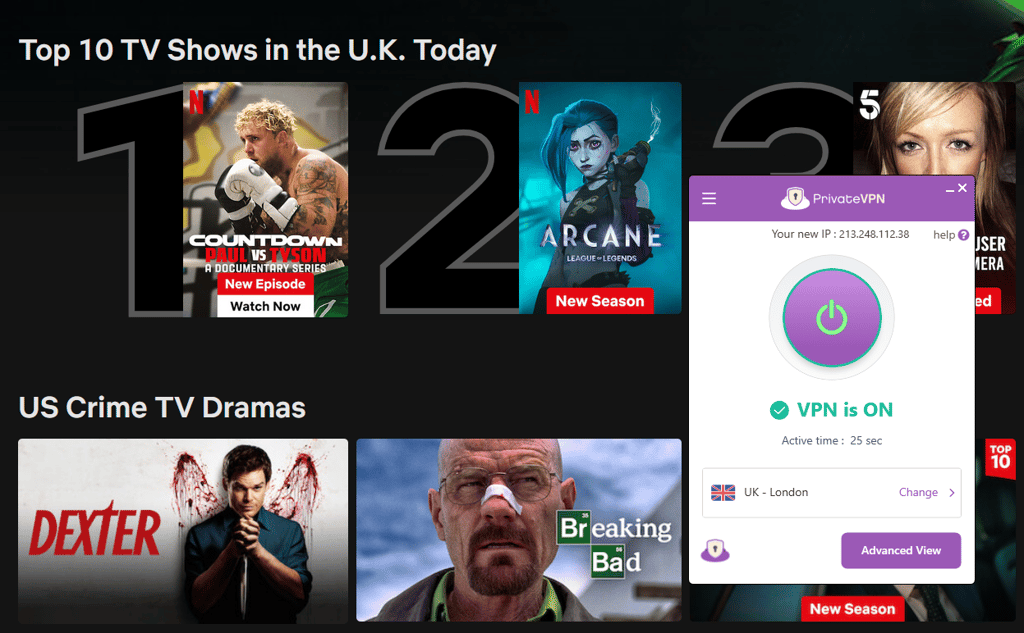
Sometimes, PrivateVPN struggles to unblock certain libraries on Netflix, as Netflix itself constantly tries to block VPNs. In this case, you may contact the VPN’s customer support to get help accessing the platform.
Also, keep in mind that if you choose a server located far from you, then you might experience buffering and loss of connection. If you have to connect to servers far away from your actual location, I recommend NordVPN. It easily unblocks geo-restricted content and maintains a good connection no matter the distance from the servers.
Is PrivateVPN good for Torrenting?
Yes, PrivateVPN is good for torrenting as it supports P2P traffic. Though, to use it with torrenting clients to download files, you'll have to connect to Dedicated IP/Torrenting servers. Together with the research team, we tested PrivateVPN’s torrenting capabilities twice.
Our first test was done a few years ago. Then, it took a while for the speed to max out, but it ended up very good. The maximum speed was 15MB/s (120mbps), which is great (but of course, it depends on many variables, including the leechers/seeders ratio).
Our most recent in-house testing showed that PrivateVPN still performs well when torrenting, with the download speed reaching 58MB/s at its peak. What’s more, it supports port forwarding, which can help improve the overall torrenting experience.
The only problem that I could potentially see with the service is that the specialized servers are not so numerous. This means that you could have to deal with overloaded servers. If this issue seems to cause you too much trouble, you can check our list of the best VPNs for torrenting and find the best option for you.
Servers and locations
PrivateVPN counts its servers in hundreds, not in thousands. This translates into a modest fleet of 200+ servers in 63 countries, which is rather small for a VPN when compared to other VPN providers, such as NordVPN, with over 8,000+ servers in 149 countries.
| Regions | Number of countries |
| Europe | 36 countries |
| Asia | 13 countries |
| Americas | 10 countries |
| Africa | 5 countries |
It’s not all bad, though, PrivateVPN offers a good range of countries to choose from in almost every continent. So, even though the country variety is good, the number of server locations is somewhat of a bottleneck. It makes PrivateVPN highly susceptible to overcrowded servers, which can leave you with slow speeds.
Does PrivateVPN work in China?
No, PrivateVPN does not work in China. Even though it has a Stealth VPN mode, which is a type of obfuscated server, PrivateVPN cannot bypass the Great Firewall.
Instead of PrivateVPN, opt for NordVPN, Surfshark, or any other VPN from our best VPNs for China list.
Speed and performance: Is PrivateVPN fast?
PrivateVPN offers good speeds for everyday browsing but may struggle with streaming, particularly loading high-quality videos. It’s not the fastest VPN on the market, but if you’re looking for an encrypted connection for browsing, PrivateVPN will do the job just fine. Simply put, it offers the perfect balance between performance and privacy for most users.

|
Download retention
|
Upload retention
|
 Australia
|
44% (220Mbit/s) | 4 % (23Mbit/s) |
 US (NY)
|
12% (62Mbit/s) | 22 % (114Mbit/s) |
 United Kingdom
|
10% (52Mbit/s) | 16 % (82Mbit/s) |
 Singapore
|
13% (66Mbit/s) | 21 % (105Mbit/s) |
 France
|
79% (399Mbit/s) | 33 % (167Mbit/s) |
So, to determine the speed of service, I measured the drop-off percentages. The lower they are, the faster your VPN will be. Since PrivateVPN doesn't have many tunneling protocols but allows changing the encryption, I ran multiple speed tests with different OpenVPN configurations:
| OpenVPN (AES-128-GCM) | Download speed drop | Upload speed drop |
| UDP | 56% | 44% |
| TCP | 80% | 89% |
Regarding the UDP variant of OpenVPN (AES-128-GCM), these are pretty good OpenVPN speed scores. Although on their own, they're nothing to write home about. The latency times were pretty high across the board, which could introduce lag or stuttering if you connect to locations further away.
As for the TCP variant, it isn’t any faster. The results are in line with what you could expect from TCP, but no one is ever using this mode for speed. It's worth noting that in some cases, ping times were excessive. For example, Singapore and Australia exceeded 500 milliseconds. That's a half a second difference, which could be noticeable.
| OpenVPN (AES-256-GCM) | Download speed drop | Upload speed drop |
| UDP | 61% | 38% |
| TCP | 80% | 87% |
The upload speed of OpenVPN UDP (AES-256-GCM) is much faster than the download speed. However, ping times are still above average with either OpenVPN version. So, if you're wondering whether encryption makes the speeds worse – it's a complicated answer.
As for the TCP variant, it’s somewhat on par with the AES-128 encryption. While the download speed drops are identical, the upload speed is a bit faster with AES-256.
In short, the AES algorithm version is the most relevant to those who are using devices that don't support AES hardware acceleration. So, this may be more important when setting up PrivateVPN on a router.
To see how PrivateVPN holds up now, I collaborated with our research team and repeated the speed tests, this time focusing on speed drops on servers located in different countries. These were the results.
| OpenVPN UDP | Download speed drop | Upload speed drop | Ping |
| US | 56% | 81% | 103ms |
| UK | 52% | 67% | 42ms |
| France | 32% | 72% | 40ms |
| Singapore | 50% | 81% | 202ms |
| Australia | 71% | 87% | 299ms |
Overall, PrivateVPN is not the speediest VPN service, with some servers dropping almost 90% of the original internet speed on OpenVPN. You may get better results on WireGuard, which has been introduced to PrivateVPN not that long ago.
| OpenVPN configurations | Speed | Security | Connection stability |
| UDP (AES-128-GCM) | Medium | Medium | High |
| TCP (AES-128-GCM) | High | Medium | Medium |
| UDP (AES-256-GCM) | Medium | High | High |
| TCP (AES-256-GCM) | High | High | Medium |
I didn't test PPTP and L2TP, mainly because I didn't manage to get them to work. Both of them are pretty outdated and not very secure anyway, so you should stick to OpenVPN.
| Provider | Speed retention rate |
| NordVPN | 90% 🏆 |
| Surfshark | 93% |
| PrivateVPN | 30% |
While PrivateVPN performs decently when it comes to speed, NordVPN is the champion. Retaining more than 90% the original internet speed, you will hardly notice you’re using NordVPN. What’s more, NordVPN has its own proprietary protocol, NordLynx, giving it an even bigger edge in speed and overall performance.

Interface and ease of use
| Platform | Experience |
| Windows | The richest version of PrivateVPN |
| macOS | Well personalized for the OS but lacks some features |
| Linux | No app, but users can set up a VPN connection manually |
| Mobile | Comfortable and solid apps for Android and iOS |
| Browser | Easy-to-use VPN extension |
PrivateVPN has done a great job developing a user-friendly interface for its application. Even though the appearance of an app varies on different operating systems, it remains similar and offers a decently personalized program.
Sure, there are some clunky spots that might be annoying. But are they going to make an impact on your experience? Let’s find out.
Windows
I found the Windows app simple to use. It pushes notifications for everything that is going on, so you'll always know your connection's status.
The main screen windows are customizable, allowing you to switch between simple and advanced views. The simple view only shows the status of your connection, with the ability to change the country you are connected to. Meanwhile, the advanced view gives access to customize the connection type and encryption, allowing you to access the app settings, such as VPN protocol, encryption type, kill switch, IPv6 leak protection, and auto-connect.

However, I encountered some weird issues. Although I liked the addition of port forwarding every time, it would assign a different port each time you connected. That means you must reconfigure your routers and other potential software to use a different port each time. Plus, you cannot disable it.
For a comparison, you can always check our list of the best VPNs for Windows.
macOS
The macOS app is almost identical to the Windows version, with more rounded buttons that better fit Apple's UI. However, there are some trade-offs, and not all the features you can use with Windows are there.

For example, one of the downsides of the macOS app is PPTP, which has turned into more of a security vulnerability than a tunneling protocol. Others, however, are quite useful additions like DNS leak protection and the ability to kill certain apps when disconnecting from a VPN server.
If you want a more personalized VPN for macOS, see our top VPNs for macOS list.
Linux
PrivateVPN doesn’t offer a desktop app for Linux users. So, they only get a manual on how to set up OpenVPN connections using PrivateVPN services.
And since you don’t get a standalone app, you'll have to set up everything manually using an OpenVPN stack with a command-line terminal. While PrivateVPN offers step-by-step guides on how to do it yourself, it’s still a tedious process, especially if you’re not tech-savvy. So, if you’re a Linux user, I’d recommend skipping PrivateVPN and opting for a service that has a graphical Linux app, such as NordVPN or Surfshark.
PrivateVPN mobile apps
The app mirrors the design principles present in the desktop versions. The key difference is that the desktop apps seem smoother, while the mobile counterparts are a bit choppy but not that noticeable.
The app for both Android and iOS looks plain and only offers the bare minimum of what you could expect from a mobile VPN service. I especially appreciate the built-in kill switch on the Android and iOS apps, which solves the problem if you're using an older device without its native support.

When it comes to functionality, the mobile app is limited. You can toggle Stealth VPN and switch the used port. However, aside from the ability to change tunneling protocols and encryption, there isn't much that you can tweak.
The app itself only switches between the list of all servers and the dedicated IP address, so you can avoid the glitchy streaming services list.
If you need more Android or iOS VPN options, consider checking out our lists of the best VPNs for Android and VPNs for iPhone.
PrivateVPN features
PrivateVPN isn’t able to brag about a feature-rich suite of security. Yet, it offers some unique tools for increasing security and browsing possibilities across the world.
Port forwarding
PrivateVPN is unique in its approach to port forwarding. When you're connected, a random port number pops up, which you can then enter in your torrent client. So, if you'll be using a VPN for torrenting, it's a godsend. You may also use the feature when setting up a remote server.
The feature is always automatically enabled. Whenever you connect to their server, you get assigned a random port number without the option to disable it.
Proxies
All PrivateVPN servers have support for HTTP and SOCKS5 proxies. They're both useful but in somewhat different scenarios. The HTTP proxy will work only with HTTP and HTTPS traffic, so it's primarily concerned with browsers.
If you need support for another kind of traffic, you'll have to use SOCKS5. These proxies are fairly flexible and secure, so many use them with torrent clients to add extra security. Here’s the list of all available servers with appropriate server addresses and corresponding ports.
Stealth mode
Stealth mode is PrivateVPN’s obfuscated server – it hides the fact that you’re connected to a VPN and works great at breaking down geo-restrictions. However, it’s important to note that obfuscated servers tend to be much slower than regular VPN servers, since they add an extra layer of security.
Customer support
PrivateVPN offers standard customer support options for a VPN provider. These include live chat and email but omit a phone line, which is not unusual.
| PrivateVPN | |
| 24/7 live chat | ✅ Yes |
| ✅ Yes | |
| Phone line | ❌ No |
| Guides or articles | ✅ Yes |
| FAQs | ✅ Yes |
When it comes to customer support, I had a mixed experience with PrivateVPN. While they do have a live chat available, it’s unreliable. Last time I contacted the support via live chat, I waited for 10 minutes and still didn’t get a response. I tried contacting support again recently, and this time it went much smoother – a live agent responded almost instantly.
That being said, email support seems to be more reliable. I received a response in around 3 minutes when I wrote an email. And considering I received an in-depth response in such a short time, it’s a huge plus for me.
I found the PrivateVPNs knowledge base a bit lacking. Some features could have been explained a bit better. For example, they didn't go into detail to explain how their port forwarding works. To find out anything about it, you have to go and check manually.
But I couldn’t skip mentioning that PrivateVPN has separate guides that show how to set up its VPN on different devices step-by-step. You can find them in the Getting Started section.
So, while email support is one of the fastest I’ve ever seen, their live chat and knowledge base could use an upgrade.
Is PrivateVPN good?
PrivateVPN is a great VPN service if you’re torrenting – it offers P2P servers and supports port forwarding, both of which are important for a smooth torrenting experience. What’s more, during our in-house tests, PrivateVPN downloaded files in under 2 minutes, showing great speeds.
In terms of streaming, PrivateVPN is not the best. It has a small server network and doesn’t always unblock less popular streaming platforms. On the bright side, it always unblocked Netflix. Moreover, if privacy is a big concern for you, PrivateVPN might not be the best option. While it brags about a no-logs policy, PrivateVPN hasn’t been independently audited, so their claims remain unconfirmed. In this case, I recommend NordVPN, a trusted VPN provider that’s a pro at unblocking geo-restricted content, has a massive server network, and has been independently audited 6 times.
FAQ
Who owns PrivateVPN?
PrivateVPN is owned by Privat Kommunikation Sverige AB. The company is located in Sweden, Sollentuna.
Is PrivateVPN safe?
Yes, PrivateVPN has many customization options, even allowing you to modify your encryption mode. Though, there are some concerns with port forwarding (a feature you can't disable on the app).
Is PrivateVPN free?
No, PrivateVPN doesn’t have a free subscription. However, the provider offers a free risk-free 7-day trial and 30-day money-back guarantee. As for the trial, you would have to contact support and disclose your email address to have an account created.