Best YouTube TV VPN 2026: how to change YouTube TV location
Our in-house cybersecurity experts and journalists, renowned for major reports like The Mother of All Breaches, conduct transparent, unbiased VPN testing and in-depth analysis.
With 750+ articles crafted based on real-world research, we empower readers to make informed purchasing decisions through first-hand expertise.
Learn more

As of 2026, YouTube TV is only available in the US. If you want to keep watching it while traveling abroad, check YouTube TV’s travel policies. I also recommend setting up and verifying your YouTube TV account in the US before your trip. Existing subscribers may be able to keep watching while abroad, but Home Area verification and periodic location check-ins can still apply. Another option that is worth trying is a high-quality VPN.
A VPN can change your IP address to a US one, and may help you appear as if you’re browsing from the States. Additionally, to access local channels and live TV, YouTube TV may require Home Area verification and periodic location check-ins. If your account location, device location, or Home Area information doesn't match YouTube TV's requirements, access may still be restricted even when connected to a US VPN server.
To help you choose a high-quality VPN for YouTube TV, together with a research team, I tested 41 VPN providers across multiple US servers on iOS, Android, Windows, and macOS to see which ones can help you bypass YouTube TV location. Below, you will find a shortlist of the best providers and a step-by-step guide to unblock YouTube TV.
A VPN can help with one part of the process: getting the US IP address. You’ll still need a valid YouTube TV account and subscription. A VPN can’t provide payment methods, billing information, or satisfy verification requirements. Additionally, YouTube TV uses additional location and account checks that a VPN cannot control. Depending on your situation, you may still encounter restrictions even when connected to a US server.


We spare no effort to test the products & their features. All information is gathered by our in-house research team & fact-checked by our team of experts. Discover the ins and outs of our testing procedures.
How to watch YouTube TV with a VPN
This is a short guide for watching YouTube TV that will work with most VPNs.
- Create a YouTube TV account and get a subscription (if you're signing up for YouTube TV for the first time, you will need a US payment method and a valid US ZIP code. A VPN only changes your IP address and doesn't replace these account requirements)
- Sign up for a reliable VPN
- Install the VPN
- Connect to a US server
- Log in to your YouTube TV account
- Adjust your YouTube TV home area settings
Keep in mind that a VPN can help by providing a US IP address, but YouTube TV uses additional location checks that a VPN cannot control. YouTube TV may require Home Area verification and periodic location check-ins. If your account or device location doesn't meet these requirements, access may still be restricted even when using a US VPN server.
Note: You can only change your YouTube TV home area settings twice per year.
Why do you need a VPN for YouTube TV?
YouTube TV is primarily intended for viewers in the United States. If you travel abroad, you may encounter an error stating that the service is unavailable in your current location. This happens because YouTube TV uses location-based restrictions to determine which content can be accessed.
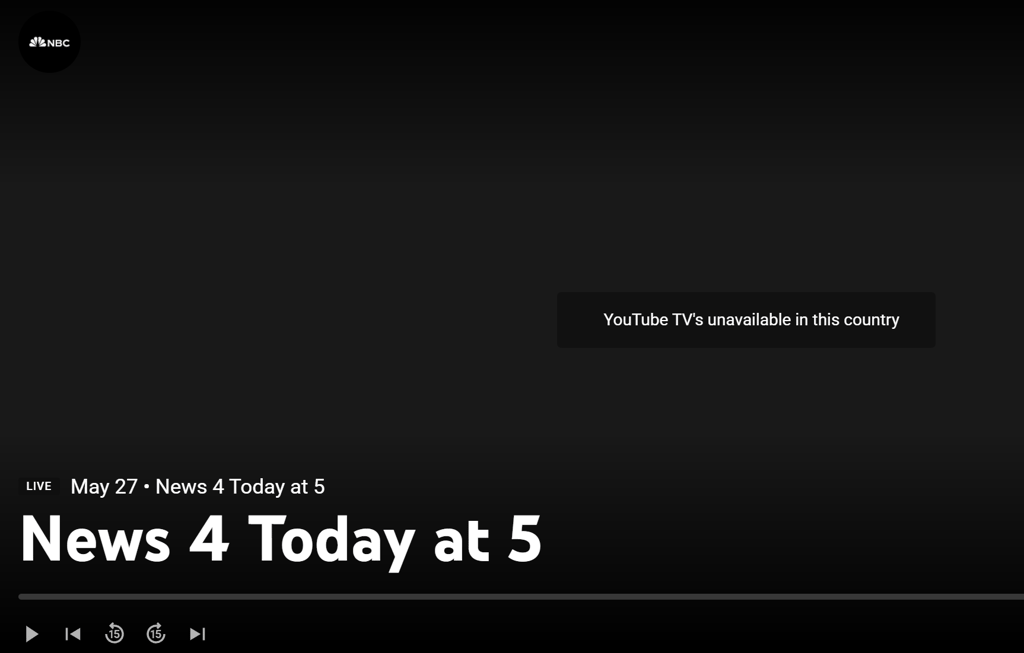
A VPN may help by providing a US IP address, which can be useful if you're traveling outside the country or trying to access your account away from your usual location. However, a VPN only changes your IP address and does not satisfy all of YouTube TV's location requirements.
In addition to IP-based checks, YouTube TV may use Home Area verification, periodic location check-ins, sports blackout rules, and location data from your device. A VPN does not change your device's GPS location. On mobile devices, location-based services may use GPS data in addition to your IP address, which can affect access to certain channels, sports broadcasts, or regional content.
What do you actually need to watch YouTube TV?
| What you need | What it requires | Can a VPN help? |
| Access YouTube TV from abroad | A US IP address | ✅ Yes |
| Watch local channels and live TV | Home Area verification | ❌ No |
| Watch regional sports broadcasts | Compliance with blackout and location rules | ❌ Not always |
| Access YouTube TV on mobile devices | Device location may be checked via GPS | ❌ No |
| Use YouTube TV | A valid YouTube TV account or subscription | ❌ No |
You may not need a VPN if:
- You're an existing YouTube TV subscriber traveling temporarily and the content you want is available under YouTube TV's travel policies.
- You're accessing YouTube TV from within your designated Home Area.
- The content you want is available through an official local broadcaster or streaming service in your current location.
While a VPN can help with IP-based location restrictions, it should be viewed as one part of the process, rather than a guaranteed solution for accessing YouTube TV from any location.
Best YouTube VPNs for 2026
YouTube TV uses some of the toughest VPN detection in streaming, and most providers fail to bypass it. I started with my shortlist of the best VPNs available right now and tested each with YouTube TV. In my case, 3 VPNs reliably unblocked the service in HD across desktop, mobile, and Smart TV.
- NordVPN – best VPN for YouTube TV in 2026
- Surfshark – budget-friendly YouTube TV VPN with unlimited connections
- Proton VPN – free-plan VPN for YouTube TV for privacy-conscious users
Best YouTube TV VPNs compared
Here's a quick summary of my top 3 providers:
| YouTube TV VPN | Rating | Unblocks YouTube TV | Servers in the US | Simultaneous connections | Free trial | Price |
| NordVPN | ✅ Yes | 3200+ in 20 locations | 10 | ✅ Yes, 3-day | From $3.49/month | |
| Surfshark | ✅ Yes | 600+ in 24 locations | Unlimited | ✅ Yes, 7-day | From $2.49/month | |
| Proton VPN | ✅ Yes | 5200+ in 22 locations | 10 | ✅ Yes, free version | From $2.99/month |
How to watch YouTube TV internationally while traveling
If you're traveling outside the US, check YouTube TV's travel policies first. Existing subscribers may still be able to access some content while away from their Home Area, although channel availability can vary by location.
If the content you want isn't available through YouTube TV's travel access, a VPN may help with the IP-location requirement. In the guide below, I'll explain how the process works, as well as the limitations you may encounter, such as Home Area verification, location check-ins, and regional content restrictions.
Step 1. Create a YouTube TV account before traveling
If you’re signing up for YouTube TV for the first time, keep in mind that getting a new subscription typically requires a valid US ZIP code and a US payment method. When planning to travel abroad, it’s generally easier to create and set up your account while you’re still in your Home Area before your trip.
Step 2. Choose a reliable VPN provider
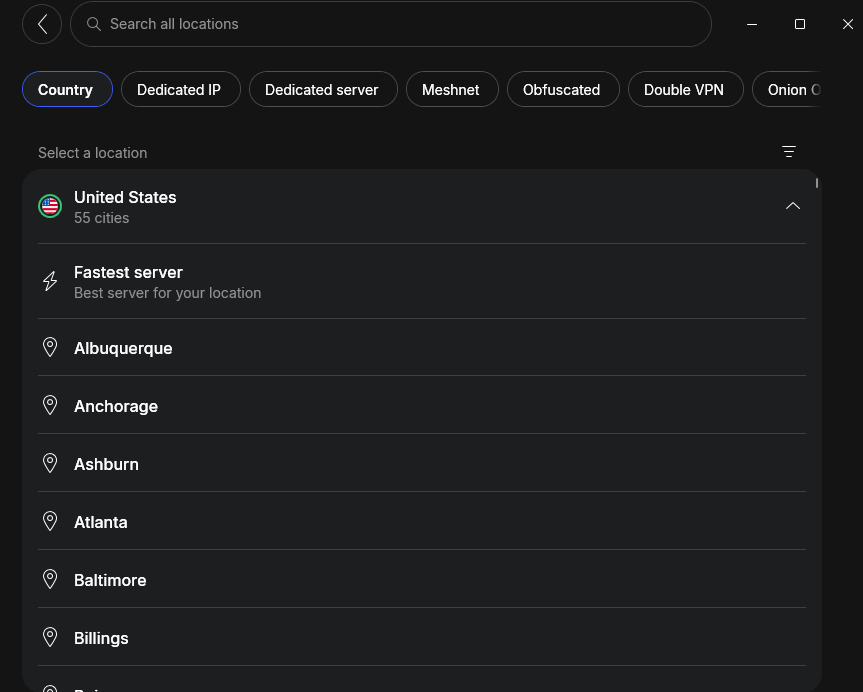
I recommend using a VPN with a selection of US servers. For example, NordVPN can be a good fit as it offers servers in 55 US cities. But any VPN that can get around geo-blocks for YouTube TV will do.
Step 3. Download and install the VPN
After signing up, download the VPN app for your device. Most providers support Windows, macOS, Linux, Android, and iOS. Once installed, open the app and log in with your account.
Step 4. Connect to a US server
Now, choose a VPN server located in the US. This will make YouTube TV think you’re still in the United States, allowing you to bypass location restrictions. For best speeds, pick a server near a major US city.
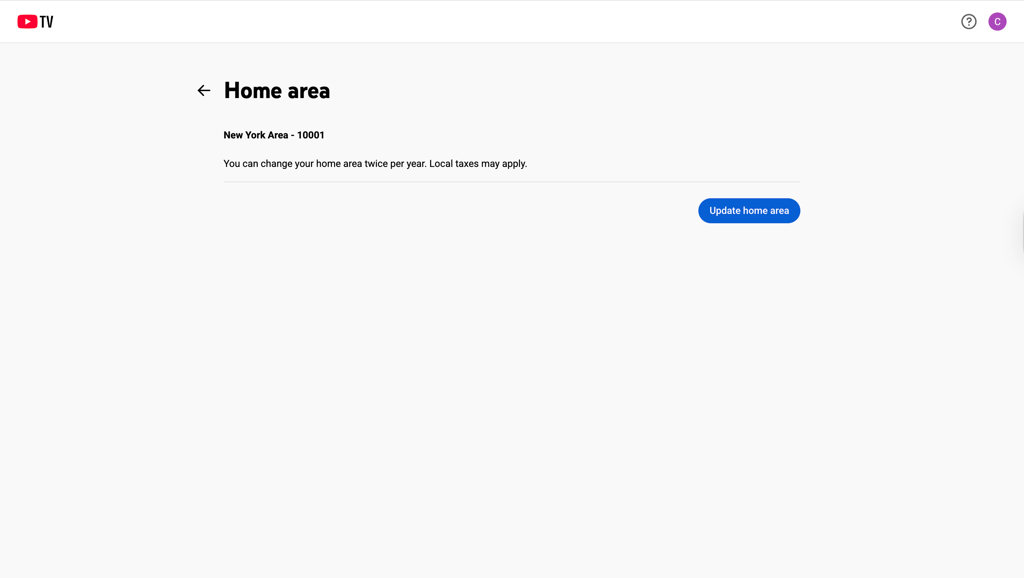
Step 5. Adjust your home area settings
For maximum success in changing your virtual location to watch YouTube TV, you will need to change your home area. Go to YouTube TV Settings, then choose Area and click Update home area. Choose the same location as the VPN server you are connecting to. Keep in mind that you can only change your home area twice per year.
Step 6. Open YouTube TV and start watching
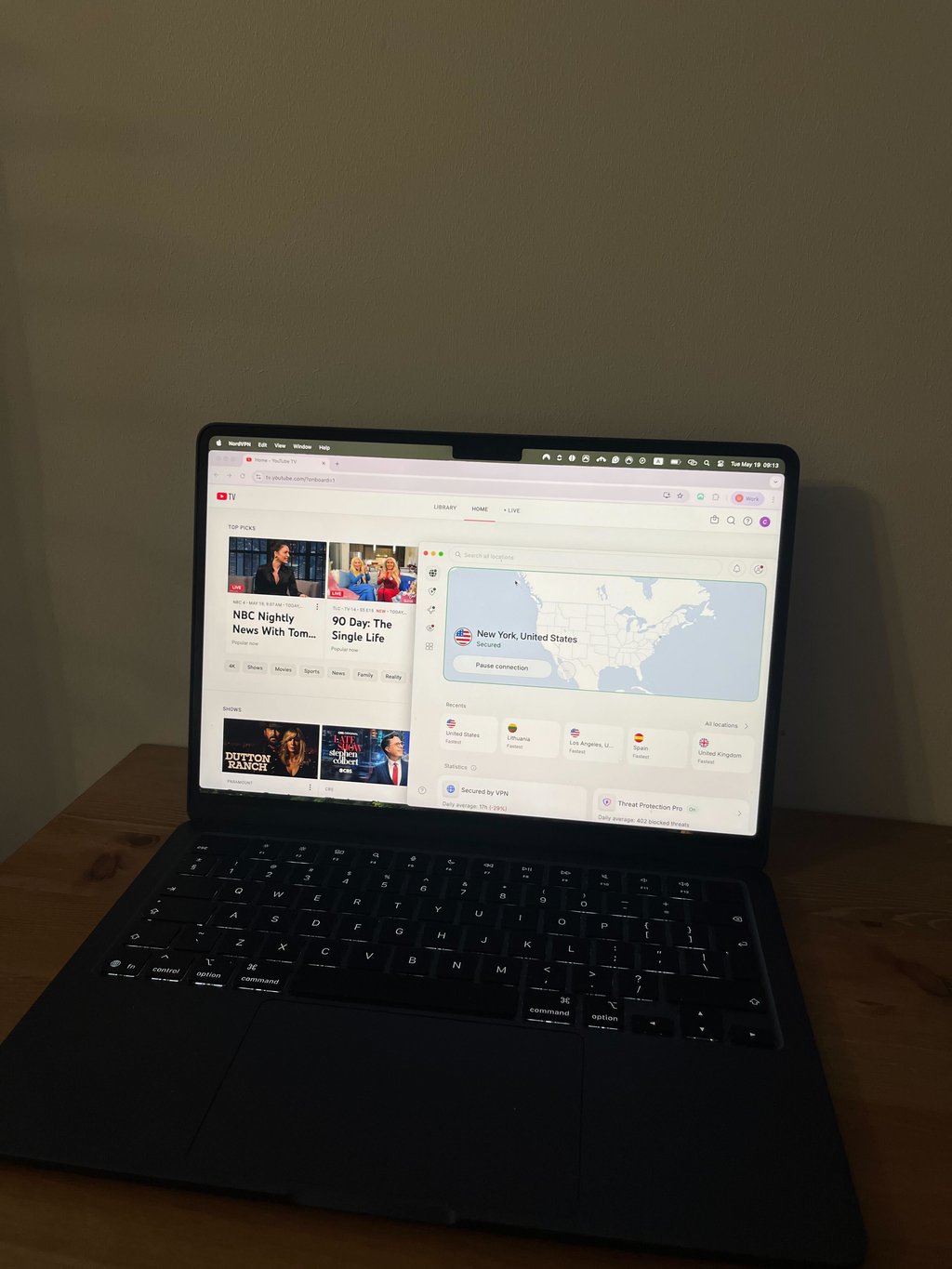
Once connected to a US server, visit the YouTube TV website or open the app and sign in to your account.
If YouTube TV accepts your location and account verification, you should be able to access available content. Keep in mind that access can still be affected by Home Area requirements, location check-ins, sports blackout restrictions, GPS-based location checks, and other YouTube TV policies.
Keep in mind that using a VPN may violate service terms and could result in access restrictions or account issues. Make sure to always check YouTube TV latest service terms.
Can I use a free VPN for YouTube TV?
You can use a free VPN to access YouTube TV, but I don’t recommend it. First of all, unreliable free VPN providers don’t have a source of income, so they may sell your data instead.
Second, because such VPNs claim to be free, they have a limited number of servers and are usually incapable of accessing streaming services. Some free VPNs can even be malware in disguise.
However, if you wish to try a free VPN for YouTube TV, I suggest trying a reputable freemium VPN provider, like Proton VPN. Of course, there’s no guarantee that it will be able to help you access YouTube TV because it lacks servers.
How to fix the "YouTube TV proxy detected" error?
Sometimes, even with a VPN, you might receive an error message saying YouTube has detected a proxy. There are a few reasons why you might not be able to watch YouTube TV with a VPN:
- Your VPN can't bypass YouTube TV's location restrictions. YouTube TV implements strong tools to detect and block VPNs. If you're using a lower-quality VPN, you might be unable to stream YouTube TV.
- Your IP and device locations don't match. A VPN changes your IP address, but it does not change your device's GPS location. If YouTube TV detects conflicting location signals, access may be limited even when connected to a VPN.
- Your cache is storing your location. Your location may be stored in cache or cookies, so clearing your browser’s cache or using a different browser or private browser mode should remove that information. If you’re using an app, you can try reinstalling it.
- Your browser is revealing your location. Some browsers can share location information that doesn't match your VPN connection. If you're troubleshooting a location-related error, check your browser's location settings and permissions. Keep in mind that browser geolocation and device GPS are separate from your VPN connection, and changing browser settings may not work for all services.
- Your VPN isn't updated. YouTube TV constantly improves its geo-blocks, so even if your VPN used to be able to unblock it, it might now be blocked.
- Your actual IP address could be leaking. Lower-quality VPNs are more prone to connection drops and can expose your location. YouTube TV detects these leaks and can block you from accessing content.
Here are four tips on how to fix these issues and unblock YouTube TV:
- Check that you're using a US-based server. Double-check that you’re using a server located in the US, preferably in a major city like New York, Los Angeles, or Chicago, as these tend to have faster and more reliable streaming connections.
- Try a different US server. If one server doesn’t work, it’s likely to be blacklisted by YouTube TV. To fix this, try connecting to a different US server until you find one that successfully bypasses the block.
- Update your VPN app. Updating your app to the latest version will fix bugs, improve performance, and patch security flaws that could be restricting you from accessing YouTube TV.
- Contact customer support. If the above steps don’t work, reach out to your VPN’s customer service team for help.
If you've tried everything and nothing seems to work, it might be time to upgrade to a better VPN.

YouTube TV VPN Reddit opinions
When it comes to choosing services, Reddit users are a great source of information. After all, they use services daily and know best what works and what doesn’t. Here are the main issues that VPN users face when trying to connect to YouTube TV:
- YouTube TV detects the use of a VPN all the time
- VPN works with YouTube TV in the home country, but not on a holiday abroad
- VPN doesn't work on a desktop device
Luckily, Reddit users provide some helpful tips.
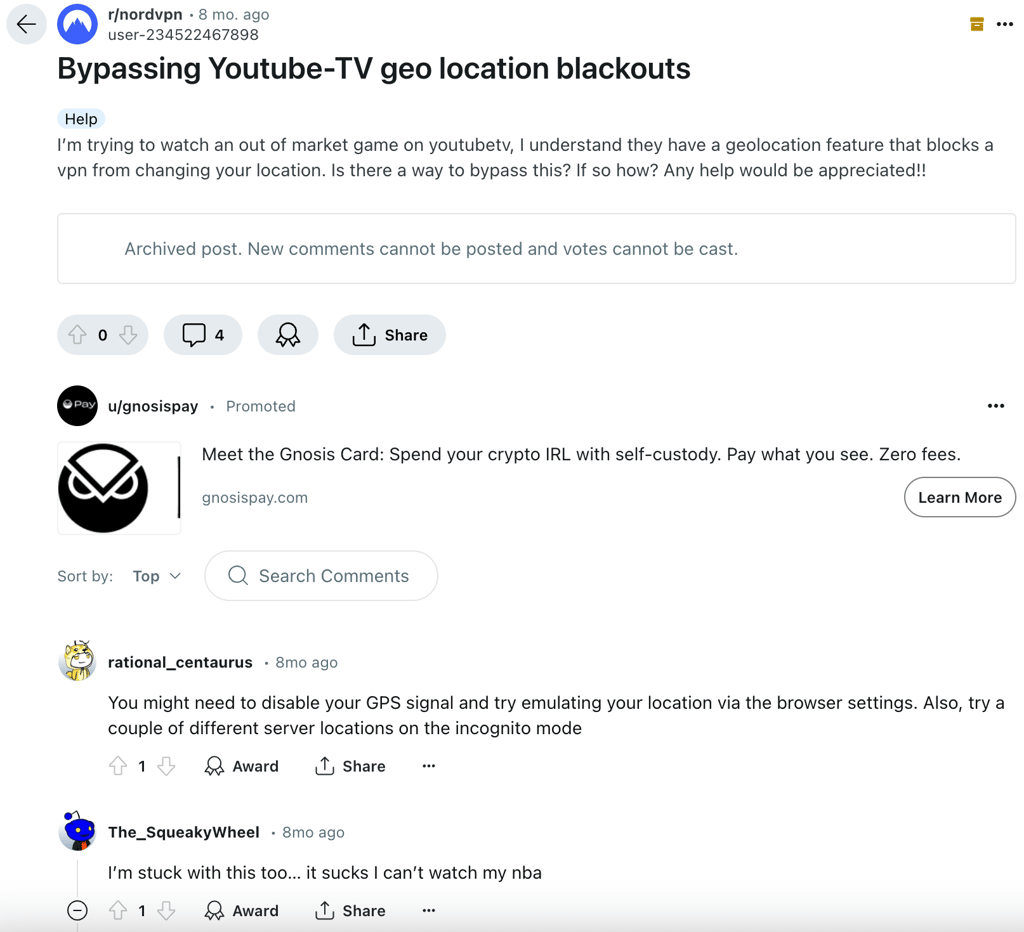
Essentially, the possible solutions are:
- Connect only in the US or to US servers. Attempting to connect to foreign libraries could cause YouTube TV to detect the use of a VPN.
- Clear browser cache and cookies, turn off GPS, and use Incognito mode. Making sure your browser and device leave as little trace as possible could help to prevent your VPN from being detected.
- Connect your VPN directly to your router. This way, all internet traffic will go through the VPN server, with no middle device that could cause a GPS leak.
- Try a different browser. This sometimes helps to solve the issue.
- Change the server or protocol. VPNs like NordVPN, for example, usually allow you to choose from more than one protocol. Changing it, particularly when it works in some countries but not others, could help you connect.
If none of this works, try a different VPN. But even then, YouTube TV works hard to prevent VPN use. So, at the end of the day, it might win against VPN providers.
Final verdict
If you're traveling outside the US or having trouble accessing YouTube TV due to location restrictions, a VPN may help by providing a US IP address. However, a VPN is only one part of the process. YouTube TV may also require Home Area verification, location check-ins, and other account-based checks, while sports blackouts and regional restrictions can still affect what content is available.
Among the providers I tested, NordVPN delivered the most consistent results with YouTube TV across different devices and US server locations. Streams loaded quickly, video quality remained stable, and switching between server locations was straightforward when troubleshooting location-related issues.
That said, no VPN can guarantee access to YouTube TV in every situation. If you're considering a VPN for YouTube TV, it's best to view it as a tool that may help with IP-based location restrictions rather than a guaranteed solution for all access or verification requirements.
FAQ
Does YouTube TV work with a VPN?
A VPN may help you access YouTube TV by providing a US IP address. However, access can still depend on Home Area verification, account requirements, location check-ins, and content-specific restrictions. Because of this, a VPN should be viewed as a tool that may help with IP-based location restrictions rather than a guaranteed way to access all YouTube TV content.
Does YouTube TV block VPN?
Yes, YouTube TV can detect VPN usage. If this happens, you may see an error like “VPN or proxy detected,” which usually means the IP address you’re using has been identified and blocked. This doesn’t necessarily mean your VPN won’t work. In many cases, you can fix the issue by switching to a different server to get a new IP address. Clearing your browser cache or enabling location services can also help resolve detection errors.
Why does YouTube TV detect VPNs?
YouTube TV actively detects and blocks VPNs to enforce regional broadcasting rights and geographic licensing agreements. Because local networks and sports channels hold exclusive rights to broadcast in specific areas, the platform must prevent users from bypassing these geographic restrictions.
How does YouTube know I'm using a VPN?
YouTube identifies VPN usage by tracking IP addresses and checking them against known blocklists of shared VPN server IPs. Additionally, mismatched DNS settings, browser timezone differences, or mobile GPS data different from your IP address can expose VPN usage.
Does YouTube ban you for using a VPN?
No, YouTube TV does not ban your account for using a VPN. Instead, it simply blocks your access to the service and displays a proxy error message until you turn off the VPN and verify your actual home location.
Can I watch YouTube TV outside the US?
Yes, you can watch YouTube TV outside the US with a VPN. By connecting to a US server, a VPN assigns you an American IP address, making it appear as though you’re accessing YouTube TV from within the country. This allows you to log in and stream your usual content even while traveling abroad.