Should you always use a VPN?
Our in-house cybersecurity experts and journalists, renowned for major reports like The Mother of All Breaches, conduct transparent, unbiased VPN testing and in-depth analysis.
With 750+ articles crafted based on real-world research, we empower readers to make informed purchasing decisions through first-hand expertise.
Learn more

I recommend keeping your VPN on in most situations, because it can help protect your privacy and reduce exposure to online risks. A VPN encrypts your connection, making your browsing activity private against internet service providers (ISPs), advertisers, and potential surveillance. This is especially important on public Wi-Fi networks.
Beyond security, using a VPN is one of the key steps in accessing geo-restricted content and services, including streaming platforms or region-locked websites. The best VPN providers handle all of this without affecting your connection speed much or making a noticeable dent in your wallet.
Of course, keeping a VPN on at all times isn't essential for everyone. I specifically recommend using one when you're connected to public or untrusted Wi-Fi networks or when you want to keep your online activity private from your ISP.
A VPN represents only one privacy layer. It changes which country your IP address appears to be in and encrypts your traffic. However, it can't change your GPS data, help bypass local account or payment requirements, pass ID KYC checks, or switch your app-store region.
What a VPN can and cannot do?
Before we dive deeper into the reasons why you should use a VPN, let’s take a quick look at what a VPN does and doesn't do:
A VPN can:
- Change your IP address to spoof your geographical location
- Hide your browsing traffic from your internet service provider
- Enhance your privacy and security (when using a reliable VPN)
A VPN cannot:
- Change your mobile device’s GPS location
- Give you a local account, payment method, or billing address
- Pass identity checks (e.g., ID and real-name verification)
- Change your region in the Apple App Store or Google Play Store
7 reasons to keep your VPN on at all times
- Stay private and anonymous online
- Unblock geo-restricted content
- Stop bandwidth throttling
- Encrypt your connection
- Safely access public Wi-Fi
- Save money
- Bypass censorship and network restrictions
1. Privacy and anonymity from third parties
The main reason to constantly have a VPN turned on is your privacy and anonymity. While you may not have anything to hide, it can still be uncomfortable knowing there are trackers looking at what you’re browsing.
A VPN carries your data through an encrypted tunnel, meaning all your information, including your browsing activities, becomes unreadable and inaccessible to anyone’s eyes. This includes your ISP, cybercriminals, or even the government authorities.
Reliable VPNs, such as NordVPN or Surfshark, have clear no-logs policies (even better if they’re independently audited), meaning they don’t track your activities either. So even if the government asks the VPN provider to share information about you, there won’t be anything to give in the first place.
On top of that, when you have a VPN on, websites won’t be able to track you or your browsing activities either. This means that external companies won’t be able to use targeted advertising. So, if you’ve searched for a product on Google, it won’t reflect in the adverts you see.
2. Access geo-restricted content
Keeping a VPN constantly connected means that you can bypass geo-restrictions and unlock content from around the world. When you use a VPN, it connects you to a secure server in a location of your choice, making it look like you are physically in that country.
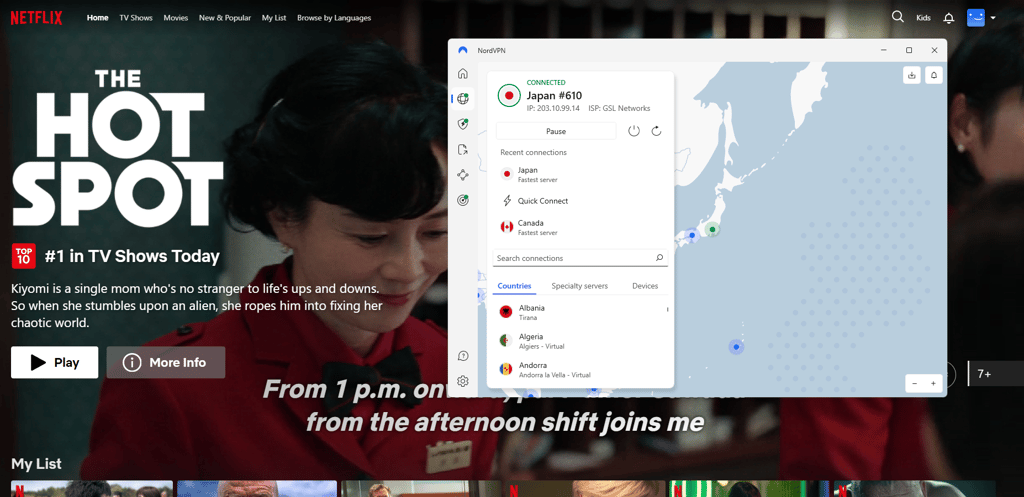
So, if you want to access different Netflix libraries, or watch Hulu or HBO Max but you’re not in the US, a VPN will let you bypass these restrictions from anywhere in the world. It will connect to a server of your choice and allocate you that country’s IP address to make it appear as though you are physically there, even if you’re not.
The other benefit is that you can switch servers seamlessly. For example, you can access an American server to watch Hulu and then switch to a British server to watch BBC iPlayer.
3. Avoid bandwidth throttling
Some ISPs will impose bandwidth limits to encourage you to upgrade to a more expensive package that promises faster internet speeds. If you have a VPN turned on, you can reduce some traffic-specific throttling because the ISP can't see what you’re doing.
So whether you want to download files, stream content, or play your favorite game in peace, you’re likely to find VPNs a valuable asset. However, if it so happens that your VPN slows down your connection even more, make sure you’re connected to a server that is closer to you physically. If switching between servers doesn’t help, consider looking into faster VPNs.
4. Encrypt your connection and protect sensitive data
Using a VPN all the time also reduces exposure on untrusted networks by encrypting traffic, which is crucial for protection against cyberattackers. Because your information, including sensitive data and online activities, is encrypted with such ciphers as AES, it becomes inaccessible to anyone.
In simple terms, even if someone accessed your data, they would never be able to decipher it. To give you an example, the VPN tunnel will secure your communication channels, including your emails and Zoom meetings, from anyone trying to access them.
Additionally, having a VPN turned on lets you transfer money more safely. Since your online activities are hidden, it doesn’t matter where you make transactions. Be it your home network or unsecured public Wi-Fi – the risks imposed by cybercriminals are greatly minimized.

5. Safe access to public Wi-Fi
Public Wi-Fi networks are highly vulnerable as you can never know who connects to them. This makes it easy for cybercriminals to access your private information. That is unless you use a VPN for public Wi-Fi. It will make it appear as if your data is coming from the server you’re connected to instead of your own device.
To put it simply, if your VPN is always turned on, that will make intercepting traffic and accessing your data much harder. As an extra precaution, turn on the kill switch so your traffic is blocked if the VPN drops. Just keep in mind that there are some downsides, including speed loss (minimal with top-rated VPNs) and higher battery drain on mobile devices.

Even if your VPN connection drops, the kill switch will temporarily shut down your internet connection until it is restored. This way, there won’t be any accidental data leaks.
6. Save money
External companies can gain access to your information and use it to their own advantage. For instance, if you keep looking for flight details or the same hotel rooms, the prices may increase the next time you come back to the same site. That’s because companies track your search history and frequency.
If you have a VPN turned on, companies can't easily track your searches, which may help avoid repeat-visit price increases. Of course, savings aren’t guaranteed. Plus, keep in mind that your payment method usually must match the region you've selected at checkout. Otherwise, the price might revert back.
It’s also important to keep in mind that some companies introduce different prices country-by-country, so changing your VPN location might be useful for comparing prices before you book your travels. However, keep mind that using a VPN to buy Netflix, Spotify, YouTube Premium, and similar subscriptions from another country may violate their terms of service. Plus, you may need to change your app-store region and provide a local payment method, which is something a VPN alone cannot help with.
All in all, if you can change your app store location and use a locally accepted payment method, a VPN that can change your location might help you save money. You might even go for one of the budget-friendly VPNs to keep your savings higher.
7. Bypass censorship and network restrictions
Because a VPN routes your traffic through an outside server, it can usually help access websites that are blocked by your network – for example at work or school. It can also help bypass IP address- and region-based censorship. Unfortunately, a VPN will not be very useful if a block is linked to your account or GPS-based location. Plus, some networks can successfully detect and block VPN connections.
It’s important to note that bypassing a workplace or school network can breach internal rules and regulations. Plus, there are some countries that have restricted VPNs or made them outright illegal. Make sure you are familiar with the rules and laws in place before you proceed with a VPN.
A VPN is just one layer to your privacy setup
A VPN can successfully hide your IP address and encrypt your traffic, which prevents ISPs and other snoopers tracking your activities. While this is incredibly useful, a VPN can only do so much. To truly reduce your digital footprint, here’s what you need to think of as well:
- GPS. Your smartphone reveals your real GPS data to apps. A VPN can't change it, but you can turn off location permissions for apps that don't actually need them.
- App permissions. Your camera, microphone, and background data are common leak points that can disclose your identity. So, review and revoke permissions that aren’t necessary.
- DNS and HTTPS. If you use encrypted DNS and stick to HTTPS sites, you can avoid lookups and page content exposure even when your VPN is off.
- Browser hygiene. I strongly recommend blocking third-party cookies, limiting trackers, and using privacy-focused browsers to make sure that you keep tracking to the minimum.
- Account and identity data. While a VPN can hide your IP address, it cannot hide who you're logged in as. Keep in mind that the accounts you sign into can still identify you through the data you have shared previously.
Overall, you should think of a VPN as one network-privacy layer, not a single tool that magically makes you private with an ON/OFF switch.
What can a VPN be used for?
Depending on what you need a VPN for, it can be beneficial in many ways. Here are a few advantages of using a VPN for business purposes or personal entertainment.
1. Business VPNs
VPNs for businesses can be more expensive than those for regular users. However, they’re much more than worth it. For starters, they protect employee data from being stolen or viewed by third parties. This includes remote workers who tend to work connected to their home network. A VPN does not let anyone, even the employee’s ISP, see what they are up to online.
Additionally, remote workers can feel safe on public Wi-Fi, knowing their data is encrypted. Public networks are known to be a cybercriminal hazard.
2. Streaming VPNs
Streaming-focused VPNs can provide IP addresses from pretty much anywhere. Let’s say, you live in Canada and have a Netflix subscription, but the movie you want to watch is only available on Netflix in the US. A VPN can help by giving you an IP address in the US. Of course, the situation is more difficult if you don’t have an account because you may have trouble setting it up from abroad, since a VPN cannot offer you a local payment method or verify your identity.
Streaming VPNs are also helpful if your ISP tends to limit bandwidth as soon as you start doing data-consuming activities, including streaming. Since your data is encrypted, your ISP can’t see what you’re up to. This means that the VPN won’t let your ISP limit your data, thus improving overall streaming speeds.
3. Gaming VPNs
If you can’t imagine your life without gaming, a VPN can benefit you in multiple ways. For starters, gaming VPNs can help you access other regions on services such as Steam. Changing your virtual location helps access a larger game library.
Also, some unfair gamers attack other players to get them out of the game. This is called a DDoS attack or distributed denial of service. A VPN hides your IP address and personal data, securing you from cyber bullies and attacks.
One more advantage relates to speed. Just like with streaming, some ISPs tend to limit speed for gamers. If that’s the case, a VPN will improve your speed and gaming experience.
Should I leave my VPN on all the time?
For the most part, yes, because your data should always be protected. VPNs are some of the best security tools on the market and are not that expensive, considering the value they bring. VPNs ensure data protection from cybercriminals and secure browsing. As a result, this prevents advertisers or ISPs from accessing your browsing data.
There also may be times when you need to turn your VPN off. That is when you want to access local sites or devices, such as streaming platforms or a printer.
When should you turn off your VPN?
While I recommend keeping your VPN on as often as you need to, there may be cases when you actually need it off. This includes accessing local content or devices.
For instance, you may need to access streaming services that are unavailable in countries you’re virtually connected to. The same goes for various websites that may be geo-restricted elsewhere. You may also need to connect to devices on your local network, such as a printer. In such cases, it’s easier to just pause your VPN connection for some time.
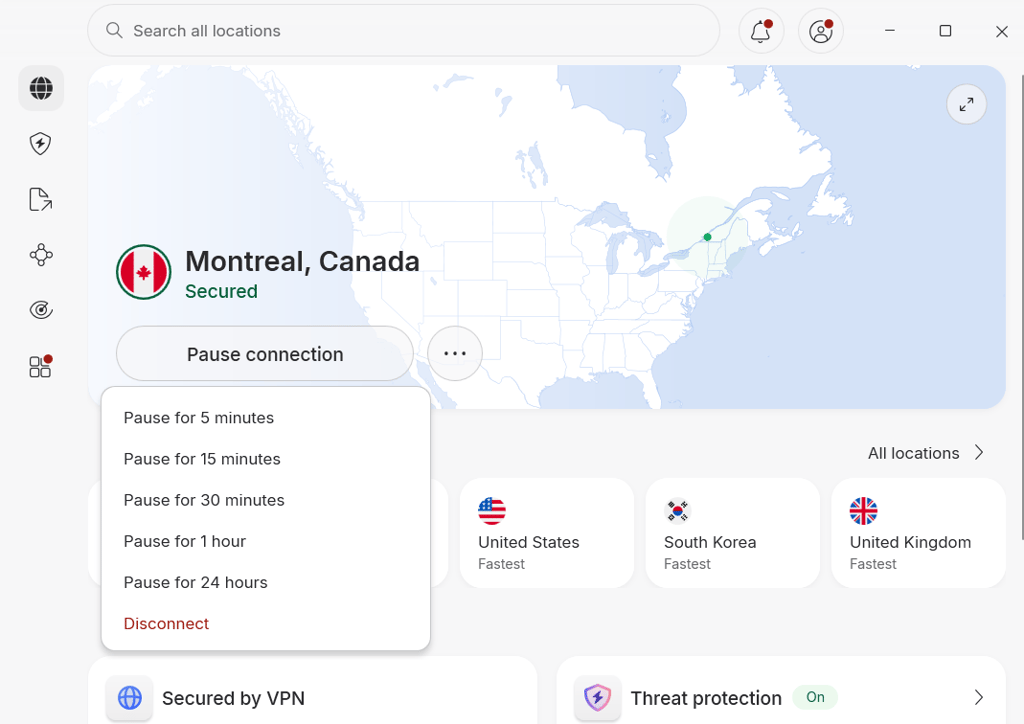
Another reason you may consider pausing your VPN is if it slows down your device speed. But first, try switching to other servers or choose those that are physically closer to you.
Should I use a VPN at home?
Using a VPN at home can be useful but isn’t always essential. The main reason it may not be necessary is that your internet activity should already be shielded by your password-protected Wi-Fi network. The other concern is that connecting to a remote server can slow your connection speed. Yet, it shouldn't be the case with NordVPN and other top-rated VPNs that offer great speeds.
At the same time, the pros of using a VPN at home largely outweigh the negatives. Even Reddit users agree that using a VPN at home is a great way to secure yourself from your own ISP. When a VPN is on, your ISP can’t see what sites you visit, and trackers can’t sell your data to third parties.
Additionally, if your ISP throttles your internet speed, a VPN could even improve it by shielding your activities. You can also set up a VPN on your router so devices that can't run a VPN app are covered. Note that router setup requires more than just installing an app — not every router supports it, the steps vary by model, and devices that leave your home network won't be protected until they reconnect.
Best VPNs to use at all times
While the VPN market is filled with promising providers, not all of them ensure great performance and security. To help you out, I gathered a list of our approved best VPNs for staying connected full-time.
- NordVPN – one of the fastest VPNs that ensures great speeds at all times and is simple to use
- Surfshark – wallet-friendly VPN that allows unlimited simultaneous device connections
- IPVanish – feature-rich VPN solution for multiple devices to stay protected at all times
When picking a provider, it’s important to choose a VPN that offers top-class security and performance. You want to have access to advanced security features as well as a clear no-logs policy. Of course, you shouldn’t have to compromise on performance, so it’s essential the VPN can also deliver fast speeds.
At the same time, I strongly advise against using unreliable free VPNs. Since they often make profit in shadier ways. They may even end up selling your data to external third parties and running malware-related ads.
If data privacy is something you are looking for, my top 3 VPNs are great choices to consider. Here’s a quick comparison:
| NordVPN | Surfshark | IPVanish | |
| Rating | |||
| Starting price | $3.49/month | $2.49/month | $2.19/month |
| Encryption | AES-256 | AES-256 | AES-256 |
| No-logging policy | No logs, independently audited 6 times by PwC and Deloitte | No logs, independently audited by Cure 53 | No logs, independently audited by Leviathan |
| Servers | Thousands of servers in 224 locations | 4,500+ servers in 100 countries | 3,400+ servers in 112 countries |
| Unblocks | Netflix, Hulu, BBC iPlayer, Disney+, and more | Netflix, Disney+, Amazon Prime Video, Hulu, and more | Netflix, BBC iPlayer, YouTube, Disney+, Hulu, and more |
| Simultaneous connections | 10 | Unlimited | Unlimited |
| Check NordVPN deals | Check Surfshark deals | Check IPVanish deals |
These VPNs offer high-level security and are astonishingly fast. Also, they all protect your browsing data with some of the strongest encryption ciphers. In terms of entertainment, they’re all capable of unblocking geo-restricted content, like Hulu, HBO Max, or BBC iPlayer.
Bottom line
In conclusion, a VPN can be a great privacy tool, but it’s not a cure-all. It encrypts your traffic and makes you more anonymous, which is why many choose to keep it on full-time, especially when using public Wi-Fi networks. That said, VPNs aren’t essential in every case. For example, you might skip it when connected to a trusted home network. You may also choose to turn it off when you need to access local content or devices on your network.
Overall, I recommend using NordVPN. It ensures advanced security, is one of the fastest VPN services on the market, and lets you pause your connection for a chosen time. Plus, with split tunneling, you can choose when to connect with a VPN and when to connect without.
FAQ
Do I need a VPN?
Yes, a VPN is a great tool for online protection. It provides a fast and secure service that maintains your anonymity. A VPN also enables a secure connection to public Wi-Fi networks and encrypts your information. My top VPN for advanced security is NordVPN. It protects from malicious threats and cybercriminals and includes a reliable kill switch to prevent data leaks.
Should businesses use VPNs?
Yes, businesses should use VPN solutions to ensure online protection. Business VPNs secure remote connections so that employee and company data isn’t intercepted.
When should I use a VPN on my phone?
You should use a VPN on your phone when you connect to public Wi-Fi networks. This will protect you from cyber snoopers lurking to access your data. Plus, you can connect to a VPN if you wish to unblock geo-restricted content on streaming platforms.
Are VPNs legal?
Yes, using a VPN is entirely legal in most countries. However, there are places where using a VPN is illegal or restricted, such as North Korea, Iran, and Belarus. You should also remember that even if VPNs are allowed in your area, that doesn’t make illegal activities legal.


