Best KVM VPS hosting in 2026
Our in-house experts conduct independent, hands-on testing and transparent reviews of VPS hosting providers by using real server environments, and industry-recognized benchmarking methods to ensure impartial and evidence-based assessments
Using the same criteria for all VPS services, we share our detailed methodologies and testing practices to help customers compare performance, reliability, scalability, and overall value before choosing a virtual private server.
Learn more

Shared hosting is fine until your site starts needing more room to grow. That's where a VPS comes in, but not all VPS hosting works the same way.
A standard VPS shares some system resources, which can affect performance. A KVM VPS fully isolates your CPU, RAM, and storage by creating an independent virtual machine, giving you more consistent speed, stronger security, and better reliability.

At Cybernews, I reviewed dozens of VPS providers to see which ones are actually worth paying for. I looked at speed, uptime, pricing, and how much control each host gives you. Based on that, I narrowed it down to the 8 best KVM VPS hosting options in 2026.
The 8 best KVM VPS providers in 2026
- Contabo – best KVPM VPS hosting overall
- Hostinger – best KVM VPS for beginners
- Kamatera – best KVM VPS host for customization
- Hetzner – best value KVM VPS host
- Vultur – best VPS hosting with global server locations
- DigitalOcean – best KVM VPS hosting for developers
- OVHcloud – best KVM VPS hosting for large projects
- ScalaHosting – best KVM VPS hosting for small businesses



Our in-house VPS research team and expert writers work together to regularly test VPS hosting services across different use cases and provide accurate, up-to-date insights. Learn more about how we test and evaluate virtual private servers.
Detailed review of the best 8 KVM VPS hosting providers
To help you choose the best VPS that are kernel-based, I’ve put together a detailed review. Below, you’ll see what makes these providers stand out, where they excel, their drawbacks, and the types of projects they’re best suited for.
1. Contabo – best overall KVM VPS for resource value

| Rating: | |
| Starting price: | From $5.28/month |
| Money-back guarantee: | ✅ Yes, 14 days |
| Best deal: | Get Contabo for just $5.28/month! |
Contabo is my top pick for KVM VPS hosting because it offers unusually generous resources at entry-level prices without requiring you to upgrade to a premium plan first. Its Cloud VPS plans use KVM virtualization, giving you an isolated virtual environment with your own operating system and allocated CPU, RAM, and storage resources. It is an especially good fit for developers, self-hosters, and small businesses that need room for Docker containers, WordPress sites, databases, game servers, or other resource-heavy projects.
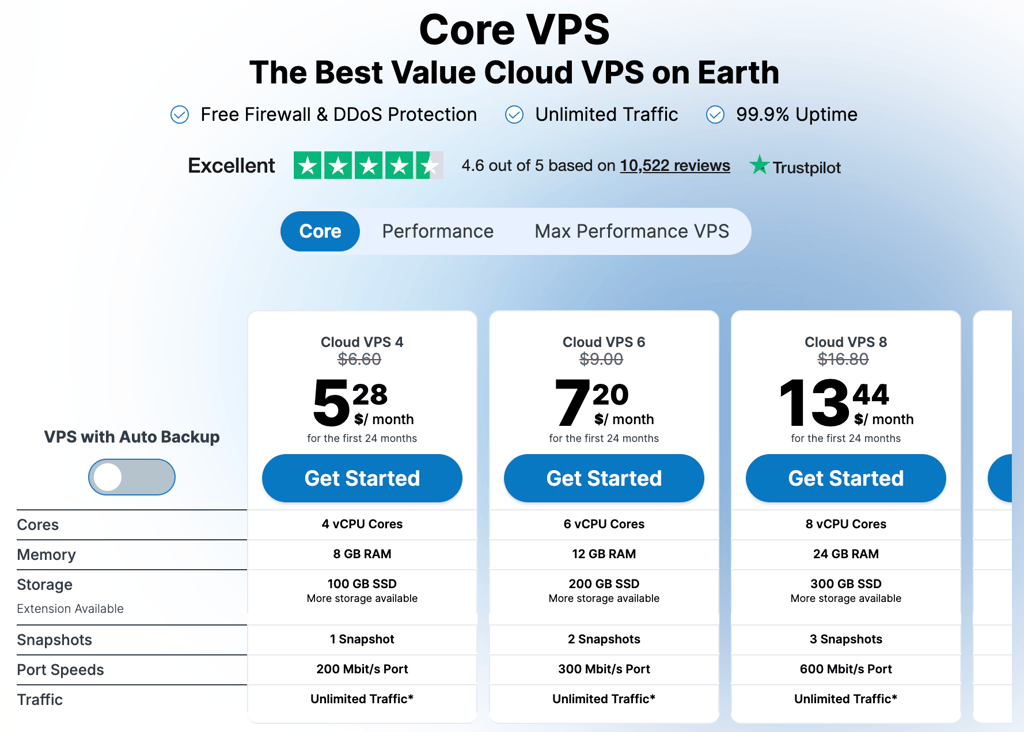
Contabo’s entry-level Cloud VPS 4 plan includes 4 vCPU cores, 8GB of RAM, 100GB of SSD storage, a 200 Mbit/s port, 1 snapshot, and unlimited traffic, subject to its fair-use policy. That is a strong starting configuration for a budget VPS, particularly compared with entry plans that begin with 1–2 vCPUs and 1–4GB RAM.
Contabo’s plans are available across multiple global regions, including the US, Europe, the UK, Singapore, Japan, India, and Australia. Contabo also supports Cloud-Init for automating first-boot configuration and lets you use custom ISO or QCOW2 images if you need a more tailored deployment.
Pricing and features
Contabo KVM VPS plans focus on high resource allocations and flexibility. Here are some of Contabo’s key points:
- Cloud VPS 4 plan starts at $5.28/month and includes 4 vCPUs, 8GB RAM, and 100GB SSD storage, plus unlimited traffic and a 200 Mbit/s port.
- All Cloud VPS plans use KVM virtualization, which isolates your VPS from other virtual machines and gives you full control over its operating system and configuration. The underlying physical server is still shared, as is normal with a VPS.
- Full root access lets you install your preferred software stack, configure security tools, deploy Docker containers, host multiple websites, or run a custom application.
- Cloud-Init support enables you to automate initial server configuration, while custom-image support lets you deploy an existing .iso or .qcow2 image via the Control Panel or API.
- Snapshots are available for Cloud VPS plans. They let you save a server state before a major update or software change, but they are not a substitute for a proper off-server backup strategy.
- Worldwide locations give you flexibility to host closer to your visitors, including US East, US Central, US West, Europe, the UK, and several Asia-Pacific regions.
Contabo also offers a separate Performance and Max Performance VPS ranges for users who need dedicated AMD EPYC CPU cores and NVMe storage. Those plans cost more, but they are the better option for sustained CPU-intensive workloads where predictable compute performance matters more than the lowest monthly price.
Read the full Contabo review for more information about its features, pricing, and performance.
Contabo is the best KVM VPS provider for users who want generous resources at a low price. Its entry plan includes 4 vCPUs, 8 GB RAM, and 100 GB SSD storage, while KVM virtualization, root access, and Cloud-Init give you plenty of control. It is best for developers and self-hosters who are comfortable managing their own servers.
Get Contabo2. Hostinger – best VPS hosting for begginers

| Rating: | |
| Starting price: | From $5.84/month |
| Money-back guarantee: | ✅ Yes, 30-day |
| Best deal: | Get up to 73% OFF Hostinger VPS |
Hostinger is best for people who want a VPS without needing to learn everything at once. Overall, it’s one of the best VPS providers, thanks to the tools that support development and plenty of room to grow.
You get one-click deployment, a wide range of pre-configured OS templates including Ubuntu, Debian, AlmaLinux, and application-ready options like Docker or cPanel, and even an AI assistant called Kodee that handles questions when you get stuck. For a KVM VPS, that's a notably smooth experience.
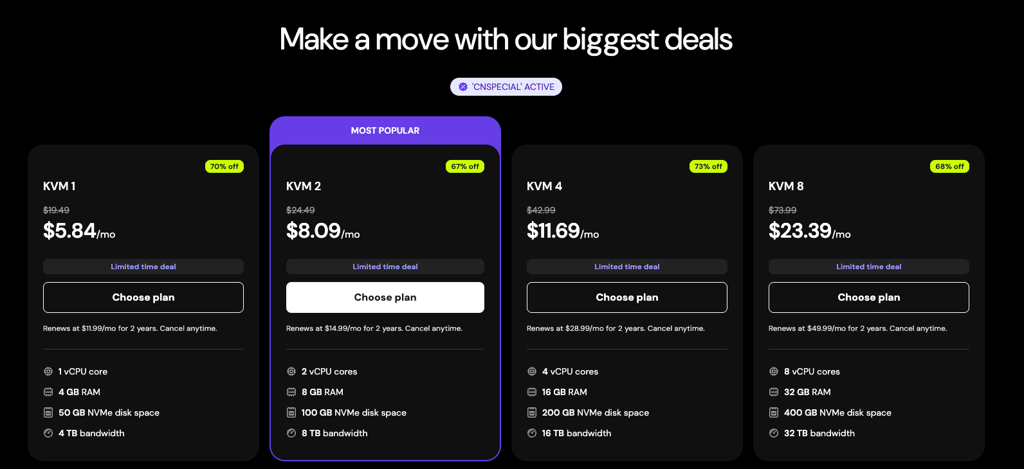
The main catch is that the best pricing requires a longer commitment, sometimes up to 48 months, since month-to-month rates are noticeably higher, so it rewards commitment. That said, starting at $5.84/month for a KVM VPS with NVMe storage and 4GB RAM, the value on longer plans is hard to argue with, plus it’s all covered by a 30-day money-back guarantee.
Pricing and features
Hostinger KVM VPS keeps things simple. Here are some of Hostinger's key points:
- Plans start at $5.84/month and scale up to 8 vCPU cores, 32GB RAM, and 400GB NVMe SSD storage, with bandwidth ranging from 4–32TB depending on the tier.
- All plans run on AMD EPYC processors with NVMe SSD storage, and free weekly backups are included across the board, which is a steal at this price range.
- One-click setup, pre-configured OS templates, and the Kodee AI assistant make it one of the more approachable KVM VPS options for less technical users, while full root access keeps it flexible for those who need it.
- Its custom control panel, called hPanel, is one of the cleanest VPS dashboards I’ve used, though pricing on month-to-month plans climbs noticeably compared to alternatives like Hetzner or Vultr, so longer commitments get the full value.
Read the full Hostinger review for more information about its features and pricing.
Hostinger works best for users who want a core KVM VPS that’s actually easy to manage right from the start. Avoid it if you’re tight on budget and plan to pay month-to-month, since the value is tailored for long-term usage.
Get Hostinger3. Kamatera – best for highly customizable cloud setup

| Rating: | |
| Starting price: | From $4.00/month |
| Money-back guarantee: | 30-day free trial |
| Best deal: | Get Kamatera now, starting at only $4.00/month |
Kamatera is a great pick if you want a managed KVM VPS. The whole setup is built around customization, so instead of choosing between preset plans, you actually configure the CPU, RAM, and storage yourself.
Spinning up a server is fast, and the hourly billing is a nice touch if you're running something temporary or just testing a configuration before committing. There's also a 30-day free trial worth up to $100.00, which gives you enough room to properly test the infrastructure before spending anything.
That said, Kamatera isn't the most beginner-friendly option. The interface feels older than what you'd get with DigitalOcean or Vultr, and once you start scaling up, the costs can get less predictable.
Pricing and features
Kamatera works differently from most KVM VPS providers on this list. Here are some of Kamatera's key KVM VPS points:
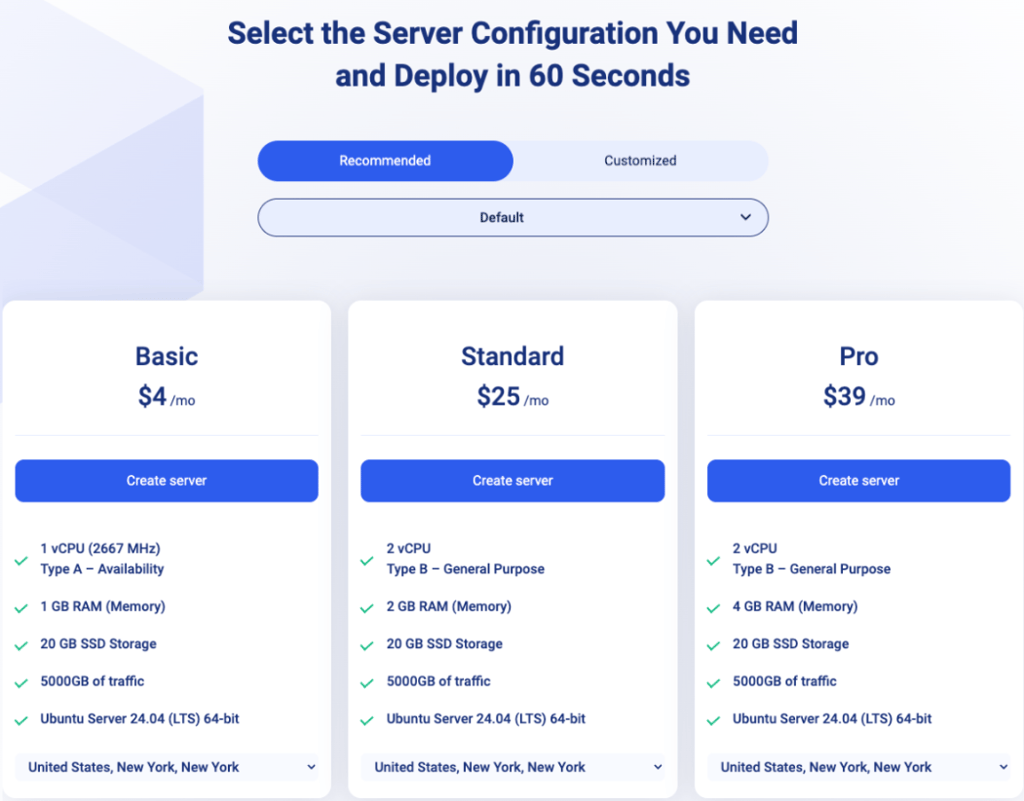
- You can configure CPU, RAM, and SSD storage individually or choose from recommended presets, with hourly or monthly billing and no long-term commitments, making it easy to scale up or down as your needs change.
- A 30-day free VPS hosting trial worth up to $100.00 lets you test a full server setup before paying anything, and unmetered bandwidth is included up to 5000GB/month, which covers most use cases without worrying about overage fees.
- Snapshots, automated backups, and load balancers are available to support more complex setups, though they're not included by default and will add to your monthly total.
- Quite extensive data center reach, spanning North America, Europe, Asia, and the Middle East, backed by a 99.95% uptime guarantee.
Read the full Kamatera review for more information about its features and pricing.
Kamatera works best for developers and teams who need a server built around their exact specs rather than a closest-fit plan. Avoid it if you need affordable managed services, as those come at a steep extra cost per server.
Get Kamatera4. Hetzner – best price-to-performance value

| Rating: | |
| Starting price: | From $3.49/month |
| Money-back guarantee: | No |
| Best deal: | Available now for only €1.60! |
Hetzner is best if you want raw hardware KVM performance without paying for what a VPS typically costs. I usually recommend it to developers or small teams that care more about raw resources than extra features or hand-holding.
Compared to providers like Vultr or DigitalOcean, you get more CPU and RAM for the same price. However, it doesn’t feel like a budget service. The AMD EPYC-based plans are fast, and even the lower tiers handle workloads without slowing down. I also like the control panel, as it is clean, fast, and intuitive enough for daily work.
That said, it’s not the easiest platform to get into. The account setup is strict (for security purposes), where access can even get delayed without much explanation. It also lacks the polish you get with DigitalOcean, such as one-click apps and beginner-friendly guides. If you are comfortable managing your own setup, it works great. If not, it can take some time to get used to.
Pricing and features
Hetzner offers three main KVM plans: Cost Optimized, Regular Performance, and General Purpose. Here are the main caveats of Hetzner pricing and features:
- All plans include local SSD storage, a firewall, private networking, DDoS protection, and access to the same web console and API for management.
- Offers virtual servers on Intel, AMD, and ARM lines, each with different performance and pricing characteristics.
- Storage for Cloud is inexpensive per terabyte but requires a relatively high minimum capacity (1TB), which makes it less suitable for very small datasets.
- Available server locations include the EU, US regions, and Singapore.
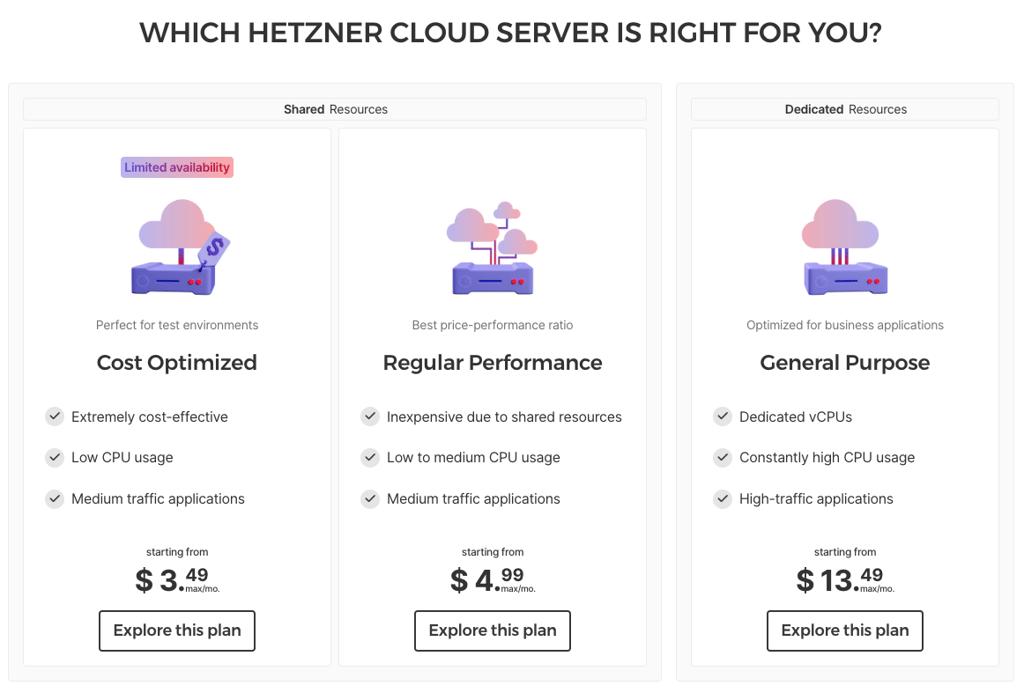
Hetzner delivers unbeatable value starting at $3.49/month with SSD storage and generous traffic, making it great for tight budgets. Avoid it if you want a gentle onboarding experience.
Get Hetzner5. Vultr – best global infrastructure and low latency

| Rating: | |
| Starting price: | From $2.50/month |
| Money-back guarantee: | No |
| Best deal: | Available now for only $2.50! |
Vultr is the one I would point to if location control matters most. It’s a good fit for game servers, VoIP, and other projects where low latency matters more than squeezing out the absolute cheapest VPS hosting price.
What I like about Vultr is how easy it is to place a server close to your users. It has 32 cloud data centers to choose from, spread across 6 continents, including multiple US metros. Compared with Hetzner, Vultr is more expensive due to its wide infrastructure.
I like that it offers a wide range of custom cloud VPS configurations, from small sites to huge workloads that scale to tens of terabytes of storage. The tradeoff is that it takes a more hands-on approach, which works well once you get used to it, but it can take longer to learn than a slightly more streamlined platform like DigitalOcean.
Pricing and features
Vultr’s lineup is broad, but it’s not one-size-fits-all. Here are some of Vultr’s key KVM VPS points:
- Vultr offers multiple KVM VPS categories, including Cloud Compute, High Performance, and High Frequency, so you can match CPU, RAM, and storage to your workload.
- All plans use SSD or NVMe storage, and outbound bandwidth scales with the instance. However, backups are optional and billed separately.
- You can pick general-purpose, CPU-optimized, memory-optimized, or storage-optimized instances without being locked into one architecture.
- The platform includes snapshots, private networking, and a full API, which makes managing multiple servers a breeze once you learn the system.

Vultr is best for users who need low-latency servers across many regions, including 32 data center locations in South and North America, Europe, Asia, Australia, and Africa. Skip Vultr if you prefer a more streamlined platform with 24/7 instant live support.
Get Vultr6. DigitalOcean – best for developer workflow and ecosystem
| Rating: | |
| Starting price: | From $4.00/month |
| Money-back guarantee: | No |
| Best deal: | Available now for only $4.00! |
DigitalOcean is ideal if you want a clean, beginner-friendly environment that still scales well for developers. It’s a good fit for small teams and growing projects because everything, from the dashboard to the documentation, helps you get up and running without wasting time.
In practice, everything is easy to follow. You can launch a server in minutes, find what you need quickly, and rely on clear docs when something breaks. Compared to Hetzner, I find DigitalOcean’s panel more polished and easier to navigate.
The tradeoff is that you pay for that simplicity. Compared to Hetzner, you get less raw CPU and RAM for the same price, and there’s less room to tweak things at a deeper level. Still, if you care more about getting projects running quickly and managing them without friction, it is easier to work with.
Pricing and features
DigitalOcean keeps pricing and features simple, but not without limits. Here are some of the key Droplets plan points:
- You can choose multiple plan types, including shared CPU, dedicated CPU, general purpose, and memory-optimized setups, depending on how stable you need performance to be.
- Data centers cover major regions, such as the US, Europe, and Asia-Pacific, though the network is smaller than Vultr’s.
- You can connect multiple servers together on a private network and move IPs between them if one fails.
- NVMe storage is available on higher tiers, while backups and snapshots cost extra.
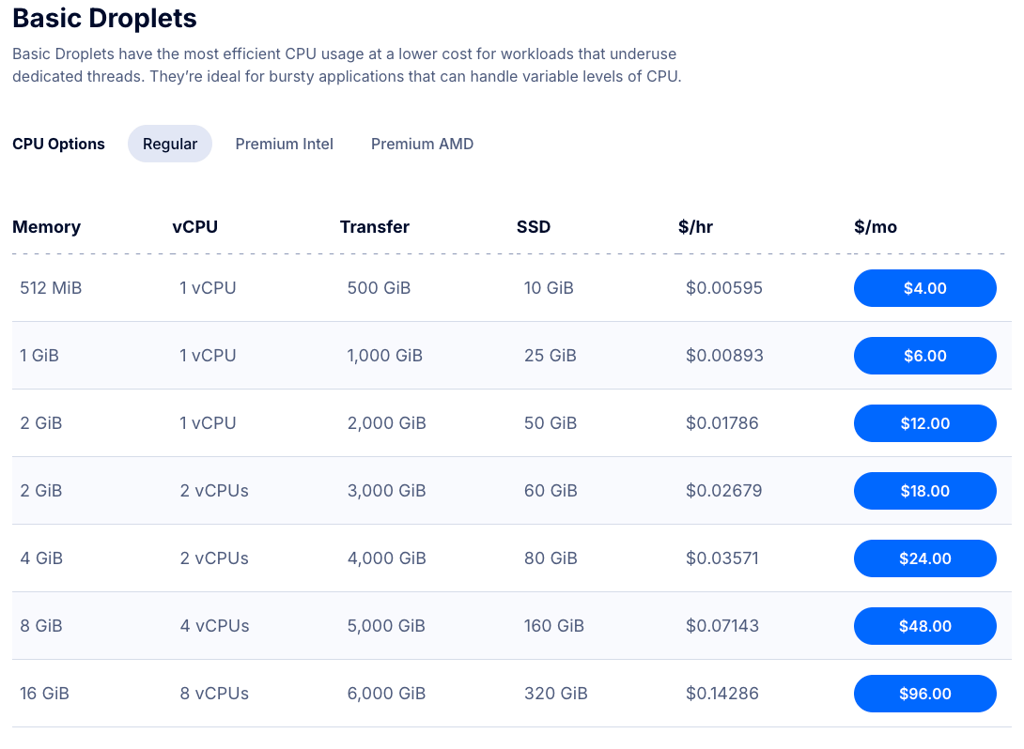
DigitalOcean works best for developers who value a clean interface, fast deployment, and a rich ecosystem. Avoid it if your main goal is getting the most hardware for the least money.
Get Digital Ocean7. OVHcloud – best for large-scale projects and DDoS protection

| Rating: | |
| Starting price: | From $9.99/month |
| Money-back guarantee: | No |
| Best deal: | Get OVHCloud for just $4.54/month! |
OVHcloud is a really good fit if you expect higher traffic or need strong network protection from the start. It suits larger sites, game servers, or community platforms well, where stability under pressure matters.
The main strength is OVHcloud’s infrastructure. Basically, all of its KVM VPS plans include DDoS protection by default and work 24/7 in the background, which removes the need for extra setup or third-party tools. Additionally, unlike some providers, such as Hetzner or Vultr, it also includes a daily backup by default, which is quite rare for this price range, giving even more peace of mind for a busy service.
OVHcloud is strong where it matters most for bigger projects, but because of that, it does cost more upfront than the budget-friendly options, and the control panel has a steeper learning curve than DigitalOcean or Vultr. However, for a business with the right team behind it, OVHcloud delivers a solid and dependable KVM VPS experience.
Pricing and features
OVHcloud has the horsepower for serious workloads, but it doesn't hold your hand getting there. Here are some of OVHcloud's key VPS pricing and feature points:
- VPS SSD and VPS Cloud plans offer plenty of CPU, RAM, and storage with a variety of options. The starting price is higher than the competition's, but you do get a lot for the price.
- All plans include daily backup and anti-DDoS protection at no extra cost, with optional premium backups and snapshots available.
- Similarly to DigitalOcean, you can connect multiple servers on a private network, which is handy for larger setups.
- Multiple server locations across Europe, North America, and Asia, with multiple regions across the globe, are promised as “coming up”.
- Scaling is flexible for large traffic or media-heavy sites, but the control panel can feel dense, and account verification and support may slow onboarding.
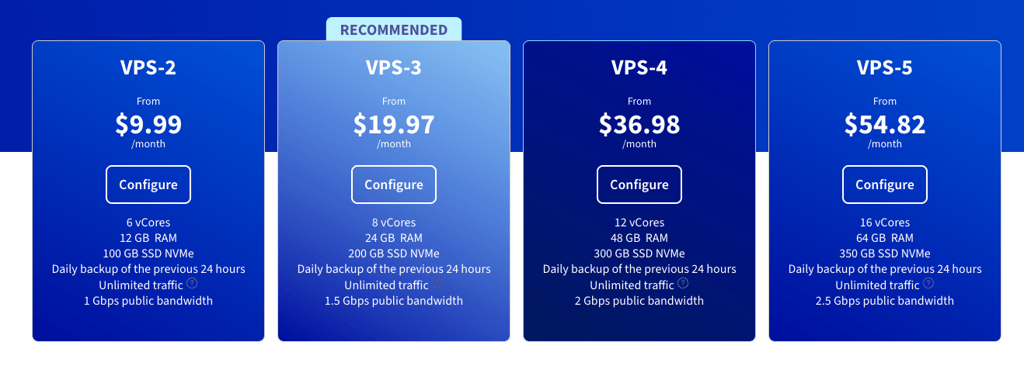
OVHcloud works best for projects where DDoS protection and raw value matter more than a slick experience. Avoid it if your project is small or early-stage, where the complexity outweighs the savings.
Get OVHcloud8. ScalaHosting – best managed KVM for small businesses

| Rating: | |
| Starting price: | From $14.95/month |
| Money-back guarantee: | Yes, 30 days |
| Best deal: | Get up to 73% OFF Hostinger VPS |
ScalaHosting is one of the rare KVM VPS providers that offers both managed and unmanaged plans. If you want full root access and handle things yourself, the unmanaged plans are there. However, if you'd rather hand off the maintenance, the managed option covers that too.
While the unmanaged KVM VPS typically starts at a higher price than competitors', I think that the biggest draw is how affordable the managed plan is, given the time savings from the management side. It gives you nearly all the control of a VPS without the day-to-day maintenance headaches.
Additionally, its SPanel really saves a lot by replacing cPanel, since there’s no additional licensing cost. Snapshots and a dedicated IP are also included across plans, so the baseline package is good overall.
Pricing and features
ScalaHosting works a bit differently from other KVM VPS providers on this list. Here are the key points that make it stand out:
- You can choose between managed and unmanaged KVM VPS plans, with enough CPU, RAM, and storage options to match different project sizes.
- SPanel comes upon request, so you get a cPanel-style setup without the extra licensing cost.
- SSD storage is standard, with snapshots and backups available, and some plans include them already.
- Private networking and US and Europe data centers help if you run multiple servers, though ScalaHosting is pricier than Hetzner or Vultr.
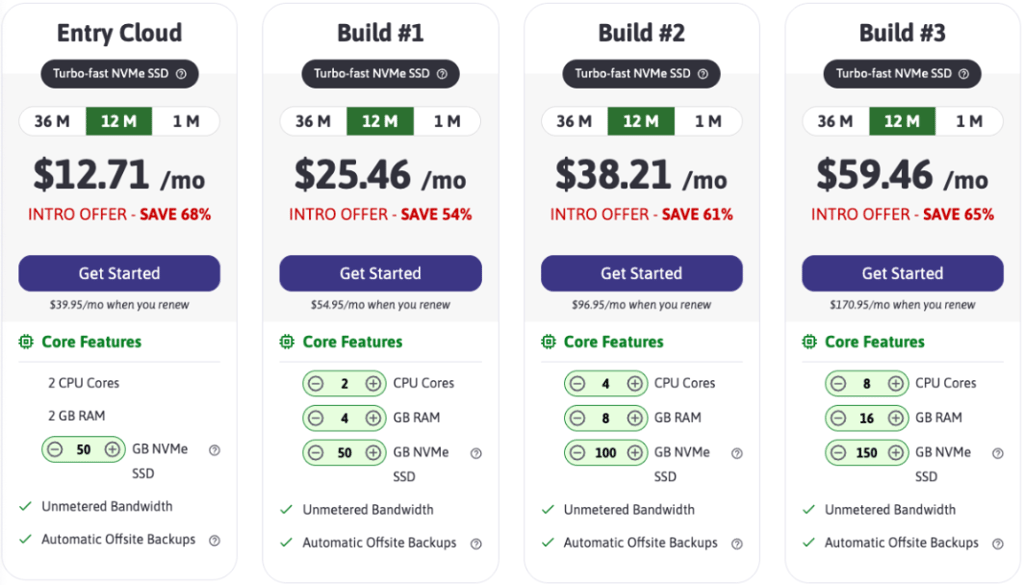
Read the full ScalaHosting review for more information about its features and pricing.
ScalaHosting works best for businesses and agencies that want a managed VPS. Avoid it if the lowest possible price matters most.
Get ScalaHostingBest KVM hosting comparison
| Provider | Rating | Best for | Starting price | RAM | CPU |
| Contabo | Overall best KVM VPS hosting | $5.28/month | 8–96GB | 4–18 vCPU | |
| Hostinger | Best VPS hosting for beginners | $5.84/month | 4–32GB | 1–8 vCPU | |
| Kamatera | Most flexible server configuration | $4.00/month | 1–512 | 1–104 vCPU | |
| Hetzner | Best hardware value for money | $3.49/month | 2–192GB | 1–48 vCPU | |
| Vultr | Best server locations and fastest connection speeds | $2.50/month | 0.5–256GB | 1–96 vCPU | |
| DigitalOcean | Easiest setup and tools for developers | $4.00/month | 0.5–256GB | 1–32 vCPU | |
| OVHcloud | Best for high-traffic sites and attack protection | $9.99/month | 12–64GB | 6–16 vCPU | |
| ScalaHosting | Best managed VPS for small teams | $14.95/month | 4–32GB | 2–16 vCPU |

How we test and rank KVM VPS services
When I rank KVM VPS providers, I follow a rigorous hosting testing methodology and start with performance. Together with the Cybernews research team, I check speed, uptime, and how stable the server stays under load. A VPS can look good on paper, but if it slows down the moment traffic rises, it does not deserve a high spot.
A real KVM setup should give you a fully isolated virtual machine, not just a shared environment, so I check whether the provider makes that separation clear through dedicated resources, root access, and solid control over the operating system and storage.
Security and support matter too. I look at backup options, firewall tools, and how easy it is to recover if something breaks. Finally, I weigh all of that against the price, because a VPS only makes sense when the performance matches what you pay for.
What is KVM VPS, and do you need it?
KVM VPS stands for Kernel-based Virtual Machine Virtual Private Server. Unlike standard VPS hosting, which often shares kernel resources between users, KVM gives each user fully isolated resources, including dedicated CPU, RAM, and storage that no one else can touch.
That isolation is the main reason to choose it. You get more consistent performance, better security, and the freedom to run any operating system you need, including Windows, rather than being locked into Linux hosting.
It's a strong fit for:
- Small and medium businesses that need reliable uptime
- Game servers and media-heavy sites that can't afford resource contention
- Developers who need custom OS or kernel configurations
- eCommerce stores handling sensitive customer data
If shared hosting feels limiting but a dedicated server is an overkill, KVM VPS sits comfortably in between.
How to choose a KVM VPS
The right KVM VPS comes down to a few practical checks you can actually verify before handing over your card details:
- Start by defining your goals. KVM VPS usually serves bigger projects. The specs you need for a high-traffic eCommerce store are very different from those for running a specific application, like hosting OpenClaw.
- Resource limits. Read through the resource limits and offerings carefully, since some providers cap bandwidth or network speed, which matters more than it sounds once your site or application starts getting consistent traffic.
- Check what's included by default. Backups, snapshots, and DDoS protection, depending on your goals, should be checked, since these vary significantly between providers and can inflate the monthly cost if treated as paid extras.
- Server locations. Pick a provider with data centers close to your audience and check how many locations are actually available besides what’s being marketed.
- Management level. Unmanaged plans are cheaper but put maintenance, updates, and security entirely in your hands. If that's not realistic for your team, a managed plan is worth the extra cost.
- Look at the refund or money-back policy before committing. A free trial or guaranteed refund window lets you test the product in a real environment without risk, since performance can only truly be judged once you're inside the platform.
- Finally, watch the renewal price. Introductory discounts can be very attractive, but the jump at renewal can be equally significant, so calculate the real long-term cost before committing to a longer term.
Final thoughts
Running everything on the cheapest VPS you can find can work until it doesn’t. That’s where KVM actually makes a difference. You get predictable performance, fewer random slowdowns, and more control as things start to grow.
Here’s how I’d break down which KVM VPS to pick:
- Best pick for resource allocation – Contabo
- Best starting point if you’re new to VPS – Hostinger
- Most flexible custom infrastructure – Kamatera
- Best raw value, lowest cost – Hetzner
- Best global coverage and latency control – Vultr
- Easiest workflow for developers – DigitalOcean
- Best for DDoS-heavy or high-traffic projects – OVHcloud
- Best managed KVM option for businesses – ScalaHosting

FAQ
Is KVM VPS better than OpenVZ?
KVM is the better choice because it provides dedicated CPU and RAM and full isolation. You can run any OS, including Windows. OpenVZ is cheaper and fine for simple Linux tasks but shares system resources, which limits control and can lead to slower, less predictable performance.
What are the benefits of KVM VPS?
KVM VPS gives you dedicated CPU, RAM, and storage, so performance stays more stable. It runs each server in full isolation, which improves security. You also get full root access and can install any OS, making it flexible, reliable, and suitable for demanding workloads.
Is KVM VPS safe?
KVM VPS is very secure because each server runs in full isolation with its own kernel and dedicated resources. This reduces risks from other users. However, security still depends on your overall setup.