Hostinger review 2026I is it worth it?
Our in-house experts conduct internal independent, hands-on testing and transparent reviews of web hosting providers by using custom-built tools or utilizing industry-recognized tools and methods to ensure impartial and evidence-based assessments.
Using the same criteria for all services, we share our detailed methodologies and practices to help customers make informed hosting decisions.
Learn more
With over 22 years of experience, Hostinger is a true veteran in the web hosting market. Among the services it offers are hosting, domains, email, and website and app building tools. Basically, everything you might need to build and manage websites and apps from one platform.
In this Hostinger review, I’ll take another look at its main pros and cons and how they’ve changed over the years, based on my personal experience with the service. I’ll cover its pricing, performance, ease of use, features, security, and customer support. My aim is to give you a 360-degree overview of the service, so you can see its highlights and limitations. So, keep reading to find out whether it’s the right fit for you.
Hostinger review: my verdict
Hostinger is a trustworthy hosting provider that’s best for beginners, personal websites, and small businesses. Its main advantages include affordable plans, easy setup, robust performance, and a multitude of useful features. I also like that you can start with shared hosting and move to cloud or VPS hosting as your website grows. The main things to keep in mind are higher renewal prices, less hands-on human support, and no dedicated server hosting.
| ⭐ Rating: | |
| 💵 Price: | From $2.69/month |
| 📑 Uptime guarantee: | 99.9% |
| ⚙️ Hosting types: | Shared, WordPress, VPS, cloud, and email hosting |
| 🌎 Server locations: | The US, the UK, the Netherlands, France, Germany, Lithuania, Brazil, Indonesia, Malaysia, India, Singapore |
| 👨💻 24/7 live support: | Yes |
| 🔥 Coupons: | Hostinger coupon 81% OFF |
Hostinger pros and cons 2026
Not sure if Hostinger is right for you?
Answer 3 quick questions and we'll help you find a hosting provider that matches your needs.


Find web hosting match
Three simple questions. We’ll point you the right pick. No email, no sign up.
What type of website are you building?
What matters most to you?
How experienced are you with web hosting?
Best web hosting pick for you

Hostinger
Launch your site quickly with beginner-friendly tools, strong performance, and easy management. A solid choice for business websites and online stores that need speed without extra complexity.
Best web hosting pick for you

WordPress.com
Build and manage your WordPress site without worrying about much of the technical setup. You get a streamlined platform for publishing, updating, and growing your WordPress site from one place.
Best web hosting pick for you

IONOS
A strong choice if you want hosting at a very low starting price. It gives users plenty of flexibility while still keeping the core setup relatively straightforward.
Hostinger provides a strong feature set at just $2.69/month
Hostinger’s pricing is very affordable, with plans offering a full set of hosting features. The 2-year starting plan I chose for $2.69/month includes three websites, 20GB of SSD storage, weekly backups, a CDN, AI tools, and priority support. That’s a solid package if you’re launching a personal site, a blog, or a small business website.
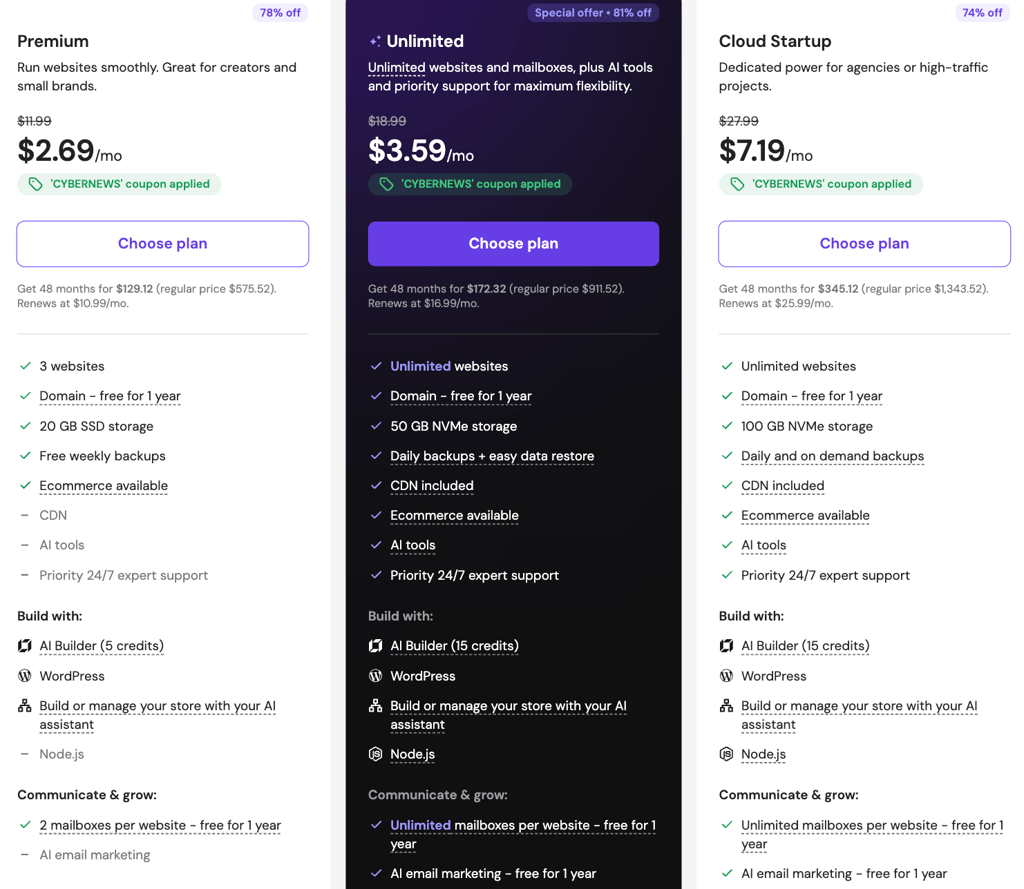
Compare it with similarly priced providers, and Hostinger’s value will become even clearer. As the table shows, Hostinger gives you more website and storage capacity than both SiteGround and Bluehost at a similar starting price:
| Provider | Starting price | Websites | Storage | Backups | CDN |
|---|---|---|---|---|---|
| Hostinger | From $2.69/month | From 3 websites | From 20GB SSD | ✅ Yes, daily or weekly backups (depending on the plan) | ✅ Yes |
| SiteGround | From $2.99/month | From 1 website | From 10GB SSD | ✅ Yes, daily backups | ✅ Yes |
| Bluehost | From $1.99/month | From 1 website | From 10GB NVMe | ✅ Yes, weekly backups | ✅ Yes |
What I liked about Hostinger is that its entry-level plan provides enough resources to get started. If your website grows, you can simply opt for a higher-tier plan anytime with more websites and storage, daily backups, and additional resources.
Hostinger plans include all business essentials
When setting up a business website, I already knew that hosting alone wouldn’t be enough. I needed some of the basics like a domain name and a business email address, which, if you buy them separately, can increase the overall cost. Fortunately, Hostinger bundles essential business features into its hosting plans without requiring separate purchases. Here’s what you can get and how it compares with other top hosts:
- Free domain for one year (also available from Bluehost, SiteGround, and IONOS, with renewal usually costing around $10.00–20.00/year depending on the domain name)
- Professional email address (Bluehost and GoDaddy offer free email trials for one month, after which paid plans start at around $2.00/month)
- AI Builder (also available from Bluehost, IONOS, and Squarespace)
- Free SSL certificate (included with Bluehost, IONOS, SiteGround, and Squarespace as well)
- Daily backups (SiteGround includes them at no extra cost, while Bluehost charges $59.40/year)
- Website security, including DDoS protection, a firewall, and anti-malware scanning (paid with Bluehost at $71.88/year; IONOS includes basic malware scanning but charges for automatic malware removal)
- Email marketing (typically a paid add-on elsewhere, with GoDaddy plans starting at $21.99/month)
- AI SEO tools (often sold separately, with GoDaddy charging from $21.99/month)
Overall, Hostinger includes many of the features you’d otherwise need to pay for separately, which can help keep the total cost of running a business website down.
Hostinger setup and ease of use
Besides affordable pricing, Hostinger’s other major strength is ease of use. Honestly, even a complete beginner can build a website with little effort. WordPress and other popular CMSs like Joomla and Drupal can be set up with one click, while Hostinger’s AI Builder can create a website from a few short prompts. SSL certificates are installed automatically, and its custom hPanel keeps website and hosting settings clearly organized.
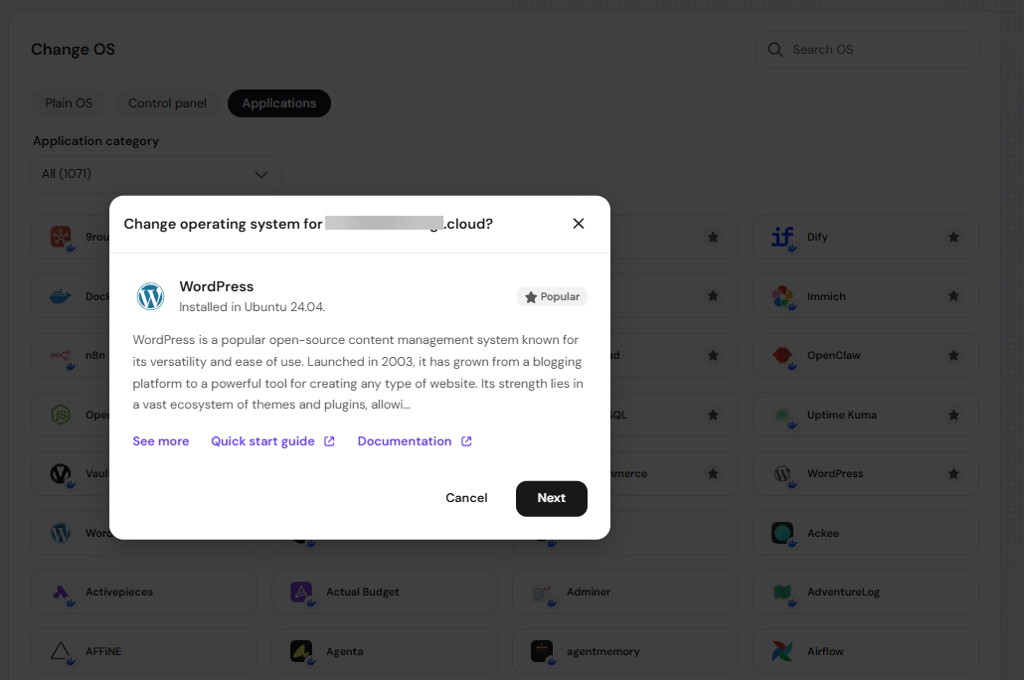
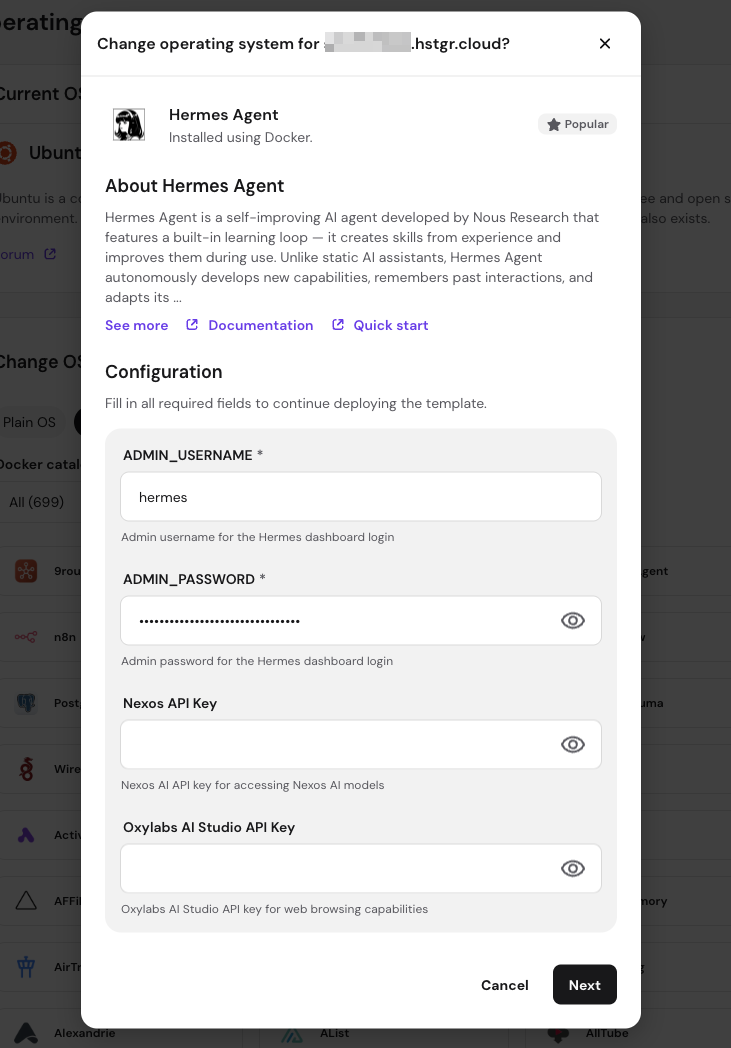
Even Hostinger’s VPS plans offer one-click templates for popular tools such as WordPress, Docker, n8n, and OpenClaw. Recently, we tested Hostinger’s VPS setup by installing Hermes Agent. The process took less than 20 minutes, thanks to Hostinger’s one-click Hermes Agent deployment and preconfigured Docker environment. We didn’t have to set up the container ourselves and could manage the installation through an admin panel. At the same time, we had full root access to the VPS. The setup was straightforward, although managing the VPS is still up to the user.
Some competitors offer similar options, but the range varies. For example, Bluehost supports one-click WordPress installation and templates for apps such as n8n and Docker, while providers like OVHcloud also offer pre-installed applications. This means Hostinger isn’t alone in offering one-click setup, but the exact options differ between providers.
AI Builder is included with all Hostinger plans
I already touched on Hostinger’s AI Builder earlier and how it makes website creation much easier. But it’s worth looking at in a bit more detail. The provider recently updated its AI Builder, and now it combines the former Hostinger Website Builder and Horizons. With this new merge, I could choose how to build a website – either using a visual editor or generating it with AI by simply describing it.
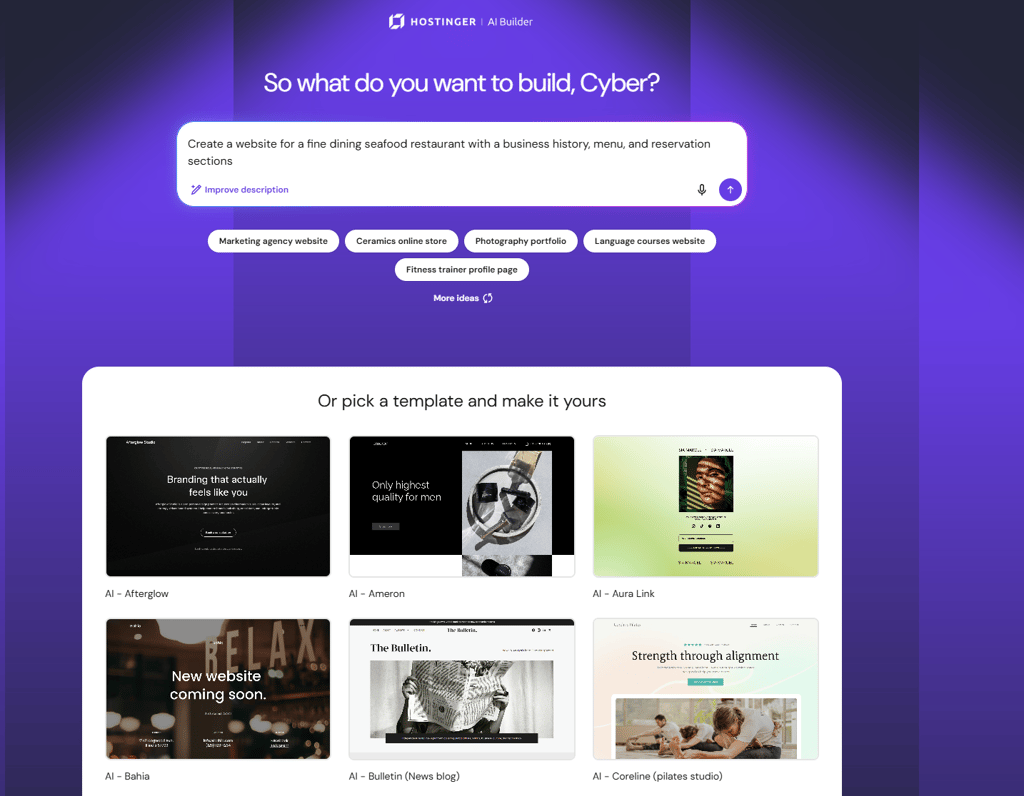
In my testing, I chose the Agentic mode and described the type of website I wanted to create, including its purpose, content, and overall style. I asked it to create a professional portfolio website for a copywriter, with sections for an introduction, services, previous work, and contact details. In less than 10 minutes, the builder generated a website based on my prompt. I was satisfied with the result, as it had a professional-looking layout, initial content, and even some images. I then switched to the visual editor and made additional changes, such as moving sections and adding examples of my copywriting work.
Overall, I found the builder very easy to use and useful for getting a basic website up and running quickly. Having it included with the hosting plan also means I didn’t need a separate website-building tool. If you’d like to learn more about it, we have an entire dedicated Hostinger’s AI Builder review.
Hostinger showed stable performance in our tests
To evaluate Hostinger’s performance, our research team and I followed our strict hosting testing methodology. In September 2026, we tested a server in Lithuania using Catchpoint WebPageTest and Grafana to measure page speed and server performance. Here are the results we gathered:
- Uptime: 100%
- Reachability: 99.96%
- Average response time: 29ms
- Largest Contentful Paint (LCP): 0.47s
- Speed Index: 0.61s
Based on our tests, Hostinger shows strong performance results, with several metrics improving compared with our previous tests. The Speed Index dropped from 1.43s in the June 2026 tests to 0.61s, while LCP improved from 1.87s to 0.47s. This means the page can display its main content and become visually usable very quickly. The average response time also fell significantly, from 246.19ms in the previous uptime tests to just 29ms in the latest results, indicating very little delay when the server handles requests.

The 100% uptime is another strong result and remains unchanged from our previous uptime test. This means the website remained available throughout testing. The 99.96% reachability result is also unchanged, showing that the server was accessible almost all the time.

Overall, these results are great. They confirm that Hostinger provides fast, responsive, and reliable performance, with less waiting when visitors open and browse the website.
Hostinger offers straightforward upgrade options
Some time ago, I built my copywriting portfolio on Hostinger’s entry-level plan, but as my projects and their complexity grew, I needed more space. Luckily, I didn’t have to switch providers. I simply upgraded to a higher-tier shared plan with more resources. If that’s no longer enough in the future, I know I could move to cloud or VPS hosting for more power and control. In other words, you don’t need to worry if your project outgrows your current plan, as Hostinger gives you plenty of room to scale.
The only thing you should be aware of is that Hostinger doesn’t provide dedicated server hosting. Therefore, you’d need to look elsewhere if you eventually outgrow VPS hosting. That said, this is unlikely to be an issue for most personal websites and small businesses, which can usually scale comfortably through shared, cloud, or VPS hosting.
Renewal prices can increase the overall cost
Hostinger’s introductory prices are very lucrative, but they don’t last forever. After the promotion term ends, the cost usually increases noticeably. For example, the Premium plan starts at $2.69/month with the 4-year subscription, but renews at $10.99/month. The same applies to other plans and even add-ons, like a domain name and a business email.

This isn’t unique to Hostinger. Other hosts also use lower introductory prices that increase after the initial term. For example, SiteGround’s plans start at $2.99/month and renew at $17.99/month, Bluehost costs from $1.99/month and renews at $8.99/month, and GoDaddy is at $4.99/month and renews at $11.99/month.
Over the years, I've noticed it’s a common practice in the hosting industry. My advice is to always check the renewal price before committing to a plan, especially if you’re looking for a long-term hosting solution.
When your introductory pricing expires, you can always migrate your website to another host with a better price. If you prefer more predictable pricing, providers like Squarespace don’t increase their prices upon renewal, although you might have to pay slightly more upfront.
Support is good, but not as good as it used to be
To judge the quality of its support, I first went through Hostinger’s Knowledge Base, Tutorials, and Hostinger Academy. I found them detailed and valuable because they cover common hosting tasks with clear, step-by-step instructions.
I then tested its 24/7 live chat, including both AI and human support. Hostinger Agent, which combines its former Kodee AI assistant with other AI agents, was extremely useful for quickly answering simple questions. However, I can’t say the same about getting help from a human agent. The support team often redirected me to guides without giving me a direct answer.
This feels different from my experience with Hostinger around six years ago, when support was more personal and hands-on. Back then, agents were more willing to troubleshoot issues and actually help solve them, rather than simply pointing me to instructions. While Hostinger still offers plenty of useful support resources, including email and WhatsApp support, the human support experience feels less proactive than it used to be.
Hostinger reviews online are mixed
Based on my online research, Hostinger’s user feedback is generally positive, though some areas draw criticism. On the major review aggregator, Trustpilot, the provider consistently ranks in the 4.4-4.7 range. What users praise the most is its easy-to-use interface, affordable pricing, reliable hosting, and helpful support.
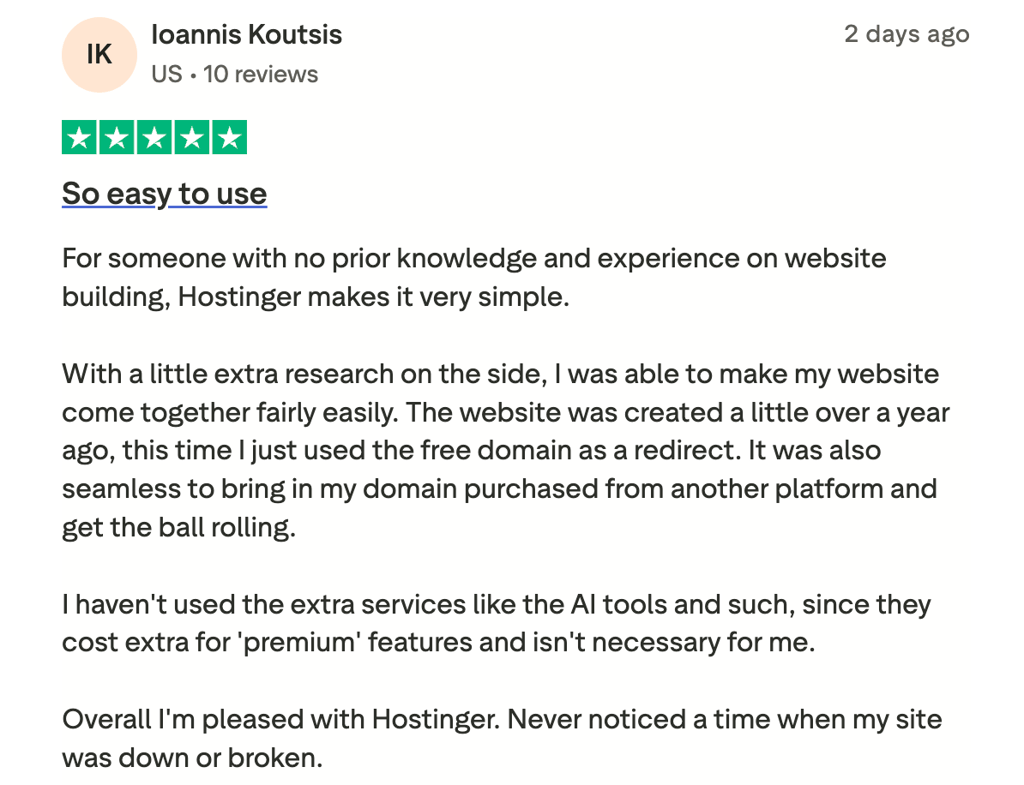
On technical forums like Reddit, discussions are more mixed. I found that many users like Hostinger for personal websites and smaller projects. However, some criticize its higher renewal prices and AI-driven support (the things I discussed in my review above).

All in all, users view Hostinger as an affordable, easy-to-use hosting provider. At the same time, you should consider its higher renewal costs and support if you expect to need frequent technical help.




Our in-house research team and expert writers work hand in hand to regularly test hosting services and provide accurate and fact-checked information. Discover the ins and outs of how we test and evaluate website hosting providers.

FAQ
Is Hostinger good?
Yes, Hostinger is a trustworthy hosting provider for beginners and small to medium-sized websites, with affordable plans and an easy-to-use control panel. However, its entry-level plans may be less suitable for high-traffic or resource-intensive websites.
Is Hostinger legit?
Yes, Hostinger is a legitimate web hosting provider with millions of users worldwide and a range of hosting services, including shared, cloud, and VPS hosting.
Is Hostinger easy to use?
Yes, Hostinger is easy to use, with an intuitive custom control panel, guided setup, and beginner-friendly website management tools. Its interface simplifies tasks such as setting up a website, managing domains, and configuring hosting.
Is Hostinger safe?
Yes, Hostinger provides essential security features such as free SSL certificates, automatic backups, and malware and DDoS protection on its hosting plans. Just keep in mind that the specific security features available depend on the plan you choose.
Is Hostinger reliable?
Yes, Hostinger is a reliable hosting provider, with strong uptime and performance across its hosting plans. However, performance can vary depending on your plan, website traffic, and resource requirements.
Is Hostinger VPS good?
Yes, Hostinger VPS is a good option if you need more control and resources than shared hosting provides, with full root access and scalable plans. On the other hand, it may be less suitable for users who need advanced managed VPS support.
Is Hostinger good for WordPress?
Yes, Hostinger is a capable solution for WordPress, offering managed WordPress hosting, automatic updates, and tools for simplifying site setup and management. I found it best for beginners and small to medium-sized WordPress websites.
Is Hostinger's email good?
Yes, Hostinger’s email service is useful for businesses and individuals who want professional email addresses alongside their hosting. It includes features such as custom email addresses, spam protection, and webmail access, although the available features depend on your plan.
Is Hostinger good for hosting?
Yes, Hostinger is great for hosting, offering affordable plans, solid performance, and a range of hosting options for different types of websites. Beginners, small businesses, and personal websites might find the best value with this provider.
Where is Hostinger based?
Hostinger is headquartered in Vilnius, Lithuania, and operates as a global web hosting company with offices and data centers in multiple locations worldwide.
Is Hostinger a good domain registrar?
Yes, Hostinger is a good domain registrar if you want to manage your domain and hosting in one place, with a wide range of domain extensions and domain privacy on eligible TLDs. However, pricing and included features vary by domain extension.
Is Hostinger good for beginners or businesses in the US?
Yes, Hostinger works well for beginners and small US businesses thanks to its beginner-friendly tools and range of hosting plans. More demanding websites may require higher-tier hosting with additional resources.