Hostinger vs IONOS: here is which one wins
Our in-house experts conduct internal independent, hands-on testing and transparent reviews of web hosting providers by using custom-built tools or utilizing industry-recognized tools and methods to ensure impartial and evidence-based assessments.
Using the same criteria for all services, we share our detailed methodologies and practices to help customers make informed hosting decisions.
Learn more

Hostinger is the better overall choice for most users thanks to its easier interface, stronger performance, and better long-term value. IONOS still works well for users who prefer phone support and low introductory pricing, but it is less user-friendly and less consistent under heavier use.
If you’re comparing Hostinger and IONOS, you’re probably wondering which one offers better value for your website. Both providers are big names in the hosting world: Hostinger has been delivering affordable, high-speed hosting since 2004, while IONOS, which rebranded from 1&1 in 2018, has spent decades helping businesses across Europe establish their online presence.
To make it easier for you to decide between these two, I’ve created a detailed Hostinger vs IONOS comparison guide. Below, you can find details on each provider’s pricing, performance, ease of use, security features, and customer support compared.
Hostinger vs IONOS 2026: my verdict
Hostinger and IONOS are both top web hosting services. However, Hostinger offers stronger long-term value, as it allows you to lock in its initial pricing for up to 48 months, whereas IONOS prices increase after 12 months.
Hostinger is the better choice for personal websites, blogs, and small businesses because it offers affordable pricing and solid performance. It also includes more advanced features upfront, such as AI SEO tools, image editors, and unlimited migrations. In contrast, IONOS offers impressive $1.00/month first-year deals and specialized phone support, making it a reliable, traditional choice for local business sites and professional portfolios.
You can save even more on your plan by applying the Hostinger promo code CNHOSTINGER for a special offer.
| Hostinger | IONOS | |
| ⭐ Rating: | ||
| 💵 Price: | From $2.69/month | From $1.00/month |
| 📑 Uptime guarantee: | 99.9% | 99.99% |
| 🔥 Coupons: | Hostinger coupon 81% OFF | - |
| Storage space (from): | 20GB SSD | 10GB SSD |
| ✂️ Free domain (first year): | Yes | Yes |
| 🔒 Free SSL certificate: | Yes | Yes |
| ➡️ Site migration: | Free unlimited migrations for WordPress and open-source sites | Manual migration or migration with the help of a WordPress plugin |
| 💾 Automated backups: | Free (weekly) | Yes (daily) |
| 📧 Email accounts: | Free (first year) | 1 free account |
| 👨💻 24/7 live support: | Yes | Yes |
| 💰 Money-back guarantee: | 30-day | 30-day |

Key differences
In the table below, I highlighted the key differences users are likely to notice between IONOS and Hostinger. While both are reliable hosting providers, their user experience can feel quite different.
| IONOS | Hostinger | |
| ⚙️ Control panel | Custom My IONOS panel | Custom hPanel |
| 📊 Performance | HDD on lower-tier plans and faster SSD/NVMe for premium plans | SSD or NVMe storage across most plans, paired with LiteSpeed servers |
| 💵 Price to value | Low introductory pricing for the first year for the Plus plan, but high renewal rates | Introductory pricing can be locked in for up to 48 months |
| 🌐 Data centers | North America and Europe | North America, South America, Europe, and Asia |
| 📞 Customer support | 24/7 live chat and phone support | 24/7 live chat support and tickets |
Key similarities
IONOS and Hostinger share many of the same core functionalities, which is why they’re often compared. Both offer a wide range of hosting types, solid security features, and tools that support both beginners and developers.
| IONOS | Hostinger | |
| 🏠 Hosting options | Offers Shared, WordPress, VPS, and Cloud hosting | Offers Shared, WordPress, VPS, and Cloud hosting |
| 💻 Website creation tools | Custom website builder and one-click installers for popular CMS | Custom AI website builder and one-click installers for popular CMS |
| 🔐 Security | Free Wildcard SSL certificate and strong in-house DDoS protection | Free SSL certificate and robust security, such as DDoS protection and web application firewalls |
| 🛠️ Development | GIT access, SSH access, and support for languages like Node.js and Python | GIT access, SSH access, and support for languages like Node.js and Python |
Pricing comparison: Hostinger offers more features for a lower long-term cost
Hostinger is the better long-term option thanks to its lower renewal rates. IONOS starts cheaper at $1.00/month for the first year, if you choose a .ionos domain, but it jumps to $12.00/month after that. Hostinger pricing starts at $2.69/month with predictability over a 4-year term, making it the more cost-effective choice if you want stable costs without surprises.
| Hosting type | Hostinger | IONOS |
| Shared hosting | $2.69/month | $1.00/month |
| WordPress hosting | $2.69/month | $1.00/month |
| VPS hosting | $5.84/month | $2.00/month |
| Cloud hosting | $7.19/month | Prices depend on your needs |
| Dedicated hosting | ❌ | $48.00/month |
Hostinger’s cheapest shared hosting plan includes up to 3 websites and 20GB of SSD storage. It also includes a free SSL, weekly backups, a free domain for the first year, plus managed WordPress tools and an AI website builder.
The IONOS $1.00/month plan offers unlimited websites and unlimited storage. You also get daily backups, a free Wildcard SSL certificate, and a professional email account. Both providers include a 30-day money-back guarantee.
Hostinger vs IONOS performance
Hostinger has established itself as one of the top hosting providers in 2026, offering excellent performance and ease of use, making it ideal for beginners. Meanwhile, IONOS remains a strong choice for Europe-based developers and agencies, thanks to its regional infrastructure and enterprise-level solutions.
As revealed during our in-house testing, Hostinger offers faster response times, and more efficient traffic handling. Unfortunately, IONOS performs well with everyday website loads but struggles under pressure when traffic spikes. Here’s a summary of Hostinger and IONOS performance metrics:
| Brand | Uptime guarantee | Response time | Speed |
| Hostinger | 99.9% | 246.19ms | 3.561s |
| IONOS | 99.99% | 853ms | 2.38s |
While both providers offer similar uptime, Hostinger remains more stable as traffic increases, making it the better choice for sites that need consistent performance under load.
Server locations
IONOS runs many of its own data centers and focuses on enterprise-grade security and compliance. Its infrastructure is mainly based in North America and Europe, with servers in the following locations:
- Europe: Germany, France, the UK, Spain
- North America: Las Vegas (US), Newark (US), Lenexa (US)
Hostinger uses a mix of its own infrastructure and Tier-3 data center partners, which allows it to offer a much wider global reach. Its server locations include:
- Europe: France, Germany, Lithuania, the UK, the Netherlands
- Asia: India, Indonesia, Singapore, Malaysia
- North America: Phoenix (US), Boston (US), Asheville (US)
- South America: Brazil
Overall, Hostinger offers better server location coverage. Its infrastructure covers more global regions, which makes it a strong choice if you’re targeting audiences outside Europe and North America. IONOS is more limited geographically, but its data centers are concentrated in the core markets.
Uptime and response time
The Cybernews research team and I tested Hostinger and IONOS’ uptime and response times over several weeks to observe how each provider performs.
During our full Hostinger review, the host showed 100% uptime and lack of outages. It also exceeded its 99.9% uptime guarantee. Remember, maintaining 100% uptime indefinitely is unfeasible, but this proves that Hostinger's infrastructure is top-class. Its response time was just as impressive, averaging at just 246.19ms – much quicker than the 600ms industry average.
On the other hand, during our IONOS review, the host also exceeded its uptime guarantee, maintaining 100%. However, its response time averaged at 853ms, which is a lot slower than Hostinger. This reduces the smoothness when clicking through pages or interacting with content.
Website speed
To find out how fast Hostinger and IONOS load website content, we used our test websites and ran speed tests for both.
While testing, we focused on two key metrics:
- Largest Contentful Paint (LCP) measures how long it takes to load the largest visible element. It should be under 2.5s for better ranking on Google.
- Fully Loaded Time measures when the entire page is fully interactive. It should be under 3s for a smooth experience.
Hostinger had an LCP of 2.28s, meeting Google’s recommended limit, while its fully loaded time was 3.561s, slightly above the ideal 3s.
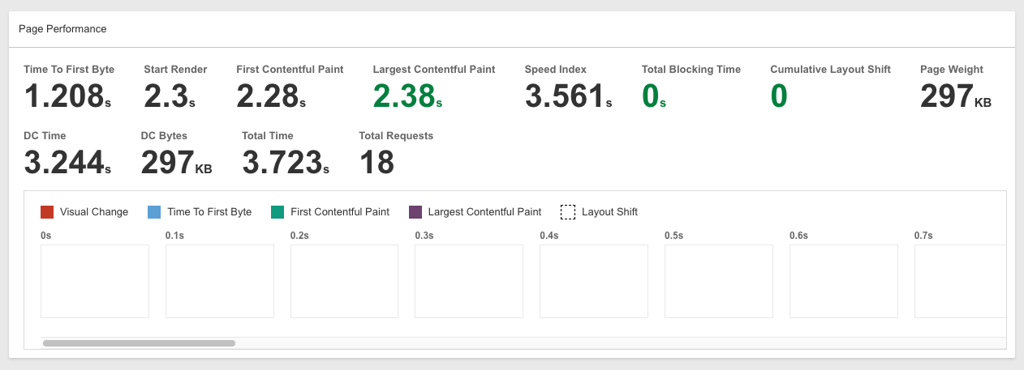
IONOS performed better in these metrics, with an LCP of 1.422s and a fully loaded time of 2.38s, meaning content appears faster on screen, and the page becomes fully interactive sooner.

Of course, how each host performs in your specific case will depend on where you’re located. Needless to say, server location is important, and Hostinger truly impressed me.
Hostinger has 13 data centers across the globe, including in the US, the UK, France, Brazil, and India. This is quite a good spread, since a broader server network means users in different areas can load websites quicker.
On the other hand, IONOS has servers in 5 countries: the US, the UK, Germany, France, and Spain. This works well for European and US audiences but is less ideal for global traffic.
Stress testing results
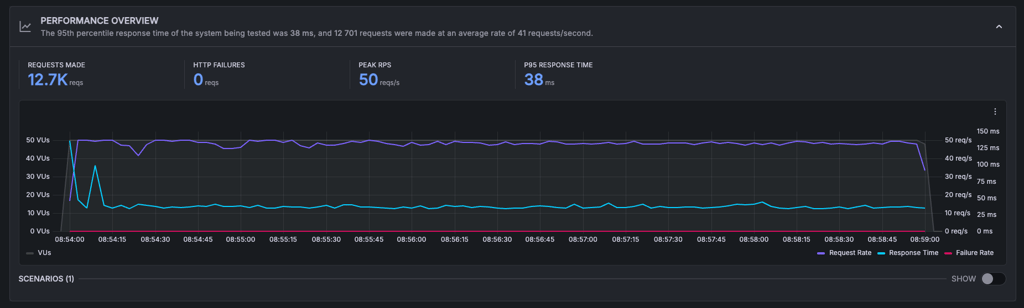
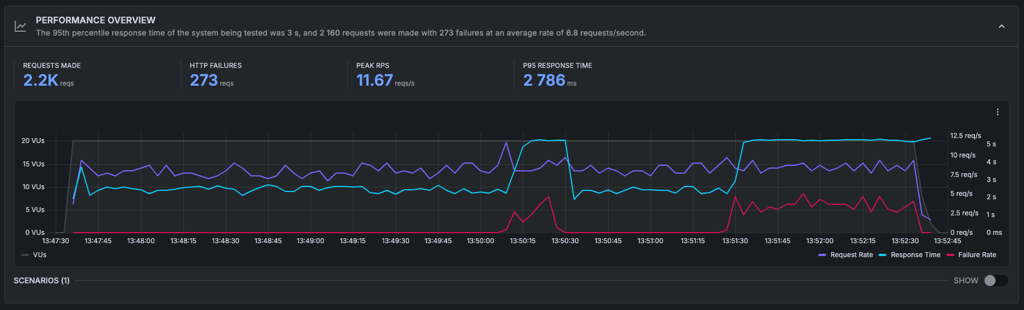
Traffic surges shouldn’t be a problem for established providers like Hostinger and IONOS. So, we simulated 50 virtual users (VUs) accessing each site at once (equivalent to 50,000 monthly visitors).
Hostinger passed the test with flying colors. Its response time stayed flat and stable as the number of visitors increased. We didn’t see any failures, slowdowns, or interruptions.
IONOS struggled with increasing traffic. Its response times spiked, and performance declined. So, we reduced the traffic to 20 VUs – about 20,000 monthly visitors – before IONOS stabilized. This is still satisfactory performance for smaller to medium-sized websites.
Hosting features and ease of use: Hostinger is more beginner-friendly with better tools
Hostinger is budget-conscious and friendly for non-tech-savvy users. It provides intuitive tools and easy-to-use features for easy website management. In contrast, IONOS brings tools designed for larger-scale websites, but its interface isn’t as beginner-friendly.
Here’s a closer look at their control panels, Wordpress tools, website builders, and extra management features.
Control panel comparison
Both providers use their custom control panels. Hostinger has designed a modern and sleek custom hPanel, while IONOS uses its custom control panel.
Hostinger’s hPanel is very easy to use, even if you’ve never built a website before. It’s nice-looking and organized, with everything divided into sections like Files, Databases, Performance, Emails, and Security. It didn’t leave me scrolling around the area trying to find what I needed.
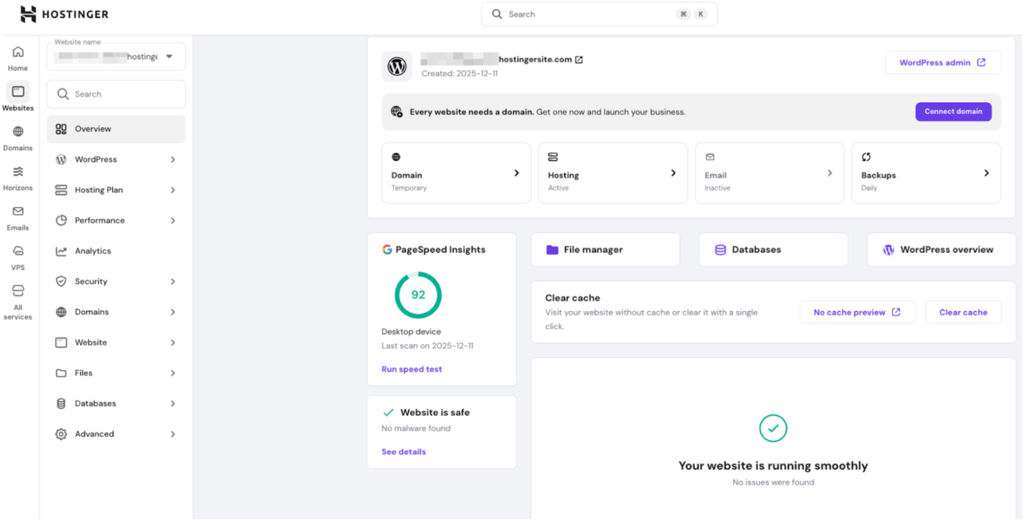
What I found really great about hPanel is the real-time performance monitoring. You can check your site’s resource usage, and it comes with LiteSpeed Cache built in to keep things running smoothly.
IONOS uses a custom and functional control panel. However, I did find it feels pretty corporate. I found that it lacks intuitiveness, and the platform seems to offer limited control over the standard web hosting. The platform looks cluttered with upsell offers, and the general navigation is confusing, with some of the settings (such as DNS) being difficult to locate.

One final thing to note is that IONOS and Hostinger don’t use cPanel on their shared hosting plans. So, if you’re moving from a cPanel-enabled host, it could be a bit tedious to manually set up everything, which isn’t great if you’re a beginner in this field. On the other hand, if you have experience with cPanel, hPanel will be very easy to get used to.
WordPress feature comparison
Both IONOS and Hostinger focus heavily on providing a smooth WordPress experience and include WordPress-specific tools.
Here are the main WordPress features provided by Hostinger:
- Suite of AI features
- 1-click WordPress installation
- 1-click Google integration
- LiteSpeed server acceleration
- Vulnerability scanner
- Amazon affiliate plugin
- On-demand backups
- Auto updates
- Web Application Firewall
IONOS WordPress features include:
- Suite of AI-based features
- Server optimization
- Automatic backups
- Vulnerability and malware scans
- SEO plugin
- Anti-spam filtering
Overall, Hostinger provides a more comprehensive WordPress toolset. Both hosts include a variety of AI features, such as a website builder and content generator, but Hostinger also focuses heavily on speed and performance.
When it comes to WordPress hosting, Hostinger makes everything a lot easier to manage. If you’re looking to set up a site quickly, the AI Website Builder for WordPress can generate an entire site from a single prompt, complete with relevant text and images in under a minute.
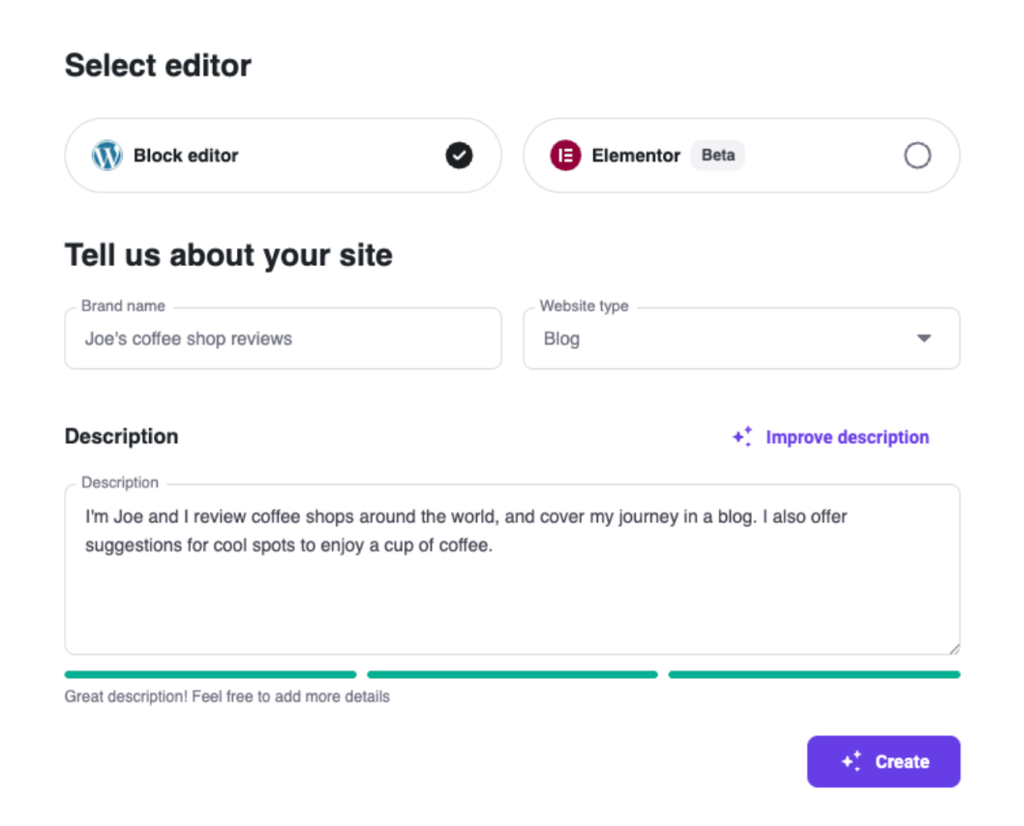
Something else to underline here is Hostinger’s Kodee AI virtual assistant. This assistant is present 24/7 to help you with installing themes, optimizing performance, and troubleshooting issues.
IONOS also supports WordPress, but it takes a more manual approach. Sure, it offers daily backups and automatic core updates, but migrating your site requires a bit more work.
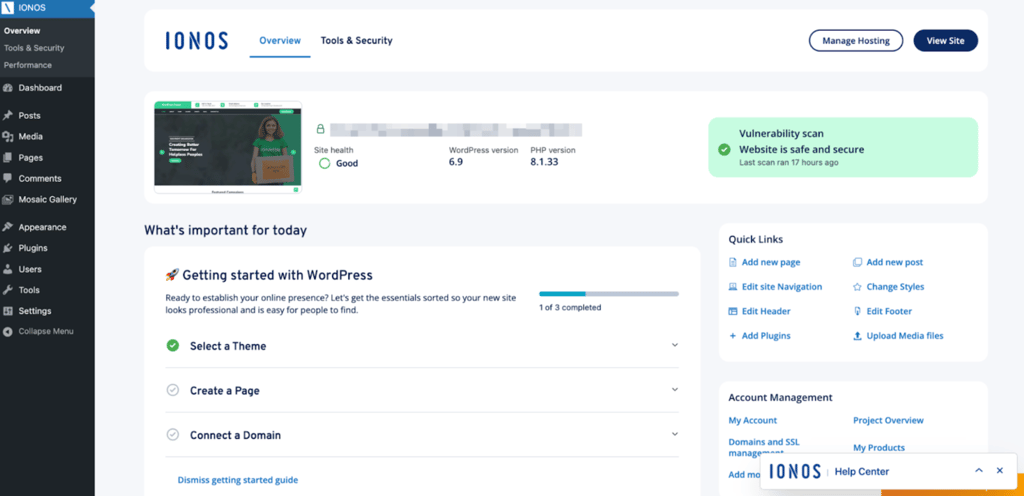
Also, without a built-in staging environment – something Hostinger can offer – updating can feel a bit riskier with IONOS. Yes, the WordPress assistant helps with the basics, but you won’t find advanced features like AI-generated layouts or tools to optimize site performance.
Web builder comparison
Hostinger’s AI-powered website builder is a great option for both beginners and small businesses. Its drag-and-drop interface makes site creation simple, even without prior experience. It includes:
- 430 + customizable templates for portfolios, eCommerce stores, and business sites
- AI Heatmap that shows which areas of your site attract the most attention
- AI-powered text generation for quick content creation, including blog posts and product descriptions
- SEO optimization tools to improve search engine visibility
- Mobile editing to adjust site layouts directly from your smartphone
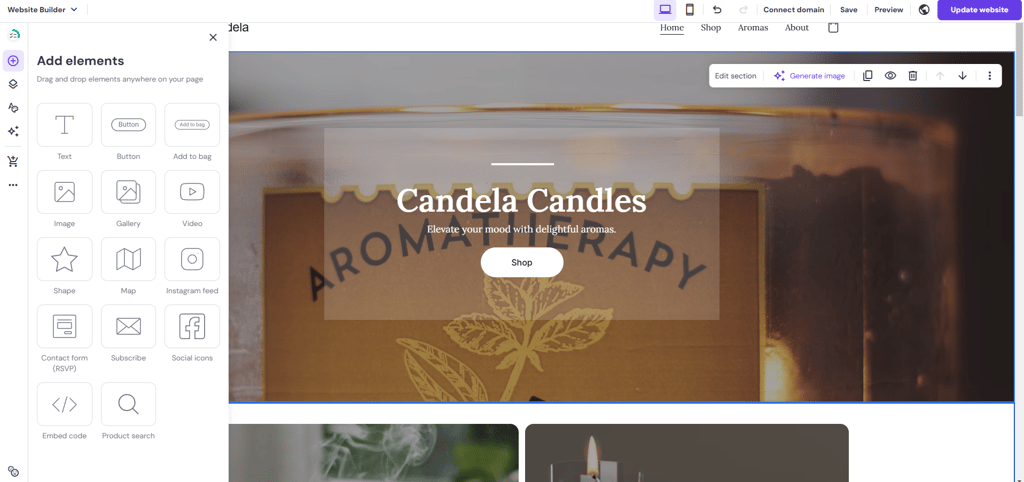
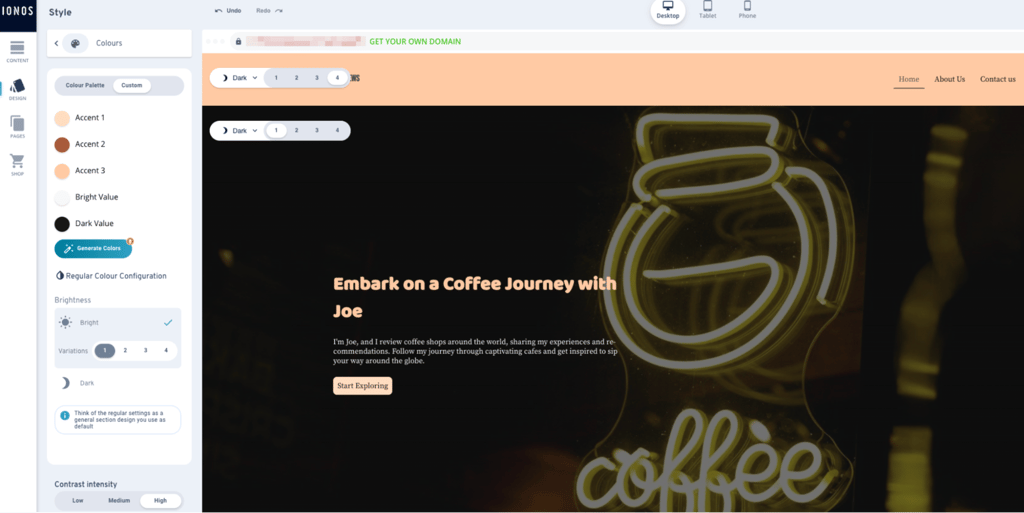
Meanwhile, IONOS offers a more basic website builder geared toward small businesses. It includes:
- 40 + customizable templates for portfolios and business sites
- AI-powered tools for quick content creation, image generation, and website editing
- Mobile editing to adjust site layouts directly from your smartphone
- Marketing tools for basic SEO needs, competitor tracking, and AI-suggested improvements
Extra hosting management features
Hostinger goes beyond the basics with a robust selection of tools to simplify hosting management. Its AI-powered Kodee assistant helps with tasks like WordPress installation, plugin management, and performance optimization. Other useful features include:
- Free automated site migration – move sites without technical input
- AI SEO assistant – suggests improvements to help your site rank better
- Automatic daily or weekly backups – depending on the chosen plan
- Account sharing and access control – manage who can access your site
- AI-powered image background remover – for professional, clean visuals on product pages
IONOS offers essential tools like domain management, email account setup, and basic site monitoring. Additional tools include:
- Personal consultant – a dedicated human expert assigned to your account for direct technical advice
- Daily automated backups – recovery snapshots of your files and databases included as standard on all plans
- Malware scanning – Site Scan checks all your webpages for malware and other threats, notifying you instantly if something is found
- Mobile management – allows you to manage your products, view real-time website analytics, and acts as a security key for 2-step verification
- User management – allows creating additional users with specific roles to give access without sharing your main password
IONOS does offer more advanced tools, such as rankingCoach and AI Online Reputation Management, but they come at an additional monthly price.
Hostinger vs IONOS security: Hostinger offers advanced security at no extra cost
Both Hostinger and IONOS cover secure web hosting fundamentals, but Hostinger adds advanced security features across all plans at no extra cost. IONOS offers strong protection, but some premium security features are reserved for the higher-tier plans.
Hostinger security features:
- SSL certificates – free SSL included for all your websites
- Backups – performed weekly on entry plans and daily on higher-tier plans
- DDoS protection and CDN – DDoS protection plus a free content delivery network to reduce attack risks and improve global loading speeds
- Malware and monitoring – malware scanner, 2FA, and secure access manager
- Extra protection – domain privacy and a secure access manager to prevent spam and unauthorized access
IONOS security features:
- SSL certificates – Wildcard SSL covering the main domain and all subdomains
- Backups – daily backups on all plans, with copies stored up to 6 days
- DDoS protection – standard DDoS protection
- Malware and monitoring – Site Scan checks for malware daily and monitors spam risks and blocklist statuses
- Extra protection – user data stored across two data centers for added redundancy
Customer support comparison: Hostinger provides you with more options
Both Hostinger and IONOS provide 24/7 support. Hostinger offers live chat, email, a ticketing system, and AI-powered assistance, while IONOS provides live chat and phone support but lacks email and ticket-based support.
| Support option | Hostinger | IONOS |
| 24/7 live chat | ✅ Yes | ✅ Yes |
| Phone support | ❌ No | ✅ Yes |
| Email support | ✅ Yes | ✅ Yes |
| AI assistant | ✅ Yes | ❌ No |
| Ticketing system | ✅ Yes | ❌ No |
| Knowledge base | ✅ Yes | ✅ Yes |
Hostinger’s live chat is quick and reliable, but response times can vary depending on demand. Also, Hostinger’s Kodee AI is a big plus – use it for troubleshooting and general hosting guidance without the help of an agent. And if you need extensive help, Hostinger has a ticketing system that tracks ongoing issues efficiently.
What’s unique for IONOS is its phone support, which Hostinger lacks, so you can speak with a live, human customer support agent. However, IONOS falls behind in terms of other options. Its live chat response time is slow sometimes, plus there’s no email or ticket system. Complex issues need to be taken care of either via chat or phone.
Hostinger vs IONOS: final recommendations
Hostinger emerges as the clear winner overall, offering the best balance of affordability, performance, and user-friendly features. Its easy-to-use interface, fast speeds, and advanced security make it ideal for beginners, small businesses, and users requiring a hassle-free hosting experience. Hostinger’s affordable pricing and robust support options, including its AI-powered assistant, set it apart from the competition.
IONOS offers solid performance and specific advantages for larger businesses or experienced developers – such as phone support and more advanced security. But our testing found that it falls short for most users due to its features and overall ease of use. IONOS works for customers with technical knowledge or those who need infrastructure that can handle more complex, large-scale projects.
| Feature | Hostinger | IONOS | Verdict |
| Pricing | Hostinger's prices start at $2.69/month, while IONOS cheapest plan costs $1.00/month for the first year. However, Hostinger’s pricing can be locked in for 48 months, while IONOS increases its price to $12.00/month after the first year. | ||
| Ease of use | Both providers are simple to use. However, I found that Hostinger’s navigation is more intuitive, while IONOS does make finding features a bit more difficult. | ||
| Performance | Hostinger wins most performance tests, being more reliable, faster, and powerful than IONOS. | ||
| Security | Hostinger offers more advanced security features for free across all plans, making it the more generous option overall. IONOS provides solid baseline protection, but some extras are only available on higher-tier plans. | ||
| Support | Hostinger provides reliable support, including AI-powered help and quicker response times overall. IONOS stands out with its phone support, but its support setup is more limited and lacks AI-driven assistance. |
In my view, people looking for value and simplicity should pick Hostinger. That said, IONOS brings phone support and strong security on its higher-tier plans to the table.

FAQ
What are the main differences between Hostinger and IONOS?
Hostinger is more beginner-friendly and offers an intuitive interface, AI-powered tools, and generally better website performance for small to medium sites. IONOS is focused on experienced users and businesses, with more advanced security options for higher-tier plans, and offers phone support.
What is the disadvantage of Hostinger?
Hostinger lacks phone support and doesn’t offer dedicated hosting. Its VPS options are more suited for smaller to mid-level sites. Some of Hostinger’s features – like daily backups – come only in higher-tier plans.
Is Hostinger the best hosting provider?
Hostinger is my top choice for web hosting because of its affordability, reliable performance, and user-friendly interface. However, the best web hosting service depends on your specific needs. That’s why it’s important to consider what matters most to you.
Is IONOS a good service?
Yes, IONOS is a business-focused option. The company has decades of experience in the field and offers strong security, daily backups on all plans, and phone support.