How to watch RaiPlay in USA (2026)
Our in-house cybersecurity experts and journalists, renowned for major reports like The Mother of All Breaches, conduct transparent, unbiased VPN testing and in-depth analysis.
With 750+ articles crafted based on real-world research, we empower readers to make informed purchasing decisions through first-hand expertise.
Learn more

RaiPlay is one of the best places to stream Italian TV, movies, documentaries, and live channels. The problem is, it only works in Italy, so if you’re in the US, you’ll likely see an error message when trying to access the platform.
Using a VPN can help you get an Italian IP address, which allows you to watch RaiPlay in the USA. However, it can’t change your App Store or Google Play Store region, so you might not be able to install RaiPlay App on your smartphone.
If you resort to using a VPN to stream content on RaiPlay, keep in mind that this approach might violate RaiPlay’s terms of service. Always double check current eligibility and risks involved before using a VPN.
What you actually need to stream RaiPlay
To stream RaiPlay while in the US, you need two things: an Italian IP address and, in some cases, an active account. When I tried to stream on RaiPlay I could easily access live streaming and World Cup 2026 highlights without registrations. However, once I tried to watch the Tempo Preso (original RaiPlay) series, I couldn’t do it without an account.
Since registering for an account only requires your personal details and an email address, a VPN is a good option to watch RaiPlay in the USA. It’s a free streaming platform, so you’re not required to provide the Codice Fiscale (tax identification number) or any other Italian-specific details. Therefore, creating an account while using a VPN should be enough to access the content.
Beware that accessing RaiPlay’s content outside of the licensed region might violate its terms of use. Also, if the platform detects VPN usage, it might restrict your account or apply other penalties.
How to watch RaiPlay outside Italy

Watching RaiPlay from outside Italy isn’t complicated. In a few simple steps, you can access its content by connecting to Italian servers, without creating an account. However, if you want to access more content on the platform, you might consider creating an account, as it’s simple and doesn’t require an Italian address or payment method. Here’s how to do it:
- Download and install a reputable VPN
- Connect to a server in Italy
- Open the website of the RaiPlay TV streaming service
- Enjoy watching unblocked RaiPlay content from anywhere in the world
Note that some content might still be inaccessible even if you use a VPN.
Why do you need a VPN to watch RaiPlay?
RaiPlay is an Italian broadcaster that is geo-locked outside of the country due to content-licensing and distribution rights agreements. While you can easily access the website even if you’re abroad, once you try streaming the content on the platform, an error message appears: “The streaming of this content is available in Italy only. We apologize for the inconvenience.”
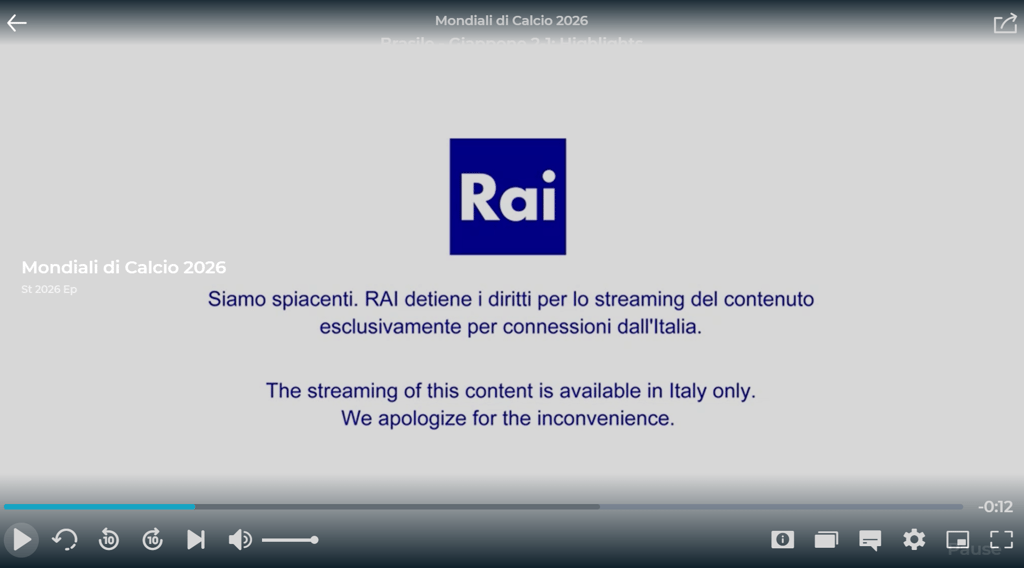
If you want to watch RaiPlay from abroad, your options are quite limited and this is where a VPN could help. A VPN can change your IP to a location where RaiPlay is available, that is Italy.
| What you need to watch RaiPlay | What it requires | Can a VPN help? |
| To be connected from Italy | An Italy-based IP address | ✅ Yes, a VPN can change your IP address |
| Active RaiPlay account | Some of the on-demand content requires active RaiPlay account, which only requires your personal details and email address | ✅ Yes, connected to an Italian server with a VPN you can create a RaiPlay account |
| App access on a mobile device | An Italy-based App Store/Google Play Store account to download the app | ❌ No, because the app store region is determined by the account settings |
A VPN can change your IP address, but it can’t change your GPS, which is required to download the RaiPlay app from either the App Store or the Google Play Store. That’s why I found it easier to access it on desktop browsers than on mobile devices.
Alternatively, US-based users can access RaiPlay’s content through major US television providers, including satellite, cable, and streaming platforms by subscribing to Rai Italia or Rai Italia+ through their existing TV service provider.
Best VPNs for RaiPlay international streaming
- NordVPN – best VPN for unblocking RaiPlay in 2026
- Surfshark – RaiPlay VPN with support for unlimited devices
- IPVanish – RaiPlay VPN for beginners
- PureVPN – budget-friendly VPN for streaming
- ExpressVPN – RaiPlay VPN with blazing-fast speeds
How to watch RaiPlay outside Italy using a VPN
Many top VPN services make it possible to access RaiPlay from various devices, including iOS, Android, Windows, and macOS. However, the steps for accessing RaiPlay may differ depending on your operating system.
I've reviewed the process for accessing RaiPlay on the most frequently used devices to simplify it, and shared detailed guides on how to do it below.
- Watch RaiPlay on your PC (Windows/macOS)
- Watch RaiPlay on your smartphone (Android/iOS)
- Watch RaiPlay on streaming devices
Watch RaiPlay on your smartphone (Android/iOS)
The easiest way to watch RaiPlay on your smartphone is to install the app before leaving Italy, as downloading it abroad may require changing your App Store or Google Play Store region. Yet, whether you already have the app installed or not, you'll still need a VPN to get an Italian IP address and access RaiPlay from outside Italy. Here are the steps that can help you get an Italian IP to stream RaiPlay content:
- Change your region in the Google Play Store or App Store settings (the region can be changed every 90 days)
- Head to the Google Play Store/App Store and download a VPN app
- Download the RaiPlay app
- Sign in to your VPN service’s account and connect to a server based in Italy
- Launch the RaiPlay app and register or log in to your account
- Enjoy RaiPlay on your mobile device
As a supplementary step, try to turn off your Google Play Store’s/App Store’s location permission, so the store can’t read your device’s GPS as a location signal.
For Google Play Store:
- Go to your device’s Settings
- Open Apps
- Select Play Store
- Click Permissions
- Click Location and select Don’t allow
For the App Store:
- Go to your device’s Settings
- Click Privacy & Security, and select Location Services
- Make sure that Location Services is on
- Scroll down to find the App Store
- Click App Store and select Never
The RaiPlay app may not appear in your App Store or Google Play Store due to region settings. These settings can be changed only when moving to a new country or region, as it requires you to provide a local payment method and billing address to change the region on your device. This can be done every 90 days.
Watch RaiPlay on your streaming devices
The good thing is that many VPNs allow streaming RaiPlay directly on your smart TV or via Amazon Fire TV. However, it’s possible your smart TV's app store doesn't have the RaiPlay app due to your tv’s app store regional restrictions. If you do find the app, I share below how you can stream RaiPlay on your device.
Please note that, for illustration purposes, I used NordVPN setup processes for all guides. Here’s a step-by-step guide on using a VPN with a smart TV:
- Pick a VPN service that has support for your router
- Purchase a VPN subscription
- Log in to the control panel of your router
- Go to Advanced > VPN Client
- Enable VPN client and save the settings
- In the Server List section, click Add
- In the pop-up window, fill in the available fields with the information available from your VPN provider
- Connect to a server in Italy
- Find the RaiPlay app in your smart TV’s store and download it
- Watch the RaiPlay content on your smart TV
Note that the exact steps for setting up a VPN on the router may differ based on router’s firmware or manufacturer.
Guide for Amazon Fire TV:
- Download a VPN app straight to your Fire TV device
- Open the VPN app on your device
- Select Log in or Sign up to create a new one
- On the screen, you’ll see a QR code you’ll need to scan or a number for remote validation
- You might get a few warning messages, which are default Fire OS warning messages for VPN connections, yet it’s safe to continue
- Connect to a server based in Italy
- Download the RaiPlay app on your Fire TV device
- Start streaming
Guide for Apple TV:
- Download a VPN app from the Apple App Store
- Connect to a server in Italy
- Open the VPN app
- Download the RaiPlay app on your Apple TV
- Start watching
Why can't I stream RaiPlay with a VPN?
If you're connected to an Italian server through a reputable VPN and RaiPlay isn't working, there are steps you can take to resolve the issue. First, try connecting to a different server in Italy in case the one you're using is blocked or overcrowded. If it doesn't work, you should consider these steps:
- Clear your browser's cache and cookies to ensure cookies don't retain a footprint of your actual location.
- Check that your VPN isn't leaking your IP or DNS addresses and ensure that features like a kill switch are enabled.
- Sign out and log back in to RaiPlay. The issue may be with the platform itself.
- If you're using a free VPN, RaiPlay may have blocked all its IP addresses, making it impossible to access the platform.
- If nothing helps, contact your VPN provider's customer support. They should be able to provide high-level support through various channels.
Final thoughts
Watching RaiPlay abroad is easy with a reliable VPN like NordVPN. You only need to connect to an Italian server to access the platform's free content from the US. Live TV doesn't require an account, and if you want to stream on-demand content, you can create a RaiPlay account without providing Italy-specific details.
I would highly recommend streaming through a desktop browser rather than a mobile app, as downloading the RaiPlay app abroad may require changing your App Store or Google Play Store region. Yet if you already have the app and a fast Italian server, a VPN is great for enjoying RaiPlay securely and with minimal setup wherever you are.
FAQ
Which VPN works with RaiPlay?
NordVPN is the best VPN that works with RaiPlay. It offers 60+ servers in Italy and starts at only $3.49/month. In addition, it streams at excellent speeds and includes security features, such as a kill switch, Threat Protection, and split tunneling.
How do I watch RaiPlay with a VPN?
To watch RaiPlay with a VPN, you must pick a provider with servers in Italy. After connecting to an Italian server, clear your browser’s cache and head to the RaiPlay page to enjoy your favorite movies and series.
How can I watch Rai TV in the USA?
To watch Rai TV in the USA, you need to change your IP address with a VPN or subscribe to Rai Italia through your existing US TV provider.