Paramount Plus not working with VPN in 2026: easy fixes
Our in-house cybersecurity experts and journalists, renowned for major reports like The Mother of All Breaches, conduct transparent, unbiased VPN testing and in-depth analysis.
With 750+ articles crafted based on real-world research, we empower readers to make informed purchasing decisions through first-hand expertise.
Learn more

If you’re dealing with Paramount Plus VPN not working, you’re not alone. Streaming platforms actively block VPN connections, which can suddenly leave you staring at error messages instead of your favorite shows. However, these issues are usually easy to fix once you know what’s causing them.
Paramount Plus features popular content from Showtime, Nickelodeon, MTV, and more, but it’s officially available only in select regions like the US, UK, Canada, and Australia. That doesn’t mean access is impossible while traveling or living abroad.
If you're traveling temporarily, you may still be able to access Paramount+ depending on your subscription, account region, and the country you're visiting. Content availability can vary between regions, and some travelers may encounter licensing-related restrictions while abroad. Before trying a VPN, it's worth checking whether Paramount+ is officially available in your current location and what content is included there.
Additionally, a capable VPN with optimized servers may help you unlock the platform. However, not all VPNs are built for streaming, and choosing the wrong one often leads to connection failures.
What you actually need to watch Paramount+
A VPN can help by changing your IP address to a country where Paramount+ is available. However, that's only one part of the process.
Access may also depend on your Paramount+ account, active subscription, billing country, app availability, and other service-side checks. Even if your VPN connection is working correctly, Paramount+ may still restrict access if it detects a mismatch between your account details and your current location.
| What you need to watch Paramount+ | What it requires | Can a VPN help? |
| Supported location | An IP address from a country where Paramount+ is available | ✅ Yes |
| Active Paramount+ account | A valid account and subscription | ❌ No |
| Correct billing or account region | A payment method and account setup accepted by Paramount+ in that region | ❌ No |
| Paramount+ app access | App availability in your App Store, Google Play, Smart TV, or streaming device region | ❌ No |
| Region-specific content library | Licensing rights for that country | ⚠️ Partly – a VPN may change your visible region, but content availability still depends on Paramount+ licensing |
| Mobile app access | App-store region and sometimes device-level location signals | ⚠️ Sometimes, but a VPN may not be enough |
You may not need a VPN at all if Paramount+ is already available in your country and you have an active subscription. You also don’t need a VPN if you’re watching Paramount+ through an official local partner, bundle, or supported platform in your region. In those cases, it’s better to sign in directly through the Paramount+ app, website, or partner service.
Why Paramount Plus is not working with a VPN
Is Paramount Plus not working with VPN services? The most likely cause for this is that the platform has detected your VPN and is blocking it. Paramount Plus is very good at recognizing if your IP address comes from a VPN. So it blocks this address and restricts your access. The other most common reasons why your VPN might not work with Paramount Plus include the following:
- Outdated VPN version. The latest version of your VPN may already have the required software to unblock Paramount Plus.
- Overcrowded or wrong server. You may be unable to access Paramount Plus because a lot of other people are using the same server at the same time as you. You also might choose a server location in which the platform is not available.
- Cache and cookies. These files store information about your actual location and could be leaking it to Paramount Plus.
- Firewall is blocking the VPN. To protect your device from viruses and other types of malware, firewalls block all unusual activity. Unfortunately, they also tend to recognize VPNs as suspicious software.
- DNS and IP leaks. Software updates, changes to network settings, or third-party applications interfering with DNS queries can leak your actual location and lead Paramount Plus to block your VPN.
- Poor VPN unblocking abilities. Not all VPNs are able to bypass streaming platforms’ geo-restrictions. Make sure that you’re using one of the best VPNs that are capable of unblocking Paramount Plus.
To learn more about these issues and how to solve them, take a look at our guide to 9 fixes that should help you unblock Paramount Plus.
VPNs that work with Paramount Plus in 2026
Since not all VPNs unblock Paramount Plus, I joined the Cybernews research team to evaluate 41 VPN providers. Our latest tests (June 2026), conducted on a Windows 11 PC from Lithuania using US VPN servers, showed that NordVPN, Surfshark, and IPVanish consistently accessed Paramount Plus.
Besides unblocking performance, we also evaluated each VPN's speed, security, and overall streaming experience. Keep in mind that while a VPN can change your IP address, it can't bypass Paramount+ account requirements or regional licensing restrictions.
- NordVPN – during our latest Paramount+ tests, NordVPN consistently accessed the US library using multiple US servers. There was no buffering during HD streaming. Server switching was quick when testing different locations, making it the most reliable option overall. Beyond streaming, it includes industry-leading privacy features and a large US server network for finding a working server if one becomes blocked.
- Surfshark – also successfully accessed Paramount+ during our testing and maintained stable streaming quality across several US servers. It stood out for households or families because unlimited simultaneous connections let multiple people stream on different devices under one subscription.
- IPVanish – reliably accessed Paramount+ in our tests through its US server network and delivered smooth playback for on-demand content. While it doesn't unblock streaming services as consistently as NordVPN or Surfshark, it remains a solid choice if you primarily want a VPN for US streaming and everyday privacy.
Using a VPN to access Paramount+ from another location may conflict with the service's Terms of Use. If Paramount+ detects VPN usage, it may prevent streaming until you disconnect the VPN or switch to a different server. A VPN cannot bypass account, subscription, or regional licensing requirements.
Paramount Plus VPN not working: 9 quick fixes
There could be several reasons why your VPN is unable to bypass Paramount Plus location restrictions. The following 9 fixes address the most common ones.
We verified the steps below on a Windows 11 device using Google Chrome and the NordVPN desktop app. Menu names may differ slightly on macOS, iOS, Android, Smart TVs, Fire TV, and other streaming devices. On mobile devices, Paramount+ may also use app-store region or device location signals, so a VPN may not always be enough.
Ensure your VPN is updated
Your VPN may not allow you to access Paramount Plus because you’re using an outdated version. If the VPN wasn’t capable of bypassing the geo-restrictions in the past, its team may have resolved this issue, but you’re unable to benefit from it due to the old software.
Therefore, you should install the latest VPN version. Launch the provider once again, enter your login credentials, and see if you can now access Paramount Plus content.
Switch to a different VPN server
VPN servers can get crowded and not perform as well as they’re supposed to. As a result, you may be unable to watch Paramount Plus content. But the issue could also be that you’ve chosen the wrong server.

In either case, what you have to do is check which countries Paramount Plus is available in and then select a server in one of these countries. I recommend using a US server, as the US library is quite extensive, and the platform works there with less issues.
Other countries where Paramount+ is available:
- Oceania: Australia
- Europe: Austria, France, Germany, Italy, Ireland, Switzerland, the United Kingdom
- North America: Canada, Mexico, the United States
- South America: Argentina, Bolivia, Brazil, Chile, Colombia, Costa Rica, Dominican Republic, Ecuador, El Salvador, Guatemala, Honduras, Nicaragua, Panama, Paraguay, Peru, Uruguay, Venezuela
Keep in mind that changing your IP address may not always be enough to access Paramount+. Depending on your account, subscription, and location, you may also encounter account-related or regional restrictions that a VPN cannot bypass. In addition, streaming websites and mobile apps may not behave the same way, as apps can use additional location information beyond your IP address. If you're traveling, it's worth checking whether Paramount+ is officially available in your current country and whether your account is eligible to access content there.
Delete your browser’s cache and cookies
The cookies and cache in your browser save data about your account login location which contains your geo-location. Due to this, it’s very easy for streaming platforms like Paramount Plus to detect where you’re really located.
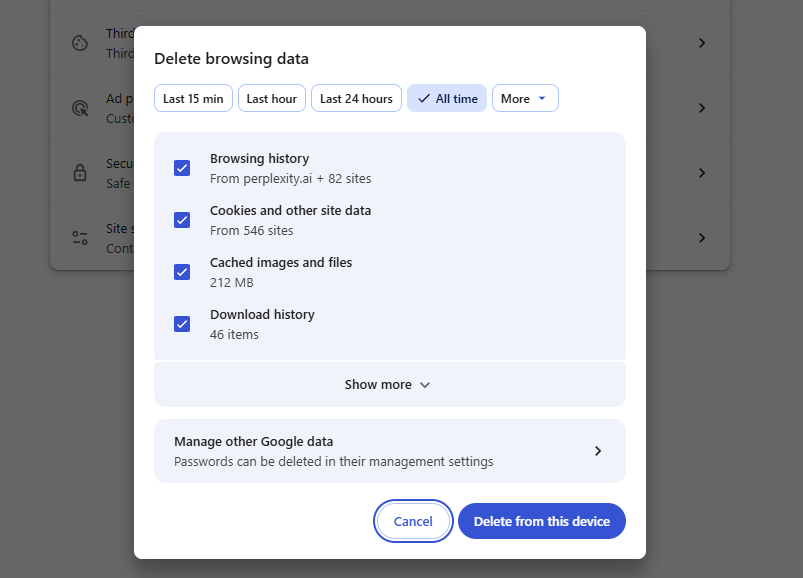
You can delete cookies and cache from your browser and avoid this issue by following the steps below. For this guide, I’m using Google Chrome as an example, but most browsers follow similar procedures:
- Open Google Chrome and click the three vertical dots in the top right corner to expand a menu
- Click Delete browsing data
- Select All time from the time range menu
-
Select the boxes you want and click Delete from this device
Check your internet connection
A weak internet connection is a common issue that might interfere with your streaming experience. Try disconnecting and reconnecting to your Wi-Fi. If that doesn’t help, restart your internet router.
Log in again
An easy fix is to sign out of your VPN account and log in again. While this is a very straightforward solution, it’s often forgotten. This could help if you haven’t used your VPN in a while.
Contact customer support
If you’ve tried different tips and tricks and Paramount Plus is still unavailable, I recommend you reach out to your VPN’s customer support. The agents will guide you through the problem and explain how to fix it.
Disable your firewall
Firewalls prevent cyberattacks that may come from the websites you visit or third parties. Even though they offer a robust security measure, they often cause issues with the VPN connection by flagging it as an unusual activity.
So, if you can’t access Paramount Plus, check whether your firewall is on. If it’s on, try turning it off and then reloading the streaming service.
Make sure you have DNS leak protection or a kill switch
DNS queries reveal a lot of personal information. If Paramount+ doesn’t work for you, it may mean that DNS/IP leaks reveal your actual location. Kill switch protects against accidental IP exposure and may help you with a smoother streaming experience.
To fix this, enable DNS leak protection or a kill switch. To activate the kill switch feature, you need a VPN that has it in its features. Then, follow the steps below to turn the kill switch on. For this demonstration, I’m using NordVPN as an example.
- Launch NordVPN, access the Settings menu, and click Kill Switch
-
Toggle the Internet Kill Switch button On

- Choose when to disable internet access by marking one of the two options
Consider switching to a better VPN provider
As not all VPNs work with Paramount Plus, you might have to switch to a more reliable VPN provider. While you may be tempted to use a free VPN provider, I don’t recommend this due to performance issues and security concerns.
Instead, look for a VPN that combines both a great service and a budget-friendly price. It may help you successfully unblock Paramount Plus and protect your privacy as well as personal data.
How Paramount Plus detects VPN usage
Paramount Plus uses VPN detection technology to prevent users from hiding their location. This has been put in place due to the contracts that Paramount signs with various TV and movie studios. In order to protect their interests and comply with their geo-restrictions, Paramount carefully monitors where its users are signing in from by using the following methods:
- VPN detection. Paramount Plus may block some VPN connections when it detects that the IP address belongs to a VPN server, data center, or an unusually high number of users. This is why one VPN server may stop working while another still streams normally. Switching servers, clearing cookies, or using a VPN with frequently refreshed US servers can often help.
- DNS and IP leaks. Even if your VPN encrypts your DNS and IP address, service interruptions might leak this information and your actual location, allowing Paramount Plus to block your VPN. The best VPNs significantly reduce the risk of such location leaks.
Conclusion
Paramount Plus is available in Australia, across North and South America, and in a few countries in Europe. If you live outside these countries and your VPN doesn’t unblock Paramount Plus, there are some quick fixes you can try.
Your best option is to switch to a better VPN provider. I recommend NordVPN for its overall excellent performance and security features that can help you with smooth Paramount Plus streaming. Plus, it has plenty of servers in countries where Paramount+ is available.
Keep in mind that a VPN can only change your IP address. It can't create a Paramount+ account, bypass subscription or billing requirements, override regional licensing restrictions, or guarantee access if Paramount+ blocks a particular VPN server or uses additional location checks.
FAQ
Why is my VPN not working with Paramount Plus?
There are several reasons why Paramount Plus may not work with your VPN. The platform may have identified and blocked your VPN server's IP address, or your VPN could be leaking your real IP address or DNS requests. However, the issue isn't always VPN-related. Your Paramount+ account, billing region, subscription type, or device can also affect what content is available. In addition, the Paramount+ app may use extra location signals that differ from browser access.
To troubleshoot the issue, try switching to a different US VPN server, clearing your browser cookies or app cache, checking for IP or DNS leaks, and making sure your account meets Paramount+'s regional requirements. If the problem persists, consider using a VPN with a proven track record of accessing Paramount+.
How do I get my VPN to work with Paramount?
To get your VPN to work with Paramount, you can implement a few fixes. Try updating your VPN, signing out and logging back in, checking your internet connection, activating a kill switch and DNS leak protection, connecting to a different VPN server, contacting the VPN’s customer support, or switching to a more reliable VPN.
Keep in mind that no VPN can guarantee uninterrupted access to Paramount+. Paramount+ may change its VPN detection methods at any time, and some restrictions – such as account eligibility, billing requirements, regional licensing, or content availability – are outside a VPN's control.