Bitdefender Identity Theft Protection review: features, monitoring depth, and value
Our in-house experts test identity theft protection services themselves, using real-world scenarios and established testing methods. We look at how well each service monitors personal information, how quickly and clearly it sends alerts, what recovery support it offers, and how it handles customer data.
We assess every provider using the same criteria and explain our testing process clearly, so readers can compare services and make a more informed choice.
Learn more
Traditionally, Bitdefender is known for antivirus software, but now also offers identity monitoring services. The Bitdefender Identity Theft Protection, also referred to as Bitdefender Digital Identity Protection, is a tool that alerts you in case of any identity threats. Due to this, it helps you keep your money and identity safe at all times.
Luckily, if you want to learn whether Bitdefender’s identity protection is as strong as its cybersecurity tools, or see how it compares to standalone providers like LifeLock, Aura, or IDShield, you’re in the right place.
I, together with the Cybernews research team, reviewed Bitdefender’s official feature disclosures, plan structure, monitoring scope, insurance terms, and recurring user feedback to evaluate its overall value. I’ll also delve deeper into its dashboard, features, credit monitoring, insurance, alerts, pricing, and alternatives. So, let’s learn more about it.
Quick overview of Bitdefender Identity Theft Protection
| Overall rating: | |
| A brief description: | Bitdefender Identity Theft Protection goes beyond credit monitoring to protect you against identity theft threats you might not always recognize. It includes access to your credit reports and scores, continuous monitoring of social media, the internet, and the Dark Web, instant alerts, data control, 24/7 recovery services, and identity theft insurance. |
| Key specs: |
|
| Pricing: | From $5.83/month |




Our in-house experts test identity theft protection services using real-world scenarios and consistent criteria. We assess monitoring, alerts, recovery support, and data handling to help readers compare providers confidently. Learn more about our testing process.
Our methodology
In order to come up with my detailed Bitdefender Digital Identity Protection review, I conducted in-depth research with the help of the Cybernews research team. Based on this, I evaluated different key criteria, including:
- Monitoring coverage depth (25%). I always kick off things by starting with the monitoring suite of features. I’m interested in the availability of tools, but also how well the monitoring service works.
- Credit monitoring and financial alerts (20%). Another thing I focus on is the availability of credit reports, monitoring of credit status, and financial alerts in case of any breaches.
- Insurance and recovery services (15%). I also look into the presence of recovery services, whether they’re available 24/7, how easily you can access them, and the amount of identity theft insurance that the tool provides.
- Ease of use and dashboard clarity (15%). Of course, I never skip to evaluate the user-friendliness of the identity protection service. I review its dashboard, access to features, and ease of navigation.
- Pricing and value (15%). The next thing I carefully examine is the overall value of the monitoring service. This includes exploring its subscription plans, as well as its price-to-value ratio.
- User sentiment consistency (10%). Last but not least, all of my reviews are supported by first-hand experience from users. I go through multiple reviews to see whether the tool actually delivers what it promotes.
Keep in mind that identity protection services, like Bitdefender, Aura, LifeLock, and IDShield reduce risk but cannot fully prevent fraud.
Getting started with Bitdefender
Getting started with Bitdefender is a breeze. You need to follow a few simple steps, such as:
- Open the official Bitdefender website.
- Click on “Login,” then “Create Account.”
- Enter your name, email, and password.
- Accept the terms and conditions.
- That’s it. You can now explore Bitdefender’s capabilities further.
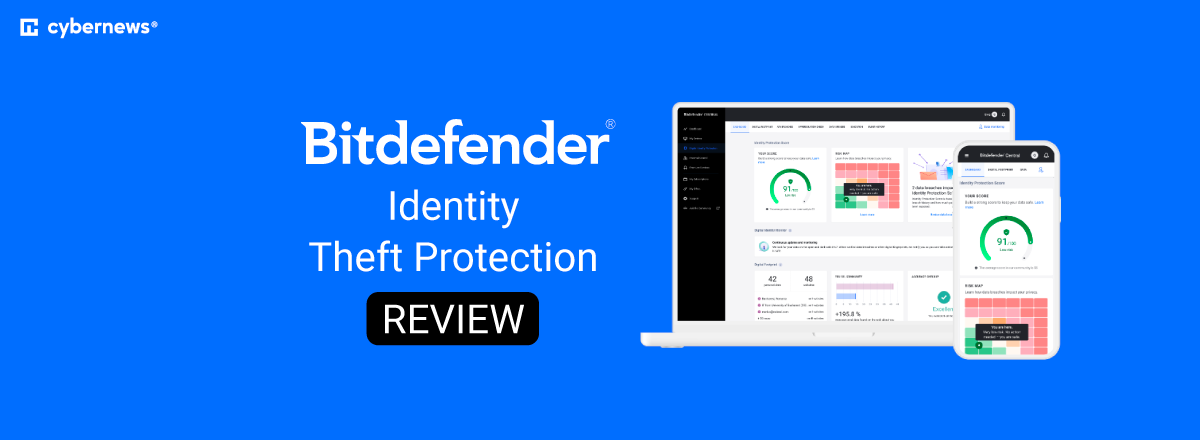
Once you create your account, the Bitdefender’s dashboard opens, where you can see the four main sections. These include Digital Identity Protection Score, Digital Footprint, Data Breaches, and Impersonation Check.
Along the main section, at the top of the dashboard area, you’ll find seven more tabs, such as Dashboard, Digital Footprint, Dark Web Monitoring, Impersonation Check, Data Brokers, News, and Event History.
As you can see, everything is just one click away from you, which makes navigation and finding what you need a seamless process.
What’s more, if you use the Premium plan, you can also manage both the antivirus and identity services through the Bitdefender Central dashboard.
Bitdefender identity theft protection features
Moving on to the main part of the Bitdefender Identity Theft Protection, the features. I must say that I was satisfied with the suite of available tools that contribute to your safety. So, let’s briefly check them out:
| Bitdefender Identity Theft Protection Standard | Bitdefender Identity Theft Protection Premium | |
| Bank, credit cards, and investments alerts | ❌No | ✅Yes |
| Change of Address Monitoring | ❌No | ✅Yes |
| Court Records Monitoring | ❌No | ✅Yes |
| Sex Offender Registry Monitoring | ❌No | ✅Yes |
| Ransomware Resolution and Refund | ❌No | Up to $25,000 |
| Social Engineering Resolution and Refund | ❌No | Up to $25,000 |
| Credit Reports & Monitoring | 1 bureau | 3 bureau |
| Identity Theft Insurance | Up to $1 Million | Up to $2 Million |
| Breach Monitoring | ✅Yes | ✅Yes |
| Smart SSN Tracker | ✅Yes | ✅Yes |
| Medical ID Fraud Protection | ✅Yes | ✅Yes |
| Identity threats and fraud alerts | ✅Yes | ✅Yes |
| Credit Reports and Score | ✅Yes | ✅Yes |
| Credit Score Simulator | ✅Yes | ✅Yes |
| Credit Score Tracker | ✅Yes | ✅Yes |
| Lost Wallet Protection | ✅Yes | ✅Yes |
| White Glove Identity Restoration | ✅Yes | ✅Yes |
| Manage Credit Freeze | ✅Yes | ✅Yes |
As you can notice, Bitdefender’s features are mainly available in both the Standard and the Premium plan.
However, some of them, like the Bank, credit cards, and investments alerts, Change of Address Monitoring, Court Records Monitoring, Sex Offender Registry Monitoring, Ransomware Resolution and Refund, and Social Engineering Resolution and Refund are limited only to the Premium subscription.
What this means is that Bitdefender monitors your bank accounts, credit cards, and investments for suspicious activities, tracks change-of-address requests and court records for identity misuse, and also checks sex offender registers to ensure your data isn’t fraudulently used.
The service also scans for data breaches and dark web exposure, monitors your Social Security Number (SSN) and medical identity for abuse, and sends real-time alerts about any identity threats.
You can even access your credit reports and score and track changes over time. Additionally, you can see a simulation of how your financial decisions may impact your credit and lets you manage credit freezes with major bureaus.
From here arises one crucial difference between identity monitoring and full credit bureau monitoring. The identity monitoring focuses on scanning public records and the Dark Web for leaked personal information, while the full credit bureau monitoring tracks your credit files for financial fraud.
Furthermore, Bitdefender offers ransomware and social engineering resolution with reimbursement if it detects any fraud, identity theft insurance to cover restoration costs, lost wallet assistance to cancel and request documents, and White Glove Identity Restoration with an expert who manages the recovery process on your behalf.
Based on all of this, I can say that Bitdefender has a pretty decent monitoring depth, which puts it head-to-head with major competitors.
Credit monitoring
Depending on your plan, Bitdefender can monitor 1 or 3 bureaus. More precisely, the Standard plan offers monitoring only of one bureau, while the Premium extends the monitoring capabilities to three bureaus (Equifax, Experian, and TransUnion) for wider protection.
What’s more, you can also access your credit score, which lets you see your reports and track any changes from the dashboard. As for the monitoring frequency, it’s performed daily, and you’ll receive instant updates if there’s some suspicious activity.
An important thing for you to understand is the difference between credit monitoring, credit freeze, and credit lock. That said, credit monitoring notifies you about any changes, while a credit freeze blocks lenders from accessing your file. Ultimately, credit lock is about restricting access, but it’s managed through a paid bureau service.
Overall, Bitdefender compares pretty well to other identity theft protection services. More precisely, while only Aura offers credit monitoring across all three bureaus with its plans, Norton’s LifeLock also unlocks these capabilities in its higher-tier plans. However, the Norton antivirus surpasses Bitdefender a bit, as it has more comprehensive features.
Insurance and services
Bitdefender is also known for its Identity Theft Insurance feature. This covers stolen funds reimbursement, legal fees, and lost wages in case of fraudulent activity. If your identity is stolen, you can recover up to $2 million with the Premium plan.
Another great thing is that the recovery services are available 24/7. This means that Bitdefender Identity Theft Protection saves you a lot of time and effort by letting the US-based experts complete the paperwork, make calls, and do all the heavy lifting to restore your identity.
While Bitdefender recovers up to $2 million with its top-tier plan, so does IDShield. Norton’s LifeLock provides up to $3 million reimbursement based on the plan. Still, Aura has the best insurance coverage. It offers up to $1 million for individuals, up to $2 million for couples, and up to $5 million for families.
Notifications and alerts
Bitdefender Identity Theft Protection comes with comprehensive alerts whenever it detects an information leak or a fraudulent attempt. You’ll receive email alerts, app push notification, and even dashboard warnings, which makes missing out the issue a bit impossible.
What’s also important is that the notifications are pretty clear, providing specific details about the breach. Plus, you’ll also get recommended steps to avoid the risk.
While Bitdefender has a low false-positive rate, you should be aware that it can occasionally misidentify legitimate software as malware. So, make sure you double-check the issue before taking any action.
User interface
Bitdefender is a relatively easy-to-use monitoring solution. Its dashboard design is pretty minimalistic, with a clear and simplistic layout that lets you easily access anything you need. Due to this, the navigation is a breeze, and you can see all of the available tools categorized in respective tabs.
More precisely, you can easily access and read your credit reports through the Bitdefender dashboard. This lets you monitor files from the three major bureaus within the same place.
You can also access Bitdefender Identity Theft Protection on both desktop and mobile devices. But there are some minor differences. The core intelligence and monitoring capabilities are identical, but the desktop experience focuses on deeper analysis and configuration, whereas the mobile platform is more about real-time alerts and instant action.
As the Bitdefender antivirus interface is also integrated, be aware that you can benefit from real-time scanning, firewall, VPN, and password manager. All of this is available in the dashboard, which also has a simple navigation.
Setup process and ease of use
Overall, Bitdefender has a straightforward setup process and ease of use. To activate the monitoring, you need to create an account by providing your name, email, and password.
Once you’re in, you’ll need to verify your identity with TransUnion. In this case, you should provide your Social Security Number and verify it with a text message code. Then, you just need to add your social media accounts for monitoring.
Approximately, this process takes around 15 minutes, and it has a low learning curve. In other words, you don’t need any specific technical knowledge to set up the tool.
In case you’re not satisfied with Bitdefender Identity Theft Protection’s services, you can cancel your account through the Bitdefender Central account portal or by contacting customer support. Plus, you can request for your data to be removed or wait 6 months after the cancellation for it to be removed automatically.
Bitdefender prices and subscriptions
The Bitdefender Identity Theft Protection review wouldn’t be complete if I didn’t explore the pricing. So, here’s what you need to know:
| Plan | Monthly price | Annual price | Key features |
| Bitdefender Identity Theft Protection Standard | $7.99/month | $69.99/year |
|
| Bitdefender Identity Theft Protection Premium | $9.99/month | $99.99/year |
|
You can pick whether you want to pay monthly or annually when choosing your Bitdefender subscription. However, if you go for the yearly option, the total cost will be lower than paying monthly.
Another option is to bundle it with the antivirus. In that case, you can expect to pay $8.99-$13.99/month or $89.99-$139.99/year.
Regardless of your choice, these prices are only for the first year. Then, you can transparently check out how much the next year will cost you if you stick with Bitdefender. Ultimately, there’s a 30-day money-back guarantee if you decide that you want a refund.
Based on my review, Bitdefender is one of the cheapest options. The costs of competitors like LifeLock, Aura, and IDShield start at $12.49/month, $12/month, and $14.95/month, respectively.
Bitdefender alternatives
If you’re still considering other options, here are some of Bitdefender’s strongest competitors:
- LifeLock. Suitable for those looking for strong credit monitoring.
- Aura. A perfect all-in-one identity protection with a bunch of cybersecurity features.
- Norton. Ideal if you want a solution with an integrated ecosystem.
- IDShield. This tool is great if you’re searching for legal-focused restoration.
- Malwarebytes. A powerful tool for removing a stubborn issue.
Final verdict: is Bitdefender worth it?
After thorough research and reviewing, I can say that Bitdefender Identity Theft Protection is worth it for users already in its ecosystem, looking for basic identity monitoring. However, if you want comprehensive 3-bureau monitoring and high insurance coverage, then you may be better off with some of its alternatives.
Still, deciding whether it’s right for you depends on your personal needs and preferences. So, before you make a decision, carefully consider whether you need full credit monitoring, if you’re already a Bitdefender antivirus user, and if insurance coverage is important to you.
FAQ
Does Bitdefender monitor all three credit bureaus?
Yes, Bitdefender monitors all three credit bureaus, but only if you purchase the Premium subscription.
Does Bitdefender offer identity theft insurance?
Yes, Bitdefender offers identity theft insurance. Depending on the plan, you can get either up to $1 or $2 million.
Is Bitdefender Identity Protection available worldwide?
No, Bitdefender Identity Protection isn’t available worldwide. It’s limited only to the US.
Can Bitdefender replace LifeLock?
Bitdefender can be a good option instead of LifeLock. However, it can only replace it if you go for the Premium subscription, so you can unlock its full potential.
Does Bitdefender Identity Protection come with antivirus?
You can easily integrate the antivirus with your Bitdefender Identity Protection subscription. However, this will increase your costs a bit.