How to opt out of TSA facial recognition in 2026
Our in-house experts test identity theft protection services themselves, using real-world scenarios and established testing methods. We look at how well each service monitors personal information, how quickly and clearly it sends alerts, what recovery support it offers, and how it handles customer data.
We assess every provider using the same criteria and explain our testing process clearly, so readers can compare services and make a more informed choice.
Learn more

Transportation Security Administration (TSA) runs two separate facial recognition programs. One runs by default at 350+ airports for all travelers – no enrollment, no prompt, no warning. The other is optional and requires advance sign-up through an app – currently available at 65+ airports nationwide.
The important part is that facial recognition by TSA is voluntary and you can opt out of both verbally at the airport. In this guide, we'll first make a clear distinction between these two programs, then show you how to opt out of each.
TSA facial recognition: two different programs
The confusion usually starts by thinking that TSA facial recognition is one thing. It’s not. There are two separate programs running at US airports, and they work differently. That distinction changes what you need to do.
The general program: all travelers, 350+ airports
TSA has installed facial-recognition scanners (CAT-2) at more than 350 US airports. The logic behind it is simple: you approach the podium and the scanner analyzes your face for unique traits like proportions of your eyes. Then, it compares that data against a corresponding analysis of your ID or passport photo.
Everything happens live – when you're at the podium – but the scanner takes a quick photograph to run the analysis. According to the TSA, the photo is deleted right away.
Since it's quick, automated, and mostly accurate, this is the preferred way of verifying ID and applies to all travelers by default – you don't need to enroll for anything or declare your consent. The camera is simply part of the checkpoint.
However, you don't have to follow this procedure. Manual verification is still an option. You can declare your lack of consent and instead have a person compare your face against your documents – just the way it's always been done.
Touchless ID: PreCheck only, 65+ airports, opt-in required
Touchless ID is a separate program available only to existing PreCheck customers. In concept, it's fairly similar to the general facial scanning – you approach the podium, the scanner does its job, and either lets you through or not. But there are some subtle differences happening behind the scenes.
Checkpoints for Touchless ID customers use slightly different machines. You don't have to scan your ID first – instead, the program compares your face against your photographs already stored in government databases, such as your passport photo (which you provided when applying for your passport). You just come in, stare at the camera, and move forward.
The second difference is in the storage policy – while the general scanner removes your images right after the check, Touchless ID keeps images for 24 hours. That's because Touchless ID is designed to work across multiple points in your journey, including at the boarding gate.
Lastly, Touchless ID can only be applied if flying with a supported airline. As of spring 2026, Touchless ID systems are available at 65+ airports and supported by all five major airlines: American Airlines, Alaska Airlines, Delta Air Lines, Southwest Airlines, and United Airlines.
Touchless ID vs general scan vs manual verification: what actually changes
To get everything sorted out, here’s a quick comparison table.
| Feature | Touchless ID (biometric) | General scan | Manual verification (opt-out) |
| Identification | Your face (biometric template) | Your face (biometric template) and your ID or passport | Physical ID or passport |
| Privacy risk | Biometric data held up to 24 hours | Biometric data deleted immediately after | Zero biometric data collected |
| Availability | 65+ major US airports | 350+ US airports | All US airports |
| Opt-in required | ✅ Yes (via airline profile) | ❌ No (default process) | ✅ Yes (by informing the officer) |
How to opt out of TSA facial recognition
The TSA facial recognition opt-out process is surprisingly simple and doesn’t require any paperwork. You don’t have to call anyone or remove your profiles from any websites.
Instead, just tell officers you’d prefer not have your face scanned prior to the security check. And frankly speaking – that’s it.
But let’s get into more details so you actually understand what happens there.
Opt out verbally at the identity check
The following instructions are true for both general scanning and Touchless ID systems.
TSA's facial recognition systems are entirely voluntary. In fact, according to the TSA, if you don't want to, you don't have to take part in them.
“Travelers who do not wish to participate in the facial comparison technology process may decline the optional photo, without recourse, in favor of an alternative identity verification process, which does not use facial comparison technology to verify their identity.”
In other words: if you don't want to have your photo taken and analyzed, a human officer can do that instead.
There aren't any specific phrases you need to use – just make sure your intention is clear, with no misunderstandings. For example, “I opt out of the face scanning” is a commonly recommended way to do this.
However, you can express your wish in all sorts of ways, like:
- I don't want to go through the face scanner
- I'd prefer to be verified by an officer
- I don't want my face to be scanned
- Can an officer check my ID instead?
One crucial thing: timing really does matter. Most unsuccessful opt-outs come down to the fact that the intention to opt out is stated too late.
While it's not officially declared that you can't opt out beyond a certain point, it's best to inform officers of your intention before you insert your ID into the machine. Otherwise, some officers may not allow you to opt out of the procedure.
Opt out through your airline’s app (Touchless ID only)
The verbal opt-out we covered above is the only way to actually avoid having your face scanned – and you'll have to do it each time. You can't really set some option in an app and forget about it. However, you can disable the Touchless ID option.
If you're enrolled in the Touchless ID program, you can decide whether you want to use it or not. The five participating airlines make enrollment fairly frictionless during check-in, and some travelers report being prompted to opt in without fully understanding what they're agreeing to.
It's worth checking your profile before your next trip.
Note: each airline has a different interface, so names may differ.
- Open your airline app and go to your account profile
- Look for a section labeled Security, Privacy, Travel Preferences, or similar
- Find the Touchless ID or biometric toggle and confirm it's turned off (if you don't see the option, you're not enrolled)
Disabling this setting comes with some real benefits. Most importantly, when you turn Touchless ID off, you won't be routed through the Touchless ID scanners. That means you're avoiding the program's pipeline and, as a result, having your photograph stored for 24 hours.
However, you will still be routed through the general scanners. At that point, you can decide whether to opt out entirely or go through it with the peace of mind that your photo is deleted immediately after.
Protect your other personal data
The checkpoint opt-out handles the biometric scan. But it doesn't address the broader security risk – data brokers.
Your home address, phone number, travel patterns, financial data, and much more – including details of your family members – have been circulating in data broker databases for years. We're talking about hundreds of data brokers.
If you're having a hard time believing it, you can verify it yourself entirely for free with specialized data broker scanners.
To address that huge privacy risk, it's best to let professionals handle it. That's where services like Incogni come in.
While the methods above handle what happens at the checkpoint, Incogni automates the removal of your personal data from 420+ data brokers that TSA policy was never designed to reach.
It sends legally valid removal requests on your behalf and re-submits them every 60–90 days, because brokers often re-add data after the initial removal.
Here's how to get started:
-
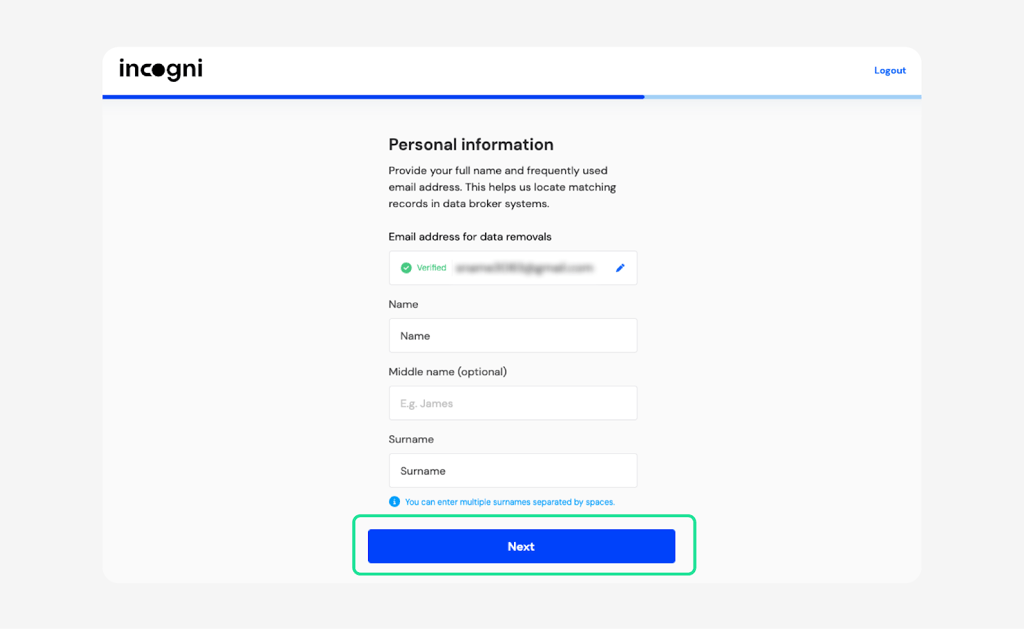
Sign up at Incogni's website and provide your name, email, and current address – minimal information needed to locate your exposed data
-
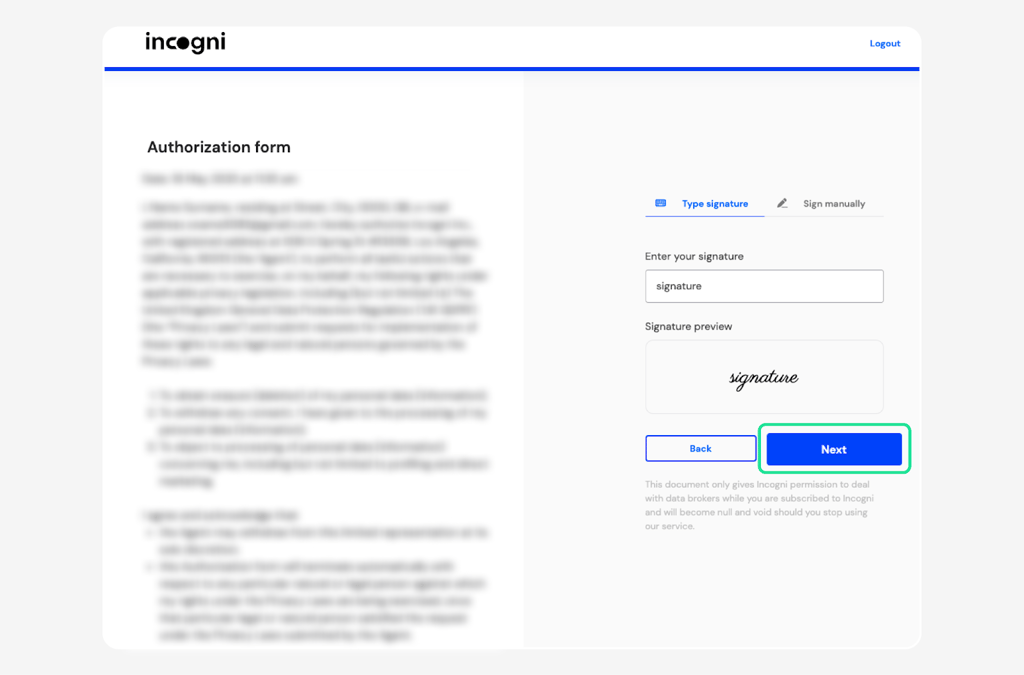
Sign the authorization form to grant Incogni legal permission to contact data brokers on your behalf
- Let Incogni run – it scans for your profiles, sends removal requests automatically, and keeps working in the background
TSA vs CBP: domestic and international travel aren't the same
TSA facial recognition covers domestic checkpoints and is voluntary for all US citizens. Customs and Border Protection (CBP) is a different system – it covers international arrivals and departures, and the rules are considerably less flexible.
- US citizens can opt out of CBP facial scanning at international gates by notifying a CBP officer and presenting their passport manually.
- Non-US citizens, including permanent residents and visa holders, generally cannot refuse – biometric collection is a legal condition of entry and departure under US immigration law.
Conclusion
Opting out of TSA facial recognition is legal, consequence-free, and takes 5 seconds if you say the right words at the right moment. The key phrase (“I opt out of the face scanning”) said before you hand over your ID is all it takes.
Most encounters go smoothly. Some agents are briefly confused or frustrated, and occasionally the process takes a minute longer than it should. None of that is a reason to skip it.
However, what happens at the checkpoint is a narrow slice of your data footprint. While TSA deletes your image, data brokers holding your home address, travel patterns, and everything else they've scraped about you – don't.
The good news is that you can handle both. Opt out at the checkpoint to keep your biometrics off the system, and use Incogni to handle the data broker side that TSA policy was never designed to reach.
FAQ
Can I fly if I refuse the TSA facial scan?
Yes, you can fly because refusing TSA facial recognition doesn't affect your ability to board. TSA policy is explicit: if you opt out, you get standard manual verification and keep your place in line. The TSA policy states that travelers may decline the scan without recourse. If someone implies otherwise, that's inaccurate and worth pushing back on calmly.
Does opting out of facial recognition cause delays?
Officially, facial recognition shouldn't cause delays. In practice, some TSA agents are less practiced at manual ID checks now that biometric processing has become the default. Some travelers report brief waits as a result.
How do I opt out of TSA PreCheck Touchless ID permanently?
The most reliable way is to remove the opt-in at the airline level. Each of the five participating airlines – American Airlines, Alaska Airlines, Delta Air Lines, Southwest Airlines, and United Airlines – has its own settings. Find Touchless ID under security or privacy preferences in your frequent flyer profile and disable it. Without that airline-side enrollment, you won't be routed into a Touchless ID lane regardless of your PreCheck status.
Is TSA facial recognition mandatory for international travel?
For domestic travel, it's voluntary for all US citizens. For international travel, the rules shift. US citizens can opt out of CBP facial scanning at international gates by presenting their passport manually. Non-US citizens generally cannot refuse – it's a legal condition of entry and departure under US immigration law.
Does opting out affect my TSA PreCheck status?
No. You keep dedicated lane access, shoes-on screening, and all other program benefits. Touchless ID is a feature layered on top of PreCheck, not a requirement of it – you can have one without the other indefinitely.
What happens if an agent refuses my opt-out request?
If you've already handed over your ID, the agent may say it's too late to reverse mid-flow. Always speak up before the process starts. If an agent refuses a clearly stated opt-out before the process begins, ask for a supervisor. You can also report it at tsa.gov/contact/customer-service or by calling 1-866-289-9673.