Google’s sneaky privacy policy update pushes users to consider alternatives
“If you're not paying, you're the product.”

Image by Shutterstock.

 Follow us
- Google says Gmail, Drive, and Photos data is not used for ads unless users connect it to ad-supported services.
- The updated policy affects users who let Gemini or Search access personal data for more personalized responses.
- Users can disconnect Google Workspace and Google Photos from connected content apps in Google Account settings.
Key Takeaways by nexos.ai, reviewed by Cybernews staff.
Google has updated its privacy policy, stating that it may use data from Gmail, Google Photos, and Drive for targeted advertising.
The search giant says that it doesn’t use data from Drive, Gmail, or Google Photos to show personalized ads, but the updated policy notes that this changes if “you choose to make data from these services available to other Google services that support personalized ads.”
Updated on October 16th, the privacy policy states that users who allow AI services such as Gemini and Search to access their personal data to provide more personalized responses and recommendations may also be subject to more targeted ads.
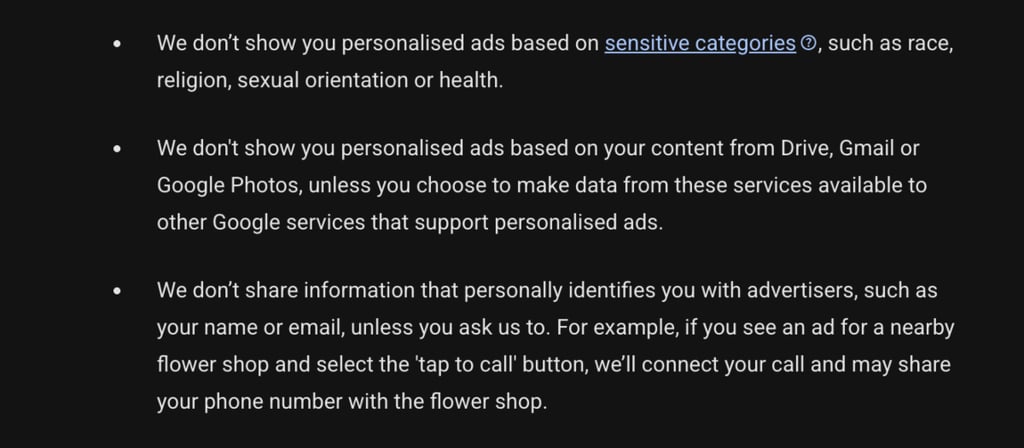






The policy also noted that it doesn’t share data, such as names, phone numbers, or email addresses, that could identify them with advertisers.
While this policy update doesn’t imply that Google will start trawling through users' emails and photos to serve them ads, it still leaves them in a vulnerable position if they share their data just to receive more personalized answers and don’t want it used for advertising purposes.
How to prevent Google from accessing connected apps?
Google users can make changes to the information accessed through their connected Google apps:
- Go to Google Account and select Data & Privacy.
- Find Personalization & Activity and select Personalization settings.
- Click on Manage Personalized Recommendations in Search Services.
- Under Additional Personal Intelligence, find Connected Content apps.
- Disconnect Google Workspace and Google Photos.
Making these changes won’t remove information that Google has already accessed, as Search Service History stores data even after a user disconnects the app or deletes the file, Android Authority noted.



Stay updated with our latest stories and follow us on social media
Be the first to discover new stories, ideas, and updates from our team.
Users react to Google policy changes
The change sparked an online discussion, with many social media users expressing disapproval while also considering how they could avoid similar changes in the future.
“People are going to have to get comfortable paying for these sorts of services. If you're not paying, you're the product,” wrote one user.
Some Redditors thought the issue should be addressed through legal action.
“The only way this stops is the government passing legislation that protects personal data and disallows companies from collecting/storing and selling personal information,” shared a user.
Google quietly changes privacy policy so your Gmail and Photos could be used in targeted ads
by u/Emilia-Rose in technology
One Redditor questioned the legality of changing policies users already agreed to, with another user noting that while companies like Google often get sued for it, they’re equipped to pay the fines and continue the same practices.
“Cringe. It's a shame that my Gmail is connected to so much. It's going to be a hassle to remove,” said another netizen.
Many responses also shared the alternatives they replaced Google apps with, including Proton Mail for email, Brave Search for maps, iDrive for cloud backup, and more.