Your questions answered by Cybernews: How to stop Gemini from spying on your inbox
Google is sneaking into your inbox to train its AI models. Is there a way to stop Gemini from scanning your emails? Every week, our team selects one pressing and common reader issue and deconstructs it to help you stay safe online.


 Follow us
Google is sneaking into your inbox to train its AI models. Is there a way to stop Gemini from scanning your emails? Every week, our team selects one pressing and common reader issue and deconstructs it to help you stay safe online.
If you use Gmail, this is something you should know. Google has quietly introduced new features that allow it to access your private messages and attachments to train the company’s AI models.
It all stems from Google's efforts to supercharge Gmail with its Gemini AI features, which aim to enhance features like Smart Compose and AI-generated replies. To improve the model, the company has begun automatically opting users in for AI training on real user emails and attachments.
Google insists that the data is anonymized and protected during the training process. However, not all may find comfort in that assurance. Internet users have been raising concerns about how to opt out and stop feeding Google’s Gemini with their data.
Let’s take a look at what can be done to prevent Google from training its AI on your emails.




How to opt out of Google AI training on your Gmail?
- Open Gmail on your desktop or phone.
- On desktop, click the gear icon and choose “See all settings.” On mobile, open the menu and go to Settings.
- Scroll until you find “Smart features in Gmail, Chat, and Meet.”
- Disable the toggle for Smart Features.
- If you're using a desktop, ensure you scroll down and click Save changes.
- Refresh your Gmail app or sign out and repeatedly sign in.
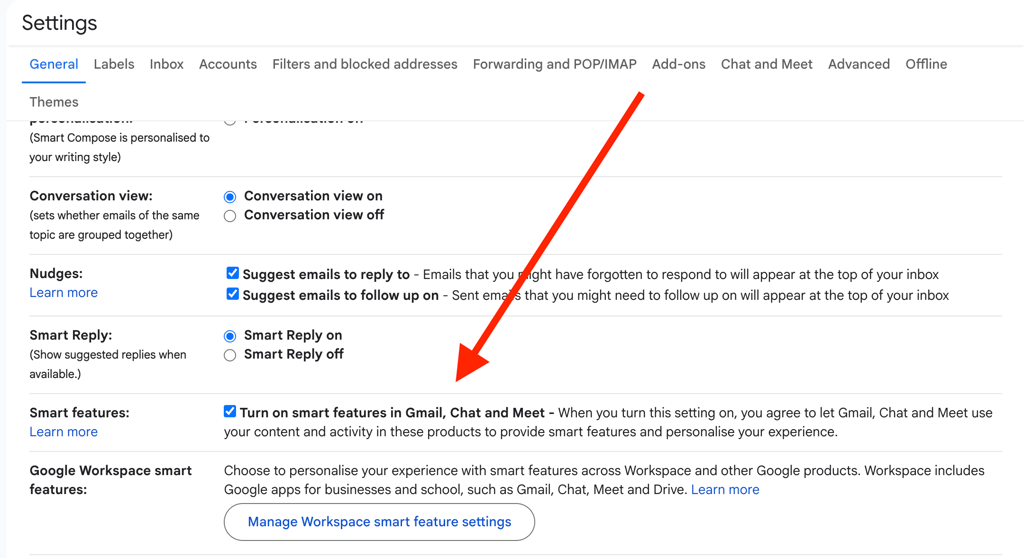
Please note that unticking “Smart features” will also remove the filtering options, as Google scans your emails to determine which emails should be categorized.
The next step is to secure your Google Workspace.
- In Settings, look for Google Workspace smart features.
- Select Manage Workspace smart feature settings.
- You’ll see two options: Smart features in Google Workspace and Smart features in other Google products. Turn both off.
- Be sure to save your changes
Does opting out save your privacy?
Despite the opt-out option being present in Google’s UI, internet sleuths remain critical.
“There isn't a way for users to verify if big tech is still not analyzing and using every character produced on their platforms, even after opting out,” reminds a commenter on Reddit.
“For me, that's the biggest problem – if I cannot independently verify it, it might as well not exist in all practical intents and purposes,” responds another one.
And Redditors’ distrust is justified. In September, a California court ordered Google to pay $425 million in compensatory damages, ruling that the company had violated user privacy. The class-action lawsuit, filed in 2020, accused Google of pulling data from Android devices even when users had disabled tracking through the “Web & App Activity” setting.






The court agreed with the plaintiffs, finding that Google continued to gather information despite users explicitly opting out of such tracking.
Additionally, Google's intrusion into Gmail inboxes is as new as Google itself.
“Gmail has been scanning your emails for 15+ years now. This opt-out is just to avoid training Gemini,” said one Redditor.
The company has long been criticized for automatically scanning emails for multiple purposes. Back in 2004, a coalition of thirty-one privacy and civil liberties groups sent a letter to Google, urging the company to pause Gmail development until its privacy issues were fully addressed.
They wanted clear answers about how long Gmail would store user data and how that information might move between Google’s business units. Their biggest concern centered on Google’s decision to scan every incoming email to place targeted ads.
Unlock more exclusive Cybernews content on YouTube.