Best free VPN services in 2026
Our in-house cybersecurity experts and journalists, renowned for major reports like The Mother of All Breaches, conduct transparent, unbiased VPN testing and in-depth analysis.
With 750+ articles crafted based on real-world research, we empower readers to make informed purchasing decisions through first-hand expertise.
Learn more
Best free VPNs without a subscription
-
 View deal1. Best free VPN service with unlimited data – Proton VPNExpert review
 -
 View deal2. Trustworthy free VPN with strong privacy policies – Hide.meExpert review
 -
 Learn more3. Offers great security features - Hotspot Shield
 -
 Learn more4. Best free VPN app for beginners – TunnelBear
Most free VPNs cut corners on security, restrict your speeds, or quietly profit from your data. Only a handful come from trusted providers and offer real protection without hidden costs. Before diving into our top picks, here's why this matters more than you might think
That said, free VPNs aren't useless when they come from a legitimate provider. Many premium VPNs offer a free version, free trial, or a 30-day money-back guarantee, making them a solid entry point for testing how a VPN works without commitment.
That’s why I created this guide to separate the risky options from the ones that actually do their job. Below, I break down what free VPNs can and cannot do, review the best free VPNs worth your time, and call out providers you should avoid. I also include a few paid alternatives for anyone who decides they want stronger privacy and broader features later on.
Are free VPNs safe to use?
No, not all free VPNs are safe to use. Many of them don’t take the necessary steps to ensure your security and privacy and may even sell your data for profit.
That being said, there are a few free VPNs that are completely safe to use. They’re usually a free tier of a premium service like Proton VPN, Hotspot Shield, and Hide.me. This means they follow industry-standard security practices and will provide premium-level protection.
Of course, even the best free VPNs are not as good as premium VPNs. While free providers can offer the same level of online security, there are limitations to using a free VPN service. For example, premium services usually have faster speeds and more servers.

Best free VPNs – detailed list
If you’re looking for a free VPN, it’s important to understand what they can and cannot do. That’s why I compiled a list of the best free VPNs that work to show off their capabilities.
1. Proton VPN – best free VPN in 2026

-
Security and privacy
-
Speed and data
-
Servers
-
Use cases
Out of all the free VPNs I’ve tried, Proton VPN has been the most reliable. It has no bandwidth or speed limit and no data caps. While it doesn’t have many server locations, one could argue that this contributes to Proton VPN’s comparatively faster speeds.
More information can be found in our Proton VPN review.
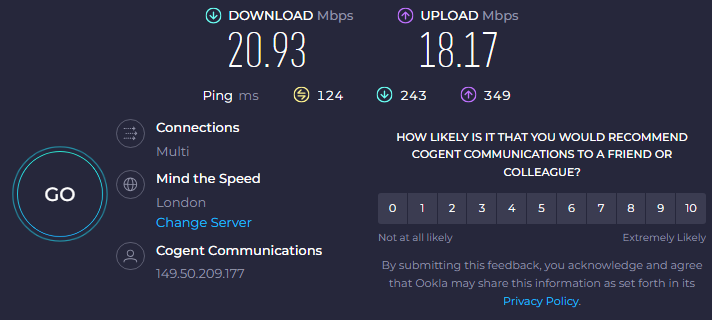
The reason why Proton VPN is the best free VPN is because it only has a few limitations of a free VPN that are common among its competitors. First and most important – the bandwidth and speed are unlimited. Our speed test confirms it, with Proton VPN maintaining around 40% average speed in the UK server. While this is lower than premium VPNs, it's important to note that Proton VPN imposes no bandwidth or data caps, meaning this speed is sustained and unlimited.
I had no issue accessing major streaming services with Proton VPN. Again, there are only 10 countries you can connect to and you can’t choose which one – this can make it difficult to unblock specific libraries. As for gaming, the US server location is the most suitable option, as I experienced lag when connected to other servers, but it could depend on your location. You’ll probably have to reconnect multiple times before you get the server you want.
When it came to server availability, I was a little bit disappointed. Although the number of countries covered has recently increased from 5 to 10, I still feel it’s not enough. Proton free VPN offers servers in the following countries: Canada, Mexico, Norway, Singapore, Switzerland, the Netherlands, Japan, Romania, Poland, and the US. That’s significantly less than the premium version can offer, so if you want access to servers in other locations, you need to upgrade to a paid version. However, I still had no issue accessing geo-restricted content in those available areas, and the servers themselves didn’t seem too crowded, as the speed remained stable.
Like most free VPNs, Proton VPN supports just one device. It means that you cannot have multiple simultaneous connections with the same free subscription. On a positive note, you can use Proton VPN on pretty much any device, as it’s compatible with Windows, Android, iOS, macOS, and Linux operating systems.
In terms of online privacy, Proton VPN is a safe choice. Its privacy policy clearly states that even the free version keeps no logs of your activity – a fact confirmed by independent audits. I also tested for DNS leaks and used the kill switch – both worked exactly as expected. I was pleasantly surprised to see an obfuscation feature included in the free tier as well. Honestly, it’s one of the few free VPNs that comes close to premium-level privacy.
While the free tier is solid, the premium Proton VPN subscription is much more feature-rich, and the provider is sure to remind you of that by showcasing those features in-app. However, to access them, you need to upgrade to a paid version. One notably missing feature in the free version is NetShield – an ad blocker with basic malware protection.
All in all, I found Proton free VPN very easy to use and well functioning. Its privacy and security features were sufficient to make me feel safe browsing the net. I was surprised I could access streaming service libraries in other locations, as that used to be an issue for Proton VPN’s free version. However, I felt a bit pressured to upgrade, seeing premium features promoted among the free ones in the app.
2. Hide.me – private and reliable free VPN

-
Security and privacy
-
Speed and data
-
Servers
-
Use cases
Hide.me stands out by offering its users some of the best security and privacy guarantees a free VPN can offer. Besides, with more server locations than some of its free competitors, Hide.me is certainly an appealing choice.
You can learn more about it in our Hide.me review.
Hide.me no longer limits users’ bandwidth and, officially, does not limit speed. However, I noticed an occasional significant lag across all Hide.me servers. Also, while there are claims that the previous 10GB/month data cap has been removed for free users, Hide.me’s own FAQ section still states that the cap exists – the lack of clarity makes the service look unprofessional.
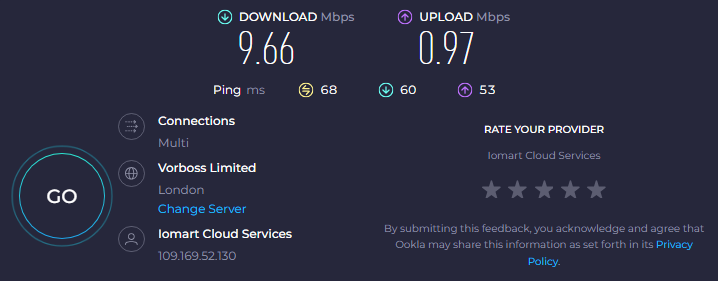
Overall, Hide.me is the kind of VPN that either shows great speed retention (80% or more) or absolutely terrible (9.6Mbps download and 1Mbps upload speeds). The speed you’ll get seems to depend entirely on chance, as servers and the time of day show different results, too. In the image below, you’ll find our speed test results based on the 76Mbps download and 30Mbps upload baseline speed.
Unsurprisingly, my experience with Hide.me wasn’t great when it came to streaming, gaming, or torrenting. Aside from slow speed, it really struggled to unblock most streaming platforms – I only got Netflix working after several tries. Even then, the connection felt laggy, which made gaming frustrating and torrenting almost not worth the effort. Overall, it just didn’t hold up for anything beyond basic browsing.
That being said, I appreciated the fact that free users get servers in 8 locations: the US, the UK, Canada, Germany, France, the Netherlands, Spain, and Singapore. That’s significantly less than with the premium version, but enough to access geo-restricted content globally.
Like Proton VPN, Hide.me supports just one simultaneous connection, which is common for free VPN services. However, it works with all operating systems – macOS, Windows, iOS, Android, and Linux. Connecting to Hide.me from any device is also very simple and straightforward.
On top of a privacy-oriented jurisdiction in Malaysia (outside of the Eyes alliance), Hide.me also offers its users strong data encryption, a built-in kill switch, IP leak protection, and a strict no-logs policy. Unlike Hotspot Shield, Hide.me does not show ads, so there’s no risk of any of your information reaching third parties.
Upon upgrading, I noticed that Hide.me’s premium version is much more feature-rich than the free one. Premium users can get features such as split tunneling, unlimited data, and access to all 2600+ global servers. However, the free version still has a few decent security and privacy features and doesn’t require you to create an account.
I loved the simplicity of Hide.me’s app, as well as strong security and privacy features. Not having to create an account is a strong advantage too. However, as most people tend to use a VPN for streaming, Hide.me’s struggle to unblock streaming services in all of its 8 free server locations was certainly a disappointment.
3. Hotspot Shield – reliable and secure free VPN

-
Security and privacy
-
Speed and data
-
Servers
-
Use cases
Hotspot Shield impresses users with strong encryption and even basic malware protection – a rare feature among free VPNs. Its connection stability is also worthy of mention.
For a deep dive into this provider, read the detailed Hotspot Shield review.
I gave Hotspot Shield’s free version a shot, and while it does offer unlimited bandwidth, there are a few catches. The speed felt noticeably slower than what I’ve seen in its premium plan, and there’s a daily 500MB data cap – which runs out faster than you’d think. That said, I managed to bump up the limit a bit by watching ads, which isn’t ideal, but it helps. When I tested the UK server, I got around 16% of my usual speed – a pretty bad result.
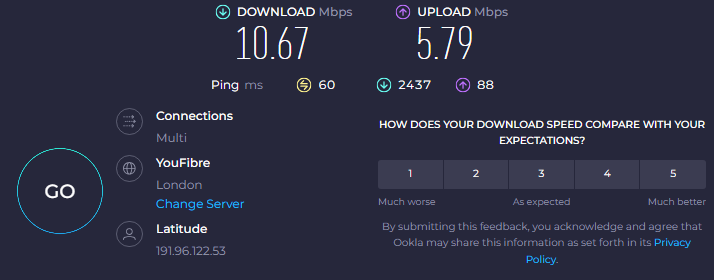
Furthermore, Hotspot Shield has free servers only in the US. While it doesn’t disclose how many servers are in this location, I doubt that number is very high.
While having just one server location does not impact the security or privacy of a VPN, it severely limits access to global streaming libraries. Add the 500MB/day limit and you’ll quickly see why the free Hotspot Shield is terrible for streaming. I could barely stream a single episode before hitting the cap.
Watching ads increased the limit a bit, but it still wasn’t enough for anything like binge-watching or gaming. I also had some trouble connecting to US streaming services at first. It took a few tries, but eventually, I got through and was able to watch the content. Still, it felt like hit-or-miss.
Unsurprisingly, Hotspot Shield also supports just one simultaneous connection. This is nothing new for free VPNs. Hotspot Shield supports all major operating systems except for Linux. But it’s not because they don’t have the capability – it’s just locked behind the paid plan.
Security-wise, Hotspot Shield provides users with everything they need to secure their internet activities. It uses the industry-standard AES-256 encryption to secure your data, even on the free plan. Besides, Hotspot Shield has a strict no-logs policy, so despite showing ads to its free users, your activity cannot be used against you. While this may not include browsing history, privacy-conscious users should be aware that Hotspot Shield is not a zero-knowledge provider. For maximum privacy, Proton VPN or Hide.me are stronger choices.
I tried upgrading and found the difference between the free and paid versions very noticeable. Not only does the free version have significantly fewer server locations, but it also has data caps and speed limitations. Meanwhile, the paid version has more extensive malware protection, and streaming-optimized servers. If you want access to these features, you need to subscribe, which costs from $2.99/month.
While my review may seem harsh, overall, I wasn’t unhappy with Hotspot Shield. Naturally, it lacked some features that Proton VPN had, plus it runs ads. But you don’t have to watch them and simply stick to the existing data cap. Besides, as I’m not based in the US, technically, I gained another server location to watch streaming content. Even though Hotspot Shield is not up to everyone’s taste, I’d say it’s a pretty reliable and secure free VPN for basic needs.
4. TunnelBear – free VPN with the most user-friendly interface

-
Security and privacy
-
Speed and data
-
Servers
-
Use cases
TunnelBear entices users with its fun, easily manageable interface and no server limits for its free version. It means that, just like premium subscribers, free version users get servers in 47 countries.
If you’d like to learn more, read our TunnelBear review.
TunnelBear limits both bandwidth and data, placing a data cap at 2GB/month, which you can’t do much with. And while there aren’t any official speed caps, TunnelBear performance was mediocre in our speed tests. It’s a bit strange, considering that it has significantly more server locations than other free VPNs on this list.
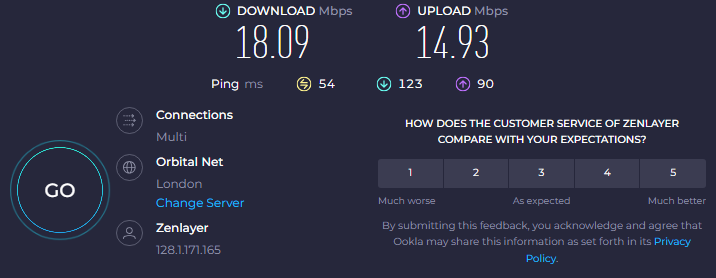
TunnelBear is the only free VPN that does not limit the number of servers for free users. It means that all 8,000+ servers in 47 countries are accessible to all. Some of those locations include popular areas like the US, the UK, Australia, Canada, Japan, and Singapore. The main downside is that you can’t select which server you’ll be connected to, which kind of defeats the purpose of having so many servers available.
The good thing about TunnelBear is that its lack of server limitations allows users to access foreign streaming service libraries across the globe. The bad thing is that TunnelBear, in general, struggles to unblock streaming services. Some platforms work better than others, while some are inaccessible. Practical use of TunnelBear is also more limited for free version users because torrenting is unavailable for free, and the data cap makes it nearly impossible to game or binge-watch.
TunnelBear, like other VPNs on my list, supports multiple operating systems and browsers. Namely Chrome, Firefox, Windows, macOS, iOS, Android, and Linux. And like most free VPNs, it supports just one device with its free version.
TunnelBear has the same privacy and security features in its free plan as it does in the paid one. It uses the same industry-standard AES-256 encryption algorithm and follows a strict no-logs policy. Free users can also take advantage of a kill switch (VigilantBear) and obfuscation technology (GhostBear). However, its split tunneling feature (SplitBear) has been removed from the free tier in early 2025.
Upgrading gave me access to country selection, advanced features, and let me connect multiple devices at once. Most importantly, the speed was significantly faster, and there was no data cap, which made a noticeable difference. Still, if you want a premium VPN, I’d recommend checking out our guide to the best VPNs.
I’d like to say that I enjoyed using TunnelBear as much as I love its interface design, but that wouldn’t be true. If I had to pick a free VPN for my personal use, I would prioritize the one that could help me access streaming libraries, and TunnelBear is unfortunately not the best at this. However, for personal data protection, especially for beginner users, this is one of the best free VPNs out there.
Compare how these VPNs stack up side by side
Here’s a quick overview of the best free VPNs in 2026 – compared side by side to help you spot the differences in their streaming capabilities, trial and money-back guarantee lengths, and server counts. Use this table to find the one that best fits your needs and how it compares with my recommended premium NordVPN.
| Best VPN | Ranking | Free trial | Starting price | Money-back guarantee | Servers | Streaming |
| ProtonVPN | Yes, unlimited | $2.99/month | 30-day | 20,700+ servers in 149 countries | Netflix, BBC iPlayer, YouTube, HBO Max, Disney+ | |
| Hide.me | Yes, unlimited | $2.69/month | 30-day | 2,600 servers in 91 countries | Netflix, BBC iPlayer, Youtube, and more | |
| Hotspot Shield | Yes, unlimited | $2.99/month | 45-day | 1,800 servers in 80 countries | Netflix, BBC iPlayer, YouTube, Amazon, Hulu, and more | |
| TunnelBear | Yes, unlimited | $3.33/month | – | 8,000 servers in 47 countries | Netflix, BBC iPlayer, YouTube |

How I tested and ranked the best free VPNs
Free VPNs vs premium free trials
I’ve tried a lot of free VPNs over the years, and, to be honest, most of them left me frustrated. Some free VPNs had low data limits, slowed down my internet too much, and quite a few locked basic features like server selection behind a paywall. Just trying to browse or stream felt like stepping back into the early 2000s.
Then I gave a few premium VPNs a shot using their free trials – like NordVPN, Surfshark, and Proton VPN – and it was a completely different story. No speed throttles, no feature restrictions, no stress. With premium VPN free trials, I was able to stream in HD, switch between countries easily, and test advanced features like adblock and malware protection without any limitations.
If you actually want to see what a VPN should feel like, a premium free trial is the bestsafe way to go. You get the full package upfront, and if it doesn’t fit your needs, you can walk away without spending anything.
Free VPNs you should avoid
There are free VPNs that are unreliable. As with all things, if the free provider seems too good to be free, it likely makes money by keeping and selling logs of your online activity. Reliable free VPNs have a clear source of income. For example, Proton VPN has a premium version and, in its limited free version, promotes paid features to encourage users to upgrade. However, free VPNs, particularly unverified ones, with many great features without a known source of income, are likely to use your data to earn money.
Just to give you some examples of untrustworthy free VPNs:
| Free VPN | Why you shouldn’t trust it |
| Hola VPN | Establishes a peer network, meaning that others can use your internet connection. In 2015 Hola VPN was exposed for selling users’ bandwidth to a botnet. |
| SuperVPN | Privacy policy establishes user data logging and lacks data encryption, potentially leading to security vulnerabilities. |
| Turbo VPN | History of privacy violations, such as selling user data to third parties. |
| Betternet | Had a version with malware and trackers. |
| SuperVPN | Suffered a data breach exposing 360 million user records in 2023, including email addresses, device information, and browsing data. |

Video review
If you prefer an audio-visual format, you can check out this year’s best free VPNs in our video review:
Final thoughts on free VPNs
Even if a free VPN comes with limits on speed or data, it’s still a smarter choice than using a sketchy, unverified service from an unknown company. A trustworthy free VPN can still do the essentials: keep your device and identity safe while browsing on public Wi-Fi and sometimes even help you access geo-restricted content.
That said, if you want the full experience – like unlocking streaming libraries, faster speeds, and extra tools for privacy – you’ll need to go premium. Proton VPN, for instance, offers advanced features that can shield your browsing activity from your ISP or on public networks. Plus, it has a massive global server network that’s ideal for streaming, torrenting, and gaming without interruptions. You can try out its free tier first and upgrade at any time.
FAQ
What are the best free VPNs without ads?
Proton VPN and Hide.me do not show ads to their free version users. Both of these providers have multiple privacy and security features.
Which free VPNs do not require registration?
Proton VPN and Hide.me are reliable free VPNs that do not require registering for an account. Instead, you can start using the service without providing sensitive personal information.
What is the fastest free VPN available?
Proton VPN is the fastest free VPN this year. Its speed across all free server locations is decent, with a good speed retention rate compared to other free VPNs on the market.
Can I use a free VPN to stream Netflix or Hulu?
Yes, but free VPNs usually struggle to unblock streaming services, particularly the ones with advanced VPN-use tracking, like Netflix or Hulu. I managed to unblock both of these streaming services with Proton VPN, but it might take a few tries.
Can I use a free VPN for torrenting safely?
Yes, but only a few free VPNs will be good enough for torrenting. Proton VPN allows users to torrent safely. However, you may encounter some issues. Due to data caps, speed limitations, or general lack of P2P support, hardly any free VPNs support torrenting. While Proton VPN does not have data caps, you should still expect lag.
Are there any truly free VPNs without data limits?
Yes, Proton VPN offers a free plan with no data restrictions. While it does have fewer servers than its paid version, it’s one of the very few free VPNs that does not limit speed, bandwidth, or data.
Do free VPNs keep logs of my online activity?
Some do, some don’t. If you want a free service that does not track your online activity, it’s important to pick a reliable free VPN with a confirmed no-logs policy. Examples of free VPNs with a no-logs policy include Proton VPN, Hotspot Shield, Hide.me, and TunnelBear.