Top VPN extensions for Chrome in 2026
Our in-house cybersecurity experts and journalists, renowned for major reports like The Mother of All Breaches, conduct transparent, unbiased VPN testing and in-depth analysis.
With 750+ articles crafted based on real-world research, we empower readers to make informed purchasing decisions through first-hand expertise.
Learn more

In my testing, NordVPN stood out as the best VPN for Chrome. It delivers strong privacy backed by an audited no-logs policy, achieves excellent speeds with the NordLynx protocol, and integrates smoothly through its secure, lightweight Chrome extension. If you need a fast and dependable VPN that keeps your browsing private without affecting performance, NordVPN is the best option.
In today’s digital landscape, Chrome users can choose from two main types of VPN solutions: browser extensions and full VPN apps. Each serves a different purpose, depending on how much protection you need.
Chrome VPN extensions are lightweight tools that work directly inside your browser. They let you switch servers quickly and protect your browsing activity with minimal setup. Full VPN applications, on the other hand, secure all internet traffic on your device, not just Chrome. This means your apps, downloads, and background connections stay encrypted as well.
In February 2026, I retested the top VPNs for Chrome and evaluated them based on extension performance, ease of use, connection speeds, privacy protections, and pricing. Below, you will find the updated results and recommendations.
Top 5 best picks for Chrome VPN in 2026
- NordVPN – speedy Chrome VPN with advanced features
- Surfshark – budget-friendly VPN for Chrome with unlimited connections
- Proton VPN – Chrome VPN for privacy
- ExpressVPN – premium VPN for Chrome
- IPVanish – beginner-friendly Chrome VPN
- CyberGhost – free Chrome VPN extension
Compare Chrome VPNs
In this table, you can see the key information about each provider compared side by side. For a deeper look into their performance on Chrome, speeds, and security features, refer to the detailed descriptions below.
| VPN provider | Rating | Is Chrome extension available? | Chrome VPN extension features | App compatibility | Price |
| NordVPN | ✅ Yes | Kill switch, next-gen antivirus, WebRTC leak protection, split tunneling, Location spoofing, warnings, multiple server locations | Windows, macOS, Linux, Android, iOS | From $3.49/month | |
| Surfshark | ✅ Yes | IP leak protection, CleanWeb, website safety warnings, multiple server locations | Windows, macOS, Linux, Android, iOS | From $2.49/month | |
| Proton VPN | ✅ Yes | Secure Core, Auto connect, Split tunneling, WebRTC leak protection | Windows, macOS, Linux, Android, iOS | From $2.99/month | |
| ExpressVPN | ✅ Yes | IP leak protection, WebRTC blocking, location spoofing, multiple server locations | Windows, macOS, Linux, Android, iOS | From $2.99/month | |
| IPVanish | ❌ No | - | Windows, macOS, Android, iOS, Linux | From $2.19/month | |
| CyberGhost | ✅ Yes | IP leak protection, ad and tracker blocker, malicious websites blocker, 4 server locations | Windows, macOS, Linux, Android, iOS | From $1.99/month |




We spare no effort to test the products & their features. All information is gathered by our in-house research team & fact-checked by our team of experts. Discover the ins and outs of our testing procedures.
Why do I need a VPN extension for Chrome?
A full VPN app is always the best choice for security, but a Chrome VPN extension is better than not using a VPN at all. Plus, an extension might be better for certain activities.
A VPN extension for Chrome might be useful for casual browsing or streaming via a browser, for example, when you need to keep your system resources less loaded.
However, it only protects traffic from the browser, so any other apps on the same device won’t be protected.
A reliable VPN app is a much better choice for securing your privacy on all system apps and browsers. Besides, some Chrome VPN extensions limit server locations or don’t allow you to choose a location at all. It’s best to choose a trusted VPN app with an additional VPN extension for Chrome, like NordVPN or Surfshark.
Best VPNs for Chrome in 2026 – detailed list
Working alongside our research team, I chose six VPN providers to test for everyday Chrome use, focusing on security tools and real-world performance. After comparing the results, NordVPN stood out with the strongest overall Chrome extension. Keep reading to see why it ranked first and explore the full list of tested providers.
Top 1. NordVPN

| Based in: | Panama |
| Chrome extension available: | ✅ Yes |
| Max connections: | 10 |
| Current deal: | Get 75% OFF NordVPN + 3 months free |
NordVPN is the top Chrome VPN of 2026, delivering blazing-fast speeds, cutting-edge features like next-gen antivirus (former Threat Protection Pro) to block malware and shield against cyberthreats. With over 7 million users globally, its user-friendly Chrome extension ensures top-tier security and seamless browsing.
Usability and user experience
The NordVPN Chrome extension, rated 4.2/5 based on 7600+ reviews, is easy to install with one click. Once logged in, you can use Quick Connect or select a specific server. Settings like language, appearance, auto-connect, split tunneling, kill switch, leak protection, and location spoofing are all easily accessible. I found that all settings are never more than four clicks away.
In my experience, the extension works seamlessly. I often forget it's there until I need to switch locations. It doesn’t slow down my browser, and with auto-connect enabled, it always starts up quickly. I also keep the kill switch on for peace of mind. However, the extension is limited compared to the full app – it only protects browsing traffic and lacks specialty servers like Double VPN and obfuscated servers.
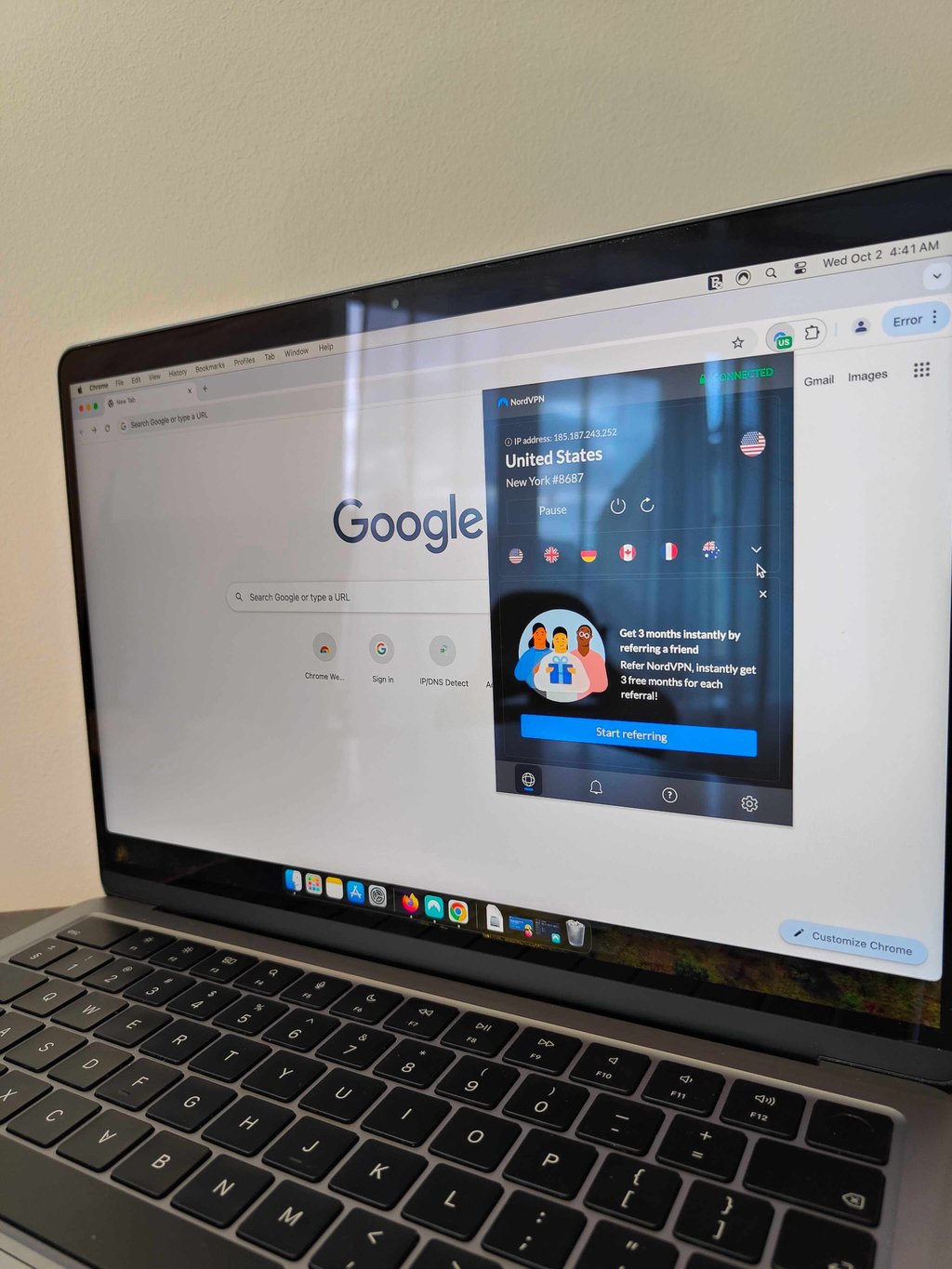
The feedback on the extension is mainly positive, with many users expressing satisfaction. However, a few have reported issues with the split tunneling feature not functioning correctly. Additionally, users connecting from countries with internet restrictions, such as China or Russia, have experienced challenges as well.
Speed and performance
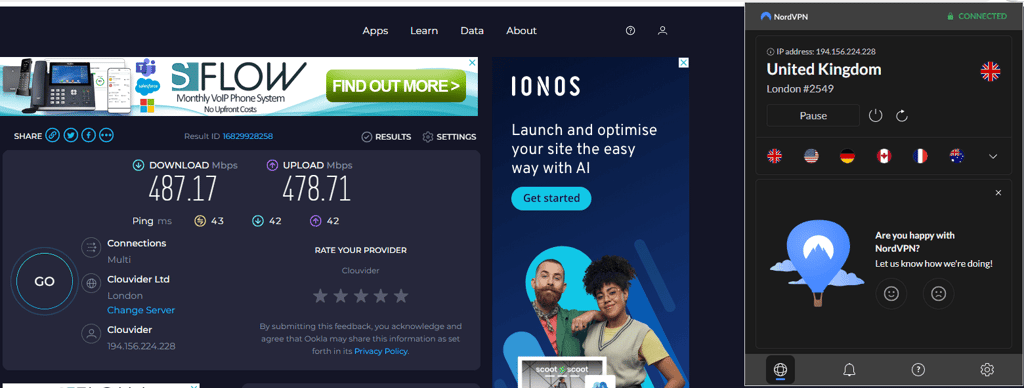
NordVPN’s Chrome extension stood out with excellent performance, retaining 97% of the original download speed and 96% of the upload speed. The 43ms ping was typical compared to others, making NordVPN one of the fastest VPNs out there.
Server network and locations
NordVPN has a massive network of over 8,000 servers across 149 countries, which is plenty for accessing almost any content you want. No matter where you are, there's likely a NordVPN server nearby – except maybe in Antarctica. It uses RAM-only servers, which means your data isn't stored long-term. If you're using the app, you also get access to specialty servers like Double VPN, Obfuscated servers, Onion Over VPN, and P2P servers, giving you extra options for security and privacy. Our thorough NordVPN review can offer deeper insights into its features and performance.
Privacy and security
NordVPN uses AES-256 and ChaCha20 encryption to keep your data secure. Its strict no-logs policy has been audited six times, most recently by Deloitte in December of 2025, ensuring that none of your browsing data is tracked or stored. It also offers a kill switch that cuts internet access if your VPN connection drops, so you never browse unprotected. The extension even has WebRTC leak protection to keep your IP address hidden and prevent leaks.
Compatibility
NordVPN works with various devices, including Windows, macOS, Android, iOS, Linux, tvOS, Android TV, Raspberry Pi, Fire TV, and routers. There's also a browser extension available for all Chromium browsers, Edge, and Firefox. For devices that don't support VPNs, you can set up Smart DNS. The app is easy to install on most devices, though setting up Smart DNS, a router, or a manual connection can be a bit more involved. Thankfully, NordVPN offers 24/7 support and guides to help with all setups.
Pricing
NordVPN offers three plans, starting at just $3.49/month, all of which support up to 10 devices. Each plan includes core VPN features, with additional cybersecurity tools available in higher-tier options. For example, the Complete plan includes the next-gen antivirus and the NordPass password manager. Higher plans allow access to NordLocker encrypted storage and Coveron (formerly NordProtect), an identity theft protection service. What I like about Coveron is that it combines identity, credit, dark web, and financial account monitoring with identity recovery support and home title protection, while its Couples and Family plans extend coverage to up to 5 adults and all children. Just keep in mind that Coveron identity protection measures are available to all US residents, except those who reside in New York and Washington state.
Whether you’re looking for a basic VPN or a comprehensive cybersecurity solution, NordVPN has options to fit your needs. You can choose between 2-year, annual, and monthly plans, with long-term subscriptions offering the best value at a reduced monthly price.
Top 2. Surfshark

| Based in: | Netherlands |
| Chrome extension available: | ✅ Yes |
| Max connections: | Unlimited |
| Current deal: | Now up to 87% OFF Surfshark + 3 months FREE |
Surfshark is a top choice for Chrome users, offering advanced security features at some of the most affordable prices on the market. To save extra, we also offer the Surfshark discount code – OFFCN. With support for unlimited devices on a single subscription and over 1 million users globally, its Chrome extension provides great value for those seeking comprehensive protection at a budget-friendly rate.
Usability and user experience
The Surfshark Chrome extension is super easy to install – just like NordVPN – and it comes packed with features. With a 3.9/5 star rating from 2400 reviews, it’s a solid choice. What really makes Surfshark shine is the variety of features it offers, especially if you choose the Surfshark One plan. With the Surfshark Starter plan, you gain access to all the standard VPN features, including server selection, along with several additional perks like Alternative ID, website safety alerts, CleanWeb, leak protection, auto-connect, and the Bypass feature. Additionally, Surfshark One offers extra functionalities such as Surfshark Alert, Search, and Antivirus. Despite packing in so much, the interface remains well organized, making everything easy to find and use.
When it comes to performance, Surfshark really impressed me. I didn’t notice any slowdowns, connection drops, or unexpected issues while browsing. The extension runs smoothly without crashing. It’s almost as powerful as the full app, minus a few advanced options like specialty servers and extra VPN protocols, but still more than capable of providing a secure, user-friendly browsing experience.
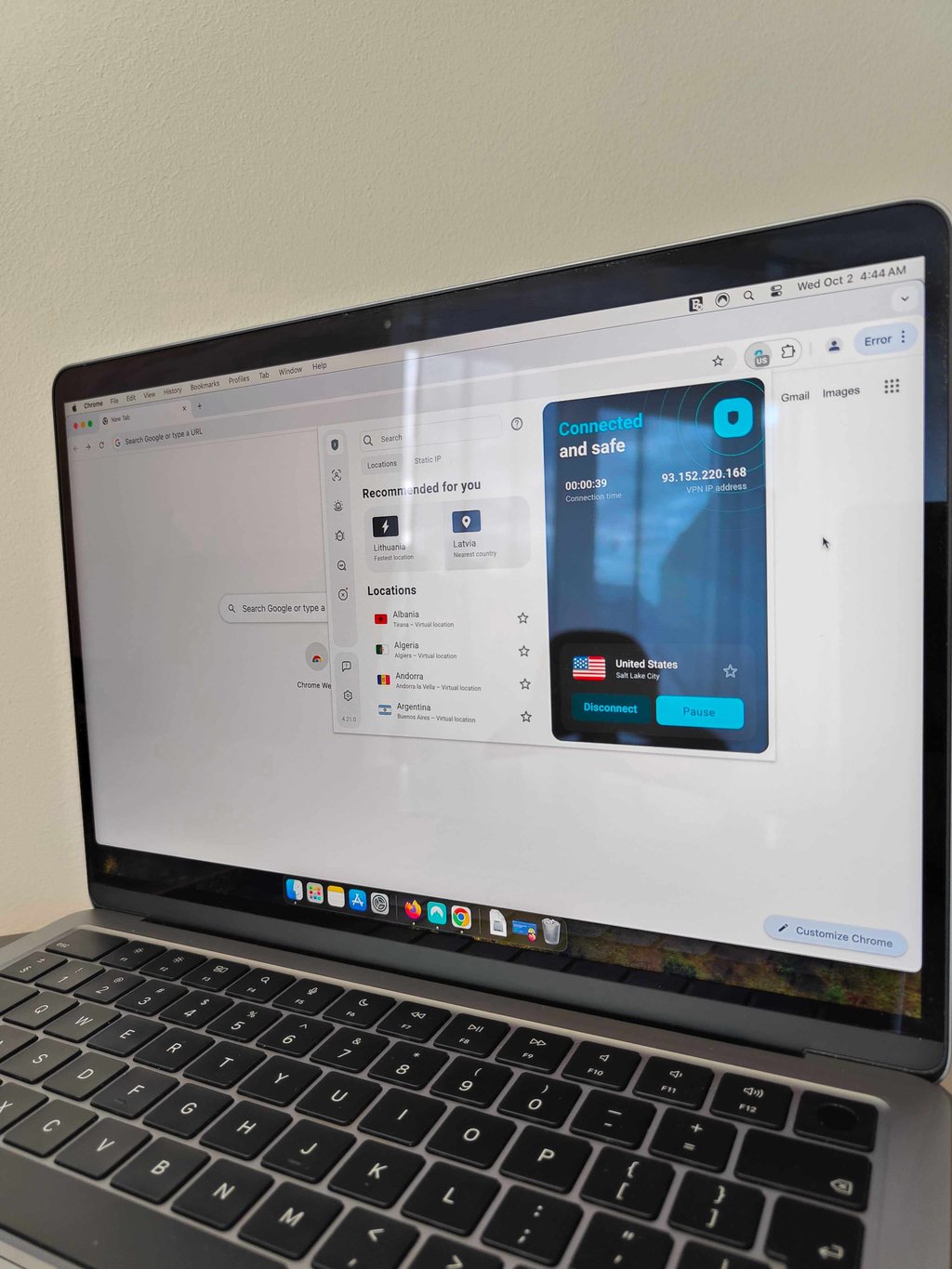
Reviews on the Chrome Web Store are mostly positive, similar to NordVPN. However, users have noted that the ad-blocker struggles to block YouTube ads, which is a common issue since YouTube has implemented strict measures to bypass ad blockers. Additionally, a few users have reported experiencing slow connection speeds.
Speed and performance
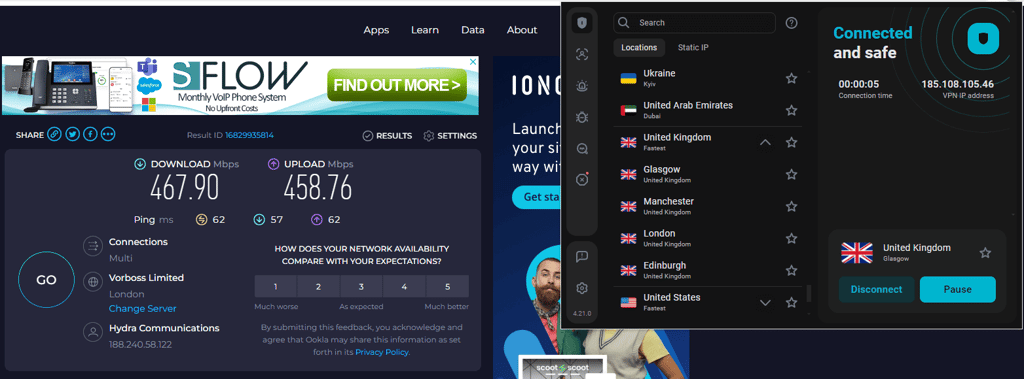
Surfshark's Chrome extension delivered strong performance, keeping 93% of the original download speed and 92% of the upload speed intact. The ping was 62ms, which, while slightly higher, still allows for a smooth browsing experience.
Server network and locations
Surfshark offers over 4,500 servers across 100 countries on six continents. In larger countries like the US, there are servers available in multiple cities. While this number is lower than what NordVPN offers, Surfshark’s global spread still makes it easy to find a nearby server. In the Chrome extension, there’s also a static IP option, which works like a dedicated IP but is shared among multiple users – a feature that’s rare among other VPN extensions, which usually only offer standard servers. The selection of these static IPs is somewhat limited, though. For a comprehensive overview of Surfshark's server options and features detailed in our Surfshark review, the app is your best choice, offering access to the fast WireGuard protocol, MultiHop, and obfuscated servers.
Privacy and security
Surfshark is based in the Netherlands, a part of the Nine Eyes alliance, which might cause some privacy concerns. However, Surfshark’s no-logs policy, independently audited by Deloitte, ensures your data stays private.
Security-wise, Surfshark offers AES-256 encryption, RAM-only servers, and features like Alternative ID for hiding your personal details, breach alerts for website safety, and an antivirus to detect malware or phishing threats. Surfshark Search allows ad-free, anonymous browsing, while CleanWeb blocks ads. In terms of settings, you get auto-connect, WebRTC leak protection, Geo-spoofing, and a Bypass list for site-specific exclusions. Impressively, all these features are available in the Chrome extension, making it almost as robust as the full app.
Compatibility
Surfshark is available on a wide range of platforms, including Windows, macOS, Linux, Chromebook, Android, iOS, Chrome, Firefox, Edge browsers, Fire TV, Apple TV, and smart TV. You can also set it up on gaming consoles or routers. With unlimited connections, you can protect all your devices without hassle. The apps are simple to install – just a few minutes to download, log in, grant connection permission, and you’re ready to go.
Pricing
Surfshark offers three plans, starting at just $2.49/month for unlimited devices, making it an excellent value for large households. The basic plan includes VPN protection and the Alternative ID feature, while the Surfshark One plan adds extra tools like Surfshark Antivirus, Surfshark Search, and Alert for enhanced security and privacy. Keep in mind, however, that Surfshark Antivirus features in the Chrome extension are limited, so you’ll need to install the desktop app for full protection.
You can choose from three billing options: 2-year, annual, or monthly. Long-term plans are the most cost-effective, but you’ll need to pay the whole price upfront.
Top 3. Proton VPN

| Based in: | Switzerland |
| Chrome extension available: | ✅ Yes |
| Max connections: | 10 |
| Current deal: | Get up to 70% OFF Proton VPN |
Proton VPN is a great option for Chrome users, offering privacy, transparency, and security. Based in Switzerland, it benefits from strong data protection laws and is fully open-source, ensuring transparency, as you can view the code at any time. The Proton Sentinel feature provides extra protection against account takeover, making it a reliable and easy-to-use choice for safeguarding your online activities.
Usability and user experience
The Proton VPN Chrome extension has a surprisingly low rating of 2.7/5 from 780 reviews, but after testing it myself, I couldn’t pinpoint why the score is so low. It worked seamlessly for me – I had no issues connecting, and it performed smoothly throughout my browsing session.
The extension includes useful features like Secure Core, auto-connect, split tunneling, and WebRTC leak protection. While it’s more limited than the full app, it still offers a solid feature set for everyday browsing and privacy needs. It even unblocked Hulu, which I was pleasantly surprised by.
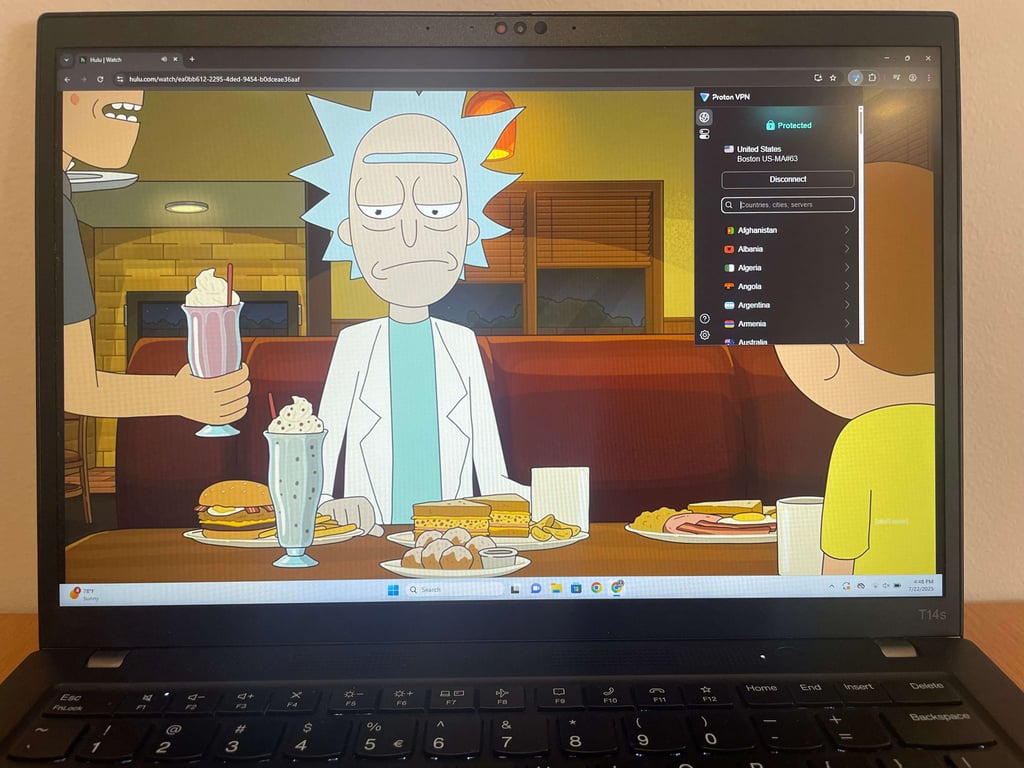
Interestingly, many of the lower ratings don’t seem to align with customer feedback, as users often note in their reviews that the extension worked well. It seems the low rating might stem from a misunderstanding or lack of clarity about the extension's functionality. Overall, I found it reliable and easy to use, making it a useful tool for online protection while using Chrome.
Speed and performance
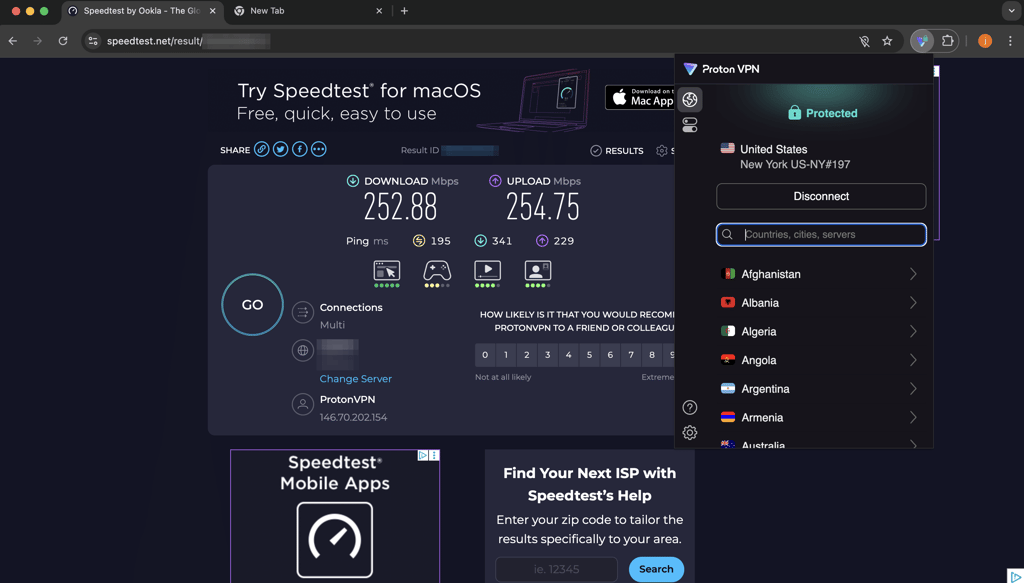
Proton VPN’s browser extension delivered decent speeds, retaining 84% of the original download speed and 85% of the upload speed when connected to a US server. However, the ping was quite high at 195ms, which I found disappointing as it may impact real-time activities like gaming or video calls.
Server network and locations
Proton VPN boasts an impressive network of 20,700+ servers across 149 countries, ensuring excellent global coverage. With well-distributed servers, you can easily find one nearby for optimal speed and performance, no matter where you are. If you’re using the desktop or mobile app, you can also access specialty servers, including P2P-optimized servers, streaming servers, and Tor over VPN servers for enhanced privacy.
Privacy and security
Proton VPN takes privacy seriously, using AES-256 and ChaCha20 encryption with the fast and secure WireGuard protocol to protect your online activity. All of its apps are open-source, meaning the code is publicly available – demonstrating Proton VPN’s confidence in its security.
The service operates under a strict no-logs policy, which has been audited three times. Plus, it’s based in Switzerland, a country with no mandatory data retention laws and strong privacy protections. The Chrome extension also includes leak protection to keep your IP address secure, which made me feel protected while browsing on Chrome.
Compatibility
NordVPN works with various devices, including Windows, macOS, Android, iOS, Linux, tvOS, Android TV, Raspberry Pi, Fire TV, and routers. There's also a browser extension available for all Chromium browsers, Edge, and Firefox. You can also manage a dedicated IP directly through the browser extension, which is useful if you need a consistent IP for specific websites.
Pricing
Proton VPN keeps things simple with just one plan, starting at $2.99/month for up to 10 devices. I love that there’s no need to worry about upgrading – this single plan includes everything Proton VPN has to offer.
You can choose between 2-year, 1-year, and monthly billing options, similar to NordVPN and Surfshark. While the starting price is fairly average compared to other providers, the $9.99/month price for the monthly plan is actually quite reasonable if you’re not ready to commit long-term.
Top 4. ExpressVPN

| Based in: | British Virgin Islands |
| Chrome extension available: | ✅ Yes |
| Max connections: | 14 |
| Current deal: | Now up to 80% OFF ExpressVPN + 4 months FREE |
ExpressVPN is a premium VPN for Chrome, known for its top-tier security, reliability, and performance. It offers a seamless browsing experience with strong privacy features. Overall, its quality, features, and price-to-value ratio make it a worthwhile choice for those seeking a good VPN.
Usability and user experience
The ExpressVPN Chrome extension is well rated at 4.5 stars with 2800+ reviews, and it’s a breeze to install. You don’t even need to log in – the extension syncs automatically with the desktop application. It works a bit differently from NordVPN or Surfshark; you can’t use the extension independently without the app. Instead, it serves as a convenient way to switch servers without leaving your browser. When connected, it protects the traffic of your whole device, not just the browser.
The extension also includes features like location spoofing and leak prevention, but there isn’t much control beyond that. For me, it’s a handy tool if you frequently change your VPN location while browsing, as it saves you a few extra clicks compared to using the app. However, since you still need to have the application installed, I personally don’t see a strong need for it beyond that convenience.

I've noticed that the majority of reviews are positive. However, some users have reported difficulties accessing certain streaming services. Additionally, there are instances of users experiencing slow connection speeds.
Speed and performance
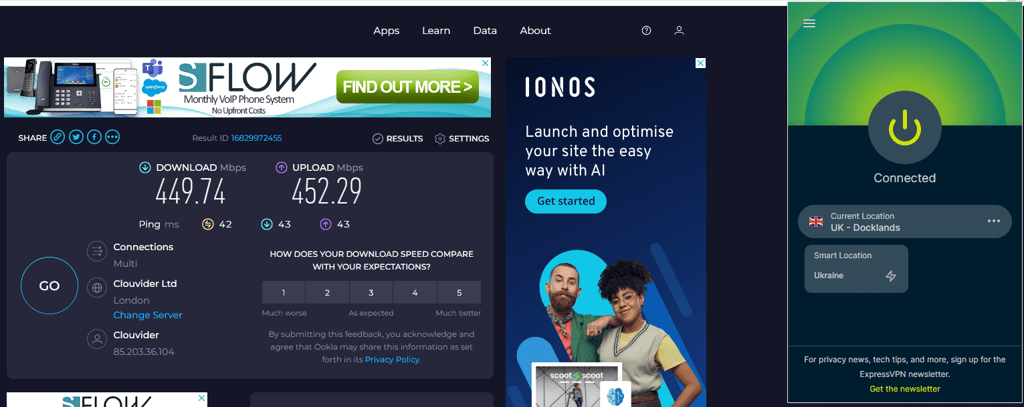
ExpressVPN’s browser extension delivered consistent speeds, maintaining 90% of the initial download speed and 91% of the upload speed, similar to the findings presented in our comprehensive ExpressVPN review. The 42ms ping provides low latency, making it well suited for responsive browsing and online gaming.
Server network and locations
While ExpressVPN doesn’t disclose the exact number of servers, it provides servers in 113 countries. Its server coverage in the Middle East is slightly lower than that of Surfshark, IPVanish, or NordVPN. All ExpressVPN servers are RAM-only, which enhances security and privacy. However, one downside is that ExpressVPN lacks specialty servers in both the application and the extension.
Privacy and security
ExpressVPN employs industry-leading AES-256 encryption to ensure your data's security. The provider has a strict no-logs policy, meaning it doesn’t track any of your activities. To back up its claims, ExpressVPN has undergone three independent no-logs policy audits, further guaranteeing your online confidentiality. Being based in the British Virgin Islands, which is outside the Fourteen Eyes alliance, adds an extra layer of trust regarding its data privacy practices.
Notably, there have been instances where law enforcement seized some of ExpressVPN's servers during criminal investigations, yet no relevant data was found, demonstrating the service’s commitment to user privacy. Additionally, ExpressVPN features a kill switch and DNS leak protection, providing you with further peace of mind while browsing online.
Compatibility
ExpressVPN offers extensive support for various devices, including Windows, macOS, Linux, iOS, Chromebook, Android, tvOS, Fire TV, Android TV, Chromecast, and nearly all gaming consoles. The installation process is straightforward and quick across all platforms. However, a potential drawback is that ExpressVPN permits only 14 simultaneous connections, which may be limiting for users with multiple devices or families wanting to connect at the same time.
Since March 31st, 2026, the ExpressVPN app for non-Aircove routers is no longer supported, though users can still set up the VPN manually or opt for the Aircove router for built-in protection.
Pricing
ExpressVPN is a moderately priced VPN option, starting at $2.99/month. It offers three plans to choose from, allowing you to cover up to 14 devices.
Like most providers, it offers 2-year, annual, and monthly billing options. While long-term plans are more expensive than other VPNs, the monthly plan is priced at $16.99/month, which is fairly standard across the industry.
Top 5. IPVanish

| Based in: | United States |
| Chrome extension available: | ❌ No |
| Max connections: | Unlimited |
| Current deal: | Now up to 85% OFF IPVanish |
IPVanish is a solid, beginner-friendly VPN offering unlimited device connections and reliable performance for torrenting and unblocking popular platforms. While it lacks standout features and a dedicated Chrome extension, the app protects your entire device traffic, even when using Chrome. It’s affordable and provides essential security, making it a good choice for everyday users seeking basic protection.
Usability and user experience
IPVanish doesn’t offer a VPN extension for Chrome, though it has a Secure Browser extension. This extension works a little differently. I can say, it’s almost like an improved incognito mode. You can change your location using this extension, and it provides handy security features.
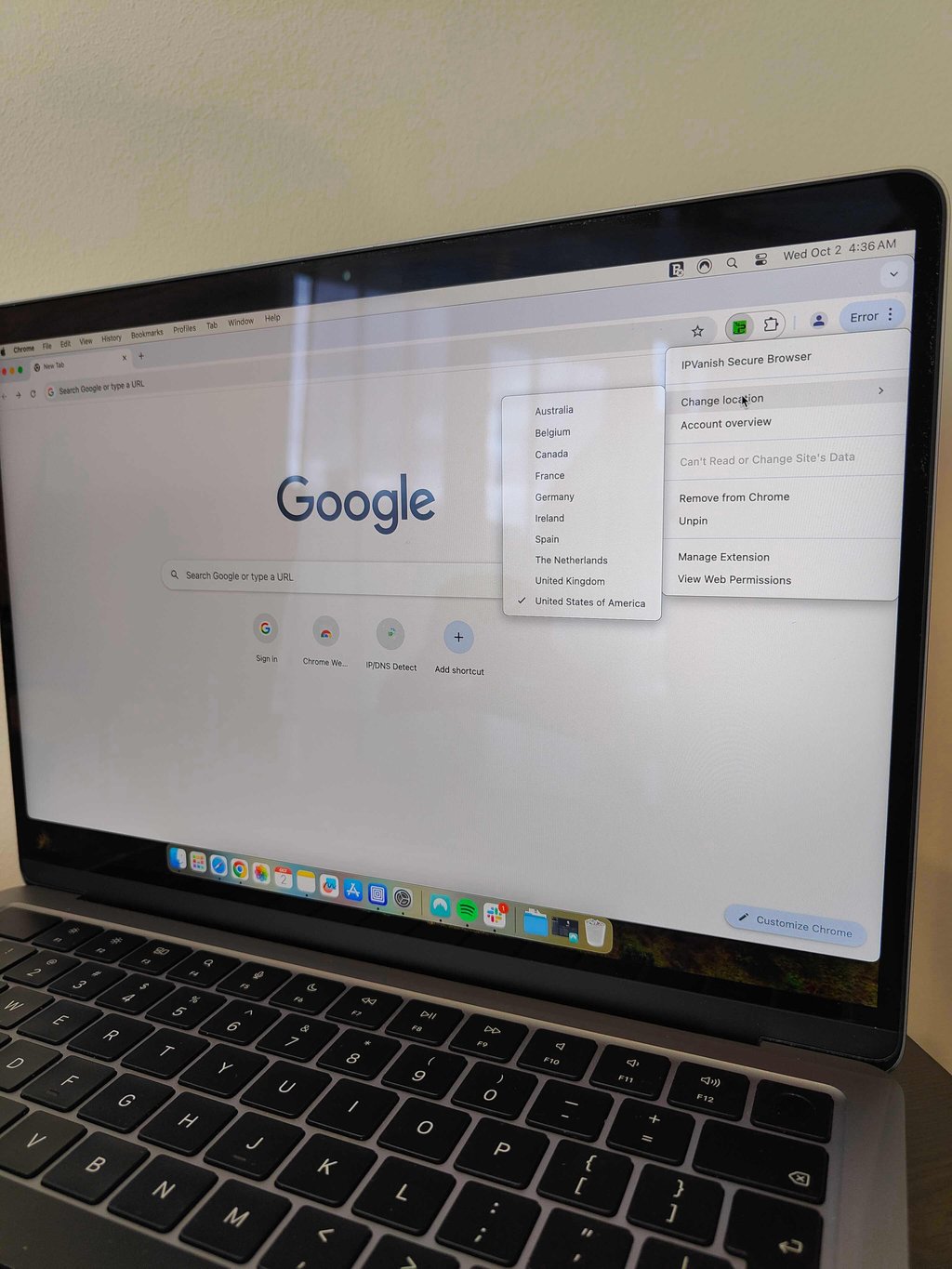
However, to use a VPN for Chrome, you’ll need to opt for the application. While it is rated highly on the Apple App Store and Google Play Store, comparing these ratings to the Chrome Web Store ratings of other providers would be unfair.
The app installation takes a few more steps than the extension. Still, installing the desktop version of IPVanish is pretty similar to any other VPN and straightforward. The app provides pretty good features like leak protection, kill switch, auto-connect, WireGuard, IKEv2, and OpenVPN protocols, threat protection, traffic obfuscation, and split tunneling.
The Secure Browser extension has seen a significant rise in popularity. In our previous review, it had just 2 reviews on Chrome and none on platforms like Reddit or Trustpilot. Now, it boasts 73 reviews on the Chrome Web Store with an impressive 4.9/5 rating. Users praise it for being a handy tool and incredibly easy to use.
Speed and performance
Since IPVanish doesn’t offer a Chrome VPN extension, we conducted our speed tests using its desktop app. The results showed a download speed of 231Mbps, retaining 46% of the original speed, and an upload speed of 304Mbps, retaining 61%.
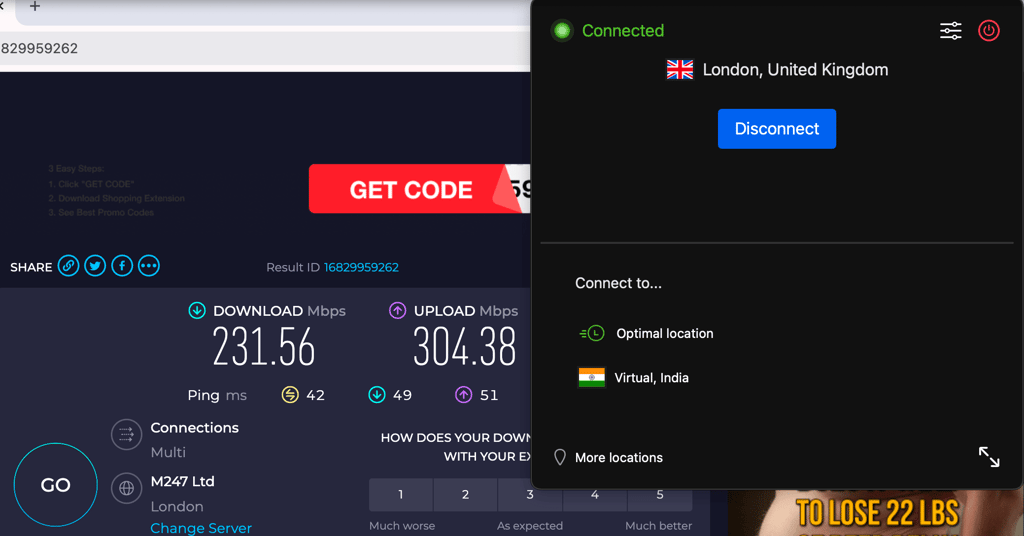
Out of curiosity, we decided to test the IPVanish Secure Browser extension, and it surprisingly delivered speeds that were significantly faster than the baseline, which is uncommon. However, since this extension works differently from a VPN, it's not a fair comparison. Nonetheless, it could be useful for those looking to enhance their browsing experience with a bit of added security.
Server network and locations
IPVanish provides over 3,400 servers across 112 countries, which is considerably lower than many other providers on this list and noted as a drawback in our IPVanish review. The server coverage in Africa is especially limited, with only three locations available. However, one positive aspect is that IPVanish doesn’t inflate its country numbers with virtual servers. The VPN also supports WireGuard, IKEv2, OpenVPN, and IPSec protocols, which are standard in most VPN desktop apps.
Privacy and security
Like other top VPNs, IPVanish uses industry-standard AES-256 encryption with SHA-512 hash functions. It operates under an audited no-logs policy and includes a functional kill switch to prevent data leaks if your connection drops. However, being based in the US – a founding member of the Five Eyes alliance – may raise privacy concerns. IPVanish also offers DNS leak protection alongside the kill switch to ensure you stay secure and not browsing unprotected.
Compatibility
IPVanish offers broad compatibility, with apps available for Windows, macOS, Android, iOS, Chrome OS, Apple TV, Fire TV, Linux, Nvidia Shield, and Android TV. While it doesn’t offer a browser extension, you can still install the app directly on most devices. This could be a drawback if you can't install software on your device, such as on a work or school computer or phone. In that case, you might prefer a provider that offers a browser extension. IPVanish also offers unlimited connections, much like Surfshark, allowing you to install it on all your devices and even share it with family.
Pricing
IPVanish offers two plan options, starting at just $2.19/month. The basic plan includes VPN protection and the Threat Protection feature, which blocks ads and trackers. Upgrading to the higher-tier plan unlocks additional features such as cloud backup, a Secure Browser extension, file sharing, and phone support.
Plans are available with 2-year, annual, or monthly billing options, with long-term subscriptions offering the best value. All plans support unlimited devices, making IPVanish a great option for users with multiple devices.
Top 6. CyberGhost

| Based in: | Romania |
| Chrome extension available: | ✅ Yes |
| Max connections: | 7 |
| Current deal: | Watch Live Sports Securely, now with 85% OFF CyberGhost + 2 months FREE |
CyberGhost is a great choice for Chrome users, offering a free proxy extension trusted by nearly 1 million users. The free extension provides basic protection and privacy, making it a perfect option for those seeking a simple, no-cost solution to enhance their browsing experience without committing to a subscription.
Usability and user experience
The CyberGhost Chrome extension has a rating of 3.4 stars based on 1100+ reviews in the Chrome Web Store. This free extension offers 4 locations to connect to, but while it functions adequately, the speeds aren’t particularly impressive. Since these free locations are shared among many users, you can expect slower performance. Additionally, the extension lacks advanced features.
For a more robust experience, you'll need to use the full application, which provides access to all servers in 100 countries, optimized for various purposes. The app also offers essential features such as WebRTC leak protection, a kill switch, and a content blocker, along with many other capabilities outlined in our CyberGhost review, making it a more comprehensive solution for online security.

The browser extension is free and provides access to only four servers, with a suggestion to download the application for a premium version. Some users have expressed confusion about not receiving a premium browser extension despite paying for a subscription. Additionally, various connection issues have been reported, including difficulties connecting to servers, accessing web pages, and functionality in countries with internet restrictions.
Speed and performance
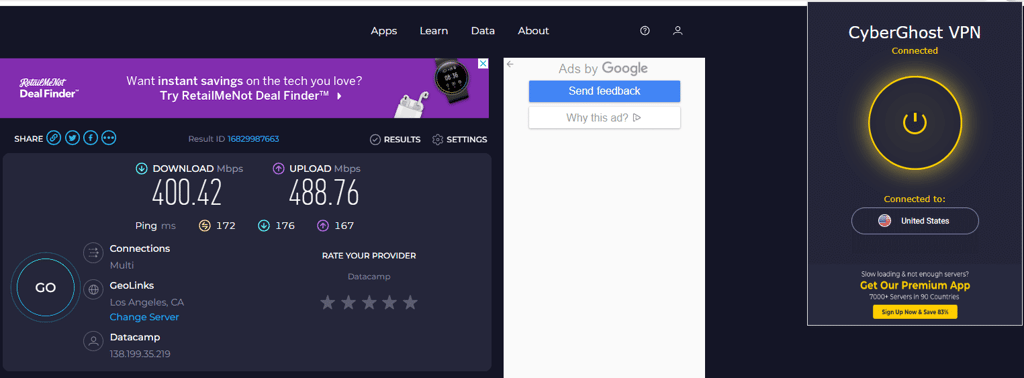
Since the CyberGhost extension lacks a UK server, we tested it using a US server. Despite the different locations, CyberGhost provided solid performance, retaining 80% of the original download speed and 98% of the upload speed. The ping was relatively high at 172ms, likely due to heavy usage. It's important to note that this server was free, which makes these results quite impressive, given the load.
Server network and locations
Like ExpressVPN, CyberGhost doesn’t disclose the exact number of servers currently available. The last reported figure was an impressive 11,500 servers, though it’s unknown if that number has since increased or decreased. CyberGhost operates in 100 countries with 125 locations, offering strong global server distribution.
The servers are well distributed around the world, and the service provides various options optimized for specific tasks, such as gaming, torrenting, and streaming. This makes it a versatile choice for users with diverse online needs, ensuring that you can find a suitable server for your activities.
Privacy and security
CyberGhost, like other top-tier VPNs, uses AES-256 encryption to keep your data secure, and has an independently audited no-logs policy to ensure privacy. Based in Romania, a country with privacy-friendly regulations, CyberGhost adds more reassurance for users concerned about data security. Their servers are all RAM-only, meaning they don’t retain data, which further ensures your privacy. On top of that, CyberGhost offers NoSpy servers, which are entirely managed by the company, providing an extra layer of privacy for users seeking enhanced security.
Compatibility
CyberGhost works seamlessly with all major operating systems, such as Windows, macOS, Linux, Android, and iOS. It also offers browser extensions for Chrome, Firefox, Edge, Brave, and Opera, making it versatile across various platforms. You can even set up Smart DNS or configure it on your router for broader coverage. However, it's important to note that each account allows only 7simultaneous connections, which may limit your ability to take full advantage of this wide compatibility.
Pricing
The free extension is a nice option, but it’s very limited. If you’re willing to upgrade, the paid plan is pretty affordable, starting at just $1.99/month. Like ExpressVPN, it only offers one tier, which covers up to 7 devices. Honestly, I was a bit disappointed by the device limit, but if you don’t need to cover too many, it’s still a great budget pick.
What I found interesting is the subscription options. You can choose between 2-year, 6-month, and 1-month plans. The 6-month option caught my attention since most providers don’t offer that, so it’s a good middle ground for flexibility.
Differences between Chrome VPN extension and VPN app
The main difference between a Chrome VPN extension and a VPN app is that the extension secures activity only within the browser, whereas the app safeguards your entire device.
Chrome VPN extension is great for hiding your IP address during regular browsing sessions. In some cases, it’s also better for streaming on a browser due to its lightweight nature.
A VPN app, on the other hand, is a better overall solution for full privacy protection. It encrypts all your device traffic that runs through all the apps.
Most premium VPN providers already have dedicated Chromium-based browser extensions, so you can choose whether you want to use the app or just the extension based on your preferences.

How to install a VPN on Chrome
Installing an extension on Chrome is usually very easy and takes just a couple of clicks. That said, if you’re installing a Chrome VPN, there are a few crucial steps you shouldn’t skip:
- Pick a VPN service provider. You can choose from the list or find another tool you like. Take a look at my top choice – NordVPN, now 75% OFF
- Register for an account and pay for your subscription. You now have a VPN service account
- Head to the Google Chrome Web Store from the device you’ll be using

- Type the name of your chosen VPN provider into the Search extension and themes field
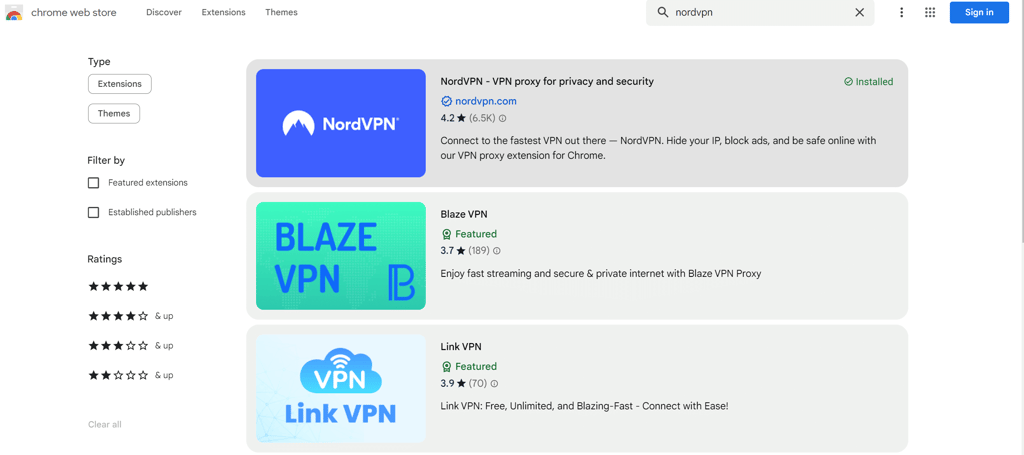
- Find the extension, click on it, and press the Add to Chrome button
- You’ll have to log in to the extension with the credentials you set up while creating the VPN account
- Once you log in and connect to a server, you can enjoy a much safer browsing experience with Chrome

Are Chrome VPN extensions safe?
Yes, Chrome VPN extensions are safe. However, for the extension to be safe, it’s crucial to choose a reliable VPN provider like NordVPN, which offers advanced security and privacy. Also, you should know that every browser extension you download is sandboxed, which means that unless you give the plugin specific permissions, it’ll be isolated from all foreground processes.
Google curates the Chrome store, so every submission gets reviewed. These procedures eliminate a larger chunk of extensions that are straight-up malware.
However, that is not to say that the system is foolproof. Even if a program seems trustworthy, some providers lie about their privacy policies. For this reason, you shouldn’t experiment with sketchy VPN extensions, as that may backfire. And remember, if something sounds too good to be true, it probably is.
Final verdict
Some users prefer Chrome VPN extensions for convenience, while others, including ChromeOS users, depend on them as their main option. Whatever the reason, many people look for a dependable VPN for Chrome to secure their browsing and protect their privacy online.
A Chrome VPN extension offers a quick way to hide your IP address and secure browser traffic. However, if you want full-device protection that covers apps and background connections, a standalone VPN app provides broader coverage.
For Chrome users, my top pick is NordVPN. Whether you choose its desktop app, mobile app, or Chrome extension, it delivers strong encryption, modern tunneling protocols, and a large global server network, making it a secure and reliable choice for everyday browsing.
FAQ
Can I use a VPN on the Chrome browser?
Yes, it’s a good practice to use a Chrome VPN. Whether you choose an app or just a Chrome VPN extension, it’ll encrypt your connection and hide your actual IP address. Depending on the service you choose, you can also get additional features, like an ad blocker or split tunneling.
Which VPN extension is best for Chrome?
The best Chrome VPN extension is NordVPN. It provides website-level split tunneling, blocks WebRTC leaks, and has malware and phishing site filters.
Does Chrome have its own VPN extension?
No, Chrome doesn’t have its own VPN extension, but mobile users can take advantage of Google One VPN. This is a proprietary VPN made by Google.
What is the fastest VPN extension for Chrome?
The fastest VPN extension for Chrome is NordVPN. This provider offers blazing-fast connection speeds for seamless browsing online, no lags or buffering.
Can Google track me if I use a VPN?
If you’re logged in to your Google account, then, without a doubt, Google can still see everything you’re doing. There are also other methods like browser fingerprinting, which means you’ll have to use some extension to avoid this.