Perplexity Computer review (2026): what happens when you hand AI 19 models and no limits
Being behind major reports like The Mother of All Breaches and RockYou2024, our in-house cybersecurity experts and journalists provide unbiased, real-world testing and in-depth analysis.
We maintain complete transparency by openly sharing our testing methodologies with our audience.
Learn more
Perplexity has been a frontrunner in AI innovation, focusing on training third-party models to perform specific tasks. Once known as the best tool for research, then touted for its Comet browser, its offer keeps expanding. In February 2026, the company released Perplexity Computer, a cloud-based AI orchestration tool that uses multiple models to complete your prompts, overseeing the workflow end-to-end.
For this Perplexity Computer review, I conducted hands-on testing with the help of the Cybernews research team. I tested its functionality across multiple workflows and fields, including content creation, coding, research, and data analysis. I also answer a simple question – is Perplexity Computer worth its price?
Overview: who Perplexity Computer is for
- Best for: independent multi-source research
- Great for: prototyping and automating iterations
- Not ideal for: simple tasks and cost effectiveness
Pros and cons of Perplexity Computer
What is Perplexity Computer? How is it different from regular AI chat?
Perplexity Computer is a cloud-based agentic AI task orchestrator. This makes it essentially a project manager with access to multiple employees trained to perform a specific task. Unlike a traditional chatbot, Perplexity Computer uses multiple models to perform the tasks given, often giving multiple tasks to multiple models simultaneously. This allows it to deliver finished work, rather than just answers.
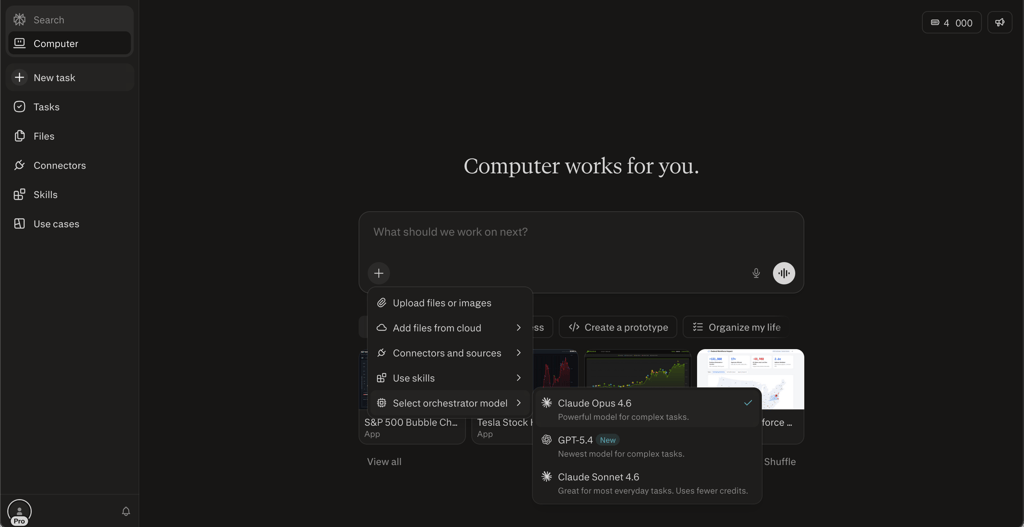
For example, if I ask ChatGPT to research a given topic and create a website with the results, it will first research the topic and then generate code based on that research. If I want to generate a video about what I found, I’ll have to do it separately from the first task. With Perplexity Computer, its orchestrator (Claude Opus 4.6 by default) will divide the tasks between a researcher (e.g., Gemini Pro), a coder (e.g., Claude Opus or Sonnet, depending on code complexity), and a video generator (e.g., Veo 3.1).
Perplexity will also have the agents perform the tasks in the background. After all, the code and the research can be performed concurrently, while the video requires the research results for the prompt. The task will be performed even if you leave the browser window.
In short, AI chatbots answer prompts. Perplexity Computer completes work.
How we tested Perplexity Computer
Along with the Cybernews research team, I performed hands-on testing of Perplexity Computer and combined it with user feedback to grade it based on our AI testing methodology. I performed the following steps to fully test the Perplexity computer:
- Ran multi-step research projects. This included competitor analysis, market summaries, and data-to-spreadsheet tasks.
- Tested the build and deploy capabilities. I prompted the tool to generate a functional micro-app and a data visualization dashboard.
- Evaluated connector integrations. I looked at how many integrations are available and how they can be used.
- Examined cost efficiency. I assessed output quality, credit consumption, and context retention across multi-day sessions.
- Researched user sentiment. I gathered and cross-referenced user feedback from Reddit, YouTube, and early adopter reviews.
Perplexity Computer features and real-world performance
In order to give you a better understanding of Perplexity Computer, I tested the claimed features by applying real-world scenarios to them and evaluating the results.
Multi-agent orchestration
In order to test multi-agent orchestration, I gave Computer the following prompt using the default orchestrator model:
I am a B2B SaaS founder preparing for a Series A pitch in 90 days. Orchestrate a full competitive intelligence report on the top 5 CRM platforms (Salesforce, HubSpot, Pipedrive, Attio, and Close). For each: summarize their latest product updates from the past 6 months, pricing tiers, G2 review sentiment, and known weaknesses. Assign the most accurate available source for each company. If current data for any company cannot be verified, note that explicitly rather than estimating. Present results as a structured comparison table followed by a 3-paragraph strategic summary.
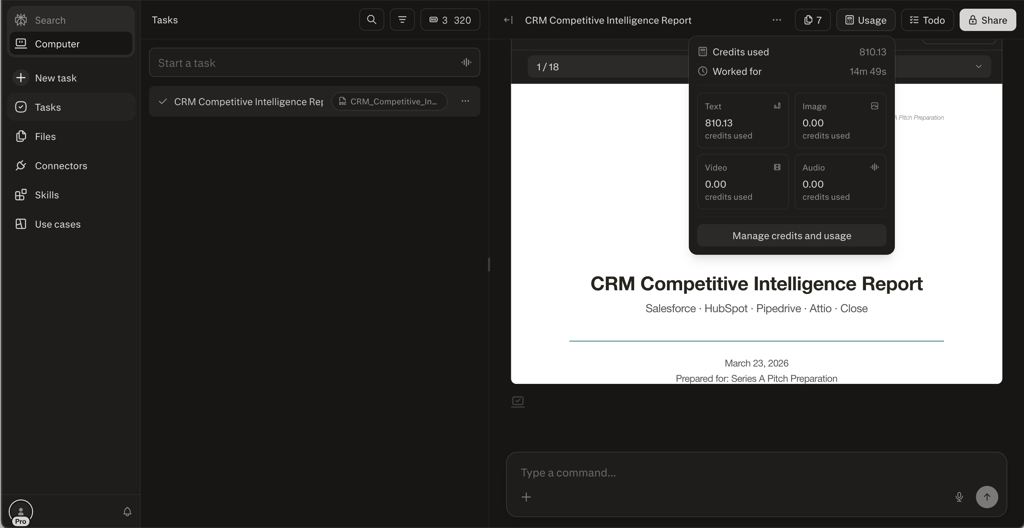
Computer orchestrated this using separate Claude Sonnet 4.6 agents. Each independently searched the web, fetched official pricing, scraped review data, and pulled information from official changelogs and press releases. Once this was complete, the orchestrator then read the outputs from the 5 agents and built an 18-page DOCX report, which was then converted to a PDF. Overall, the research was in-depth and included detailed company profiles, along with an executive summary.
The whole process lasted 14 minutes and 49 seconds and cost 810.13 credits.
Parallel research engine
In order to test Perplexity Computer’s parallel research capabilities, I used the following prompt:
I am a climate policy analyst at a mid-sized NGO. Research three parallel tracks simultaneously: (1) the latest IPCC and UN climate reports published in 2025–2026, (2) current carbon credit market prices and trading volume from verified financial sources, and (3) recent legislation or executive actions on carbon pricing passed in the EU, US, and UK in the past 12 months. For each track, cite only publicly indexed, authoritative sources. If a track yields no recent verifiable results, say so clearly. Deliver the three tracks as separate labeled sections, each ending with a one-sentence implication for NGO advocacy strategy.
Computer decomposed the request into three simultaneous research tasks. It assigned each track strict sourcing constraints (publicly indexed, authoritative only), and agents were instructed to flag where data couldn’t be found, instead of estimating. When the three agents completed the research, a synthesis agent created a final report. The report itself was very clear, and the agents did flag whenever they couldn’t find an applicable assessment rather than hallucinating a result.
The task took 6 minutes 24 seconds to complete and cost 72.76 credits.
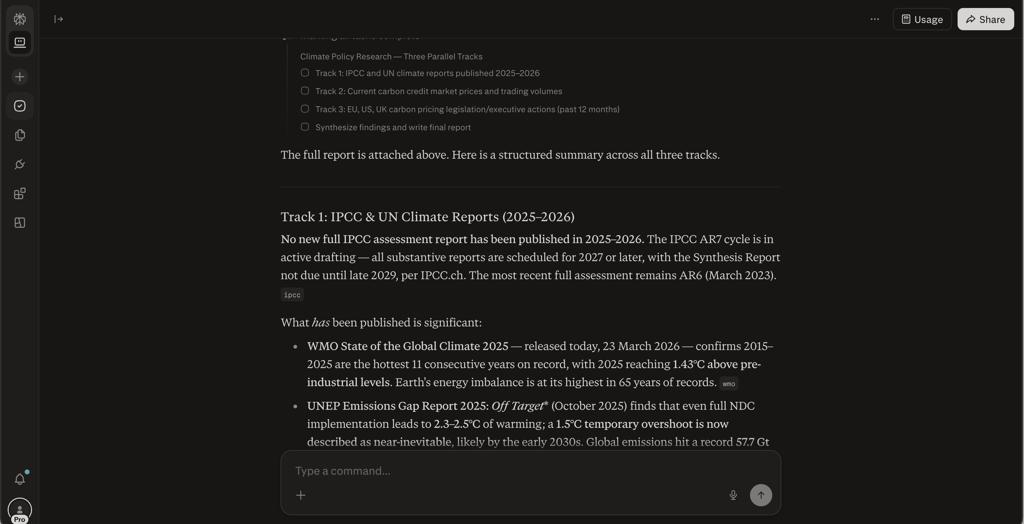
Perplexity Computer parallel research results
Build and deploy capabilities
For this task, I used the following prompt to see how Computer deals with coding:
Build and deploy a live dashboard that pulls open pull requests from the OpenClaw GitHub repository, displays them in a prioritized view ranked by days open, and refreshes automatically every day. The dashboard should be accessible via a shareable public URL with no login required. Use only free-tier infrastructure. Flag any step where a credential or API token is required and pause for input before proceeding. When complete, provide the live URL, a plain-English summary of how the system works, and instructions for adjusting the refresh interval.
Computer started out by scoping out and creating the architecture. An agent researched the target repository to confirm it was public and verified that the tool would work without GitHub API verification. Once that was done, the orchestrator decided to create a client-side infrastructure and built three files. Before deploying the final product, Computer used the Playwright platform to perform a visual QA check and found a bug on mobile. Once it was fixed and retested, the software was uploaded to S3 as a publicly accessible website with no login required.
The task took Computer 6 minutes 59 seconds, and it cost 295.43 credits to complete.
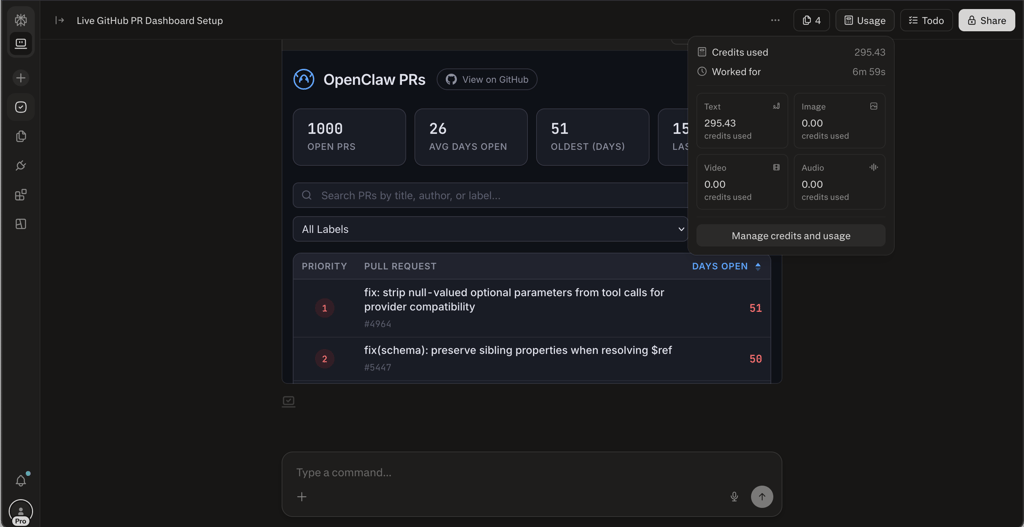
Connectors and integrations
Perplexity Computer can connect to over 400 apps via OAuth. These include everything from Gmail, Outlook, and Slack to tools like Snowflake, Databricks, and Salesforce. Giving Computer access to your data will enable it to work based on your information or use your existing tools for its automations.
Here, I looked at user feedback to see how they use Perplexity Computer’s integration. Many users found mixed results. While the pool is wide, some integrations are bugged and lead to uncontrolled credit usage when the AI loops in circles trying to solve them.
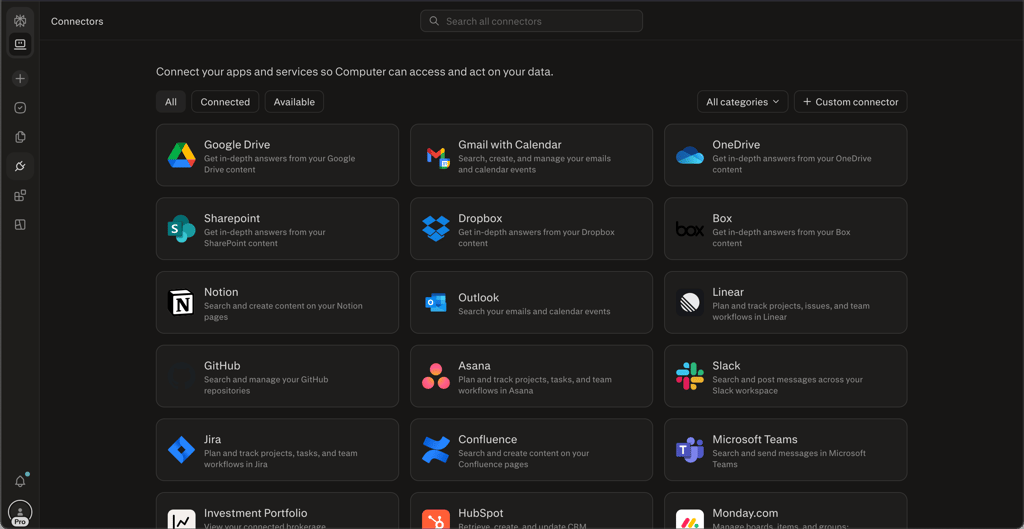
Persistent memory and context management
As my final task for Perplexity Computer, I wanted to see how it deals with persistent memory and context management. This time, I used GPT-5.4 as the orchestrator model to see whether changing models affects context management. I used the following prompt:
Research the top 5 AI news stories published today from verified tech sources (TechCrunch, The Verge, Wired, VentureBeat, or equivalent). For each story include: headline, source, one-sentence summary, and why it matters for someone working in enterprise software. Deliver the results as a clean daily brief titled 'AI Daily - [today's date]'.
Save this task and repeat it automatically every day at 9:00 AM in my local timezone. Each brief should be a fresh search - do not reuse yesterday's results. If a source returns no new AI stories in the past 24 hours, skip it and substitute the next most credible indexed source. If you are unable to run at the scheduled time, run it at the next available opportunity and note the delay in the brief.
Computer started by checking the past context. It noted that I’m a B2B SaaS founder and climate policy analyst and didn’t find any history of requests for recurring AI work briefs. It then created comprehensive briefs using a daily pipeline that scraped, filtered, curated, and framed my requests before delivering and rescheduling the task. It then replicated the workflow on the second day. The output was detailed and in accordance with my initial prompt.
Two days' worth of tasks took Computer 20 minutes 43 seconds, and the task cost 817.62 credits. Unfortunately, stopping the workflow also cost me credits – 29.34 to be precise. This is unfortunate, as terminating a process shouldn’t cost you a limited resource.
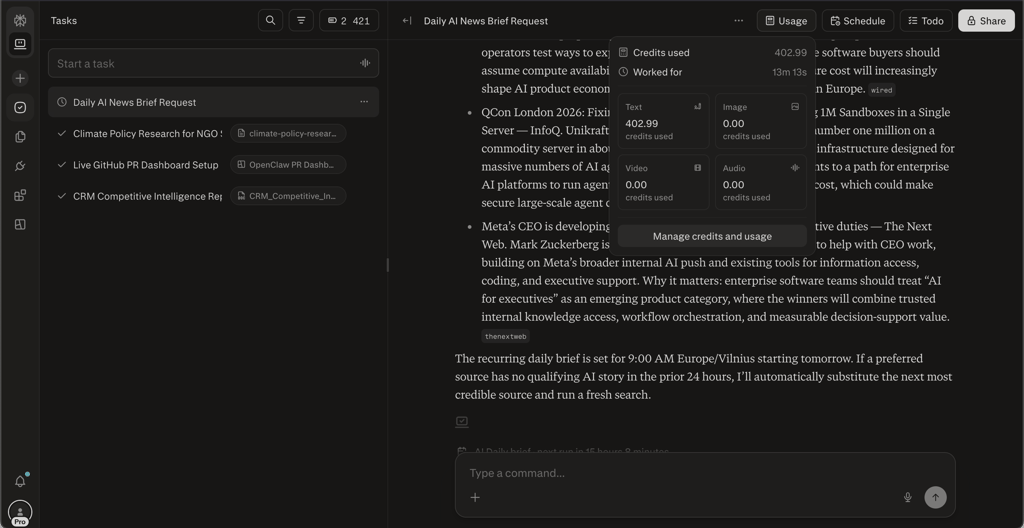
Pricing and available plans
Perplexity Computer is priced based on a credit usage system. At the time of writing, Perplexity offers 4,000 free credits to Pro ($17.00/month) users, which will expire on May 1st, 2026. While your access to Computer will remain active after this, you will have to buy more credits at $1.00 for 100 credits.
However, for a steady credit supply, you will have to pay at least $167.00/month for the Perplexity Max plan. This will grant you access to 10,000 credits per month, plus 35,000 bonus credits. While this may seem like a good deal, it’s actually not worth it unless you need the additional Max features or the extra credits. Pro maxes out at $100 a month, so if you need more than 10,000 credits a month, you are forced to switch to Max – and essentially overpay for 3,000 extra credits a month.
Here’s a breakdown of the credit costs on Pro vs Max Personal plans, not including the bonuses. Note that Perplexity doesn’t disclose credits pricing, and these prices are based on my own testing with a Pro account and may differ in your region or with your subscription.
| Plan | Price (monthly term) | Price (yearly term) | Credits included/month | Total yearly cost of 120,000 credits (1 year-plan) | Monthly cost of 10,000 credits | Monthly cost of 10,00 credits (1-year plan) |
| Pro | $20.00/month | $200.00/year ($17.00/month) | 0 | $1400.00 (credits + yearly plan) | $120.00 (credits + monthly plan) | $117.00 |
| Max | $200.00/month | $2,000.00/year ($167.00/month) | 10,000 (+35,000 one-time bonus) | $2000.00 | $200.00 | $167.00 |
For Enterprise users, the pricing is as follows:
| Plan | Price per seat (monthly) | Price per seat (1-year plan) | Credits per seat |
| Enterprise Pro | $40.00/month | $34.00/month | 500/month |
| Enterprise Max | $325.00/month | $271.00/month | 15,000/month |
Enterprise admins can also create a “credit reserve” by buying credits separately and making them available to users who cross their monthly allowance.
Perplexity Computer vs OpenClaw vs Claude Cowork
Perplexity Computer exists in a steadily growing niche of agentic AI assistants. So far, the biggest competition in that field has been OpenClaw and Claude Cowork. The three have some major differences in approach, which I compare in the table below.
| Tool | Hosting | Models | Setup required | Starting price | Best for | Privacy |
| Perplexity Computer | Cloud hosting | 19 models including Claude Opus 4.6, ChatGPT 5.4, Gemini 3.1, Veo, Nano Banana | None | $17.00/month + $1.00/100 credits | Independent researchers, content strategists, prototyping, small teams | Low (everything goes through the Perplexity cloud) |
| OpenClaw | Self-hosted | Depend on user choice | Installation on server or desktop, API integration, communication interfaces (Discord, Telegram, Slack, etc.) | Hosting and API use costs | Users who need detailed customization, highly tech-savvy users who can handle setup | Setup dependent |
| Claude Cowork | Self-hosted | Claude Opus 4.6, Claude Sonnet 4.6 and earlier | Self-contained Desktop app, or 1-click deployment in cloud | $17.00/month (+ hosting costs if used on cloud) | Casual users who need a desktop or cloud assistant | Low-to-medium, can be secured by limiting data retention and training |
Overall, you should:
- Pick Perplexity Computer if you need a simple-to-use cloud-based assistant and you don’t mind the high costs
- Pick OpenClaw if you know how to set up your own instance and have the tech knowledge to customize it to your needs
- Pick Claude Cowork if you need an affordable desktop or cloud assistant that can be easily deployed and is intuitive to use, and you don’t need image or video generation
Who should use Perplexity Computer and who shouldn't
Whether you should use Perplexity Computer will depend on your use case. Here’s who I think should and shouldn’t use the software.
Perplexity is best for:
- Independent researchers, analysts, or consultants who need an assistant who can help run multi-step projects
- Content strategists and marketers who need research and output in a single workflow
- Prototyping developers who need quick iteration of complex apps
- Small teams that need a shared cloud-based worker without a large enterprise overhead
Perplexity isn’t the right fit for:
- Users handling sensitive or confidential information, as everything is parsed by Perplexity’s servers
- Budget-conscious users who are not ready for uncertain spending
- People who want local control or open-source flexibility, who will be better served by OpenClaw
- Casual users who need quick answers, as Perplexity Computer is overkill for simple prompts
Final verdict
Perplexity Computer is an interesting approach to the personal assistant space. Its cloud-based interface makes it very easy to set up and use, and its connectors offer significant potential – especially if the bugs are ironed out.
The combination of different agents itself also makes Computer more appealing than Claude Cowork for creatives, as it can generate images and videos within its loop. Creatives will also appreciate its ease of use compared to OpenClaw, which requires some technical savvy to set up properly.
However, it’s not perfect by any means. Its pricing structure is rather expensive, and since it’s run in the cloud, it doesn’t offer the data privacy and safety framework a custom OpenClaw AI would.
FAQ
What is Perplexity Computer?
Perplexity Computer is an autonomous, cloud-based AI agentic orchestrator that researches and completes complex, multi-step tasks for you.
How much does Perplexity Computer cost?
Perplexity Computer starts at $17.00/month. It is included in the Perplexity Pro subscription. However, at the time of writing, you only get a one-time bonus of 4,000 credits, and after you run out, you have to pay $1.00/100 credits. You can also get 10,000 monthly credits with the $167.00/month Max plan.
Is Perplexity Computer better than OpenClaw?
It depends. Yes, if you want easy, safe cloud research without setup. No, if you want a free, open-source agent with direct control over your local device.
Is my data safe with Perplexity Computer?
For general uses, yes. However, you have to be careful with its integrations, and for high-level compliance, Perplexity Computer may be a potential weak point. Be sure to opt out of data training using your information.