How to block ads on Crunchyroll in 2026: Ultimate guide
Our trusted in-house research experts conduct independent, unbiased testing of ad blockers, combining internal and external evaluation data and tools for comprehensive reviews.
We maintain full transparency by sharing our methodologies and technical insights, empowering readers to make informed, independent decisions.
Learn more

Crunchyroll is a popular streaming platform that provides its users access to a vast collection of anime, manga, and Asian dramas. However, like many other streaming services, it relies on advertising revenue to sustain its operations. As a result, users are subjected to a blast of ads, which can be quite disruptive and annoying, especially for those who prefer uninterrupted streaming experiences.
Fortunately, you can watch Crunchyroll without ads by purchasing a premium plan or get access to its content by getting an ad blocker. With a reliable ad blocker, you can effectively block ads on Crunchyroll and enjoy an ad-free streaming experience without having to purchase a premium plan.
In this article, we will explore how to block ads on Crunchyroll and the various options available to users who want to take control of their streaming experience.
How to block ads on Crunchyroll in 4 steps

Stop ads on Crunchyroll: a detailed guide
The process of blocking ads on Crunchyroll will depend on the device you want to stream it on. Whether you want to enjoy Crunchyroll’s content on a browser or a mobile device – it’s super easy. Below we provide detailed lists of how to block ads on browsers and mobile devices.
How to block ads on browsers
If you’ve been wondering how to Crunchyroll ads on browsers – it’s pretty straightforward. In fact, using a browser ad blocker is the easiest way to block ads on Crunchyroll. All you need is to enable the chosen ad blocker on your browser, and it will do the rest for you. Follow the step below:
-
Choose a powerful ad blocker and create an account. Total Adblock worked best for us

- Download and install a browser extension. Follow the instructions of the ad blocker
-
Turn on the ad-blocking feature if it’s not already enabled

-
Stream Crunchyroll content without any ads!

How to block ads on mobile devices
I have tested numerous VPN ad blocker features for mobile, however, none of them proved effective. On the other hand, some ad blocker browser extensions have shown great results in blocking ads on Crunchyroll and other websites. Particularly, uBlock Origin, which is available on Firefox browser as an add-on.
-
Download and install Firefox browser from the Google Play Store

-
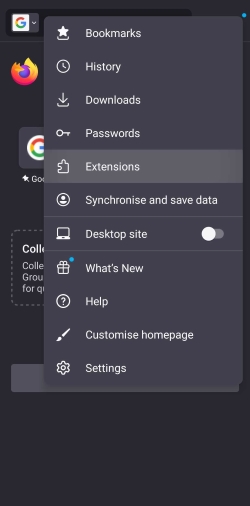
Open the Firefox browser and select “Extensions” from the browser toolbar
-
Select “uBlock Origin” and follow the installation instructions

-
Enjoy Crunchyroll without ads!

Purchase Crunchyroll Premium
If you decide to opt for Crunchyroll Premium, it offers three options: Fan ($7.99/month), Mega Fan ($9.99/month), and Ultimate Fan ($14.99/month) plans. These subscription-based plans provide an ad-free streaming experience.
No ads Crunchyroll can be accessible with ad blockers too. In fact, the cost of an ad blocker subscription is lower than the price for even the lowest subscription tear for Crunchyroll. In result, ad blockers come out to be a good value for money.
All you have to do is to download an ad blocker, enable it on your device or a browser, and relaunch Crunchyroll for ad-free streaming.
Use a Guest Pass
Earlier on, Crunchyroll Premium users were given a Guest Pass code once a month, which could then be used to invite someone else to try Crunchyroll’s premium service for free.
Unfortunately, the Guest Pass feature appears to have been out of service for a few years now.
Instead of a Guest Pass, users can use Crunchyroll’s 14-day free trial. It claims it includes premium access to unlimited anime, no ads, and new episodes as early as one hour after Japan. After the trial ends, you can opt for a premium plan or go back to a free version with ads.
Use a browser with an ad blocker
One effective way to block ads on Crunchyroll is to use a browser with an ad blocker installed. A good ad blocker can prevent ads from appearing on websites, including Crunchyroll, and can also protect your device from potentially harmful ads.
Total Adblock is a reliable ad blocker that can be easily added as an extension to your browser (Chrome, Edge, Safari, Opera, and Firefox).
It blocks all types of ads, including pop-ups, banners, and video ads, and is regularly updated to stay ahead of new ad techniques. By using Total Adblock, you can enjoy your anime viewing experience on Crunchyroll without the distraction and annoyance of ads.
Why you might want to block ads on Crunchyroll
Here are some of the reasons why you would want to block ads on Crunchyroll:
| Types of ads blocked: | Pop-ups, banners, social media ads, in-video ads, etc. |
| Features: | Whitelisting, tracker blocker, filters, and more |
| Compatibility: | Apps, browser extensions |
| Security: | VPN, antivirus |
- Crunchyroll is freezing on ads. Users have reported Crunchyroll crashing or freezing on ads, which can get frustrating. It can be server connectivity issues or a specific server program not running properly.
- Crunchyroll ads won’t stop. Ads can be annoying and disruptive when you're trying to watch your favorite anime on Crunchyroll.
- Crunchyroll ads can get really annoying. Crunchyroll has a lot of ads, with some users reporting up to 10 ads per episode.
- Some ads may be inappropriate. This can be especially concerning if Crunchyroll is being used by kids and those of younger age, if you're sharing an account with others, or watching in a public place.
- Ads can also slow down your Internet connection. Whether you’re using wifi or data, ads can really slow down the connection and use up your data if you're watching on a mobile device.
Crunchyroll ads are designed in a way that you cannot skip them. They appear quite frequently (averages out to a fifth of your viewing time) during your streaming and last up to 30 seconds.
By blocking ads on Crunchyroll, you can enjoy uninterrupted anime streaming without any distractions or potential issues with inappropriate content.
Final words
In conclusion, blocking ads on Crunchyroll is a hassle-free process if you use the right tools. While the use of ad-blockers is not officially supported by the platform, it is possible to implement them through browser extensions or third-party apps.
The easiest way to block the ads on Crunchyroll is to get an ad blocker on your browser. Total Adblock stands out as the best tool to block ads on Crunchyroll. This ad blocker effectively blocks all types of ads, including pop-ups and banner ads, without compromising the quality of the video.
Moreover, it is easy to install and use, making it a convenient option for anime fans who want to avoid annoying ads. By using Total Adblock, you can have an immersive anime experience without any interruptions from ads.
More ad blocker guides from Cybernews:
How to block ads on Android: prevent adware threats
How to block ads on Chrome: browse safely without interruptions
How to block Hulu ads: stream your favorite content without ads
How to block ads on iPhone: secure your iPhone from adware
FAQ
How often do ads appear on Crunchyroll?
Ads on Crunchyroll appear quite frequently. Its ad placement structure is consistent with a pre-roll ad (15 seconds), four ads at the beginning (30 seconds each), four mid-rolls (30 seconds each), and four post-roll ads up to 30 seconds each.
How do I stop Crunchyroll from crashing?
Clearing your device’s cache and app data for the Crunchyroll app can prevent your Crunchyroll from crashing. Other methods would be updating your app, checking whether your device’s firmware is up to date, reinstalling the Crunchyroll app, and making sure your network is in service. Additionally, make sure you use an ad blocker, such as Total Adblock to avoid any interruptions.
Why does Crunchyroll keep playing the same ad over and over?
There can be several reasons for Crunchyroll playing the same ads. When the Crunchyroll system is unable to read your cookies or doesn't have access to your settings, it repeatedly plays the same advertising in order to fill up the available ad space.
Is blocking ads on Crunchyroll illegal?
No, it is totally legal to block ads on Crunchyroll. There’s no mention of the prohibited use of ad blockers in Crunchyroll’s Terms and Conditions. The easiest way to remain ad-free on Crunchyroll is to get Total Adblock for the best-uninterrupted experience on browsers – it blocks all of the showcased ads.
How much does Crunchyroll “no-ads” cost?
You can get Crunchyroll ad-free content by getting a Premium subscription, which starts from $7.99/month. With a Premium subscription, you’ll be able to access the entire library of anime content and enjoy streaming them unlimitedly without any ads. In fact, you can block all the ads with an ad blocker like Total Adblock for way cheaper than Crunchyroll Premium subscription.