OpenVPN CloudConnexa vs Access Server – 2026 review
Our in-house cybersecurity experts and journalists, renowned for major reports like The Mother of All Breaches, conduct transparent, unbiased VPN testing and in-depth analysis.
With 750+ articles crafted based on real-world research, we empower readers to make informed purchasing decisions through first-hand expertise.
Learn more
OpenVPN offers two major business VPN solutions: CloudConnexa and Access Server. On the surface, they look similar, but they serve different needs. CloudConnexa is a cloud-based service designed for flexible, scalable remote access, while Access Server focuses on self-hosted control and customization.
Together with the Cybernews research team, I tested both hands-on to see how they perform in real-world use – looking at setup, management, speed, and everyday reliability. In this 2026 review, I’ll break down the strengths and trade-offs of each option to help you decide which one fits your organization best.
Overview: what each product is and who it's for
| CloudConnexa | Access Server | |
| What it is | Cloud-based VPN solution with ZTNA capabilities | Self-hosted business VPN server |
| Target audience | Businesses needing scalable remote access | Admins and IT teams wanting full control |
| Deployment options | Cloud (OpenVPN global Points of Presence [PoPs]) | Linux, cloud provider (AWS, Azure, GCP, Oracle Cloud, DigitalOcean, IBM Cloud), and virtualization support (Pre-configured images available for Docker, Microsoft Hyper-V, and VMWare ESXI) |
| Licensing model | Subscription (per seat) | Per concurrent connection (2 free) |
| Authentication options | SAML/SSO, LDAP, local | Local, LDAP/AD, RADIUS, PAM, SAML/SSO, post-authentication script support (with Python3) |
| MFA/TOTP support | ✅ Supported | ✅ Supported |
| Client apps | OpenVPN Connect (Windows, macOS, iOS, Android) | OpenVPN Connect (Windows, macOS, iOS, Android, Linux) and open-source clients |
| Official links | Visit CloudConnexa | Visit Access Server |
Pros and cons (CloudConnexa vs Access Server)
| CloudConnexa | Access Server | |
| Pros |
|
|
| Cons |
|
|


We spare no effort to test the products & their features. All information is gathered by our in-house research team & fact-checked by our team of experts. Discover the ins and outs of our testing procedures.
Pricing comparison
When choosing between CloudConnexa and Access Server, the pricing models deserve careful attention. CloudConnexa is sold as a cloud-subscription service, billed either monthly or annually and priced by the number of seats (a User or a Connector). It’s easy to scale up, but keep an eye on your cloud VM usage as a result.
Access Server, in contrast, is a self-hosted license model: you pay per connection, deploy on your own infrastructure (Linux, cloud marketplace images), and pay infrastructure costs yourself. Support tiers differ too – basic support is included, but enterprise engagements bring premium SLA options and dedicated assistance. The per-connection subscription can also be purchased directly through cloud marketplace billing (e.g., AWS or Azure PAYG models) for consolidated invoicing.
| CloudConnexa | Access Server | |
| Starting price | From $11/month per seat (5-user minimum, billed annually) | From $11/month per connection (5-user minimum, billed annually) (first 2 free) |
| Price for 5 users/connections | $55.50/month (billed annually) | $55/month (billed annually) |
| Pricing model | Subscription-based, billed monthly or annually | Per-connection license, billed monthly or annually |
| Infrastructure | Billing managed by OpenVPN | Billing managed by OpenVPN |
| Official links | Visit CloudConnexa | Visit Access Server |
For CloudConnexa, you sign up for a specific number of seats, such as 5, 10, or 25. With Access Server, you purchase a license for the exact number of concurrent connections you need and can extend that license pool as your network grows. In both cases, if you deploy Connectors or Access Servers onto a public cloud, you are responsible for the separate cloud provider costs – such as running the virtual server (VM) and associated data transfer fees – for those customer-managed resources. Always check OpenVPN’s official pricing before purchase.
Features: side‑by‑side comparison
Both OpenVPN solutions share the same security core but differ in approach. CloudConnexa is built for convenience and scale, while Access Server is about control and customization.
Web portals and management
CloudConnexa includes a clean web dashboard where admins can manage users, networks, and connectors in one place. Access Server provides separate web interfaces for administrators and end users – offering direct access to connection files, client downloads, and user management.
Access control and authentication
Both support granular access rules, SSO/SAML integration, and multi-factor authentication (MFA). With CloudConnexa, network segmentation, along withper-app or per-network, device posture, and location context policies are easy to apply from the portal. Access Server allows root-level, group-based configurations and supports LDAP, RADIUS, PAM and local authentication.
Networking and routing
Each solution offers split tunneling, domain-based routing, and private DNS for efficient traffic control. Access Server adds push DNS and route management options, while CloudConnexa handles this automatically through its cloud infrastructure.
Automation and integrations
Access Server supports a comprehensive REST API and powerful CLI commands for programmatic control over server settings, user provisioning, and profile creation. Plus, deployment can be automated with pre-built images for major cloud marketplaces or Docker/VM templates.
CloudConnexa simplifies network management with its public CloudConnexa API and official Terraform Provider to define the entire Wide-area Private Cloud (WPC) as Infrastructure-as-Code (IaC). This is ideal for automating network segmentation, updating access policies, and scaling resources via existing CI/CD or DevOps pipelines.
Hands-on comparison: setup, management, daily use
To compare CloudConnexa and Access Server fairly, both were tested in realistic environments. The goal was to see how smoothly each product installs, secures connections, and handles everyday administration. Both tools delivered stable, secure sessions, but they cater to very different workflows.
Installation and setup
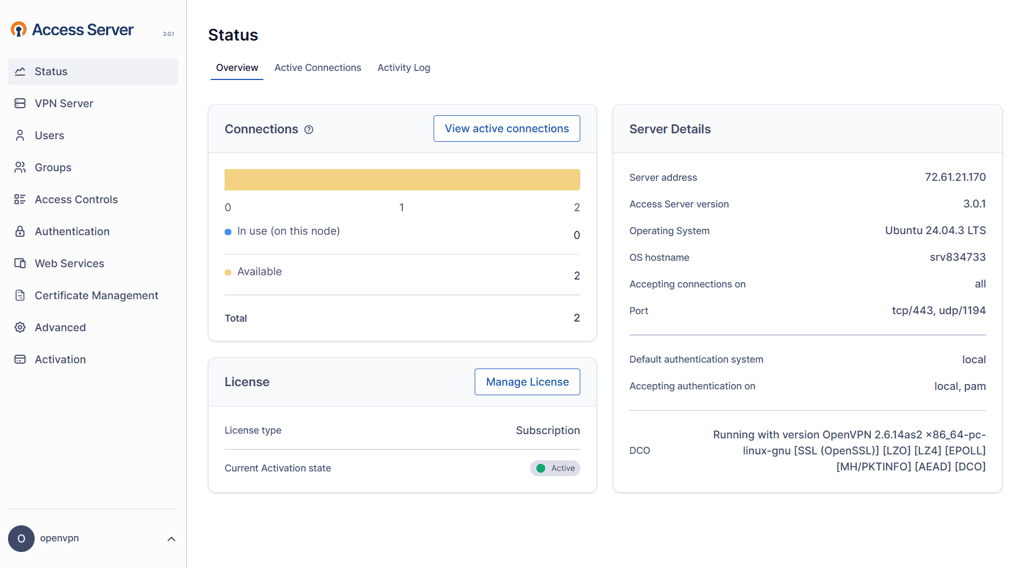
Setting up Access Server feels much like configuring a classic self-hosted VPN. The Linux installer runs quickly and the web-based Admin Web UI becomes available right after activation. From there, user accounts, authentication modes, and network settings are configured through a clean but slightly technical interface.
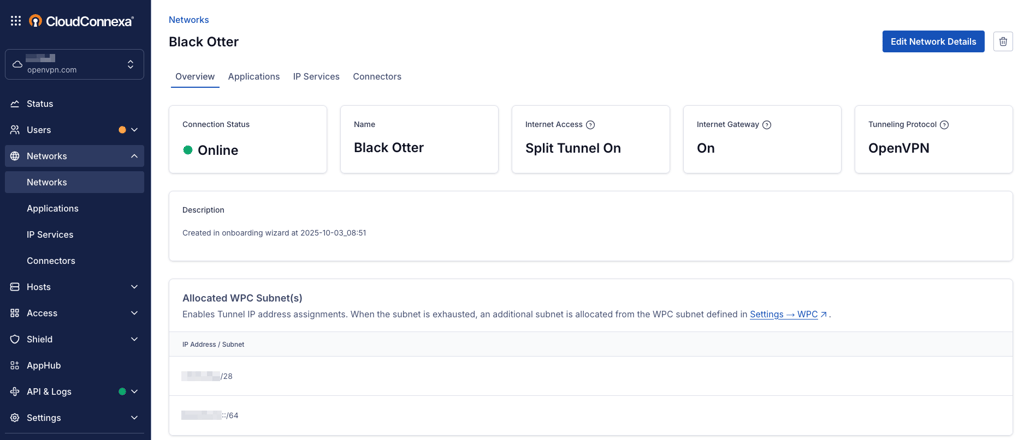
By contrast, CloudConnexa handles setup entirely through a browser dashboard. No local deployment is needed – you simply create a workspace, define users and deploy connectors, and choose the nearest point of presence from the OpenVPN Connect app to connect. The onboarding wizard guides you through linking a cloud provider or VPS if you need private routing. It’s far quicker to get running than a self-managed server, especially for distributed teams.
Authentication, security and access control
Access Server gives administrators tight control over authentication. It supports local user credentials, LDAP or Active Directory integration, RADIUS, and SAML SSO. Multi-factor authentication using TOTP can be enabled for additional security. Encryption standards are strong by default (AES-256-GCM with TLS keys), and policies can restrict which subnets or devices each group can reach.

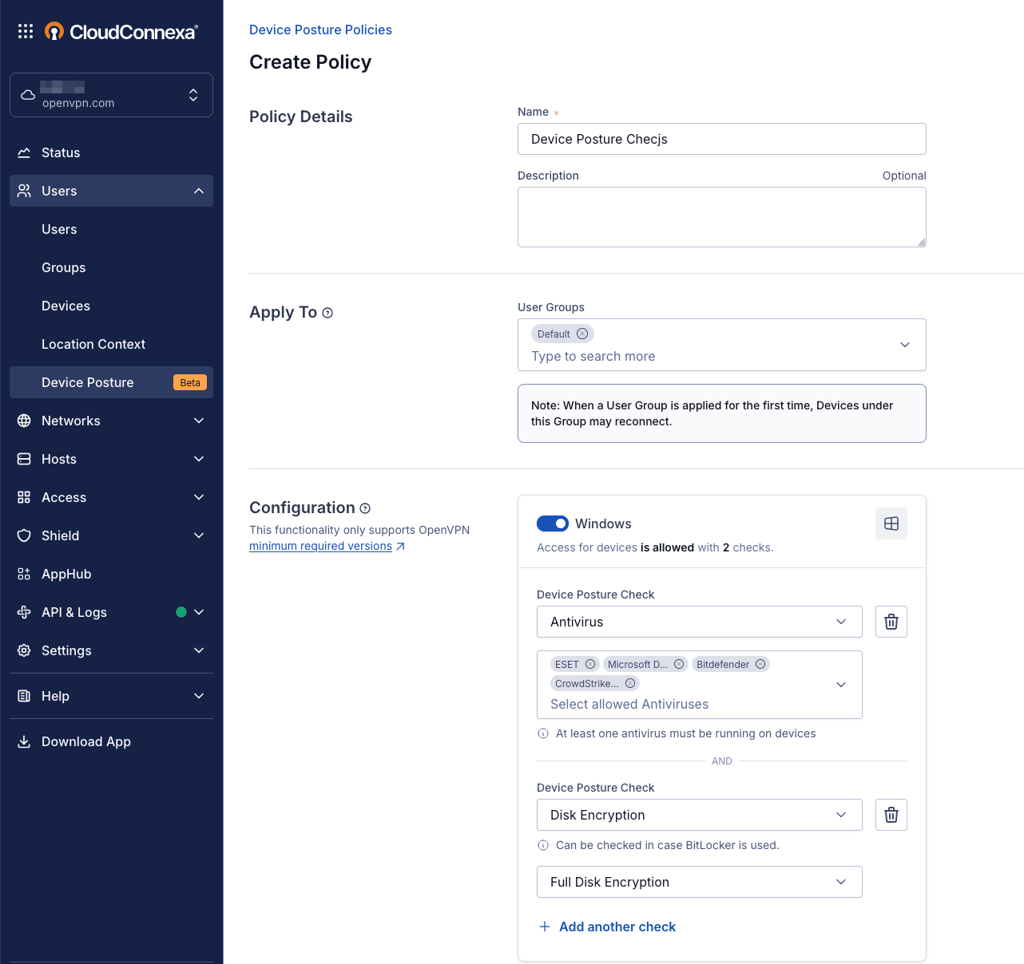
CloudConnexa focuses on identity-based, zero-trust principles. It includes device posture checks – verifying antivirus, disk encryption, or OS version before allowing access – and integrates smoothly with SAML providers like Okta or Azure AD. Administrators can define access based on user groups, location, or device context. These cloud-native features make it easier to enforce security across remote users without maintaining local infrastructure.
Management and monitoring
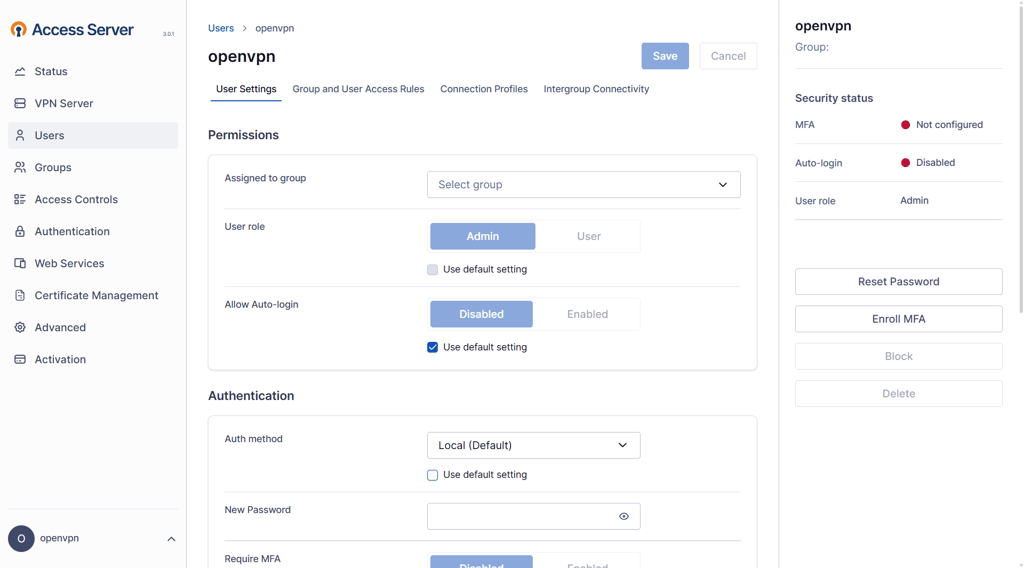
Day-to-day management differs sharply between the two. Access Server offers a straightforward web dashboard with status indicators for connected users, licensed connections, and system load. It also exposes detailed logs for troubleshooting and session auditing. However, large-scale reporting or alerting requires additional tooling.
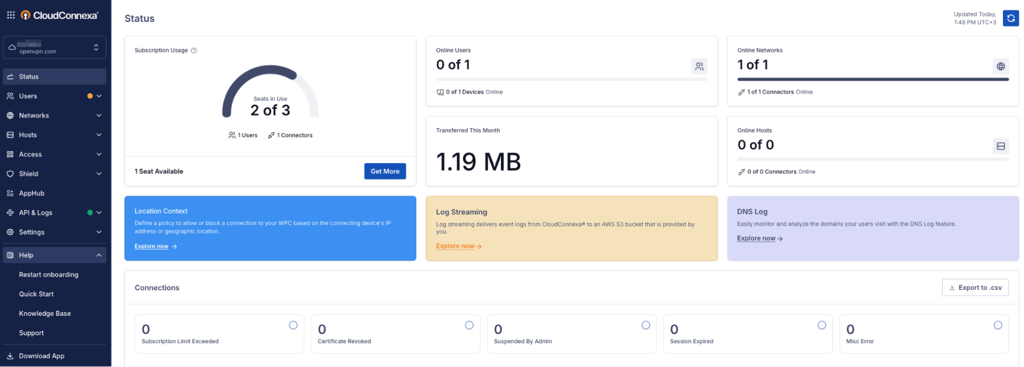
CloudConnexa, on the other hand, provides centralized visibility from its “Status” panel. Administrators can view seat usage, data transferred, and connector health at a glance. There are numerous other features that enhance visibility overall, with Cyber Shield and DNS and Audit Log functionality. Log Streaming exports data directly to AWS S3 for long-term storage or analytics. The UI feels cleaner and faster to navigate, which suits teams managing multiple sites or contractors.
Integrations and extensibility
Access Server integrates well with standard IT stacks. It can seamlessly integrate with your AWS, Azure, GCP, Oracle Cloud, DigitalOcean, or IBM Cloud environments, and controlled via REST API or command-line automation. Administrators can push routes, DNS settings, and scripts to clients, making it highly adaptable for on-prem or hybrid networks.

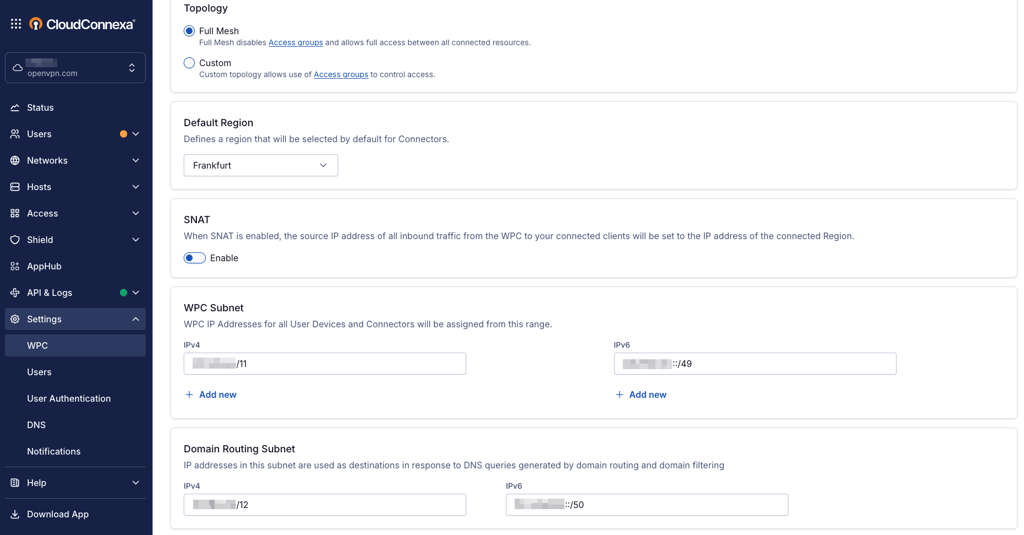
CloudConnexa extends integration further into the SaaS and cloud worlds. It natively supports API-based automation and includes a Terraform Provider for Infrastructure-as-Code (IaC) management. Deployment of Connectors is simple – you typically generate a token or download a configuration file and run the installer on your host (VM, router, or server). Furthermore, CloudConnexa includes AppHub, a feature designed for securely sharing access to private applications between different Wide-area Private Clouds (WPCs) or with trusted third-party organizations.
Performance and speed
Both CloudConnexa and Access Server deliver stable, consistent performance once configured correctly, but their efficiency depends on how they’re deployed.
With Access Server, performance is closely tied to the hardware or virtual machine you use. When hosted on a capable instance, file transfers and remote connections feel smooth and responsive, even under moderate load. Scaling for larger teams mainly involves allocating additional CPU resources or setting up extra nodes, which OpenVPN’s licensing model supports easily.
CloudConnexa, on the other hand, manages the heavy lifting automatically. Since it runs on OpenVPN’s distributed cloud infrastructure (PoPs), bandwidth and latency remain steady across regions without any manual optimization. Connections adapt dynamically as more users log in, making it ideal for organizations that don’t want to manage hardware or routing themselves.
For smaller teams, both services provide more than enough speed for daily operations. As usage grows, CloudConnexa’s automatic scaling offers simplicity, while Access Server rewards those who prefer a more hands-on approach to performance management and network configuration.
Security and privacy
Security remains one of OpenVPN’s strongest points, and both Access Server and CloudConnexa apply the same trusted encryption standards. Data is protected with AES-256-GCM encryption combined with TLS-based key exchange, ensuring end-to-end confidentiality across both local and remote connections.
Access Server gives administrators full control over where data is stored and how logs are handled. It supports multiple authentication methods, including local credentials, LDAP, and SAML/SSO, allowing complete oversight of privacy settings in on-premise environments.
CloudConnexa extends the same protections into a managed, cloud-based framework. User authentication integrates with third-party identity providers, while OpenVPN’s global infrastructure complies with standards like SOC 2 Type 2, ISO/IEC 27001, GDPR, and HIPAA. Logs are minimal and used primarily for service reliability, not traffic inspection (which can be done with Cyber Shield).
For smaller teams, default settings are secure enough. Larger deployments may benefit from tightening MFA policies, reviewing access groups, and enabling device posture and location context checks for consistent compliance.
Alternatives
Access Server and CloudConnexa cover most business needs, but they aren’t the only options. Access Server suits teams that want full control and can manage their own infrastructure, while CloudConnexa fits those preferring a hands-off, cloud-based ZTNA VPN solution.
If you don't need the flexibility of managing servers by yourself, you could choose a fully managed solution like NordVPN Teams or Perimeter 81. These handle scaling, updates, and support automatically while offering comparable security but with less customization and control.
Ultimately, Access Server is best for administrators who value customization, while CloudConnexa is ideal for companies seeking simplicity and low maintenance.
Verdict: which one should you choose?
After spending time with both, it’s clear they’re built for different kinds of teams. CloudConnexa makes life easy – setup takes minutes, and once it’s running, you barely have to touch it. Access Server feels more traditional but gives you full control over your own environment. It needs a bit more care, yet it rewards that effort with flexibility.
Both share OpenVPN’s trusted security, so the real question is how much work you want behind the scenes.