Fastest WordPress hosting in Singapore 2026 (based on real-world testing)
Our in-house experts conduct internal independent, hands-on testing and transparent reviews of web hosting providers by using custom-built tools or utilizing industry-recognized tools and methods to ensure impartial and evidence-based assessments.
Using the same criteria for all services, we share our detailed methodologies and practices to help customers make informed hosting decisions.
Learn more

When a site takes too long to load, people do not wait around. They close the tab and move on, which is exactly why hosting speed matters so much for WordPress in Singapore.
At Cybernews, we tested over 64 hosting providers using industry-leading tools like WebPageTest and Grafana. We built identical WordPress sites, used a lightweight theme, and tracked both loading speed and uptime over time.
Based on those results, we narrowed it down to the 6 fastest WordPress hosting Singapore providers in 2026.
6 fastest WordPress hosting providers in Singapore 2026
- Hostinger – overall best WordPress hosting in Singapore
- Hosting.com – beginner-friendly WordPress hosting in Singapore
- Cloudways – best value-driven WordPress hosting for strong performance
- Kinsta – premium managed WordPress hosting in Singapore
- SiteGround – reliable WordPress hosting option in Singapore
- Rocket.net – high-end alternative for premium hosting




Our in-house research team and expert writers work hand in hand to regularly test hosting services and provide accurate and fact-checked information. Discover the ins and outs of how we test and evaluate website hosting providers.
Best WordPress hosting in Singapore 2026 – detailed reviews
1. Hostinger – best Singapore hosting overall

| Rating: | |
| Starting price: | $2.69/month |
| Money-back guarantee: | 30 days |
| Storage: | From 20GB NVMe |
| Server locations: | Singapore, India, Indonesia, multiple locations in the US and Europe |
| Special deal: | Get up to 82% OFF Hostinger + free months |
Hostinger works really well for Singapore if you want something simple, affordable, and still reliable for local traffic. It wasn’t the fastest hosting provider during our Singapore testing, but in my experience, it delivers really good overall performance for the price.
Why it’s good for Singapore hosting:
- It reached a 1.536s loading speed in our Singapore Hostinger testing, which is decent for its price range
- You can choose a Singapore server location on web and cloud plans, so your site stays close to local visitors
- It uses LiteSpeed servers and NVMe storage, which helps improve response times on hosting
- The platform includes a built-in CDN, so static content loads faster across Asia
- It comes with AI tools and a beginner-friendly dashboard, making setup quick, even without experience
2. Hosting.com – fastest Singapore hosting for WordPress for beginners

| Rating: | |
| Starting price: | $1.99/month |
| Money-back guarantee: | 30 days |
| Storage: | From 5GB NVMe |
| Server locations: | Singapore, Sydney, multiple locations in the US and Europe |
| Special deal: | Get hosting.com, now up to 86% OFF |
Hosting.com is my second top pick for Singapore because of its performance. When I set it up, I could select a Singapore server right away, which is exactly what you want if your audience is local. Along with a strong managed WordPress setup, you don’t have to tweak much to get solid performance.
Why Hosting.com is the best for WordPress hosting in Singapore:
- It delivered a 0.5s loading speed in our Hosting.com testing, the fastest result on this list
- You can choose a Singapore data center, which keeps your site close to local users and ensures fast response time
- It includes Cloudflare CDN and WAF, so most content is served from nearby edge locations instead of your origin server
- NVMe storage helps sites load and process data faster, especially for larger or more demanding websites
- LiteSpeed-powered Turbo stack and built-in caching for stronger PHP performance on WordPress sites
- Entry-level pricing and promotional rates that make testing or short-term launches inexpensive
3. Cloudways – best performance for its value WordPress host

| Rating: | |
| Starting price: | $6.60/month |
| Money-back guarantee: | Trial available |
| Storage: | From 20GB |
| Server locations: | Singapore, Tokyo, Sydney, multiple locations in the US and Europe |
| Special deal: | Get up to 40% OFF Cloudways |
Cloudways is great if you want fast hosting at a decent cost. Compared with Hosting.com, it was only a hair slower in our testing, at 0.518s, but it can still be a very good choice if you want to pick the underlying cloud provider and region yourself.
Why Cloudways works well for Singapore WordPress hosting:
- It delivered a 0.518s loading speed in our Cloudways testing, which is strong for a managed cloud setup
- You don’t have to manage the server yourself since Cloudways handles updates, security, caching, and backups automatically
- Lets you run your site on popular cloud providers like DigitalOcean, Vultr, AWS, or Google Cloud, and pick a server in Singapore so local visitors get fast access
- Because Cloudways supports multiple cloud providers, you can choose one with the best network performance in Southeast Asia
- 1‑click WordPress deployment and staging environments make it easy to test changes before they go live
4. Kinsta – best premium managed hosting for Singapore

| Rating: | |
| Starting price: | $35.00/month |
| Money-back guarantee: | 30 days |
| Storage: | From 10GB |
| Server locations: | Singapore, Asia-Pacific regions |
| Special deal: | Get Kinsta, now up to 17% OFF! |
Kinsta is a premium managed WordPress host ideal for Singapore-based sites that need a hands-off yet high-performance setup. It’s built on Google Cloud’s network, which means you can select Singapore as the hosting region for low-latency access while benefiting from Google’s private network connections between data centers in the region.
Why Kinsta works well for hosting in Singapore:
- During Kinsta testing, sites loaded in 0.72s, which is still one of the best performance results in this list
- A free CDN distributes your content across nearby Asia-Pacific servers, reducing delays for local visitors
- Managed WordPress platform with containerized PHP workers and integrated Redis for caching
- NVMe storage on Google Cloud provides consistent speed when reading and writing site data
- Automated daily backups and staging environments make it simple to test updates or recover from mistakes without downtime
5. SiteGround – best hosting for WordPress in Singapore

| Rating: | |
| Starting price: | $2.99/month |
| Money-back guarantee: | 30 days |
| Storage: | From 10GB |
| Server locations: | Singapore, Sydney, multiple locations in the US and Europe |
| Special deal: | Get up to 83% OFF SiteGround + FREE TRANSFER |
SiteGround is a solid choice for WordPress hosting in Singapore, offering strong integrated caching, a broad CDN footprint, and Google Cloud infrastructure. It’s best for users who want reliable performance without having to manage every technical detail themselves.
Why SiteGround works well in Singapore:
- Singapore data center, plus a large CDN with 170+ edge locations, for fast static content delivery
- Strong security features, including free SSL, daily backups, and AI content generation tools
- Built-in caching and optimized PHP help pages load faster, especially for content that changes often
- Automatic daily backups and WordPress updates save time and reduce risk
- During SiteGround tests for Singapore, it stayed online 100% of the time, and pages loaded in 1.41 seconds
6. Rocket.net – best premium alternative

| Rating: | |
| Starting price: | $30.00/month |
| Money-back guarantee: | 30 days |
| Storage: | From 10GB |
| Server locations: | Singapore with wide coverage in the US and Europe |
Rocket.net is a solid premium option for Singapore if you want managed hosting with a local server choice. It did not beat the top providers in our testing, but it still delivered a respectable 1.821s loading speed.
Why Rocket.net works for Singapore hosting:
- It now offers a Singapore location, which helps keep your origin closer to local visitors
- It uses NVMe-based servers, so the backend stays responsive under normal WordPress loads
- Most of your content is served through its built-in CDN, so pages don’t feel as slow as the raw speed suggests
- The setup is fully managed, so you do not need to spend time tuning caching or security settings
- Pricing stays the same on renewal, no sudden jumps later
Fastest and best WordPress hosting in Singapore comparison
| Best for | Loading time | Uptime results | Server locations | ||
| Hostinger | Beginner value | 1.536s | 100% | Singapore, India, Indonesia | |
| Hosting.com (A2) | Overall fastest hosting | 0.5s | 100% | Singapore, Sydney | |
| Cloudways | Performance for its value | 0.518s | 100% | Singapore, Tokyo, Sydney | |
| Kinsta | Premium managed hosting | 0.72s | 100% | Singapore, Tokyo, Sydney | |
| SiteGround | WordPress overall | 1.41s | 100% | Singapore, Sydney | |
| Rocket.net | Premium alternative | 1.821s | 99.99% | Singapore |

Methodology
To find the best WordPress hosting providers in Singapore, working closely with the Cybernews research team, I followed our standard hosting testing methodology. We set up the same WordPress website on each provider and then measured how well each one handled real-world use.
1. Identical test website setup
We used the same WordPress installation for every host, so the results stayed consistent. Each site had the same version of WordPress, the same theme, and the same demo content, including pages, posts, and images. I did not add any extra plugins or any other custom tweaks that could make one provider look better than another.
2. What we measured
To test hosting providers in Singapore, we focused on two factors that matter most to website owners: speed and uptime.
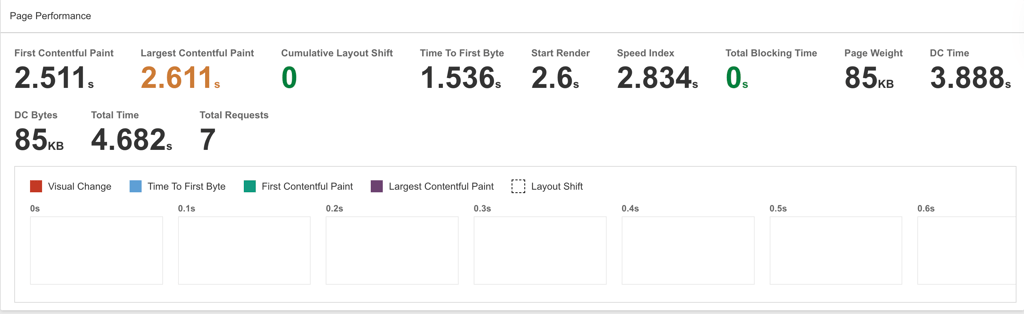
Loading speed shows how quickly a site opens for visitors. Uptime shows whether the site stays online. A fast host is useful, but only if it is also dependable.
3. Tools we used for testing
To check performance, we used WebPageTest to measure how quickly each site loaded from Singapore. Uptime was monitored using Grafana, which continuously tracked availability over the testing period. These tools allowed us to get reliable, comparable results across all providers.
4. Why the Singapore location mattered
Because this article is about hosting in Singapore, we cannot meaningfully rely on data unrelated to Singapore. Hence, we paid attention to whether each provider offered a Singapore data center or at least a nearby Asia-Pacific location. A closer server usually means faster response times for local visitors.
5. How we compared the providers
After testing, I compared the average loading speed and uptime for each host and looked at the overall experience too. I also considered how easy each service was to use, whether it offered a Singapore location, and also considered features like built-in caching, CDN support, and managed WordPress tools.
Only by testing under these conditions could I reliably rank each provider for Singapore-based websites.
How to choose the best WordPress hosting in Singapore
Since you cannot test a host’s actual speed before buying, the safest approach is to verify the details you can check up front. That makes it easier to compare providers and avoid surprises later.
Look at these things first:
- Server location – Singapore data center should be a must. If that is not available, choose a nearby Asia-Pacific location
- Resources and limits – check CPU, RAM, storage type, bandwidth, and any technical limitations or caps
- Storage – NVMe is usually a better sign than older SSD storage for sites
- Money-back guarantee – clear refund policy gives you a way out if the host does not fit your site
- Security and backups – free SSL, automatic backups, malware protection, and a firewall are worth having
- WordPress tools – 1-click installs, staging, and automatic updates make setup and day-to-day work easier
- Support – 24/7 help matters when something breaks, and you need a quick fix
Final thoughts
If your audience is in Singapore, picking a host with local servers makes a real difference. In our tests, the gap between providers was clear, especially when it came to the loading speed.
Here’s a quick way to choose:
- Affordable and beginner-friendly – Hostinger
- Fast and simple setup with solid performance – Hosting.com
- Good balance of control and speed – Cloudways
- Premium managed WordPress with hands-off maintenance – Kinsta
- Easy WordPress management with strong CDN support – SiteGround
- Fully managed, hassle-free option – Rocket.net