How to watch Crave TV in the USA in 2026
Our in-house cybersecurity experts and journalists, renowned for major reports like The Mother of All Breaches, conduct transparent, unbiased VPN testing and in-depth analysis.
With 750+ articles crafted based on real-world research, we empower readers to make informed purchasing decisions through first-hand expertise.
Learn more

If you're trying to watch Crave TV in the US, you’ve probably run into the frustrating “only available in Canada” notification. That's because Crave TV restricts its streaming service to Canadian viewers only.
If you already have a valid Crave subscription, a VPN might help you access the service while you're outside Canada by providing a Canadian IP address. However, a VPN can't create a Crave account, provide a Canadian payment method, or guarantee access if Crave detects VPN use or changes its access policies.
If you’re already in Canada or have a valid Crave subscription that works in your region, you can access Crave TV without using a VPN at all. In this guide, I’ll explain how to access Crave TV from the US, the limitations of using a VPN, and which VPNs performed best in our testing for connecting to Canadian servers.
Using a VPN to access Crave TV from outside Canada may violate the platform’s Terms of Service. While a VPN only changes your IP address, streaming platforms often use additional checks, such as account region, payment method, and device signals, to detect access from unsupported locations. If Crave detects VPN usage or determines that your access doesn’t meet its regional requirements, it may block streaming access, request verification of your account or payment details, or restrict your account access. A VPN doesn’t guarantee access to Crave TV, and it doesn’t override subscription, billing, or regional eligibility rules.
Watch Crave TV in the USA with a VPN

- Choose a VPN with Canadian servers.
- Download and install the software.
- Connect to a server in Canada.
- Sign in to your existing Crave account. If you don't have one, you'll need to create an account on Crave's official site using a Canadian payment method.
- Open Crave and check whether you can stream the content you want. Note that a VPN changes your IP address but doesn't guarantee access if Crave detects VPN use or changes its access policies.
Why do you need a VPN to watch Crave TV?
CraveTV is available in Canada only. So, if you’re already in Canada, you don’t need a VPN to watch Crave TV. You can simply open the Crave app or website and sign in with your existing account to start streaming.
However, access to its content catalog, including HBO and Paramount shows or movies, isn't available for anyone with a different IP address. Some users turn to VPNs to get a Canadian IP address, but it’s only one part of accessing Crave. VPNs don’t create a Crave account, provide a valid payment method, change your app store region, or give you a Crave subscription. Here’s what a VPN can and can’t do for accessing Crave TV abroad:
| What you need | Can a VPN help? | Details |
| Canadian IP address | ✅ Yes | A VPN can change your IP address so it appears you're browsing from Canada. |
| Crave account | ❌ No | You'll need to create a Crave account or sign in to your existing one. |
| Valid payment method or accepted gift card | ❌ No | A VPN can't provide or verify a payment method or complete the signup process for you. |
| Apple App Store or Google Play region (mobile devices) | ❌ No | A VPN doesn't change your app store region. You might need to change your account settings separately if the Crave app isn't available in your region. |
All these restrictions exist because the platform needs to adhere to licensing agreements, distribution rights, and copyright laws. If you attempt to access CraveTV from outside Canada, you will be blocked by the following error message: “We’re sorry, this content is only available for viewing in Canada.”

A reputable VPN will help you change your IP address, which might allow you to access CraveTV from the US, the UK, India, or anywhere else in the world. If you already have an eligible Crave account and meet the service's subscription requirements, once you’ve installed the VPN, connect to a server in Canada, go to CraveTV’s website or app.
VPNs to watch Crave TV in the USA
My top recommended VPNs for Crave TV are NordVPN, Surfshark, and IPVanish. They all have plenty of servers in Canada and helped me access Crave TV during testing.
- NordVPN – all-around VPN for CraveTV
- Surfshark – great-value VPN for CraveTV
- IPVanish – excellent provider with servers in Canada
How to subscribe to Crave TV in the USA
While a VPN might help you access Crave TV in the US, you might encounter issues when signing up for a subscription. This is because CraveTV doesn’t accept US payment cards.

One option is to have someone in Canada purchase a Crave gift card for you. If Crave currently offers gift cards, a friend or family member with a Canadian payment method can buy one and share the redemption code with you. Keep in mind that redeeming a gift card doesn't guarantee you'll be able to create an account or access Crave, as additional account verification or regional requirements may still apply. Here's the general process:
- Ask someone in Canada to purchase a Crave gift card from the official Crave website using an accepted payment method
- Have them send you the gift card code and PIN
- If you're accessing Crave from outside Canada, connect to a VPN server in Canada
- Visit the Crave website and click Subscribe
- Sign in or create a Crave account and choose the subscription plan you want
- When you get to the payment screen, select Add Gift Card
- Enter the code and PIN for your gift card, which you will be able to find in your confirmation email
- If your account meets Crave's current eligibility requirements, complete the sign-up process and sign in
How to watch Crave TV on an Android or an iPhone
If you plan to use Crave while traveling outside Canada, it's easiest to install the Crave app and sign in to your account before leaving Canada. Once the app is installed, you can connect to a Canadian VPN server and check whether you can access the service while abroad. If you're setting up Crave on a new mobile device outside Canada, here's the general process:
- Download and install a reliable VPN on your Android device or iPhone.
- Connect to a server in Canada.
- Check whether the Crave app is available in your Apple App Store or Google Play Store region. If it isn't, you might need to change your store region according to Apple's or Google's requirements before you can download it. Note: Changing your app store region has its own eligibility requirements and might affect existing subscriptions or account settings. A VPN doesn't automatically change your app store region.
- If you already have the Crave app installed, consider disabling location permissions for the app if you don't want it to access your device's precise location. Note: This doesn't guarantee access, and Crave might use additional methods besides your device's location to determine availability.
- Open the Crave app or visit the Crave website.
- Sign in with your existing Crave account or subscribe if you're eligible to do so.
- Browse the available content and check whether streaming is available.
Watch Crave TV on a streaming device
It’s worth noting that most streaming sticks, including Roku, Kodi, and Apple TV, don’t support VPN apps. In some cases, users route VPN connections through a router, but this doesn’t guarantee access to Crave content. Basic setup might include:
- Use a VPN that supports router configuration
- Connect your network to a Canadian server
- Check whether the Crave app is available on your device store
- Sign in if you already have a valid account and subscription (if not, you might need a Canadian payment method to complete registration)
Some devices, like Amazon Fire TV, might support VPN apps directly, but availability still depends on regional app store access and subscription eligibility.
Can’t access CraveTV with a VPN?
Even if you follow all the steps correctly, you may still find you’re getting a CraveTV error message. This can happen for several reasons, including regional availability limits, account restrictions, or payment and device checks.
First, double-check that you’re connected to a Canadian server, as the service is only available in Canada and may be restricted in other regions. If you’re connected correctly but still can’t access the service, the issue might be related to VPN performance or the platform’s restrictions rather than a configuration error. To help diagnose the issue, you can try the following steps:
- Clear your cache and cookies, as they may be giving away your true location
- Make sure you have IP leak protection enabled on your VPN, as your true IP address may be visible
- Connect to a different server
- Try another browser
- Contact your VPN’s customer support team
If access still doesn’t work after these checks, it may indicate that the service is blocking VPN connections or that access isn't available in your current setup.
What you can watch on Crave TV
From HBO to Paramount, CraveTV has some of the world’s most popular movies and TV shows in its content library.
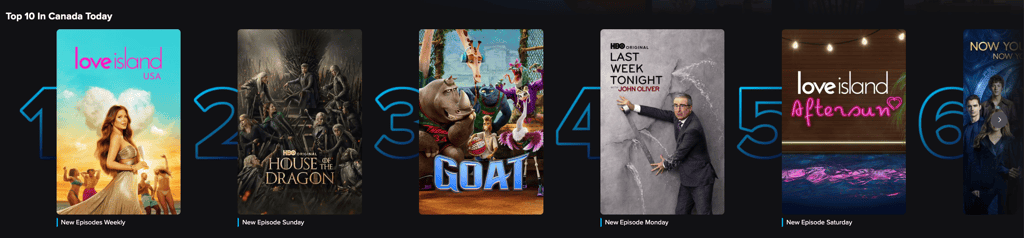
Here are some of the best things you can find on CraveTV that you cannot miss:
| Title | Genre |
| House of the Dragon (2022 – present) | TV drama |
| The Flight Attendant (2020 – 2022) | TV drama |
| The Last of Us (2023 – present) | TV drama |
| Love Island USA (2019 – present) | Reality TV show |
| Big Little Lies (2017 – 2019) | TV drama |
| Euphoria (2019 – 2026) | TV drama |
| The Handmaid’s Tale (2017 – 2025) | TV drama |
| I May Destroy You (2020) | TV drama |
| Mare of Easttown (2021) | Crime drama |
| Nomadland (2020) | Hollywood movie |
| RuPaul’s Drag Race (2009 – present) | Reality TV show |
CraveTV is adding new content all the time. To find out about new releases, be sure to keep an eye on CraveTV’s Twitter page and Facebook page.
Conclusion
With HBO and Paramount content, CraveTV has a big library of great shows and movies. But it’s only available to stream in Canada. A VPN can help by changing your IP address so it appears you’re browsing from Canada, which might allow access to geo-restricted pages. However, it doesn’t guarantee access, since account, billing, and platform checks can still affect availability.
In some cases, a VPN like NordVPN might provide stable connections to Canadian servers, but results can vary depending on how the service detects and restricts access. Beyond streaming, VPNs can also add a layer of privacy by encrypting internet traffic and might help reduce certain types of ISP throttling, depending on the network and service used.
FAQs
Is CraveTV available to stream in the US?
No, CraveTV is only available to stream in Canada. A VPN can change your IP address to a Canadian location, which may allow you to view the Canadian version of the service. However, this doesn’t guarantee access to streaming, since availability also depends on account registration rules, billing requirements, and platform detection systems.
Is it legal to watch CraveTV with a VPN?
Yes, it’s perfectly legal to use a VPN to watch CraveTV from outside Canada. However, it may go against CraveTV’s Terms of Service to do so, although we haven’t heard of anyone being penalized for this. Bear in mind that some countries, such as Turkey and Russia, have banned the use of VPNs for any reason.
Can you get CraveTV for free with Amazon Prime?
No, unfortunately, CraveTV doesn’t come free with Amazon Prime. You’ll need to sign up for a subscription through CraveTV. To do this from outside Canada, take a look at our quick step-by-step instructions.


