These Chrome AI assistants secretly harvested ChatGPT chats
Nearly 900,000 people installed AI browser assistants on Chrome and Edge that secretly harvested their chat conversations and browsing activity.

Image by Cybernews

 Follow us
Nearly 900,000 people installed AI browser assistants on Chrome and Edge that secretly harvested their chat conversations and browsing activity.
Microsoft’s security researchers have uncovered a malicious campaign aimed at stealing corporate data. Attackers use browser extensions, which are distributed through the Chrome Web Store like any other extension used daily.
The discovered malicious extensions trick users into installing them by posing as legitimate AI productivity tools for Chrome and Edge.
However, instead of helping users, the extensions harvest chat histories from platforms like ChatGPT and DeepSeek and collect user browsing history.
The malicious extensions were active across more than 20,000 enterprise environments. This suggests that many organizations are at risk.






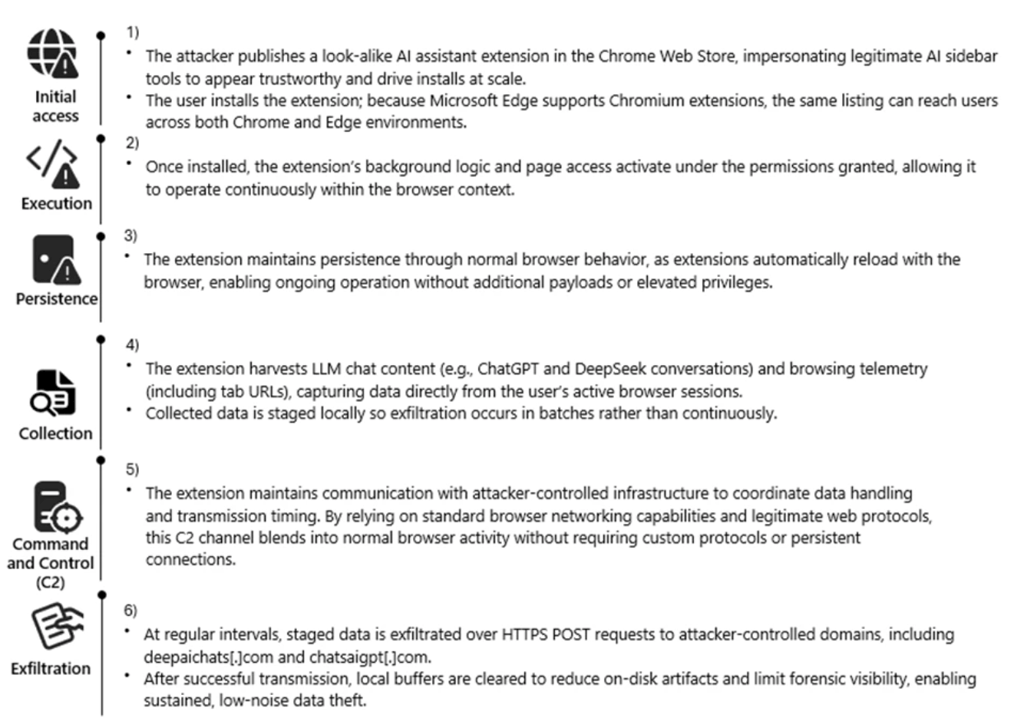
The attackers behind the campaign cloned the branding and appearance of legitimate AI extensions to trick users into believing they were legitimate. The malicious extensions were mainly distributed via the Chrome Web Store, but they were also picked up by browsers as legitimate tools.
“We also observed cases where agentic browsers automatically downloaded these extensions without requiring explicit user approval, reflecting how convincing the names and descriptions appeared,” said Microsoft researchers.
That meant users didn’t need to go hunting for them. The extensions came to them.
How malicious AI extensions steal data
According to researchers, the malicious extensions behaved as normal browser add-ons. They even included a consent mechanism that appeared to give users control over data collection.
However, the extensions automatically reloaded whenever the browser started, requiring no elevated privileges or additional user actions. This means that when the extensions were reloaded, it quietly turned data collection back on, even if users had previously disabled it.
The collected data was stored locally before being exfiltrated to an attacker’s infrastructure. At scale, this attack flow transformed a simple browser add-on into a long-term surveillance mechanism. “Collected data was staged locally and prepared for periodic transmission, enabling continuous visibility into user browsing behavior and interactions with AI platforms,” explained researchers.
What data do malicious extensions collect:
- Full URLs visited in the browser, including internal corporate sites
- Snippets of AI chat prompts and responses
- The AI models used during conversations
- Persistent identifiers tied to each user session
Researchers observed the extensions sending data to domains including deepaichats[.]com and chatsaigpt[.]com.
The traffic used normal HTTPS requests, making it look like routine web activity rather than data exfiltration. After each upload, the extension wiped its local buffers, leaving very little evidence behind.
Why AI chat data is valuable
AI assistant extensions have exploded in popularity as part of a wider push for industries to adopt AI.
Employees are increasingly using sidebar tools that can summarize pages, generate code, or interact with AI models without leaving the browser.
As a result, prompts could often include sensitive material such as:
- Proprietary code
- Internal workflows
- Strategic planning discussions
- Confidential documents or datasets
By harvesting prompts and responses, attackers could gain an evolving window into how companies think, build, and operate.
Also, stealing such data might provide attackers with a vast range of useful information that could be used in further attacks against organizations. Effective phishing and social engineering campaigns fall within that scope.
Browser extensions are a growing blind spot in security
The discovery adds to rising concerns regarding the safety of using browser extensions. As previously reported by Cybernews, LayerX Security researchers warn that browser extensions have a massive security blind spot.
They are widely trusted, easily installed, and often granted sweeping permissions to read page content and interact with websites.
“An extension, by the mere act of downloading it, is granted enormous implicit power. Any extension can be weaponized to install malware on target hosts,” LayerX Security researchers said.






Last year, thousands of Firefox users were compromised by 17 malicious browser extensions.
Malicious Chrome and Edge extensions reportedly targeted users by masquerading as legitimate password managers and digital wallets to steal valuable user information.
Security researchers warn that over 2.3 million users have been infected by Trojans, thanks to malicious browser extensions on Chrome and Edge.
Cybernews's in-house research also showed worrying trends. Researchers took a deeper dive into the top 100 extensions and found that, on average, they requested high-risk permissions. 86 of the investigated extensions gain highly dangerous permissions upon installation.
How organizations can defend themselves
Microsoft warns that companies should treat browser extensions as part of their security surface, especially as AI assistants become more common.
Defensive steps include:
- Monitoring network traffic for connections to suspicious domains such as *.chatsaigpt.com and *.deepaichats.com
- Auditing and restricting browser extensions used within the organization
- Enabling SmartScreen and network protection features
- Deploying data protection controls around AI tools and chat platforms
- Employers should establish clear policies for how employees use AI in the workplace
- Employees should also periodically review their installed extensions and remove any unfamiliar ones
Unlock more exclusive Cybernews content on YouTube.