Fake McAfee emails refuse to die as new round of phishing emails targets consumers
A new wave of fake McAfee renewal emails proves that sometimes the oldest tricks are the best ones, reviving a long-running scam that security experts say continues to thrive by exploiting fear and confusion around antivirus subscriptions.

Image by Cybernews

 Follow us
A new wave of fake McAfee renewal emails proves that sometimes the oldest tricks are the best ones, reviving a long-running scam that security experts say continues to thrive by exploiting fear and confusion around antivirus subscriptions.
- Fake renewals are back: Scammers are heavily reviving old McAfee expiration emails and pop-ups to exploit user fear.
- Scareware drives panic: Deceptive virus alerts are designed to panic users – even those who don't use McAfee – into taking immediate action.
- Beware of fake IT support: Many of these fake alerts include phone numbers that direct victims to fraudulent IT call centers; always verify your status directly on McAfee's official website.
Key Takeaways by nexos.ai, reviewed by Cybernews staff.






The warnings resurfaced after a recent Guardian report highlighted emails claiming users' McAfee protection was about to expire, often followed by urgent messages warning that devices could be exposed to malware unless action was taken immediately.






Fake McAfee renewal campaigns have been doing the rounds for the last couple of years, with security experts warning consumers about fraudulent subscription notices, fake invoices, and browser pop-ups impersonating the antivirus company.
What appears to keep the tactic effective is its ability to mimic legitimate software warnings.
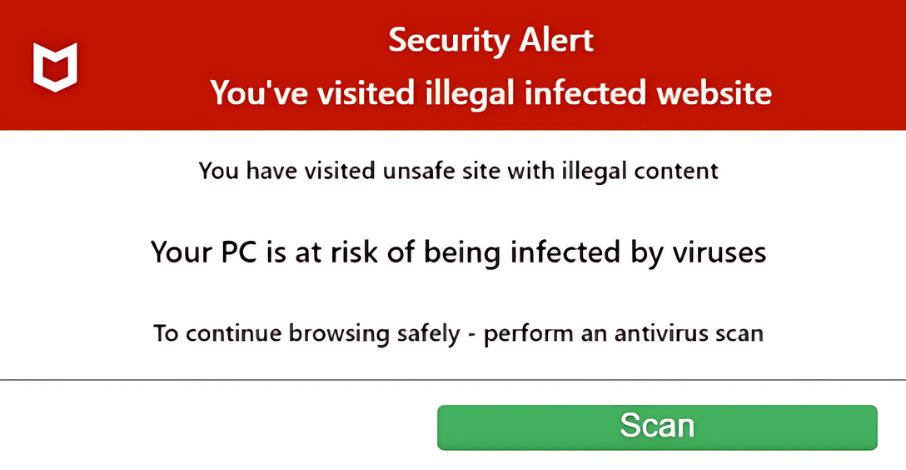
In a recent Reddit post, one Mac user described clicking an old bookmarked website before being shown what appeared to be a security alert claiming five viruses had been detected and that a McAfee subscription had expired – despite never having used the software.
“I completely panicked. It said "McAfee expired [yesterday]" even though I've never had McAfee. I immediately assumed it was something that I was supposed to have, so I bought the cheapest McAfee plan from their website and downloaded the installer,” the poster said.
“The installer refuses to install (says ‘internet not available’ even though I'm connected to the internet),” they added.
It was only later that the user suspected the warning itself was fraudulent.
“Scareware” that leads to Fake IT lead generation
Some security researchers warn that many of these campaigns are no longer just phishing attempts.
Fake renewal notices frequently include phone numbers that encourage recipients to contact supposed support staff. Security experts warn that these are usually connected to fraudulent IT support staff, who then attempt to con callers into buying fake subscriptions.

Only last month, security researchers at the security firm Barracuda uncovered one such scam that used deceptive pop-ups and fake warnings to trick users into believing that their device had been compromised, prompting them to contact fraudulent IT help desks.
"Callback phishing is thriving,” says Gavin Knapp, head of cyber threat intelligence at cybersecurity firm Bridewell
“These scams often create urgency through fake payment confirmations or unauthorized charge alerts designed to alarm recipients and prompt them to call. People are more likely to trust a convincing individual during a live conversation."Gavin Knapp, head of cyber threat intelligence, Bridewell
The security expert adds that while AI is helping attackers make scams “more convincing and easier to scale” the real focus of social engineering remains “exploiting human trust.”
McAfee confirms that cybercriminals increasingly impersonate trusted brands through fake emails, text messages, pop-ups, and phone calls.
Has your password leaked?
“We will never ask you to confirm personal deals, and we’ll never require you to call a phone number in an email or text,” McAfee confirmed on its website.
It added that signs an email could be fake include spelling and grammar mistakes, suspicious links and attachments, and requests for personal or financial info
The company advises users to verify subscription information directly through official McAfee channels rather than links or contact details contained in unsolicited messages.
Unlock more exclusive Cybernews content on YouTube.