Intro to phishing: simulating attacks to build resiliency
While organizations must still account for flashy vulnerability exploitations, denial-of-service campaigns, or movie-themed cyber-heists, phishing-based social engineering attacks remain a perennial choice of cybercriminals when it comes to hacking their victims.

By Shutterstock/Cybernews

 Follow us
While organizations must still account for flashy vulnerability exploitations, denial-of-service campaigns, or movie-themed cyber-heists, phishing-based social engineering attacks remain a perennial choice of cybercriminals when it comes to hacking their victims.
Phishing-borne threats
IBM’s 2022 Data Breach report highlighted how effective phishing-based attacks have become, being the second leading cause of cybersecurity incidents globally, by using a sample instance that affected hundreds of international entities.
An organization’s access controls and security tools (for example, secure email gateways, network filtering mechanisms, SIEM, and so on) do not guarantee relative safety either, as several classes of social engineering platforms, reverse proxies, or man in the middle (MitM) frameworks are fully capable of nullifying multifactor authentication (MFA) and other traditional security protections.
A 2022 analysis of several billion document attachments, website links, and email messages, by cybersecurity firm SlashNext, reflects a 60% increase in phishing-borne attacks that focus on the exploitation of user credentials via their mobile devices.



Email security provider Proofpoint’s 2023 State of the Phish report reflects an ever-escalating financial loss attributed to phishing attacks but also highlights the importance of how appropriate end-user behavior greatly reduces organizational impacts arising from them.
This article will provide some insights into current phishing methods cyber-criminals leverage to exploit human behavior, performance metrics useful for measuring organizational resiliency to phishing, and examples of free tools that can be leveraged to conduct internal simulated phishing exercises.
Fresh tactics
Cybercriminals employ a blend of focused and indirect phishing methods to lure unsuspecting victims, which include targeted attacks crafted towards specific individuals or departments (spear phishing), attacks focused exclusively on high-value targets like business executives (whaling), or even tax-related schemes.
Hackers have shifted tactics recently, with a noted increase in not only telephone oriented attack delivery (TOAD) campaigns but also conversation hijacking, a method where attackers first compromise an organization’s downstream suppliers or business partners, then start generating responses to previously resolved email chains to generate confusion and trick users into clicking on malicious links. Organizations should focus their security awareness and training efforts towards educating their userbases on how to differentiate between each type of phishing attack, and strive to build phishing resiliency over time using routine simulated exercises that mimic real-life attacks.
The infographic below outlines the most common types of phishing attacks used against individuals or businesses.

Measuring an organization's resiliency to phishing can be a tricky science. When done correctly, it helps to ensure employees not only avoid clicking malicious links but follow procedure by reporting malicious emails to designated teams within the organization.
Building phishing resilience
Phishing resilience is measured by assessing the average rate of users reporting simulated phishing emails they receive, divided by the average end-user failure or click rate across all campaigns for a calendar year.
When using this assessment method, Proofpoint recommends a resiliency score of 14, where the average reporting rate is approximately 70%, and click rates are 5% or less. Security firm Hoxhunt noted further that high engagement rates from end users in simulated phishing exercises allow the business to truly measure its risk of phishing attacks versus instilling a false sense of security due to data results from campaigns that include low participation and/or low click rates.
Simulated phishing campaigns should be conducted at least monthly and mimic real-world communications and popular or common branding like Microsoft, and include layers of variation to thoroughly test user awareness of social engineering attacks. The below table highlights an example of a resiliency score measurement against a simulated phishing program, capturing one calendar year’s worth of data.

After the organization better understands the phishing methods used by cybercriminals and how end-user resiliency can be measured, it's useful to initiate simulated phishing campaigns against the user population to gauge how they may respond, triggering corrective actions if necessary.
When finding the appropriate mock-phishing framework, organizations can purchase vendor solutions, self-host using free options, or, surprisingly enough, buy them from advanced persistent threat (APT) actors.
It is also worth considering developing simulated spear-phishing campaigns against specific departments within the organization to provide focused awareness towards heavily targeted groups like finance, HR, legal, or the C-Suite – a generic term for top-level positions within an organization. The remainder of this article will focus on respectable phishing capabilities that organizations can leverage directly, to test user security awareness using free, open-source frameworks: Zphisher and GoPhish.
A closer look at Zphisher
This bash script solution is maintained on GitHub by htr-tech, allowing a simple command-line installation and quick invocation of the tool's phishing capabilities. Zphisher ships with over 30 pre-built templates containing login pages impersonating known brands like Microsoft, Instagram, and Dropbox.
Phishing traffic is tunneled through the user's choice of Ngrok, Cloudflare, LocalXpose, or a localhost option. After issuing a "git clone https://github.com/htr-tech/zphisher.git" command to install the tool, then "./zphisher.sh" to execute it, the below menu options are presented to allow the creation of chosen phishing lures. Once a lure template is selected, the user selects their tunneling option, and a unique URL is created to embed within an email sent to simulated phishing targets.


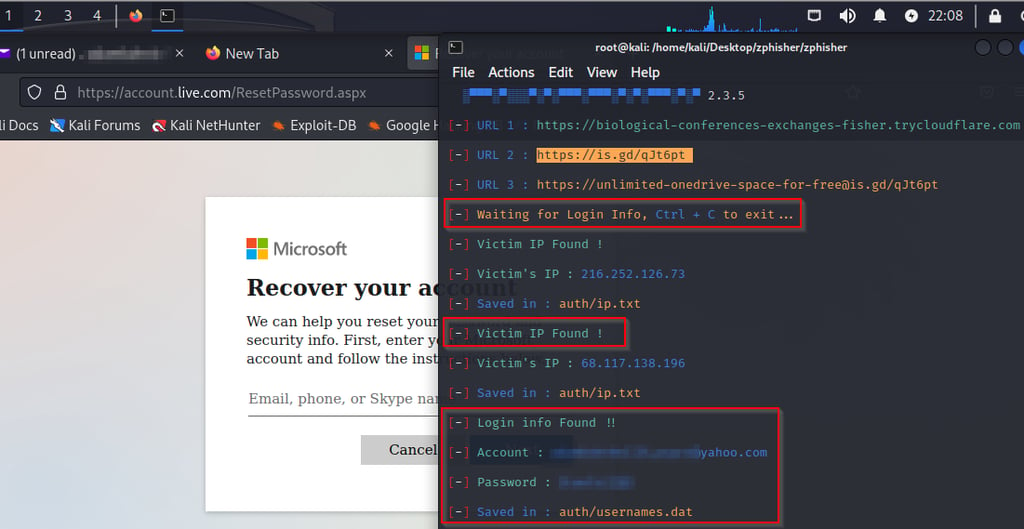
Zphisher can be used at scale but may require more manual effort to produce effective reporting against the results of each phishing campaign. The tool will shine in spear-phishing exercises aimed at 100 users or less.
GoPhish review
When using a free tool that provides broader targeting and more granular control over larger-scale phishing campaigns, GoPhish is preferred. It leverages the Go language, hence the name, and this is a requirement for the tool to function. After Go is installed, the tool can be downloaded to Linux or Windows workstations for installation and use.
The following screenshots demonstrate launching the tool from a Windows 10 workstation, then creating and managing aspects of an example phishing campaign in the tool.

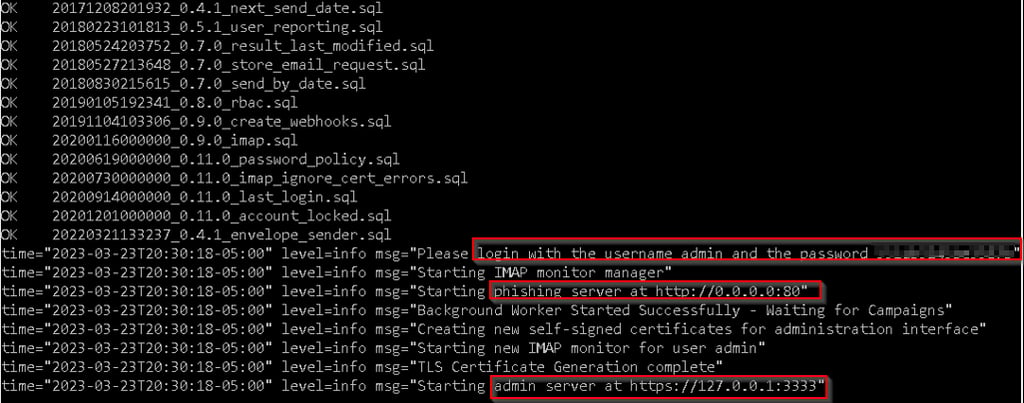

For testing purposes, a Gmail account was created and defined in a GoPhish Sending Profile. Using a Gmail account to send on behalf of an application first requires 2-Step Verification to be active, along with an app code that functions as a password for the specified application. The app-code menu can be accessed within the Gmail account via the Security menu, followed by 2-Step Verification, and finally App Passcodes at the bottom of the screen. To execute a successful campaign in GoPhish, the table below summarizes the general requirements that must be satisfied for each numbered item in Figure 10 above.
| #1- Sending Profile: | #2 – Users & Groups: |
| ✔️ Name – Any name works ✔️ Interface Type – SMTP ✔️ SMTP From: The email account the campaign sends emails as ✔️ Host – The server sending the emails (smtp.gmail.com, etc.) ✔️ Username – username associated with “SMTP From” ✔️ Password – password associated with “SMTP From” * Click “Send Test Email” to verify GoPhish can send simulated emails as expected. | ✔️ Create and Name a New Group for users targeted by a phishing campaign. Each Group entry will have: ✔️ Targeted User First Name ✔️ Targeted User Last Name ✔️ Targeted User Email Address ✔️ Targeted User Job Title * GoPhish allows CSV file imports using a provided template. |
| #3 – Email Templates: | #4 – Landing Pages: |
| ✔️ Template Name ✔️ Envelope Sender – Same as “SMTP From” ✔️ Subject ✔️ Text/HTML – Copy or Import an existing email format (Original Source on a sample email) ✔️ Add tracking Image – Check this box | ✔️ Name ✔️ Capture Submitted Data – Check this box ✔️ Capture Passwords – Check this box * Use theImport Sitebutton to capture a legitimate website to impersonate (https://linkedin.com, for example). * For increased success, landing pages and email templates should be the same brand (email and landing page both resemble Instagram branding or messaging, and so on) |
There are two necessary settings to consider before launching any campaigns.
The first is to ensure the traffic between GoPhish, targeted users, and the general internet are secured with solid encryption, as captured credentials could be leaked in transit or as they are stored in the GoPhish database. Review the GoPhish user guide on how to set proper encryption settings in the config.json file on the device where GoPhish is installed or operating from.
The second relates to receiving return data from users who click on phishing links. The phishing server must be able to receive network traffic back from various networks or end-user machines. The organization may have to modify firewall rules and/or make the GoPhish server internet accessible. Changing the config.json file again will allow different listening addresses and ports to be specified.
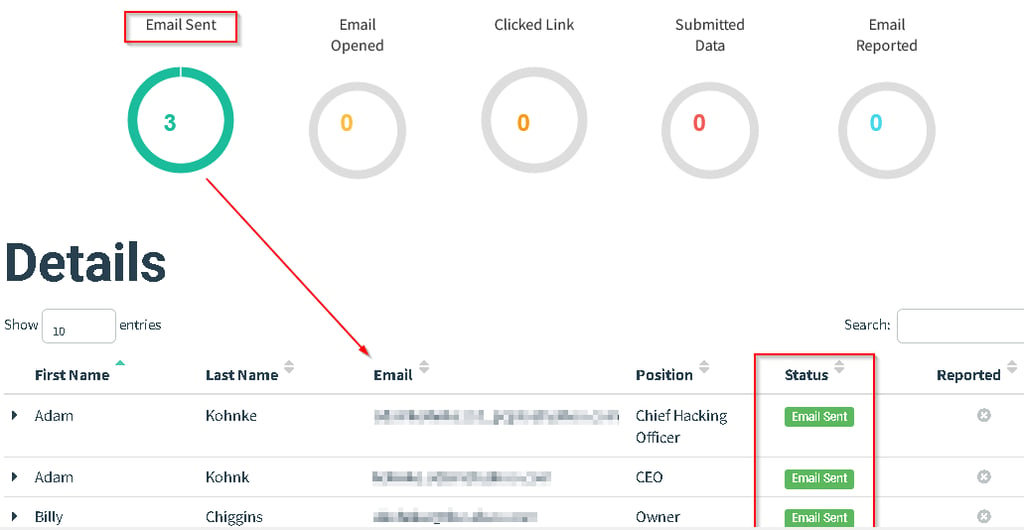
Once the general requirements are satisfied, a GoPhish campaign can be created and launched. Granular reporting becomes possible, allowing phishing resiliency to be measured over time. As users receive, open, and click on emails sent from the campaign, the various pie charts become updated.
Moving into 2023, increasing security awareness around phishing threats is critical, as these types of social engineering attacks are poised to increase due to their low cost and high-impact returns for cybercriminals.
This article demonstrated how simple it can be for attackers to download, install, and run realistic phishing campaigns with no-cost solutions in under 30 minutes. While these benefits are enjoyed by those looking to do harm, organizations can also leverage similar methods and tools to protect their stakeholders better and prepare their end users for real-world attacks.
Enterprise cybersecurity programs should ensure security awareness and training curriculums pair role-based learning content that educates its user about the telltale signs of phishing, while also providing them with routine, hands-on practice via simulated testing. This approach encourages high participation rates, ensuring users respond appropriately at all levels across the business.
When real email threats are received, bad actors will face a prepared organization that effectively shuts them down and disenfranchises further attempts at compromise using this method.
