Best VPNs for Roku in 2026: how to set up on any device
Our in-house cybersecurity experts and journalists, renowned for major reports like The Mother of All Breaches, conduct transparent, unbiased VPN testing and in-depth analysis.
With 750+ articles crafted based on real-world research, we empower readers to make informed purchasing decisions through first-hand expertise.
Learn more

Roku doesn’t support VPN apps, which makes using a VPN on it more complicated than on other devices. Instead of installing an app, you’ll need to set up a VPN on your router, share a connection from your computer, or use Smart DNS.
In this guide, the Cybernews research team and I reviewed 41 VPNs in real Roku setups, including router configurations and Smart DNS, to find which ones actually work for streaming without buffering or complicated setup. Some VPNs look good on paper but fail to unblock popular platforms or slow your connection too much.
Below, you’ll find the best VPNs for Roku in 2026, along with the easiest ways to set them up and what to expect from each option.
| NordVPN | Surfshark VPN | Proton VPN | |
| ⭐ Rating: | |||
| 🥇 Overall rank: | #1 out of #41 | #2 out of #41 | #3 out of #41 |
| 🖥️ Servers: | 8,000+ servers in 149 countries | 4,500+ servers in 100 countries | 20,700+ servers in 149 countries |
| 📖 No logs policy: | No logs | No logs | No logs |
| 💵 Price: | From $3.49/month | From $2.49/month | From $2.99/month |
| 🔥 Coupons: | NordVPN coupon 75% OFF | Surfshark coupon 87% OFF | Proton VPN coupon 70% OFF |
| 🔒 VPN protocols: | OpenVPN, NordLynx, NordWhisper | OpenVPN, WireGuard, IKEv2, Dausos | OpenVPN, WireGuard, IKEv2, Stealth |
| 🍿 Streaming services: | Netflix, Hulu, BBC iPlayer, Disney+, and more | Netflix, Disney+, Amazon Prime Video, Hulu, and more | Netflix, BBC iPlayer, YouTube, HBO Max, Disney+ |
| 🖥️ Platforms: | Windows, macOS, Linux, Android, iOS | Windows, macOS, Linux, Android, iOS | Windows, macOS, Linux, Android, iOS |
| 📥 Simultaneous connections: | 10 | Unlimited | 10 |
| 💁🏻 Support: | Knowledge base, email, 24/7 live chat | Knowledge base, email, 24/7 live chat | Knowledge base, email, 24/7 live chat (paid users only) |
How to set up a VPN on a Roku device

- Select a reliable VPN; I recommend NordVPN, now 75% OFF
- Download and install the VPN app on your Roku TV
- Open the VPN app and log in
- Connect to a server of your liking
- Start streaming on your Roku device

Can you use a VPN on Roku? (Important)
Roku does not support VPN apps directly. To use a VPN with Roku, you must:
- Install a VPN on a router
- Share a VPN connection from a PC or Mac
- Use Smart DNS (no encryption)
How to choose a VPN for Roku
There are dozens of VPNs on the market, so picking the best Roku VPN can take time and effort. To make the whole process much easier for you, I’ve prepared a list of the most important criteria when picking your Roku VPN.
- Compatibility. Since Roku isn’t VPN-friendly, you’ll need to set your VPN on a router or use the Smart DNS feature. So make sure to pick the provider that’s compatible with your router version and has the needed setup guides. Alternatively, pick the VPN with Smart DNS so you can bypass geo-restrictions on Roku easier.
- Streaming. Look for a VPN provider that can unblock various streaming platforms and has a vast list of geographically diverse servers so you can easily access different content libraries.
- Security. To encrypt your connection to the Roku device and prevent surveillance or other online threats, hacks, or malware, pick a VPN that has next-gen encryption, a kill switch to prevent data leaks, ad blockers, and other privacy and security features.
- Speed. A good VPN won’t cause issues for your seamless browsing or streaming experience. Therefore, pick a fast VPN provider with stable connection speeds that ensures lag-free and buffer-free streaming with Roku.
- Price. Pick the VPN for Roku TV that meets your budget and offers an excellent price-to-value ratio. If you’re eyeing a more expensive VPN, don’t forget to use free trials and money-back guarantees.
Recent Updates
Top 5 Best Roku VPNs – detailed list
With so many VPNs on the market, finding the right option can be tricky. To make it easier, I collaborated with our research team and tested dozens of VPNs to find the best ones for Roku TV. Each one of my picks stands out with reliable and stable speeds, excellent unblocking capabilities, and user-friendly interfaces.
Shortlist
- NordVPN – best VPN for Roku TV overall in 2026
- Surfshark – budget-friendly VPN for Roku TV
- ExpressVPN – Roku VPN with advanced security
- CyberGhost – streaming-specialized VPN for Roku TV
- IPVanish – easy to use Roku VPN with strong customer support




We spare no effort to test the products & their features. All information is gathered by our in-house research team & fact-checked by our team of experts. Discover the ins and outs of our testing procedures.
1. NordVPN – overall best VPN for Roku in 2026

-
Security and privacy
-
Speed and data
-
Servers
-
Use cases
NordVPN is my top recommended Roku VPN for 2026. Thanks to its vast network of 8,000+ servers across 149 countries, NordVPN lets you stream content from anywhere. The NordLynx protocol ensures faster speeds, eliminating buffering and providing a smooth streaming experience. Additionally, if you worry about privacy, NordVPN uses 256-bit AES encryption and has a strict no-logs policy, which was independently audited six times, most recently by Deloitte in December 2025, ensuring total anonymity while streaming. The prices for a basic NordVPN plan start at $3.49/month, and you can connect up to 10 devices to the same account.
My experience using NordVPN on Roku
Setting up NordVPN on Roku was smooth. Since I only had to set it up on my router, I encountered no problems and completed the process in a few minutes. Alternatively, I could use NordVPN’s Smart DNS (SmartPlay) feature, which allows to configure a VPN on Roku very quickly. Also, if you have trouble setting it up, I discovered you can follow very clear installation guides on NordVPN's page or contact NordVPN's 24/7 live chat agents. Based on my hands-on experience, NordVPN support agents respond in less than a minute.
After setting up NordVPN, I could access Netflix, Max, Hulu, and YouTube without issues. I also tested NordVPN's kill switch feature during streaming. When I simulated a VPN drop while watching Netflix, the kill switch paused the stream and prevented potential data leaks. Once I reconnected the VPN, I could resume watching without exposing my real IP address.
Who I recommend NordVPN to
NordVPN is a solid pick for both beginners and tech-savvy users. The router setup process is straightforward, but its Smart DNS feature is the best way to get your VPN on Roku TV. When it comes to NordVPN pricing, it doesn’t disappoint. You can get a subscription for just $3.49/month and use it on up to 10 devices.
2. Surfshark – fast and affordable Roku VPN supporting unlimited devices

-
Security and privacy
-
Speed and data
-
Servers
-
Use cases
Surfshark is another top choice for Roku users seeking to unblock content and enjoy buffer-free streaming at market-leading prices. To get an additional discount, use the Cybernews Surfshark promo code: OFFCN. With 4,500+ servers across 100 countries, it offers robust global coverage. Also, it encrypts your connection with AES-256 encryption and has a no-logs policy, so your privacy will be guaranteed. You can get Surfshark for just $2.49/month, and it comes with unlimited simultaneous connections for your entire household to enjoy.
My experience using Surfshark on Roku
Since Roku doesn't offer native VPN support, I couldn't install a VPN directly on it. However, Surfshark easily bypasses this limitation with its Smart DNS feature, which gives you an alternative way of setting up a VPN on devices such as Roku. Thanks to this feature, I configured a VPN on my Roku in just a few minutes.
Due to Surfshark’s impressive features, using it on Roku felt very comfortable. For example, it has an obfuscation system called Camouflage Mode. It works like an automatic stealth VPN, which hides my data and the fact that I'm using a VPN. Also, it has another good feature called NoBorders, which automatically switches to the best available server if it detects geo-blocked content.
However, what I liked the most about Surfshark was its speed. Since it uses the WireGuard protocol, whether I was watching movies, TV shows, or sports, Surfshark provided me with fast, uninterrupted viewing on Roku.
Who I recommend Surfshark to
Surfshark stands out as one of the cheapest VPNs on the market, providing excellent value for those who just want a VPN for streaming. At just $2.49/month, you get everything you need for a seamless streaming experience, including a Smart DNS, which makes the setup process even easier. Surfshark’s price makes it the most optimal VPN for Roku TV.
3. ExpressVPN – fast and reliable VPN for streaming on Roku

-
Security and privacy
-
Speed and data
-
Servers
-
Use cases
ExpressVPN is another solid VPN you can use on Roku. It has servers in 113 countries, allowing you to access movies and TV shows from almost any country. ExpressVPN stands out with TrustedServer Technology, which is designed to ensure none of the user data gets in the wrong hands, making it a solid option for privacy-conscious users. In addition, it follows a strict no-logs policy and regularly undergoes independent audits. Its prices start from $2.99/month, and you can use it on 14 devices.
My experience using ExpressVPN on Roku
I didn't encounter any problems while setting up ExpressVPN on Roku. Since this provider includes the MediaStreamer, which works like Smart DNS, I could set it up on my device. Alternatively, you can set up ExpressVPN on your router.
However, if you're not using an ExpressVPN Aircove router, you'll need to set it up manually. That's because starting March 31st, 2026, the Express VPN app no longer supports non-Aircove routers. Detailed instructions for this process are available on the provider's setup tutorials page, or you can use email or 24/7 live chat support for assistance.
Regarding the user experience, even though ExpressVPN doesn't officially disclose how many servers it operates, I had no trouble bypassing geo-blocked content while using it on Roku. I watched Netflix, Hulu, BBC iPlayer, and Disney+ on my Roku, and the experience was good. Thanks to its Lightway tunneling protocol, I didn't notice any stuttering.
Additionally, ExpressVPN excels at privacy. It operates in the British Virgin Islands, is free from surveillance alliances, and has undergone multiple independent audits, including 3 no-logs audits.
Who I recommend ExpressVPN to
When using a VPN for the first time, it's easy to get intimidated. However, ExpressVPN's streamlined approach makes everything much more straightforward. It automatically picks protocols and lets you connect to the VPN with a simple button press. That's why I recommend it to beginners who are just looking for a simple VPN for Roku. ExpressVPN pricing starts at just $2.99/month.
4. CyberGhost – streaming-optimized VPN with many servers

-
Security and privacy
-
Speed and data
-
Servers
-
Use cases
CyberGhost is one of the few VPNs that come with streaming-optimized servers, making it a great option for streaming on Roku TV. You can choose from servers in 100 countries, so you can virtually unblock content from anywhere in the world. While it’s cheaper, CyberGhost is just as secure as NordVPN, following the same industry-standard security practices like AES-256 encryption, a no-logs policy, and independent audits. You can get CyberGhost for just $1.99/month for up to 7 devices.
My experience using CyberGhost on Roku
I used CyberGhost's Smart DNS feature and was able to set up the VPN on Roku in just a few minutes. However, you can also install CyberGhost on your router. This method is more complicated, but it will protect all your home network devices with a VPN at once.
Since CyberGhost is a streaming VPN, I accessed various Netflix libraries, Disney Plus, and Max easily. CyberGhost makes it convenient by automatically choosing the best server for my platform. I really like that it clearly labels servers for specific platforms.
However, if you're still concerned about buffering or interruptions while streaming on Roku, CyberGhost guarantees an excellent streaming experience using the WireGuard protocol, just like NordVPN and Surfshark.
Who I recommend CyberGhost to
CyberGhost is a fantastic choice for streaming enthusiasts. It provides features explicitly designed to stream and bypass geo-restrictions, so it can easily be used on streaming devices such as Roku. For just $1.99/month, you can enjoy limitless access to your favorite shows and movies from anywhere.
5. IPVanish – great VPN for Roku for beginners

-
Security and privacy
-
Speed and data
-
Servers
-
Device connections
IPVanish can reliably unblock almost any international library on Roku TV, making it one of my favorites. It’s fast, secure, and easy to set up on Roku. Best of all, IPVanish doesn’t limit how many devices can connect at the same time, so your entire household can use it without worrying about hitting the limit. You can get IPVanish for just $2.19/month, making it ideal for anyone just starting out with VPNs and not wanting to splurge.
My experience using IPVanish on Roku
Installing IPVanish on my Roku was slightly more complicated than with NordVPN or Surfshark. Since it doesn't offer alternative installation options, I had to install it on my router. However, with the help of the great IPVanish support and knowledge base, it didn't take long to figure it out.
Once installed, I could watch most of the major streaming platforms I tried, including Netflix, Disney Plus, and YouTube TV. Moreover, I experienced minimal buffering while streaming on my Roku. That's because IPVanish uses the WireGuard protocol to ensure blazing-fast connections.
Another thing I love about IPVanish is that it offers unlimited device connections on one subscription. Since I had to set it up on my router, my entire home network was instantly protected, including my phone, laptop, desktop, and, of course, my Roku device. And when I ran streams on all those devices simultaneously, I didn't experience any noticeable drops in quality or speed.
Who I recommend IPVanish to
Since IPVanish allows unlimited devices to be connected simultaneously, I recommend it to families or households with multiple Roku devices. This feature makes it convenient for everyone in the household to use IPVanish without limits. It also offers great value – for just $2.19/month, you can enjoy fast speeds and robust security.
Comparing the best VPNs for Roku
| Roku VPN provider | Rating | Servers | Unblocks streaming platforms | Security features | Price |
| NordVPN | 8,000+ servers in 149 countries | Netflix, Hulu, BBC iPlayer, Disney+, and more | Kill switch, Threat Protection, Dark Web Monitor Pro, Scam Checker, Call Protection on Android, Meshnet, AES-256 encryption | From $3.49/month | |
| Surfshark | 4,500+ servers in 100 countries | Netflix, Disney+, Amazon Prime Video, Hulu, and more | CleanWeb, IP rotator, dedicated IP, alternative ID, AES-256 encryption | From $2.49/month | |
| ExpressVPN | Servers in 113 countries | Netflix, Hulu, BBC iPlayer, Disney+, and more | AES-256 encryption, an audited no-logs policy, IP & DNS leak protection malware protection | From $2.99/month | |
| CyberGhost | Servers in 100 countries | Netflix, Hulu, BBC iPlayer, Disney+ | WireGuard tunneling protocol, advanced AES-256 encryption, ad blocker | From $1.99/month | |
| IPVanish | 3,400+ servers in 112 countries | Netflix, BBC iPlayer, YouTube, Disney+, Hulu, and more | Kill switch, forward secrecy for account authentication, WireGuard, obfuscated servers, AES-256 encryption | From $2.19/month |

Why do I need a VPN for Roku?
Roku is a media device that allows you to watch TV shows and movies on streaming services, such as Netflix. However, we all know that some streaming services have different libraries for different locations. Others don’t exist in specific areas altogether. A VPN is your golden ticket, and here's why:
- Access more content. A VPN can help you change Netflix's location and gain access to any region's library of different streaming services. This opens up way more content, ensuring you always have things to watch.
- Access geo-restricted streaming services. A VPN connection allows you to access streaming services that are unavailable in your region.
- Access streaming services when traveling. Streaming platforms base their content on geo-locations. That’s due to licensing laws. Therefore, when traveling outside of your country, you won’t be able to access local content libraries unless you use a reliable VPN that will allow you to change your IP address to your original location.
How to install a VPN on Roku TV
Although Roku devices don’t have native VPN support, alternative methods to secure your connection exist. If you're wondering how to get a VPN on Roku, one option is to configure a VPN on your router, allowing all devices connected to the router, including Roku, to benefit from the VPN.
Another approach is to share a VPN connection over Wi-Fi, which is possible on both Windows and macOS. Additionally, you can consider using Smart DNS as an alternative solution for accessing geo-restricted content on your Roku.
While I provide detailed instructions on how to set up a VPN on Roku with different devices, the instructions can differ based on the VPN you are using. Therefore, I suggest checking out these Roku VPN setup guides:
- How to set up NordVPN on Roku
- How to set up ExpressVPN on Roku
You can unlock Roku’s full and, most importantly, secure streaming potential with the best VPNs in a few steps.
Setting up a VPN on a router
Not all providers or routers are the same, so the setup process for connecting a VPN to Roku will vary depending on your router model and the provider you choose. In general, the process involves installing the VPN on your router and then connecting your Roku to the router's Wi-Fi network.
Before you begin, it’s important to know what type of router firmware you have, as this will determine the compatibility with the VPN you’ve chosen. Once you’ve identified your router’s firmware, you can find the appropriate instructions on the VPN provider’s support page.
Since each VPN has its own specific setup instructions, it's best to head directly to the provider’s support or guides page for detailed steps. NordVPN, in particular, offers by far the most comprehensive guide for a wide variety of routers.
These guides will walk you through the exact process, as setup steps may differ slightly between providers. Below, you'll find the specific tutorial links for each VPN to help you with the setup.
- How to set up a router with NordVPN
- How to set up a router with SurfShark
- How to set up a router with IPVanish
- How to set up a router with ExpressVPN
- How to set up a router with CyberGhost
If your router doesn’t support VPNs natively, you may need to flash it with compatible firmware. However, this process can be risky – if done incorrectly, it could damage your router. Be sure to follow the instructions carefully and take appropriate precautions. For further guidance, you might want to explore our recommendations for the best VPNs for routers.
Sharing a VPN connection with Roku TV over Wi-Fi
Did you know you can set up a VPN-enabled virtual router? It’s easier than with a physical router. All you need is a laptop that will act as a Wi-Fi hotspot. When you connect your Roku to that hotspot, you’re protected by the laptop’s VPN connection. Here’s how to create a virtual router on different operating systems.
Sharing a VPN Connection on Windows 11
-
Go to Settings > Network and Internet > Mobile hotspot

- Select Wi-Fi and then enable Mobile hotspot
-
Go to Settings > Network and Internet > Advanced Network Settings > More network adapter options (under Related settings)
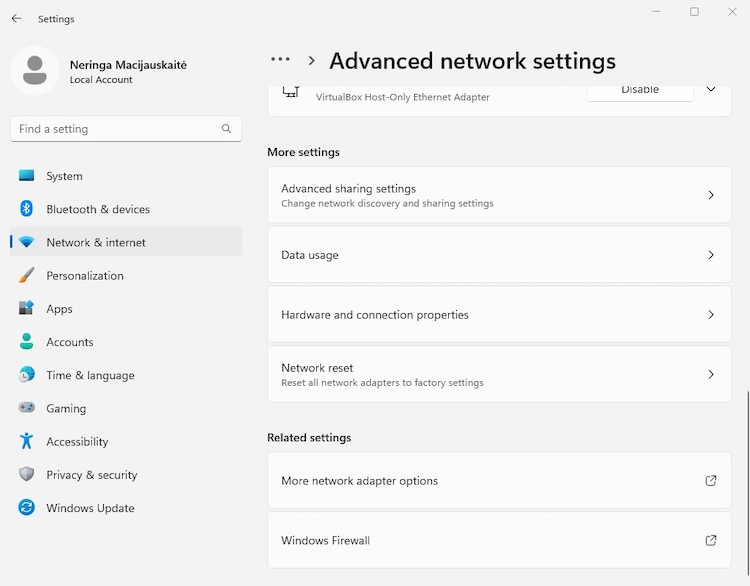
-
Right-click on [VPN name] Windows Adapter and select Properties
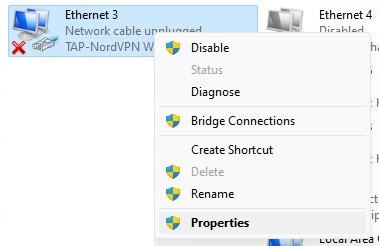
-
Select the Sharing tab and check the Allow other network users to connect through this computer’s internet connection box (select the hotspot you created in the drop-down menu above the adapter tagged as Microsoft Wi-Fi Direct Virtual Adapter)
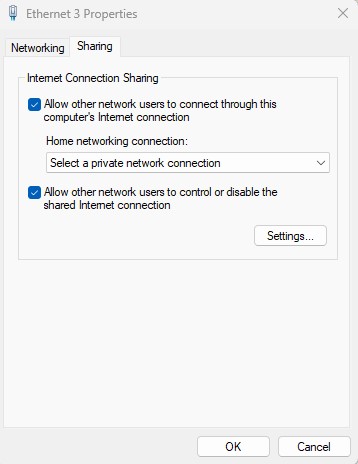
Sharing a VPN connection on macOS
- Find the account credentials from your VPN provider
- Set up an L2TP/IPsec VPN on your Mac
-
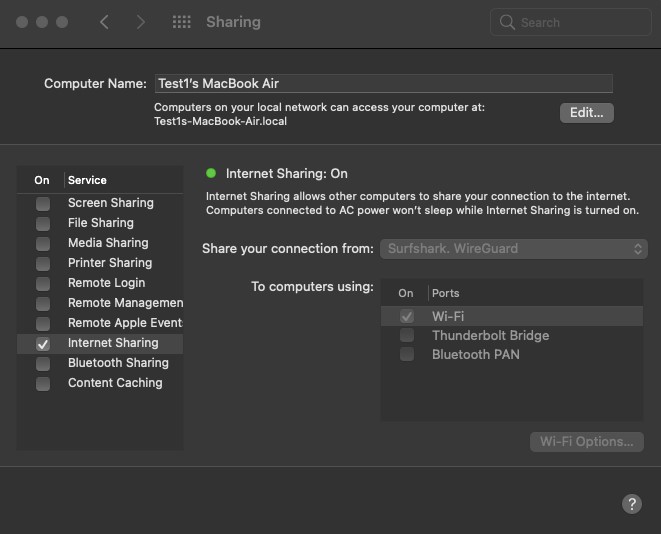
Go to System Preferences > Sharing
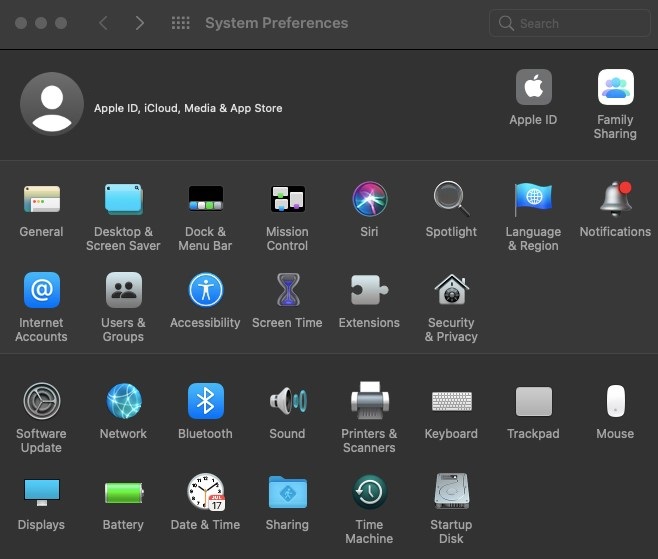
- Go to Internet Sharing, but don't enable it yet
-
Choose the VPN connection from the drop-down and check the Wi-Fi box in To computers using

-
In Wi-Fi Options, set the Wi-Fi password for the Wi-Fi

-
In Internet Sharing, click Enable
- Connect to the VPN
- Connect Roku to your Mac via Wi-Fi
- Enjoy Roku TV
Using Smart DNS with Roku
Smart DNS uses specific DNS (Domain Name Servers) to unblock content on geo-restricted services. Smart DNS routes only part of your traffic to its servers. Consequently, the speed of your internet connection is not affected like it is with a VPN connection. Here’s how to use Smart DNS with Roku:
- Go to your router’s dashboard and locate the DNS settings
- Obtain, from your VPN provider, two DNS server addresses located in the country in which the unblocked content is located
- Input those two DNS server addresses in the designated fields within Roku settings
Is it legal to use a VPN for streaming on Roku?
Yes, it’s legal to use a VPN for streaming on Roku TV. However, it violates Roku’s as well as other streaming platforms’ Terms and Conditions. In fact, Roku has explicitly stated in its community forum that it will get you banned, so use it with caution.
Can I use a free VPN with Roku?
I don’t recommend using a free VPN to stream on Roku. Firstly, free providers usually cannot be set up on your router or don’t have Smart DNS available. Second, free VPNs don’t offer the same quality services. They aren’t as safe as premium VPNs, have limited server options, and cannot unblock different streaming platforms.
For those looking for a VPN for Roku without spending money, freemium VPN providers offer a practical solution. Although the free versions of these VPNs have certain limits compared to their premium counterparts, they still provide a secure and speedy connection, along with a selection of available servers. One example of a VPN that might work with Roku is Proton VPN.
I highly recommend a premium VPN subscription for the best Roku experience. Try out premium providers that offer free trials or money-back guarantees. My top recommendation for a premium VPN that works best with Roku is NordVPN, which comes with a 3-day free trial on Android devices, a 30-day money-back guarantee, and costs $3.49/month.
Final verdict on Roku VPNs
Choosing the right VPN for Roku ultimately comes down to how you plan to use it. Since Roku doesn’t support VPN apps directly, the best option is a service that offers reliable router setup or a well-functioning Smart DNS feature, along with fast speeds for smooth streaming.
Based on my testing, NordVPN remains the best overall VPN for Roku thanks to its consistent streaming performance, easy setup options, and strong Smart DNS support. However, Surfshark is a great budget-friendly alternative, especially for households with multiple devices, while ExpressVPN stands out for its simplicity and beginner-friendly setup.
No matter which option you choose, a reliable VPN can significantly expand what you can watch on Roku — especially when traveling or accessing different content libraries.
FAQ
Can I use a VPN on my Roku TV?
No, you cannot use a VPN directly on your Roku TV because VPNs cannot be installed directly on any Roku device. Your options are to install a VPN on your router, use a hotspot on your laptop, or use Smart DNS.
Why doesn’t Roku support VPN?
Roku doesn’t support VPNs directly because it aims to maintain simple use and ensure stable performance. VPN configurations can complicate the user experience and introduce potential issues with connectivity and speed, which Roku seeks to avoid. However, there are alternative methods for using a VPN with Roku.
What is the best VPN for Roku TV?
The best VPN for Roku TV is NordVPN. It offers top-tier speed, a vast server network, and robust security features, making it the best choice for an enhanced and private streaming experience on your Roku device.
How to change Roku TV location?
To change your Roku TV location, use a VPN on your router to select the desired country, create a new Roku account with that location, and reset your Roku device to connect it to the new account.
Does IPVanish work on Roku?
IPVanish works with Roku by configuring the VPN on your router or using a virtual router setup on your PC or Mac. This allows your Roku device to benefit from the VPN's protection and access geo-restricted content.
What is the best free VPN for Roku?
The best option for a free VPN experience on Roku is to use NordVPN's 3-day free trial and 30-day money-back guarantee. This lets you experience premium security, fast streaming speeds, and a wide server network, all without being tied to a long-term commitment. After testing it out, you can decide if it’s the right fit for your needs.