Best VPN for TikTok: which VPN works best in 2026?
Our in-house cybersecurity experts and journalists, renowned for major reports like The Mother of All Breaches, conduct transparent, unbiased VPN testing and in-depth analysis.
With 750+ articles crafted based on real-world research, we empower readers to make informed purchasing decisions through first-hand expertise.
Learn more
Recommended VPNs for TikTok
-
 View deal1. The best VPN for TikTok in 2026 – NordVPNExpert review
 -
 View deal2. Budget-friendly TikTok VPN with unlimited connections – SurfsharkExpert review
 -
 View deal3. Security-first VPN to safely scroll and access TikTok – Proton VPNExpert review
 -
 Learn more4. Versatile VPN for unblocking TikTok from anywhere – IPVanish
 -
 Learn more5. Private and speedy VPN to watch TikTok – ExpressVPN




We spare no effort to test the products & their features. All information is gathered by our in-house research team & fact-checked by our team of experts. Discover the ins and outs of our testing procedures.
TikTok has become one of the most popular content platforms in the world, and especially in the US. When it was temporarily unavailable in January 2025, some users turned to alternatives like RedNote, while others relied on VPNs to bypass restrictions. Today, TikTok is freely accessible in the US, but concerns over future limitations and data privacy remain.
Following the brief shutdown, President Donald Trump delayed enforcement of the ban, allowing the platform to continue operating while ownership and compliance issues were addressed. So whether you’re a TikTok content creator or a casual scroller, having a reliable VPN can help you stay connected, protect your privacy, and avoid disruptions caused by network or regional restrictions.
How to use TikTok with a VPN
If TikTok is restricted in your region, you can still access it safely using a VPN. Follow these simple steps:
- Download and set up a VPN. We recommend NordPVN, as it has a wide server network, including countries where TikTok is available. It also has robust security features, lightning-fast speeds, and simple-to-use apps.
- Connect to a VPN server. For the best performance, choose a server in a nearby country with strong internet infrastructure. You can also pick any country where TikTok is accessible.
- Log in or create a TikTok account. Once connected, you can now scroll or upload TikTok videos without restrictions.
TikTok users have noted that using Wi-Fi over mobile data when changing the virtual location on a mobile device works better. So, if you have a strong VPN, you can avoid TikTok location tracking by connecting to a Wi-Fi network. Of course, if that doesn’t work, try a trusty method of connecting to TikTok via a desktop device.
Best VPNs for TikTok in 2026 – detailed list
While NordVPN remains our top choice for TikTok, other reliable options include Surfshark, Proton VPN, IPVanish, and ExpressVPN. These VPNs can bypass restrictions in countries where TikTok is limited and also help protect your privacy and security. Our selections are based on in-house testing of speed, usability, features, and overall reliability for unblocking TikTok content. For users looking for a dependable TikTok VPN in 2026, these five providers consistently deliver strong performance.
1. NordVPN – best VPN for TikTok overall

-
Speed and latency
-
Server network
-
Security features and privacy
-
Compatibility
NordVPN is ideal if you're trying to access TikTok in countries where it’s restricted or limited. It offers great speeds, over 8,000 servers worldwide, including locations where TikTok is available, along with strong security and privacy guarantees. Additional features such as obfuscated servers, a dedicated IP, and the NordWhisper protocol contribute to smooth compatibility with the platform. If you’re looking for a VPN to maintain reliable TikTok access despite restrictions, NordVPN is a top choice.
Section title
Who is NordVPN best for?
We found NordVPN to be best for both those who simply love scrolling through TikToks as a pastime and those who rely on it for income. With over 300 servers in Canada, I was able to easily connect to TikTok and keep on watching content that was not too dissimilar to what I might watch in the US. Dedicated IP is a great option for content creators, as it permits stable connectivity. However, upon initial use, the app lagged a little, but the more I used it, the smoother the connectivity became.
Is NordVPN good at unblocking TikTok and other platforms?
Given that internet use is becoming more restrictive globally, NordVPN recently introduced NordWhisper. This protocol was made specifically to tackle various restrictions, especially the ones that usually pick up on VPN use. NordWhisper is different from the usual VPN protocols, such as WireGuard, so most blockers can’t pick up on it based on a familiar pattern. It also mimics regular web traffic, making it even harder to recognize than a normal VPN.
Learn more: how to use basic and advanced features of VPN.
Speed and server network
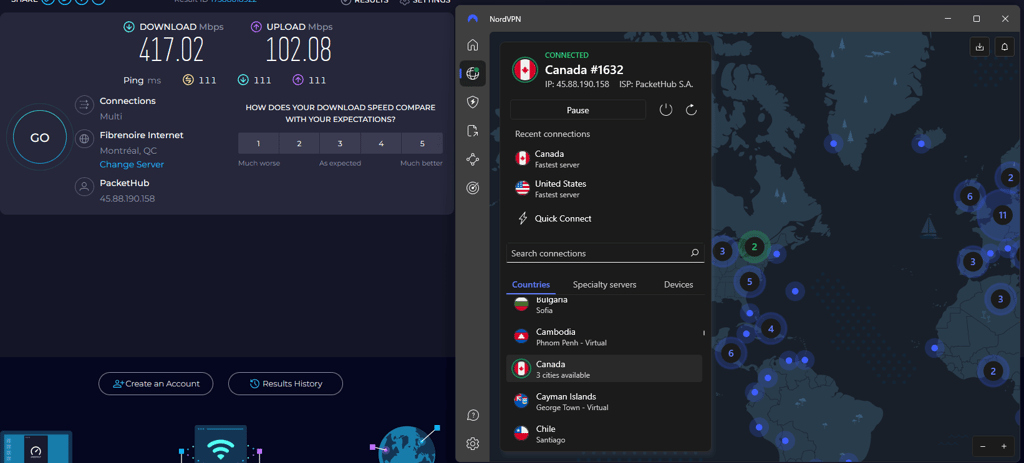
NordVPN’s NordLynx protocol provides faster download speeds than IPVanish and Proton VPN. We tested the provider’s speed on Canadian servers to evaluate performance across nearby regions, and the results were second-best out of all tested, falling just behind ExpressVPN. NordVPN recorded an average download speed of 417Mbps and an upload speed of 102Mbps (from a 500Mbps baseline). Upon first accessing TikTok, the connection was slightly patchy, but it stabilized quickly and remained reliable throughout testing.
Pricing
NordVPN prices start at $3.49/month. Moreover, you can test this VPN risk-free with a 3-day free trial on Android mobile devices or use a 30-day money-back guarantee if the ban gets lifted again. Due to this special trial, this is an excellent Android VPN for TikTok. Here’s a quick summary of NordVPN’s plans and prices.
| NordVPN plan duration | Basic plan | Complete plan | Prime plan |
| 1 month | $14.99/month | $14.99/month | $29.99/month |
| 1 year | $5.49/month | $6.99/month | $9.49/month |
| 2 years | $3.49/month | $4.49/month | $7.49/month |
Learn more: what makes up the price of a VPN.
2. Surfshark – affordable VPN choice for TikTok

-
Speed and latency
-
Server network
-
Security features and privacy
-
Compatibility
Surfshark is an affordable VPN for TikTok. Its fast speeds, servers in Canada, Mexico, and 100 other countries, and unlimited simultaneous connections, make it an appealing choice if you’re in a country where TikTok is banned.
Read our Surfshark VPN review.
Section title
Who is Surfshark best for?
We recommend Surfshark for people who are on a tight budget but still want to access TikTok. Unlimited device support makes it ideal for account sharing. While not as server-rich as NordVPN or Proton VPN, it has its appeal for effectively accessing TikTok. Thanks to its simplistic app, Surfshark is also a great iPhone VPN for TikTok Live.
Unblocking TikTok and other platforms
When TikTok was banned in the US, we tested Surfshark and found it effortlessly bypassed these restrictions, allowing us to use the platform without issues. With 4,500+ servers, it’s also great for unblocking social media, gaming sites, and streaming platforms like Netflix and Amazon Prime. I particularly liked its Camouflage Mode, which masks VPN traffic and helps navigate tough firewalls seamlessly – perfect for accessing TikTok or other restricted services from anywhere.
Speed and server network
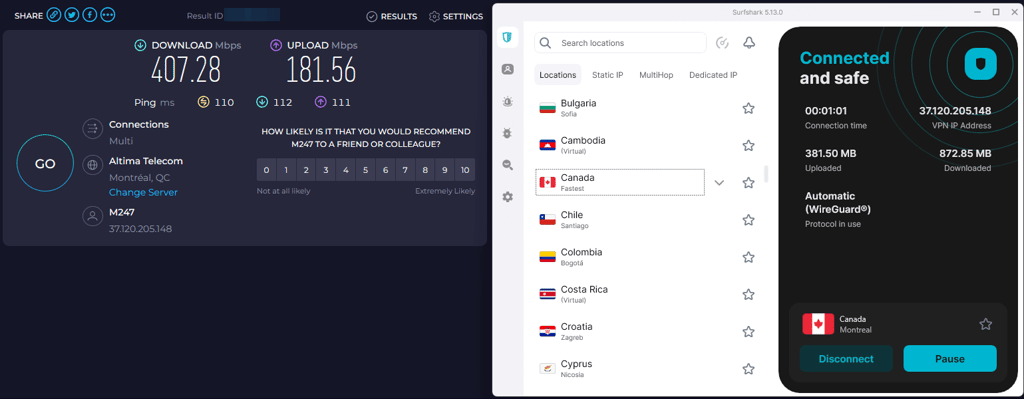
Surfshark uses the quick WireGuard protocol, compared to NordVPN, which uses its own version called NordLynx. With WireGuard, the provider had 407Mbps download and 181Mbps upload speed compared to the original 500Mbps upload and download speed. Speed is crucial for apps like TikTok, and Surfshark, which performed well during our tests, even with live video streaming, showed no buffering issues. Overall, there were no lags, slowdowns, or delays.
Pricing
Surfshark’s subscriptions start as low as $2.49/month. There’s also a 7-day free trial or a 30-day money-back guarantee for those who change their mind. Here’s a full breakdown of Surfshark’s plans and prices.
| Surfshark plans | Surfshark Starter | Surfshark One | Surfshark One+ |
| 1 month | $16.45/month | $18.95/month | $21.85/month |
| 1 year | $3.39/month | $3.59/month | $7.49/month |
| 2 years | $2.49/month | $2.79/month | $4.49/month |
If you want to test a VPN for a month, here’s a list of the cheapest monthly VPNs.
3. Proton VPN – TikTok VPN with a free version

-
Speed and latency
-
Server network
-
Security features and privacy
-
Compatibility
Proton VPN is a great option for accessing TikTok if it’s banned in your location. With multiple privacy and security features, even in its free version, it’s a great way to access or upload content in spite of restrictions.
Read our Proton VPN review.
Section title
Who is Proton VPN best for?
Proton VPN is great for privacy-oriented people. We found that even with TikTok being fully accessible, it’s a great addition to make the service a bit more private and secure. The free version is quite limited, and we struggled to access TikTok in other locations, but the paid plans had no issues at all.
Unblocking TikTok and other platforms
With Proton VPN on, we noticed no lags, slowdowns, or delays when browsing through TikTok content in various locations. Overall, Proton VPN is good for accessing geo-restricted content, such as streaming service libraries. It worked for me when accessing Netflix, BBC iPlayer, and Hulu. Even the free version could occasionally access Netflix, though it was more laggy.
Speed and server network
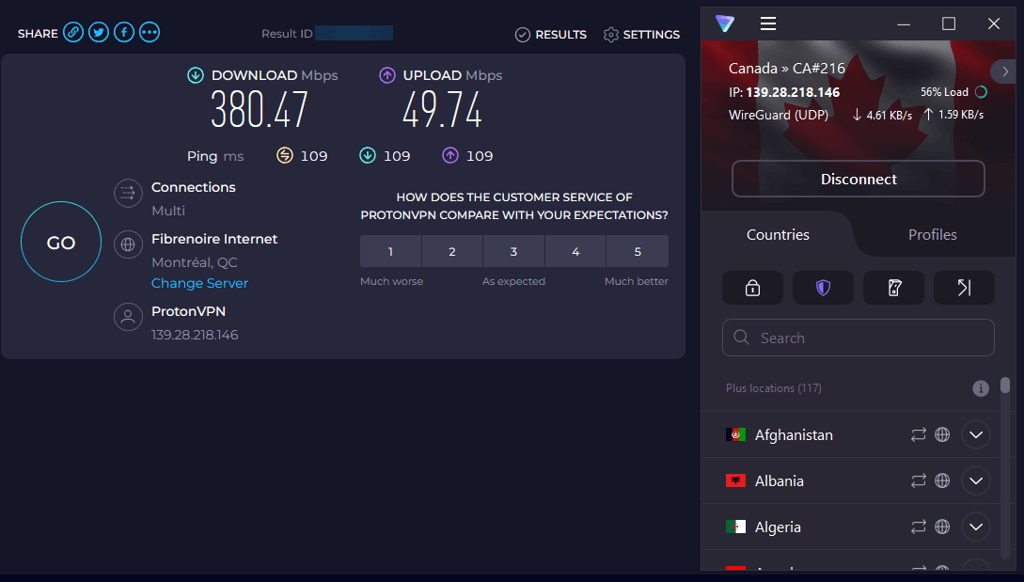
Proton VPN has the largest server network of our tested VPNs – over 20,700. However, in terms of speed, it had the lowest speed retention of the top TikTok VPNs. Its download speed was 380Mbps, and its upload speed was just 49Mbps. Compared to such fast services like NordVPN or ExpressVPN, it falls behind. However, when using it with TikTok, I personally did not notice the speed difference.
Pricing
Proton VPN is available for free. But if you want it to work well with TikTok or to access servers in Canada, you need to get a premium version, which costs from $2.99/month. Paid Proton VPN subscriptions include a 30-day money-back guarantee. Here’s a breakdown of all plans and prices.
| Proton VPN plan duration | Price |
| 1 month | $9.99/month |
| 1 year | $3.99/month |
| 2 years | $2.99/month |
4. IPVanish – VPN with proxy servers integrated

-
Speed and latency
-
Server network
-
Security features and privacy
-
Compatibility
IPVanish has 3,400+ servers in 112 countries. One of its best features is great speeds, which make streaming and TikTok uploads a breeze. But best of all, IPVanish is one of the most privacy-friendly VPNs, with a Threat Protection feature similar to some features of NordVPN’s next-gen antivirus.
Section title
Who is IPVanish best for?
IPVanish is best for those who value privacy and security. It’s also relatively fast, being the third fastest VPN on this list. We found it very easy to use, and its Threat Protection, which blocks malware and ads, is just as good as NordVPN’s. However, its greatest flaw is that it’s just not the best in any category. It’s not the cheapest, fastest, or most secure. But it is reliable and provides excellent performance in all categories.
Unblocking TikTok and other platforms
During our tests, IPVanish worked reliably for unblocking TikTok in the US, where the app has faced restrictions. It also performed well for accessing other social media platforms. However, there were occasional connection drops during peak hours, which could disrupt the experience briefly. Also, it did have slight buffering.
Speed and server network
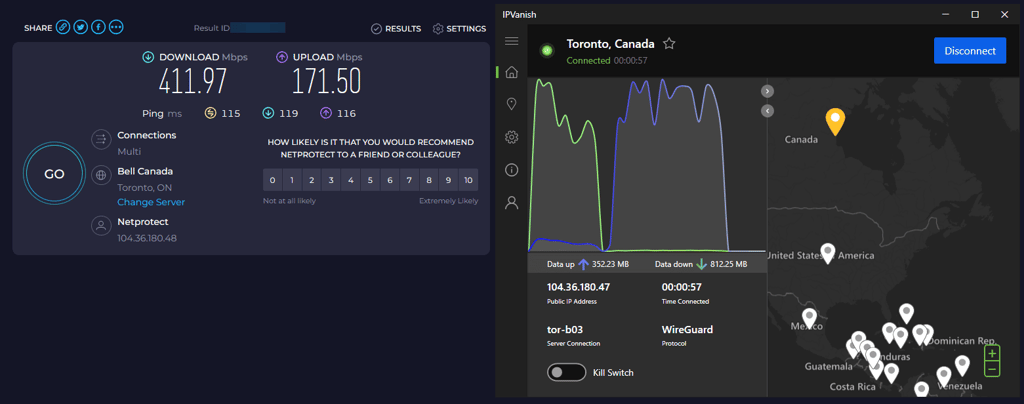
IPVanish can provide excellent download speeds thanks to the implementation of the speedy WireGuard tunneling protocol. However, that did not prevent buffering and lag. During testing, IPVanish maintained an average download speed of 412Mbps and an upload speed of 171Mbps.
Pricing
IPVanish is an affordable VPN option. The subscription price starts at $2.39/month and covers unlimited simultaneous connections. More so, you can test this provider out with the 30-day money-back guarantee. Here’s a full list of IPVanish plans and prices.
| IPVanish plan duration | IPVanish Essential | IPVanish Advanced |
| 1 month | $14.99/month | $17.99/month |
| 1 year | $3.89/month | $5.39/month |
| 2 years | $2.39/month | $3.59/month |
5. ExpressVPN – expensive, but popular VPN choice

-
Speed and latency
-
Server network
-
Security features and privacy
-
Compatibility
ExpressVPN is another reliable VPN for TikTok. This provider has undisclosed number of servers in 113 countries, but its best feature is excellent speed retention, making streaming and uploading a breeze.
Section title
Who is ExpressVPN best for?
ExpressVPN is a great option for anyone who needs a fast and stable connection, which is especially important if you upload content regularly. I found ExpressVPN to be reliable, though I’m not sure I would personally pay as much for its subscription, given that Surfshark and IPVanish are cheaper options. Nevertheless, it absolutely earned its place on the list of best TikTok VPNs.
Unblocking TikTok and other platforms
ExpressVPN has undisclosed number of servers spanning 113 countries, ensuring plenty of options in TikTok-friendly countries, so you'll always find a reliable server no matter where you are. ExpressVPN not only unlocks TikTok but also other social media like Snapchat, Spotify, WhatsApp, Instagram, and Pandora. It's also great for streaming, letting you access popular sites like Netflix, Hulu, HBO Max, and others. It's worth mentioning that as of March 31st, 2026, ExpressVPN discontinued support for its router app, but you can still configure it manually or use the ExpressVPN Aircove router.
Speed and server network
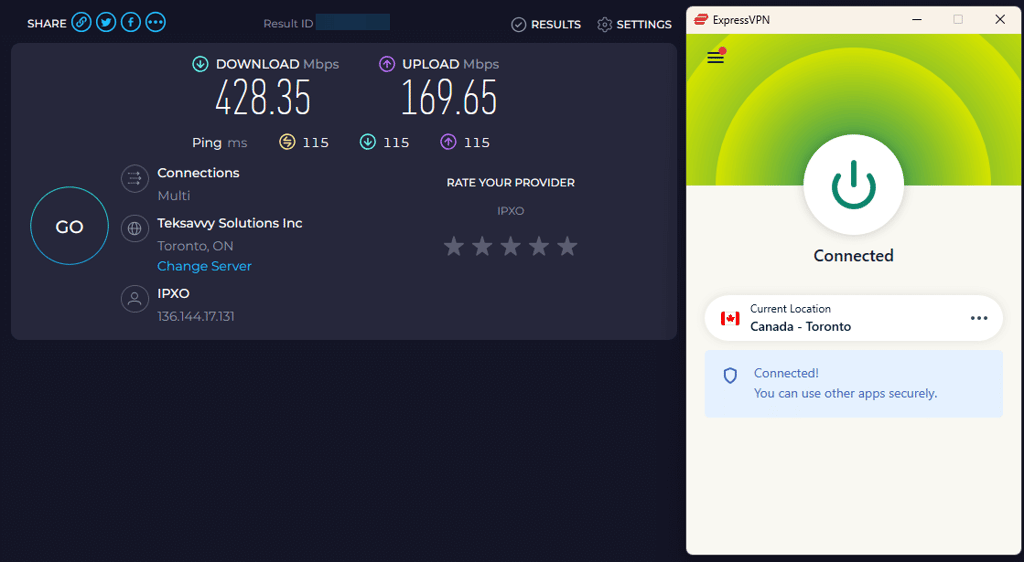
ExpressVPN's Lightway and OpenVPN protocols perform well, with only minor speed drops in nearby countries like the US or the UK. The latest speed tests for in-house ExpressVPN showed 428Mbps download speed and 169Mbps upload speed compared to the 500Mbps baseline. Although it is the fastest VPN on the list, we noticed some initial speed drops before it performed well again.
Pricing
ExpressVPN isn’t the cheapest VPN provider. It costs $2.99/month and covers 14 devices with 1 subscription. However, you can test this VPN before paying by using its 30-day money-back guarantee or 3-day free trial. Here’s a full list of ExpressVPN prices.
| ExpressVPN plan duration | Price |
| 1 month | $16.99/month |
| 1 year | $5.99/month |
| 2 years | $2.99/month |
Video review
Watch our video review to find out which VPN works best with TikTok, featuring top options, speed tests, and tips for seamless access and privacy.
Comparing these VPNs
Check out the comparison table below to see the key features of the top 3 TikTok VPNs. Explore their benefits and differences to help you make the right choice when picking a VPN service.
| NordVPN | Surfshark VPN | Proton VPN | |
| ⭐ Rating: | |||
| 🥇 Overall rank: | #1 out of #41 | #2 out of #41 | #3 out of #41 |
| 🖥️ Servers: | Thousands of servers in 225 locations | 4,500+ servers in 100 countries | 20,700+ servers in 149 countries |
| 📖 No logs policy: | No logs | No logs | No logs |
| 💵 Price: | From $3.49/month | From $2.49/month | From $2.99/month |
| 🔥 Coupons: | NordVPN coupon 75% OFF | Surfshark coupon 85% OFF | Proton VPN coupon 70% OFF |
| 🔒 VPN protocols: | OpenVPN, NordLynx, NordWhisper | OpenVPN, WireGuard, IKEv2, Dausos | OpenVPN, WireGuard, IKEv2, Stealth |
| 🍿 Streaming services: | Netflix, Hulu, BBC iPlayer, Disney+, and more | Netflix, Disney+, Amazon Prime Video, Hulu, and more | Netflix, BBC iPlayer, YouTube, HBO Max, Disney+ |
| 🖥️ Platforms: | Windows, macOS, Linux, Android, iOS | Windows, macOS, Linux, Android, iOS | Windows, macOS, Linux, Android, iOS |
| 📥 Simultaneous connections: | 10 | Unlimited | 10 |
| 💁🏻 Support: | Knowledge base, email, 24/7 live chat | Knowledge base, email, 24/7 live chat | Knowledge base, email, 24/7 live chat (paid users only) |
How we tested and ranked TikTok VPNs
Not all VPNs work with TikTok equally well. That’s why I had to do some research, together with the Cybernews research team, testing 41 VPNs. We applied our trusted methodology to narrow down the options and determine which providers deliver the most reliable experience. Here’s how we reviewed and compiled the list of the best VPNs for TikTok:
- Privacy (25%). We checked each VPN for IP and DNS leaks on ipleak.net so that your real location wouldn’t be exposed. TikTok is unavailable in countries such as India, Pakistan, and China, where access may be limited by ISPs. The app can stop working if your IP indicates a restricted region. That’s why we tested servers with VPN features like a kill switch and DNS leak protection on and off, to ensure no leaks and pick the most reliable VPNs for TikTok.
- Security (25%). We carefully tested all VPN security features to put it on our list. We checked for strong encryption like AES-256 and reviewed privacy policies to ensure no activity logs are kept. We also looked for VPNs based in privacy-friendly countries for added security, especially for bypassing geo-restrictions. Additionally, we tested extra features like NordVPN's next-gen antivirus (formerly Threat Protection) and Surfshark's CleanWeb to see if they're truly effective and add value for users.
- Server availability (20%). We reviewed providers' server locations to ensure that they have a wide selection of countries so that you could choose the one that meets your needs, whether you want videos from a specific country or a viewership from a particular location. The more server locations there are, the more different content you can access.
- Speed (15%). We conducted in-house VPN speed tests using various tunneling protocols to see which ones work best. Additionally, we tested each VPN with the TikTok app to ensure videos play smoothly without glitches or buffering.
- VPN features (15%). Recognizing discussions about potential VPN bans in the US, we focused on providers offering obfuscation features like stealth modes or obfuscated servers. These tools help make VPN traffic indistinguishable from regular traffic, ensuring continued access even under stricter regulations.
We compiled the results by thoroughly testing each VPN's performance, security features, and speed. Based on these assessments, we compared the VPNs accordingly to provide you with the most reliable and effective options.
Using a VPN on different devices
Here, we break down the best practices for using a VPN with TikTok on different devices. We recommend following these steps to avoid TikTok detecting your real location, or if you’re having trouble changing it.
TikTok's location detection methods
TikTok uses different methods to determine your location. They depend on the country you live in and its laws. This is what TikTok might use to determine your location:
- IP address tracking: your IP address reveals your approximate geographic location
- GPS Data: the app can request access to your device's GPS
- SIM card information: on mobile devices, TikTok can detect your carrier's country
- Network information: Wi-Fi networks can provide location hints
- Device time zone: your device settings can indicate your region
- App Store account: the country associated with your App Store or Google Play account
What does a VPN do?
A properly configured VPN addresses these tracking methods by:
- Masking your IP address by routing traffic through servers in permitted countries
- Encrypting your data traffic to prevent deep packet inspection
- Creating an encrypted tunnel that hides your actual connection details
- Bypassing ISP-level blocks implemented under government restrictions
- Enhanced security VPNs encrypt your data, protecting your online activity from prying eyes, especially on public Wi-Fi networks
Tips for using VPN for TikTok
To get the best results out of your chosen VPN, follow these tips:
- Clear TikTok's cache before each VPN session to remove stored location data. On Android: Settings > Apps > TikTok > Storage > Clear Cache. On iOS: Settings > General > iPhone Storage > TikTok > Offload App (then reinstall).
- Turn off device location services. On Android: Settings > Location > Turn off the toggle at the top. On iOS: Settings > Privacy & Security > Location Services > Turn off toggle.
- Choose servers in nearby countries where TikTok is available (e.g., Canada or Mexico for users in the United States) for better speeds. In your VPN app, simply browse the server list and select a location in a neighboring country.
- Look for servers with low user loads (usually indicated by a percentage) for smoother streaming. In most VPN apps, server load is shown as a percentage or bar next to each server in the selection list.
- Manually match time zones. On Android: Settings > System > Date & time > Turn off Automatic time zone > Select time zone. On iOS: Settings > General > Date & Time > Turn off Set Automatically > Select time zone.
- Use Wi-Fi instead of mobile data. TikTok can detect your location through your cellular network. Simply turn on Wi-Fi in your device settings and connect to a network before launching TikTok.
- Remove your SIM card if TikTok keeps detecting your actual location despite using a VPN. Power off your device, use the SIM ejection tool to remove your SIM, then restart and connect to Wi-Fi.
Accessing region-specific TikTok content
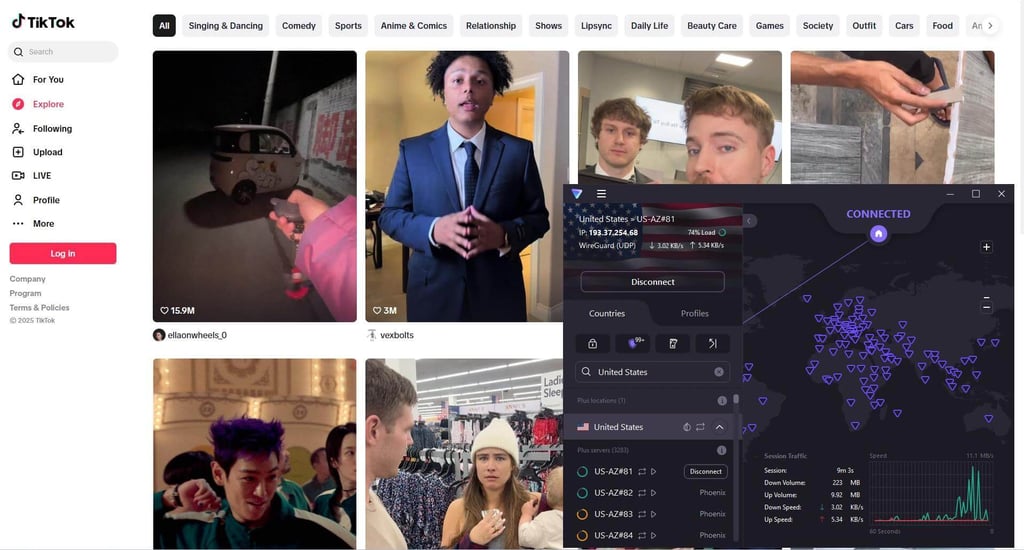
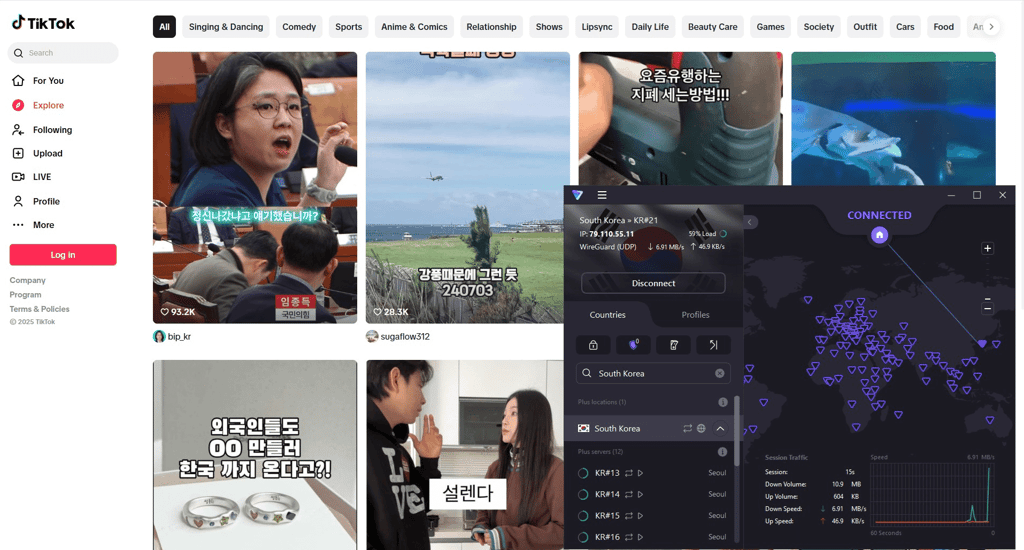
TikTok content changes depending on the region you connect to. It’s because TikTok doesn’t just recommend content based on what you like but also based on what’s popular in your area. We could access TikTok content in other countries with a VPN without an issue. In each region, the suggestions we got differed.
Below, you can see an example of content in the US.
And here’s the suggested content in South Korea.
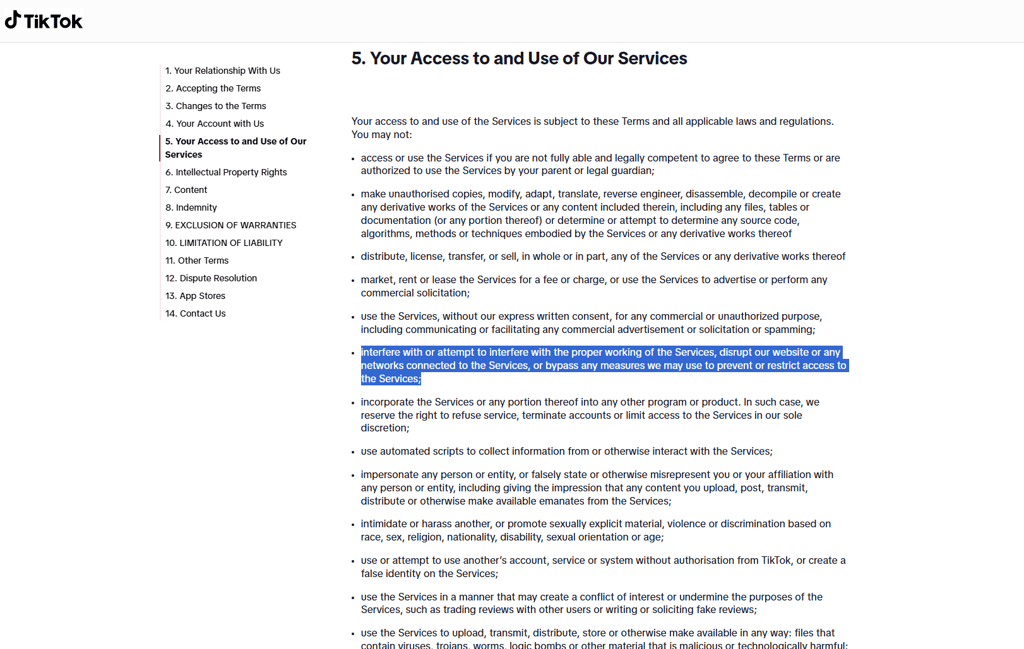
TikTok's terms of service regarding the use of VPN
Technically, it is possible to get banned for using a VPN with TikTok. While TikTok does not explicitly mention the use of a VPN as a violation of its Terms of Service, it does state that bypassing the measures TikTok uses to restrict access is against the rules.
Precisely, customers will be penalized for interfering with or attempting to interfere with the proper working of the Services, disrupting the website or any networks connected to the Services, or bypassing any measures TikTok may use to prevent or restrict access to the Services.
So, while VPNs are not explicitly mentioned in this case, the definition alone implies that changing your location is a breach of the Terms of Service. Of course, you may not get banned. In most cases, TikTok can simply block you from accessing content until you switch off a VPN. That’s because TikTok tracks your real location using your mobile phone’s SIM card.
If you encounter issues, Surfshark suggests accessing TikTok through your computer rather than a mobile app. This way, TikTok won’t be able to monitor your location, and your use of a VPN is less likely to get detected.
Is a free VPN for TikTok a good option?
If you’re looking to use TikTok with a free VPN, there are some reliable options available that can provide basic online security. While free VPNs come with certain limitations, they can still be suitable for occasional users who prioritize saving money over speed and additional features. Here are 3 free VPNs to consider:
- ProtonVPN. Proton VPN is a privacy-focused service that offers a free version with strong security features. The free version provides access to servers in 3 countries (the United States, the Netherlands, and Japan) and uses strong encryption with a no-logs policy to ensure your privacy. It also has the advantage of unlimited data usage, which is rare for free VPNs. However, users may experience slower speeds compared to the premium version, and the limited server selection may impact the overall performance, especially when using apps like TikTok. Additionally, the free version only supports one device connection.
- TunnelBear. TunnelBear is a user-friendly VPN that’s simple to set up and offers good security with 256-bit AES encryption. Its free version allows access to servers in over 20 countries, providing decent global coverage. The service is particularly easy to use, making it ideal for beginners. However, the free version comes with a data limit of just 500MB per month, which can be restrictive for frequent TikTok use. Moreover, it lacks some of the advanced features available in the premium version, such as more server locations and enhanced security settings.
- Hotspot Shield. This VPN has some of the best security and privacy features a free service can offer. Additionally, it showed consistently great speeds – perfect for loading one video after another. While the free version only has 8 global server locations and a 500MB/day data cap, it’s still great for casual TikTok use. Hotspot Shield is compatible with all operating systems.
How to choose a VPN for TikTok
Choosing the best TikTok VPN involves considering different factors like speed and server locations. When choosing a VPN for TikTok, it's very important to follow these best practices for your online privacy:
- Check if the VPN has servers in countries where TikTok is available. You can easily find this information on the official websites of providers.
- Ensure the VPN supports your devices to access TikTok, whether a smartphone, tablet, or computer. Usually, this information is found in the additional information section of the App Store or Google Play Store (or the official provider website).
- When choosing a VPN, make sure it has strong security features. Look for AES-256 encryption or other modern encryption methods. Also, check for features like a kill switch, DNS leak protection, and split tunneling, as they add an extra layer of advanced security.
- Check the VPN country of jurisdiction, as some of them can belong to the Five Eyes, Nine Eyes, or Fourteen Eyes alliances, which are not so privacy-friendly, as they have mandatory data retention laws.
Final verdict
With TikTok access still limited in some regions, using a VPN is the most reliable way to keep watching and uploading content. Quality VPNs help bypass restrictions while protecting your privacy, even when the platform tries to detect VPN traffic.
NordVPN remains our top pick for TikTok thanks to its strong security, vast server network, and features like obfuscation and dedicated IPs that ensure smooth, undetected access. Other solid options include Surfshark, Proton VPN, IPVanish, and ExpressVPN, all of which combine fast speeds, broad device support, and robust privacy safeguards.
When choosing a TikTok VPN, look for servers in countries where the app is available, strong security features, and apps that are easy to use. Free VPNs may seem tempting, but they often have limited servers, slower speeds, and higher detection risk.
FAQ
Can a VPN bypass the TikTok ban?
Yes, a VPN can bypass a TikTok ban by masking your IP address and connecting you to a server in a country where TikTok is not blocked. By doing so, you can access TikTok as if you were located in a different region, effectively bypassing the ban.
What's the best VPN for TikTok?
The best VPN for TikTok is NordVPN. It not only unblocks the application, but it also offers lots of other features that keep you safe and anonymous. For example, it has obfuscated servers that hide the VPN traffic. NordVPN also lets you use the same IP address every time you connect.
Which VPN country is best for TikTok?
For US citizens, the best countries for TikTok are Canada and Mexico. These countries are the closest to the US, ensuring optimal VPN performance. And as some Canadian provinces are English-speaking, there won’t be a huge difference in available content.