Best VPNs for the USA in 2026: my top tested picks
Our in-house cybersecurity experts and journalists, renowned for major reports like The Mother of All Breaches, conduct transparent, unbiased VPN testing and in-depth analysis.
With 750+ articles crafted based on real-world research, we empower readers to make informed purchasing decisions through first-hand expertise.
Learn more
A VPN for the US can help you in various instances. From accessing US streaming platforms to getting a US IP address and improving your online privacy – all of this can be done with a reliable VPN.
Whether you’re located in the US or abroad, the best VPN for the USA can help you easily access US streaming platforms, improve your online privacy, and avoid tracking or ISP monitoring.
To find the top picks, I reviewed dozens of VPNs and selected the 6 best VPNs for the USA for 2026 for further testing. Keep reading for expert-tested picks, their performance comparisons, and a practical setup guide.
Best USA VPNs in 2026
- NordVPN – best USA VPN in 2026
- Surfshark – affordable VPN for US with unlimited connections
- IPVanish – best US-based streaming VPN
- ExpressVPN – feature-rich VPN for USA users
- Private Internet Access – USA VPN with servers in all 50 states
- CyberGhost – USA VPN that offers specialty servers




We spare no effort to test the products & their features. All information is gathered by our in-house research team & fact-checked by our team of experts. Discover the ins and outs of our testing procedures.
Recent Updates
Best VPN for the USA in 2026 reviewed
I teamed up with the Cybernews research team, and together we reviewed 41 VPNs based on their privacy policies, jurisdiction, server network, and ability to access geo-restricted content. Then we selected 6 providers and tested them vigorously to assess their performance, features, speed, and ease of use.
Keep reading to find out which VPNs are best for the USA if you live there or want to access local content.
1. NordVPN – best overall VPN for the USA

-
Server network
-
Connection speed
-
Security and privacy
-
Device compatibility
NordVPN is my #1 pick as the best VPN for the USA. It has a vast network of 3390+ servers in the US alone and over 8,000 servers to pick from worldwide. Additionally, thanks to its proprietary NordLynx tunneling protocol, you can enjoy the highest connection speeds, while your data stays secure and private. Bypassing geographical restrictions is no hard task for NordVPN either. It uses SmartPlay technology that unlocks the most popular streaming platforms in the US and abroad.
Server locations and network size
NordVPN's US server fleet consists of 3390+ servers in 12 states and 55 cities. With the Quick Connect feature, you can connect to the fastest server or manually choose a preferred location, which is the best way to bypass emerging age verification laws.
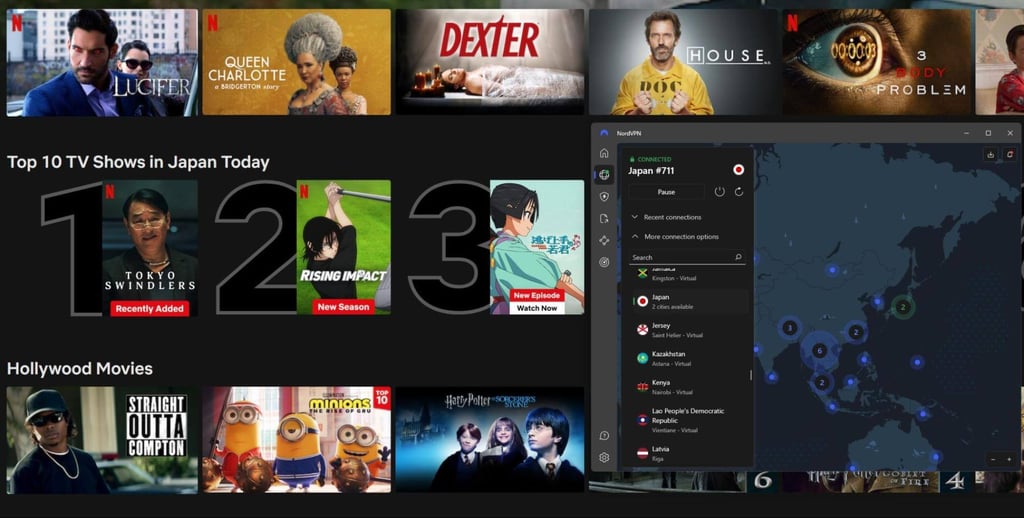
Outside of the US, NordVPN has 8,000+ servers in 149 countries. The elaborate global server spread lets you pick a nearby server for the best connection speed or access foreign streaming content, like the Netflix library in Japan.
Speed and latency
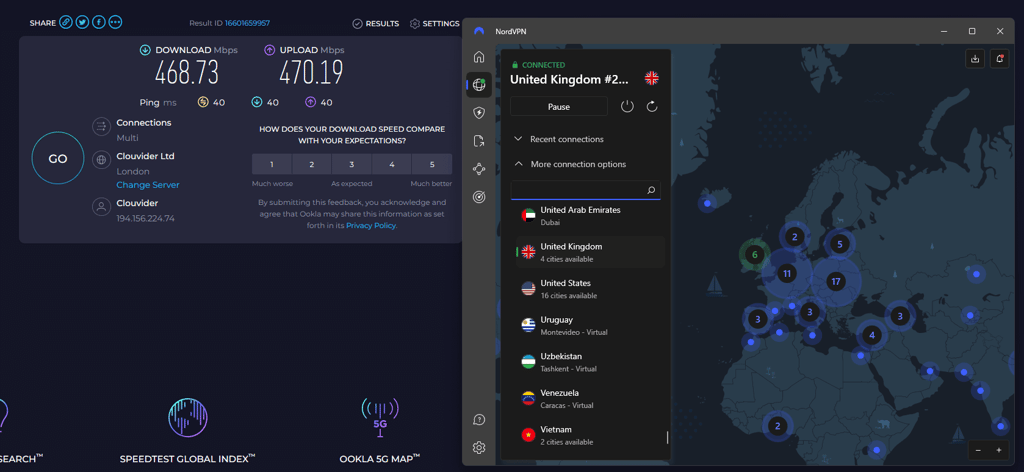
Thanks to the proprietary NordLynx protocol and reliable server maintenance, NordVPN is one of the fastest VPNs in 2026. During my tests, it never fell below 80% of the original connection speed, and some US locations maintained an impressive 88%. That means that with NordVPN, you can barely feel the VPN running in the background. I tested NordVPN against the 940Mbps baseline connection speed and got a 756Mbps average download speed. On the other hand, the average upload speed was 755Mbps, which is great for quickly uploading pictures and videos.
Security features and privacy policies
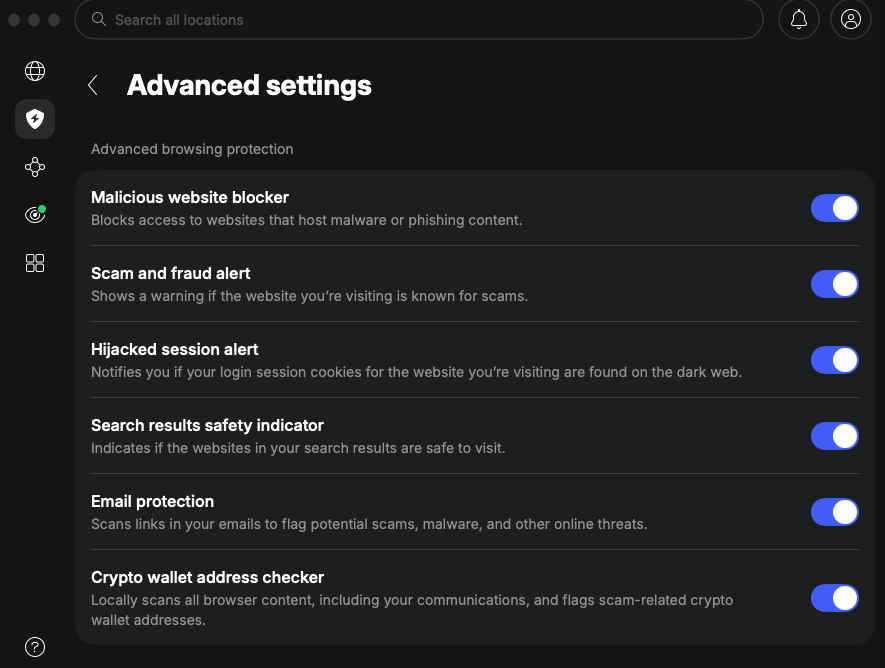
NordVPN is setting the standards for VPN transparency with no-logs audits conducted by independent auditors like PwC and Deloitte. The provider has passed rigorous no-logs audits in 2018, 2020, 2022, 2023, 2024, and 2025, proving it does not collect or store any user data. What's more, NordVPN has also rebranded its former Threat Protection Pro tool as next-gen antivirus. It now includes scam protection, advanced browsing protection, malware protection, and several other security features. It secures your traffic using AES-256 and ChaCha20 encryption algorithms that meet even the strictest cybersecurity standards.
Compatibility with various devices
You can use NordVPN on up to 10 devices simultaneously. It has an intuitive app for Windows, macOS, Android, and iOS devices. NordVPN also provides a dedicated app for Linux and has recently added a full GUI for it, so I no longer have to use the command line to connect to a US server. Regarding streaming, you can use its app on Android TV and tvOS, but you have to set it up on a router to work with PlayStation, Xbox, and Nintendo Switch. There’s also browser support for Chrome, Firefox, and Edge.

Personal experience
NordVPN is my personal VPN favorite. Over the last 6 years of actively using it, I saw NordVPN adapting the WireGuard protocol, expanding its server fleet, upgrading cybersecurity features, and going through 6 no-logs audits. While I’m not a fan of frequent updates that require app restarts, it’s a small price to pay for a better security feature suite. This VPN works spectacularly well with US streaming sites, so I recommend it for both online privacy and unrestricted internet access.
Pricing and subscription plans
NordVPN's pricing starts at $3.49/month for the Basic plan, but I recommend paying $4.49/month for the most popular Complete plan, which unlocks the next-gen antivirus, includes a top-notch password manager, and monitors the web for data leaks. I also suggest choosing a 1-year or 2-year plan to get the biggest discount. Monthly plans are quite expensive. For example, you have to pay $14.99/month for the Basic plan.
NordVPN also has a 3-day free trial, for which you can register using an Android device. Once you snag the free trial, you can then use the account on all compatible devices. There’s also a 30-day money-back guarantee.
2. Surfshark – best VPN for USA with unlimited devices

-
Server network
-
Connection speed
-
Security and privacy
-
Device compatibility
Surfshark is another great choice for a US VPN. It offers unlimited device connections and affordable pricing. While it has fewer US servers than NordVPN, Surfshark focuses on precise geographical targeting. It also offers a wide range of cybersecurity features that set it apart, especially given its low price tag.
Server locations and network size
Surfshark may not boast a huge server network like NordVPN, but it catches up in performance. Currently, it has 600+ servers in 19 US states and 24 US cities, including Los Angeles, Las Vegas, and New York. Worldwide, Surfshark has 4,500+ servers in 100 countries.
This VPN offers specialty MultiHop and Camouflage Mode servers, generally called double VPN and server obfuscation, dedicated to online privacy protection and geo-block evasion. You can also get a static IP address, and the whole network supports P2P traffic.

Speed and latency
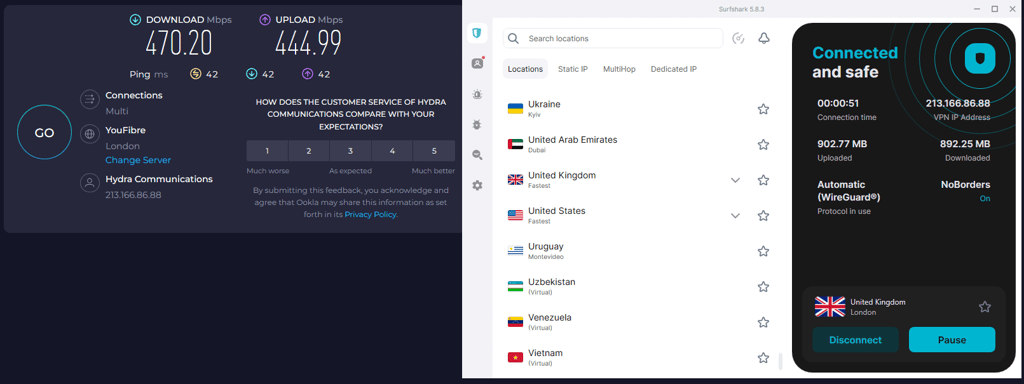
Surfshark is one of the fastest VPN services in the USA. When I tested its US server speed, it maintained 84% of the original speed on average. In fact, it improved compared to the earlier tests. The upload speed was much lower, averaging only 10% – a result with room for improvement.
Thanks to the WireGuard protocol, the connection to the server is nearly instantaneous. During 2-day testing, I observed around 764Mbps download speed, tested against the 940Mbps baseline, so this VPN can ensure seamless downloading, streaming, and gaming.
Security features and privacy policies
Surfshark is a great VPN for the US with extra features – it includes an antivirus in its Surfshark One bundle. In fact, it's our top selection in the antivirus with a VPN list. So, if you require all-encompassing malware protection, Surfshark is definitely an option to consider.
Similarly to NordVPN, Surfshark utilizes ChaCha20 encryption combined with an improved AES-256-GCM encryption algorithm. It also follows a strict no-logs policy, which was audited by Deloitte in 2025. However, it’s based in the Netherlands, which is a part of the Nine Eyes alliance. That said, Surfshark uses a RAM-only server structure designed to erase all data upon restart or shutdown, supporting the no-logs claims.

Compatibility with various devices
Surfshark is one of the few VPNs that does not limit simultaneous connections, so one subscription can protect all your devices or the whole household. Surfshark is a family-friendly VPN, so it aims to cover the devices you often find in the home. Its simplistic yet feature-rich app is suited for newcomers and experienced VPN users alike. It is compatible with Windows, macOS, iOS, Android, Android TV, and FireTV and offers extensions on Chrome, Firefox, and Edge browsers. I strongly recommend Surfshark for Linux users because its app comes with a neat GUI on Ubuntu 20.04 LTS, Debian 11, and Mint 20 distros and their newer versions.

Personal experience
I found Surfshark to be a simplistic but intuitive and feature-rich VPN strongly oriented at online identity privacy. Installing it on supported devices and routers is a breeze, and I'm a fan of numerous additional benefits rarely found elsewhere. Although Surfshark is aimed at casual internet users or large households, advanced encryption algorithms and a Linux app GUI will satisfy VPN experts.
I tried accessing the US Netflix, HBO Max, and Disney+ services and BBC iPlayer in the UK, and I didn't encounter a single issue, making Surfshark a streaming-friendly VPN. Its private search engine is simplistic, and the results are accurate, but if you’re switching from, let’s say, Google Chrome, it requires some adjustment.
Pricing and subscription plans
The Surfshark Starter plan costs $2.49/month, but I suggest paying $2.79/month for the Surfshark One bundle. The slight increase in price is well worth the added features. Alongside a VPN, this bundle includes an antivirus, a private search engine, data leak monitoring, and personal data security reports.
Surfshark’s most expensive Surfshark One+ bundle costs $4.49/month and adds data removal from business databases and public website tools, which is currently available only in the US, Canada, the UK, Switzerland, and the European Union. Additionally, there's a 7-day free trial for iOS and Android users and a 30-day money-back guarantee.
3. IPVanish – US-based VPN for streaming

-
Server network
-
Connection speed
-
Security and privacy
-
Device compatibility
IPVanish is a US-based VPN, which makes a solid choice for users seeking to access more online content, especially streaming. Despite the US’s extensive online surveillance, IPVanish has proved to be a secure service. Its no-logs policy was last audited in 2025 by Schellman, proving it doesn’t collect, store, or share user data.
Server locations and network size
In the US, IPVanish operates over 1020 servers spread across 18 states and 22 US cities, including Dallas, Boston, New York, and Las Vegas. While inspecting the server variety for this review, I noticed the lack of specialty servers, like streaming or Onion over VPN servers.
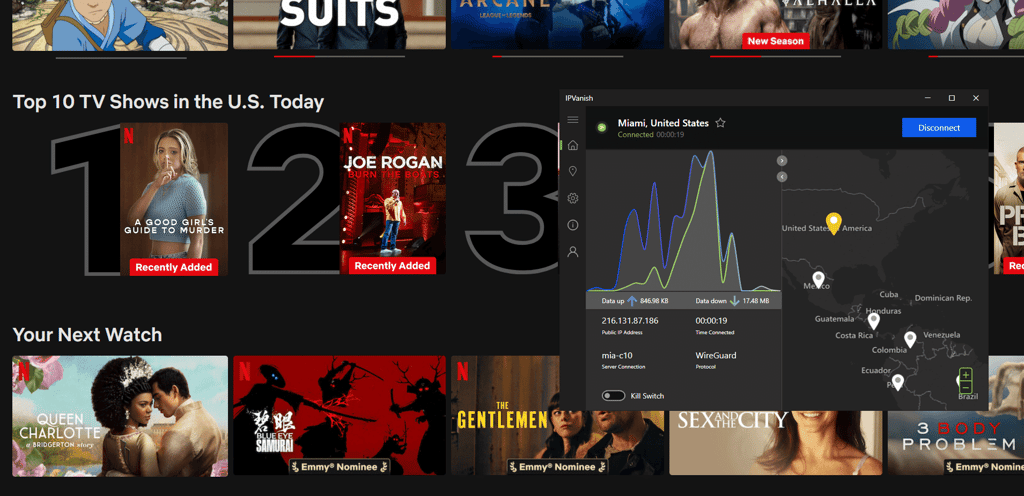
Although there are no dedicated streaming servers, this VPN works well with Netflix, HBO Max, Amazon Prime Video, Disney+, YouTube TV, and BBC iPlayer. In fact, I only had issues unblocking Hulu, so I recommend it to anyone wishing to expand the US content access. Outside of the US, IPVanish has 3,400+ servers in 112 countries.
Speed and latency
A sufficient connection speed is paramount for a good streaming VPN to avoid lag and buffering. Like many other VPNs for the US on this list, IPVanish employs the WireGuard protocol, which significantly increases its speed capabilities. During my tests, IPVanish US servers retained 60% download and 69% upload speeds. Against the 940Mbps test baseline, IPVanish averaged 591Mbps during downloads and 443Mbps during uploads, which is more than enough for streaming without encountering lag or slowing down other processes.
Security features and privacy policies
This VPN uses the industry-standard AES-256 encryption and offers WireGuard, OpenVPN, IKEv2, and IPSec protocols. Although I recommend sticking to WireGuard for the best performance, IKEv2 can perform better on mobile, and OpenVPN offers more customization options.
IPVanish offers two more customizable features that are often more restricted on other VPNs. First, you can use a kill switch, which terminates your internet connection system-wide. Second, it has an On Demand function for iOS devices. It lets you set specific auto-connect rules, like connecting to a VPN server upon joining a specific network or visiting a particular website.

Compatibility with various devices
Like Surfshark, IPVanish supports unlimited simultaneous connections, which are suitable for large households or for sharing a VPN while traveling. It supports Windows, macOS, iOS, Android, FireOS, and Debian or RedHat Linux distributions using manual configuration. Although it doesn't have an app for other SmartTVs besides Amazon, you can install IPVanish on your router to use the VPN on devices that don't support a native VPN app.
On the downside, IPVanish does not have a browser extension. However, it usually uses fewer system resources and is often more accessible for streaming than a stand-alone app.

Personal experience
In my experience, IPVanish is the best VPN for unblocking streaming content in the US. That doesn't mean it's unsuited for private browsing, public Wi-Fi protection, or P2P traffic. Being based in the US and offering unlimited concurrent connections and an app for FireOS, I consider it a top-notch streaming VPN.
On the other hand, its cybersecurity features cannot keep up with the market leaders like NordVPN or ExpressVPN. While the proximity to local streaming services ensures great-quality streaming, the jurisdiction is not ideal for political activists and journalists seeking privacy from government surveillance and censorship.
Pricing and subscription plans
IPVanish has a simplistic payment model. The 2-year plan starts from $2.39/month with the current 84% discount, going up to $3.89/month for a 1-year plan. Its monthly plan costs $14.99/month, which is standard among VPNs. You can try the service out with a 7-day free trial for iOS and Android users, and IPVanish offers a 30-day money-back guarantee.
4. ExpressVPN – secure VPN for the USA

-
Server network
-
Connection speed
-
Security and privacy
-
Device compatibility
ExpressVPN is one of the top VPNs for the USA. It’s based on the privacy-friendly British Virgin Islands, which have no data retention laws. Also, it includes useful features, such as Threat Manager, which blocks trackers and ads. Meanwhile, its proprietary Lightway protocol ensures fast connection speed. Moreover, its recent pricing update makes it a compelling competitor for providers like NordVPN and Proton VPN.
Server locations and network size
ExpressVPN has servers in 60+ US server locations but does not disclose the exact number. In terms of states, ExpressVPN covers all 50 of them. Like IPVanish, ExpressVPN does not offer specialty servers but uses obfuscation technology on the whole network to mask VPN traffic, which helps access geographically restricted content.
ExpressVPN’s network was also upgraded from a maximum of 1 to 10Gbps speed, so this could be your priority pick if you have high-speed internet, like fiber optics.

Speed and latency
To test ExpressVPN speed, I connected to its New York server. It maintained 580Mbps speed against the 940Mbps baseline for a solid 62% retention rate. Upload speed retention was 37%, which could use some improvement.
ExpressVPN allows P2P traffic, making it a good choice for torrenting, which is even safer considering its strong encryption and no-logs policy. I also tried streaming the US Netflix exclusives in HD and didn't encounter any lag or buffering.
Security features and privacy policies
ExpressVPN underwent 3 no-logs audits by KPMG, PwC, and Cure53 with positive results, so you can be sure it does not collect user data. Additionally, in 2016, Turkish authorities seized an ExpressVPN server, suspecting criminal activities, and found it contained no logged data. This VPN uses industry-standard AES-256 encryption and offers a kill switch, split tunneling, RAM-only servers, and private DNS technology to protect your DNS queries from unwanted attention. Although ExpressVPN is based in the privacy-friendly British Virgin Islands, I must point out it is owned by Kape Technologies, which has a bad reputation for developing questionable software.

Compatibility with various devices
You can use ExpressVPN on Windows, macOS, Linux, Chromebook, Android, iOS, Linux, and even Amazon Fire devices. However, some of them require manual configuration. This VPN also works well on routers, like Linksys and Netgear.
What makes ExpressVPN stand out is its proprietary Aircove router. Having tested it out myself extensively, it’s undeniably one of the best options if you’re hoping to protect every smart device in your household. However, it's important to note that as of March 31st, 2026, ExpressVPN has discontinued support for its dedicated app on non-Aircove routers. Still, you can set up the VPN manually on compatible routers if you prefer a custom configuration.

Personal experience
This VPN offers numerous benefits, and using it was a pleasant experience. It performed equally well connected to the US or any other country's servers. I didn't get a single IP address block or VPN traffic error accessing geographically restricted content, like the US Netflix, Disney+, and Hulu libraries. On the other hand, its Threat Manager uses DNS-filtering technology, which cannot keep up with NordVPN's Threat Manager Pro – it blocks more malware by inspecting traffic for malicious elements.
Pricing and subscription plans
ExpressVPN pricing has changed recently, and you can now get a 2-year plan for $2.99/month. Its 1-year plan costs $4.99/month, while the monthly subscription costs $14.99/month. ExpressVPN also offers a 30-day money-back guarantee and a 3-day free trial on mobile so you can test out its services before paying.
5. Private Internet Access – VPN with servers in all 50 US states

-
Server network
-
Connection speed
-
Security and privacy
-
Device compatibility
Private Internet Access is a US VPN that offers servers in all 50 US states. Once, it was a VPN with the most extensive server fleet, but it no longer discloses the exact number of servers. Another drawback was PIA’s in-house test results, which demonstrated inconsistent speeds. However, it’s an affordable VPN service that offers an antivirus tool and other add-ons.
Read Private Internet Access VPN review
Server locations and network size
Private Internet Access VPN used to have a massive network infrastructure of 35,000+ servers. However, it no longer discloses the exact server count, including the number of US servers. What Private Internet Access VPN is public about is that its servers are spread across all 50 states. In total, this VPN covers 90 countries worldwide.
PIA has a RAM-only server structure to erase all data upon shutdown or restart, maintaining its no-logs policy. However, this is another VPN for the US that does not offer specialty servers but aims to optimize the whole network for P2P data transfers, streaming, and gaming.

Speed and latency
There were significantly inconsistent results when testing PIA against a 940Mbps download and upload baseline, and I got 637Mbps download and 205Mbps upload retention. While download speed held up relatively well, upload speeds dropped sharply. It dropped further testing outside of the US, where it retained 443Mbps in Japan – about 47% of the original speed.
Security features and privacy policies
This VPN offers WireGuard and OpenVPN protocols, DNS leak protection, a kill switch, and AES-256 encryption. Its OpenVPN clients are open-source, which many consider a security advantage, as a dedicated community can fix vulnerabilities without delay.
Because PIA is based in the US but claims a strict no-logs policy, an independent audit is mandatory to prove its dedication to user privacy. Luckily, Private Internet Access VPN underwent a successful no-logs audit in 2022 and another one by Deloitte in 2024.
Additionally, there's a MACE ad blocker to shut down ads, trackers, and, to some extent, malware.

Compatibility with various devices
PIA offers unlimited device connections so that you can secure all of your devices with one account. It is compatible with Windows, macOS, Linux, Android, and iOS, and has browser extensions for Chrome, Firefox, and Opera. Although it doesn't offer router compatibility to the same extent as ExpressVPN's hardware release, Private Internet Access VPN provides clear guides on setting it up on routers manually.

Personal experience
I thoroughly enjoyed connecting to PIA’s server network, which felt massive and very precise for geo-targeting, especially given its vast distribution of servers across the US. However, inconsistent speed does not allow me to place Private Internet Access VPN higher on this list.
I think switching to unlimited simultaneous connections is a superb decision that market leaders like NordVPN should follow. However, top VPNs offer specialty servers, compared to none on the Private Internet Access app.
Pricing and subscription plans
The 2-year plan provides the best price-to-value ratio and costs $2.03/month. Additionally, you can add PIA antivirus for $1.45/month (on a 2-year plan), which is more affordable than most of the best antivirus software on the market. PIA also offers a dedicated IP for $2.50/month whenever you require an unchanging IP address. The 6-month plan drops the exclusive discount and costs $7.50/month, and you'll have to pay $11.95 for its monthly plan.
6. CyberGhost – VPN for the US with excellent specialty servers

-
Server network
-
Connection speed
-
Security and privacy
-
Device compatibility
CyberGhost is a great USA VPN with specialty servers. What’s more, CyberGhost offers good connection speeds, robust encryption, and easy access to popular streaming sites. That said, it allows only 7 device connections, and I noticed slight HD buffering during testing.
Server locations and network size
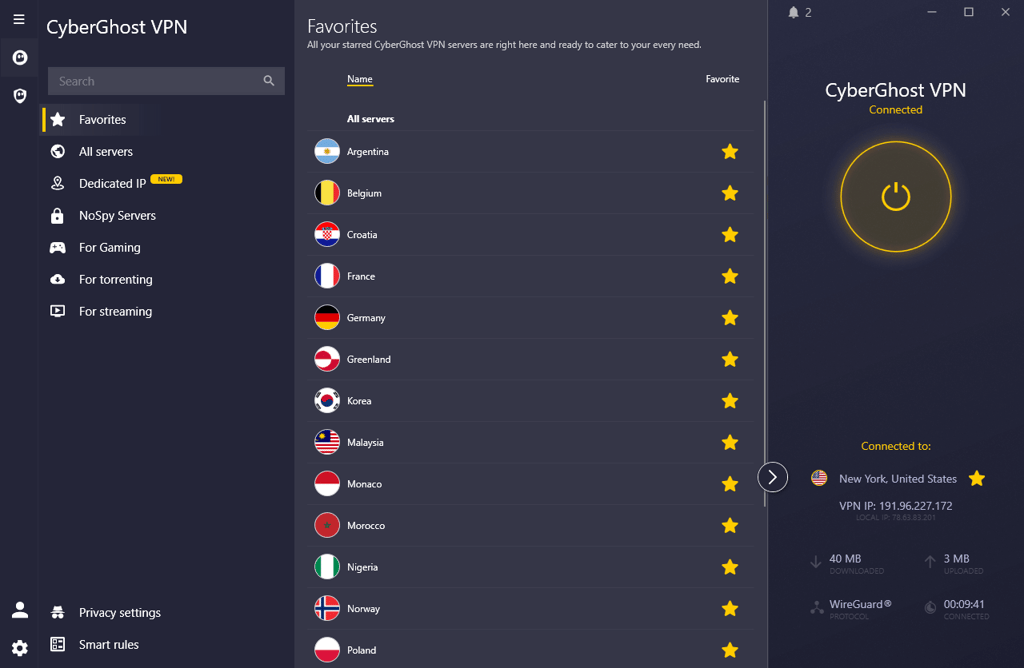
CyberGhost does not officially disclose the number of servers it has globally and in the US. That said, it is currently known that CyberGhost has servers in 9 US states and 11 cities. In the app, you can find dedicated streaming, torrenting, gaming, and NoSpy servers. These are optimized for private browsing and located in a data center managed by the CyberGhost VPN team in Romania.
Speed and latency
CyberGhost VPN US servers offer excellent speeds, but they are just slightly slower than the fastest VPNs on this list. Connected to a server in New York, the download speed settled at 746Mbps against the 940Mbps baseline, with a relatively low 190Mbps upload speed.
All in all, CyberGhost retains about 80% of the initial capacity, performing equally well worldwide. In short, this VPN delivers speeds good enough for streaming, so it's a great traveling companion if you plan to share high-quality pictures and lengthy videos.
Security features and privacy policies
This VPN service is based in Romania and is not part of any state surveillance network. It has all the necessary privacy protection, like AES-256 encryption, DNS leak protection, and a kill switch.
CyberGhost VPN automatically connects when joining a Wi-Fi hotspot, and the specially designed NoSpy servers are an additional layer of online safety, paramount to political activists and journalists. However, it is also owned by Kape Technologies, like ExpressVPN, and suffers from the same reputational damage the company has received in the past.

Compatibility with various devices
CyberGhost is compatible with Windows, macOS, Linux, iOS, Android, Android TV, Amazon Fire TV, LG SmartTV, and Samsung SmartTV. It has Chrome and Firefox browser extensions and provides instructions on setting it up on Raspberry Pi. Because CyberGhost provides Smart DNS technology, it's an excellent choice to get more streaming content and gaming options.

Personal experience
If not for its sometimes shaky performance, CyberGhost would be higher on the list of the best VPNs in the USA. While testing its streaming capabilities, I noticed it sometimes lags despite maintaining an excellent connection speed. Although it has thousands of servers globally and in the US, it is currently known that they are located in 11 states, limiting the VPN’s geo-targeting capacity. However, it has a superb list of specialty servers, so prioritize this VPN if you focus on torrenting, gaming, and streaming.
Pricing and subscription plans
You can get a CyberGhost VPN 2-year plan with an 83% discount for $2.19/month, while the 6-month plan costs $6.99/month. One month is currently priced at $12.99.
Additionally, you can pay $1.00/month extra to get its antivirus and a security updater, and the dedicated IP address costs $2.50/month. It also offers a 3-day free trial for Android, 7 days for iOS, 1 day for Windows and macOS, and a 45-day money-back guarantee.
Comparison of top VPNs for the USA
| Rating | US server locations | Global servers | Streaming services | Pricing | |
| NordVPN | 55 | 8,000+ servers in 149 countries | Netflix, Hulu, BBC iPlayer, Disney+, and more | From $3.49/month | |
| Surfshark | 24 | 4,500+ servers in 100 countries | Netflix, Disney+, Amazon Prime Video, Hulu, and more | From $2.49/month | |
| IPVanish | 22 | 3,400+ servers in 112 countries | Netflix, BBC iPlayer, YouTube, Disney+, Hulu, and more | From $2.39/month | |
| ExpressVPN | 60+ | Undisclosed number of servers in 113 countries | Netflix, Hulu, BBC iPlayer, Disney+, and more | From $2.99/month | |
| Private Internet Access | 50 | Undisclosed number of servers in 90 countries | Netflix, YouTube TV, Hulu, BBC iPlayer | From $2.03/month | |
| CyberGhost VPN | 11 | Undisclosed number of servers in 100 countries | Netflix, Hulu, BBC iPlayer, Disney+ | From$2.19/month |

Why use a VPN in the USA?
A reliable and trusted US VPN can be useful in many scenarios. It doesn’t matter if you are abroad looking to watch your favorite geo-blocked content online or in the US feeling anxious over increasing content control and surveillance.
Here are the key reasons why I recommend using a US VPN:
- Data encryption and security. A US VPN provides robust features to strengthen your digital security. It applies additional encryption to your online traffic and reroutes it through a secure VPN server. This way, the US ISPs cannot peek at your online activities and share them with third parties. The same applies to cybercriminals who cannot break the encryption and exploit your data.
- Protection from surveillance. It’s notable that the US is a founding member of the Five Eyes alliance. The US government can monitor its citizens and also share intelligence with foreign partners. Fortunately, a reliable no-logs VPN can ensure that your browsing habits do not travel halfway across the globe without you ever noticing it.
- Bypassing geo-restrictions. Sports channels, streaming services, news sites, and YouTube videos are often restricted to selected countries. For example, the popular US sports channel ESPN+ is not available outside the US. Fortunately, you can effortlessly bypass these blocks by connecting to your VPN USA server and continue streaming as if you were physically there. A VPN also helps access apps banned in certain regions, like a TikTok VPN, to unblock TikTok where it's restricted.
- Circumventing the porn ban. Another nuisance is that some states are forcing age verification using a driver's license, ID card, or passport to watch adult content online. That means you must share your most sensitive information with websites unfit for data storage and safety. Instead of complying with the risky age verification demand, pick a VPN with servers in states that do not require identification and enjoy unrestricted adult content access.
- Protection from cybercriminals. I also strongly recommend using a VPN when connecting to public Wi-Fi networks. Malicious hackers often target internet hotspots, looking for users who don't have additional cybersecurity software. Without it, you can easily fall victim to an identity theft attack that could even result in financial loss. The good news is that the best VPNs in the USA offer real-time protection to keep your device safe when using public Wi-Fi.
- Avoiding ISP throttling. You can enhance the quality of your internet connection and bypass ISP throttling with a VPN. Some uncompetitive ISPs throttle the connection speed upon noticing bandwidth-consuming activities, leaving you with a massive lag. Use one of the VPNs on this list to cloak your online activities from ISPs and prevent them from throttling your connection.
How to get a US IP address with a VPN
Getting a US IP address is easy once you’ve set up the right VPN service on your device. Here’s a short guide on how to do it:
- Sign up for a reliable US VPN service – I recommend NordVPN, now 75% OFF
- Download and install the app, following the installation instructions
- Go to settings and enable the kill switch to add extra security
- Connect to a US server and instantly get a US IP address
Final thoughts
A reliable VPN for the US is essential not only for streaming local content abroad. It also protects your online privacy, whether you’re based in the US or elsewhere.
My top choice for the best US VPN is NordVPN. It offers elaborate security features, strong encryption, fast speeds, and great content unblocking – everything I expect from a trustworthy VPN. However, if you’re in the market for a more affordable option, Surfshark is a great alternative that also supports unlimited device connections.
FAQ
What's the best US VPN?
NordVPN is the best US VPN that has 3390+ high-speed servers in 55 locations. It is based in Panama and has undergone multiple rigorous no-logs audits to prove its dedication to online privacy. Additionally, the next-gen antivirus has outstanding anti-malware capabilities and blocks dubious websites before entering them.
How do I get a VPN for the USA?
The best way to get a VPN for the USA is to pick one from the list of best USA VPNs. I meticulously tested their US server availability, regional distribution, connection quality, and available features. Review the advantages and disadvantages of all providers in the list and pick the top US VPN.
Are US VPN servers safe?
Yes, US VPN servers are perfectly safe. Although the US is known for its extensive online surveillance, many VPN providers establish headquarters in countries without data retention laws, like NordVPN in Panama and ExpressVPN in the British Virgin Islands. VPNs headquartered in the US rely on no-logs audits to prove they do not collect data.
What is the fastest VPN in the USA?
NordVPN is the fastest VPN in the USA. During my tests, it maintained an excellent 88% initial connection speed retention and never fell below 80%, whichever server I connected to. This VPN runs on a proprietary NordLynx protocol that ensures a nearly instantaneous connection to the VPN server.
Which VPN has the most US servers?
Although Private Internet Access VPN has servers in all 50 states, it does not disclose the number of its US servers. ExpressVPN does not disclose the number of US servers either, but it also has servers in all US states. Based on the available numbers, NordVPN comes in close second with 3220+ US servers in 20 locations and 39 cities.
Which VPN has the most servers in different US states?
Private Internet Access and ExpressVPN are two VPN providers with the widest server coverage across the United States, offering servers in all 50 states and IP addresses in virtually every location nationwide. However, keep in mind that both PIA and ExpressVPN do not disclose the exact number of servers they currently operate in the US.