Top 3 best VPNs for Firestick in 2026
Our in-house cybersecurity experts and journalists, renowned for major reports like The Mother of All Breaches, conduct transparent, unbiased VPN testing and in-depth analysis.
With 750+ articles crafted based on real-world research, we empower readers to make informed purchasing decisions through first-hand expertise.
Learn more
After researching the top-rated VPNs and testing them on a Fire TV Stick myself, I found the 3 best VPNs for Firestick that combine fast streaming speeds, reliable app performance, and trustworthy privacy. In this guide, I compare each VPN’s installation process, streaming capabilities, performance, and usability.
As you’d expect, not every VPN worked well on Firestick during testing. For example, some weren’t able to ensure smooth 4K playback, while others couldn’t access geo-restricted content. The providers that made my top list stood out for consistent performance, simple setup, and overall streaming experience. Continue reading to discover my top recommendations.
My top 3 best VPNs for Firestick – shortlist
- NordVPN – best streaming VPN for Firestick with the fastest speeds
- Surfshark – best affordable Firestick VPN for unlimited devices
- IPVanish – reliable VPN for Firestick with solid speeds




We spare no effort to test the products & their features. All information is gathered by our in-house research team & fact-checked by our team of experts. Discover the ins and outs of our testing procedures.
How to install a VPN on Firestick (3 methods)
Setting up a VPN on Firestick takes no longer than 3–5 minutes with any of these three most popular methods – no advanced skills needed. Choose based on your VPN provider and setup preference for seamless streaming and privacy.
The easiest way for most users – grab official apps directly from the Amazon Appstore without extra steps:
- From Fire TV home, select the search icon and type your VPN's name – I recommend NordVPN, now 75% OFF
- Select the official app and hit Download/Install
- Launch the app and sign in using the available login method, such as a QR code, activation code, or account credentials
- Tap Quick Connect or pick a server manually – and enjoy
This method is perfect for VPNs not in the Amazon Appstore, like custom or sideloaded versions:
- Install the Downloader app from the Amazon Appstore
- Go to Settings > My Fire TV > Developer Options and turn on Unknown Sources/Apps from Unknown Sources
- Open Downloader and enter the official APK download link provided by your VPN service
- Install the APK, log in, grant any required permissions, and connect to a server
You can protect your entire network (including Fire TV Stick) with one setup – no app needed on the device:
- Check if your router supports VPN firmware, either natively or using compatible firmware
- Log in to the router’s admin panel (usually 192.168.1.1) and upload the VPN config file or credentials
- Select the protocol (OpenVPN/WireGuard), connect, then plug in the Firestick – it auto-uses the VPN network-wide
- Verify via whatismyipaddress.com on the Fire TV Stick browser
Method 1 works for all top recommendations in this article, as I narrowed down the VPN options to those with dedicated Fire TV apps. Start there for the fastest results.
Why do you need a VPN for Amazon Firestick?
Using a VPN is one of the best upgrades I’ve discovered for my Amazon Firestick. It helps you unlock more streaming content, protect your privacy, and take your streaming experience to a whole different level. Here are some key benefits of Firestick VPNs:
- A VPN can unblock content that is only available in other regions. Netflix has completely different libraries depending on the country you’re connecting from. The same goes for BBC iPlayer, Hulu, and many other services that users typically stream on Firestick. I tested this across multiple servers, and the difference between the US, the UK, and Australian Netflix libraries is significant. A VPN lets you connect to a server in another country and access that region's content catalog.
- A VPN helps you avoid ISP throttling. ISP throttling is one of the most common causes of buffering on Firestick. It happens because ISPs detect streaming traffic and deprioritize it to manage load. A VPN encrypts your connection, making it impossible for your ISP to see what you’re doing.
Best VPNs for Firestick in 2026 – detailed reviews
I tested a wide range of VPNs on a Fire TV Stick, and only a handful delivered steady speeds and reliable performance — many others struggled with slowdowns or connection drops. Check out all the tested options below and choose the one that suits your streaming setup best.
| Winner | |||
| NordVPN | Surfshark VPN | IPVanish | |
| ⭐ Rating: | |||
| 🥇 Overall rank: | #1 out of #41 | #2 out of #41 | #8 out of #41 |
| 🖥️ Servers: | 8,000+ servers in 149 countries | 4,500+ servers in 100 countries | 3,400+ servers in 112 countries |
| 📖 No logs policy: | No logs | No logs | No logs |
| 💵 Price: | From $3.49/month | From $2.49/month | From $2.39/month |
| 🔥 Coupons: | NordVPN coupon 75% OFF | Surfshark coupon 87% OFF | IPVanish coupon 84% OFF |
| 🔒 VPN protocols: | OpenVPN, NordLynx, NordWhisper | OpenVPN, WireGuard, IKEv2, Dausos | OpenVPN, WireGuard, IKEv2, IPSec |
| 🍿 Streaming services: | Netflix, Hulu, BBC iPlayer, Disney+, and more | Netflix, Disney+, Amazon Prime Video, Hulu, and more | Netflix, BBC iPlayer, YouTube, Disney+, Hulu, and more |
| 🖥️ Platforms: | Windows, macOS, Linux, Android, iOS | Windows, macOS, Linux, Android, iOS | Windows, macOS, Linux, Android, iOS |
| 📥 Simultaneous connections: | 10 | Unlimited | Unlimited |
| 💁🏻 Support: | Knowledge base, email, 24/7 live chat | Knowledge base, email, 24/7 live chat | Knowledge base, email, 24/7 live chat |
| Get NordVPN |
1. NordVPN – best overall VPN for Firestick

| Dedicated Fire TV Stick VPN app: | ✅ Yes |
| Smart DNS: | ✅ Yes |
| Servers/countries: | Thousands of servers in 225 locations |
| Simultaneous connections: | 10 |
NordVPN is my top VPN for Firestick. It consistently delivers fast streaming speeds, and its Firestick app is very user-friendly, making it a top option for binge-watching shows.
In our NordVPN tests, it was the fastest VPN I tried on Fire TV. I started with a 940Mbps base connection, and when I connected to a nearby UK server, it reached 833Mbps, resulting in 87% speed retention. Then I connected to a more distant server in the US, and there I got a 799Mbps speed (85% retention). The Australian server achieved 567Mbps (60% retention). 4K Netflix streams loaded in seconds and played without a single buffer, and switching between servers took under 3 seconds each time. I browsed, scrolled social media, and downloaded in the background while streaming without any drop in playback quality. I believe it’s an ideal pick for binge-watching on Netflix, Prime Video, or Kodi-based add-ons.
NordVPN’s Fire TV app is available directly from the Amazon Appstore, so you don’t need to sideload anything or tweak advanced settings. Unlike other providers on my list, it already supports Vega OS-based Fire TV Sticks, including the latest Amazon Fire TV Stick 4K Select device, with a layout designed for remote control navigation.
Setting up NordVPN on Firestick was effortless in my experience. I installed it from the Amazon Store, signed in using a QR code or on-screen login, hit Quick Connect, and was ready to open streaming apps. The app automatically selects a fast, nearby server, but you can also choose specific countries to unlock different libraries or hide IPTV use from your ISP.
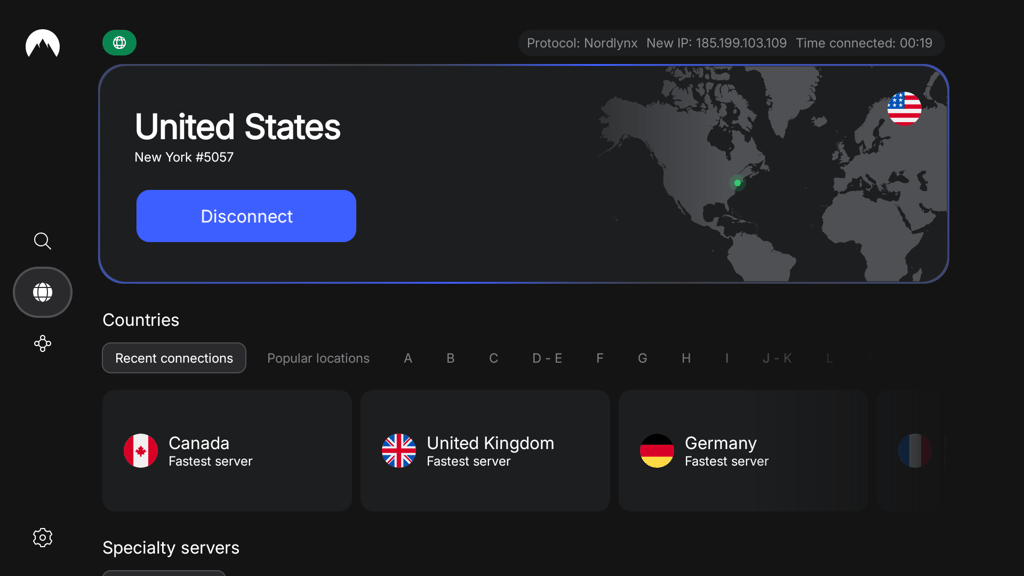
NordVPN pricing is competitive on more extended plans, starting at $3.49/month with a 2-year subscription, which you can use on up to 10 devices at once, not just the Fire TV Stick. While its 3-day free trial is relatively short, NordVPN offers a 30-day money-back guarantee so you can test the service risk-free.
2. Surfshark – budget-friendly Firestick VPN with unlimited connections

| Dedicated Fire TV Stick VPN app: | ✅ Yes |
| Smart DNS: | ❌ No |
| Servers/countries: | 4,500+ servers in 100 countries |
| Simultaneous connections: | Unlimited |
Surfshark stands out as the best budget-friendly VPN for Fire TV Stick, especially because it supports unlimited devices on a single subscription. Even with its low price, it still delivers fast speeds and a highly user-friendly TV app, making it easy to use on a Firestick.
When testing Surfshark, I started with a baseline speed of 940Mbps. Connecting to a UK server gave me 839Mbps (89% retention), while the US server delivered 778Mbps (83% retention). Australia was a different story, dropping to 603Mbps (64% retention), which felt slower in everyday use and isn’t ideal for high-quality streaming. Server switching was quick and seamless, consistently taking under 3 seconds, and overall performance remained stable even while running background activities like online gaming, with streaming Netflix, Prime Video, and Disney+ in HD at the same time, with no interruptions.
Its native Fire TV app is available directly in the Amazon Appstore, with a clean, remote-friendly interface that makes it easy to pick locations, mark favorites, and quickly reconnect if your ISP starts throttling.
Learning how to install Surfshark on Fire TV is simple enough, and I could manage it in a couple of minutes. You just grab the Surfshark app directly from the Amazon Appstore, sign in using on-screen details or a short code linked to your account, and connect to a recommended server optimized for speed. What I like most is that after the initial setup, the app remembers your preferences, so you can quickly hop between locations to unlock new streaming libraries or keep IPTV activity better shielded from your ISP.
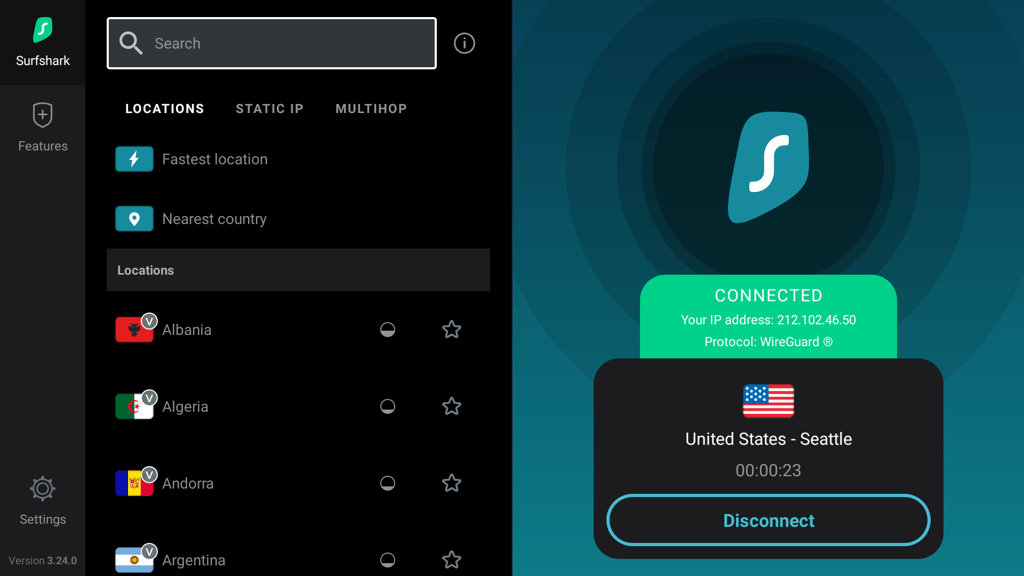
Surfshark’s pricing is budget-friendly for long-term deals, with plans starting at just $2.49/month. This is exceptionally affordable considering you can use one subscription on as many devices as you like, making it great for households with multiple smart TVs, mobiles, and other devices. There’s also a 7-day free trial and a 30-day money-back guarantee, so you can try the service before committing long-term.
3. IPVanish – reliable VPN for Firestick with solid speeds

| Dedicated Fire TV Stick VPN app: | ✅ Yes |
| Smart DNS: | ❌ No |
| Servers/countries: | 3,400+ servers in 112 countries |
| Simultaneous connections: | Unlimited |
IPVanish is a great Firestick VPN if you want reliable streaming performance at an affordable price. Although it doesn't include Smart DNS, IPVanish’s Fire TV app is simple to use and optimized for streaming. It also allows unlimited simultaneous connections, so you truly get your money's worth.
In our IPVanish review, it worked well on Firestick, although it wasn’t quite as fast as NordVPN or Surfshark. Starting from a 940Mbps baseline connection, IPVanish delivered 778Mbps on UK servers (83% speed retention), 676Mbps on US servers (72%), and 584Mbps on Australian servers (62%). While that wasn’t the best result I’ve recorded, it was still more than enough for streaming in 4K.
I was able to watch content on Netflix, Prime Video, and Hulu without buffering or lagging. Switching between servers took 3–4 seconds on average, slightly longer than NordVPN and Surfshark, but not frustratingly so. I also browsed websites, checked emails, and performed other background tasks while streaming, and didn’t notice any major impact on performance.
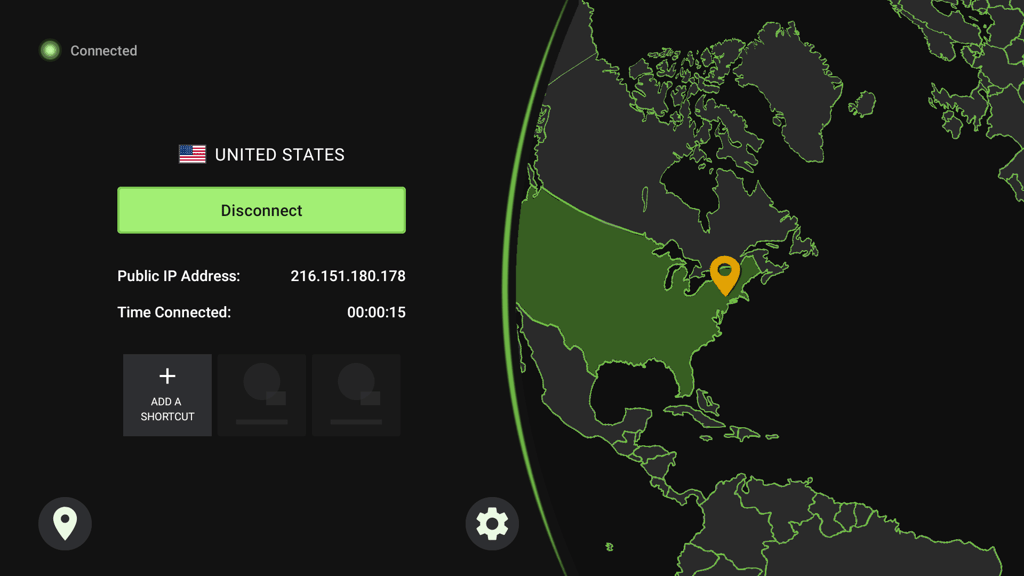
IPVanish pricing starts at $2.39/month for 2-year plans. You can also test it with a 30-day money-back guarantee, or get the IPVanish 7-day free trial instead.
VPNs that didn’t make our top 3 for Firestick
While only 3 VPNs earned a spot on my list of the best VPNs for Firestick, a few other providers still delivered a solid experience. They performed well in testing and handled streaming without major issues, but they simply couldn't match the overall performance, features, value, and reliability of our top picks.
Below, I break down 3 VPNs that worked well on Firestick and explain why they ultimately fell short of making the final list.
Proton VPN
Proton VPN is a strong choice if privacy is your top priority. It has a native Fire TV app, a strict no-logs policy, and its standout Secure Core feature routes your traffic through privacy-friendly countries for an extra layer of protection. For anyone who cares most about staying private, it’s one of the most trustworthy VPNs available.
The problem is that Proton's biggest privacy advantage comes at a cost. Secure Core servers noticeably slowed my speeds during testing, which makes smooth streaming on Firestick difficult. Given that streaming is the main reason people use Firestick, this is hard to overlook.
Proton VPN is solid overall, but for Fire TV specifically, NordVPN is a better alternative since it delivers the privacy you want without sacrificing the speed you need to stream comfortably.
ExpressVPN
ExpressVPN is one of the more reliable streaming VPNs I tested on Firestick. It has a native Fire TV app, delivers consistent speeds, and its MediaStreamer Smart DNS feature is genuinely useful for unblocking content on devices that need it. Streaming 4K Netflix and Prime Video was smooth throughout my testing.
The issue is that NordVPN does everything ExpressVPN does, but better. In my tests, NordVPN was faster, more reliable with streaming, and offered more server locations, which means access to more streaming libraries around the world.
Overall, ExpressVPN is a good Firestick VPN, but when it comes to the things that matter most for streaming, NordVPN is simply better.
CyberGhost
CyberGhost comes with streaming-optimized servers tuned for specific platforms, which sounds great on paper for a Firestick. It has a dedicated Fire TV app and is one of the cheaper options on its long-term plan, so for casual streaming, it can get the job done.
But in my testing, it was the slowest of the bunch. While it was fast enough for streaming on Firestick, the slower speeds left less bandwidth available for other online activities running in the background. It also struggled more than the top providers when bypassing geo-blocks.
Although CyberGhost costs less than Surfshark, the small savings do not justify the drop in speed and unblocking performance. If budget is your main concern, Surfshark is cheaper while still delivering the speed and reliability CyberGhost lacks.
Watching IPTV via Firestick with a VPN
Fire TV users often turn to IPTV apps like TiviMate, Perfect Player, or Kodi add-ons for live TV, sports, and VOD – accessing thousands of channels at a lower cost. However, it’s important to note that ISPs frequently block IPTV server IP addresses, especially during live events like Premier League matches or NFL games, as seen with the UK High Court orders forcing providers to block illegal streams.
A VPN fixes this issue practically: it encrypts your traffic in a secure tunnel, so your ISP sees only generic data sent to a VPN server – not the IPTV destinations. As such, they can't block specific streams, throttle speeds, or flag your account, as explained by Cloudflare's VPN guide.
Quick setup steps for IPTV protection:
- Install a reliable VPN from the Amazon Appstore – my top recommendation is NordVPN, now 75% OFF
- Connect to a nearby or obfuscated server before launching TiviMate or Kodi
- Enable the kill switch to prevent leaks during stream drops
- Test with live sports – enjoy stable streams without blackouts
This approach keeps Premier League or NFL viewing uninterrupted while hiding usage from ISPs. All VPNs recommended in this article excel here without speed hits.
Conclusion
A fast Firestick VPN can make a noticeable difference to your streaming experience. It can unlock content libraries from other countries, reduce buffering on HD, 4K, and IPTV streams, and help prevent ISP throttling that can slow down video playback.
Based on my testing in September 2026, NordVPN stood out as the best VPN for Firestick thanks to its exceptionally fast speeds, extensive server network, and superb unblocking performance. Surfshark came in a close second, offering solid speeds, budget-friendly pricing, and unlimited device connections. IPVanish takes third place, providing a solid balance between performance and affordability, with user-friendly Fire TV apps and enough speed for smooth streaming.
FAQ
Do you actually need a VPN for Firestick?
Yes, especially if you sideload apps, use IPTV, or stream geo-restricted content. Reliable VPN providers like NordVPN hide your traffic from ISPs that throttle speeds or block servers (like during live sports), bypass regional locks on streaming platforms, and protect against account flags or legal notices for unofficial streams. It’s also recommended from a privacy perspective, especially if you’re hoping to avoid data logging.
Can Firestick block VPN?
No, Amazon doesn't block VPN apps. NordVPN, Surfshark, and other providers on my list are in the official Amazon Appstore. Sideloading works too via Downloader. Streaming services might detect VPN IP addresses (rare if you connect to obfuscated servers), but switching servers fixes it instantly.
Which VPN is the fastest for Firestick?
NordVPN performed best during in-house tests with top speed retention for HD and 4K streaming and IPTV, thanks to its proprietary NordLynx protocol and Vega OS optimization. Surfshark VPN follows closely with consistent global performance without buffering.
Is there a free VPN for my Firestick?
I recommend avoiding free VPNs, as they often log data, show ads, or sell bandwidth. However, you can consider a freemium VPN, such as Proton VPN, which offers a free tier with a native Fire TV app. Note that it also has data limits, slower speeds, and fewer servers, which is fine for light use but not for 4K or IPTV. You can find more details in our separate guide on the best free VPNs for Firestick.