Best VPNs with ad blockers in 2026
Our in-house cybersecurity experts and journalists, renowned for major reports like The Mother of All Breaches, conduct transparent, unbiased VPN testing and in-depth analysis.
With 750+ articles crafted based on real-world research, we empower readers to make informed purchasing decisions through first-hand expertise.
Learn more
Not all ad blocker extensions are good. Some of them are compatible with only certain browsers, others can slow down your internet connection and even miss dangerous ads. Fortunately, other solutions exist, and my favorite one is using a VPN.
VPNs with an ad blocker are even better than browser plugins, as they offer many great features, including secure browsing, unrestricted streaming, and online privacy. Continue reading to learn which providers are the safest and what extra benefits they can offer.
Best VPNs with ad blocking
-
 Get 75% OFF NordVPN + 3 months freeView deal1. NordVPN – Best VPN with an ad blocker overallExpert review
 -
 Now up to 85% OFF Surfshark + 3 months FREEView deal2. Surfshark – VPN with ad blocker for unlimited devices, discount code OFFCNExpert review
 -
 View deal3. TotalVPN – Affordable and effective VPN that blocks adsExpert review
 -
 Learn more4. Proton VPN – A great freemium VPN for blocking ads
 -
 Learn more5. CyberGhost – A robust ad blocker VPN
What to look for in the best VPN with ad blocker
Even though there are plenty of great VPN providers, not all of them offer reliable ad blockers. Moreover, even if a VPN contains an ad blocker, its quality can be disappointing. So, to find the best ad blocker VPNs, I considered the following criteria:
- Ad blocker feature. If you have found an attractive provider, make sure it offers a built-in ad blocker feature.
- Malware protection. Reliable protection against cyberthreats should always be offered alongside an ad blocker. This ensures you are protected from malware and phishing scams.
- Extra security features. Security is the main focus. Thus, choosing a VPN that can offer you complete protection with strong encryption and reliable tunneling protocols should be a priority.
- Multiple device compatibility. Securing only one device from a dozen you have isn’t enough to guarantee you security and comfort. So, look for VPNs that allow you to protect multiple devices.
- No-logs policy. The best VPNs with ad blockers will have no intention to collect customers’ data.
- Pricing. if all you want is solid VPN protection plus a built‑in ad blocker, a feature-rich but cheaper provider like Surfshark is more than enough and stays affordable, especially when you use the OFFCN discount code at checkout.
Do VPNs block ads?
No, most VPNs don’t work as ad blockers. A VPN’s primary goal is protecting your privacy and security. It does so through encrypting your internet traffic and hiding your IP address. While a VPN can reduce the amount of ads you see, it doesn’t completely block all ads. Though, by hiding your IP address with a VPN, you’re making it difficult for advertisers to track you, which results in fewer ads.
However, if you want to completely block out ads, choosing a premium VPN with built-in ad blocker is a good option. A VPN with ad blocker as an additional service is actually designed to take care of trackers and misleading advertising that pop-up on your browser.


We spare no effort to test the products & their features. All information is gathered by our in-house research team & fact-checked by our team of experts. Discover the ins and outs of our testing procedures.
Best VPNs for blocking ads – detailed list
As using a VPN can somewhat reduce the amount of the ads you see, it’s not enough to completely block all advertising. Therefore, you’ll need a premium VPN that has a built-in ad blocker. With this goal in mind, our research team and I reviewed 41 VPNs. After an additional evaluation round, I chose 5 top providers. All of them include ad blockers and malware protection capable of protecting all of your devices.
1. NordVPN – the best VPN with an ad blocker

-
Ad blocker functionality
-
Security
-
Speed
-
Compatibility
NordVPN’s ad blocking feature is called the next-gen antivirus (formerly Threat Protection) and it’s the best VPN with ad blocker on the market in 2026. It increases your online security by scanning for any potential risk and identifying advanced threats.
During in-house tests, NordVPN's next-gen antivirus successfully blocked websites that contain malware and phishing scams and didn’t allow annoying flashy banner ads to pop up onto my screen while browsing.
However, keep in mind that NordVPN’s Android version is not as great at blocking ads. That’s because this operating system only supports limited features and you have to connect to a VPN server for this feature to work. On Windows and macOS devices, VPN connection is not required with a next-gen antivirus enabled.
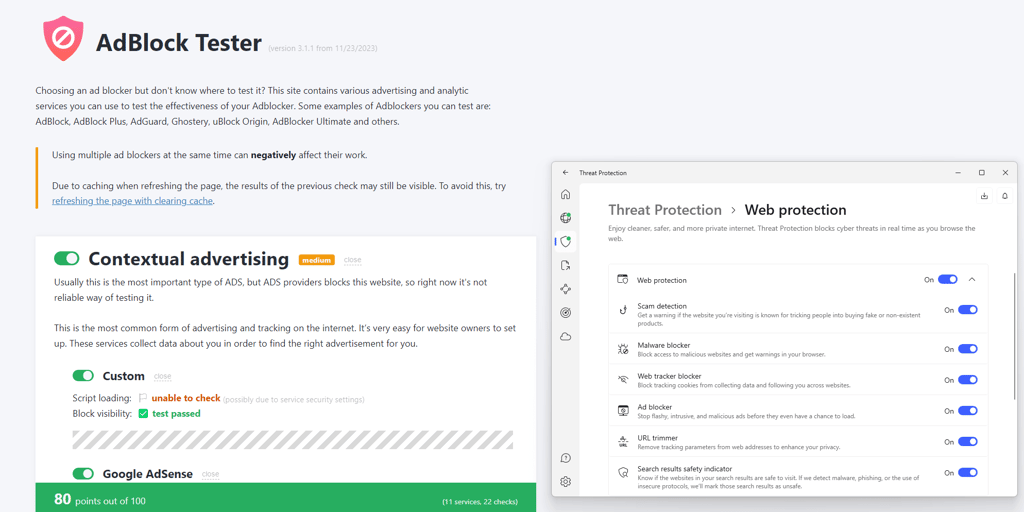
During testing of NordVPN next-gen antivirus I used AdBlock Tester to assess its effectiveness on Windows. Surprisingly, the ad blocker did not demonstrate the best results. Nonetheless, it scored 80/100 points, which proves that NordVPN can successfully block most ads.
Aside from ad blocking, NordVPN is also great at unblocking such popular streaming services as Netflix, Hulu, Disney+, Max, and Amazon Prime Video. This means that a single tool allows you to enjoy both geo-restricted content and ad-free streaming.
In addition, NordVPN offers amazing speeds due to its NordLynx tunneling protocol. During hands-on testing, it retained 90% of the original internet speed. It also supports torrenting, has the split tunneling feature, and offers obfuscated servers that work in oppressive countries.
NordVPN subscription plans are budget-friendly, and pricing starts from just $3.49/month. And if you have any doubts whether or not it’s the right choice for you, you can make use of the 30-day money-back guarantee, which makes the whole experience completely risk-free.
2. Surfshark – ad blocking VPN for unlimited devices, cheaper with code OFFCN

-
Ad blocker functionality
-
Security
-
Speed
-
Compatibility
Surfshark is yet another great VPN with an ad blocker, referred to as CleanWeb. The feature is able to block all sorts of ads, from banners to pop-ups and phishing attempts.
Read Surfshark CleanWeb review
With Surfshark's CleanWeb your device has a much lower chance of being infected with malware, as you’re simply not introduced to malicious ads.
However, keep in mind that Sufshark’s CleanWeb won’t block YouTube ads – you’ll have to get something else for that. Nonetheless, AdBlock Tester results were near perfect – Surfshark’s CleanWeb caught almost all ads and received 98/100 points.

Just like NordVPN, Surfshark offers more than just ad block capabilities. It’s a great streaming VPN, and you can easily access geo-restricted Netflix content from multiple countries, including the US and the UK. It also unblocks BBC iPlayer, YouTube, and Hulu.
Our Surfshark VPN review revealed that there are lots of other Surfshark features too. For example, the double VPN feature routes your traffic through two servers for extra security, while split tunneling allows you to mark the apps that should use the VPN connection. Lastly, GPS spoofing on Android tricks your apps into believing you’re physically in another location.
The best part is that Surfshark is highly affordable. Pricing starts from $2.49/month, and all plans support unlimited simultaneous connections.
3. TotalVPN – affordable and effective VPN with a strong ad blocker

-
Ad blocker functionality
-
Security
-
Speed
-
Compatibility
TotalVPN is part of one of the best cybersecurity packages in 2025 – the VPN is bundled with TotalAV and Total Adblock. So with TotalVPN’s multilayered security service you can relax completely.
If you get the TotalAV Internet Security package, pricing starts from just $1.59/month, and Total Adblock is included for free along with a strong VPN and a versatile antivirus tool. You can utilize all tools on the most popular desktop and mobile operating systems.
VPN connections are powered either by the OpenVPN or IKEv2 tunneling protocol. Whichever you choose, you’ll be protected by top-of-the-line AES-256 encryption to prevent excess snooping and intrusions. Meanwhile, server options span 30 worldwide options.
In-house Total Adblock tests confirmed that the service is effective and easily blocks various ads, trackers, and unwelcome notifications. Plus, you can whitelist websites that should be excluded from ad blocking. Just like Surfshark, Total Adblock also received 98/100 points, making the tool’s ad block capabilities some of the most effective.

Unfortunately, if you’re looking into TotalVPN for an ad-free streaming experience, I must warn that it’s not the best VPN for streaming. During tests, I could not access Netflix, Hulu, BBC iPlayer, or other popular platforms.
Of course, the most important part of the TotalVPN service package is the powerful TotalAV antivirus software. It provides real-time protection for around-the-clock security, ransomware protection, and system tune-up to keep everything running smoothly.
Although TotalVPN doesn’t offer a free trial, you can give it a try without full-time commitment using the 30-day money-back guarantee.
4. Proton VPN – a great VPN for blocking ads

-
Ad blocker functionality
-
Security
-
Speed
-
Compatibility
With strong encryption, servers in 149 countries, the WireGuard tunneling protocol, and decent download speeds, Proton VPN is a security tool that’s suitable for beginners. Not to mention it’s extremely intuitive and easy to use.
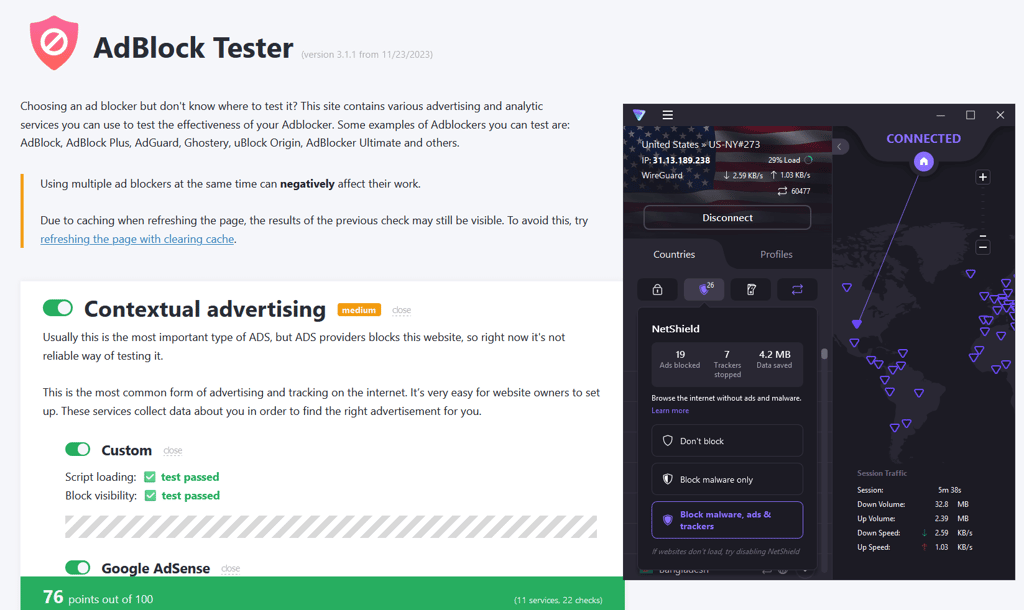
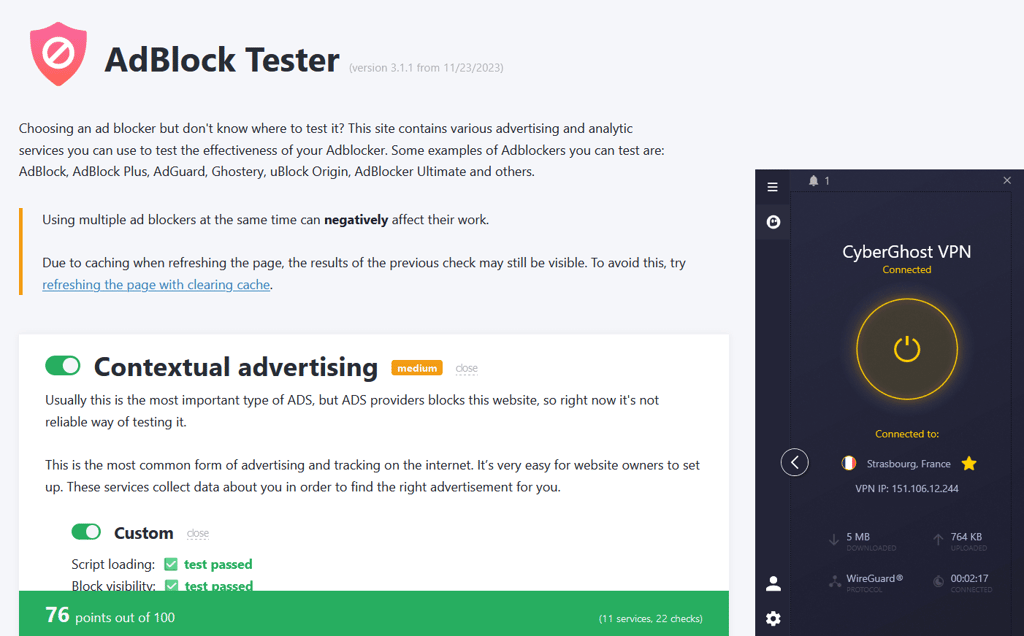
I put Proton VPN on this list due to its ad blocking capabilities. With the help of NetShield – the VPN’s ad blocker feature – it automatically blocks malicious websites and ads, preventing malware from entering your device, whether it’s a PC or a smartphone. AdBlock Tester has confirmed this conclusion, and the tool earned 76/100 points, and Proton VPN shares the same result with CyberGhost.
Among other interesting Proton VPN features is two-factor authentication. This security measure asks to confirm your identity each time you log into your Proton VPN account from a different device.
You also won’t be disappointed in this service if you’re looking for a VPN for streaming. During in-house tests, I successfully unblocked Netflix, BBC iPlayer, YouTube, HBO Max, and Disney+ streaming services.
Of course, every subscription to Proton VPN comes with a 30-day money-back guarantee, which allows you to make sure that this service truly fits your needs. And if you decide to stay, the pricing starts from $2.99/month.
5. CyberGhost – a robust ad blocker VPN

-
Ad blocker functionality
-
Security
-
Speed
-
Compatibility
CyberGhost is a robust VPN provider with a large server fleet and a built-in ad blocker for Windows users. The Content Blocker feature blocks ads, trackers, and malware from hindering your online experience.
Content Blocker is a solid choice for stopping ads, but its primary focus is on containing viruses and blocking trackers. Paired with a kill switch and other leak protection features, CyberGhost is a decent option for an ad blocker VPN. The VPN demonstrated effective ad block capabilities with AdBlock Tester and received 76/100 points. This is a decent result, although it certainly cannot beat the results of Surfshark, TotalVPN, and NordVPN.
What’s more, the VPN offers massive global coverage – 9,800+ servers in 100 countries. While CyberGhost speeds might be lower than NordVPN's – it retained around 91% of the original internet speed during tests – it offers excellent infrastructure and stable connections making it one of the best VPNs for streaming. I had no problem unlocking Netflix, Hulu, BBC iPlayer, Disney+, and their best streaming libraries.
CyberGhost manages connections with the main suite of VPN protocols – WireGuard, OpenVPN, and IKEv2. It is a safe VPN protected by AES-256 encryption and has extra security features: a kill switch, IPv6, and DNS leak protection.
As a VPN with a large server fleet, CyberGhost is a surprisingly cheap option. Pricing starts from just $2.19/month, and you can test this VPN with an ad blocker risk-free due to its extra long 45-day money-back guarantee.
How we selected and tested VPNs with ad blocking features
The VPN market is improving incredibly fast. Its products offer a rich range of features, but not all suit your needs the best. To ease your way of choosing, I joined our team of experts to test VPNs with ad blockers. We reviewed 41 providers and, after extensive research, I picked the top 5 VPNs with ad blockers based on these characteristics:
- Ad blocker functionality (35%). The best VPNs with an ad blocker must offer you protection against ads, malware, phishing scams, and other unwanted threats. To test the effectiveness of each provider’s ad block capabilities, I used AdBlock Tester on the Windows operating system. I also observed how each VPN reacts to ads on streaming platforms and other websites with the ad blocking features enabled.
- Security (25%). A VPN’s intention is to keep you safe while browsing. Therefore, I made sure that the listed VPN providers offer strong encryption (e.g., AES-256), a kill switch, two-factor authentication, and other crucial security and privacy features.
- Speed (25%). Even though a VPN is meant for security, it also shouldn’t disturb your browsing, streaming, torrenting, and gaming experiences. Every one of the top providers has been tested by our experts, and I only included providers that manage to retain at least 70% of original internet speed on average.
- Compatibility (15%). If you are considering protecting only your desktop device, then think twice. Both desktop and mobile devices have high chances of being hacked. To ensure that you have the opportunity to secure all of your gadgets, I made sure that VPNs on this list are compatible with Windows, macOS, Android, and iOS – the most popular operating systems worldwide.
Why would ads be dangerous?
The danger of ads relates to malvertising (malicious advertising). Dangerous ads are launched by threat actors who, for example, can buy ad space via advertising websites and attach infected images or links. It’s a trap that catches its victim by surprise, making them visit or load a malicious site and click on a suspicious ad. Unfortunately, there are many other ways in which attackers can take advantage of malvertising.
Take a look at what dangers hide behind malicious ads:
- Identity theft. There is a type of malvertising that coaxes you to disclose your personal information. Or as soon as the threat actor gets into your device’s system, they easily access your personal info. In both cases, your sensitive information is in danger.
- Misappropriated financial information. Either you have provided your credit card information or the threat actor managed to steal it on their own, your financial security could be jeopardized. So if you have suspected that you might have been tricked, check your account for unknown payments and contact your bank for further assistance.
- Infected device. Through an ad, your gadget can get infected by all kinds of malicious threats. As a consequence, your device might get taken over by a threat actor. And your personal information might end up in their hands.
A VPN with an ad blocker can hide infected ads and detect malicious websites. Of course, using antivirus software is a good idea too. In fact, I recommend taking all available security measures to protect your devices.
Are VPNs safer than ad blocker extensions?
Yes, VPNs are safer than ad blocker extensions. And there are several reasons why.
First of all, ad blocker extensions are not compatible with a variety of browsers. On the other hand, VPNs are doing their best to support a wide range of browsers. Even if you get an ad blocker on your browser, you might still come across malicious ads because some ad blockers are unable to hide all malvertisement.
Furthermore, VPNs provide you with a fuller security suite. For example, VPNs with ad blocker functionality usually have built-in tools against malware as well. Moreover, a VPN hides your IP address and encrypts your traffic, making you virtually untraceable.
Not to mention all the other security features like obfuscated servers, a kill switch, and dark web monitoring. A VPN is just an excellent tool to ensure a safe browsing experience. Also, you get all this with just one service, without the need to purchase extra ones.
How to block ads with a VPN
Using a VPN for ad blocking is quick and easy. As a built-in feature, it simply runs in the background. Here’s how to set up your VPN with ad blocker and enjoy a safer browsing experience:
- Choose a VPN with an ad-blocking feature – I recommend NordVPN, now 75% OFF
- Download the VPN app or browser extension
- Sign up for a VPN and log in
- Activate the ad blocker (with NordVPN, you can turn on the next-gen antivirus via the Dashboard)
- Enjoy increased protection against unwanted ads
VPNs with ad block compared
During in-house tests, I checked the effectiveness of each VPN’s ad block capabilities. I employed an AdBlock Tester with all blocking capabilities enabled.
| Brand | Blocks malicious websites | Blocks YouTube ads |
| NordVPN | ✅ Yes | ✅ Yes |
| Surfshark | ✅ Yes | ❌ No |
| TotalVPN | ✅ Yes | ✅ Yes |
| Proton VPN | ✅ Yes | ✅ Yes |
| CyberGhost | ✅ Yes | ✅ Yes |
Despite the fact that NordVPN lacked effectiveness compared to Surfshark and TotalVPN (80/100 score vs 98/100 score), it can block both malicious websites and YouTube ads. All in all, NordVPN is going to perform best with its implemented ad blocking feature.
Best VPNs with ad blocker for Android or iPhone
Surfshark is an excellent option as a VPN with an ad blocker for your mobile device. It’s a perfect match not only for your mobile but also your computer, ensuring you can keep all your devices protected.
Surfshark calls its ad blocker CleanWeb. It’s capable of blocking ads not only on browsers but on smart TVs too. It also detects and prevents malware. This tool can even save you money as malvertising consumes enormous amounts of mobile data. Your network speed will also increase because malicious ads successfully slow down the connection.
With Surfshark, you can keep your devices away from ads at a budget-friendly price – subscriptions start from $2.49/month. Plus, you can cover an unlimited number of devices.
Here’s how to set up CleanWeb on Surfshark:
- Download Surfshark onto the preferred device
- Sing up and log in
- Launch the Surfshark app and navigate to Features
- Find the CleanWeb feature and enable the feature by moving the toggle on
The CleanWeb feature runs in the background; therefore, you won’t have to do anything else besides connecting to the Surfshark VPN.
VPNs I do not recommend
Although a VPN should be all about security, not all providers can be called safe. Some simply offer a nice-looking feature list for an attractive price but end up being completely ineffective.
Then, there are legitimate VPNs that are actually trustworthy but their offered ad blockers don’t work. So, you’d be wasting your money by investing in them.
Here’s a list of the VPNs that I'd gladly avoid.
Fake VPNs:
- BeetleVPN
- Buckler VPN
- Hat VPN Pro
VPNs that claim to have an ad blocker:
- Hola VPN
- Opera VPN
Before you subscribe to a VPN, I recommend reading the reviews first. If a VPN is untrustworthy or ineffective, it’s most likely that other users will warn about it.
You can also compare the pricing of your chosen VPN with other VPNs on the market. If the price is very different from other popular providers’ pricing, don’t risk paying for the services. Also, don’t forget to take a look at the provider’s privacy policy to get a glimpse into their privacy practices.
Overall, if you are looking for a legitimate and reliable VPN provider, you can always check out the top VPNs list. It showcases the VPNs that offer great prices, trustworthy services, and excellent features to improve your online security.
Can I use a free VPN for blocking ads?
Yes, free VPNs with ad blocking functionality exist, but I don’t recommend using them. Although there are plenty of free VPNs on the market, most of them cannot be trusted to block all ads effectively.
Also, unfortunately, free VPNs might sell their users’ activity logs to advertisers and the government as a way to make money.
If you come across a free VPN that claims to offer ad blocking services, I strongly recommend researching it first. This is the easiest way to protect yourself against potentially unreliable services.
Conclusion
Through research and in-house testing, I've learned that trusting a VPN for ad-blocking instead of a simple ad blocker extension is much more effective. Having just an ad blocker app or extension might fail to protect you from malvertising, whereas a VPN with an ad blocker won’t only keep dangerous ads away from your device but will also look for malware and stop it before you get threatened.
Moreover, a VPN is an excellent tool to increase your online security. Your online privacy will be protected by keeping your real IP address hidden. Streaming sites won’t bother you with limited content as a VPN is able to bypass those restrictions.
The best VPN with an ad blocker in 2026 is NordVPN with its implemented next-gen antivirus feature. It successfully deals with ads and malware and comes with a suite of security features to keep you safe.
FAQ
What is the best VPN with an ad block?
NordVPN is the best VPN with an ad blocker overall. Its ad blocker is called the next-gen antivirus and it has demonstrated great ad block capabilities during in-house tests. It blocks trackers, YouTube ads, and other types of annoying and potentially dangerous advertisements.
Can I block YouTube ads with a VPN?
Yes, some VPNs can block YouTube ads. However, even if a VPN has a built-in ad blocker, it might be impossible for it to block ads on YouTube. NordVPN is a great VPN with an ad blocker to avoid YouTube ads.
Will a VPN stop pop-up ads?
Yes, a VPN is capable of blocking pop-up ads. For this, a VPN has to have an ad blocker in its feature list. A pop-up ad can be malicious and come as a threat to your devices. Therefore, a VPN with an ad blocker recognizes it and stops it from causing dangerous actions.
Why am I still getting ads with a VPN?
Most VPNs encrypt your data and hide your IP. They're not inherently meant to block ads. For this reason, if your VPN doesn’t have an ad blocker, you’ll still see some ads when using a VPN.
Does NordVPN block all ads?
Yes, NordVPN’s next-gen antivirus feature is capable of blocking all ads. It has superior ad blocking capabilities that are based on DNS filtering. This allows blocking not just ads but also malicious domains.
Does VPN stop Spotify ads?
A VPN can’t stop Spotify ads completely, but can reduce their amount. Since a VPN can make it appear that you’re logging in from a different country, this can result in you hearing fewer ads.
Are ad blockers illegal?
No, ad blockers aren’t illegal. You are free to use an ad blocker to protect yourself from malvertising. However, it’s illegal for an internet provider to enable an ad blocker by default. Please note that some websites might block ad blockers because they can impact revenue from ads.