CyberGhost vs ExpressVPN: which VPN is best for you?
Our in-house cybersecurity experts and journalists, renowned for major reports like The Mother of All Breaches, conduct transparent, unbiased VPN testing and in-depth analysis.
With 750+ articles crafted based on real-world research, we empower readers to make informed purchasing decisions through first-hand expertise.
Learn more

CyberGhost and ExpressVPN are two of the most popular VPN services on the market, valued for their strong security, vast server networks, and clean, user‑friendly apps. While both brands deliver solid protection and streaming performance, they differ in speed, feature polish, and how they fit different types of users.
In this CyberGhost vs ExpressVPN comparison, I evaluated both VPNs across key criteria: real‑world speeds across multiple locations, streaming and unblocking success on major platforms, feature sets, and current pricing plans. I also looked at privacy policies, server counts, and overall ease of use to give you a balanced, hands‑on view.
If you’re trying to decide between CyberGhost and ExpressVPN, this breakdown will help you see which VPN aligns better with your priorities – whether it’s raw speed, budget‑friendly plans, or extra streaming flexibility. Read on to find out which one suits you best.
CyberGhost vs ExpressVPN: overview
ExpressVPN edges ahead of CyberGhost with faster speeds, stronger security, and a more polished interface, making it the better‑rounded choice for most users. CyberGhost remains a strong, budget‑friendly alternative with a very large server network and solid streaming support, but it’s slightly less refined in overall performance and feature consistency.
| ExpressVPN | CyberGhost VPN | |
| ⭐ Rating: | ||
| 🥇 Overall rank: | #4 out of #41 | #5 out of #41 |
| 🖥️ Servers: | 3,000+ servers in 113 countries | 9,800+ servers in 100 countries |
| 📖 No logs policy: | No logs | Independently-audited |
| 💵 Price: | From $2.99/month | From $2.19/month |
| 🔥 Coupons: | ExpressVPN coupon 80% OFF | CyberGhost VPN coupon 83% OFF |
| 🔒 VPN protocols: | OpenVPN, WireGuard, Lightway | OpenVPN, WireGuard, IKEv2 |
| 🍿 Streaming services: | Netflix, Hulu, BBC iPlayer, Disney+, and more | Netflix, Hulu, BBC iPlayer, Disney+ |
| 🖥️ Platforms: | Windows, macOS, Linux, Android, iOS | Windows, macOS, Linux, Android, iOS |
| 📥 Simultaneous connections: | 14 | 7 |
| 💁🏻 Support: | Knowledge base, email, 24/7 live chat | Knowledge base, email, 24/7 live chat |

Recent Updates


We spare no effort to test the products & their features. All information is gathered by our in-house research team & fact-checked by our team of experts. Discover the ins and outs of our testing procedures.
CyberGhost vs ExpressVPN: key differences
CyberGhost and ExpressVPN are both among the best VPNs available, offering strong security, extensive server networks, and user‑friendly apps. While they share many strengths, they differ in how they fit different types of users. Below you’ll see which service better matches your priorities.
Choose CyberGhost if:
- You want a more budget‑friendly option. CyberGhost frequently offers heavily discounted multi‑year plans, making it one of the more affordable high‑quality VPNs on the market.
- You need a broad server network across many regions. CyberGhost covers around 100 countries, giving you a solid spread of locations for streaming and browsing.
- You want extra streaming automation. CyberGhost’s specialized streaming profiles and Smart Rules make it easier to auto‑connect to the right server for platforms like Netflix or BBC iPlayer.
Check out our full CyberGhost review for a detailed breakdown of features, performance, and pricing.
Choose ExpressVPN if:
- You prioritize speed and reliability. ExpressVPN consistently delivers fast, stable connections on both local and long‑distance routes, ideal for streaming, gaming, and video calls.
- You want broad, hassle‑free streaming access. ExpressVPN reliably unblocks major platforms such as Netflix, BBC iPlayer, Hulu, and Disney+ with minimal tweaking.
- You prefer a polished, premium‑feel package. With RAM‑only servers, an audited no‑logs policy, and a clean, intuitive app across all devices, ExpressVPN feels more like a complete, top‑tier service.
Speed, performance, and streaming
I tested CyberGhost and ExpressVPN for speed, overall performance, and streaming quality. Below you can see the results from my tests.
Speed comparison
If you’ve ever used a VPN, you probably know it can slow down your internet speed at least a little. Luckily, both CyberGhost and ExpressVPN have large server networks and support modern tunneling protocols like WireGuard and ExpressVPN’s proprietary Lightway. Here's how they performed in our real‑world tests.
ExpressVPN's speed test results:
| Server location | Download speed | Upload speed | Ping |
| Local | 724.19Mbps | 370.83Mbps | 17ms |
| London, UK | 573.30Mbps | 459.13Mbps | 40ms |
| New York, US | 468.69Mbps | 200.41Mbps | 97ms |
| Perth, Australia | 382.37Mbps | 91.45Mbps | 220ms |
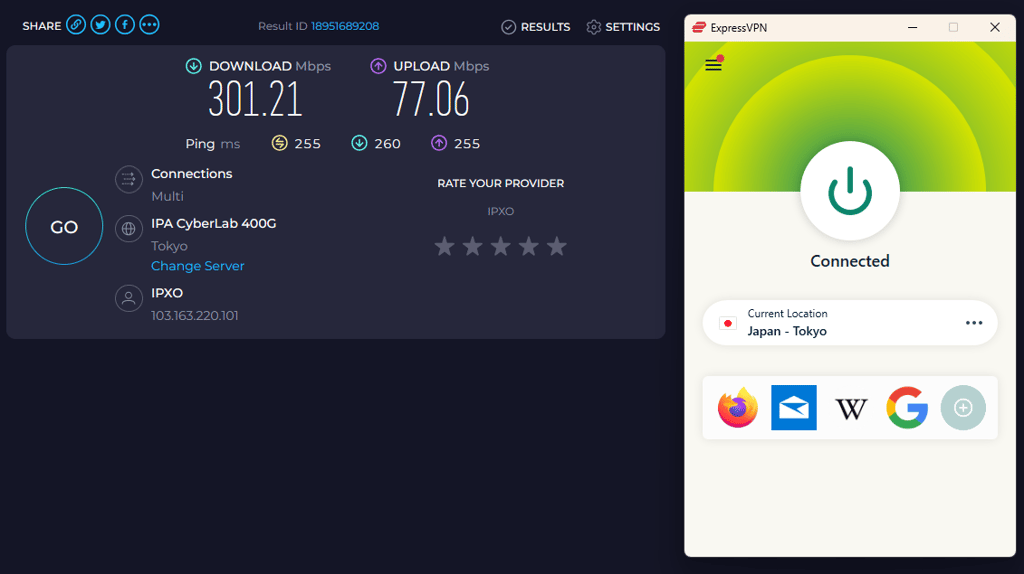
| Tokyo, Japan | 301.21Mbps | 77.06Mbps | 255ms |
CyberGhost's speed test results:
| Server location | Download speed | Upload speed | Ping |
| Local | 741.51Mbps | 290.65Mbps | 7ms |
| London, UK | 855.61Mbps | 490.69Mbps | 39ms |
| New York, US | 593.58Mbps | 166.64Mbps | 120ms |
| Perth, Australia | 601.30Mbps | 77.86Mbps | 257ms |
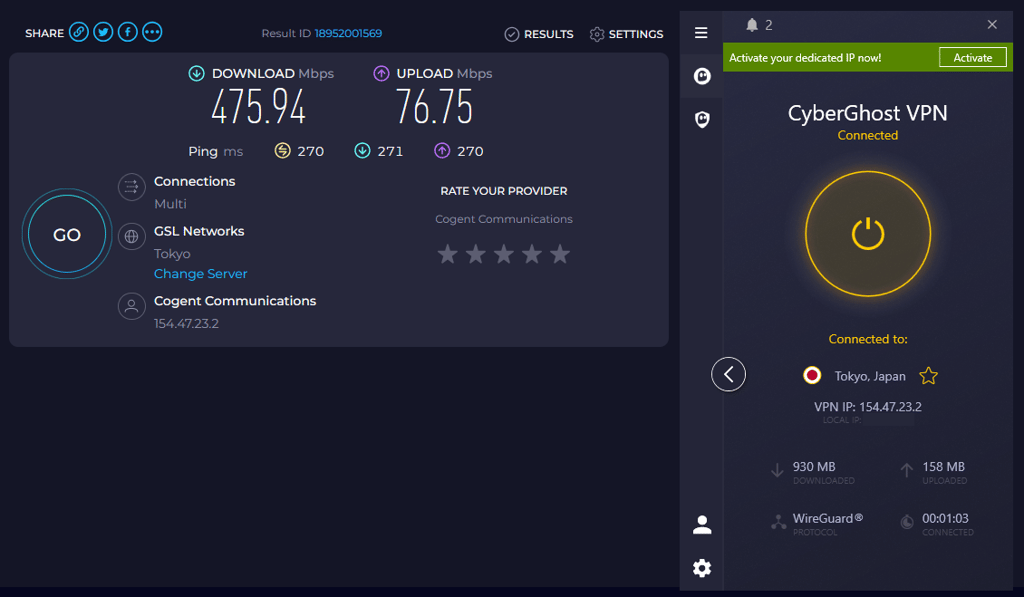
| Tokyo, Japan | 475.94Mbps | 76.75Mbps | 270ms |
Overall, CyberGhost averaged slightly higher download speeds than ExpressVPN, especially on routes like London, Perth, and Tokyo, which can translate to smoother 4K streaming and faster downloads for most users.
ExpressVPN posted lower average ping and more consistent performance, meaning fewer hiccups in gaming, video calls, and quick browsing tasks. CyberGhost’s uploads were a touch weaker, while ExpressVPN maintained a better balance between downloads and uploads across long‑distance connections.
Streaming performance
Many people use VPNs for watching geo-blocked movies and shows. Why limit yourself to your own country’s Netflix library when you can access multiple? To help you pick the VPN you need the most, we tested both services on multiple streaming platforms.
And here are the results: ExpressVPN successfully unblocked Netflix US, Hulu, BBC iPlayer, and, of course, YouTube. Also, there was no significant decline in speed.
The situation with CyberGhost was slightly different: it managed to load the US Netflix, but the speed was really slow. The same quality rule applies to BBC iPlayer and YouTube.
It’s important to mention that CyberGhost has specialized servers for streaming – for example, a UK server for BBC iPlayer and a US server for Netflix. Also, both VPN services offer SmartDNS, which lets you watch geo-blocked content on devices that don’t support VPN connections.

Torrenting and P2P
If you're in the market for a reliable torrenting VPN, both ExpressVPN and CyberGhost are solid options.
ExpressVPN supports torrenting across all its servers, making it especially convenient. In our tests, download speeds started off a bit slow but quickly ramped up, landing between 6 and 15 MB/s (48–120 Mbps) once things got going.
CyberGhost takes a different approach by offering dedicated servers optimized for torrenting. These work well with popular torrent clients, but in our experience, download speeds topped out at 5 MB/s (40 Mbps).

Of course, it's important to note that torrenting performance can vary based on many factors outside the VPN itself.
Pricing
Both CyberGhost and ExpressVPN land in a similar price range but with different discounts and perks.
| Plan | Monthly billing | 6-month billing | Yearly billing | 2-year billing |
| ExpressVPN Basic | $14.99/month | - | $4.99/month | $2.99/month |
| ExpressVPN Advanced | $16.99/month | - | $5.99/month | $4.49/month |
| ExpressVPN Pro | $22.99/month | - | $8.99/month | $7.49/month |
| CyberGhost | $12.99/month | $6.99/month | - | $2.19/month |
ExpressVPN pricing is based on tiered plans (Basic, Advanced, Pro) with monthly costs ranging from $14.99 to as low as $2.99/month on 2‑year terms. CyberGhost starts at $12.99/month, with a 6‑month option at $6.99/month and a 2‑year deal as cheap as $2.19/month.
ExpressVPN offers a 30-day money-back guarantee and allows 14 simultaneous connections. CyberGhost offers 45 days to test, plus a free trial, and supports 7 devices at once, making it a less suitable option for households.
Server locations
When choosing a VPN, server‑location coverage is a big deal – especially if you need regions beyond the US and the UK. Neither ExpressVPN nor CyberGhost will disappoint here, but they distribute their networks differently.
| ExpressVPN | CyberGhost VPN | |
| Servers | Undisclosed | Undisclosed |
| Countries (total) | 113 | 100 |
| Americas | 89 locations | 30 locations |
| Europe | 66 locations | 55 locations |
| Asia Pacific | 40 locations | 27 locations |
| Middle East & Africa | 9 locations | 12 locations |
ExpressVPN covers 113 countries with servers spread across the Americas, Europe, Asia Pacific, the Middle East, and Africa. It offers a strong presence in Europe and the Asia Pacific, which is helpful if you frequently connect from those regions.
By comparison, CyberGhost covers 100 countries and leans more heavily on Americas-centric and European locations, with fewer servers in Europe and the Asia Pacific. While CyberGhost still offers solid coverage and a larger apparent number of servers, it spreads its footprint less evenly across continents overall.

Features overview
If your definition of using a VPN doesn’t end with watching Netflix, you will like both ExpressVPN and CyberGhost, as these two are seriously crammed with useful features – so much that it’s become difficult to determine which VPN is better feature-wise.
SmartDNS
If you want to watch geo-restricted movies on a device that isn’t compatible with a VPN (like a smart TV or a gaming console), you’ll need the Smart DNS feature. ExpressVPN calls it MediaStreamer, while CyberGhost simply refers to it as My Smart DNS. Both VPN services offer step-by-step guides for setting up SmartDNS on a wide range of devices, including routers, PlayStation, Xbox, Apple TV, and more.
Port forwarding
For more advanced users, the port forwarding feature can be a real lifesaver. For example, it allows you to access your computer when you’re far away from home, host a small website, or set up a gaming server.
So, ExpressVPN will help you do all that, and more. That’s because its proprietary router app supports port forwarding, letting you access your devices remotely. In contrast, CyberGhost VPN doesn’t support this feature.
Note: Since March 31, 2026, the dedicated ExpressVPN app for non-Aircove routers is no longer supported. You can still set it up using a manual connection, and the Aircove router continues to have its own dedicated app.
Smart rules
CyberGhost VPN has a whole tab called Smart rules, which offers a lot of configuration options. Here, you can set up automatic connections, tweak the wifi protection options, and mark the websites you want to exclude from the VPN connections.

ExpressVPN has something slightly different called Shortcuts. Here, you can make a certain app or a website open automatically as soon as you connect to the VPN.
Specialized servers
If you need a server for a specific task (like torrenting), CyberGhost will instantly help you pick the right one. That’s because it offers a list of specialized servers for downloading (or torrenting), streaming, and gaming. It’s worth noting that torrenting servers display the approximate distance to the server, user count, and server load.
In addition, CyberGhost offers NoSPY servers for less than a dollar a month. Located in a private data center in Romania, they offer extra bandwidth and greater privacy.
Ad-blocker
This is a feature that only CyberGhost users will get. It promises to block ads, malicious websites, online tracking, and more. However, our in-house tests didn’t show stellar results – it didn’t manage to block all of the ads on some pages we visited. Still, CyberGhost’s ad-blocker is much better than nothing.
Split tunneling
After using a VPN for a while, you might notice that it would be convenient to use the VPN connection only on certain applications. For example, if you want to listen to a geo-blocked podcast while working, it’s a good idea to set up a VPN connection only with the streaming service to conserve bandwidth. And this is where split tunneling comes in. It allows you to pick certain applications or websites that go through the VPN tunnel.
ExpressVPN offers this feature on its Windows, Mac, and Android applications.

But what about CyberGhost? Well, even though it doesn’t offer split tunneling as a separate feature, you can exclude specific websites in its Smart rules tab in the Windows and macOS apps. Moreover, the Android app includes a full-fledged split-tunneling feature that lets you include or exclude applications.
CyberGhost vs ExpressVPN: which is more secure?
I’m glad to say that, security‑wise, I’d recommend both ExpressVPN and CyberGhost without hesitation. However, we do need a winner, and ExpressVPN still pulls ahead in several key areas. It has undergone multiple independent audits of its no‑logs policy and infrastructure, and its servers run on TrustedServer technology (RAM‑only), which greatly reduces the risk of long‑term data retention.
There has been some public scrutiny around a former ExpressVPN executive’s past involvement in Project Raven, a UAE‑linked surveillance operation. That said, there’s no evidence connecting this to ExpressVPN’s actual VPN infrastructure or user data handling. In addition, both ExpressVPN and CyberGhost are now owned by the same parent company, so this background detail doesn’t outweigh ExpressVPN’s current security strengths.
Encryption and protocols
Both CyberGhost and ExpressVPN are strong when it comes to core security. By default, they use AES‑256 encryption, which is effectively resistant to brute‑force attacks. In addition, ExpressVPN lets you use the ChaCha20/Poly1305 cipher with its Lightway protocol, which is lighter and works particularly well on weaker or mobile devices.
ExpressVPN also gives you a broader protocol selection:
- Lightway – an in‑house, lightweight protocol focused on speed and reliability
- OpenVPN (UDP/TCP) – the industry standard, with UDP for speed and TCP for stability
- IKEv2 – a fast, mobile‑friendly option for switching networks
- L2TP/IPsec – an older fallback protocol you can use if others fail on your device
CyberGhost offers fewer choices, but they’re the ones most users actually need:
- WireGuard – a modern protocol known for excellent speed and security
- OpenVPN (UDP/TCP)
- IKEv2
If you leave CyberGhost’s protocol setting on Automatic, it will pick the option that best fits your current network conditions.
Logging policy
ExpressVPN’s logging policy is straightforward: it does not record activity logs such as browsing history or DNS queries. It may collect minimal technical data like successful connection timestamps and server choices to improve service reliability, but this is optional and can be disabled. Its no‑logs claims have been independently audited, adding credibility to its privacy promises.
CyberGhost is also a no‑logs VPN and states that it does not collect connection logs or information about your online activity. Unlike older statements you may have seen, CyberGhost has since undergone an independent audit that reviewed its infrastructure and no‑logs policy, giving extra reassurance about how it handles user data.
From a jurisdiction standpoint, both providers are well positioned. ExpressVPN is based in the British Virgin Islands, a privacy‑friendly territory outside major surveillance alliances, while CyberGhost operates from Romania, which is outside the Fourteen‑Eyes alliance and has comparatively strong privacy protections.
Kill switch
A reliable kill switch is crucial for preventing your real IP address from leaking if the VPN connection drops. Both services include one.
ExpressVPN’s kill switch, called Network Lock, is configurable and works on Windows, macOS, Linux, and Android, cutting off traffic until the VPN tunnel is restored. CyberGhost also includes a kill switch on its apps, though it offers fewer customization options and is generally less flexible than ExpressVPN’s implementation.
RAM-only servers
On the server side, ExpressVPN uses TrustedServer technology, running its infrastructure entirely on RAM. Because RAM is wiped on every reboot and doesn’t write data to disk, this significantly limits the possibility of long‑term data storage or forensic recovery.
CyberGhost similarly runs on a RAM‑only architecture, but ExpressVPN’s longer track record and deeper technical documentation still give it a slight edge for users who want the most mature, battle‑tested implementation.
Platforms, interface, and ease of use
Both VPN services offer great applications and are easy to install and set up. CyberGhost is simple to navigate and features a dark, minimalist design. However, it allows for 7 simultaneous connections, while ExpressVPN supports 14.
| ExpressVPN | CyberGhost VPN | |
| Supported OS | Windows, macOS, Linux, Android, iOS | Windows, macOS, Linux, Android, iOS |
| Other software/devices | Android TV, Fire devices, routers | Only manual setup |
| Browser extensions | Chrome, Firefox, Edge | Chrome, Firefox, Edge |
| Simultaneous connections | 14 | 7 |
Desktop apps
When it comes to CyberGhost, it took a totally different approach design-wise. Its desktop apps look much more modern, intuitive, and inviting thanks to the colors and layout. Interestingly, the macOS version of CyberGhost is a bit more feature-rich. At the same time, CyberGhost’s Linux application could use some more time in development. It is difficult to install and even more difficult to use due to frequent crashes.

As for ExpressVPN, the Windows and Mac applications are nearly identical. The design is a bit simplistic, but it offers many features and configuration options. Even though there’s no map, it’s not difficult to choose the desired location. ExpressVPN also offers a Linux application that supports the Lightway protocol and shares many features with the Windows app. I didn’t find any bugs in any of the ExpressVPN applications during our testing.
Mobile apps
Both CyberGhost mobile apps are great. They are a bit simpler than the desktop applications, but they perform a bit better, as I found no bugs during testing. The main difference is the choice of tunneling protocols: the Android version supports OpenVPN and WireGuard, while the iOS application uses WireGuard and IKEv2.

If you’ve seen one ExpressVPN application, you’ve seen them all: aside from being a bit taller, the Android and iOS apps look just like their desktop counterparts. However, keep in mind that there are some differences in functionality: the iOS app lacks features such as split tunneling and a kill switch.
Customer support
In my eyes, rude or incompetent customer support can ruin even the best VPN service. Luckily, that’s not the case with ExpressVPN and CyberGhost. I've contacted the support teams for both VPNs via live chat and received really helpful, polite responses.
In addition to live chat, CyberGhost and ExpressVPN offer extensive knowledge bases with FAQs, troubleshooting, and configuration instructions. You can also write an email to the support team of ExpressVPN.
Video review
Watch our video review of CyberGhost vs ExpressVPN, where we evaluate their features, speed, and security to help you choose the best VPN for your needs.
Which is better: CyberGhost or ExpressVPN?
The ExpressVPN vs CyberGhost matchup ultimately comes down to priorities. ExpressVPN clearly comes out on top thanks to faster speeds, more consistent streaming unblocking, and a thoroughly audited no‑logs policy with RAM‑only servers, making it the superior choice if security, performance, and reliability matter most. CyberGhost still offers great value, with a cheaper long‑term price and solid privacy‑focused features, but it falls short of ExpressVPN’s overall polish and consistency.
Overall, ExpressVPN is the clear winner for users who want a premium, polished experience across security, speed, and streaming.
| Feature | CyberGhost | ExpressVPN | Verdict |
| Speed | ExpressVPN consistently delivers faster and more stable speeds, especially on long‑distance routes, while CyberGhost offers strong download speeds but slightly higher ping. | ||
| Streaming | ExpressVPN unblocks Netflix US, Hulu, BBC iPlayer, and more with minimal buffering. CyberGhost can work with the right servers but is often slower and less consistent. | ||
| Torrenting | ExpressVPN supports P2P on all servers with higher‑throughput speeds. CyberGhost uses dedicated P2P servers but is generally slower. | ||
| Pricing | CyberGhost’s 2‑year deal starts around $2.19/month and offers a 45‑day trial. ExpressVPN is pricier but still competitive on long‑term plans. | ||
| Server locations | ExpressVPN covers 113 countries with a more balanced global spread, while CyberGhost covers 100 countries but leans more on the Americas and Western Europe. | ||
| Features | Draw. ExpressVPN offers port forwarding, polished SmartDNS (MediaStreamer), and broader split‑tunnel options. CyberGhost counters with Smart Rules, specialized servers, and an ad‑blocker. | ||
| Security | ExpressVPN runs on RAM‑only TrustedServer, has multiple independent audits, and a strong no‑logs record. CyberGhost is also secure with RAM‑only servers and audits, but ExpressVPN’s stack is more mature. | ||
| Interface & ease of use | Draw. ExpressVPN offers consistency and stability, while CyberGhost feels more modern and flashy. Both are easy to use for most users. | ||
| Customer support | ExpressVPN offers 24/7 live chat and polished support, CyberGhost is solid but relies more on tickets and knowledge‑base articles. |
FAQ
Is CyberGhost better than ExpressVPN?
ExpressVPN is generally better than CyberGhost thanks to faster speeds, more consistent streaming, stronger security, and richer features. However, CyberGhost can be a better option for you if your main priority is low cost and extra‑focused features like its Smart Rules and ad‑blocker.
Is CyberGhost VPN good for gaming?
Yes. In fact, it offers specialized servers for gaming that will provide you with great speeds.
Is ExpressVPN worth the money?
Yes. It’s a great all-around VPN that will satisfy both beginners and advanced users alike. It’s easy to use, offers many features, supports a wide range of devices, and unblocks most streaming platforms.