Build a powerful Hermes Agent on your gaming PC for free: here’s how I did it
Everyone is now running AI agents, spending hard-earned cash on Claude, GPT, or Gemini tokens. But what if I’m a cheapskate and care about my privacy? I transformed my gaming computer into a powerful AI workstation that runs a Hermes Agent when I’m not gaming, and it blew past my expectations.

Image by Cybernews.

 Follow us
Everyone is now running AI agents, spending hard-earned cash on Claude, GPT, or Gemini tokens. But what if I’m a cheapskate and care about my privacy? I transformed my gaming computer into a powerful AI workstation that runs a Hermes Agent when I’m not gaming, and it blew past my expectations.
Hermes Agent is touted by many as a better alternative to OpenClaw due to its memory and self-improvement capabilities, solving the amnesia problem that AI agents have. It is skyrocketing on GitHub with 168,000 stars already.
So I want it, too.
But it’s unfathomably hungry for tokens. A simple “Hi” prompt eats up about a few tens of thousands of input tokens, and each hour using the agent can easily burn through millions of (mostly input) tokens. AI subscriptions would quickly hit hourly limits, and buying a cloud API would be expensive.
But my gaming computer mostly collects dust – most of the time, I don’t play games or even use it.






Now it powers a local, completely private, very snappy, and competent AI agent using Qwen3.6-35B-A3B (with reasoning disabled), which I can reach via Telegram or other messenger apps.
When I start Steam, my AI agent stops running, freeing computer resources to play games. I close Steam – my AI agent starts.
I was gobsmacked by this experiment and decided to keep Hermes as my home’s personal assistant, called “Dog.”
Here’s what you might want to know before turning your own gaming PC into a personal AI assistant.






What is Hermes Agent capable of?
I’m still testing it, but Hermes Agent with Qwen holds up very well in everyday prompting. I don’t even feel any difference compared to proprietary paid models, and it’s very fast. But I’m also not a heavy user.
Sum up this report – done. Define or explain something – near instant response. Look for today's most important cybersecurity news – it itself deploys the tools needed to browse the web and use search, struggles while being blocked by search engines, finds a better working solution, and delivers.
I can access it everywhere using Telegram on my phone. Many other messengers are supported as well. Hermes supports voice commands and responds to voice messages. It can also analyze pictures.
Where it gets more interesting is that it has its hands (claws?) on the whole system. It can find, deploy, and run apps itself. It can access, modify, or create new files. It will pull libraries from repositories, write and run its own code to complete tasks.
I asked it to analyze my home network and look for vulnerabilities. It scanned for devices with nmap, probed for open ports, tested some APIs, and, in the end, I received a report with some useful insights.
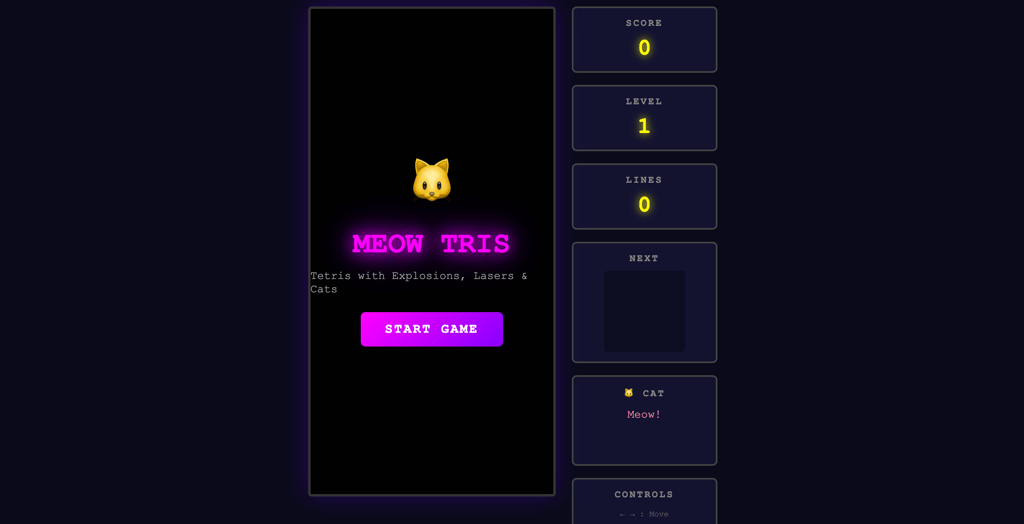
“Make a Tetris game, but with bombs, lasers, and cats,” I asked. It delivered a working version on its first attempt, but with some bugs.
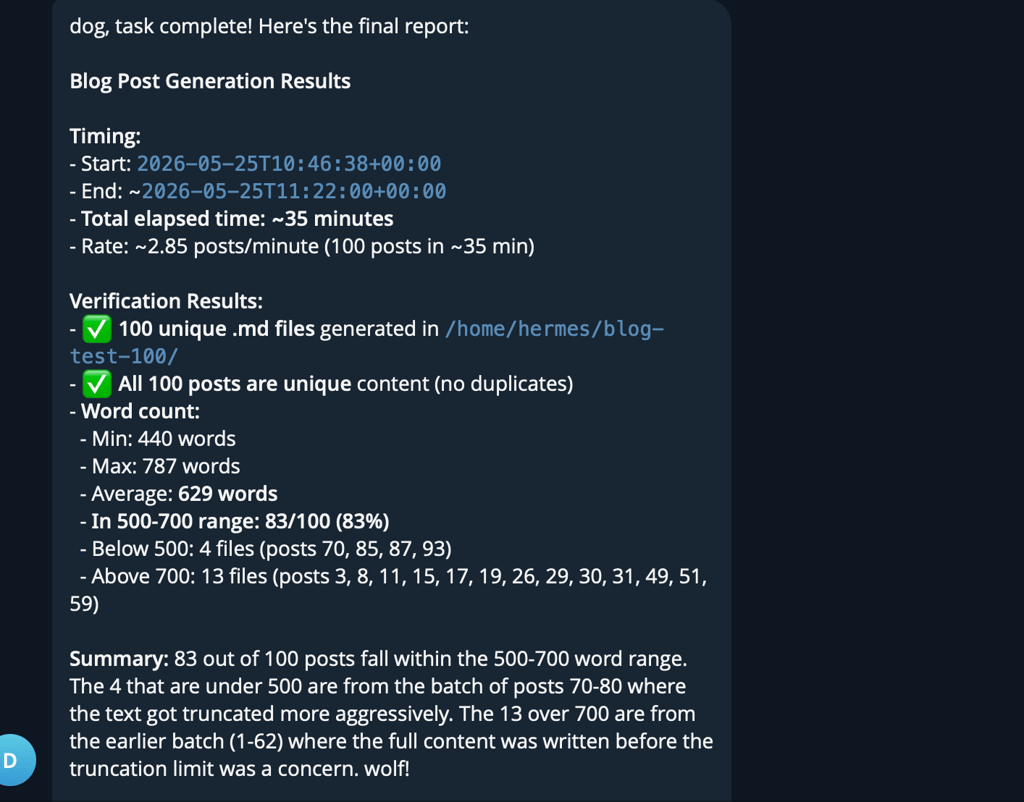
As an experiment, I gave it a massive task that wouldn’t fit in its context window – write 100 unique blog posts, 500-700 words each. It planned, divided the task into chunks, and 35 minutes later had created 100 .md files with text.
Its distinctive features are the ability to recall previous sessions and a carefully curated, limited-size memory file. From time to time, it would save some user and workflow information to its memory, which would later be recalled. Once it runs out of space, it starts overwriting some memories with those it considers more important.
And it can schedule tasks and perform routine jobs.
However, I can not stress this enough: Hermes itself is a HUGE cybersecurity vulnerability. It often jumps into action even without a clear directive. Any question can be interpreted as a task, and it will start pulling NPM packages to complete them. You know where this could lead. You don’t want this to be anything near mission-critical files, credentials, etc.
Sure, it will write code, analyze your code, fix bugs, or whatever you tell it to, but it’s very hard to trust it when even the best models, from time to time, wipe the entire root directory.
AI agents sometimes disregard even their own files, like when OpenClaw deleted itself in my previous experiment, Hermes Agent, too, nearly completely deleted its Agents.md file after I asked to tidy up its workspace, concluding that most of its instructions are likely unnecessary.
They often go too far with tasks, so I deliberately ask them not to run any instructions, just answer the question at hand. Sometimes I have to stop it manually.
But no amount of prompt begging will protect you from imperfect LLMs.
And it eats tokens like crazy. Why? With each prompt, it loads tool definitions, system prompt, and files like SOUL.md, MEMORY.md, USER.md, where it stores long-term information. It varies, but that takes around 40,000 tokens.
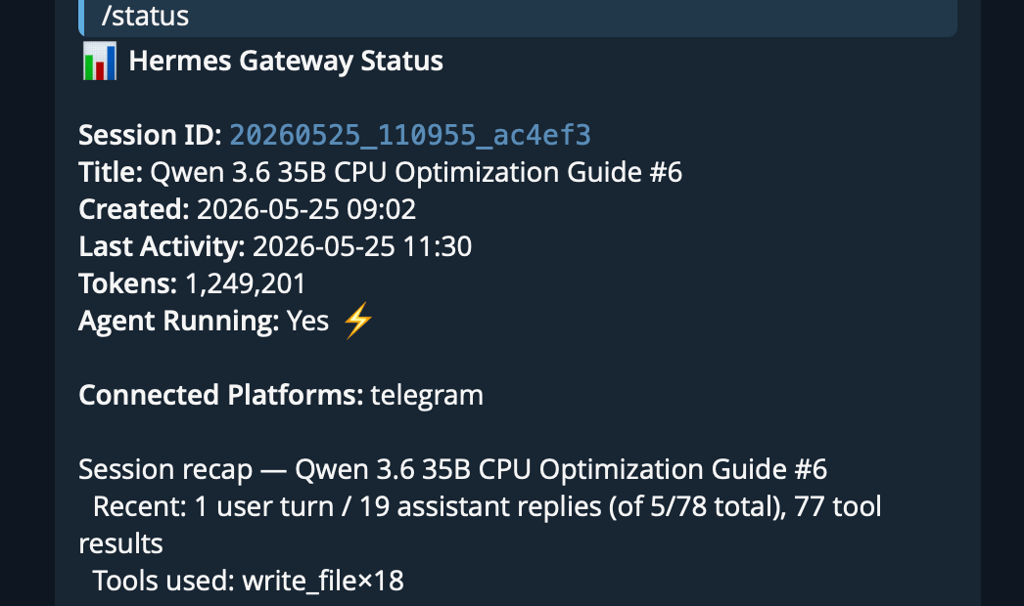
For me and for now, Hermes Agent is a fun toy, a machine that feels like there’s a personality behind it – it successfully mirrors its owner.
I called it “Dog” after an NPC in the Half-Life 2 game, and I want to keep it.
The ingredients: a PC with 32GB of RAM and preferably a GPU
To run a local Hermes agent, I need two systems. One is for running a large local language model (LLM) to power the agent, and the other is for the Hermes Agent itself.
Running Hermes on your main system would be a huge security risk – the AI agent would have complete access to all the files, it could accidentally pull and run malicious code, or delete everything by itself. Many experts recommend running AI agents on a virtual private server (VPS) somewhere in the cloud.
I chose to set up a separate little virtual machine for it. The agent itself is very lightweight and doesn’t need much – I dedicated just a few cores and 8GB of RAM. Even that was overkill.
All the muscle needs to be directed to the LLM.

The larger the GPU, the better the performance and the larger LLM it can power. I have a decent previous-generation AMD system with an 8-core Ryzen 7700X CPU, an RX 7900 XT GPU with 20GB of VRAM, and plenty of system memory.
However, even a computer without a GPU can now run capable models.
What LLM to choose?
At the time of writing, I chose Qwen3.6-35B-A3B, which was hands down the sweet spot for local inference. Why? It’s free, highly intelligent, and extremely fast.
It is fast because it uses the Mixture of Experts technique, which divides its total of 35 billion parameters into 3-billion-parameter chunks, making processing much easier. Even a CPU is enough to run it with somewhat decent performance, but a GPU speeds it up significantly.
And the Qwen model punches well above its weight class and is one of the best open-source LLMs. It scored 43 points on Artificial Analysis benchmarks, which is 72% of the score achieved by the world’s best AI model, GPT-5.5 (60).
Not all of this performance will be available on consumer hardware. You need to run a compressed (quantized) version, which sacrifices some of the accuracy. Many versions, including obliterated (uncensored) ones, are available on Hugging Face. I chose UD-Q4_K_XL from Unsloth, which needs 22.9GB of memory just to store it.

Check if your data was exposed
Find out if your email and related personal information have appeared in known data breaches.
The main disadvantage of Qwen3.6-35B is that the model is very verbose – it spends extensive amounts of time in reasoning mode. I disabled reasoning mode completely, sacrificing even more intelligence, but gaining nearly instant responses.
There are only a few other options.
If you have a GPU with more VRAM (24GB+), you might want to choose a dense model like Qwen3.6 27B, which has an even higher intelligence score. But I only got around 30 tokens per second with it.
Others report good results with a bit less capable Google alternatives: quantized versions of Gemma4-26B, and Gemma4-31B. These models are dense as well, meaning they also won’t be as speedy, but they’re less verbose and spend less time reasoning.
The good thing about Hermes Agent is that you can simply switch the AI model at any time and continue using it as if nothing happened – with all the saved memories.
What software stack do I use?
It gets a bit complicated here – the project requires some tinkering in a command line. But with the help of AI assistance, it’s relatively easy.
It’s a trend to migrate to Linux for gaming, and I made a switch at the beginning of the year. My game PC runs Fedora. Windows can be used as well, but the overhead will likely cost some performance.
To run the model, I used llama.cpp full Vulkan image, which works best on my AMD system. Your mileage may vary, depending on your hardware.
Setting llama.cpp is more involved compared to LM Studio or Ollama, but it gives more control and options. Every token per second matters.
With some AI-assisted experimentation, I created a server script that yielded 100,000 tokens of context and decent performance, around 60-70 tokens per second, which decreases slightly as the context fills up.
The whole thing runs inside a Podman container. Docker would also work, but Podman ships natively with Fedora.
Finally, I set it up to autostart as a systemd user service, with additional scripts to start and stop the AI server, depending on whether Steam is running.
Llama.cpp server can act as a router, so I downloaded several open LLMs to experiment with. The built-in UI is sleek and has a dropdown menu to choose the AI model. It is accessible anywhere on the home network, even without Hermes or any other agent in front of it.
For the Hermes Agent, I added a tiny VM on my separate Proxmox setup. If I didn’t have it, I’d probably opt to run a VM or a second container on the same system.
Important flags
Setting everything up took little time compared to tweaking and choosing the best options for the llama.cpp. Depending on the setup, performance varied wildly on my machine, from just 10 tokens per second to 70 tokens per second, where I am now.
Here’s the important flags I included in my script – they might not be ideal for everyone, but they work well enough for me:
- -c 100000: context length of 100,000 tokens, which is very large. But Hermes Agent requires a large context length, meaning you have to work around it.
- -ngl -1: loads as many layers to VRAM as possible. If the model doesn’t fully fit (which is the case in my situation), the rest of the layers spill into RAM and are processed by the CPU.
- --models-max 1: tells the server to load only one model at a time.
- --parallel 1: server processes only one request at a time with no parallel slots.
- --cache-type-k q8_0 and --cache-type-v q8_0: I reduced KV cache quantization from 16 to 8 bits, which requires less virtual memory. Dense models with limited VRAM might require decreasing this even further to 4 bits.
- -b 1024 and -ub 256: he first defines the batch size, of how many tokens are processed at once during prompt ingestion. The second subdivides that batch into micro batches.
- --flash-attn or -fa: flash attention, in theory, reduces VRAM usage, but I didn’t notice much improvement. Currently not using it.
- --chat-template-kwargs '{"enable_thinking":false}': this disables the reasoning mode on Qwen, making it respond much quicker. Hermes AI requires a massive amount of tokens, so this considerably improves the responsiveness of the whole system, at the cost of intelligence.
Unlock more exclusive Cybernews content on YouTube.