Experiment: I ran a datacenter-class 120B parameter model for just $800
You can build a computer for around $800 to run the 120 billion-parameter AI model GPT-OSS-120B locally, privately, securely, and at a decent speed – well above 10 tokens per second. We’re talking about a datacenter-class, state-of-the-art AI model.

Image by Cybernews.

 Follow us
You can build a computer for around $800 to run the 120 billion-parameter AI model GPT-OSS-120B locally, privately, securely, and at a decent speed – well above 10 tokens per second. We’re talking about a datacenter-class, state-of-the-art AI model.
When I reported that you can run a 120B model on a budget GPU, I made a huge mistake. It turns out, you don’t even need a GPU (graphics processing unit) to achieve similar usable performance.
To run GPT-OSS-120B, a highly performant large language model (LLM) from OpenAI, the creator of ChatGPT, at around 15 tokens per second, all you need is a decent CPU with plenty of fast DDR5 memory.
I tested the same prompt on GPT-OSS-120B with different configurations on two systems. One system was running AMD Ryzen 7700X, and the other Intel i9-14900K. LMStudio allows anyone to quickly download and deploy LLMs, and I selected Llama.cpp CPU open source software library that doesn’t use a GPU.
The performance did not scale linearly with the increase of CPU cores, and the builds weren’t optimal for the task. But they still delivered over 14 tokens per second.






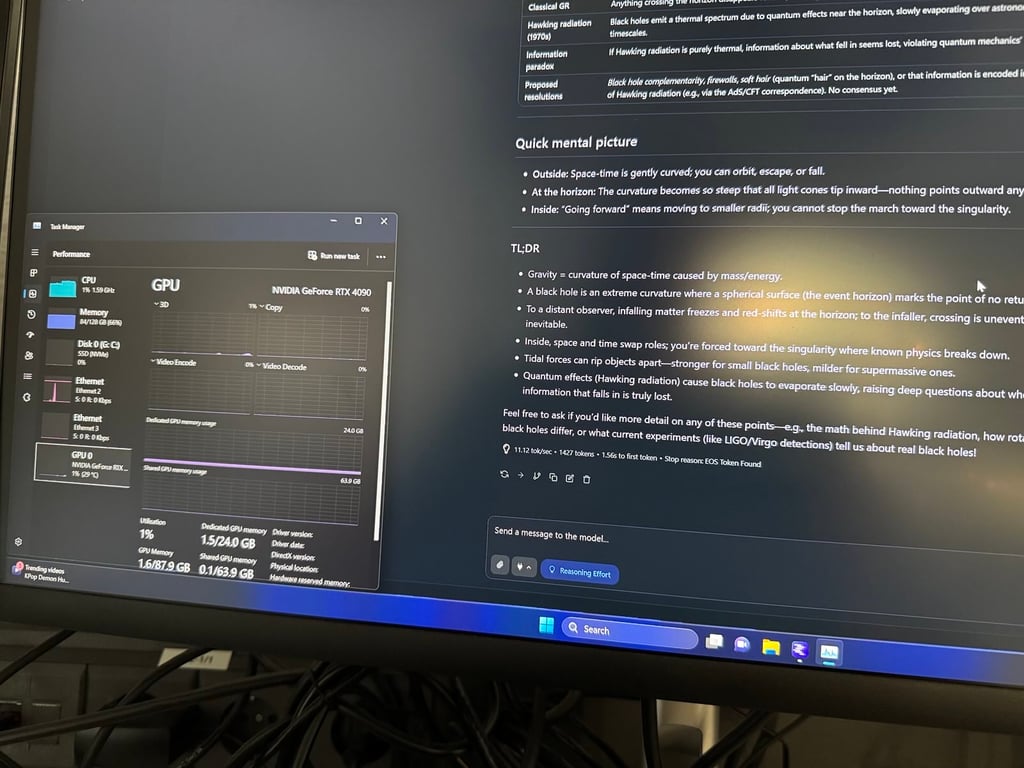
This throughput isn’t very impressive, but it's a bit faster than the average human reading speed of around 240 words per minute. And this baseline can be achieved on very affordable systems.
Find the most important lessons below.
Why won’t a 70B parameter model run well on a CPU, but a 120B one will?
It depends on the model’s training technique. Previous LLMs were traditionally dense – trained as one giant “brain” handling everything, using all of its parameters for every single generated token.
The Mixture of Experts (MoE) technique divides the single brain into many smaller “expert” networks specializing in different things. It means that to generate a token, the LLM doesn’t need all of its weights, but only a small part of them, contained in the relevant experts.
MoE models have a gatekeeper (router) that directs queries to the best experts. It’s the defining design choice of MoE models.
For example, the CPU struggles to generate a single token per second when running a “monolithic” dense Llama model with 70 billion parameters.
Meanwhile, the GPT-OSS-120B is divided into 128 experts. This model activates only 5.1 billion parameters to generate a single token, which is nearly 14 times less than Llama.

Newer LLMs, including some from Meta, now often utilize MoE.
For example, Llama 4 Scout has 109 billion parameters in total, divided into 16 experts. This model activates 17B parameters at a time for each token. These chunks are 3.3 times larger compared to GPT-OSS-120B, so Llama runs much slower on the CPU.
OpenAI’s engineers really nailed the expert sizing in GPT-OSS-120B. By activating 5.1 billion parameters, the CPU can handle the heavy lifting. Memory bandwidth of DDR5 is capable of feeding the CPU with this reduced parameter count.
Experiment 1: having more cores doesn’t automatically mean more performance
First, I ran the tests on a machine with an Intel Core i9-14900K inside. It’s a monster CPU with 32 threads, overkill for many things. But this CPU on the system was significantly “crippled” by the memory configuration.
The PC had 128GB of memory in total, but it used four DRAM modules to achieve that. Four modules are very taxing for memory controllers and degrade the memory frequency – the PC was running only at default 4,800 megatransfers per second (MTS).
This gives the theoretical maximum memory bandwidth of 76.5 gigabytes per second (GBps), which is far below what this processor could otherwise achieve using two modules.
I used a new chat every time and the same prompt, and had the CPU llama.cpp inference engine selected in LMStudio on Windows.
First I tried running the LMM with just a single CPU thread assigned (CPU Thread Pool Size – 1) to it. While one CPU core usually has two threads, it seems here that the app assigns the whole core.
- Just a single assigned thread averaged 3.05 tokens per second. During the generation of tokens, the CPU was partially using 4-6 threads at a time – likely, the OS scheduler distributes the load between several cores
- Rerunning the test with two threads assigned netted 7.05 tokens per second.
- Three threads delivered 9.73 tok/sec. The CPU usage was around 20 percent, which was still more than the proportion of assigned 3/32 threads would suggest
- With four threads, the performance was 11.70 tok/sec
- Five threads added an additional token and lifted the performance to 12.66 tok/sec
- Six threads: still improving: 13.72 tok/sec
- Seven threads: 14.32 tok/sec
- Eight threads: 14.75 tok/sec
- Nine threads: 13.93 tok/sec. I ran the same query again just to be sure: 14.35 tok/sec. Again: 14.07 tok/sec.
- Ten threads: further performance degradation to 13.5 tok/sec
- Eleven threads delivered a similar 13.73 tok/sec
- Increasing the CPU Thread Pool Size with more threads further eroded performance. Twelve threads: only 11.05 tok/sec.
The LMArena slider allowed me to select up to sixteen threads, despite the CPU having a total of 32 threads and 20 cores.
Sixteen threads also only delivered around 11.35 tokens per second.
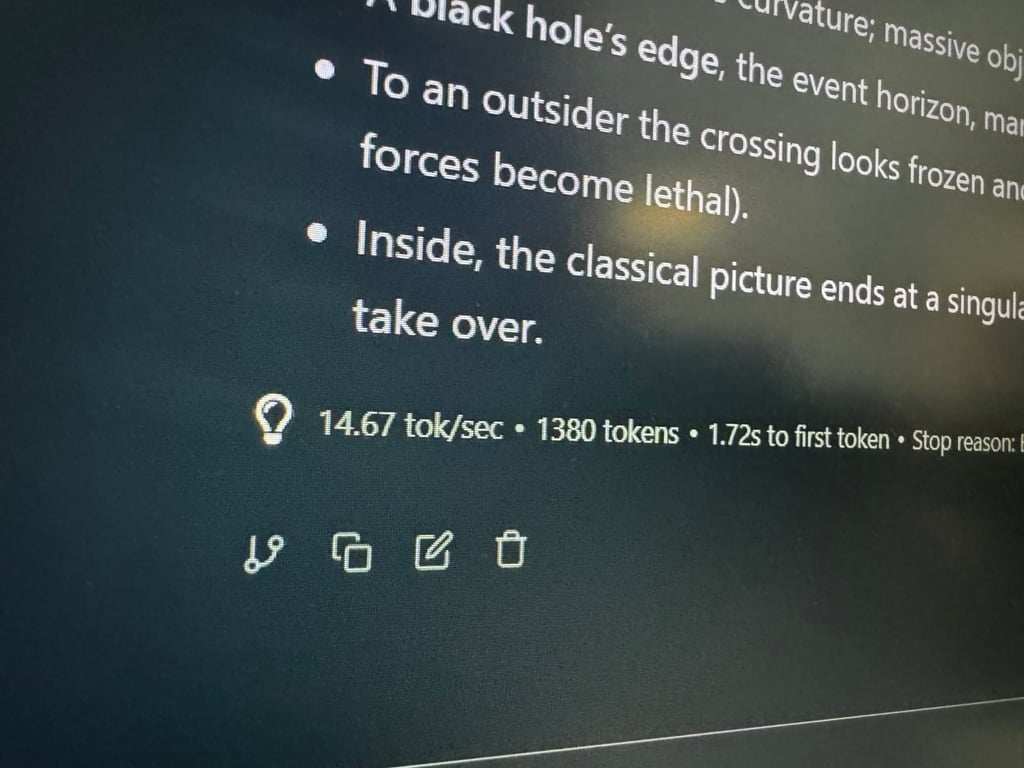
I’m not sure what’s happening here. Adding more threads above eight only decreased performance. My speculation is that this is due to the way the cores are interconnected, or due to the involvement of the so-called efficiency cores.
Some discussions online also suggest that inference of LLM is better when only using performance cores. Or maybe with more threads, the cores compete for the same cache memory causing more cache misses.
It’s worth noting that even when setting the context length to the maximum (131,072 tokens), the performance for initial prompt was the same. But the model slowed down significantly as the context length increased. At 10% of this context filled, the performance dropped to around 4-5 tokens per second and it quickly gets even worse.






Experiment 2: 64GB of RAM is a very “tight” fit
Next, I tested an AMD system with a Ryzen 7 7700X processor, which is significantly more affordable. This system only had 64 GB of RAM, but it was faster: it ran at 6,000 MTS, which gives a theoretical memory bandwidth of 96 GBps.
However, the amount of RAM was too low. Over 58 GB or RAM was required just to load the model itself. I wasn’t able to reliably run GPT-OSS-120B on Windows. It was visibly inconsistent, requiring a big cache and 100% SSD utilization.
I switched to LMStudio on Linux Ubuntu, which was a bit better but still required constant SSD access.
Here are the results:
- One thread assigned: 4.9 tok/sec
- Two threads: 8.51 tok/sec
- Three threads: 11.26 tok/sec
- Four threads: 13.08 tok/sec
- Five threads: 14.12 tok/sec
- Six threads: 14.39 tok/sec
- Seven threads: 14.37 tok/sec
- Eight threads: 14.24 tok/ sec
LMStudio only allowed to assign up to eight threads, despite the processor having eight cores and 16 threads.
The builds: how to choose parts somewhat optimally
Both the builds I tested were suboptimal due to their memory configurations. One had plenty of “slow” memory, and the other did not have enough memory. Neither system was installed freshly, and lacked any optimizations.
If you’re building a PC and want to ensure it will run GPT-OSS-120B at these or even better speeds, pay attention to RAM amount and speed first.
Also, if the only goal is to run the model as cheaply as possible, sacrificing other flexibility, such systems can be built for around $650-$800 new.
While a similar AMD system with 7700X CPU can also be built for around $750, but I’d opt for cheaper processor but more memory.
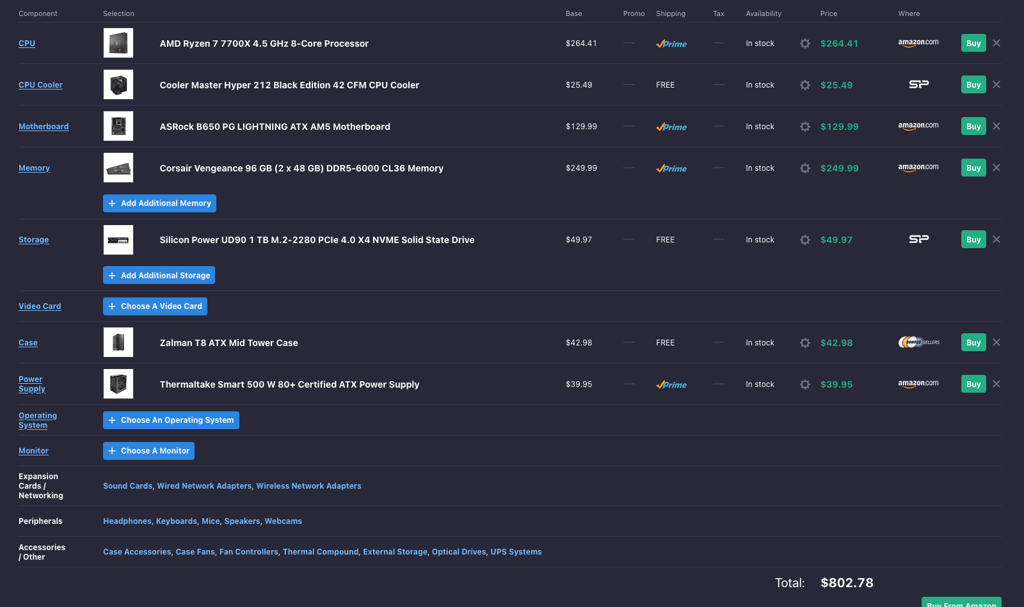
The price of 96GB RAM kits has decreased significantly and is now around $230, while 128GB kits can be found for less than $400. I’d choose 6,000 MTS or higher-frequency kits.
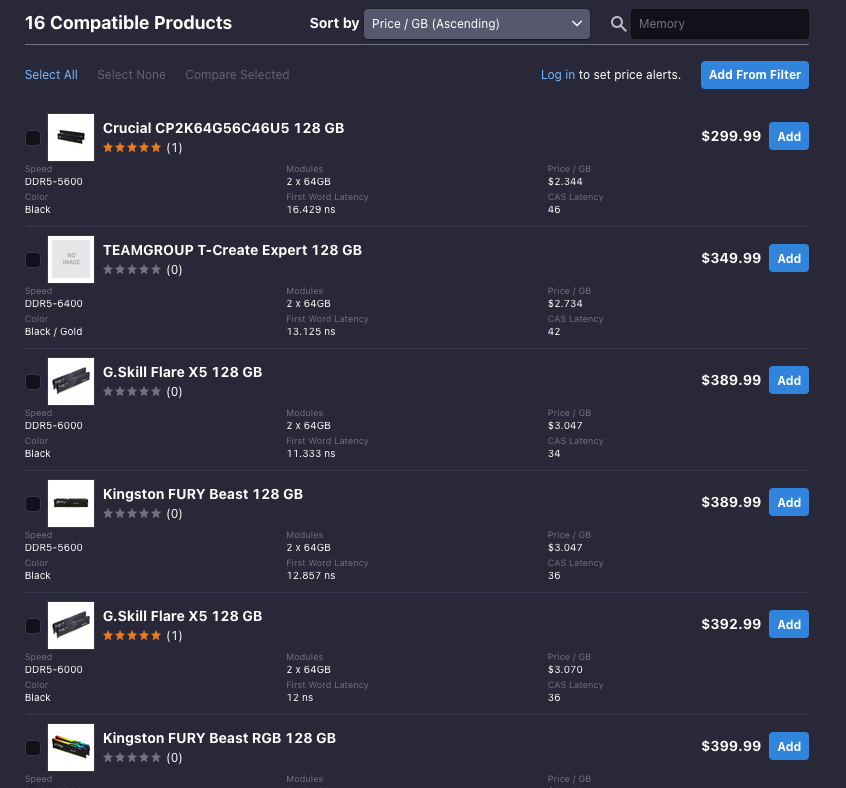
Intel processors generally better support higher-frequency memory. However, I couldn’t find any high-capacity memory with higher frequencies than 6800 MTS.
Any decent CPU from the last few years should deliver this level of performance, and six to eight cores seem to be enough.
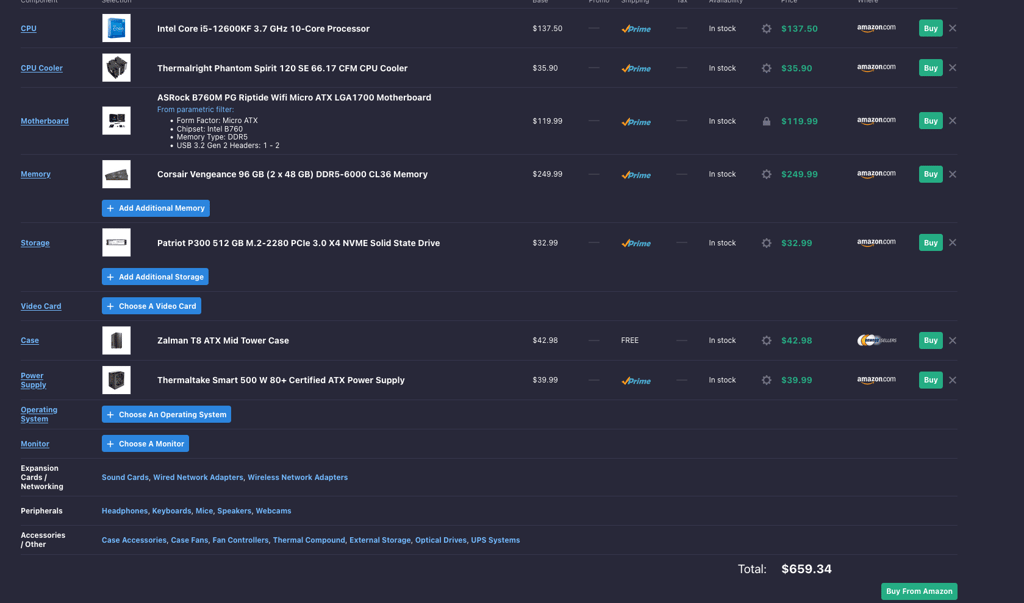
It’s like building any gaming PC, just with expanded memory. While the tests show that a GPU is optional, having one will help achieve even better performance and add an option to run small LLMs very quickly.
How does this compare to other systems?
Linus Tech Tips reviewers got their hands on the NVIDIA H200, a state-of-the-art data-center GPU that costs over $30,000, and tested the same model on it. This GPU has extremely fast HBM3e memory of 4.8 terabytes per second, more than 50 times faster than my CPU setups.
They achieved 122.01 tok/sec using LMStudio, or around nine times more.
Dr. Tristan Behrens, an AI engineer, demonstrated 155 tok/sec running the model on Nvidia RTX Pro 6000, a professional workstation GPU, which costs over $8,000 in the US.
Some Redditors and users on other forums claim that they’re able to achieve around 40-50 tokens per second on M4 Max Macs or Macbooks with at least 128GB of memory. However, the cheapest Mac Studio M4 with such a memory capacity costs $3,500.
AMD recently released “the world’s first consumer AI PC processor” and demonstrated it running GPT-OSS-120B at around 30 tokens per second on a system with 128GB fast LPDDR5x-8000 memory. Such systems currently start at around $2,000.
Other options include running multi-GPU setups. HardwareCorner shared their tests on three RTX 3090 GPUs, scoring up to 73 tokens per second for short context windows.
Lessons learned
Here are some observations I’ve learned during some experiments with running local AI models.
- Memory frequency is extremely important to get the best performance when running an LLM on a CPU. This limits purchasing decisions to only two sticks of RAM with higher capacities for dual-channel memory configurations. I had to learn the hard way that four sticks of RAM are very taxing on memory controllers and result in lower frequency and bandwidth.
- Running on a CPU is quite power-efficient, as the chip uses far less power than GPUs.
- A CPU-only system is not suitable for running LLMs universally. While GPT-OSS-120B can work with compromises, others won’t. The smaller the “experts,” the better the mixture of them will run on a CPU alone, but there aren’t many such models. And small LLMs will always run better on a GPU.
- Another important parameter that affects the model quality, performance, and size is quantization. It's about the size of the numbers used to store model weights. GPT-OSS-120B was already released quantized at 4.25-bit weights. Running models with more precision can be even more taxing.
- There is no discussion: a GPU with a massively higher memory bandwidth and parallelization computing will be much faster. However, multi-GPU setups or professional GPUs with plenty of memory are much more expensive.
- Vulcan llama.cpp runtime execution always delivers better performance when using a GPU compared to Nvidia Cuda or AMD’s frameworks.
- I wouldn’t choose AMD GPUs. While they’re fine for LMStudio, the support for many frameworks on Linux seems to be worse and more complicated.
- If I were to build a budget PC for running LLMs universally, I would still add a GPU, prioritizing its VRAM amount. This would give the flexibility to run small models like Gemma or Mixtral Small very fast while still having the option to launch GPT-OSS-120B.
- I would choose a 128GB RAM kit “just in case” OpenAI or other vendors release even larger LLMs with many small experts. The smaller the experts, the better they run on a CPU. LMStudio allows activation of even fewer experts than intended, but this leads to considerable answer quality loss.
- LMStudio’s assignment of threads is weird. It doesn’t match the physical cores and threads of the CPU.
- If a model doesn’t completely fit in the VRAM, its performance will always tank to a similar level as if it were only running on the CPU.
- Macs seem to have better support when porting new models to their native MLX framework. For example, the new Qwen3-Next-80B model, which ranks 17th on LMArena, beating many proprietary models, was quickly ported to MLX after launch. Meanwhile, weeks later, the community is still waiting for a way to run it on LMStudio (llama.cpp).
- Prosumer quad-channel DDR5 memory workstations (Xeon W series or threadripper) might be another good alternative for a platform, providing entry performance and expandability for multi-GPU setups. However, they’re a lot more expensive.
Unlock more exclusive Cybernews content on YouTube.