How to change your TikTok location in 2026
Our in-house cybersecurity experts and journalists, renowned for major reports like The Mother of All Breaches, conduct transparent, unbiased VPN testing and in-depth analysis.
With 750+ articles crafted based on real-world research, we empower readers to make informed purchasing decisions through first-hand expertise.
Learn more

TikTok remains available to US users as of June 2026. However, it underwent a major restructuring after years of legal and political pressure over its ownership.
Long story short, a 2024 law required ByteDance to sell TikTok's US operations or face restrictions, and the Supreme Court upheld it in January 2025. After several enforcement delays, TikTok's US operations were restructured in early 2026 with US-based investors and Oracle. The ownership situation has shifted multiple times and may continue to change, so check the latest news if you're concerned about future availability.
Many people use VPNs to access TikTok content from other regions or to enhance privacy while browsing. This guide explains how changing your IP location with a VPN can affect your TikTok experience.
Keep in mind that a VPN only changes your IP address. It can't change the other signals TikTok may use to determine your location, such as GPS data, SIM card information, app store region settings, or account history.
How to change TikTok location with a VPN

- Choose a reliable VPN provider
- Download and install the software and complete the sign-up process
- Turn off location permissions for TikTok so your real GPS doesn't override the VPN – you can do it in the app settings
- Connect to a server in the location you want
- Make sure your VPN connection is active
- Open the TikTok application and browse the content in your selected region
When you don't need a VPN for TikTok at all
A VPN only helps if your real problem is your IP address. You don't need one if:
- You're in a country where TikTok is officially available, and you only want your local feed – just open the app and browse content.
- You only want to view another region's trends occasionally – you can browse that region's feed at tiktok.com in a desktop browser without an account or a paid setup.
- You want to earn from TikTok in your own country – if monetization is available where you actually live, apply with your real account. A VPN doesn’t bring any value here and can actually put your account at risk.
Why do you need a VPN to change your TikTok location?
TikTok's availability and the content you see depend on your location. The app is restricted or fully banned in some countries, and even where it's allowed, your For You feed, the trends you're shown, and the monetization programs you can apply for are all decided by the country TikTok thinks you're in.
When you download and open TikTok from a restricted country, you'll hit a block. The app typically shows a message like, “Our services are not available in your country or region.”
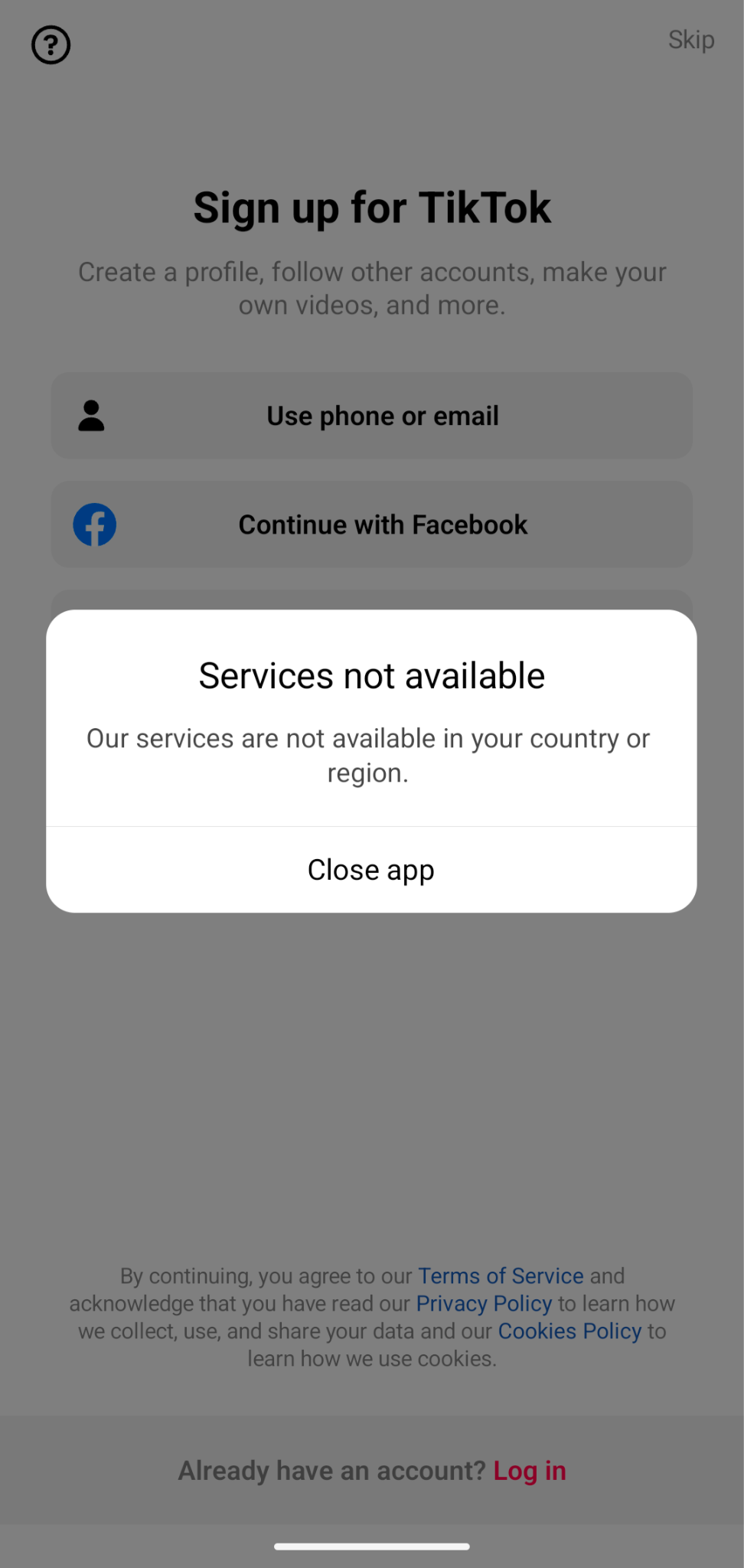
A VPN solves one part of this: it changes your IP address to a country where TikTok is available, which is enough to access and browse that region's feed.
On the other hand, a VPN doesn’t change your phone's GPS, your SIM card's country, or your App Store or Google Play region, so a VPN alone often won't change what you see or unlock region-locked features. It also can't give you a local account, a local payment method, or the tax and identity details that monetization requires.
Here are some vivid examples of a VPN’s capabilities and limitations when using it for TikTok:
What you need vs. what a VPN can help with?
| What you want to do | What it requires | Can a VPN help? |
| Browse another country's feed in a desktop browser | An IP address in the target country | ✅ Yes |
| Change what the mobile app shows | A consistent IP, SIM country, app-store region, and GPS | ⚠️ Partly – IP only; SIM, GPS, and store region usually override it |
| Download or update TikTok where it's removed from the store | An app-store account set to a country where TikTok is available | ❌ No – done in account settings, not by a VPN (Apple allows a region change roughly once every 90 days; a local payment method may be required) |
| Get your videos pushed to a foreign audience | TikTok to read you as genuinely local (region-set device, often a local SIM) | ❌ No – IP alone won't do it; a foreign SIM may, but can disrupt SMS-based 2FA and reset the algorithm |
| Apply for region-locked monetization (e.g. Creator Rewards Program) | A qualifying account region plus valid local tax information (in the US: SSN, ITIN, or EIN) | ❌ No – payouts need real KYC/tax details; using false information is fraud |
Using a VPN to deliberately spoof your location can breach TikTok's policy against bypassing access restrictions, risking a shadowban or account lock. In some countries, VPN use itself is restricted – check the law where you are, and don't use these methods for anything illegal.
How does TikTok detect your location?
TikTok works out your location from several signals: your SIM card country, your IP address, and your GPS. When you sign up, it also asks you to verify with a phone number (partly to cut down on fake accounts), and on some versions of the app, posts can be auto-tagged with a location.
Because TikTok reads your SIM country and GPS alongside your IP, a VPN (which only changes your IP) can't fully hide your location from the app on mobile.
The more location data you let the app collect, the more detailed a picture it builds of where you are and where you've been. Under its privacy policy, TikTok may share the information it collects with service providers and business partners, within its corporate group, in connection with a business sale or merger, and for legal reasons.
Separately, depending on your privacy settings, information from a public account, including account details and the content you post, can be seen by anyone and may appear on search engines and other sites.
You can limit what TikTok collects and exposes directly in your device and app settings, rather than relying on a VPN only:
- Turn off location access for TikTok in your phone's settings
- Don't add location tags to your posts
- Set your account to private, or limit the audience for individual videos, so your content and location clues aren't publicly visible
- Review TikTok's in-app privacy settings to limit location-based personalisation where the option is available
What are good VPNs for changing your TikTok location?
Together with the research team, I conducted thorough tests on 41 VPNs to find the best ones to change your location on TikTok. Running specific tests – like changing the location and challenging the speed of servers has resulted in this list of the best VPNs for TikTok. Here’s a quick rundown of my top 3 VPN providers for changing your TikTok location.
- NordVPN – reliable VPN to change your TikTok location
- Surfshark VPN – low-cost VPN for TikTok
- Proton VPN – great VPN for TikTok and other apps
How to change TikTok location with a VPN – detailed guide
If you're looking to access TikTok content from countries where the app isn't restricted, using a VPN with your web browser is the most reliable way to do it. Also, it’s far more reliable than on the mobile app, where TikTok also reads your SIM and GPS (see the mobile guide below).
In this guide, I show you how to change your TikTok location to a country where this app is fully available using a VPN, so you can browse that region's feed through your web browser.
Step 1: choose a VPN
The first step is choosing and subscribing to a reliable VPN service. For this guide, I use NordVPN due to its consistent performance with TikTok in our in-house tests. While there are many VPN providers available, it's important to select one with a proven track record of reliability and security.
Step 2: download and install the VPN
Once you've chosen your VPN provider, you need to download and install the software. Visit the official VPN website and download the appropriate version for your operating system. Most VPN providers offer dedicated apps for both Windows and macOS. The installation process is straightforward – simply follow the installation wizard to complete the setup. After installation, launch the VPN application and log in with your credentials.
Step 3: choose a country you want to connect to
After logging into your VPN app, locate the server list or search function. You can either type the name of the country you want to connect to in the search bar or find it and click on it on the map. If multiple servers are available in the country of your choice, choose one with a lower load for better performance. Wait for the connection to establish – you should see a confirmation message when successfully connected.
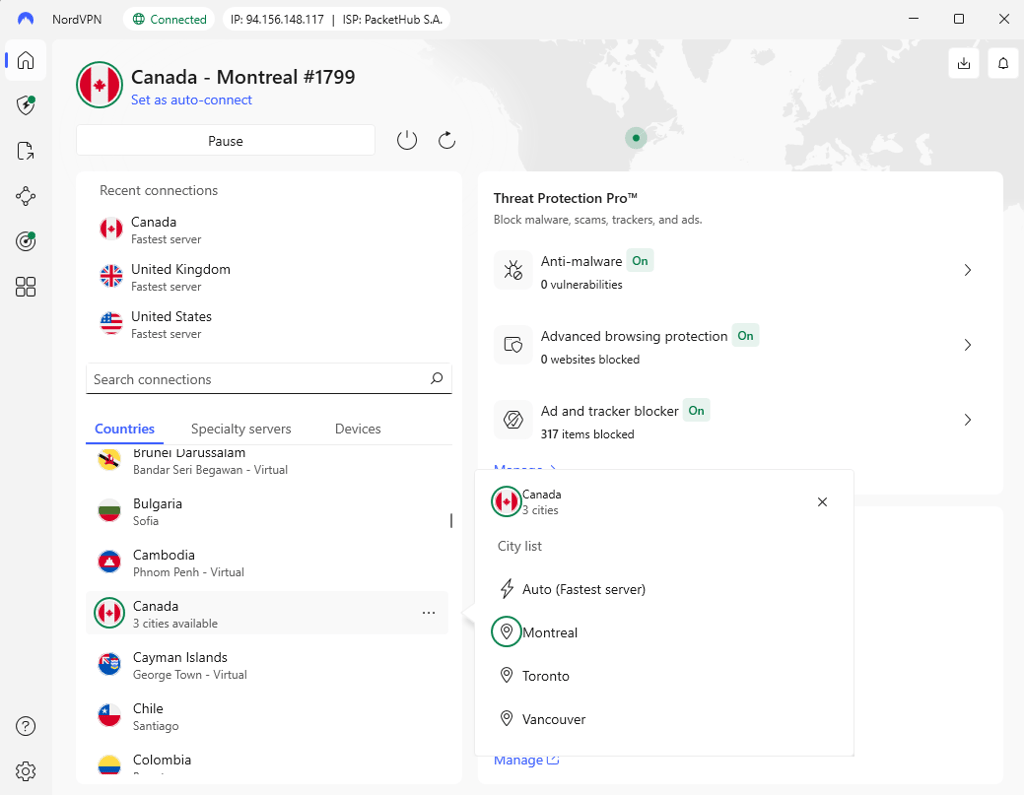
Step 4: go to tiktok.com
Open your preferred web browser (Chrome, Firefox, Safari, etc.) and visit TikTok's website (www.tiktok.com). At this point, you can either browse as a guest or create a new account.
If you decide to create a new account, don't link it to a phone number from your home country. Instead, use one from the region you're connecting to, or skip the number where TikTok allows it, so the account isn't tied straight back to your real location. Once you're set up, check that you can browse the target region's feed. Bear in mind that the For You algorithm takes time to adjust, so the content won't switch over instantly.
How to change TikTok location on the mobile app?
Changing your TikTok location on a mobile device is more limited than doing so on a browser or desktop. That’s because TikTok relies on multiple signals, not just your IP address, to determine your location. On mobile, turning on a VPN usually isn't enough on its own, and in many cases it won't change the content you see at all.
In addition to your IP address, TikTok may use other location indicators such as your SIM card country, app store region, and GPS data. To have any chance of changing your TikTok location on mobile, all of these signals need to match the target country – and even then it may not work. If you only want to view another region's feed, the desktop-browser method above is far more reliable.
How to change TikTok location on mobile using a VPN: step-by-step guide
- Choose and install a VPN app. Download a reputable VPN app from your device’s app store. Make sure it offers servers in the country you want to switch to.
- Connect to a VPN server in your target country. Open the VPN app and connect to a server in the region where you want your TikTok location to appear (for example, Canada). Avoid switching VPN locations frequently once you start – rapid changes can be ignored by TikTok or slow down how quickly your feed updates.
- Change your app-store region. This is a settings change, not something a VPN can do. Your app-store region must match your target country, and a VPN can't change it. On iPhone, you can change your Apple ID region in Settings. However, you will need to clear active subscriptions and balance first, and it can also require a local payment method. Alternatively, you can use a separate Apple ID set to that country. On Android, you'll need a Google Play account registered in the target country.
- Download or update TikTok. With the VPN connected and the app store region set correctly, download TikTok or update the app if it’s already installed.
- Create a new TikTok account. New accounts are more likely to reflect the target region than an existing account that's already tied to your real location. Create it while connected to the VPN. Be aware: a phone number from your original country, or losing access to SMS-based two-factor authentication, can pull you back to your real region or lock you out – so think this through before changing anything.
- Turn off location permissions for TikTok. Your phone's GPS can override the VPN and reveal your real location, so block it before you start browsing.
- Use TikTok with the VPN enabled. Keep the VPN connected when using TikTok so your IP address continues to match the selected region.
For the best chance of your IP sticking:
- Turn off location services, or remove your SIM card, so your GPS and SIM country don't contradict the VPN
- Use mobile data instead of Wi-Fi, since Wi-Fi networks can reveal approximate locations that conflict with your VPN's IP
- On Android, clear the TikTok app cache to refresh location-related data if your content doesn't change.
Even with everything aligned, TikTok's algorithm needs time to adjust, and if your GPS or SIM still signal your real country the app may keep serving your original feed. If it doesn't change, that's expected, since mobile is the weak case for this method.
Problems while changing location on TikTok with a VPN?
A VPN doesn't always change your TikTok region, especially on the mobile app, where TikTok reads your GPS and SIM as well as your IP. Here are the most common reasons it fails, and what you can (and can't) do about each:
- You've connected to a server in the wrong region
- Your VPN provider doesn't have a server in the country you want
- Your real IP address is leaking past the VPN
- Cookies stored on your device still point to your real location
- You're on the mobile app, where your GPS and SIM country override the VPN's IP – this is the most common reason mobile fails, and no VPN setting can fix it
- You're trying to unlock an account-, payment-, or monetization-locked feature, which a VPN can't do regardless of the server
Here’s what you can try to fix it:
- Connect to a different server, or a different city, in your target country
- If your provider has no server there, that's a hard limit – you need to switch to a provider that does
- Turn on your VPN's leak-protection settings (kill switch, DNS-leak protection) to stop your real IP from showing through
- Clear your browser's cache and cookies, then reconnect before reopening TikTok
- Try a different browser, or an incognito window, to rule out stored location data
- On mobile, turn off location services or remove your SIM so your GPS and SIM country don't contradict the VPN
- Contact your VPN's support team if leaks or connection issues persist
If none of these work, it may simply be that a VPN can't do what you're trying to do – for example, changing the mobile app's feed or unlocking a feature that needs a local account. In that case, the browser method or the no-VPN options above are your realistic routes.
Is changing your location for TikTok worth it?
Changing your TikTok location isn’t as complicated as it sounds, but it does require some effort, and not every method is 100% successful. Depending on your goals, different methods will work if you’re trying to bypass a government or app store ban, reach a specific audience, or access region-specific features like the Creator Rewards Program.
VPNs, foreign SIMs, and dedicated IPs can work for different purposes. Many users use these methods to access TikTok, get better reach, or even start earning. Just remember that some steps, like tax verification for payments, have to be real. Trying to manipulate the system can get your account shadowbanned or locked.
For browsing another region's feed in a desktop browser, a reputable VPN is the most reliable route. That's the one case where changing your IP with a VPN is enough. It hides your real IP from the sites you visit and from your ISP, and encrypts your connection.
Keep its limits in mind, though. A VPN changes your IP only. On the mobile app, or for anything that needs a local account, payment method, or monetization access, it won't be enough on its own.
FAQ
Does TikTok allow the use of VPN on the platform?
TikTok doesn't explicitly ban VPNs in its Terms of Service, and many people use the platform while connected to one. But its rules do forbid bypassing access restrictions and manipulating how the service works. Using a VPN to deliberately change or spoof your location can fall under that, which risks a shadowban or account action.
Does VPN change your TikTok region?
Partly. A VPN gives you an IP address in another country, which is enough to browse that region's feed in a desktop browser. On the mobile app it often isn't enough on its own, because TikTok also reads your SIM country and GPS.
Does location affect TikTok?
Yes, your location decides whether TikTok is available to you and shapes what your For You feed shows, since the algorithm serves content based on the country it thinks you're in. Some countries have also restricted or banned the app.
Should I use a VPN for TikTok?
It depends on what you want. If you're browsing another region's feed on a desktop, or accessing TikTok from a country where it's restricted, a VPN for TikTok can help with the IP step. If you only want your local feed, or you're trying to unlock features that need a local account or payment, a VPN won't add much.
Is it legal to change your location on TikTok?
Yes, changing location or region on TikTok is legal in most countries. However, it might pose a risk to your account: spoofing your location can breach TikTok's terms. A few countries restrict VPN use itself, so check the rules where you are before using one.
If TikTok is banned, can I use a VPN?
Yes, if TikTok gets blocked, you can use a VPN to bypass the ban and change your virtual location to where it's still allowed. Just remember, not all VPNs work the same, and you shouldn't use them for anything illegal.