How to change Steam region with a VPN
Our in-house cybersecurity experts and journalists, renowned for major reports like The Mother of All Breaches, conduct transparent, unbiased VPN testing and in-depth analysis.
With 750+ articles crafted based on real-world research, we empower readers to make informed purchasing decisions through first-hand expertise.
Learn more

Steam is the largest digital game platform, offering over 100K games, ranging from AAA titles like Assassin’s Creed Shadows or Call of Duty Black Ops 6 to indie darlings like Balatro or Stardew Valley. However, despite Steam being an online store, copyright laws and licensing mean that prices vary from region to region. This, of course, opens up some options for using a VPN to change your Steam region and save some money on your favorite game. A VPN can also be helpful if you’re planning to move to a different country and want everything to be set up beforehand. That way, you’ll be able to reward yourself on a move well done with a new game as soon as you’re done unpacking your PC.
In this article, I show you how to change your Steam region and explore the top 3 VPNs for the job. I also give you some tips and tricks so you can get new games quickly.
How to change Steam region

- Choose a reliable VPN. I recommend NordVPN, now 75% OFF
- Download and install the VPN on your device
- Connect to a server in your preferred country
- Log in to your Steam account, go to the Steam Store, and add any game to your shopping cart
- Select a country that matches your VPN server in Steam by selecting Update store country in Account details
- Enter a new billing address and click Apply country change
Things to keep in mind while changing the Steam region
Changing your store region and currency on Steam may seem straightforward, but there are some things worth taking into consideration. Here are the most important things to remember before, while, and after changing Steam country:
- Steam allows you to change your store region and currency only once every three months. It does this to prevent people from changing their store region too often to find better game deals.
- Changing your Steam store region requires a billing address from that region. So before you do that, find some friends who are willing to share their address and zip code with you for this purpose. Otherwise, you won’t be able to buy games from different countries.
- You need to use a payment method linked to the same country. Otherwise, it's likely that you will get suspended or banned from Steam. You can always try using a virtual card.
- Take into account whether the VPN you use has servers in your desired countries, how fast and secure the encryption protocols are, and if there are any bandwidth limitations.
5 reasons to use VPN for Steam
If you’re unsure whether you should really use a VPN to change the region on Steam, here are some of the benefits to consider:
- Access geo-restricted deals and discounts. Some countries charge different prices for Steam games. If you activate a VPN in that country, you may be able to get the same Steam games at a cheaper price than the one available in your current location. Additionally, a VPN can help you if there is a problem changing your country on Steam.
- Protect yourself from DDoS attacks. DDoS attacks are particularly prominent in the gaming communities, so hiding your IP address while playing in multiplayer servers would be in your best interest. A VPN changes your IP address, so no one will be able to execute DDoS attacks against you.
- Unblock Steam in censored countries and environments. Some countries, like China, censor content on Steam. So, whether you live in one of those countries, or want to play in a place with internet restrictions, like work or school, a VPN will be useful.
- Improve ping. Some ISPs might throttle your connection, thus causing your game to lag. By using a VPN, you will prevent your ISP from interfering with your connection by concealing your online activities, and potentially reduce your ping.
- Maintain online privacy. Browsing with a VPN has advantages over and above access to geo-restricted content. VPNs encrypt your browsing activity, blocking it from prying eyes, so you can stay safe and anonymous online at all times.

How to change your Steam region with a VPN: a detailed guide
While changing your location on Steam was simple back in the early days, it's not so simple now. In fact, Steam lets you update your store region and change currency only once every three months.
Here’s a comprehensive step-by-step guide on how to change your store region on Steam with a VPN:
- Get a VPN subscription – look for a service with great speeds and lots of servers. NordVPN is my top choice, as it offers a 75% discount for a service featuring 9,500servers in 149 countries.
- Download the VPN app and install it.
- Connect the VPN to a server in your desired country. If you’re looking to buy the cheapest games, I suggest connecting to Argentina, Turkey, India, or Brazil.
-
Open Steam, go to the Store, and add a game to your shopping cart. You won’t have to purchase anything just yet. This is a necessary step to update your store region and change currency. Note the price of the game – it will change after your next steps.

-
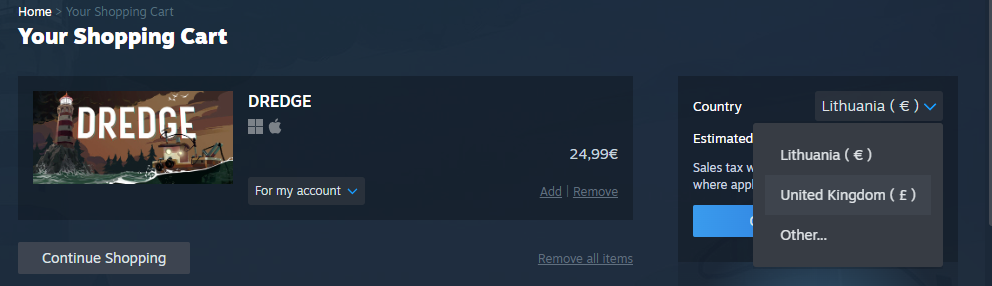
Inside the shopping cart, click on the country list in the upper right corner and select your preferred country (the same one you’re connected to on your VPN).
-
In a pop-up window, set the location to match your preferred country. This way, your store’s country and currency will be updated.

-
Once you pick a different country and change your Steam currency, the price of the game should also change.

-
Proceed to checkout and enter your new payment method details. Note: your billing address has to be in the country you selected, together with that country’s zip code.

- Once you’ve entered the payment method details, proceed to checkout and enjoy your new discounted game.
Using a VPN to change countries to get cheaper or geo-restricted game deals is against Steam's Terms of Service. The Steam’s parent company, Valve, reserves the right to suspend or permanently ban your account if you are caught purchasing games and items in Steam with a VPN. Keep in mind that the Cybernews team does not condone illegal activity with or without a VPN, so do so at your own risk.
The cheapest Steam regions
Due to copyright laws and licensing deals, Steam imposes regional restrictions on games. This means that in some countries, the same games arebe less expensive than in others. If you want to get yourself a deal and get Steam games cheaper, you can use a VPN to change your Steam Store country.
Some Steam regions where video games tend to be cheaper than elsewhere are Argentina, Turkey, India, and Brazil. There are several VPN providers that have servers in these countries, like NordVPN or Surfshark. Here’s an example of how Stardew Valley prices differ across various regions:
| Price in local currency | Price in USD | Difference from US price | |
| United States | USD $14.99 | $14.99 | - |
| Canada | CDN $16.99 | $11.80 | $3.19 |
| United Kingdom | GBP £10.99 | $14.17 | $0.82 |
| Germany | EUR €13.99 | $15.08 | -$0.08 |
| Argentina | USD $4.99 | $4.99 | $10.00 |
| Turkey | USD $5.99 | $5.99 | $9.00 |
| Brazil | R$24.99 | $4.34 | $10.65 |
| India | INR ₹479 | $5.59 | $9.40 |
| Philippines | PHP ₱419.95 | $7.32 | $7.73 |
Note: prices are subject to change due to changes in currency exchange rates and Steam policies. Prices are accurate as of April 1st, 2025.
It’s clear that the biggest price difference is in countries such as Brazil, Argentina, India, and Turkey, while in Germany, it’s even slightly more expensive. But bear in mind that to get a better deal, you not only have to provide that country’s billing address, but also use a payment method linked to the same country.
Changing your Steam region to purchase games at lower prices or to circumvent regional restrictions can lead to account suspension or bans as it violates Steam’s Terms of Service. Do so at your own risk.
Best Steam VPNs to change Steam region in 2026
While a VPN is the best way to change your region on Steam, finding the best provider can be difficult. I did some research and made a list of the best Steam VPNs to use on all of your gaming devices so you can make an informed decision yourself.
- NordVPN – overall best Steam VPN with plenty of cheap Steam locations
- Surfshark – affordable Steam VPN to use on multiple devices
- IPVanish – very secure and easy-to-use Steam VPN
For more information about each VPN, check our detailed guide below.
1. NordVPN – the best VPN for accessing cheap Steam regions

| Based in: | Panama |
| Simultaneous connections: | 10 |
| Servers/Countries: | 9,500+ servers in 149 countries, including Argentina, Brazil, India, and Turkey |
NordVPN is my top choice VPN for changing regions on Steam, with servers in countries like Argentina, Brazil, Turkey, and many more. This VPN uses AES-256 encryption and offers other features to keep your browsing identity private. Our NordVPN review shows that it is lightning-fast, with the option to get a dedicated static IP address for an additional fee and no throttling or bandwidth limitations, so it won’t slow down your gaming.
It’s one of the most reliable VPN services, with over 9,500+ servers in 149 countries. It also comes with a reasonable price tag (starting from $3.09/month) and a 30-day, no-questions-asked money-back guarantee.
2. Surfshark – cheap multiple-device VPN to change Steam country

| Based in: | The Netherlands |
| Simultaneous connections: | Unlimited |
| Servers/Countries: | 4,500+ servers in 100 countries, including Argentina, Brazil, India, and Turkey |
My next pick that will serve you well when changing a region on Steam is Surfshark. What's even better is that for team gamers, Surfshark offers the advantage of using unlimited devices on one subscription. You and a whole group of your friends can game together with one budget-friendly VPN subscription. You can even lower the price further using our Surfshark promo code: OFFCN.
In our Surfshark review, we found that it boasts impressive speeds, unlimited bandwidth, and over 4,500 servers across 100 countries, including Brazil, Argentina, and Turkey. It also gives a 30-day money-back guarantee. The provider's tiers are also on the cheaper side, with prices starting from $2.49/month.
3. IPVanish – safe and easy-to-use VPN to change Steam region

| Based in: | United States |
| Simultaneous connections: | Unlimited |
| Servers/Countries: | 3,400+ servers in 112 countries, including Argentina, Brazil, and Turkey |
Another great VPN option for changing Steam region is IPVanish. With this VPN for Steam, geo-restrictions are a thing of the past.
With one of the lowest VPN prices on the market, IPVanish offers value and security. It offers servers in cheap Steam regions, including Brazil, Argentina, and Turkey. It is compatible with torrenting clients, includes split tunneling and SOCKS5 proxy, and can obfuscate your traffic, which we go into in-depth in our IPVanish review. That way, no one will even find out that you’re using a VPN.
IPVanish offers subscriptions starting from $2.49/month. And no matter which plan you choose, you will be getting unlimited simultaneous connections. That’s plenty to cover all your devices.
How to change Steam region to Brazil
To change your Steam region to Argentina, follow these steps:
- Get a reliable VPN with Brazil servers. I recommend NordVPN, now 75% off
- Connect to a server in Brazil
- Go to the Steam Store and add games to your cart
- Click Update store and wallet country and choose Brazil
How to change Steam region to India
To change your Steam region to India, follow these steps:
- Get a reliable VPN with Indian servers. I recommend NordVPN, now 75% off
- Connect to a server in India
- Go to the Steam Store and add games to your cart
- Click Update store and wallet country and choose India
How to change your Steam region to play games early
While changing your Steam region to play games early might be tempting, I wouldn’t advise doing so. Most Steam games are launched on a global release schedule. For example, while Assassin’s Creed Shadows had a staggered release on console and in Ubisoft Connect, it unlocked worldwide at 12:00 AM EDT on Steam. While some regions do get some games earlier, releases are usually tied to your purchase location rather than where you’re connecting from.
This means that to play the game early, you have to connect to a country that has an early release, have a valid payment method and address there, and remain with an account in that region for at least three months while violating Steam’s Terms of Service. In this case, getting the game a few days early might just not be worth the effort. That said, in some game cases, users have found success simply connecting to a VPN server, so that might be worth a try.
In what countries is Steam unavailable?
Steam is a software distribution platform and gaming hardware producer owned by Valve Corporation, and it is available globally, with few exceptions. Valve is a US corporation, and the United States has software export prohibitions due to sanctions applied to some countries.
Some countries where Steam may not be available are North Korea, Syria, Cuba, Sudan, Iran, and China. There are also locations where game publishers and developers can’t receive payments from Steam, including Russia, Belarus, Ukraine, and more.
Nonetheless, the Steam app is still available in these countries, and users can play region-locked content they bought before the sanctions came into effect.
How to choose the VPN to change your Steam region
Knowing what to pay attention to when choosing a Steam VPN can save you time and nerves. Below, you will find the main criteria that help to find a suitable VPN:
- Geographically diverse and extensive server fleet. The more servers and countries you can connect to, the better it gets. This way, you can avoid overcrowded servers that cause lagging and access a wider range of restricted games for better prices.
- Steadfast security. It’s crucial to choose a VPN that offers market-leading encryption, a functional kill switch, and a strict no-logs policy
- Fast connection speeds. To interfere less with your connection speed, a VPN should use the advanced WireGuard tunneling protocol. With it, the speed remains excellent without compromising security.
- Extra features. A bigger number of features guarantees a splendid browsing and gaming experience.
- Compatibility. It’s important that a VPN has apps for a variety of platforms. Additionally, the more simultaneous connections it allows – the better.
Steam VPN not working: how to fix it
Sometimes, even the best VPN doesn’t work as it’s supposed to, and you can’t change your Steam country. Here are some reasons why a VPN might not work with Steam and what you can do about it:
- Network problems. Sometimes using a VPN can cause internet connection problems that prevent Steam from functioning. Try reconnecting to your VPN or choose a different server.
- Firewall problems. Occasionally using a firewall could interfere with your VPN connection or Steam. Try turning it off or adjusting firewall settings to allow VPN and Steam connections.
- Your real IP address is leaking. If that is the case, Steam will see your real location. Enable IP and DNS leak protection in your VPN settings.
If a VPN is still not working with Steam, contact your VPN provider’s support or change your VPN provider.
- NordVPN – considered the best VPN provider on the market with blazing fast speeds and next-gen encryption. It also offers a 30-day money-back guarantee and a free trial on Android.
- Surfshark – one of the fastest and the most budget-friendly VPNs with advanced features for your security and privacy online. Surfshark has a 30-day money-back guarantee, and you can also try Surfshark for free for 7 days.
Bottom line
There are a few reasons why you might want to change your Steam region. These can range from getting cheaper prices to preparing for a big move. To do so without actually traveling to different countries, you need a reliable VPN.
A reliable Steam VPN has servers in cheap Steam regions, like Brazil or India while offering other benefits. It encrypts and secures your connection, prevents DDoS attacks and ISP throttling, and increases your privacy.
The best VPN to change Steam region is NordVPN. It has over 9,500 servers in 149 countries, including Turkey, India, Argentina, and Brazil – some of the cheapest Steam countries. It will also provide up to 10 simultaneous connections, split tunneling, strong AES-256 encryption, and various other advanced security features.
That said, Steam’s ToS are very strict, so to avoid being banned when changing Steam region, make sure you use a billing address and a payment method linked to the same country.
FAQ
Can I use a VPN to change the Steam location?
Yes, you can change the Steam location with a VPN. If this doesn’t work for you, it’s possible that the country of your IP address and billing address don’t match. To get around this issue, use a VPN to change your IP address to your chosen country. Our top choice for changing Steam country is NordVPN.
Does Steam ban VPNs?
Yes, Steam can technically ban you for using a VPN to change the store region in order to buy cheaper games. However, if you’re using a VPN for other purposes, such as privacy and protection, Steam won’t really care, and you most likely won’t get banned.
How to buy Steam games cheaper from another country
To buy Steam games cheaper from another country, follow these steps: connect to a VPN server in a cheap Steam country such as India or Brazil, go to the Steam Store, add games to your cart, and update your country to match your VPN server location.
Which is the best VPN to change the Steam store country?
NordVPN is the best VPN to change the Steam store country. It has a geographically diverse server fleet, uses industry-leading encryption, and offers obfuscated servers that allow you to use a VPN in heavily censored countries.
Which Steam region is the cheapest?
The cheapest Steam regions where games cost much less than elsewhere are India, Argentina, Turkey, and Brazil. You can use a VPN, such as NordVPN, to change your virtual location and access games in these countries.
Does changing the Steam region affect games?
Yes, changing your Steam region affects what games are available and their prices. Some games are unavailable to buy in different countries due to licensing restrictions. Game prices could also be lower or higher depending on the region or country.
Is Steam region locked?
No, Steam does not have a region lock for most areas. However, game developers may have unique regional restrictions. Moreover, you may face restrictions when purchasing gifts for someone in a different country.
Can I use my Steam account in another country?
Yes, you can use Steam in another country by changing Steam region. You do not need to change your Steam account. Instead, employ a reliable VPN, like NordVPN, to change your country and access different pricing or games restricted in your region. Note that you can only change your region once every three months.
Can you get banned for using a VPN on Steam?
No, you won’t get banned on Steam for using a VPN to protect your identity, avoid DDoS attacks, or improve your internet connection. However, using a VPN to change countries to get Steam games cheaper or access geo-restricted games is against Steam's ToS and might lead to account suspension or ban.
Why might someone want to change their Steam region?
Most people change their Steam region when moving to a different country or looking for cheaper games. Since countries like Argentina, India, Brazil, and Turkey offer far lower prices for games than the US or Europe, picking a new region helps lower costs.