How to watch TNT Sports in the USA in 2026
Our in-house cybersecurity experts and journalists, renowned for major reports like The Mother of All Breaches, conduct transparent, unbiased VPN testing and in-depth analysis.
With 750+ articles crafted based on real-world research, we empower readers to make informed purchasing decisions through first-hand expertise.
Learn more
TNT Sports (formerly BT Sport) is one of the UK’s leading sports broadcasters, covering major sports events like the UEFA Champions League, English Premier League, MotoGP, and Premiership Rugby. However, due to international licensing agreements, the content is geo-restricted outside the UK and Ireland.
In March 2026, TNT Sports moved to HBO Max for subscribers in the UK, and you can access the content through your subscription. However, if you connect to your HBO account from the US, the service determines your true location by your IP address. Now, if you use a VPN to connect to a UK-based server, you can make it seem as if your connection is actually coming from the United Kingdom.
Of course, a VPN cannot help you create an HBO Max account or bypass other account-related requirements. However, if you're a UK subscriber traveling abroad, a VPN may help you access your existing account by providing a UK IP address. Keep this in mind before you turn to a VPN to solve the question of how to watch TNT Sports in the USA in 2026.
As per HBO Max Terms of Use agreement, “You are prohibited from using any technology to mask your location or hinder HBO Max's ability to determine your location.” Accessing TNT Sports from the US using a VPN may be in violation to your account usage. Please review the terms before proceeding.
Why do you need a VPN to watch TNT Sports in the USA?
Because of content-licensing and broadcasting-rights agreements, TNT Sports is available on HBO Max only in the UK. The platform checks your IP address to determine your location, and if it’s outside the accepted region, it does not offer TNT Sports content. If you have a link to a specific TNT Sports title and try to access it from the US, you are greeted with the "Content Not Available” message:

A VPN with servers in the UK can help you get a British IP address to make your connection appear as if it’s originating from the United Kingdom. But that's all a VPN can do for your access – it cannot create your account, provide a UK payment method, or override GPS checks (on mobile).
| What you need to watch | What it requires | Can a VPN help? |
| UK-based connection | UK IP address | ✅ Yes |
| HBO Max account with TNT Sports | HBO Max subscription | ❌ No |
| App access on a mobile device | UK location during GPS checks | ❌ No |
Of course, it’s important to remember that beyond helping you access TNT Sports content, a top-rated VPN can offer much more. It can also strengthen your online security and enhance your protection against malicious hackers or spying ISPs.
Best VPNs to watch TNT Sports streams online
- NordVPN – top-rated VPN for streaming TNT Sports in the US
- Surfshark – best VPN for unblocking TNT Sports from the US on unlimited devices
- IPVanish – budget-friendly VPN for TNT Sports
The main feature to look out for when you’re selecting a VPN to unblock TNT Sports is a range of UK-based servers. But the best VPNs should also deliver fast connections for lag-free streaming, top-tier security features to keep you safe online, and great apps for all your devices.
How to watch TNT Sports with a VPN on your devices
A VPN can help you access TNT Sports on compatible devices by providing a UK IP address. If you already have an eligible HBO Max subscription and meet the platform's account requirements, you can stream on devices such as your PC or smartphone.
How to watch TNT Sports on your PC
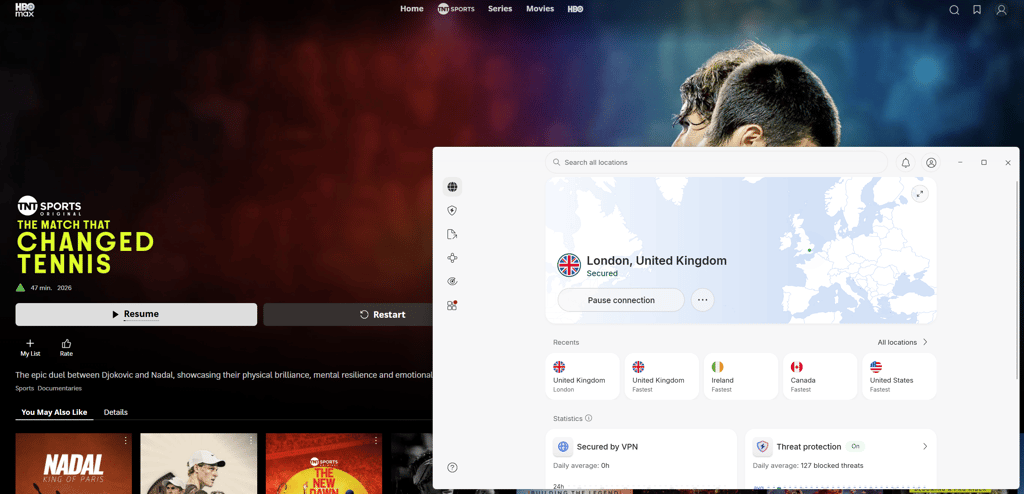
Streaming TNT Sports content via HBO Max in the US is most effective on a desktop browser. That’s because mobile devices often rely on GPS checks to determine the true device location, which can prevent the VPN from working successfully. Here’s how you can watch TNT Sports on your PC:
- Choose a VPN with UK servers — I recommend NordVPN because it has 440+ servers in 4 UK cities
- Download and install the app and set up your account
- Connect to a server in the UK
- Log in to HBO Max
- Access TNT Sports from the menu at the top
How to watch TNT Sports on your mobile device
HBO Max can use location services and GPS data to determine your mobile device’s true location. Therefore, using a VPN to stream TNT Sports via HBO Max may be a hit or miss situation. I recommend streaming via a desktop browser instead. If you want to watch TNT Sports on a mobile device, here are the steps you can try:
- Revoke the location permission for Google Play Store/App Store – this should prevent the store from reading your GPS
- Download and install a VPN and set up your account
- Connect to a server in the UK
- Log in to HBO Max
- Access TNT Sports – if HBO Max still detects your location, switch to a desktop browser
How to stream TNT Sports on streaming devices
Streaming devices like Roku, Apple TV, and Fire TV Stick are handy for streaming TNT Sports. You can install a dedicated VPN app directly on your Apple TV or Fire TV Stick. However, note that you can’t install a VPN directly on all streaming devices, including Roku, in which case, you need to use the router method instead. Don’t worry, it’s very straightforward:
- Get a VPN that works on routers – NordVPN is the option I recommend
- Set up the VPN and link it to your router
- Connect to a server in the UK
- Open the HBO Max app on your Roku and sign in
- Access TNT Sports
How to subscribe to TNT Sports if you’re outside the UK
If you already have an HBO Max subscription, but you’re traveling or outside the UK, accessing TNT Sports might be as simple as connecting to a UK server provided by a VPN and then logging in. In my personal experience, I didn’t need an HBO Max account that was registered in the UK, but it’s possible that the provider could detect your true location from your account registration details. In this case, a VPN might not be able to help you.
If you don't yet have an HBO Max account, you should subscribe first. Note that a VPN can't create the account or process the payment for you – this is what you need to do on your own.

What can you watch on TNT Sports?
TNT Sports is one of the UK’s top sports broadcasters. It offers live English Premier League and UEFA Champions League games, rugby, cricket, moto racing, and WWE.
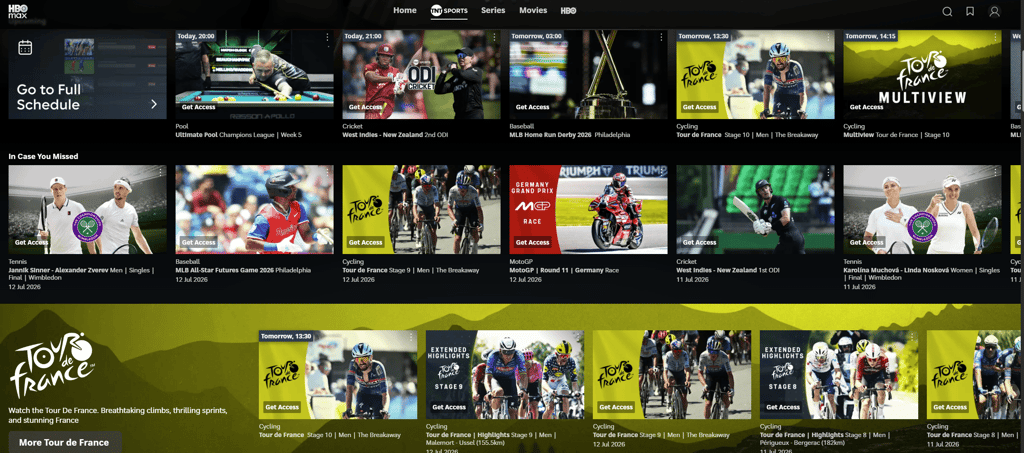
Take a look at what you can watch on TNT Sports:
| Sporting event | Season |
| English Premier League | 2026–2027 season |
| UEFA Champions League | 2026–2027 season |
| Premiership Rugby | 2026–2027 season |
| Rugby Champions Cup (Investec Champions Cup) | 2026–2027 season |
| Tour de France | July 2026 |
Final thoughts
Although TNT Sports is not available outside the UK and Ireland (where it's available on HBO Max), a reliable VPN may enable you to watch TNT Sports in the US using a British UK IP address. However, even when your connection appears to come straight from the UK, you may not be able to stream TNT Sports successfully due to account registration-related information or GPS checks. That’s something a VPN cannot assist you with.
That said, a VPN can successfully encrypt your traffic and hide your IP address from your ISP, making it a terrific security and privacy tool. So, if you decide to try the VPN route for accessing TNT Sports in the US, I recommend choosing your provider carefully. Pick NordVPN if you want a VPN that has plenty of UK servers, can successfully conceal your traffic, and help bypass geo-restrictions.
FAQ
Does NordVPN work with TNT Sports?
Yes, NordVPN works with TNT Sports. You can use NordVPN to unblock TNT Sports, whether you’re in the US, Canada, or anywhere else. NordVPN has 440+ British servers that you can use to access HBO Max (the main broadcaster of TNT Sports) as if you were from the UK.
Can you watch TNT Sports from abroad?
Yes, you can watch TNT Sports from abroad, provided you have a VPN set up on your device. With a VPN, you can change your IP address to a UK location, bypassing TNT Sports geo-blocks.
Can you watch TNT Sports outside the UK?
Yes, you can watch TNT Sports outside of the UK by using a VPN to change your IP address. TNT Sports is currently available on HBO Max but only for users from the UK, so you need a UK-based IP address to access all its sports content.
How can I watch TNT Sports for free?
You can’t watch TNT Sports for free. You need an HBO Max subscription to get access to TNT Sports in the UK. Besides, if you’re in the US, you won’t be able to stream TNT Sports without a VPN.
Is it safe to watch TNT Sports in the USA with a VPN?
Yes, using a VPN to watch TNT Sports in the USA is safe. VPNs add security and anonymity to your online life, protecting you from malicious hackers and ISPs with features like end-to-end encryption for your data and kill switches – in case your connection drops.