How to watch CTV content in the USA in 2026
Our in-house cybersecurity experts and journalists, renowned for major reports like The Mother of All Breaches, conduct transparent, unbiased VPN testing and in-depth analysis.
With 750+ articles crafted based on real-world research, we empower readers to make informed purchasing decisions through first-hand expertise.
Learn more

CTV is one of Canada's most popular TV networks, known for hit dramas, reality shows, live sports, and Canadian programming. While the CTV website and app are no longer the main streaming route, many CTV shows are now available on Crave. However, because of licensing restrictions, CTV content on Crave is only available in Canada, so viewers in the US can't normally access its content.
Fortunately, a VPN lets you connect to a Canadian server and obtain a Canadian IP address, allowing you to access CTV content while traveling outside Canada or living in the USA.
Based on Canadian server availability, fast streaming speeds, and reliable access to geo-restricted content, NordVPN remains our top recommendation for watching CTV content on Crave. Surfshark is my favorite affordable option, and Proton VPN is a strong option for privacy-focused users.
Below, I show you how to watch CTV content in the USA and compare the best VPNs for the job.
A VPN can help by giving you a Canadian IP address, but you’ll still need a valid Crave account, a subscription where required, accepted payment or billing details, and supported device or app access. Additionally, using a VPN to access streaming content from outside its licensed region may also go against Crave’s Terms of Use or streaming restrictions, which can result in blocked access or account issues.
How to watch CTV content in the USA with a VPN

- Choose a VPN with servers in Canada
- Download and install the VPN
- Connect to a server in Canada
- Go to the crave.ca website or app, sign in with a valid Crave account
- Browse a large CTV library and start watching
- Make sure your account, subscription, payment details, and device are accepted by Crave
- Browse available CTV content on Crave and start watching
Why do you need a VPN to watch CTV content in the USA?
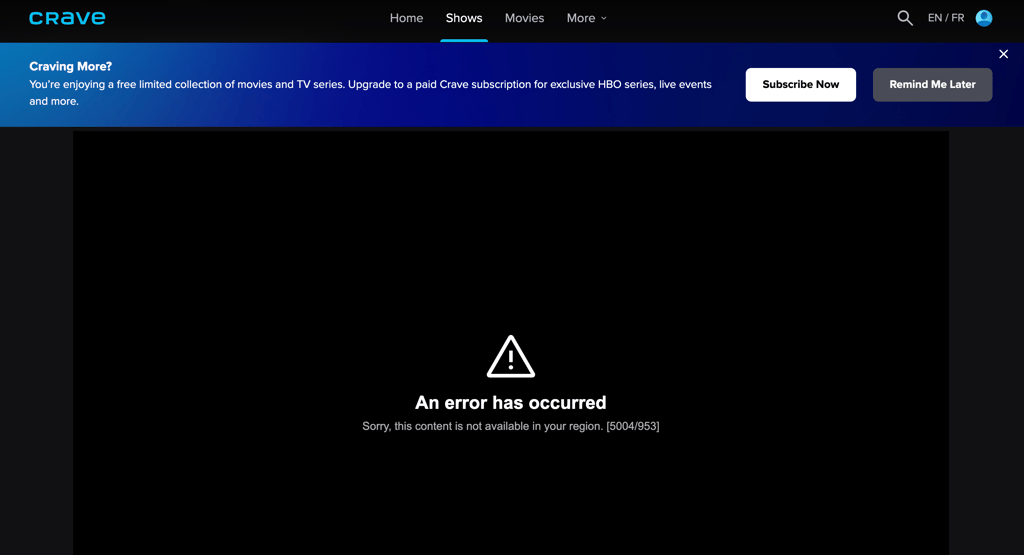
CTV is a Canadian TV network with plenty of popular content. However, its content is only available to watch in Canada on Crave. This is because Crave must comply with distribution rights, licensing agreements, and copyright laws. That’s why, if you attempt to watch CTV content from the US or anywhere else outside Canada, you may see the following geo-restriction error message: “Sorry, this content is not available in your region.”
The good news is that a VPN can give you a Canadian IP address, helping you access CTV content on Crave from outside Canada. Simply download and install the VPN app and connect to a Canadian VPN server to change your IP address. Then, if you have a valid account and subscription, you may access Crave from outside Canada.
Besides helping with IP-based geo-restrictions, a VPN is also a useful personal security tool. It encrypts your traffic and hides your browsing activities from your ISP or network administrator. But do keep in mind that a VPN doesn’t provide you with a Crave account, subscription, accepted payment method, billing details, or app-store access.
What do you actually need to watch CTV content on Crave?
| What you need | What it requires | Can a VPN help? |
| Canadian connection | A Canadian IP address | ✅ Yes |
| Crave account | Access to a valid Crave account | ❌ No |
| Active subscription | A paid Crave subscription for content that is not included in the free limited collection | ❌ No |
| Payment or billing details | Accepted payment or billing information, where required | ❌ No |
| Crave app access | A supported device and app availability in your App Store, Google Play, or device platform region | ❌ No |
If you’re already in Canada, then you won’t need a VPN to access Crave directly. Additionally, you may also not need a VPN if the specific CTV show you want is available through a different licensed streaming service, broadcaster, or digital store in your country.
Best VPNs to watch CTV content stream online
We selected our top three VPNs for accessing CTV content on Crave from the US and other countries. We based our decision on Canadian server availability, security features, speeds, connection reliability, and support for region-restricted content.
- NordVPN – best VPN for accessing CTV content on Crave
- Surfshark – fast and affordable VPN for CTV content
- Proton VPN – excellent provider with strong security
How to watch CTV content with a VPN on any device
You can watch CTV content from outside Canada on your PC, Mac, iPhone, Android device, or even a smart TV by using a VPN to get a Canadian IP address. However, the process isn’t the same for every device, and you’ll still need a valid Crave account with a subscription. Below, I provide step-by-step guides that explain how to access CTV content on Crave across different devices.
Watch CTV content on your smartphone
You can watch CTV content on Crave on both Android and iOS smartphones by using a VPN to connect to a Canadian server. Here’s how to do it:
- Download and install a VPN on your device
- Log in or create an account
- Connect to a Canadian VPN server
- Clear the cache and cookies of your device and/or browser
- Turn off location permissions for the Crave app (only for mobile)
- Head to crave.ca in a supported browser or open the Crave app
- Sign in with a valid Crave account and make sure your subscription and payment details are accepted
- Start browsing the available CTV library on Crave
Stream CTV content on your streaming device
Before you start, make sure Crave supports your streaming device. Crave is available on devices like Roku, Amazon Fire TV, Apple TV, Android TV, Samsung Smart TVs, Xbox One, and computers, but support can depend on the exact device model, operating system version, and app availability in your account region.
Most streaming sticks, such as Roku, don’t support native VPN apps. In such cases, you can set up a VPN on your router to get a Canadian IP and access CTV content on Crave through your streaming device. With all of that in mind, here’s what you need to do:
- Choose a VPN with plenty of Canadian servers
- Set up the VPN on your router
- Connect to a Canadian server
- Connect your streaming device to the router via Wi-Fi or an Ethernet cable
- Find or install the Crave app on your streaming device, or go to the Crave website in a supported browser
- Log in with a valid Crave account and subscription to start watching
If you have an Amazon Fire TV Stick, you can download a VPN app straight onto your streaming stick.
Crave app availability may depend on your device, platform, and account region. You can change your IP address with a VPN, but it won’t change your app store country, device region, or payment details. If the Crave app requests device location access, you can check its location permissions in your device settings.
If you need more help, take a look at these in-depth guides:
- Best Kodi VPNs
- VPNs best suited for Apple TVs
- Top VPNs for Roku
- VPNs with the best apps for Fire TV Stick

What CTV content can you watch on Crave?
From popular US shows to exclusive Canadian content, CTV content on Crave has a lot to offer. Here’s my pick of the best CTV titles that you really shouldn’t miss:
| Title | Genre |
| The Amazing Race Canada (2013-present) | Game show |
| Being Canadian (2015) | Documentary film |
| Canada’s Worst Driver (2005-2018) | Reality TV show |
| Jann (2019-2021) | TV drama |
| MasterChef Canada (2014-present) | Reality TV show |
| Transplant (2020-2024) | Medical TV drama |
| Sullivan's Crossing (2023-present) | TV drama |
| The Traitors Canada (2023-present) | Reality TV show |
CTV content on Crave may change over time as new shows are added and licensing agreements shift. To keep up to date with all the latest releases, check Crave’s official website, as well as CTV’s X and Facebook pages.
Conclusion
CTV is one of the most popular TV networks in Canada, with many of its shows now available through Crave. However, Crave is only available to watch in Canada. If you’re in the USA, Australia, the UK, or another country outside Canada, a VPN can help by giving you a Canadian IP address. Just keep in mind that you’ll still need a valid Crave account and subscription where required.
NordVPN is my top option for accessing CTV content on Crave. It has over 300 servers in Canada, offers fast speeds, and reliable performance for IP-based geo-restrictions.
Even better, a VPN can improve your online security by encrypting your traffic and hiding your browsing activity from your ISP.
FAQ
Is it possible to watch CTV content in the USA?
Yes, you may be able to watch CTV content in the USA through Crave. Many CTV shows are now available there after the CTV website and app shut down. A VPN can help by giving you a Canadian IP address, but you’ll still need an active Crave account. Do note that account creation and playback may also depend on accepted payment or billing details.
What’s the best way to watch Canadian TV in the US?
The best way to watch Canadian TV from anywhere is to use a VPN, such as NordVPN, to connect to a server in Canada. This gives you a Canadian IP address, which may help with IP-based geo-restrictions. Do keep in mind that each Canadian streaming service may have its own account, subscription, payment, billing, and app availability requirements
Is it legal to watch CTV content in the USA with a VPN?
Is it legal to watch CTV content in the USA with a VPN?Using a VPN to access CTV content on Crave from outside Canada may go against Crave’s Terms of Use or streaming restrictions. That said, using a VPN is legal in most countries, including the USA.