Certifier.io review 2026: the automation engine for digital credentials
Being behind major reports like The Mother of All Breaches and RockYou2024, our in-house cybersecurity experts and journalists provide unbiased, real-world testing and in-depth analysis.
We maintain complete transparency by openly sharing our testing methodologies with our audience.
Learn more

Most teams don’t realize how much time they’re wasting on certificates until they’re stuck exporting files, renaming them one by one, and attaching each PDF to individual emails. For course creators, HR departments, and event organizers, that process quickly turns into a recurring operational headache.
In this Certifier review, we look at a platform built to eliminate that friction entirely. The platform goes beyond being a simple certificate maker – Certifier.io is designed as a scalable system for issuing digital credentials in bulk. With tools like CSV uploads and native built-in integrations with popular LMSs and CRMs, it enables teams to automate certificate delivery instead of managing it manually. Importantly, this doesn’t stop at certificates. Certifier also functions as a digital badge platform, allowing teams to create badges online and issue them alongside or instead of certificates, depending on the use case.
To see how it performs under real conditions, we tested large-scale issuance ourselves, focusing on speed, consistency, and reliability. The results show why it’s gaining attention as one of the best digital credentialing software options available.
What is Certifier.io and why automation is key
At its core, Certifier.io is a cloud-based system built to handle the full lifecycle of digital credentials, from design to delivery to ongoing management, without the usual manual overhead. Instead of treating certificates as static files, it approaches them as data-driven assets that can be generated and distributed at scale. The same infrastructure applies to digital badges, which are increasingly used for micro-credentials, skill verification, and ongoing learning pathways where traditional certificates may be too rigid. That distinction matters if you’ve ever dealt with spreadsheets full of names, last-minute edits, or endless copy-paste cycles. This Certifier review shows how the platform removes manual data entry from the equation entirely. You upload a CSV or trigger issuance through one of the integrations, and the system takes care of the rest.
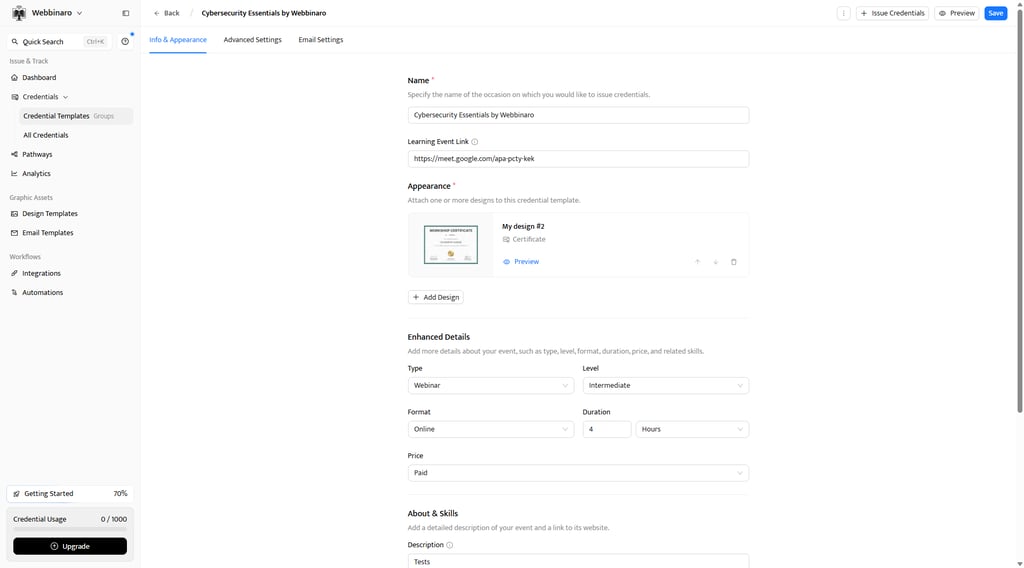
More importantly, Certifier doesn’t operate in isolation. It fits into existing workflows by connecting natively with tools like HubSpot, Canvas LMS, Moodle LMS, Zoom, Google Sheets and Salesforce. Thinkific, SurveyMonkey, and Kajabi through Zapier or Make.com. That means certificates can be issued automatically based on real events. Think course completion, webinar attendance, or internal training milestones – all without anyone stepping in to manage the process. The same triggers can also automate badge issuance, which is especially useful for organizations that want to recognize a sequence of achievements (like completing modules or attending multiple sessions) without waiting to issue a final certificate. For operations teams, this shift feels less like an upgrade and more like removing a constant source of friction. That timing aligns with a broader 2026 trend in EdTech: verifiable, trackable proof of learning is becoming a requirement, not an extra. And Certifier provides the infrastructure to support that shift cleanly.


Our experienced team of researchers, writers, editors, and technical support thoroughly tests digital marketing products working by clearly outlined and structured processes. We provide you with a big picture by combining in-depth, hands-on testing with insights from acknowledged industry research. Our purpose is to support you in selecting apps and tools that will meet your marketing objectives. Learn how we test digital marketing tools.
Certifier bulk issuance – hands-on test
To see whether Certifier.io actually delivers on its promise of automation at scale, we moved beyond feature lists and ran a controlled bulk issuance test. The goal was simple: replicate a real-world scenario where an HR team needs to send compliance certificates to a large group of employees without turning it into a multi-day task. What matters here isn’t just whether the platform works, but how it feels when you’re the one responsible for getting certificates out the door on a deadline. The bulk workflow also applies when issuing digital badges, which can be distributed just as efficiently for shorter trainings or skill-based recognitions.
What Certifier.io does and how well
We simulated a compliance training rollout for 200 employees. The starting point was a standard CSV file, structured with columns for full name, email address, department, and final exam score. This is typically where things begin to fall apart in manual workflows: formatting errors, mismatched fields, and last-minute corrections. Certifier handles this step perfectly. Again, the same CSV-driven flow can be used to issue digital badges alongside certificates, making it easy to create badges online without duplicating work.
After uploading the CSV, the platform prompts you to map each column to a corresponding field in your certificate template. The interface is straightforward: dropdown selectors for each dynamic field, clearly labeled, with a live preview updating as you map the data. Names snap into place, scores populate automatically, and any formatting issues are flagged immediately. No guesswork, no trial-and-error exports. Badge templates follow the same mapping logic, which keeps credential design consistent across both digital certificates and badges.
Once mapping is complete, issuing the certificates is a single action. You click “Generate & Send,” confirm the batch, and the system processes everything in the background. For our 200-recipient test, the entire batch was generated and delivered in under a minute. I don’t exaggerate – what would typically require hours of exporting, renaming, attaching, and double-checking was reduced to a single step.
The recipient experience is just as streamlined. Each employee receives a branded email with a personalized link to their certificate. There’s no login requirement, no account creation, and no friction. Clicking the link opens a clean, branded certificate page where they can view, download, or share their credential instantly. From an operational standpoint, this eliminates the usual follow-up emails from people who “can’t find the attachment” or “need it resent.” When badges are included, recipients can access and share them just as easily, often with formats optimized for social platforms and professional profiles.
This is where Certifier separates itself from a typical digital certificate maker. It’s not just about creating something that looks good – it’s about removing the entire layer of manual handling that usually comes with it. The combination of CSV bulk upload and automated delivery turns what used to be a repetitive task into a background process. Certificates plus badges issued from a single workflow is what elevates Certifier into the category of best credentialing software for operational teams.
The analytics advantage
Once the digital certificates or badges are sent, Certifier shifts from a delivery tool to a tracking system. Instead of sending files into a void and hoping recipients open them, you get a detailed view of what actually happens next.
The dashboard functions as a central monitoring hub. You can see which emails were successfully delivered, which ones bounced, and who has opened their certificate. This alone solves a common blind spot for HR and training teams – knowing whether employees have actually received and accessed their credentials. Certifier’s unified certificate and badge tracking removes the need for separate analytics tools.
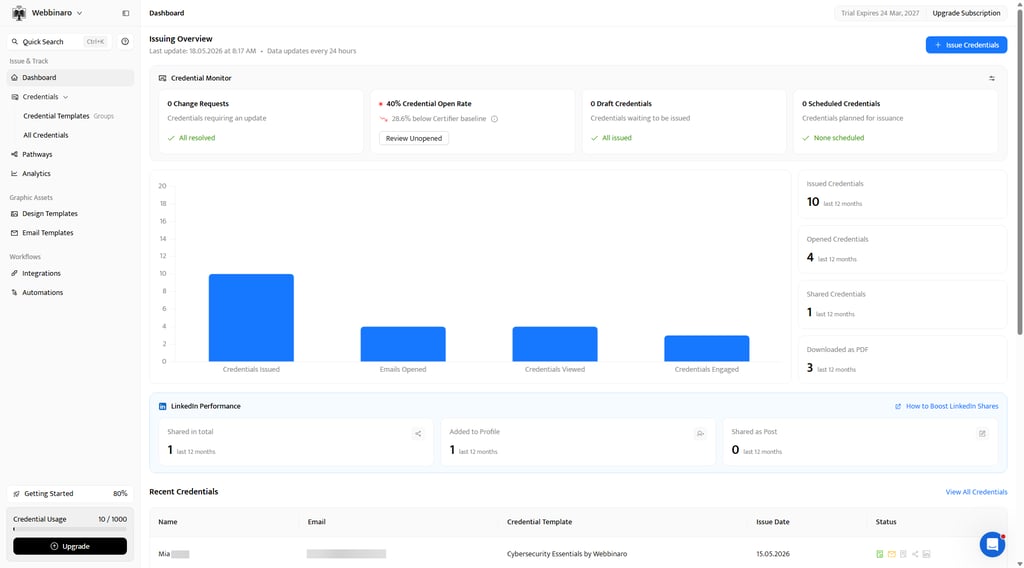
Beyond delivery metrics, the platform tracks engagement. If recipients share their certificates, particularly on LinkedIn, those interactions are logged. This is more than a showcase metric. For course creators and webinar hosts, every shared certificate becomes a piece of organic promotion. Participants effectively broadcast their achievement, along with your brand, to their professional network. Badges tend to amplify this effect, as they are often more shareable in feed-based environments and can be embedded directly into profiles.
This turns credentialing into a measurable marketing channel. Instead of guessing the impact of a training program or event, you can point to tangible data: how many certificates were issued, how many were opened, and how many generated social visibility. For teams responsible for proving ROI (especially in marketing or partnerships), this level of immediate insight is hard to achieve with static PDFs. Including badges in the same campaigns adds even more visibility, especially when users display them across multiple platforms.
It also changes how you think about certificate delivery as a whole. With traditional workflows, the process ends once the email is sent. Here, that’s just the starting point. Certifier gives you a feedback loop, showing how credentials are being received and shared in real time. That added visibility helps justify its position among the best credentialing software options, especially for organizations that care about both efficiency and reach.
Honest limitations
Although Certifier is designed for scale, it rarely forces users into complex, developer-heavy setups. Yet, advanced scenarios (like issuing tiered credentials based on multiple conditions) do require some planning. However, the combination of native integrations, guided workflows, and an intuitive UI means most users can build these systems directly inside the app.
In practice, what might seem like an API-dependent task is often achievable through built-in automation tools, templates, and step-by-step resources. For teams looking to automate digital certificate and badge delivery without separate engineering support, this simplifies the process compared to most other credentialing software alternatives.
One more consideration is branding control. While the platform offers strong customization out of the box, fully removing Certifier branding from emails and certificate pages is reserved for higher-tier plans. For most mid-sized teams, this won’t be a dealbreaker, but it’s something to factor in if white-labeling is a strict requirement.
That said, these limitations are unlikely to impact the majority of users. For typical use cases (bulk issuance, automated delivery, and tracking), Certifier runs smoothly without adding complexity.
The full Certifier stack – a system, not just a designer
What becomes clear very quickly is that Certifier isn’t a single-purpose tool – it’s a three-dimensional system that covers the entire credentialing workflow:
| Feature | What it does | Why it matters |
| The Visual Builder | Drag-and-drop designer with 2,000+ templates | Beautiful certificates and badges without needing a graphic designer |
| The Delivery Engine | Bulk issues via CSV or triggers via native integrations | Replaces manual HR/admin labor. Saves hundreds of hours |
| The Recipient Portal | Login-free tracking and 1-click LinkedIn sharing | Turns graduates into organic marketers for your course/brand |
The visual builder handles design, offering a drag-and-drop editor with hundreds of templates, so you can create polished digital credentials without involving a designer. That’s the familiar layer most tools focus on. But Certifier doesn’t stop there.
The delivery engine is where the real shift happens. Instead of manually sending files, you issue credentials in bulk via CSV or trigger them automatically through built-in integrations. This replaces hours of repetitive admin work with a process that runs in the background. It’s the difference between “designing certificates” and actually operating a scalable certification program. Certifier connects to a wide range of systems to make that automation practical:
- Native and low-code integrations with LMS platforms to trigger issuance on course completion.
- Connectors to form builders and survey tools so submissions can instantly create credentials.
- CRM syncs to update contact and enrollment records.
- Spreadsheet/database (CSV) flows for batch programs and legacy systems.
By offering direct API access, webhook events, and compatibility with integration platforms (Zapier/Make-style connectors), Certifier lets you tie credential issuance into CRMs, LMSs, form builders, and data sheets. So whether your workflow starts in a learning platform, a registration form, or a customer record, certificates and badges are issued automatically and tracked centrally. Also, Certifier has its own MCP (Model Context Protocol), an open standard that lets AI assistants connect to external tools securely, allowing users to issue and manage certificates directly from AI assistants like Claude and ChatGPT.
Then there’s the recipient portal, which closes the loop. Each certificate lives behind a simple, login-free link, where recipients can view, download, or share it instantly, especially on LinkedIn. That shareability turns every issued certificate into a small piece of brand exposure.
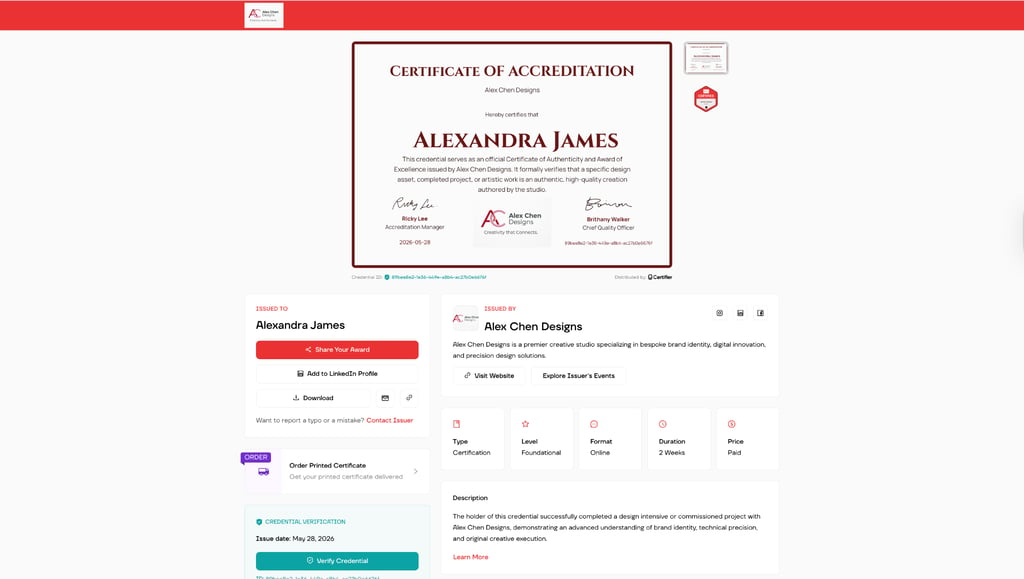
Put together, these three layers (design, delivery, and distribution) form a complete infrastructure. Canva can help you make something look good, but Certifier ensures it actually works at scale.
Features that make day-to-day work effortless
The biggest shift with Certifier beyond automation is how many small, recurring tasks quietly disappear from your workload. Take the template library: with 2,000+ ready-made designs, you’re not starting from a blank page or chasing a designer for every new course or compliance badge.
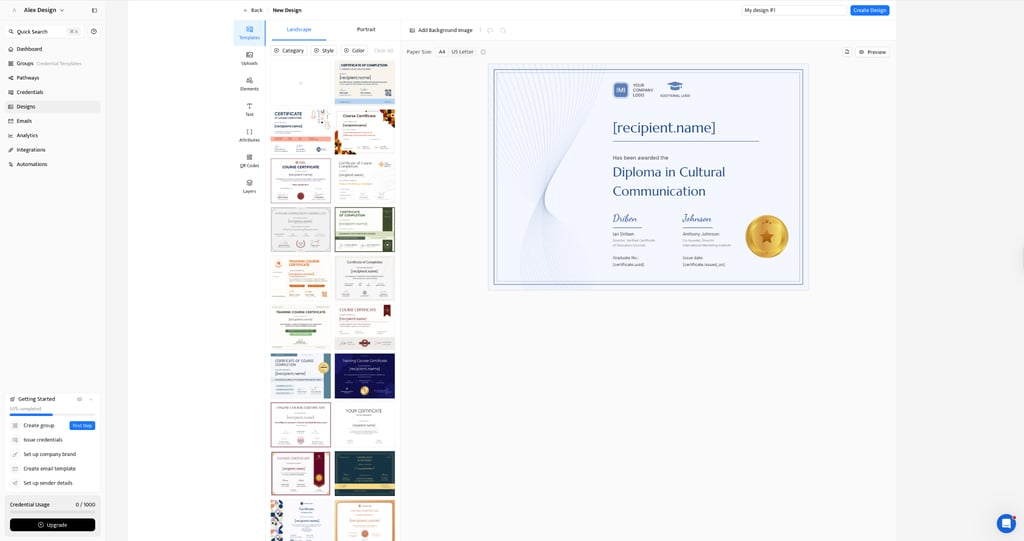
You pick a layout, adjust branding, and move on. For teams handling multiple programs, that head start adds up fast.
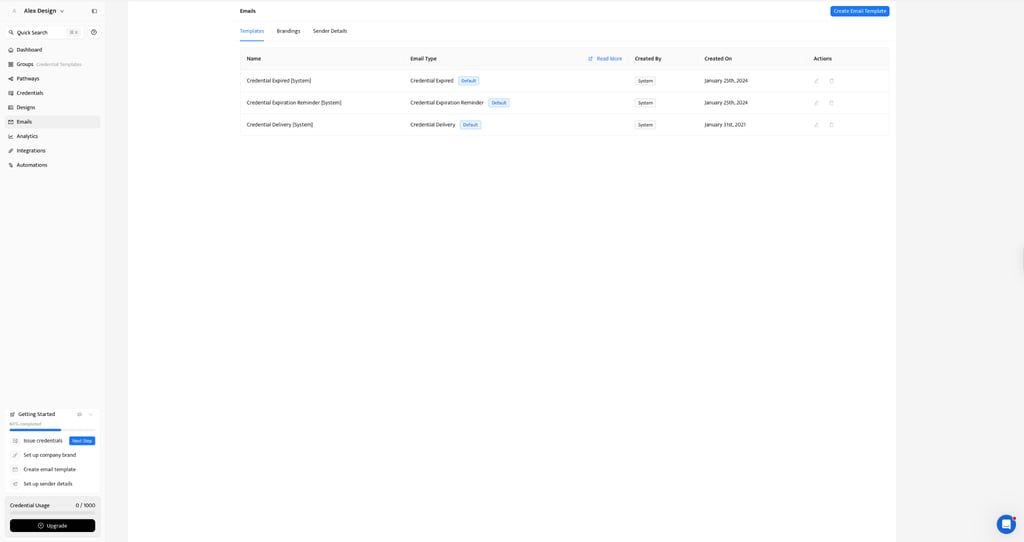
Where it gets even more advantageous is expiration management. Instead of tracking renewal dates in spreadsheets (or worse, forgetting them), Certifier can automatically set validity periods, trigger reminders, and revoke outdated credentials. For HR teams dealing with compliance-heavy certifications (think OSHA or internal safety training), that’s not a convenience but a risk prevention. You’re far less likely to end up with employees holding expired credentials without realizing it.
Verification is equally practical. Each certificate comes with a unique QR code that links back to a secure record, making it easy to confirm authenticity in seconds. No back-and-forth emails, no manual checks, and no risk of altered PDFs circulating. It’s a simple feature on the surface, but it reinforces credibility in a way static files never can.
Certifier pricing – structured for scale
Certifier pricing is designed in a way that mirrors how most teams actually grow into credentialing:
| Plan | Price | Best for |
| Free | $0/month | Small webinar hosts, testing the platform (up to 250 credentials/yr) |
| Professional | ~$33/month | Growing courses/businesses needing custom email branding (up to 1,000/yr) |
| Advanced | ~$66/month | Mid-size orgs needing API access and white-labeling |
| Enterprise | Custom | Massive certification and education bodies needing custom volume and SSO |
The free plan is surprisingly usable. It’s not a stripped-down demo, but a practical starting point for small webinar hosts or course creators issuing up to 250 certificates/badges per year. If you’re testing a digital certificate maker or validating a new training program, it works as a low-risk sandbox with real output.
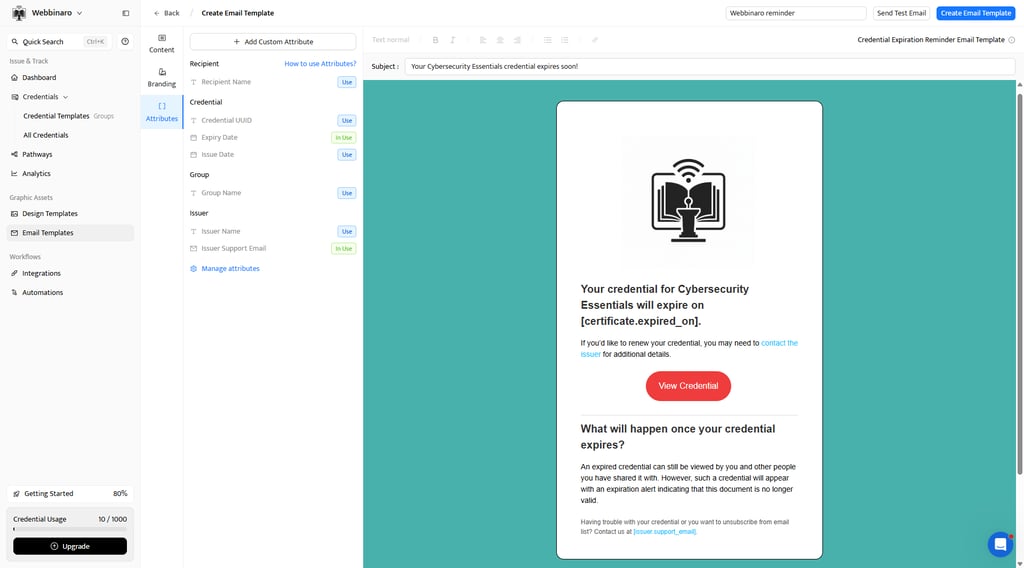
The Professional tier upgrade (around $33/month) is where things start to feel operationally serious. The key upgrade here is custom email branding, which matters more than it sounds. Sending certificates from a generic address with weird branding undermines credibility fast. At this level, you’re presenting a consistent, branded experience, and doing it automatically.
From a cost perspective, the math is straightforward: paying a monthly fee is significantly cheaper than hiring a virtual assistant to manually process and send even a few hundred certificates.
Advanced and Enterprise plans expand into API access, white-labeling, and custom volume limits. These tiers make sense when you’re integrating deeply into existing systems or operating at an institutional scale, not for everyday use.
Who Certifier is built for, and why it's exactly right for them
Certifier makes the most sense for people who’ve already felt the strain of doing this manually. If you’re running an online course and trying to turn it into a structured academy, sending certificates one by one quickly becomes unsustainable. The same goes for HR managers responsible for compliance. For example, tracking completions, generating documents, and making sure nothing slips through the cracks. And for webinar hosts, there’s always that post-event scramble: hundreds of attendees expecting proof of participation, but no quick and easy way to deliver it.
This is where Certifier review discussions tend to shift from “nice-to-have” to “why didn’t we use this before?”. Instead of generating 500 PDFs after a virtual summit and attaching them manually, you upload a file once and let the system handle the rest. Certificates go out instantly, correctly named, and fully branded – all without the usual chaos.
There are, of course, edge cases. Large universities managing complex, multi-institution credential frameworks or blockchain-backed transcripts may need more specialized systems. But for the vast majority of teams, like course creators, mid-sized companies, and training providers, Certifier hits the exact right balance between simplicity and scale.
Certifier vs the competition – where it wins
If you’ve been researching the best credentialing software, you’ve likely come across names like Accredible, Credly, or even tried to stretch Canva into something it’s not. Each has its place, but they solve different problems. Here’s the nutshell:
| Tool | Their pitch | Why Certifier wins |
| Accredible | Enterprise-grade digital credentials and credential management | Certifier delivers the same core features (verifiable URLs, CSV bulk issuing, API/webhooks, badges, and analytics) without heavy onboarding. It is fully self-serve and can be deployed in hours, while Accredible typically requires more setup. |
| Credly | The standard for IT/Tech badges | The key difference is ownership. Credly operates as a closed ecosystem with credentials hosted under its branding, while Certifier is fully white-label, covering domain, design, and recipient experience. |
| Canva (Bulk Create) | Free design tool | Canva only generates static PDFs with no verification, tracking, or delivery system. |
Accredible and Credly are powerful, especially in enterprise or tech certification ecosystems. The tradeoff is complexity and cost. Setup often feels like a project in itself, which doesn’t suit smaller teams that just need to automate certificate delivery without a long onboarding cycle. Certifier sits in a more practical middle ground: enterprise-capable features (API, badges, verification, analytics) with much faster setup and clearer, lower-cost pricing. This way, teams can automate certificate and badge delivery without a long vendor project.
Canva, on the other hand, is where many teams start, but also where workflows begin to break. Its Bulk Create feature can generate certificates, but that’s where it stops. There’s no tracking, no verification layer, no unique URLs, and no real delivery system. It’s essentially a PDF generator. Again, Certifier closes that gap by combining design, automation, and verification into one continuous workflow.
Is Certifier.io worth it? Our verdict
After testing it in a real bulk workflow, this Certifier review comes down to simple math. If your team is still manually creating and sending certificates, you’re spending hours on a task that can be fully automated. Certifier removes that process entirely – it’s one of the clearest examples of a high-ROI administrative tool available right now.
The free plan makes it easy to validate this yourself with a basic CSV upload, no commitment needed. But the real value shows up at scale: paying around $33/month to save 10+ hours of repetitive work isn’t a tradeoff – it’s an obvious operational upgrade.
People Also Ask
Is Certifier.io free?
Yes, Certifier offers a forever-free plan that allows you to issue up to 250 credentials per year. This is perfect for small courses or testing the platform before committing to a paid tier.
Can I remove the Certifier logo from my certificates?
Yes, Certifier’s white-labeling removes “Powered by Certifier” mark from your emails and recipient portals. That said, it requires upgrading to one of their premium tier plans.
Does Certifier integrate with Zapier?
Yes, Certifier integrates with Zapier smoothly. The Zapier integration allows you to automatically trigger certificate generation and delivery whenever a student completes a course in platforms like Canvas, Teachable, or Thinkific.
Are the certificates verifiable?
Yes, credentials generated by Certifier have a unique, secure URL and a QR code. This means that employers can instantly verify its authenticity without contacting the issuing institution.
Is Certifier better than Accredible?
Yes, Certifier is generally better than Accredible for the following reasons. For small to mid-sized businesses and independent creators, Certifier is generally much easier to use, faster to deploy, and significantly more cost-effective, whereas Accredible leans heavily into enterprise-level blockchain verification.
Is Certifier better than Credly?
Yes, for teams that want quick setup, simple batch workflows, and both printable certificates and badges, Certifier is the more practical choice than Credly. It supports fast CSV bulk issuing, predictable pricing, PDF export/print options, and standard badge verification and LinkedIn sharing. While Credly remains strong for large, badge-first ecosystems, Certifier reduces operational overhead for most course creators and mid-sized teams.